Posts in Featured

Instapaper 3.0 Is Out: You Can Now “Follow” Other Users

Instapaper, the most popular “read later” tool for the web, iOS and Kindle, received a major update a few minutes ago that brings it to version 3.0 and adds a whole social layer to the app. In Instapaper 3.0 you can now follow other Instapaper users to see the articles they “like” (a new name for “starring” an article). You can find friends via Facebook or Twitter through a simple login or directly from your local Address Book.

The app is faster with a new engine that finally grants perfect quality images, and you can now search all articles (the downloaded ones, at least) for title or content. Sharing to Twitter, Facebook, Pinboard, Tumblr and Evernote has also been implemented natively, to work offline as well. This is a great improvement over the previous versions that didn’t let you share articles that easily. I love this new feature.

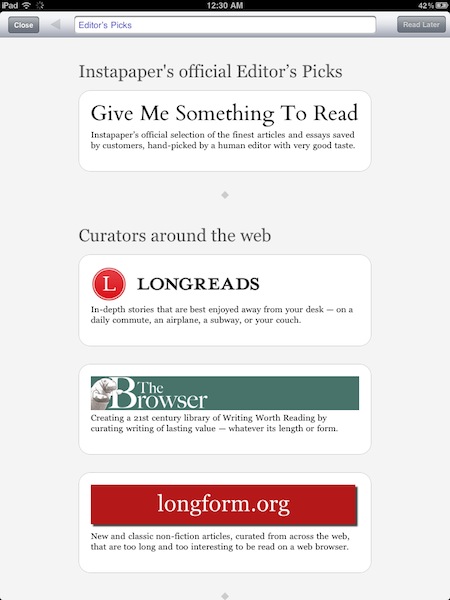
Other new functionalities include a “smart rotation lock” that can understand whether the change in rotation was accidental or not (it really seems to be working) and several new tweaks in the Preferences and bug fixes. Also, you can browse for articles in-app or choose from the Editor’s Picks recommended list of content.

The app also now has a completely rewritten web browser built in, so you can browse to any website, find the articles you want to read later, and save them directly from the app. And there’s a new Editors browser, featuring the best human curators on the web who recommend great articles for Instapaper reading.

With these great new additions, many customers won’t even need the bookmarklet anymore.

Instapaper 3.0 is a free update available here, and it’s a terrific new version you should go download right away. Check out more screenshots of the iPad version below. Read more
Access Extra Content and Perks

Founded in 2015, Club MacStories has delivered exclusive content every week for nearly a decade.

What started with weekly and monthly email newsletters has blossomed into a family of memberships designed for every MacStories fan.

Learn more here and from our Club FAQs.

Club MacStories: Weekly and monthly newsletters via email and the web that are brimming with apps, tips, automation workflows, longform writing, early access to the MacStories Unwind podcast, periodic giveaways, and more;

Club MacStories+: Everything that Club MacStories offers, plus an active Discord community, advanced search and custom RSS features for exploring the Club’s entire back catalog, bonus columns, and dozens of app discounts;

Club Premier: All of the above and AppStories+, an extended version of our flagship podcast that’s delivered early, ad-free, and in high-bitrate audio.

Learn more here and from our Club FAQs.


GarageBand for iPad Now Available

Following the release of iMovie for iPad, Apple also pulled the trigger on the second app unveiled at the March 2 event, GarageBand for iPad. The app is available now in the App Store at $4.99.

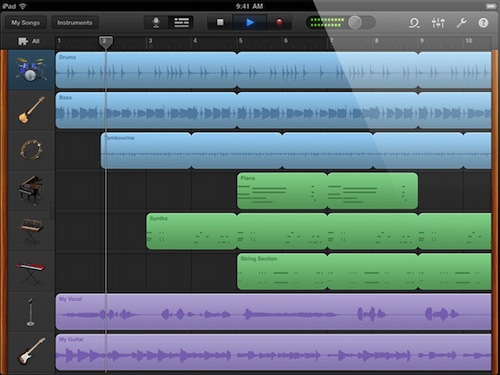
GarageBand for iPad features an intuitive interface depicting real music instruments you can play with your fingers and multitouch; with Smart Instruments, users who are not musicians but still want to play music can use the tools provided by the app to easily switch between chords and notes without actually having to precisely know music. For medium to advanced users, GarageBand offers a semi-professional music making and mixing environment with multi-track audio recording, exporting features, touch instruments with a realistic interface for drums, guitars, synthesizers, pianos and many more. GarageBand for iPad really is a full-functional port of the Mac version with the addition of multitouch that allows you, for example, to play instruments at different sensitivity levels thanks to the built-in support for pressure recognition through the accelerometer.

GarageBand looks like a must-have for iPad owners and an app that we’ll thoroughly test next week once we get our hands on the iPad 2. You can find it here at $4.99. Full changelog below. Read more

Access Extra Content and Perks

Founded in 2015, Club MacStories has delivered exclusive content every week for nearly a decade.

What started with weekly and monthly email newsletters has blossomed into a family of memberships designed for every MacStories fan.

Learn more here and from our Club FAQs.

Club MacStories: Weekly and monthly newsletters via email and the web that are brimming with apps, tips, automation workflows, longform writing, early access to the MacStories Unwind podcast, periodic giveaways, and more;

Club MacStories+: Everything that Club MacStories offers, plus an active Discord community, advanced search and custom RSS features for exploring the Club’s entire back catalog, bonus columns, and dozens of app discounts;

Club Premier: All of the above and AppStories+, an extended version of our flagship podcast that’s delivered early, ad-free, and in high-bitrate audio.

Learn more here and from our Club FAQs.


Apple Releases iMovie for iPad

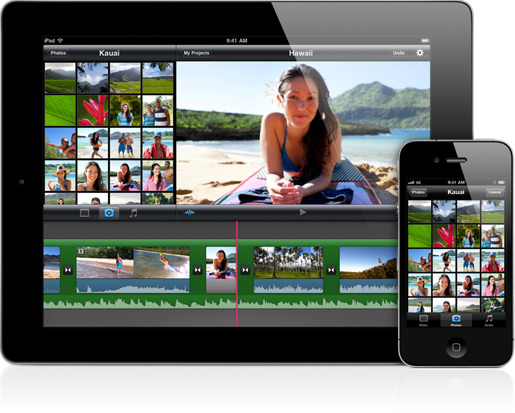
As announced in a press releases earlier today, Apple has just released the new iMovie for iPad. It is available now in the App Store at $4.99 here. iMovie is a universal app for iPhone 4 and iPad 2, a free update for existing customers.

iMovie for iPad takes where the Mac and iPhone versions left off to bring a powerful yet easy to use movie editing experience to the iPad, deeply based on multitouch technology. Users of iMovie for iPad can easily import their photos shot on the iPad 2, or iPhone or iPod touch (or any other camera) through the Camera Connection Kit; movies recorded at 720p through the iPad 2’s back camera can be accessed from a Library popup menu to start editing right away. With a split-screen interface you can visualize the movie you’re editing in the top section, and manage or trim video and photo segments in the lower part of the iPad’s screen. You can pinch to zoom to additional parts of a video, use the precision editor to adjust videos with accuracy.

You can import songs from your iPod library to use for background audio, or use the built-in effects in iMovie. You can share videos on the web through Facebook, Youtube and a variety of other services, beam your creations to the Apple TV via AirPlay, or simply export to iTunes.

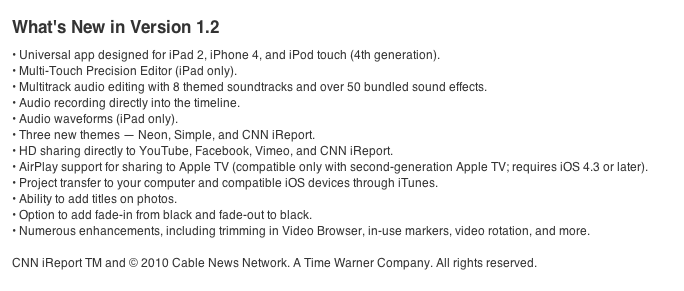
Go get the new iMovie 1.2 here. Read more

Access Extra Content and Perks

Founded in 2015, Club MacStories has delivered exclusive content every week for nearly a decade.

What started with weekly and monthly email newsletters has blossomed into a family of memberships designed for every MacStories fan.

Learn more here and from our Club FAQs.

Club MacStories: Weekly and monthly newsletters via email and the web that are brimming with apps, tips, automation workflows, longform writing, early access to the MacStories Unwind podcast, periodic giveaways, and more;

Club MacStories+: Everything that Club MacStories offers, plus an active Discord community, advanced search and custom RSS features for exploring the Club’s entire back catalog, bonus columns, and dozens of app discounts;

Club Premier: All of the above and AppStories+, an extended version of our flagship podcast that’s delivered early, ad-free, and in high-bitrate audio.

Learn more here and from our Club FAQs.


Flipboard 1.2 Is Out: Instagram Integration, Faster, Search

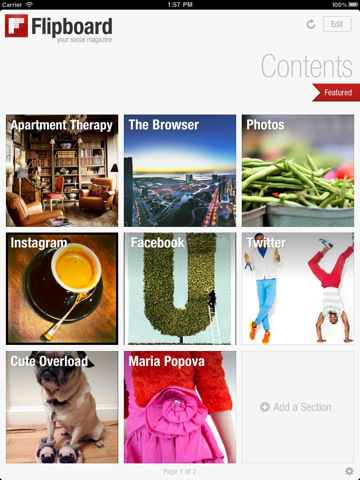
A major new version of Flipboard, the social iPad magazine, was released a few minutes ago, and it’s a rather big update since the “iPad app of the year” was first released last summer. Flipboard 1.2, now available in the App Store, comes with ful Instagram integration to let users browse Instagram pictures as if they were flipping through a full-size photo album. It looks great on the iPad, photos are much bigger than the native iPhone Instagram app, and all of this has been achieved thanks to the Instagram API we covered a few times in the past.

Thanks to a new feature called “social search”, users can also browse for specific words and hashtags inside Flipboard. This was a much requested functionality that adds a lot of value to the app, which now can not only display content from your favorite online sources, but also search for relevant fresh one.

Flipboard 1.2 is faster thanks to a new backend engine, features a refresh button to check for new articles at any time without closing and restarting the app, has a Featured section at the top to browser editors’ picks. Again, another way to find great content you might like and read in Flipboard.

Flipboard 1.2 is available in the App Store here. In case you missed them, check out our previous reviews of the app here and here. Read more

Access Extra Content and Perks

Founded in 2015, Club MacStories has delivered exclusive content every week for nearly a decade.

What started with weekly and monthly email newsletters has blossomed into a family of memberships designed for every MacStories fan.

Learn more here and from our Club FAQs.

Club MacStories: Weekly and monthly newsletters via email and the web that are brimming with apps, tips, automation workflows, longform writing, early access to the MacStories Unwind podcast, periodic giveaways, and more;

Club MacStories+: Everything that Club MacStories offers, plus an active Discord community, advanced search and custom RSS features for exploring the Club’s entire back catalog, bonus columns, and dozens of app discounts;

Club Premier: All of the above and AppStories+, an extended version of our flagship podcast that’s delivered early, ad-free, and in high-bitrate audio.

Learn more here and from our Club FAQs.


iPad 2 Review Roundup

The iPad 2 won’t be here for two more days, but Macworld, Engadget, and others are flooding the Twitternet with the reviews we’ve all been waiting for. Reviewed in ebony and white with all of those colorful smart covers, your purchasing decision was just made easier.

Joshua Topolsky:

It might frustrate the competition to hear this, but it needs to be said: the iPad 2 isn’t just the best tablet on the market, it feels like the only tablet on the market. As much as we’d like to say that something like the Xoom has threatened Apple’s presence in this space, it’s difficult (if not impossible) to do that. Is the iPad 2 a perfect product? Absolutely not. The cameras are severely lacking, the screen – while extremely high quality – is touting last year’s spec, and its operating system still has significant annoyances, like the aggravating pop-up notifications.

Jason Snell:

The iPad 2 also has 512MB of RAM—twice that of the original iPad—and a 200MHz bus speed, likewise twice that of the original.

Though the iPad 2 is an improvement on the original iPad in numerous ways, it’s still an evolutionary product, not a revolutionary one. If you’re happy with your current iPad, there’s no reason to dump it just because there’s a shinier, newer one. (This is not to say that millions of people won’t do just that. I mean: shiny!) If you’ve invested in iPad accessories such as a dock or case, keep in mind that you probably won’t be able to use them with the new iPad.

Walter S. Mossberg:

Apple’s design wizards have made the new iPad feel much airier. Placed on a table between the original model and the new Motorola Xoom, it makes the others look bloated. Its top surface doesn’t even reach the side buttons on the original model. It has much more sharply tapered edges, and a new, optional, white color adds to the sense of lightness. While the 1.33-pound weight isn’t that much less than the original’s, I found the difference noticeable when carrying the device.

David Pogue:

My friends, I’m telling you: just that much improvement in thinness, weight and speed transforms the experience. We’re not talking about a laptop or a TV, where you don’t notice its thickness while in use. This is a tablet. You are almost always holding it. Thin and light are unbelievably important for comfort and the overall delight. So are rounded edges, which the first iPad didn’t have.

MG Siegler:

The single biggest change form a physical perspective is the thickness. Holding the original iPad now feels a bit like holding a slightly bulky monitor compared to the iPad 2. The iPad 2 feels much more like holding a clipboard — albeit a mildly heavy one. The move to cut the thickness from 13.4mm down to 8.8mm really makes a huge difference when you switch from holding one to holding the other.

Read more

Access Extra Content and Perks

Founded in 2015, Club MacStories has delivered exclusive content every week for nearly a decade.

What started with weekly and monthly email newsletters has blossomed into a family of memberships designed for every MacStories fan.

Learn more here and from our Club FAQs.

Club MacStories: Weekly and monthly newsletters via email and the web that are brimming with apps, tips, automation workflows, longform writing, early access to the MacStories Unwind podcast, periodic giveaways, and more;

Club MacStories+: Everything that Club MacStories offers, plus an active Discord community, advanced search and custom RSS features for exploring the Club’s entire back catalog, bonus columns, and dozens of app discounts;

Club Premier: All of the above and AppStories+, an extended version of our flagship podcast that’s delivered early, ad-free, and in high-bitrate audio.

Learn more here and from our Club FAQs.


Angry Birds Seasons: St. Patrick’s Day Edition Now Available

Angry Birds Seasons: St. Patrick’s Day Edition Now Available

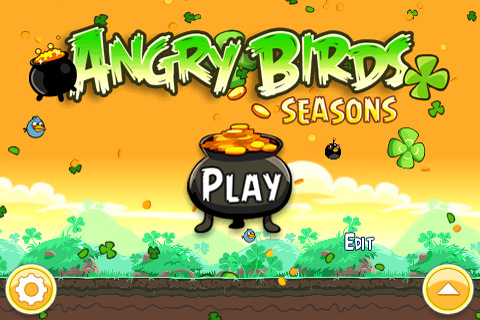
As previously reported, Rovio has finally released a new update for Angry Birds Seasons, which now comes themed for Ireland’s St. Patrick’s Day. The update features “green levels” (green is Ireland’s national color), 15 new levels, new achievements and more.

Have the Luck of the Irish and Go Green with this episode of Angry Birds Seasons: The St. Patrick’s Day Edition! After the love fest of Valentines, Angry Birds Seasons is back with the greenest update to date. May Irish eyes shine upon you and as usual Angry Birds gives the most generous updates of any app!

Oh, you can also send St. Patrick’s Day cards to your friends. Go grab the update here.

Permalink

Readability Launches Mobile Webapp with Full iOS Support, Offline Reading

Web service Readability announced a few minutes ago that, with an iOS native application still waiting for Apple’s second review, they are rolling out today a full-featured, mobile optimized web version of their reading tool. To use the new Readability on your cellphone or tablet, just head over Readability.com with your browser and save the website to your homescreen. Readability’s new mobile app is indeed an HTML5-based application that runs on iOS, Android handsets & tablets and a plethora of other devices available in the market.

Underneath the hood is…the web. Readability for mobile is a web application specially fitted for mobile and tablet devices. It’s a great example of what can be achieved by building apps on the latest web technology.

A final thought regarding our iOS submission: our overarching goal is to deliver the best possible experience to users of Readability. We re-submitted the Readability app to Apple along with an appeal approximately two weeks ago. We haven’t heard back yet.

Readability made the rounds of the Internet a few weeks ago when they announced a completely revamped service (based on a revenue split model with publishers of content consumed through Readability) and went public with an open letter to Apple about the rejection of their official iOS client for iPhone and iPad, heavily based on Marco Arment’s Instapaper (Arment is also an advisor to the company). According to Readability, Apple rejected the app because of the lack of implementation of app subscriptions – the ones where Apple takes a 30% fee off every subscription processed inside an iOS application. The company didn’t understand the rejection as, in their own vision, Readability isn’t a publishing app but a web service that aggregates articles produced by others on the Internet.

Readability’s move to HTML5 is interesting because they’re proving they can have a reading platform that works on a variety of OSes without being forced to go through Apple’s approval process and subscription policies. They’re relying on the power of modern open web technologies to deploy a beautiful application that works anywhere, anytime thanks to offline reading support. An app that also lets you quickly paste URLs to read articles in an uncluttered, elegant view meant for mobile devices. The Readability webapp also senses your device’s orientation and changes the on-screen graphics accordingly for an optimized reading experience. We can’t wait to try it out tonight.

As the team stresses on the company’s blog, this app was put together in two weeks. While it’s still unclear whether the native iOS client will go through the App Store’s gate or not, cheers to Readability for delivering what the service’s users were waiting for. Read more

Access Extra Content and Perks

Founded in 2015, Club MacStories has delivered exclusive content every week for nearly a decade.

What started with weekly and monthly email newsletters has blossomed into a family of memberships designed for every MacStories fan.

Learn more here and from our Club FAQs.

Club MacStories: Weekly and monthly newsletters via email and the web that are brimming with apps, tips, automation workflows, longform writing, early access to the MacStories Unwind podcast, periodic giveaways, and more;

Club MacStories+: Everything that Club MacStories offers, plus an active Discord community, advanced search and custom RSS features for exploring the Club’s entire back catalog, bonus columns, and dozens of app discounts;

Club Premier: All of the above and AppStories+, an extended version of our flagship podcast that’s delivered early, ad-free, and in high-bitrate audio.

Learn more here and from our Club FAQs.


Apple Releases iOS 4.3 - Direct Links

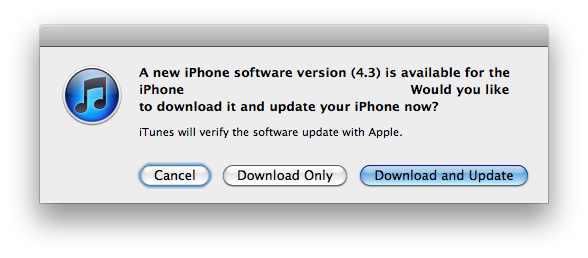
Apple just released iOS 4.3, available for iPhone (3GS, 4), iPod touch (3rd and 4th gen), iPad, iPad 2 and Apple TV. The new firmware is available for download in iTunes (check for updates) or through Apple’s website.

iOS 4.3 adds a number of new features such as Personal Hotspot for the iPhone, which allows users to share their 3G connection with other devices via WiFi, USB and Bluetooth; AirPlay support for Mobile Safari and third-party applications; improved Safari performances with the new Nitro engine and iTunes library streaming on a local network with Home Sharing.

On the iPad users now have the possibility to choose whether the side switch must act as a rotation lock or mute button, whilst iPhone owners can use Personal Hotspot’s tethering with up to three devices over WiFi, three devices over Bluetooth and one over USB connection.

Direct links below. Our full iOS 4.3 coverage here.

Read more

Access Extra Content and Perks

Founded in 2015, Club MacStories has delivered exclusive content every week for nearly a decade.

What started with weekly and monthly email newsletters has blossomed into a family of memberships designed for every MacStories fan.

Learn more here and from our Club FAQs.

Club MacStories: Weekly and monthly newsletters via email and the web that are brimming with apps, tips, automation workflows, longform writing, early access to the MacStories Unwind podcast, periodic giveaways, and more;

Club MacStories+: Everything that Club MacStories offers, plus an active Discord community, advanced search and custom RSS features for exploring the Club’s entire back catalog, bonus columns, and dozens of app discounts;

Club Premier: All of the above and AppStories+, an extended version of our flagship podcast that’s delivered early, ad-free, and in high-bitrate audio.

Learn more here and from our Club FAQs.


White iPhone 4 Coming Next Month?

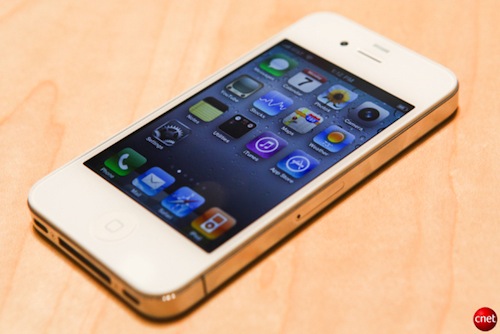
According to a note by analyst Ming-Chi Kuo reported by AppleInsider, Apple may be ready to start shipping the long-awaited white version of the iPhone 4 next month after multiple delays in 2010. The last delay announced by Apple in October pushed back the release of the white unit, initially expected to launch in June 2010 alongside the black iPhone 4, to Spring 2011. An April launch sounds right on schedule with the previous announcement and recent speculation pointed to Apple using a new Japanese paint to fix the manufacturing problems with the white iPhone.

Manufacturers will initiate production of the GSM-based iPhone 4 version in white enclosures and begin dispatching them to Apple ahead of general availability planned for next month, Concord Securities Analyst Ming-Chi Kuo told AppleInsider. Apple has made changes the “film material to solve the full-lamination problem that [was] the reason why white iPhones [were] delayed,” he added. The handset was first scheduled to debut last June. Kuo did not provide a timeframe for a white CDMA-based iPhone.

Indication of solved manufacturing issues is also provided by the iPad 2, which is going to launch later this week in two different models: black and white. Steve Jobs stressed on stage last week that the white iPad 2 will be available on day-one. The iPhone 4, however, has a white painted color both on the front and back glass enclosure, whilst the iPad 2 has a flat aluminum back.

Apple is also rumored to be considering a white version of the iPhone 5 for a summer 2011 launch. The white iPhone 4 recently showed up on various international carrier websites and Best Buy internal inventory system, leading to speculation that Apple has finalized the launch details and is preparing for a worldwide rollout in the coming weeks.

Access Extra Content and Perks

Founded in 2015, Club MacStories has delivered exclusive content every week for nearly a decade.

What started with weekly and monthly email newsletters has blossomed into a family of memberships designed for every MacStories fan.

Learn more here and from our Club FAQs.

Club MacStories: Weekly and monthly newsletters via email and the web that are brimming with apps, tips, automation workflows, longform writing, early access to the MacStories Unwind podcast, periodic giveaways, and more;

Club MacStories+: Everything that Club MacStories offers, plus an active Discord community, advanced search and custom RSS features for exploring the Club’s entire back catalog, bonus columns, and dozens of app discounts;

Club Premier: All of the above and AppStories+, an extended version of our flagship podcast that’s delivered early, ad-free, and in high-bitrate audio.

Learn more here and from our Club FAQs.