Posts in Featured

Apple Releases Official WWDC 2011 App

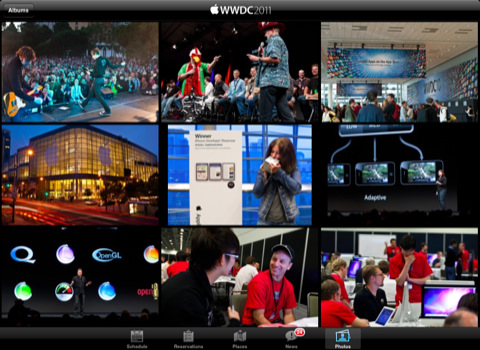
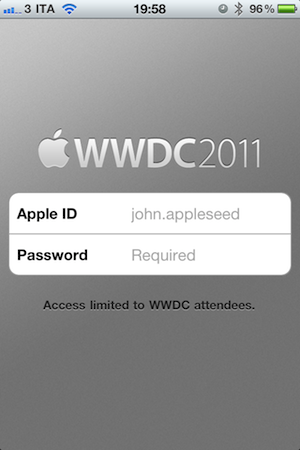
Apple has just released the free, official WWDC app on the App Store – the app is propagating now in iTunes and should be available here. Unlike last year, this year’s WWDC app works both on the iPhone and iPad with a native interface. The WWDC app allows you to check on the conference’s schedule, view floor diagrams of the Moscone Center and create your own schedule of labs, sessions and events you’re planning on attending. The app also comes with a News section to stay on top of the latest announcements made at WWDC throughout the week.

Apple says a new photo gallery will be updated daily with the latest photos from the show floor, labs and events, and the Favorites tab in the bottom toolbar will offer a way to organize sessions you want to attend. The new map feature will allow attendees to tap on a specific session or lab to find the specific level or location they need to go.

Access to the app is limited to WWDC attendees only – developers who purchased a ticket to WWDC ‘11 can use the app.
From the iTunes description:

Reserve Time at the Labs
The WWDC 2011 app allows you to make a reservation at the User Interface, App Review, iTunes Connect, Program Support, or Developer Publication lab. Once you make a lab reservation, it will appear in the schedule section of the app when you filter your view by Favorites.

Sessions and Labs Schedule
View the daily conference schedule including lunchtime and evening events. Filter your view to search by technology, platform, sessions, or labs.

Create Your WWDC Schedule
Tap on the detail view of any session, lab, or event. Then tap “Add to Favorites”. Your selections will be added to the Favorites section of the app and can be updated on-the-go.

Locate Sessions and Labs
Easily find your way around Moscone West with detailed floor maps. You can also tap on a specific session or lab for the level and location where you need to go.

The WWDC ‘11 schedule has also been posted online but it’s only available to owners of a WWDC ticket. Check out more screenshots of the app below. Read more

Access Extra Content and Perks

Founded in 2015, Club MacStories has delivered exclusive content every week for nearly a decade.

What started with weekly and monthly email newsletters has blossomed into a family of memberships designed for every MacStories fan.

Learn more here and from our Club FAQs.

Club MacStories: Weekly and monthly newsletters via email and the web that are brimming with apps, tips, automation workflows, longform writing, early access to the MacStories Unwind podcast, periodic giveaways, and more;

Club MacStories+: Everything that Club MacStories offers, plus an active Discord community, advanced search and custom RSS features for exploring the Club’s entire back catalog, bonus columns, and dozens of app discounts;

Club Premier: All of the above and AppStories+, an extended version of our flagship podcast that’s delivered early, ad-free, and in high-bitrate audio.

Learn more here and from our Club FAQs.


Patent Hints At Apple’s Traffic Service for Calendar Alerts

When Apple posted the location tracking Q&A to address the questions raised after two researchers discovered iOS was keeping a database of cell towers and WiFi hotspots iPhones and iPads used in the past stored unencrypted on a user’s computer, the company also revealed that, besides crowd-sourced WiFi hotspot and cell tower data, they were also collecting crowed-sourced traffic data to build an improved traffic service to launch in the next couple of years. Much speculation led to believe Apple was finalizing work on its own maps service after the acquisition of poly9 and Placebase, though a report from last week and a tidbit from Google’s Chairman Eric Schmidt confirmed the upcoming iOS 5, which will be unveiled on Monday, will keep using Google Maps.

Whilst Apple’s mapping technology and traffic service seem to be in the works for a future version of iOS, perhaps iOS 6 in 2012, a new patent uncovered by AppleInsider today gives us a glimpse at how Apple could use traffic data, GPS signal and the Calendar application to build a service that keeps users informed on appointments and meetings and how long it would take to get there, with real-time information. The patent, entitled “Dynamic Alerts for Calendar Events”, was filed in 2009 and published by the U.S. Patent and Trademark Office recently. According to the application, Apple is envisioning a system where an iPhone can send a calendar alert based on location and time required to get to a specific location; by analyzing upcoming events and appointments, the operating system would be able to look at the location, consider external factors such as weather and traffic, and calculate how much time it would take to get to the destination. The user would be alerted with a popup on screen, which in the patent design shows “map” and “routes” options as the system would also provide a way to find the best route based on road conditions, traffic, and so forth.

Location-based alerts and scheduled reminders are currently possible in a variety of iOS applications – however, a centralized system developed by Apple would rely on years of crowd-sourced data collection to bring extensive information and, perhaps, accurate predictions on traffic and road conditions. Apple is expected to preview iOS 5 at the WWDC keynote on June 6, though such traffic service won’t likely find its way in the new OS.

Access Extra Content and Perks

Founded in 2015, Club MacStories has delivered exclusive content every week for nearly a decade.

What started with weekly and monthly email newsletters has blossomed into a family of memberships designed for every MacStories fan.

Learn more here and from our Club FAQs.

Club MacStories: Weekly and monthly newsletters via email and the web that are brimming with apps, tips, automation workflows, longform writing, early access to the MacStories Unwind podcast, periodic giveaways, and more;

Club MacStories+: Everything that Club MacStories offers, plus an active Discord community, advanced search and custom RSS features for exploring the Club’s entire back catalog, bonus columns, and dozens of app discounts;

Club Premier: All of the above and AppStories+, an extended version of our flagship podcast that’s delivered early, ad-free, and in high-bitrate audio.

Learn more here and from our Club FAQs.


Pixelmator 2.0 Announced And Teased, Coming This Summer

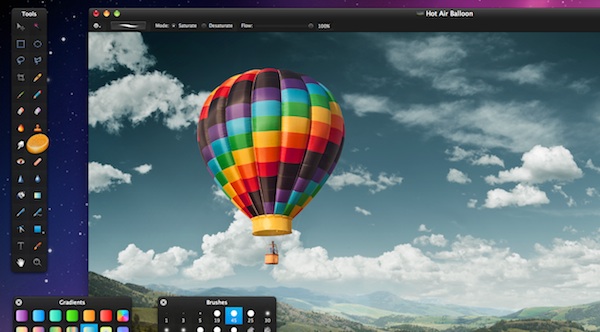
The Pixelmator team has today revealed details of what is coming in Pixelmator 2.0, the next major version of Pixelmator. The popular Mac image editor will bring big new features in the 2.0 version, including Content-Aware fill, a healing tool, new and improved retouching tools and a smudge tool – many of which are advanced features included in (the much more expensive) Photoshop application from Adobe.

Drawing tools will be completely revamped in the 2.0 version, currently codenamed Chameleon, and allow users to create and edit vector shapes with precise tools. The drawing tools will include the Pen, Freeform Pen, Convert and Path Selection tools as well as tools to include pre-drawn shapes too. The full-featured drawing tools mean that there are fill, stroke and shadow options for shapes – all in all the Pixelmator teams say the new drawing tools will be very useful for creating web page elements and illustrations and various other items.

The Content-Aware Fill technology in Pixelmator 2.0 promises to “magically get rid of unwanted elements in images”, any of the selection tools or the Healing Tool will let you select a region of the picture and Pixelmator will “smartly and seamlessly” fill the area with nearby image content. Also in the retouching field, the new Sponge Tool will let users add or take away color from areas of an image, Burn and Dodge will let users alter the brightness and the Red Eye Tool will get rid of those pesky red-eye effects.

Other notable new features are the Smudge Tool for “smearing paint” which could be used by users to rub out blemishes and a cleaner user interface. If you are interested, be sure to jump over to the Pixelmator 2.0 ‘Sneak Preview’ page, which runs down a whole list of new features and shows off some screenshots. Pixelmator 2.0 will be available exclusively to the Mac App Store at a cost of $59 later this summer. However, if you purchase the current version of Pixelmator for $29, you will get a free upgrade to Pixelmator 2.0 when it is released.

Read more

Access Extra Content and Perks

Founded in 2015, Club MacStories has delivered exclusive content every week for nearly a decade.

What started with weekly and monthly email newsletters has blossomed into a family of memberships designed for every MacStories fan.

Learn more here and from our Club FAQs.

Club MacStories: Weekly and monthly newsletters via email and the web that are brimming with apps, tips, automation workflows, longform writing, early access to the MacStories Unwind podcast, periodic giveaways, and more;

Club MacStories+: Everything that Club MacStories offers, plus an active Discord community, advanced search and custom RSS features for exploring the Club’s entire back catalog, bonus columns, and dozens of app discounts;

Club Premier: All of the above and AppStories+, an extended version of our flagship podcast that’s delivered early, ad-free, and in high-bitrate audio.

Learn more here and from our Club FAQs.


OmniOutliner for iPad Tutorial: Learning the Nuts & Bolts by Tracking Expenses

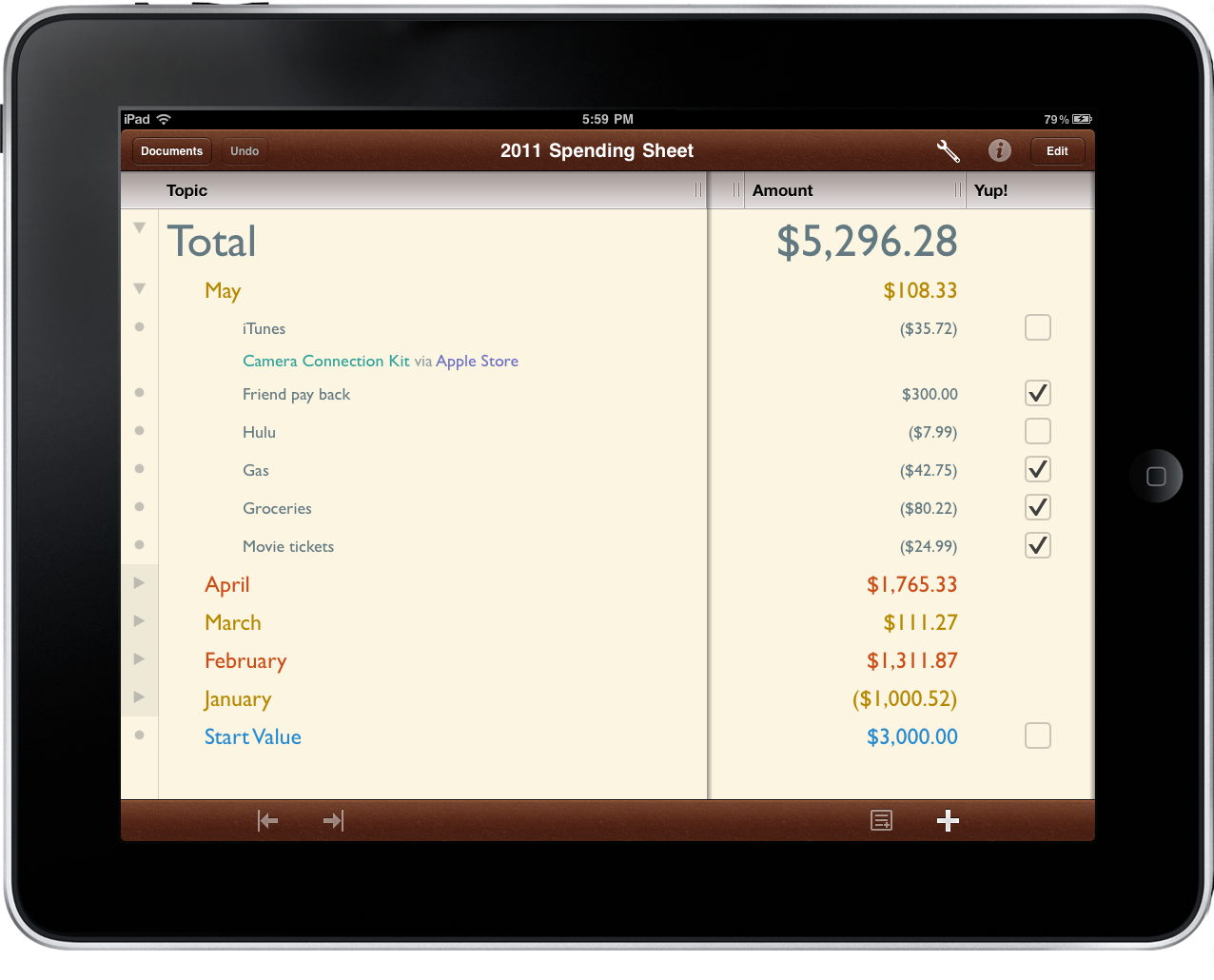
When The Omni Group brought OmniOutliner to the iPad, they didn’t just create an outlining app for text and field notes. While useful for preparing research, taking notes, and organizing ideas, OmniOutliner can adapt to a variety of needs and circumstances with relative ease. Combined with a personal desire for customization, OmniOutliner can be tailored to solve a variety of creative problems such as the one we’re looking at today.

The flexibility in OmniOutliner can be admired when we apply a real world scenario such as tracking your daily spending. Mint might be useful for telling you how you spend your money, but nothing beats your own checklist when it comes time to compare the month’s expenditures against a bank statement. Writing your purchases down enables you to catch maintenance charges, find fraudulent activity, and become better aware of your current financial status. With paper likely being a rarity in our lives thanks to the iPad, OmniOutliner fits the bill nicely.

The tutorial past the break will teach you how to modify a provided template to your liking; you’ll learn how styles work in OmniOutliner; we’ll cover date, number, and pop-up columns; and lastly we’ll put it all together to make something terrific. Even if you have zero interest in tracking your spending, this tutorial will help you learn quite a bit about how OmniOutliner’s features fit together quite beautifully.

Read more

Access Extra Content and Perks

Founded in 2015, Club MacStories has delivered exclusive content every week for nearly a decade.

What started with weekly and monthly email newsletters has blossomed into a family of memberships designed for every MacStories fan.

Learn more here and from our Club FAQs.

Club MacStories: Weekly and monthly newsletters via email and the web that are brimming with apps, tips, automation workflows, longform writing, early access to the MacStories Unwind podcast, periodic giveaways, and more;

Club MacStories+: Everything that Club MacStories offers, plus an active Discord community, advanced search and custom RSS features for exploring the Club’s entire back catalog, bonus columns, and dozens of app discounts;

Club Premier: All of the above and AppStories+, an extended version of our flagship podcast that’s delivered early, ad-free, and in high-bitrate audio.

Learn more here and from our Club FAQs.


iOS 5 To Feature Direct Twitter Integration?

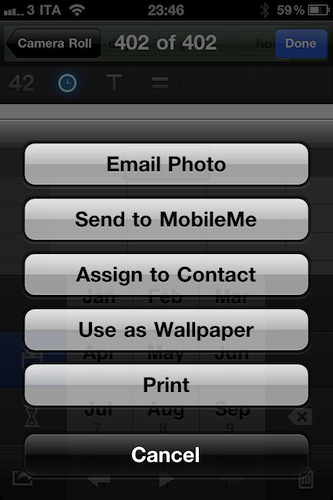
Following today’s news on iOS 5, Lion and iCloud announcements at the WWDC keynote on June 6, TechCrunch reports Twitter’s upcoming photo service, reported by various blogs yesterday and rumored to offer a similar service to Twitpic, yfrog and others, will be directly integrated into iOS 5. The new sharing option will reportedly allow users to instantly send a photo to Twitter like they can already do with videos and YouTube. Provided they have logged into Twitter from the Settings or a specific web view, iOS 5 will sport a new sharing menu to beam photos directly to Twitter, without using a third-party client.

We’ve heard from multiple sources that Twitter is likely to have a big-time partner for such a service: Apple. Specifically, we’re hearing that Apple’s new iOS 5 will come with an option to share images to Twitter baked into the OS. This would be similar to the way you can currently share videos on YouTube with one click in iOS. Obviously, a user would have to enable this feature by logging in with their Twitter credentials in iOS. There would then be a “Send to Twitter” option for pictures stored on your device.

Internal builds of iOS 4 from last year confirmed Apple was testing Facebook integration, but Twitter was never spotted in the hidden settings and code strings, at least not in the way TechCrunch claims iPhone and iPad owners will be able to share media from the Camera Roll. It’s likely that iOS 5 will bring the Facebook option back, integrate Twitter and perhaps even Flickr, but it’s too early to tell. Code strings found in the iOS 4.3 suggested Apple was working on two new features called MediaStream and Photo Stream, which, according to several reports, were targeted at letting users instantly share photos and videos with their friends using Apple’s new cloud system, now officially known as iCloud. Currently, Twitter has native apps for the Mac, iPhone and iPad available for free on the App Store.

A screenshot of an iOS 4 build featuring a Facebook preference panel in the Settings.app:

Update: Daring Fireball’s John Gruber hints at something bigger coming with Twitter integration in iOS 5:

So close to the bigger story, but yet so far. Imagine what else the system could provide if your Twitter account was a system-level service.

Access Extra Content and Perks

Founded in 2015, Club MacStories has delivered exclusive content every week for nearly a decade.

What started with weekly and monthly email newsletters has blossomed into a family of memberships designed for every MacStories fan.

Learn more here and from our Club FAQs.

Club MacStories: Weekly and monthly newsletters via email and the web that are brimming with apps, tips, automation workflows, longform writing, early access to the MacStories Unwind podcast, periodic giveaways, and more;

Club MacStories+: Everything that Club MacStories offers, plus an active Discord community, advanced search and custom RSS features for exploring the Club’s entire back catalog, bonus columns, and dozens of app discounts;

Club Premier: All of the above and AppStories+, an extended version of our flagship podcast that’s delivered early, ad-free, and in high-bitrate audio.

Learn more here and from our Club FAQs.


Pulp for Mac 2.0 Released with Cloud Sync

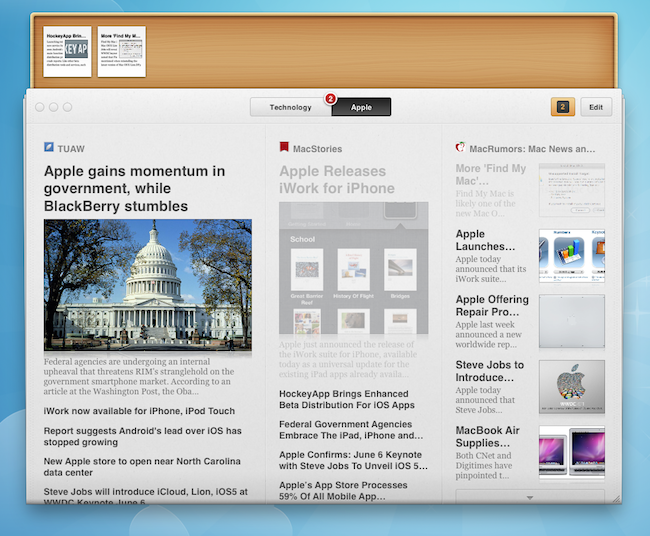
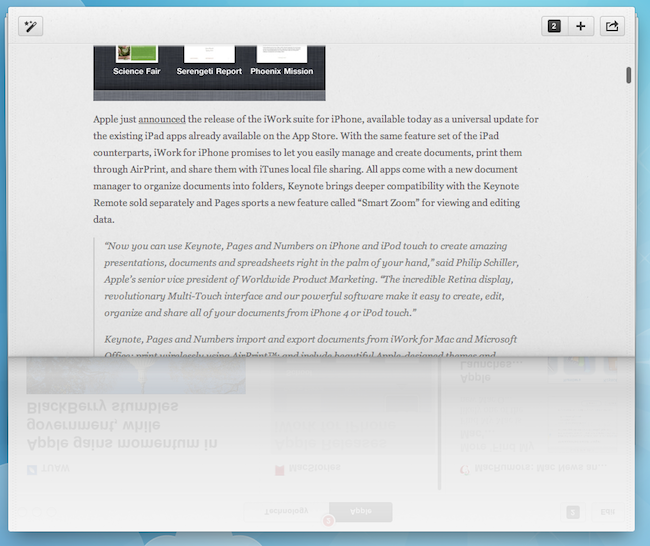
Times, the visual news reader for Mac that came to the iPad last year, received a major update earlier today which sees the application becoming Pulp for Mac 2.0 following the re-branding on the iPad version, and the introduction of a new cloud sync service to keep settings, articles and sources in sync across the Mac client and the tablet counterpart. I’ve been testing the new Pulp for Mac for a few months, and I’m positively impressed with the quality of cloud sync and reading experience the Acrylic Apps developers have built into this latest version. First off, the new Mac app looks just like Pulp for iPad, only running on a Mac: if you followed the development of Times / Pulp with our previous coverage, you know what to expect: you can create pages to organize content sources by topic, organize feeds and articles with different layouts, as well as import websites from Google Reader if you don’t feel like entering a website’s name manually (which takes seconds, by the way). More importantly, the release of Pulp for iPad brought the possibility of reading articles with the Magic Reader, a feature that strips away all the clutter from webpages and displays truncated RSS articles in their entirety without any manual fiddling. Pulp for Mac does everything the iPad version did, it’s got the shelf to save articles for later and syncs everything via the cloud.

The cloud service is free, and can sync ”your pages, feeds, read articles, and other settings in sync on all of your Macs and iPads”. It’s that simple: every change that’s either made on the iPad or Mac is pushed to the cloud instantly, and received on the second device in seconds. I have tested this with articles, pages and the shelf interface and it worked really well. The cloud sync can be enabled or disabled in the Settings.

I don’t particularly appreciate the page-curling effect on the Mac as I believe it wastes too much real screen estate, but the rest of the interface is really minimal, elegant, and easy to scan through. Pulp can’t be compared to other news readers like Flipboard that plug into your social streams to deliver a magazine-like experience – instead, Pulp is more focused on single websites and RSS, and on letting you build a personalized newspaper that’s now in sync with the iPad, which also received a Pulp updated today to version 1.3. If you’re already a Pulp for iPad user, you should check out the free trial for Mac and see how cloud sync and the new app work for you. If you don’t own Pulp, I still recommend you start off with the iPad version, and later consider an upgrade to the desktop application which, by the way, is an excellent port of the iPad app.

Pulp for Mac is available at $9.99 in the Mac App Store.

Access Extra Content and Perks

Founded in 2015, Club MacStories has delivered exclusive content every week for nearly a decade.

What started with weekly and monthly email newsletters has blossomed into a family of memberships designed for every MacStories fan.

Learn more here and from our Club FAQs.

Club MacStories: Weekly and monthly newsletters via email and the web that are brimming with apps, tips, automation workflows, longform writing, early access to the MacStories Unwind podcast, periodic giveaways, and more;

Club MacStories+: Everything that Club MacStories offers, plus an active Discord community, advanced search and custom RSS features for exploring the Club’s entire back catalog, bonus columns, and dozens of app discounts;

Club Premier: All of the above and AppStories+, an extended version of our flagship podcast that’s delivered early, ad-free, and in high-bitrate audio.

Learn more here and from our Club FAQs.


Potion Factory’s The Hit List 1.0 Now Available

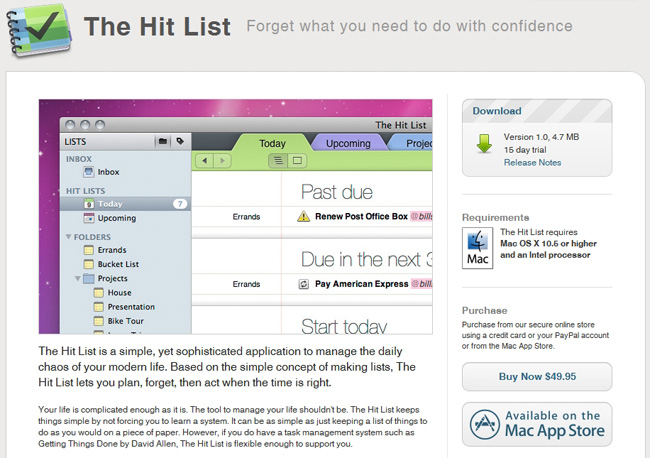
A unicorn has been born at the Potion Factory because The Hit List just went 1.0 and is ready for download via Potion Factory’s site (with a 15 day free trial) or the Mac App Store for $49.99. Back in 2009, people who purchased the MacHeist bundle got a license for the app when it was in beta and that license will still work today.

Many people doubted that it would ever see an official 1.0 release, but Andy Kim said “This, its iPhone companion app, and its sync service were the single most difficult undertaking of my life so far bar none. I hope that it won’t dissappoint and I hope that it will help you become more productive by taking the chore out of keeping track of what to do.”

More screens and iPhone news after the break.

Read more

Access Extra Content and Perks

Founded in 2015, Club MacStories has delivered exclusive content every week for nearly a decade.

What started with weekly and monthly email newsletters has blossomed into a family of memberships designed for every MacStories fan.

Learn more here and from our Club FAQs.

Club MacStories: Weekly and monthly newsletters via email and the web that are brimming with apps, tips, automation workflows, longform writing, early access to the MacStories Unwind podcast, periodic giveaways, and more;

Club MacStories+: Everything that Club MacStories offers, plus an active Discord community, advanced search and custom RSS features for exploring the Club’s entire back catalog, bonus columns, and dozens of app discounts;

Club Premier: All of the above and AppStories+, an extended version of our flagship podcast that’s delivered early, ad-free, and in high-bitrate audio.

Learn more here and from our Club FAQs.


Apple Releases iWork for iPhone

Apple just announced the release of the iWork suite for iPhone, available today as a universal update for the existing iPad apps already available on the App Store. With the same feature set of the iPad counterparts, iWork for iPhone promises to let you easily manage and create documents, print them through AirPrint, and share them with iTunes local file sharing. All apps come with a new document manager to organize documents into folders, Keynote brings deeper compatibility with the Keynote Remote sold separately and Pages sports a new feature called “Smart Zoom” for viewing and editing data.

“Now you can use Keynote, Pages and Numbers on iPhone and iPod touch to create amazing presentations, documents and spreadsheets right in the palm of your hand,” said Philip Schiller, Apple’s senior vice president of Worldwide Product Marketing. “The incredible Retina display, revolutionary Multi-Touch interface and our powerful software make it easy to create, edit, organize and share all of your documents from iPhone 4 or iPod touch.”

Keynote, Pages and Numbers import and export documents from iWork for Mac and Microsoft Office; print wirelessly using AirPrint™; and include beautiful Apple-designed themes and templates. All iWork apps now include improved document management with thumbnail images that let you find your files quickly, organize them and group them into folders using intuitive gestures. From the Tools button in the toolbar, you can easily share any presentation, document or spreadsheet without leaving the app.

The three apps – Pages, Numbers and Keynote – retain the same feature set seen on the iPad, with the addition of document manager in the 1.4 universal update and some iPhone-specific views and zoom functionalities to make sure large documents can be edited and viewed easily on the iPhone’s smaller screen. Numbers, for example, comes with the same special keyboards of the iPhone, but places the function toolbars on top. In Pages, media, charts, tables and shapes are accessible from a Camera Roll view and file picker that’s similar to what already happens on the iPad, only smaller.

Check out more screenshots and full press release below. Read more

Access Extra Content and Perks

Founded in 2015, Club MacStories has delivered exclusive content every week for nearly a decade.

What started with weekly and monthly email newsletters has blossomed into a family of memberships designed for every MacStories fan.

Learn more here and from our Club FAQs.

Club MacStories: Weekly and monthly newsletters via email and the web that are brimming with apps, tips, automation workflows, longform writing, early access to the MacStories Unwind podcast, periodic giveaways, and more;

Club MacStories+: Everything that Club MacStories offers, plus an active Discord community, advanced search and custom RSS features for exploring the Club’s entire back catalog, bonus columns, and dozens of app discounts;

Club Premier: All of the above and AppStories+, an extended version of our flagship podcast that’s delivered early, ad-free, and in high-bitrate audio.

Learn more here and from our Club FAQs.


Apple Confirms: June 6 Keynote with Steve Jobs To Unveil iOS 5 and iCloud

Apple just confirmed with a press release Steve Jobs will be on stage (alongside other Apple executives) at the WWDC keynote on Monday, June 6, to officially unveil iOS 5, Mac OS X Lion and iCloud, the upcoming cloud service from Apple. The WWDC ‘11 was long rumored to be focused on new software announcements with Mac OS X Lion set to debut this summer and an iOS 5 beta ready to be seeded to developers, but the iCloud launch was far from certain as Apple was rumored to be closing deal with music publishers, but negotiations could still fall off before the WWDC. It’s not clear yet whether iCloud will be a music service or a much larger set of tools part of a MobileMe rebrand, though Apple’s press release seems to suggest just that.

Apple® CEO Steve Jobs and a team of Apple executives will kick off the company’s annual Worldwide Developers Conference (WWDC) with a keynote address on Monday, June 6 at 10:00 a.m. At the keynote, Apple will unveil its next generation software - Lion, the eighth major release of Mac OS® X; iOS 5, the next version of Apple’s advanced mobile operating system which powers the iPad®, iPhone® and iPod touch®; and iCloud®, Apple’s upcoming cloud services offering.

Previous reports indicated iOS 5 would be released publicly this Fall, with betas seeded throughout the summer to developers. The OS was reported to feature new music, location services, “completely revamped” notifications and widgets, as well as a heavy cloud-based underlying structure that, at this point, we assume will be directly connected to iCloud for the web, desktop and mobile. Other rumors in the past months pointed at iOS 5 with new features called “Photo Stream” and “Media Stream” to instantly share photos and videos with your friends through the Cloud, similarly to how a separate report claimed the new MobileMe would be a mix of Facebook and uStream for social functionalities and video sharing.

Access Extra Content and Perks

Founded in 2015, Club MacStories has delivered exclusive content every week for nearly a decade.

What started with weekly and monthly email newsletters has blossomed into a family of memberships designed for every MacStories fan.

Learn more here and from our Club FAQs.

Club MacStories: Weekly and monthly newsletters via email and the web that are brimming with apps, tips, automation workflows, longform writing, early access to the MacStories Unwind podcast, periodic giveaways, and more;

Club MacStories+: Everything that Club MacStories offers, plus an active Discord community, advanced search and custom RSS features for exploring the Club’s entire back catalog, bonus columns, and dozens of app discounts;

Club Premier: All of the above and AppStories+, an extended version of our flagship podcast that’s delivered early, ad-free, and in high-bitrate audio.

Learn more here and from our Club FAQs.