
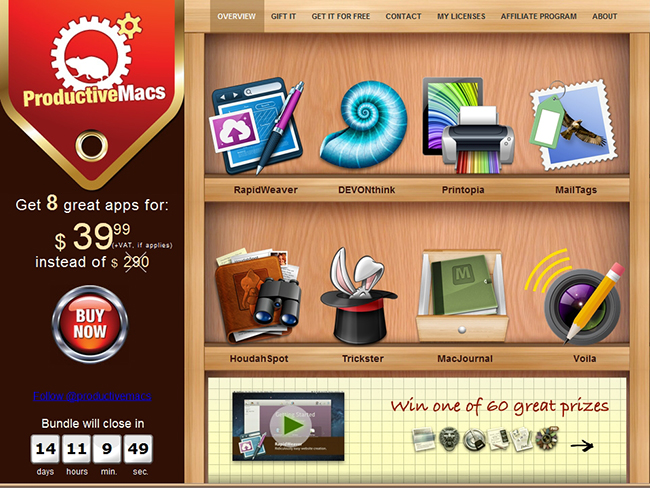
Bundle season for the Mac is in full effect, but this one isn’t about games. This bundle throws together some really powerful utilities that will help you get work done such as RapidWeaver, DEVONthink, Printopia, MailTags, HoudahSpot, Trickster (brand new, read our review) MacJournal and Voila. If you purchased all 8 of these productive goodies separately they would cost $290 but this bundle is priced at the super-low total of $39. The ProductiveMacs bundle, organized via Apparent Software, are hosting a bundle that features a fine collection of seriously powerful software for your Mac.
Posts in Featured
ProductiveMacs Bundle: 8 Great Mac Apps for $39

Access Extra Content and Perks
Founded in 2015, Club MacStories has delivered exclusive content every week for nearly a decade.
What started with weekly and monthly email newsletters has blossomed into a family of memberships designed for every MacStories fan.
Club MacStories: Weekly and monthly newsletters via email and the web that are brimming with apps, tips, automation workflows, longform writing, early access to the MacStories Unwind podcast, periodic giveaways, and more;
Club MacStories+: Everything that Club MacStories offers, plus an active Discord community, advanced search and custom RSS features for exploring the Club’s entire back catalog, bonus columns, and dozens of app discounts;
Club Premier: All of the above and AppStories+, an extended version of our flagship podcast that’s delivered early, ad-free, and in high-bitrate audio.
Favs for iPhone
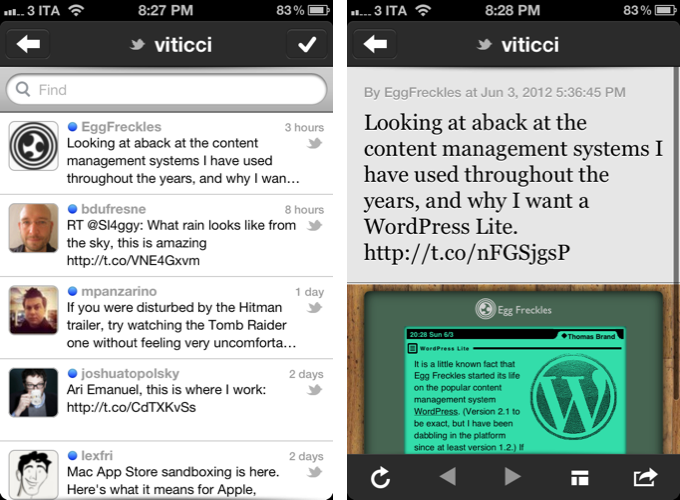
I don’t normally begin articles with puns, but Favs has become one of my new favorite apps. Developed by Dirk Holtwick, Favs is “an app for your Internet favorites” – it collects items you’ve liked, starred, or marked as favorite on a variety of social networks and online services. In my review of the Mac version, I wrote:
Services like Instapaper and Pinboard empower you to “read later” and “bookmark” the things you like. Favs runs at a higher level, collecting favorites from other services that already enable you to save favorites. As I said, this kind of app is a web nerd’s dream come true for me.
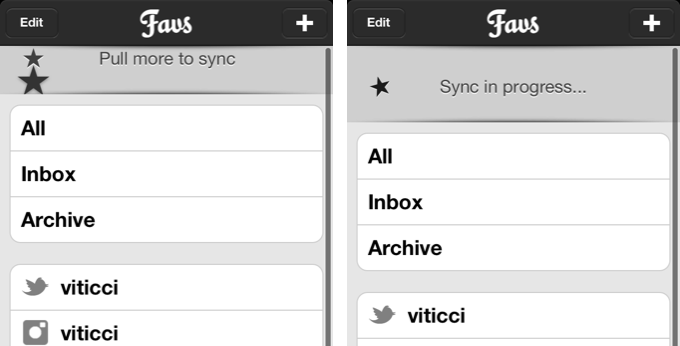
Released yesterday, Favs for iPhone is a $2.99 mobile companion that serves the same purpose of Favs for Mac – it offers a unified interface to browse favorite items from multiple sources. The main screen features three general tabs for All items, Inbox, and Archive. However, I never use Favs’ own read/unread indicators, because I don’t want to “feel the guilt” of having too many favorites in my accounts. For this reason, I am glad Favs for iPhone lets me hide unread counts from the Settings, which also reveal iCloud sync will be coming soon to keep account information synced across Mac and iOS devices. I very much prefer to browse favorites by their original source.
The main screen of Favs also reveals a custom “pull to refresh” implementation that uses two stars that need to be aligned to initiate a new sync session. This action will refresh all your sources and check for new favorite items (single sources can be refreshed as well).
Like the Mac app, Favs for iPhone supports the following services:
- Delicious
- Dribbble
- Flattr
- Flickr
- GitHub
- Google Reader
- Instapaper
- Pinboard
- Readability
- StackOverflow
- Vimeo
- YouTube
- Zootool
Tapping on items containing links will open an embedded web view in the lower portion of the screen. An option to load the Readability version of an article is present, as well as buttons to email a URL, tweet it, copy it, or launch it in Safari.
The app’s performances are good, but not perfect. I found Favs to be slightly slowed down when scrolling through thousands of Twitter favorites, though I recognize I may be an edge case here. However, after the initial refresh, the app was quite smooth at switching between Twitter, Google Reader, Facebook, and the main view. The sync animation could use some further optimizations.
If you already use Favs on the Mac, there’s no question you’ll want to take a look at the iPhone version. Favs for iPhone has a clean design, works with a lot of services, and, overall, leverages the convenience of having all your Internet favorites always with you. Favs is $2.99 on the App Store.
Access Extra Content and Perks
Founded in 2015, Club MacStories has delivered exclusive content every week for nearly a decade.
What started with weekly and monthly email newsletters has blossomed into a family of memberships designed for every MacStories fan.
Club MacStories: Weekly and monthly newsletters via email and the web that are brimming with apps, tips, automation workflows, longform writing, early access to the MacStories Unwind podcast, periodic giveaways, and more;
Club MacStories+: Everything that Club MacStories offers, plus an active Discord community, advanced search and custom RSS features for exploring the Club’s entire back catalog, bonus columns, and dozens of app discounts;
Club Premier: All of the above and AppStories+, an extended version of our flagship podcast that’s delivered early, ad-free, and in high-bitrate audio.
iOS 6 Mockups→
iOS 6 Mockups
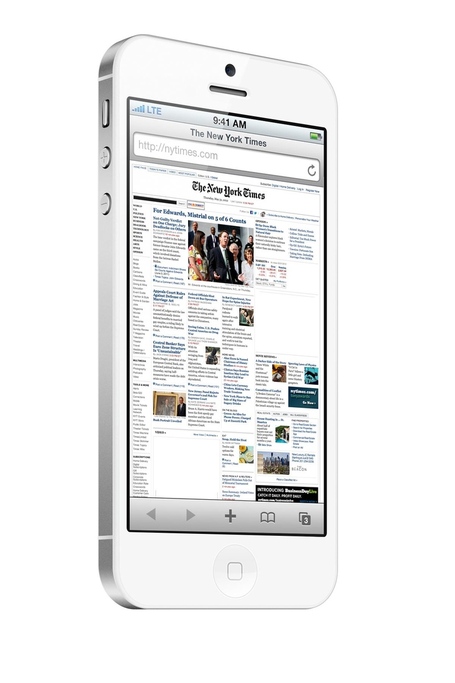
The Verge Forums member ”gizmosachin” created some nice mockups of iOS 6 and the next-generation iPhone based on recent rumors.
Well this week we saw the “composite” image of the new iOS 6 Maps app, the blurrycam photos of the new iPhone, and with the WWDC 2012 app it seems that iOS 6 will make most UI elements silver like their counterparts on the iPad. Thought I’d make some mockups of the new iPhone running Safari and the supposed new Maps app just for fun. I couldn’t find any high res C3 Tech images so I just used the OpenStreetMap maps that Apple currently uses in iPhoto.
According to speculation surrounding the next major version of iOS, Apple will switch to a “silver” theme – roughly the same that has been used on the iPad since iPhone OS 3.2. Marco Arment believes the iPhone UIKit widget styling (the stock blue element) is out of style. Cult of Mac thinks that the recently released WWDC app and iPhoto for iOS set the stage for silver coming to the iPhone soon.
In theory, apps that use stock UI items provided by Apple would work “out of the box” with an updated color scheme. However, developers who relied on custom icons, colors, and other patterns would still need to optimize their apps for the new UIKit – and that’s exactly why Apple “previews” new version of iOS at WWDC before their Fall release.
Composite mockups of iOS 6 Maps based on “leaked” screenshots of the software first surfaced last week. Check out more mockups at The Verge.
Review: DM1 Drum Machine for iPad
The day the iPad was unveiled, the whole Apple community screamed that the device would change the way we look at arts and be the center of any kind of creation process in mankind’s mobile future. While this mainly came true for writing and visual arts (think of apps like iA writer or procreate), it still lacks when it comes to mobile music making. Due to the absence of multiple optical inputs like FireWire, the iPad is not suited to be the only mobile recording studio. After the first wave of electronic music software with the KORG line (iElectribe, iMS-20, iKaossilator etc.) as the most prominent example, new electronic music production environments got very rare. I was very excited, however, when I saw this new iPad drum machine on Beautiful Pixels called DM1 Drum Machine. The demo video of Fingerlab’s new product promised a decent, easy, but powerful workstation on the road for a very fair price, so I downloaded it.
And DM1 didn’t disappoint me. The DM1 was the very first drum machine software I ever bought for iOS devices; I tried iElectribe once on a friend’s iPad, but even that iconic (and expensive) app seemed more like a toy than a serious musical instrument to me. On the iPad, I am after professional software, something that encourages me to create awesome music. And because you cannot impress through the haptic feel of a synth on a flat screen, you need UI simplicity combined with a stunning feature set to get your product to the user. With the DM1, I finally found a music app that fulfills those needs.
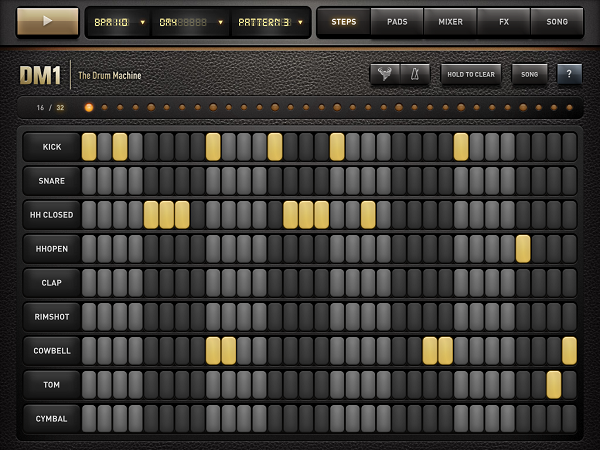
In their demo video, Fingerlab shows a 3D animation of the DM1 as a Little Phatty-like workstation with several areas for its five different main features: a step sequencer, drum pads to manually enter beats, a mixer for each sequenced kit part, effects, and song information with structuring options. In the real app, those five features are available via the top selection bar right beside the three most basic selecting options to set the basis for a song – BPM, selected sound, and the currently played pattern, and a play button. In the following lines, I’ll firstly dive into each of these parts, and cover the visual arrangement, DM1’s production possibilities, and some features I’d wish for in future app updates to make the app even more pro-oriented.
Step Sequencer and Sounds
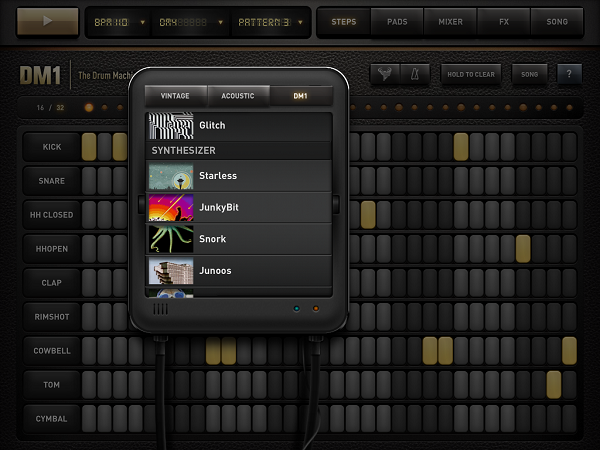
In terms of the provided variety of sounds, DM1 is the most professional effort I’ve seen to date. 19 classic drum kits (e.g. the iconic Roland machines TR-808 and TR-606), 19 acoustic sets from Ludwig drum kits to Cello sounds and Wurlitzer pianos, and 26 DM1-only kit including Bristol-styled beats and freaky synth sounds speak for themselves. In the 16/32-step sequencer, these sounds are divided into 9 kit parts: kick, snare, open and closed Hi-Hat, clap, rimshot, cowbell, tom, and cymbal. The sounds connected to these parts vary a lot, so it can occur (especially when using a synth sound) that the app plays melodic elements on the rimshot and cowbell steps.
This brings us to creating sequences with the step sequencer. In both 16 and 32 mode (which is twice as long, not twice as fast) tapping single steps works flawlessly; aiming and selecting is easy. The 4 bars are separated using different shades of grey, and they can also be easily identified using the LEDs on top, where each beginning bar is indicated with a bigger one.
Clearing steps is just as simple; you can even drag you finger around the whole screen and every step you swipe over is getting activated or de-activated, depending on what your first tap did. If this still is not fast enough for you, ou can also use the “hold to clear” button below the feature selection panel. This and the nearest three buttons (metronome, a very functional random rhythm creator, and the obligatory, very neatly implemented help menu) are also available over multiple screens.
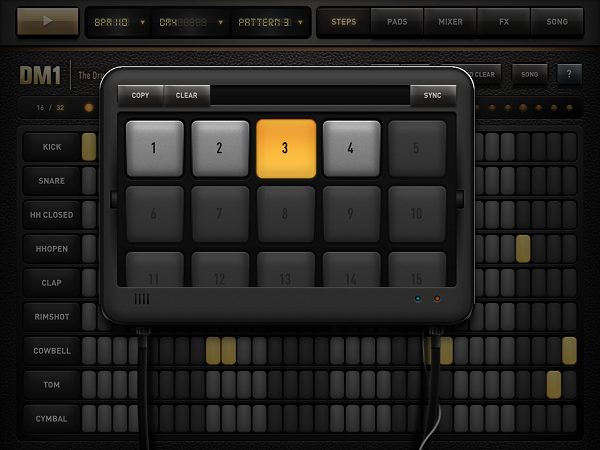
Any time you change a single step, it is automatically saved in the activated pattern. You can create up to 25 different patterns, which then can be arranged to a final piece in the “song” section (I’ll come to that later). If you want multiple patterns (which are built upon each other to create an evolving rhythm), you can also copy one pattern into another slot, add some elements to it, and the basic beat will still be the same.
Drumpads
If you’re better at playing than imagining or experimenting with new rhythms using the sequencer (when you come from drumming for instance), you can use the drumpads combined with the integrated quantized recorder to teach the sequencer the rhythms you have in your head. The pads are really big and very responsive, even when double-tapping with two fingers to create a 16 step Hi-Hat beat.
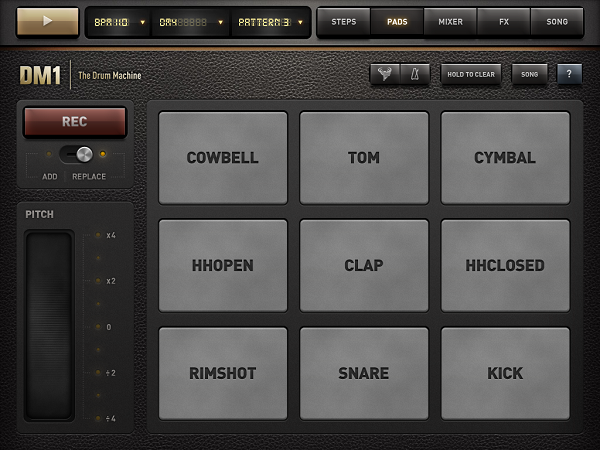
Unfortunately, the app doesn’t play a bar solely with the metronome before a recording begins, so you have to wait four whole bars until you can input your beats properly. But the conversion into the single steps works perfectly and instantly. To make the recorded beats even more personal, there’s a large, functional pitch-shifting ribbon to customize the sequence further (this can also be applied after the four bars are recorded).
Mixing and Customizing Single Steps
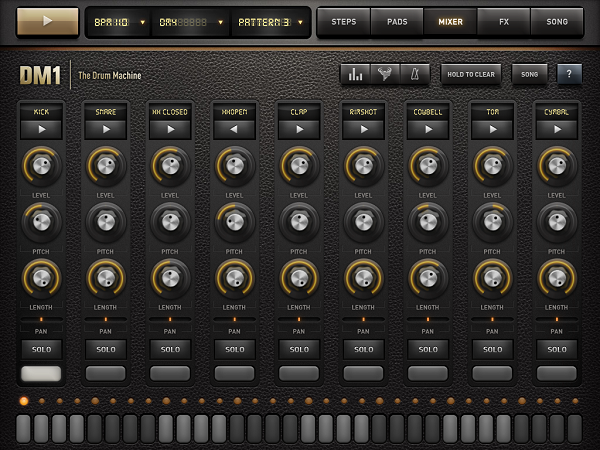
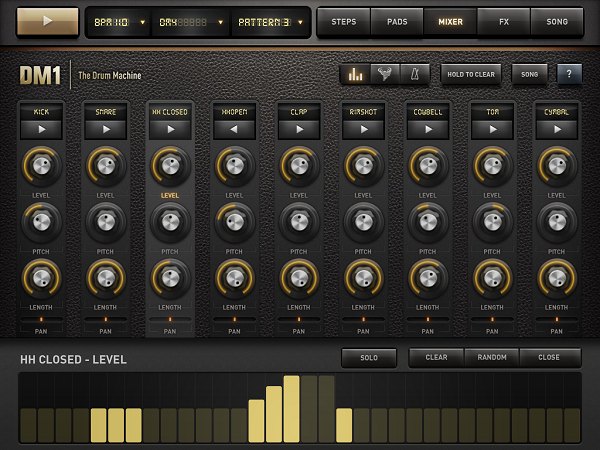
The third big feature is the most used out one, with which you can edit any part of the available kit anyhow you can imagine: the kit mixer. In a moog-styled layout you can customize every sound in level, pitch, and length to make it sounds just the way you want it. You can reverse the whole sound of a step by holding the play button, and pan the part to the right or left to create a stereo effect. Set the sound on solo mode and use the bottom bar to add or delete steps for a specific track. But the to me, the most powerful feature is the velocity leveler that you can bring up by tapping the diagram-like button in the nav bar. Although the upcoming vertical bars (of which lighter ones indicate active, changeable steps) are not perfectly responsive to sliding to change their level, you can create crescendos and decrescendos with one tap here, something I always use when I start a new project.
FX and Song Timeline
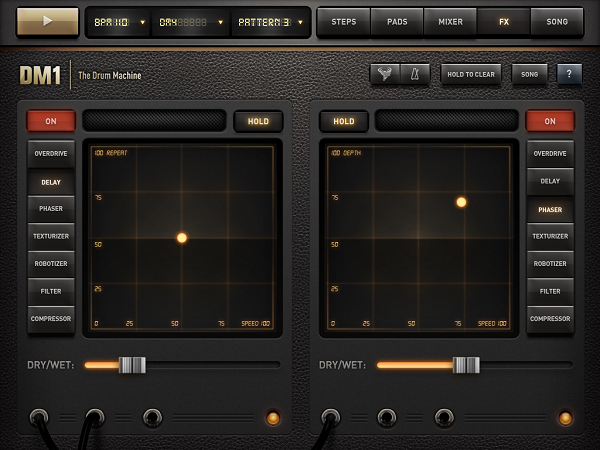
The fourth way to customize your sequences is the FX section. It’s powerful, but also pretty hard to handle properly. Here’s why: you can select an effect (overdrive, delay, phaser, etc.), set the dry/wet mix portion, tap the red “on” button, and the effect is immediately applied to your mix. Yet most of the time, you’ll then think: “This is destroying the whole thing”. The reason for that lies within the two-axis field which is used to set the two main parameters of the effects; for instance, when using the delay, these parameters are Repeat (y-axis) and Speed (x-axis) with respective values from 0 to 100. Unlike the velocity columns, this is very responsive. Every time you move the LED dot indicating the current setting just a little bit, the sound changes more or less completely. As you see, this offers both a huge amount of treasured sounds, but can be completely counterproductive.
If you’re done creating, editing and customizing your sounds, tap the song panel to turn “just playing around with a drum machine app” into serious business. Here you can make an actual song out of your single beats; just drag and drop patterns into the timeline, and tap the play button to listen to your arrangement. If you like what you hear, you can export the song (or single patterns)as a .wav file to iTunes or send it via mail. You can even sync in via WIST to another device with the DM1 installed to have it on all of your devices or share your work with friends or colleagues.
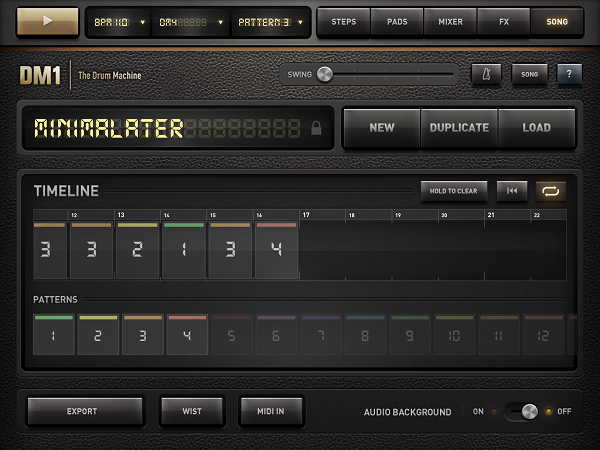
Fingerlab also integrated AudioCopy to send the created beats to a variety of other music production apps like FourTrack or AirWrench. Other features in the song panel include MIDI Input (using auto or pre-selected channels to enable plug and play using a USB Camera Connection kit) and a swing option to play around with the overall song rhythm.
User Interface
The biggest issue I had with the app’s design was a really impudent one considering the immense feature set: the DM1 does not have Retina graphics. The features all worked great – my problem with the app was that it didn’t look nice. But this would need just an update, and considering the rest of the UI, I definitely excuse this lack.
I mentioned the 3D version of the machine the devs designed to visualize the feature set. This also makes the UI more understandable. Using the cool designed popups and the top navigation bars is easy after watching the demo video – don’t get me wrong, the app is very intuitive even if you don’t watch any demo, but it takes some time to find out how every feature works.
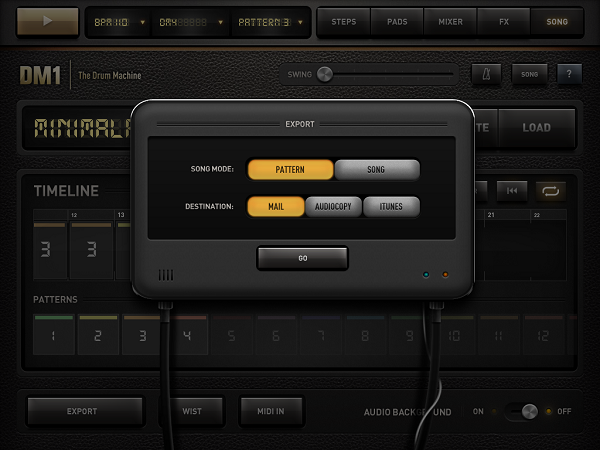
The leather background fits very well with the sepia tones the designers used for the buttons, text panels, and other controls. I disliked some buttons’ 3D look though, especially the square ones like the play button. Nevertheless, the UI design fits the needs of the feature set, making it understandable and flexible, and – what’s most important – it never privileges any feature to ensure that you will equally find and use all of them. Ultimately, this is the most intriguing aspect of the DM1: you always use every part of it and are thrown into a very clear but flexible workflow – which is optimized for mobile use, but still feels very professional and delivers great outputs.
Wish List
What follows now is something I normally avoid; I consider myself in a position to review and criticize existing features, but not suggest new ones. With music apps, though, it’s a little different. I use several desktop products including GarageBand and Ableton Live, and I always think about which features could be transferred to mobile apps while using them. DM1 offers many of such features, but some – even quite simple and obvious ones – are still missing in my opinion, and they could be easily added to make the app even more stunning.
First: better organization. If you like the app as much as I do, you will create many projects to dive into all those sounds and effects. And you’ll enjoy that for sure. What you won’t enjoy, however, is finding your favorite sounds and saved songs again. Both are displayed in one single list with dividers for categories which completely lack of folders, tags or anything. And especially the list of saved songs is designed way to small for the iPad’s large screen. A simple folder structure within this list could solve this problem, and having a separate list for your favorite sounds would also be pretty useful.
Secondly, I would like to remind developers of such professional software that iOS devices have multitouch. Please make use of it. It would’ve been both intuitive, very cool, and useful to use, say, two-finger swipe to switch between panels.
Last, but certainly not least, I imagined many possible extra features while using the DM1 to extend it up to the situation where you can have it it as your sole production platform, not just on the road, but also at home. In my opinion, the app doesn’t need not that much to reach that position. What it misses are basically just three things: 1) more options to create melodies like more synth kits (or maybe just indicating existing melodic steps better) to create whole songs with beat, basslines and hooks, 2) the creation of own drum kits on the go, and 3) the capability of applying different effects to different patterns. Currently, the two effects you set are applied to the whole song, whether you like it or not (they even cannot been disabled for single patterns). Some ideas in this direction would turn this drum machine into a full-featured workstation.
Wrap Up
I urge you to get DM1 Drum Machine for your iPad. If you’re into music and rhythm and whether you have experience in using sequencers or not, you will have a lot of fun with the app. It is flexible and offers an incredible amount of directions your sound can go. And, believe it or not, this whole package is available for just $4.99 in the App Store.
Access Extra Content and Perks
Founded in 2015, Club MacStories has delivered exclusive content every week for nearly a decade.
What started with weekly and monthly email newsletters has blossomed into a family of memberships designed for every MacStories fan.
Club MacStories: Weekly and monthly newsletters via email and the web that are brimming with apps, tips, automation workflows, longform writing, early access to the MacStories Unwind podcast, periodic giveaways, and more;
Club MacStories+: Everything that Club MacStories offers, plus an active Discord community, advanced search and custom RSS features for exploring the Club’s entire back catalog, bonus columns, and dozens of app discounts;
Club Premier: All of the above and AppStories+, an extended version of our flagship podcast that’s delivered early, ad-free, and in high-bitrate audio.
Game In-App Purchases: A Conflict Between Developer Economics & Goodwill

In-App Purchases for iOS games. It’s a bit of a sensitive topic really, not many people like them at all, and quite a few people hate them and the impact they have had on the iOS games market. But today I want to explore the reason for their prevalence and explain why it has become an important part of the market for developers. I also want to reframe the discussion from one of “In-App Purchases are a problem” to one where we consider how they are being used and what developers could do to improve their implementation.
Below the break is Part 1: The Economics, in which I tackle the reason for their prevalence and importance in the iOS games market. Following that is Part 2: “Developers and Goodwill To Customers” in which I discuss how they are being used and perhaps what might be some best practices.
Access Extra Content and Perks
Founded in 2015, Club MacStories has delivered exclusive content every week for nearly a decade.
What started with weekly and monthly email newsletters has blossomed into a family of memberships designed for every MacStories fan.
Club MacStories: Weekly and monthly newsletters via email and the web that are brimming with apps, tips, automation workflows, longform writing, early access to the MacStories Unwind podcast, periodic giveaways, and more;
Club MacStories+: Everything that Club MacStories offers, plus an active Discord community, advanced search and custom RSS features for exploring the Club’s entire back catalog, bonus columns, and dozens of app discounts;
Club Premier: All of the above and AppStories+, an extended version of our flagship podcast that’s delivered early, ad-free, and in high-bitrate audio.
#MacStoriesDeals - Thursday

Here are today’s @MacStoriesDeals on hardware, iOS, and Mac apps that are on sale for a limited time, so get them before they end!
Read more
Access Extra Content and Perks
Founded in 2015, Club MacStories has delivered exclusive content every week for nearly a decade.
What started with weekly and monthly email newsletters has blossomed into a family of memberships designed for every MacStories fan.
Club MacStories: Weekly and monthly newsletters via email and the web that are brimming with apps, tips, automation workflows, longform writing, early access to the MacStories Unwind podcast, periodic giveaways, and more;
Club MacStories+: Everything that Club MacStories offers, plus an active Discord community, advanced search and custom RSS features for exploring the Club’s entire back catalog, bonus columns, and dozens of app discounts;
Club Premier: All of the above and AppStories+, an extended version of our flagship podcast that’s delivered early, ad-free, and in high-bitrate audio.
Apple To Acquire Italian Digital Music Editing Company Redmatica
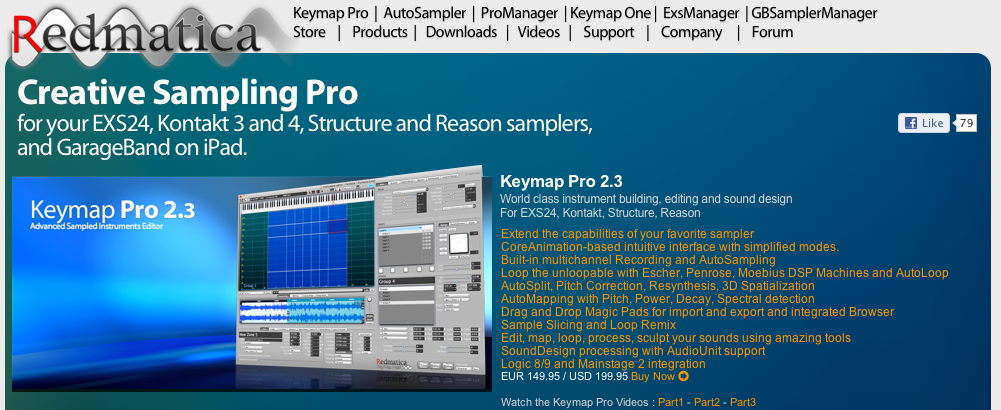
As noted by Italian website Fanpage [Google Translation] and reported by TechCrunch, Apple has filed documentations with Italian authorities to acquire Italian company Redmatica. Based in Correggio, Italy, Redmatica specializes in “digital audio workstation” software – notably, the company is well known for Mac audio editing and mixing editors such as KeyMap Pro, AutoSampler, and ProManager. Based on Apple technologies such as CoreAnimation, Redmatica’s software integrates with popular desktop editors and tools such as Logic, Reason, MainStage, and even GarageBand for iPad.
The acquisition of “DAW” (Digital Audio Workstation) assets by Redmatica has been reported by Italian regulator AGCOM in an official document available here. The document notes how Redmatica’s worldwide revenue in 2011 has been under €1 million, with, surprisingly, no revenue (“fatturato”) coming from Italy. Apple, on the other hand, reported, according to the document, approximately €77,6 billion revenue worldwide in the fiscal year 2011 (2010/2011 as noted in the document), €19.9 billion in the European Union, and “over €1 billion” in Italy alone.
As for the DAW software, the AGCOM filing notes how Redmatica holds a share less than 1%, while Apple holds around 10/15% among “several and qualified competitors”. The document explains how DAW software may fall under the category of “business software”, as DAW applications allow for recording, editing, mixing, and playback of digital music, and are typically used by sound professionals, but also “prosumers” (“expert amateur users” in the document), musicians, and DJs.
The AGCOM document doesn’t say Apple has acquired Redmatica. Rather, provided a description of both companies, the nature of the acquisition, and the aforementioned numbers and stats, the filing goes on to note how Apple isn’t a big player in the area of DAW software, and thus the acquisition should be safe for competition. In the document, in fact, Italian law n. 287/90 (art. 16, comma 4) is mentioned as a possible factor that could prevent Apple from acquiring the company. Specifically, law n. 287/90 (art. 16, comma 4) notes how, in case of competitive disadvantages (explained in art. 6), authorities may begin an investigation (detailed in art. 14) for a proposed acquisition or merger (“operazione di concentrazione”).
The AGCOM document ends noting how AGCOM deliberated an investigation won’t be necessary; AGCOM’s conclusions have been forwarded to Apple, Redmatica, and the Italian Minister of Economic Development of Infrastructure and Transport. It is safe to assume that, considering AGCOM’s position, the acquisition will be given the final go-ahead by Italian authorities soon. It is obviously unclear how much Apple is willing to spend to acquire Redmatica’s assets, or how Apple plans to integrate its software in its existing suite of digital audio applications.
We have reached both Apple and Redmatica for comment, and we’ll update this story with more details when available.
Access Extra Content and Perks
Founded in 2015, Club MacStories has delivered exclusive content every week for nearly a decade.
What started with weekly and monthly email newsletters has blossomed into a family of memberships designed for every MacStories fan.
Club MacStories: Weekly and monthly newsletters via email and the web that are brimming with apps, tips, automation workflows, longform writing, early access to the MacStories Unwind podcast, periodic giveaways, and more;
Club MacStories+: Everything that Club MacStories offers, plus an active Discord community, advanced search and custom RSS features for exploring the Club’s entire back catalog, bonus columns, and dozens of app discounts;
Club Premier: All of the above and AppStories+, an extended version of our flagship podcast that’s delivered early, ad-free, and in high-bitrate audio.
Quip: A New iPad Twitter App With A Focus On Conversations
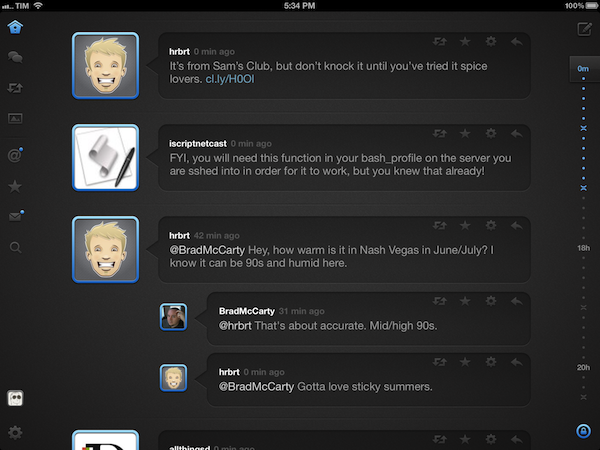
I have often written about the need for developers of third-party Twitter clients to focus on different, fresh experiences aimed at providing a new take on mobile tweeting. On iOS, as I have previously argued, apps like Tweetbot, Twitterrific, and Twitter’s official client have managed to capture a large portion of a devoted userbase split in those seeking a wide array of functionalities, a streamlined interface, or the free price tag. Quip, a new Twitter app by Glasshouse Apps (makers of The Early Edition), takes a unique approach at filtering the typical Twitter timeline by conversations, images, and retweets.
I have been testing Quip since its early beta versions, and the app has been no replacement for Tweetbot on my iPad. But that’s exactly Quip’s greatest strength and, I believe, one of its most valid points alongside a care for beautiful UI design and ease of use. While capable of being an average user’s primary iPad client because of its support for basic Twitter functionalities such as direct messages, search, and favorites, I think Quip works best as an attractive companion for catching up on Twitter and browsing certain sections/tweets that could otherwise get easily lost in a “regular” timeline. Quip doesn’t support Twitter lists, its search features are limited, and you won’t find the same degree of link and tweet manipulation options of Tweetbot.
Rather than contributing to the app’s possible detriment when compared to more advanced clients, however, Quip’s extremely specific feature set catalyzes the convenience of those Twitter-based functionalities that Glasshouse implemented. Read more
Access Extra Content and Perks
Founded in 2015, Club MacStories has delivered exclusive content every week for nearly a decade.
What started with weekly and monthly email newsletters has blossomed into a family of memberships designed for every MacStories fan.
Club MacStories: Weekly and monthly newsletters via email and the web that are brimming with apps, tips, automation workflows, longform writing, early access to the MacStories Unwind podcast, periodic giveaways, and more;
Club MacStories+: Everything that Club MacStories offers, plus an active Discord community, advanced search and custom RSS features for exploring the Club’s entire back catalog, bonus columns, and dozens of app discounts;
Club Premier: All of the above and AppStories+, an extended version of our flagship podcast that’s delivered early, ad-free, and in high-bitrate audio.
Tim Cook at D10 [Updated with Highlights and Storify Recap]

A dapper Tim Cook will be sitting down with Walt Mossberg and Kara Swisher this evening in Racho Palos Verdes, California, where AllThingsDigital’s D10 Conference will be held for the next three days as tech industry heavyweights are invited to speak and demo new products. Since last August, Tim Cook has continued to drive Apple’s success with new product launches of the iPhone 4S and the iPad 3. Apple has given stock dividends, joined the Fair Labor Association, and has reported its best quarter ever since Cook was promoted to CEO. We expect most of tonight’s interview to focus on his tenure at Apple, what’s in the company’s future, and how Cook views the tech industry and the pace of innovation that’s currently happening.
All Things Digital has made available an iPhone/Android app so readers can stay updated on upcoming events and interviews during the conference. Livestreams will be made available for certain speakers, and Twitter users can follow the conversation around D10 through the hashtag #atd10. A livestream for Tim Cook’s talk will not be available, but there should be a recorded session available by Wednesday.
As the conversation with Tim Cook gets underway, we’ll be highlighting some of the key takeaways and sharing thoughts and opinions from around the web that occur as a result of what Tim Cook says or doesn’t say. We’re looking forward to the interview, and hope you’ll tune in with us at 9:00 EST as we quietly follow along with the live transcripts.
Update 9:23: Tim Cook is on stage! We’ll be posting highlights past the break.
Access Extra Content and Perks
Founded in 2015, Club MacStories has delivered exclusive content every week for nearly a decade.
What started with weekly and monthly email newsletters has blossomed into a family of memberships designed for every MacStories fan.
Club MacStories: Weekly and monthly newsletters via email and the web that are brimming with apps, tips, automation workflows, longform writing, early access to the MacStories Unwind podcast, periodic giveaways, and more;
Club MacStories+: Everything that Club MacStories offers, plus an active Discord community, advanced search and custom RSS features for exploring the Club’s entire back catalog, bonus columns, and dozens of app discounts;
Club Premier: All of the above and AppStories+, an extended version of our flagship podcast that’s delivered early, ad-free, and in high-bitrate audio.