Posts in Featured

Byword 2.0 Gets Publishing Services, Improved Sync, And More

Byword 2.0

Byword 2.0

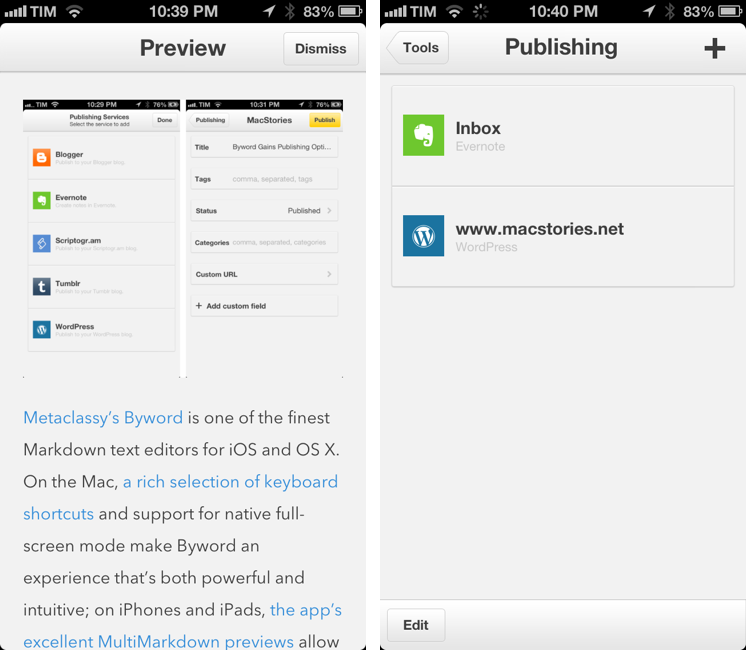
Metaclassy’s Byword is one of the finest Markdown text editors for iOS and OS X. On the Mac, a great selection of keyboard shortcuts and support for native full-screen mode make Byword an experience that’s both powerful and intuitive; on iPhones and iPads, the app’s excellent MultiMarkdown previews allow the Markdown-savvy writer to always keep an eye on the final outcome of a document. With sync (both through iCloud and Dropbox) and solid exporting options (including PDF), Byword has become many’s preferred solution to write down thoughts and longer essays – with a focus on Markdown, rich text, and cross-device availability of documents.

Byword 2.0, released today for iOS and OS X, introduces new publishing options for WordPress, Tumblr, Evernote, Blogger, and Scriptogram, more robust sync with offline support and better conflict resolution, and several other enhancements. I have been testing Byword on all my devices for the past month, pointing the app to my /Apps/ folder in Dropbox where all my text files are stored. Read more

Access Extra Content and Perks

Founded in 2015, Club MacStories has delivered exclusive content every week for nearly a decade.

What started with weekly and monthly email newsletters has blossomed into a family of memberships designed for every MacStories fan.

Learn more here and from our Club FAQs.

Club MacStories: Weekly and monthly newsletters via email and the web that are brimming with apps, tips, automation workflows, longform writing, early access to the MacStories Unwind podcast, periodic giveaways, and more;

Club MacStories+: Everything that Club MacStories offers, plus an active Discord community, advanced search and custom RSS features for exploring the Club’s entire back catalog, bonus columns, and dozens of app discounts;

Club Premier: All of the above and AppStories+, an extended version of our flagship podcast that’s delivered early, ad-free, and in high-bitrate audio.

Learn more here and from our Club FAQs.


Reeder To Add Support For Feedly and Feed Wrangler

Soon after Google announced they would shut down their RSS platform Reader this July, Feedly confirmed they would build an API clone – codenamed Normandy – to ease the transition from Reader to Feedly for users and third-party developers. Essentially, this meant Feedly had been working on its own RSS syncing service with support for third-party clients to complement its own set of native apps.

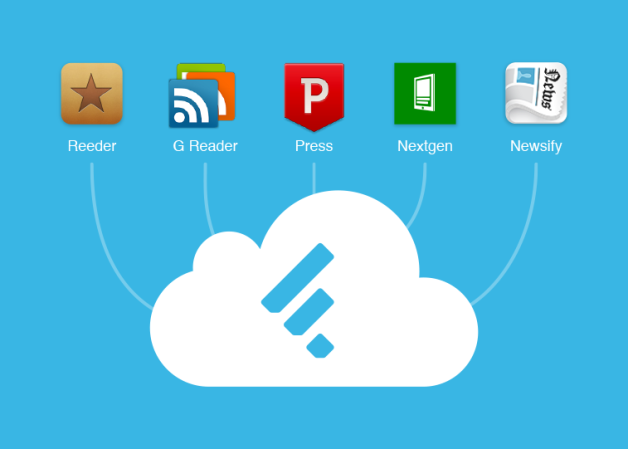
In a blog post published today, Feedly has announced that they have been working with developer partners over the past two months to ensure the feedly API, based on the Normandy project, could launch with an ecosystem of native third-party apps. And among the apps that will support Feedly before July 1 (when Google will shut down Reader) there’s Silvio Rizzi’s Reeder, one of my favorite RSS apps for the iPhone and iPad.

We are also hearing from users that saving their feeds is not enough: One of the key features of Google Reader was that they had an ecosystem of apps – apps that people love and depend upon.

We have been working behind the curtains with the developers of Reeder,Press, Nextgen Reader, Newsify and gReader as design partners for our Normandy project. Today we are excited to announce that you will be able to access your feedly from all these apps before Google Reader retires and that the access to feedly API will be free. More details soon.

I have reached out to Rizzi, who confirmed Feedly support will indeed be added to the next versions of Reeder. His client, which was updated last April on the iPhone to support Feedbin sync and local RSS feeds, will also be updated for Feedly integration. While a precise release timeframe isn’t clear yet, it’s safe to assume Feedly integration will first come to the iPhone and then to Reeder for Mac and iPad (Rizzi made Reeder for iPad and Mac free while he’s working on a major 2.0 update).

Rizzi also told me that Reeder will support Feed Wrangler, David Smith’s RSS service that launched in late April. In my review of Feed Wrangler, I noted:

In the next “few weeks”, an official API will be released to let third-party developers create Feed Wrangler clients, and I think that will be a key aspect for scaling the service’s adoption rate to accommodate different kinds of users and applications. While the platform is solid and reliable, it lacks the beautiful interface polish of Google Reader apps like Reeder, or the power-user functionality of Mr. Reader’s services menu. The official website and apps should serve as an example of what Feed Wrangler can do, but it’ll be up to third-party clients to prove Feed Wrangler’s flexibility.

Again, as with Feedly integration, Rizzi can’t provide a specific release date today. Feed Wrangler, which has become my favorite Google Reader replacement, comes with a series of unique implementations of the decade-old concept of syncing and reading feeds, and it’ll be interesting to see how Reeder will take advantage of it in its custom interface.

Today, another popular RSS app for iPad – Mr. Reader – confirmed that it will add support for Feed Wrangler (alongside Feedbin and Fever) in a future 2.0 update.

Access Extra Content and Perks

Founded in 2015, Club MacStories has delivered exclusive content every week for nearly a decade.

What started with weekly and monthly email newsletters has blossomed into a family of memberships designed for every MacStories fan.

Learn more here and from our Club FAQs.

Club MacStories: Weekly and monthly newsletters via email and the web that are brimming with apps, tips, automation workflows, longform writing, early access to the MacStories Unwind podcast, periodic giveaways, and more;

Club MacStories+: Everything that Club MacStories offers, plus an active Discord community, advanced search and custom RSS features for exploring the Club’s entire back catalog, bonus columns, and dozens of app discounts;

Club Premier: All of the above and AppStories+, an extended version of our flagship podcast that’s delivered early, ad-free, and in high-bitrate audio.

Learn more here and from our Club FAQs.


Apple Introduces New Low-End 16 GB iPod Touch

Apple today quietly updated its online Store to launch a new low-end iPod touch that replaces the fourth-generation model. Eric Slivka reports at MacRumors:

Apple today made a quiet update to its iPod touch lineup, launching a new 16 GB fifth-generation model without a rear camera for $229. The new iPod touch, which is only available with a black front and silver back, replaces the fourth-generation iPod touch that Apple had continued to offer since the introduction of new models late last year. The new model is available now in Apple’s online store and should be available in the company’s retail stores starting tomorrow.

New design aside, there are a series of notable additions for the new low-end iPod touch. Removing the rear-facing camera and 16 GB of storage from the higher-end iPod models, Apple could reach the $229 price point, which is $70 cheaper than the fifth-generation iPod family. Keeping the front-facing camera (bumped to a 1.2 MP “HD” status) allows Apple to keep FaceTime and ensure basic compatibility with third-party iOS camera apps.

Apple is, essentially, future-proofing the iPod touch family: adding Lightning, a taller Retina screen, a dual-core A5 chip, faster WiFi on the 5GHz band, and, presumably, more RAM than the 256 MB found in the fourth-gen iPod, the new 16 GB iPod touch will certainly be capable of running iOS 7 and future updates. It’ll be interesting to see if iOS 7 will run on the just-discontinued iPod touch 4th gen, which had less RAM than the iPhone 4 (512 MB), also released in 2010.

On the new iPod touch webpage, Apple features the higher-end iPod models as the ones with iSight and loop – the latter absent from today’s new low-end model.

Access Extra Content and Perks

Founded in 2015, Club MacStories has delivered exclusive content every week for nearly a decade.

What started with weekly and monthly email newsletters has blossomed into a family of memberships designed for every MacStories fan.

Learn more here and from our Club FAQs.

Club MacStories: Weekly and monthly newsletters via email and the web that are brimming with apps, tips, automation workflows, longform writing, early access to the MacStories Unwind podcast, periodic giveaways, and more;

Club MacStories+: Everything that Club MacStories offers, plus an active Discord community, advanced search and custom RSS features for exploring the Club’s entire back catalog, bonus columns, and dozens of app discounts;

Club Premier: All of the above and AppStories+, an extended version of our flagship podcast that’s delivered early, ad-free, and in high-bitrate audio.

Learn more here and from our Club FAQs.


#MacStoriesDeals - Wednesday

We have many great deals for #MacStoriesDeals today. You can find us as @MacStoriesDeals on Twitter.

Read more

Access Extra Content and Perks

Founded in 2015, Club MacStories has delivered exclusive content every week for nearly a decade.

What started with weekly and monthly email newsletters has blossomed into a family of memberships designed for every MacStories fan.

Learn more here and from our Club FAQs.

Club MacStories: Weekly and monthly newsletters via email and the web that are brimming with apps, tips, automation workflows, longform writing, early access to the MacStories Unwind podcast, periodic giveaways, and more;

Club MacStories+: Everything that Club MacStories offers, plus an active Discord community, advanced search and custom RSS features for exploring the Club’s entire back catalog, bonus columns, and dozens of app discounts;

Club Premier: All of the above and AppStories+, an extended version of our flagship podcast that’s delivered early, ad-free, and in high-bitrate audio.

Learn more here and from our Club FAQs.


Instacast For Mac

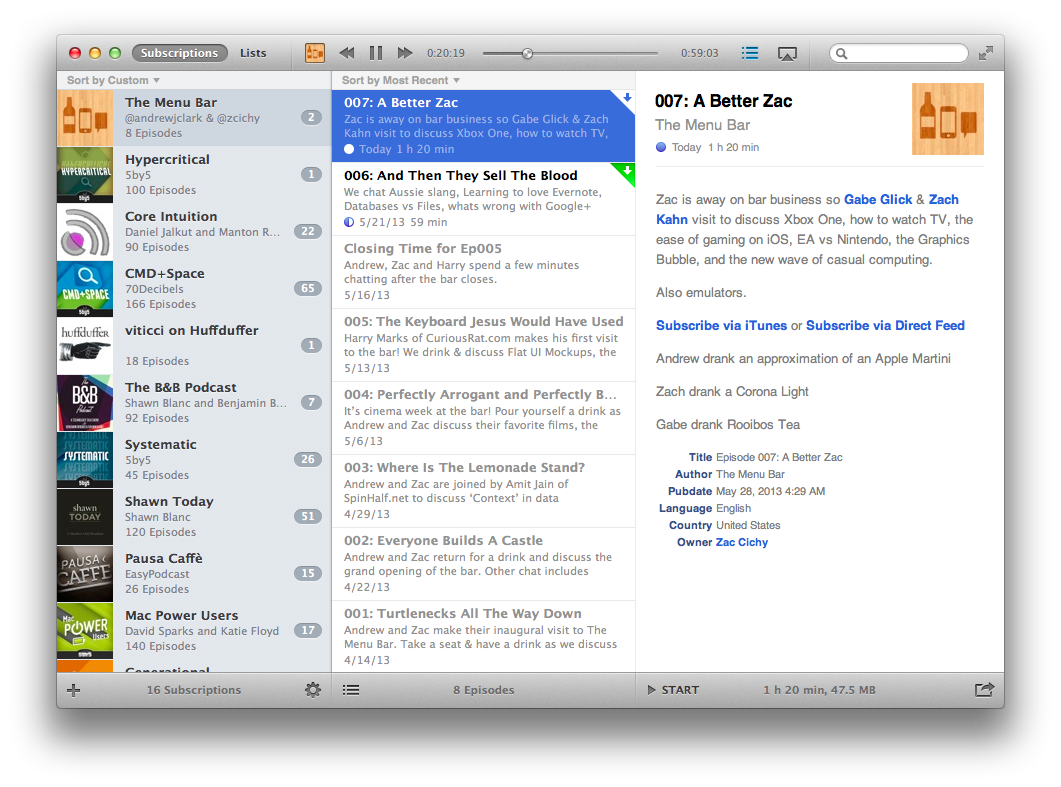
Back in early May, Vemedio released a first beta of Instacast for Mac. Instacast is my podcast client of choice on the iPhone and iPad, and I was eager to see whether Instacast could fulfill my long-standing wish of a proper podcast app for OS X. Instacast is officially out of beta today, and it’s my new favorite podcast app for Mac.

There isn’t much to say about Instacast for Mac that hasn’t already been explained in our review of Instacast 3.0 for iOS. The Mac version retains the same interface and episode management principles of its iOS counterpart: you can subscribe to podcasts and organize them in lists, sort them by parameters such as Title or Date, or delve deeper into subscription-specific settings for refresh times and automatic download/deletion options. Literally everything that you know about Instacast 3.0 for iOS – including the app’s design style – has been ported to OS X with this first release.

There’s some stuff that has been built exclusively for the Mac. I am particularly fond of Instacast’s rich selection of keyboard shortcuts, which fit well with the Mac’s nature and will help you save time if you’re looking for a specific command or option (there are many of them, so remembering each one of them may require special mnemonic skills).

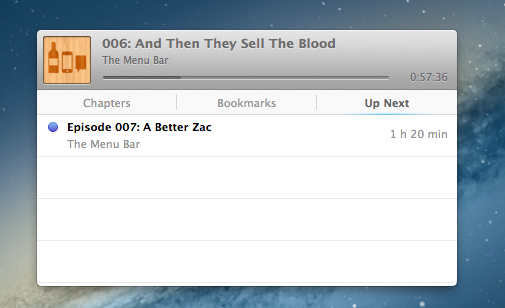
I like when developers porting popular iOS apps to the Mac don’t simply convert their projects for a desktop window: that was the case with Tweetbot (another app that took advantage of OS X features like keyboard shortcuts and larger displays), and, fortunately, it’s happening with Instacast as well through the aforementioned shortcuts and an iTunes-like MiniPlayer. Available through the Window menu (with the keyboard, it’s ⌥⌘2), the MiniPlayer allows you to check on either the episode you’re listening to (with a widget that’s got a minimal footprint on your desktop) or to the ones that you have queued up for later thanks to – another Mac-only feature – Up Next support. Again, similarly to iTunes 11, Instacast lets you send specific episodes to a list that you can consult and modify while you’re already listening to something else.

Another feature that’s currently exclusive to Instacast for Mac is local text search: if you remember an episode that had a particular keyword in its title or description, you can look for it. This is especially useful for names of apps or services that are mentioned in podcasts, but I wish it was possible to save recurring searches.

Instacast for Mac is Instacast 3.0, responsibly and intelligently ported to OS X. It’s not a simple conversion of the iOS app as it takes advantage of the Mac in obvious, but still welcome ways. Sync with Instacast Cloud, initially spotty in the beta, has been reliable and fast for me in the last builds, making the process of switching between devices and continuing to listening to podcasts seamless.

If you’ve been looking for a solid podcast app for Mac that syncs with iOS, Instacast gets my recommendation. Until May 31, Instacast for Mac will be available at $14.99 instead of $19.99.

Access Extra Content and Perks

Founded in 2015, Club MacStories has delivered exclusive content every week for nearly a decade.

What started with weekly and monthly email newsletters has blossomed into a family of memberships designed for every MacStories fan.

Learn more here and from our Club FAQs.

Club MacStories: Weekly and monthly newsletters via email and the web that are brimming with apps, tips, automation workflows, longform writing, early access to the MacStories Unwind podcast, periodic giveaways, and more;

Club MacStories+: Everything that Club MacStories offers, plus an active Discord community, advanced search and custom RSS features for exploring the Club’s entire back catalog, bonus columns, and dozens of app discounts;

Club Premier: All of the above and AppStories+, an extended version of our flagship podcast that’s delivered early, ad-free, and in high-bitrate audio.

Learn more here and from our Club FAQs.


Apple Airs New iPhone 5 Commercial: “Music Every Day”

Following the “Photos Every Day” commercial first aired last month, Apple today posted a new iPhone 5 ad called “Music Every Day”. As the name suggests, it is a follow-up to the previous commercial, this time with a focus on music.

Music Every Day doesn’t show music apps – instead it puts the spotlight on people enjoying music with their iPhones and Apple’s distinctive white earbuds. The commercial includes a variety of everyday situations – from exercising and waiting in line to a DJ set and a group of friends listening to music in their car. It’s not about the playback feature itself, it’s about music as a life companion.

Apple only briefly shows the iOS Music app in the commercial. The spotlight, unlike the Photos commercial, isn’t strictly on the iPhone’s display itself – rather, it emphasizes how music can seamlessly fit in our lives thanks to a device that’s often carried in a pocket, put on a table or outside of the shower, or shared with friends. The protagonist of the ad isn’t the iPhone per se: it’s people relying on it to enjoy their music.

The iPhone qualities that Apple subtly implies (intuitiveness of the interface, sound quality, portability) are important, but secondary. The voiceover sums it up at the end: “Every day, more people enjoy their music on the iPhone than any other phone”. With an elegant juxtaposition, the ad fades to black.

Apple hasn’t uploaded the new commercial to its website yet, but you can watch the official YouTube version below.

Read more

Access Extra Content and Perks

Founded in 2015, Club MacStories has delivered exclusive content every week for nearly a decade.

What started with weekly and monthly email newsletters has blossomed into a family of memberships designed for every MacStories fan.

Learn more here and from our Club FAQs.

Club MacStories: Weekly and monthly newsletters via email and the web that are brimming with apps, tips, automation workflows, longform writing, early access to the MacStories Unwind podcast, periodic giveaways, and more;

Club MacStories+: Everything that Club MacStories offers, plus an active Discord community, advanced search and custom RSS features for exploring the Club’s entire back catalog, bonus columns, and dozens of app discounts;

Club Premier: All of the above and AppStories+, an extended version of our flagship podcast that’s delivered early, ad-free, and in high-bitrate audio.

Learn more here and from our Club FAQs.


Apple Confirms WWDC Keynote on June 10

As first reported by John Paczkowski at AllThingsD, Apple has confirmed its WWDC ‘13 keynote for June 10 in San Francisco. Speakers haven’t been revealed yet, but it wouldn’t be a surprise to see CEO Tim Cook kicking off the keynote, with other executives following up on news and announcements during the event.

WWDC ‘13 was announced on April 24. Running through June 14, the conference will allow Apple to show developers “the latest advances in software technologies and developer tools to help them create innovative new apps”; Apple has also confirmed new versions of iOS and OS X will be seeded to developers. WWDC will feature more than 100 technical sessions presented by over 1,000 Apple employees. As usual, there will be hands-on labs where developers will be able to seek advice from Apple engineers for “code-level assistance, insight into optimal development techniques and guidance”.

Tickets for WWDC ‘13 went on sale on April 25 and sold out in two minutes in a new record for the company. Full-time or part-time students over the age of 13 had the chance of winning one of 150 scholarships to attend this year’s WWDC. As in previous years, Apple will reward outstanding achievement and excellence for well designed and innovative apps with the Apple Design Awards.

We’ll update this post with more information about WWDC schedule and keynote as the story develops.

Access Extra Content and Perks

Founded in 2015, Club MacStories has delivered exclusive content every week for nearly a decade.

What started with weekly and monthly email newsletters has blossomed into a family of memberships designed for every MacStories fan.

Learn more here and from our Club FAQs.

Club MacStories: Weekly and monthly newsletters via email and the web that are brimming with apps, tips, automation workflows, longform writing, early access to the MacStories Unwind podcast, periodic giveaways, and more;

Club MacStories+: Everything that Club MacStories offers, plus an active Discord community, advanced search and custom RSS features for exploring the Club’s entire back catalog, bonus columns, and dozens of app discounts;

Club Premier: All of the above and AppStories+, an extended version of our flagship podcast that’s delivered early, ad-free, and in high-bitrate audio.

Learn more here and from our Club FAQs.


Evernote Launches Reminders

Evernote Reminders

Evernote Reminders

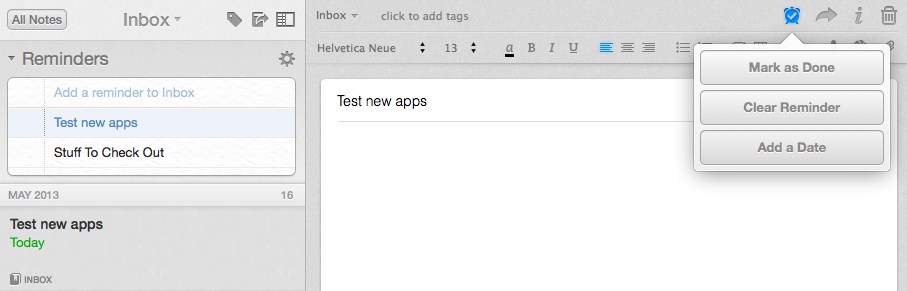
In the years I’ve spent using and recommending Evernote, I’ve always noticed a chasm between people who rely on the service to store reference material and notes, and those who want to also use Evernote as a “getting things done” system to keep track of their todos. The topic has been widely discussed on the Internet, with smart folks such as Sven Fechner and Fraser Speirs delving deeper into the subject of Evernote as a GTD system. Tutorials and eBooks have been published with tips on how to use tags and saved searches to turn Evernote into an app capable of equally handling documents, notes, and todos under a single, searchable archive. Clearly, there was a demand for a task management feature built right into Evernote.

Today, Evernote is releasing updates to its Mac and iOS clients to introduce a major new feature: native reminders. I have been testing the new versions of the app, and I believe reminders are a good addition that fit well with Evernote’s focus on remembering everything through a unified, polished interface. Read more

Access Extra Content and Perks

Founded in 2015, Club MacStories has delivered exclusive content every week for nearly a decade.

What started with weekly and monthly email newsletters has blossomed into a family of memberships designed for every MacStories fan.

Learn more here and from our Club FAQs.

Club MacStories: Weekly and monthly newsletters via email and the web that are brimming with apps, tips, automation workflows, longform writing, early access to the MacStories Unwind podcast, periodic giveaways, and more;

Club MacStories+: Everything that Club MacStories offers, plus an active Discord community, advanced search and custom RSS features for exploring the Club’s entire back catalog, bonus columns, and dozens of app discounts;

Club Premier: All of the above and AppStories+, an extended version of our flagship podcast that’s delivered early, ad-free, and in high-bitrate audio.

Learn more here and from our Club FAQs.


Keyboard Maestro 6.0 Adds Syncing, Browser Actions, Device Triggers, And More

Keyboard Maestro 6

Keyboard Maestro 6

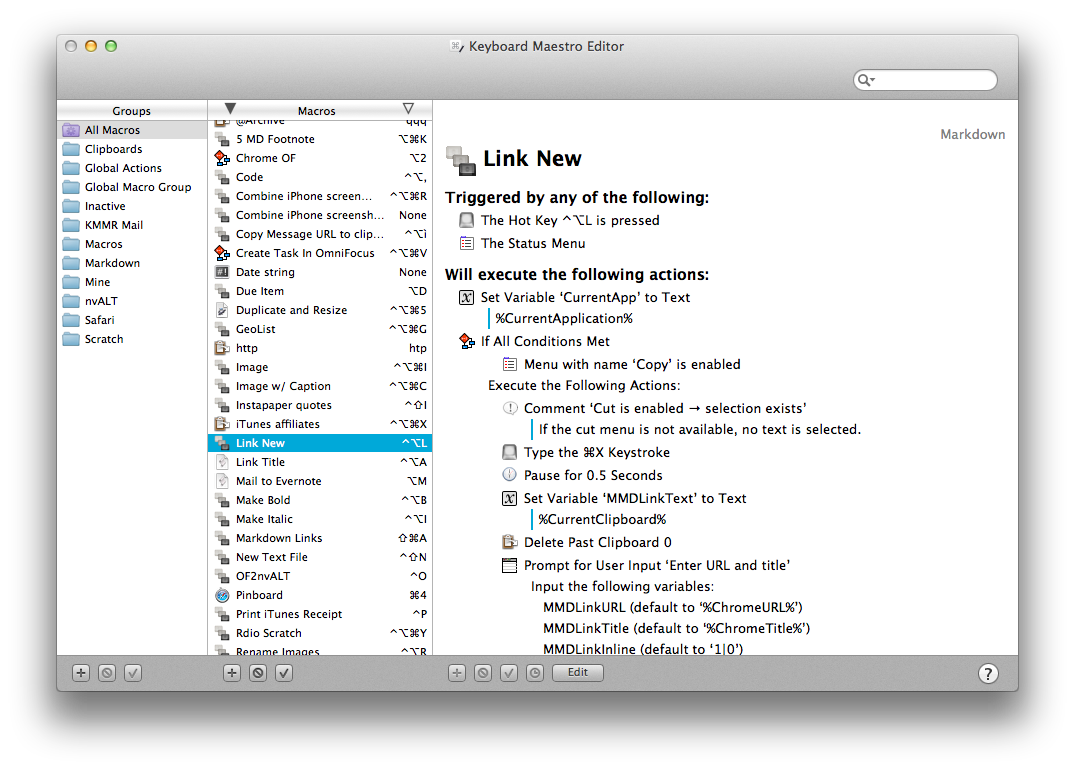
Long-time MacStories readers know how deep-seated Keyboard Maestro is in my OS X workflow. I use it every day, constantly, to automate my Mac to speed up writing, resize images, save PDFs, execute scripts, and more. Version 6.0 is out today and it brings over 100 new features. Unfortunately, I have only been playing with the app for a few hours, so an in-depth review will be published in the coming weeks.

Keyboard Maestro 6.0 retains the same interface and design principles of its predecessor while adding powerful new features that are exclusively built for Mountain Lion. For owners of multiple Macs, the good news is that Keyboard Maestro can now sync macros using Dropbox or any other sync service; in my initial tests, sync worked as advertised.

There are, of course, new triggers and actions to build macros that can automate (almost) any aspect of your Mac. You can now specify triggers for USB devices that are attached/detached to a computer, volumes, and wireless networks that your Mac connects to. This will be useful to build workflows (possibly to run at a specific time of the day) that handle backups or move files from one folder to another (the triggers can also be used as conditions in a macro). When you’re building a macro, you can now take advantage of a Macro Debugger that shows every action with completion status and breakpoints; this will come in handy to better understand why a macro isn’t working and, if so, how to fix it.

I’m personally excited to play around with the new actions for Safari and Google Chrome. As most of my workflows revolve around doing research in and grabbing text/URLs from a web browser, I have created dozens of macros that leverage AppleScript to store a webpage’s name and URL in variables to include in actions that output Markdown for my articles. With Keyboard Maestro’s new Safari and Chrome actions, you can eschew AppleScript entirely and let actions open and select tabs, get URLs and titles, submit and reset web forms, click links, wait until a browser has finished loading – while obviously accessing the same data as text tokens in your actions. On top of this, you can execute JavaScript in Safari and Chrome – which means activating bookmarklets from Keyboard Maestro with custom keyboard shortcuts is now easier than ever. I have already rewritten my actions for Markdown links to take advantage of the new browser actions; I have eliminated every instance of AppleScript, so there’s less manual saving to variables, the actions look more elegant, and I’m using built-in tokens.

There’s a lot of new stuff that I haven’t had time to properly test. You can now interact with styled text from Keyboard Maestro; you can write your own actions; there’s improved support for showing menus from installed apps (essentially enhanced GUI scripting); you can capture components of a regular expression by searching inside a variable or named clipboard – a power-user functionality that I am extremely curious to try with my regex to capture groups of Markdown inline links.

From what I’ve seen so far, Keyboard Maestro 6.0 doesn’t revolutionize the app but adds welcome (and needed) features such as syncing and browser actions while broadening its automation scope with intriguing new triggers, conditions, and actions. I look forward to seeing how I can update my macros to take advantage of the new functionalities introduced today.

Keyboard Maestro 6.0 is a paid upgrade. The app is available at $36, with an upgrade price of $25 for owners of the older version. A free trial of Keyboard Maestro 6.0 can be downloaded from Stairways Software’s website.

Access Extra Content and Perks

Founded in 2015, Club MacStories has delivered exclusive content every week for nearly a decade.

What started with weekly and monthly email newsletters has blossomed into a family of memberships designed for every MacStories fan.

Learn more here and from our Club FAQs.

Club MacStories: Weekly and monthly newsletters via email and the web that are brimming with apps, tips, automation workflows, longform writing, early access to the MacStories Unwind podcast, periodic giveaways, and more;

Club MacStories+: Everything that Club MacStories offers, plus an active Discord community, advanced search and custom RSS features for exploring the Club’s entire back catalog, bonus columns, and dozens of app discounts;

Club Premier: All of the above and AppStories+, an extended version of our flagship podcast that’s delivered early, ad-free, and in high-bitrate audio.

Learn more here and from our Club FAQs.