

If I have to pull out my mobile device to read QR codes, I want an app that’s fast, locks on, and scans codes quickly without any fuss. While there’s a plethora of QR code scanners on the App Store, one in particular I’ve fallen in love with is Scan. Maybe it’s because Barcode Scanner on the Android Marketplace is so damn slow (I’m tired of how long it takes the camera to focus), and I was blown away by how fast Scan was… on an iPod touch (which comparatively has a pretty crappy camera). As soon as I opened the app, I simply placed the QR code inside of the sights and just as instantly it opened a web page in its own browser. If it can’t scan a QR code (which is rare), Scan won’t complain. Just relocate your device or find a higher quality image: how painless Scan is to use is fantastic. Plus, it saves a history of everything you scanned in a simple list that’s perfect for how often I use it. Sure there are other apps that let you generate QR codes or offer a lot more features, but for sheer simplicity and fast scanning, Scan has become the mainstay reader on my device. You can download it for free on the App Store.
Posts in reviews
QR Code Reader Scan for iOS is Fast
Robick: Visual Audio iPhone App for Learning Music By Ear

Previously, we’ve covered the Capo range of apps for the iPhone, iPad, and desktop that help students learn music by ear via setting repeating segments, altering the tempo & pitch, and giving students the ability to adjust an equalizer. When we previously covered these apps, the Capo mobile applications were more limited in some respects compared to it’s older desktop sibling - not a bad thing, but it would be nice to bring over the ability to adjust highs and lows for example instead of just only pitch and tempo. Robick is an alternative take on plugging in tracks from your iPod’s library, and altering them in such a way that helps you learn parts of a song. The developer noted to me it was primarily designed for learning Jazz (I’m assuming for Japanese students), and the interface reflects a modern edge and a shifting paradigm that’s quite neat.
Twitterrific 4.1 for iPhone & iPad Unifies Mac, iOS Experience
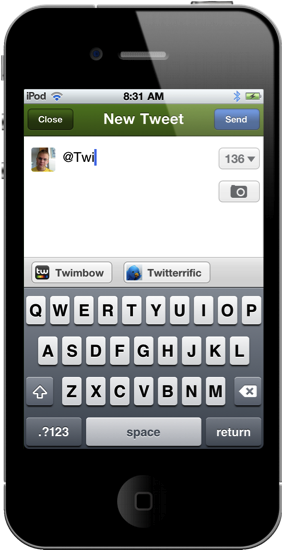
Launching late last night, Twitterrific 4.1 is now available in the App Store for immediate consumption! I’d consider this a milestone update for the iOS version of Twitterrific, as it greatly improves usability on the iPhone and continues the march towards feature parity with the desktop app. I’d say now, Twitterrific has unified their ecosystem such as that replies for example are now handled similarly. This change is most noticeable on the iPhone, where users are no longer taken to the single tweet view to perform actions. Quite frankly, that change alone should address the main complaint many had when wanting to perform simple actions: what used to take three taps now only takes two. 4.1 is a significant update and brings much requested features into the spotlight.
ListBook: A Simple List App for iPhone

ListBook, a new iPhone app from the developers of MoneyBook, wants to be the simplest solution to create lists on an iPhone, and check off completed items with ease. The App Store is full of apps that enable you to create lists: just think about Simplenote, the popular note-taking application for iPhone and iPad (and the web) that, among other things, also allows you to convert notes to lists. Not to mention the hundreds – if not thousands – of Dropbox-enabled apps that you can use to set up quick shopping lists, todos and reminders and have them always available anywhere you go. The ListBook’s developers, though, recognize that setting up a Dropbox account and having to mess with plain text files, folders and, why not, Markdown support might be a pattern average iPhone users aren’t ready to learn. We, as geeks, love to fiddle with OTA sync, filenames and tags: the majority of iPhone users, however, might not want to do that. And that’s why ListBook doesn’t come with any of these features, but still enables you to create lists, with a beautiful interface and a clever use of gestures.
In ListBook, you create lists and assign new items to them. There are no due dates or tags – you just check off an item once it’s been taken care of. Every list can have a name, as well as a badge on the homescreen to tell you how many tasks you still have to complete. There is no sync or iPad version, no web app or Dropbox integration. You can navigate between lists in a Safari-like UI that displays lists as “pages” in the browser; you can also pinch & zoom to reveal a list and close it.
ListBook won’t satisfy the geeks, but it should be a good alternative to Apple’s Notes app for most iPhone users. Get it in the App Store at $0.99.
Sleipnir Browser Comes To The iPad With Gestures, Bookmark Sync

When I originally reviewed Sleipnir, an alternative browser for the iPhone, back in December, I was impressed by how the app managed to innovate in a market – the one of alternatives to Apple’s MobileSafari – that was saturated and full of apps that were just trying to offer the same set of functionalities over and over again – that is, tabs and Dropbox integration and, overall, some UI schemes that were aimed at porting the classic browsing desktop experience to the iPhone. Like Portal, Sleipnir was one of the very few apps that truly wanted to innovate on the platform. Rather than just copying the desktop and trying to squeeze a Mac-like experience into the iPhone’s screen, Sleipnir provided a series of features like touch-based tab management, tab groups and fullscreen mode that showed everyone how it was indeed possible to innovate with a mobile browser. And now Sleipnir wants to do the same on the iPad.
Released last night in the App Store, Sleipnir for iPad looks a lot like the iPhone version but it makes much greater use of multitouch gestures and tabs to offer a unique browsing experience like no other on the tablet. Instead of placing tabs as “panels” under the top app toolbar, Sleipnir for iPad follows the path traced by its iPhone counterpart and visualizes open pages as thumbnail previews at the bottom. The larger screen of the iPad allowed developers to further play around with this concept and implement a larger bar that shows more open websites at once. The refined cache management in version 1.2 also makes it possible to keep more pages open at once without losing your scrolling position and being forced to reload a page – although I’ve noticed after a dozens of tabs running in the background Sleipnir will refresh a page anyway. However, it works as well as Safari on the iPad 2, if not better: I rarely stumbled upon the page reload issue, and when I did Sleipnir refreshed the page in a way that my exact position was maintained. But there’s more: this new version introduces “TouchPaging”, a new feature that allows you to navigate between tabs with a horizontal swipe (think of the iOS 4.3 multitasking gestures, or the “back” animation in Lion’s Safari) and close a single tab by tracing a “L” on screen. I love these gestures, as they make browsing on the iPad so much natural it’s incredible to think Apple didn’t come out with a similar idea on Safari.
Just like on the iPhone, tabs can be organized in “groups” with drag&drop support, and you can close a tab with a vertical swipe on its preview. You can also drag a tab to the trash, and move as many tabs as you want inside a group. Again, the iPad’s bigger screen allows for a more convenient tab management that truly shines on Sleipnir for iPad. Last, bookmark sync: I still don’t like how Sleipnir handles the creation of bookmarks and the assignment of labels, but with a free Sleipnir Pass account the app lets you keep bookmarks in sync across the iPad and iPhone. The lack of bookmark importing features is annoying, but OTA sync across devices is just great.
Sleipnir is available for free on the App Store, and it’s one of the most innovative browsers ever released on iOS. Give it a try. Read more
News.me iPad App Launches To Take On Social Magazines

News.me, a new social reading experience for the iPad developed by technology incubator Betaworks and The New York Times, launched on the App Store a few minutes ago after much anticipation and speculation on whether or not the service could take on well-established “social magazines” like Flipboard and Zite. There’s no doubt the iPad has created a new market for this kind of applications: rather than presenting a series of links pulled from the top Google News or Techmeme, apps like Flipboard aim at showcasing content being shared by your friends on Twitter and Facebook. But while Flipboard simply collects all content shared in your timelines without applying any sort of filter for relevance and popularity, News.me wants to change the rules of tablet-based social reading experiences by offering a “smart” system that, thanks to data provided by popular URL shortener bit.ly, can filter out the most relevant items appearing in your Twitter timeline – and in someone else’s as well.
That’s the key point of News.me, the feature that will need to be tested in the long term to see if the experiment has a chance to survive in this crowded digital and social newsstand. Not only does News.me enable you to see what your friends are sharing (through tweets), it also lets you see what they are reading. And from this standpoint, logging into Twitter within News.me gives the app a whole new meaning when it comes to “Twitter integration.” It’s a huge bet for Betaworks and The New York Times: can the bit.ly-backed algorithm provide an efficient way to distribute personalized news to iPad users? More importantly, is it enough to convince people to pay $0.99 a week, or $34.99 a year? Read more
RemoteTunes Brings iTunes Home Sharing to Back to My Mac

When I reviewed Hamachi for Mac a few weeks ago and called it a great, free alternative to Apple’s Back to My Mac, I noted how Hamachi – among other things – managed to successfully enable remote iTunes Home Sharing between two Macs. The iTunes Home Sharing functionality, introduced on iOS 4.3 for iOS devices and Macs on the same local network (and a long-time favorite of iTunes desktop users), allows you to share your entire iTunes library locally, wirelessly, between computers and iPhones or iPads. But wouldn’t it be great to have the same feature available on Macs connected remotely to each other? Hamachi does that out of the box, but Back to My Mac doesn’t. RemoteTunes, a $5 utility, fixes this.
Once installed, RemoteTunes will find Macs that are sharing the same Back to My Mac credentials on your network. If Back to My Mac is correctly configured, you should see a machine pop up under the Shared tab in your OS X Finder. RemoteTunes will find the remote shared library (makes sure to activate iTunes Home Sharing on the remote machine), and let you stream music between Macs using MobileMe as the communication tool. It all works in the background, and it’s basically a graphical user interface for complex SSH and DNS commands most users don’t want to mess with. I’ve tried this on a friend’s iMac (I’m no longer a MobileMe user), and I was pleased to see connections happening through RemoteTunes were stable, and reliable.
If you’re a MobileMe subscriber, at $5 RemoteTunes is a no-brainer. It won’t work with iOS devices, but it will stream music between Macs just fine.
Seamless: Transition Playing Music From Your Mac To Your iPhone
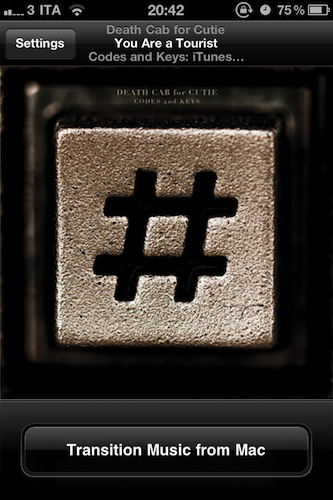
I’ve been there before: I’m working, I’m listening to some Oasis or Death Cab for Cutie on iTunes on my Mac, and iCal reminds me I have to go out. I take my iPhone, I quit iTunes, and I realize I was really liking the song I was listening to. So I’m forced to fire up the iPod app on my iPhone, find the song again, and start listening from the beginning of the track. I could manually move the on-screen cursor to the exact position the song was on iTunes, but it’s quicker this way, plus I really have to go out. Seamless, a new iPhone app by Five Details, provides the simplest solution to this problem: a button.
Once installed on the Mac (for free) and on your iPhone ($0.99 in the App Store) Seamless will communicate with your Mac to see what song is playing. If the song is found on your device’s iPod library and you’re ready to leave your computer, tap “Transition Music” and the song will quickly fade on your Mac, and magically start playing on the iPhone. Same position, same song, one button. You can do the opposite, too: you’ve just got home, with a song playing on your iPhone. Tap the button, and music will start playing on your Mac . This happens in less than a second, provided that both devices are on the same local WiFi network.
While Seamless is intriguing, clever and almost magical in its concept, there are some execution issues to iron out. For instance, I couldn’t get the app to work last night (it kept saying the “song was not present” on my iPhone, but it was) and the developer told me it’s because of a bug that won’t find songs on a synced device unless you’re playing from a playlist – not just the Music library. So I created a playlist, synced it to my iPhone, and now the app works just fine. This bug will be fixed soon with an update, I was told. And of course, the app won’t work at all if you don’t sync music – don’t expect Seamless to be able to transition music you haven’t synced on your iPhone.
As long as you keep in mind that this version might require syncing a playlist and that you can’t just transition music you don’t have on your iPhone, Seamless is a great idea. It’s simple, and it’s only $0.99 in the App Store. Check out the promo video featuring the omnipresent Adam Lisagor below.
Read more
UpdateBar for Mac Sends Status Updates To Multiple Social Networks
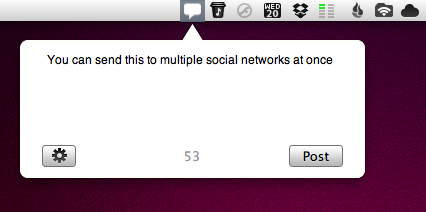
If you’re tired of using the browser to post the latest Steve Jobs spoof video on your Facebook wall, or don’t want to send quick updates using a full-featured Twitter client because you’re afraid of being distracted by the amount of content in your timeline, a new app called UpdateBar provides an easy way to post status updates on multiple social networking sites at once. Released at $0.99 in the Mac App Store, UpdateBar does one thing well: it displays an unobtrusive popup from your Mac menubar, allowing you to send a status update to Twitter, Facebook, Tumblr and Identica. You can configure these services in the settings, and choose which one to use from a dropdown menu that lists all your available accounts.
The app can shorten links using is.gd and goo.gl, and you enter your custom URL shortening service as well. There’s no way to trigger the popup window with a keyboard shortcut yet, and I hope this will be implemented in a future update. The possibility to quickly drag photos from the desktop onto UpdateBar’s window would also be a nice addition.
UpdateBar makes it easy to post updates to Twitter and Facebook. Get it at $0.99 in the Mac App Store.