Federico Viticci

10876 posts on MacStories since April 2009

Federico is the founder and Editor-in-Chief of MacStories, where he writes about Apple with a focus on apps, developers, iPad, and iOS productivity. He founded MacStories in April 2009 and has been writing about Apple since. Federico is also the co-host of AppStories, a weekly podcast exploring the world of apps, Unwind, a fun exploration of media and more, and NPC: Next Portable Console, a show about portable gaming and the handheld revolution.

This Week's Sponsor:

Inoreader

Build your own newsfeed and cut through the noise


iPhone App with Face Tracking Technology Lets You Try Virtual Glasses

The Total Immersion developers released a free iPhone app in the App Store a few days ago that uses augmented reality face-tracking technologies to let you try virtual glasses and see how they fit. The app – Atol les opticiens – was commissioned by French optician and eyeglasses retailer Atol and, apparently, it’s the first of its kind to land in the App Store that relies on this kind of face recognition to allow you to try various models of glasses. Unfortunately, the app is in French so if you want to try it prepare to see a lot of “telecharger” and “Oui”.

The developers write:

This is the most fully realized mobile commerce application ever to use augmented reality, and the first  AR app in the m-commerce space featuring face- tracking technology, newly available on mobile,” said Bruno Uzzan, co-founder and CEO, Total Immersion.  “Face tracking is ideally suited to purchases like eyeglass frames, where it’s essential to try before you buy.  In this environment, the m-commerce experience is both more convenient and more satisfying for consumers and merchants alike.  Product selection is virtually unlimited – and those with corrective lenses can keep them on through the AR fitting.

I tried the app and, after a few calibrations, it works pretty well. Check out the video below, and go download here. Read more


Desire: An App To Track The Things You Want

In the next few weeks, I think I’m going to buy an iPad 2 and a new MacBook Pro. Not to mention a pair of new headphones, some cool gloves compatible with the iPhone and a bunch of other things I’ve found online. To track these items and the money required to buy them, I might just use this neat new iPhone app by Michal Grossmann and Maros Holly called Desire that’s aimed at letting you keep track “and manage your savings for the things you always wanted so much”.

In the main screen of Desire, you can enter the items you want to keep track of. From the “new desire” screen you can choose a name, and set a price. Once you’ve got some desires added in the database, you can deposit and withdraw money to visualize your savings for a specific item. The interface and animations in the single item view are simply beautiful, with a progress bar that display how much money you’ve saved and two buttons to add or remove cash. A “show history” button lets you see your log of withdrawals and deposits in the past weeks. It’s a very simple approach that’s also great to look at.

Desire is available at $0.99 in the App Store. Give it a try if you’re looking for a gorgeous app to manage the things you’re dreaming of.


Tweeple Tap: iPhone Game to Recognize People By Their Tweets

Here’s a neat iPhone game for today while you’re waiting for more Apple news to come in and get you all excited about the event on March 2: Tweeple Tap, a free app by Puntrix, is all about the people you follow on Twitter, and how well you think you know them. In this game, in fact, you’ll have to recognize people by their tweets, which are displayed one after another as you select the correct Twitter user and keep on accumulating points.

There’s nothing else to do, just prove your skills in knowing the people you follow. You can get hints by tapping on a link on a tweet, or just go ahead and try to guess who tweeted what without even looking. Ok, maybe not that one.

Still: go download, it’s free.


Apple Confirms: iPad 2 Event on March 2

According to The Loop, Apple just sent out the invitations for the previously reported media event on March 2 – where the company is expected to announce a new iPad.

Apple on Wednesday sent an invitation to media inviting them to a special event on March 2 in San Francisco, Calif.

According to the invitation received by The Loop, the event will be held at the Yerba Buena Center for the Arts at 10:00 am. This is the same venue Apple has used to introduce a number of products in recent years.

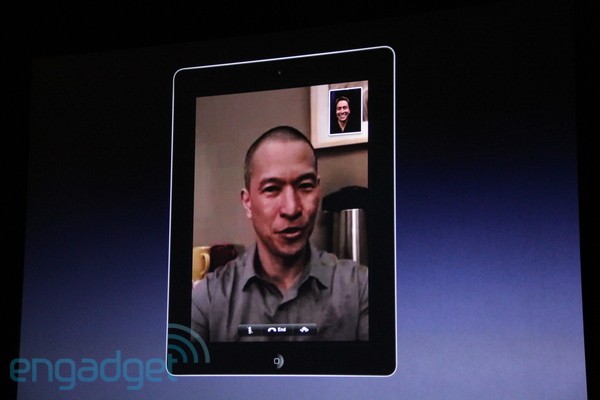
For a summary of the iPad 2 rumors surfaced on the Internet from September until today, check out our iPad 2 rumors timeline. The event will take place at 10 AM Pacific Time, and you’ll find our meta-liveblog coverage on MacStories, as well as posts as iPad 2 details will start coming in. The new iPad – dubbed “iPad 2” so far – is widely believed to introduce a front-facing camera for FaceTime, a thinner and lighter design, an updated version of iOS 4.3 with Photo Booth capabilities. It’s still unclear whether or not Apple will also include a rear camera and a USB / Light Peak port on the device.

Looking at the invitation, it appears that Apple is kind of putting a reference to other tablets from competitors in there: it says “Come see what 2011 will be the year of”. That’s a nice tagline. Does this mean we’ll only see an iPad 2 in 2011, and not an iPad 3?

Tune in at 9.30 AM Pacific Time on Wednesday for our live coverage of Apple’s iPad 2 event.


Canned Mail Lets You Save Time Sending Pre-Composed Emails

There are cool utilities for the iPhone, and then there are must-have apps you just can’t work without anymore once you’ve tried them. That has been the case for me with Canned by Sky Balloon, a neat little iPhone app that allows me to send pre-composed text messages to my favorite contacts, thus saving time typing when the subjects are always the same over and over. I’m talking about stuff like “Hey mom, remember to buy some pizza” or “Meet me in 5 at the station”. Canned, of all the apps I have, is probably the one I use the most.

But Sky Balloon knew that text messages were just the beginning, and so they listened to their userbase’s requests and developed a new version of Canned that’s meant for emails. Canned Mail, available at $0.99 in the App Store, lets you create pre-composed emails to send at any time to one of your Address Book contacts, or multiple ones at once. You can in fact create complete emails with subject / To / CC / BCC fields, save them in the app’s main screen and tap on them to send them in seconds.

If you find yourself sending the same emails every day, you need Canned Mail. Go download it here.


The Power Of The iPad Illustrated In Infographic

If there was any doubt the iPad is a very strong product among consumers, an infographic by Yudu Media is here to confirm Apple achieved a huge success with its first tablet. The full image is available here, but let’s break it down a bit. 9 out of 10 consumers are aware of the iPad, not a surprise considering Apple’s massive advertising strategy. Those consumers who have bought an iPad, however, have made 9 in 10 app purchases from the App Store (this is not very clear), and 91% of them have downloaded at least one app. 63% of iPad owners have downloaded at least one paid app. That’s not a bad number – I can tell you many of my friends are that kind of users that refrain from entering their credit card information in iTunes and only download free apps on their iPhones. Perhaps the iPad shows bigger paid app numbers than the iPhone? This is an interesting subject.

The infographic also reports Apple is expected to make $15 billion from app revenue in 2011, 3 times the total of 2010. Overall, iPad owners “are more likely to view, interact with, and buy as a result of viewing advertising than other device users”. Whatever that means in our daily iPad usage, we’re pretty sure Apple’s commercials play an important role in this.

Check out the infographic here.


Image Editing and Photo Booth for iOS Surface in Apple Patent

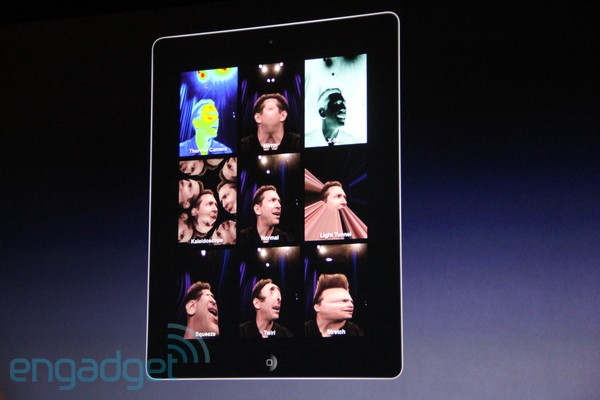
A few days after Apple released the first beta of iOS 4.3, several developers and bloggers did a little bit of digging into the SDK and new firmware file to find out whether Apple had  managed to hide references to new hardware and features into iOS 4.3. iPad camera files aside, icons for FaceTime and Photo Booth surfaced, as well as strings in the code that pointed to new camera effects finding their way to iOS. These effects looked very similar to the ones used by Apple in the iPod nano fifth generation: X-Ray, thermal, light tunnel, kaleidoscope, and so forth.

A new patent design uncovered by Patently Apple today confirms that engineers and designers at Cupertino have been studying the implementation of Photo Booth with image effects for iPhones and iPads, but the most interesting part is perhaps the adoption of image editing features system-wide, configurable in the settings, that users will also be able to manipulate with sound, motion, GPS and touch. Read more


Sixth Beta of 10.6.7 Now Available in Mac Dev Center

A sixth beta of Mac OS X 10.6.7 has been seeded to developers, and it’s available now for download in the Mac Dev Center. Build number is 10J860. No known issues have been reported in the build’s seed notes, and like the previous beta focus areas include Safari, Bonjour, Mac App Store, AirPort, SMB and Graphic Drivers.

The fifth beta of OS X 10.6.7 was seeded 5 days ago to developers. Apple is clearly accelerating the development of the new version of the OS, which should come out soon.


Seas0nPass Untethered Jailbreak for Apple TV 4.1.1 Released

A few minutes ago the FireCore team announced the availability of a new version of Seas0nPass for Mac that brings untethered jailbreak for the Apple TV 4.1.1 – also known as iOS 4.2.1 for all other devices.

All credit for the untethered jailbreak process goes to the Chronic Dev Team. Seas0nPass for Windows is also being finalized with the untether and will be available soon.

The latest Beta3 version of aTV Flash (black) is compatible with Seas0nPass, GreenPois0n and Pwnage Tool jailbreaks.

A previous version of the app with tethered boot option was released in January. There aren’t many tweaks and apps available for the Apple TV yet, so feel free to try this if you’re really willing to experiment with the little black box.