Federico Viticci

10876 posts on MacStories since April 2009

Federico is the founder and Editor-in-Chief of MacStories, where he writes about Apple with a focus on apps, developers, iPad, and iOS productivity. He founded MacStories in April 2009 and has been writing about Apple since. Federico is also the co-host of AppStories, a weekly podcast exploring the world of apps, Unwind, a fun exploration of media and more, and NPC: Next Portable Console, a show about portable gaming and the handheld revolution.

This Week's Sponsor:

Inoreader

Build your own newsfeed and cut through the noise


Apple Introduces New MacBook Pros

Apple introduced the new MacBook Pro line today with Intel “Sandy Bridge” processors and Light Peak technology renamed “Thunderbolt”, integrated over mini DisplayPort on the 13”, 15” and 17” models. In this year’s update to the line, Apple included quad-core CPUs in the 15” and 17” MacBook Pros, and new AMD Radeon GPUs.

The 13-inch MacBook Pro is available in two configurations: one with a 2.3 GHz Dual-Core Intel Core i5 and 320GB hard drive starting at $1,199; and one with a 2.7 GHz Dual-Core Intel Core i5 and 500GB hard drive starting at $1,499.

The new 15-inch MacBook Pro is available in two models: one with a 2.0 GHz Quad-Core Intel Core i7, AMD Radeon HD 6490M and 500GB hard drive starting at $1,799 and one with a 2.2 GHz Quad-Core Intel Core i7, AMD Radeon HD 6750M and 750GB hard drive starting at $2,199.

The new 17-inch MacBook Pro features a 2.2 GHz Quad-Core Intel Core i7, AMD Radeon HD 6750M and 750GB hard drive and is priced at $2,499.

Press release here. Specs below, full specs here.

MacBook Pro 13” -  1280x800 screen resolution. 2.3 GHz Intel Core i5, Dual core. 320 GB 5400 rpm hard drive. 4 GB 1333 MHz RAM. Intel HD 3000.

MacBook Pro 13” -  1280x800 screen resolution. 2.7 GHz Intel Core i5, Dual core. 500 GB 5400 rpm hard drive. 4 GB 1333 MHz RAM. Intel HD 3000.

MacBook Pro 15” - 1440x900 screen resolution.  2.0 GHz Intel Core i7, Quad core. 500 GB 5400 rpm hard drive. 4 GB 1333 MHz RAM. AMD Radeon HD 6490M 256 MB.

MacBook Pro 15” - 1440x900 screen resolution.  2.2 GHz Intel Core i7, Quad core. 750 GB 5400 rpm hard drive. 4 GB 1333 MHz RAM. AMD Radeon HD 6750M 1 GB.

MacBook Pro 17” - 1920x1200 screen resolution. 2.2 Ghz Intel Core i7, Quad core. 750 GB 5400 rpm hard drive. 4 GB 1333 MHz RAM. AMD Radeon HD 6750M 1 GB.

Update: configuration options available for the new MacBook Pros. A few notes: no 7200 rpm drive for MBP 13”, no high-res display option for MBP 13”, SSD up to 512 GB available.

Read more


FaceTime for Mac Now Available in the Mac App Store, 720p Video Calling

Ahead of the new MacBook Pros, Apple launched the final version of FaceTime for Mac in the Mac App Store today. It’s priced at $0.99. The new version of FaceTime for Mac will allow 720p video calling Mac-to-Mac with supported Intel models that have a FaceTime HD camera – the new MacBook Pros. New MacBook Pro owners will get the app pre-installed, other users will have to buy it from the Mac App Store.

Video calls require a built-in FaceTime camera, an iSight camera (built-in or external), a USB video class (UVC) camera, or a FireWire DV camcorder; and a 128-Kbps upstream and downstream Internet connection. Making HD video calls requires a built-in FaceTime HD camera and a 1-Mbps upstream and downstream Internet connection. Receiving HD video calls requires a supported Intel-based Mac (for a complete list, visit http://support.apple.com/bk/HT4534).

Full description below. Read more


New MacBook Pro 15” Specs Leaked? AMD Radeon, Thunderbolt, No SSD

The Apple Store is down, the new MacBook Pros are only a few hours away at this point, yet Mac4Ever is posting a photo of the specs of the new MacBook Pro 15-inch (although it’s not specified whether it’s a low-end or high-end model).

First off, no SSD. There’s a 500 GB 5400 rpm hard drive in there. The photo also shows the following details:

  • Intel Core i7, quad-core, 2Ghz
  • 4 GB SDRAM DD3

  • Thunderbolt port as seen on the leaked MacBook Pro 13” photos

  • AMD Radeon HD 6490M graphic processor

  • FaceTime HD camera

  • SuperDrive 8x

  • SDXC, two USB ports, ForeWire 800

  • 1440 x 900 screen resolution

Mac4Ever posted a series of leaked shots yesterday, later confirmed by multiple sources, so we’re very confident this photo is real. We’ll find out in a few hours anyway. Read more


Joystickers’ Classic Will Put Buttons On Your iOS Device

If you’re a hardcore iOS gamer and you’ve always felt like your iPhone and iPad could use some hardware button love in certain games (coughshooters and platformscough), you should take a look at this new Kickstarter project by a Chicago-based startup called Joytstickers, which aims at improving the quality of your gaming by putting physical buttons on the shiny glass surface of your iOS device of choice.

Question is: how? The Classic, a product that’s been in development for 9 months, is a set of buttons that can stick to an iPhone’s screen thanks to a special “micro-suction cup material imported from Japan” that’s invisible to the naked eye but allows the material to stay put on the screen without damaging it or leaving any sign of attachment. As you can see in the promo video, they really just stick. The reason why Joystickers is doing this is to overcome the lack of tactile feedback when playing iOS games. Personally, I can say this sounds extremely good for games like Pizza Boy or shooters that require a “fixed” control position on a glass screen that, admittedly, doesn’t usually make gamers so excited. The only major problem for now is that there’s no solution for directional (D-Pad) controls, meaning that you’ll either have to stick 4 buttons on screen and forget about diagonal input or just use a Classic for non-directional virtual buttons.

The startup is also promoting a brush and a stylus for iOS, but we think The Classic is the most interesting product available on Joystickers’ Kickstarter page. You can back the project here by pledging $1 or more, and it will be funded if $25,000 is pledged by March 24th. [via MobileCrunch] Read more


An Interview With The Designer Of The Apple Logo

Craig Grannel posted a transcript of his interview with the designer of the original Apple logo, Rob Janoff. Sorry to destroy all the theories about the logo:

What was the thinking behind the colour order of the stripes, and the ‘bite’?

There wasn’t a whole lot of hidden meaning behind the colours. The logo predates the gay-pride flag by about a year, so that wasn’t it—and there also goes the whole Alan Turing myth! The religious myths are just that too—there’s no ‘Eve and Garden of Eden’ and ‘bite from the fruit of knowledge’ symbolism!

I didn’t have much of a formal brief on the logo assignment, other than “don’t make it cute”. But I did know the selling points of the Apple Computer, and one of the biggest was colour capability. To me, that looked like colour bars on a monitor, which became the stripes in the logo. The order of the stripes, I’m sorry to say, had no particular grand plan other than I liked them that way. And, of course, the green stripe would be at the top where the leaf is.

The bite is really about scale and the common experience of biting into an apple. It was a happy accident that ‘byte’ is a computer term.

It’s just an Apple. [via The Brooks Review]

Permalink

New Design for MacBook Pros in 2012? Next Week’s iPad 2 Actually an iPad 1.5?

Following today’s leaks of the upcoming MacBook Pros and the official iPad 2 event announcement by Apple, iLounge has posted more information on the next-generation MBPs and iPads we’re going to see tomorrow and next week. According to iLounge’s sources, this year’s MacBook Pro refresh is turning out to be an incremental upgrade / speed bump, but a major redesign for the line is planned for 2012, and it’s already in development at Apple’s manufacturers in Taiwan.

Next year is the year when Apple will introduce an all new design for the MacBook Pro product family, which is already under development at Quanta in Taiwan. It’s being described as a big, “milestone” release for the Pro family, as compared with the speed bump features that will be introduced in tomorrow’s models.

Read more


Most Realistic iPad 2 Mockup To Date?

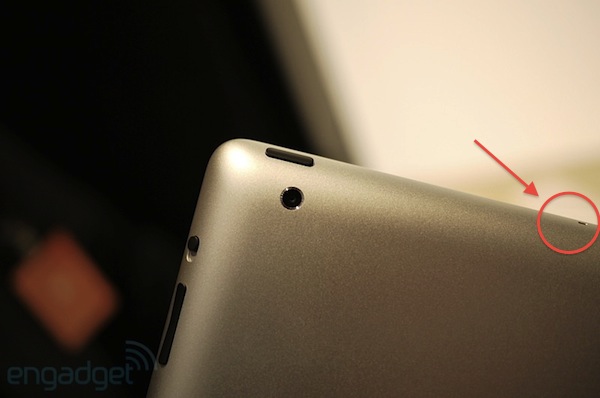
Japanese parts vendor iLab.cc [Google Translation] has posted some photos of a physical iPad 2 mockup built using information from case vendors and manufacturers near Apple’s facilities in Shenzen, China. The mockup, which you can see above and after the break, looks like the most realistic we’ve seen so far as it groups all the rumors we’ve been hearing about the second-gen iPad into one: flat back, tapered edges, front and rear-facing cameras, huge speaker grill. Compared to a current generation iPad, the mockup looks a lot thinner and, overall, flatter. It’s also very similar to other mockups we’ve seen before.

We wonder if Apple will really abandon the slightly curved design that made it easy for many people to hold the device on their lap while writing, reading, etc. Personally, I’d like a flat back much better as I hate when my iPad “moves” due to its design on my desk. What do you think? More pictures below. [via 9to5mac] Read more


Apple’s Succession Proposal? Rejected

At Apple’s shareholders meeting today in the company’s Town Hall auditorium, a proposal to reveal Apple’s succession plan was rejected. For many months now, speculation has arisen that Apple should reveal its succession plans for Steve Jobs’ retirement (which, you know, is going to happen eventually) – but the company always refused to give out details, that are likely already in place, fearing repercussions in the management sphere with names of executives to succeed Jobs going public.

Apple COO Tim Cook took the stage today to introduce the board of directors, whose seven members – including Jobs – were reelected.

The most controversial shareholder proposal – that Apple adopt a detailed succession plan – was introduced about 20 minutes later. According to the representative of the Central Laborers’ Pension Fund who introduced it, Proposal No. 5 did not require the company to name names, she said, so management’s fears about the proposal were unfounded.

Apple has a succession plan for when Steve Jobs will leave, but they don’t want anyone to know just yet.


You Can Now Control Your Apple TV and XBMC with Rowmote

Rowmote is an excellent virtual trackpad for iPhone and iPad we reviewed a while ago that lets you control the mouse cursor and media playback on your Mac. In my review I wrote:

Rowmote is one of the most solid virtual touchpad apps I’ve tested recently: the touchpad is large, buttons for media control have been placed at both sides of the iPad so you can quickly tap on them with your thumbs. That’s a great idea. A smaller surface in the Trackpad tab also allows you to adjust the Mac’s volume by sliding your fingers. A series of modifier keys placed in the same toolbar let you easily perform keyboard shortcuts assigned to certain OS X applications.

With a blog post published last night, the developers of Rowmote have confirmed that the app now works with an Apple TV – as long as you’re willing to jailbreak it, which shouldn’t be a problem using the latest Seas0nPass. Rowmote’s compatibility with the Apple TV software doesn’t just stop at menus and tabs, it also lets you easily control applications like XBMC installed on the Apple TV. That’s pretty cool.

Rowmote is the only app which will control both the standard Apple menus as well as third party applications such as XBMC on your Apple TV. Rowmote Pro’s keyboard is fully supported.  Please look at the instructions below before purchasing to ensure you’re comfortable with the requirements!

Installation requires jailbreaking your Apple TV.  This process is not supported by Apple.   While these instructions have worked well for me and for many others, I can not guarantee they will work for you.  If for some reason the installation fails, you can always ‘factory restore’ your Apple TV.

Instructions are available here. Go download Rowmote from the App Store at $4.99.