Federico Viticci

10776 posts on MacStories since April 2009

Federico is the founder and Editor-in-Chief of MacStories, where he writes about Apple with a focus on apps, developers, iPad, and iOS productivity. He founded MacStories in April 2009 and has been writing about Apple since. Federico is also the co-host of AppStories, a weekly podcast exploring the world of apps, Unwind, a fun exploration of media and more, and NPC: Next Portable Console, a show about portable gaming and the handheld revolution.

Rediscovering A Must-Have Movie Utility: Air Video

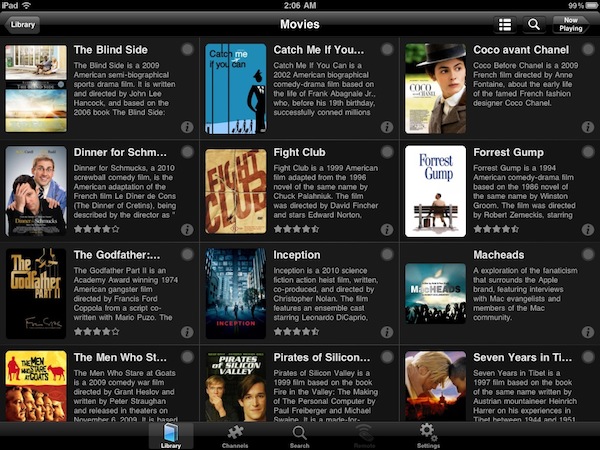
In the sea of App Store releases and updates, it’s easy to get lost and forget about that great app you used to love. New apps come around, better alternatives for just about anything are provided by developers and, especially if you’re geek, you know what it means to constantly tweaking your workflow to accomodate the latest offering in the iOS or OS X panorama. In the past week, I’ve rediscovered an app I had for a long time, but somehow managed to leave unused in my iTunes app library: Air Video.

I’ve always been a fan of Air Video and have been following the development (and updates) closely. Yet, for the reasons mentioned above, during the past months I kind of forgot how useful this app used to be, and how greatly it could improve my media consumption experience. So when the iPad 2 showed up at my doorstep and the thinner design made it crystal clear that it was easier (for me) to hold with one hand, I remembered about Air Video. And I’ve fallen in love with it all over again. Read more


Meet The Plasticine iPad

iOS devices are beautiful examples of industrial design and we know they can also resist the most terrible accidents thanks to their great build quality, but none of them is as cute as the plasticine iPad 2 we found on Youtube. Perfectly “compatible” with multitouch and coming with a handful of third-party apps installed, this alleged prototype from Cupertino (not really, but we like the idea) does 3D projections without glasses as well, with real-time manipulation. Of course it also does games, maps, Twitter and web browsing.

Seriously though, the work that went into this stop-animation video must have been huge, and you should check it out below.
Read more


Never-used 20th Anniversary Macintosh Available on eBay

In the spring of 1997 Apple released a $7,499 computer produced in 12,000 limited copies and designed by Jonathan Ive. This computer, the Twentieth Anniversary Macintosh, was in fact the first “big project” for Ive at Apple, but its sales didn’t go very well. Widely regarded by true Apple aficionados as a unique piece of Apple history that can also run Mac OS 9 (initially developed with System 7 in mind), this Macintosh model was built by Ive to “have a very small footprint” on the desktop and be easy to “move around”. Many see it as the father of the popular iMac line that was introduced a year later, and to good reason: the Twentieth Anniversary Macintosh provided a better way to manage and install cables, had a standalone keyboard and, overall, was the first example of “all-in-one” design.

A never-used Twentieth Anniversary Macintosh has surfaced on eBay, and it’s currently bidding at $1,025.00. The box was opened for inspection, but the computer was never used and the packaging parts are still sealed. From the description of the item:

The TAM comes in one large box, with four smaller boxes inside consisting of the accessory box, keyboard, system and subwoofer. The accessory box was opened only to inspect the condition of the batteries out of concern that the corrosion of them over time could have damaged other components. The batteries did in fact expand but did not leak, causing no damage to any of the other accessories. The accessories themselves are all new, otherwise untouched, including the thick users manual which is still shrink-wrapped, and a special TAM pen and pencil set which come in a special Apple embossed leather case. The system and subwoofer boxes remain sealed, and therefore are to be in perfect condition, but because testing was not performed this system is being sold in as-is condition. Servicing of TAM’s is no longer available directly from Apple, but may be available thru an independent authorized service center.

The “TAM” was only released in the US, Japan, France, Germany, and UK – this is a great chance to get your hands on it if you’ve got money to spend (the auction will likely go up very soon) and you want to add a piece of Apple’s Macintosh history to your collection. Check out a video of Jony Ive talking about the Twentieth Anniversary Macintosh below, courtesy of Electronista.
Read more


Fresh Feed Elegantly Puts RSS In The Menubar

There are many ways to consume RSS feeds on the Mac platform: when it comes to syndicating content from your favorite websites, apps like NetNewsWire and the Reeder beta come to mind, although many people simply prefer to keep an eye on Google Reader (the most used service nowadays to subscribe and follow feeds) in their desktop browser.

Over the years several alternatives have surfaced that enable users to read RSS feeds in different ways on the desktop. Fresh Feed, a free utility in the Mac App Store, does what many other apps have tried, but in a very elegant way: it puts RSS items in the menubar, and allows you to open them as new tabs in the browser. Where Fresh Feed really shines, in my opinion, is the user interface: it looks like a bigger iPhone app placed in the menubar, yet it doesn’t feel “weird” as several other Mac apps that try to resemble their iOS counterparts. Its “cells” for new RSS entries look sweet and polished. They’re chronologically ordered, but you can scroll with your trackpad to load as many articles as you can. A click on the “more” button loads the item in your desktop browser, automatically leaving Fresh Feed. To add new RSS feeds, you have to open the Preferences and paste a website’s feed URL.

There’s no option to set refresh times or auto-import feeds from Google Reader, unfortunately. If you just want to use Fresh Feed to stay up to date with the articles from a specific website, however, and not your entire Google Reader list, this might just be the app you need.

Looking forward to future updates with more features, Fresh Feed is a free download in the Mac App Store.


Apple Design Awards 2011 To Feature Both iOS and Mac Apps

Together with the official announcement of WWDC 2011, Apple also put a teaser page up for the Apple Design Awards, which recognize “apps that demonstrate technical excellence, innovation and outstanding design.” Unlike last year, this year’s ADAs will feature both iOS and Mac apps: in 2010, Mac software was surprisingly excluded and iOS was the focus. Steve Jobs said that it was “just the normal cycle of things”. Among the winners of the 2010 edition: Flight Control HD, Star Walk and Doodle Jump.

At the WWDC 2011 Apple will award outstanding apps for the iPhone, iPad and Mac. Apps that  are “currently on the App Store and demonstrate excellence in the following areas:”

  • Design: Well designed apps are delightful, elegant, intuitive, engaging, exciting, compelling, and reliable.
  • Innovation: Innovative apps are revolutionary, inspirational, unique, and do things in completely new and exciting ways.
  • Technical excellence: Technically advanced apps have excellent performance and make extensive use of the latest Apple technologies to deliver innovative, platform differentiating, and advanced features.

To be eligible for the Apple Design Awards 2011, apps must be available in the App Store by May 23. More details and frequently asked questions here.


Apple Announces WWDC 2011 Dates: Kicks Off June 6

Apple just announced the official dates for the WWDC 2011. The developer event kicks off in San Francisco on June 6 and it runs through June 10. With more than 100 sessions and support by over 1,000 Apple engineers, the WWDC is the perfect place to connect with fellow iOS and OS X developers around the world. Apple is heavily betting on the WWDC 2011 to “unveil the future of iOS and OS X”:

At this year’s conference we are going to unveil the future of iOS and Mac OS,” said Philip Schiller, Apple’s senior vice president of Worldwide Product Marketing. “If you are an iOS or Mac OS X software developer, this is the event that you do not want to miss.

Furthermore, there will be Apple Design Awards for iPhone, iPad and Mac apps this year. Last year, Apple didn’t include Mac software in the Design Awards, which “recognize apps that demonstrate technical excellence, innovation and outstanding design”.

Tickets are available now starting at $1,599 here. Press release below.

Read more


Steve Jobs: Once Again One Of The “World’s Best CEO’s”

Just like every year, online publication Barron’s has posted its list of the “world’s best CEO’s”, and like last year Steve Jobs is included and considered “without a doubt” the most valuable one. The list, which includes names like Jeff Bezos of Amazon and Jamie Dimon of JPMorgan Chase, is made of 18 CEO’s of US-based companies and eight of them are new entries. Steve Jobs is mentioned – in spite of his medical leave of absence – for the amazing milestone of 100 million iPhones sold, the release of the iPad and the continuous success of Apple’s products overall.

Recently, Fortune named Apple “most admired company”. Complete list below, courtesy of Setteb.it:

  • Jeff Bezos (Amazon)
  • Warren Buffett (Berkshire Hathaway)
  • Jamie Dimon (JPMorgan Chase)
  • Larry Ellison (Oracle)
  • Larry Fink (BlackRock)
  • Reed Hastings (Netflix)
  • Steve Jobs (Apple)
  • Patrick Kron (Alstom)
  • Ma Huateng (Tencent)
  • Fujio Mitarai (Canon)
  • Alan Mullaly (Ford)
  • Gordon Nixon (Royal Bank of Canada)
  • Michael O’Leary (Ryanair)
  • Sam Palmisano (IBM)
  • Bruce Rockowitz (Li & Fung)
  • Peter Sands (Standard Chartered)
  • Jim Sinegal (Costco Wholesale)
  • Jim Skinner (McDonald’s)
  • Fred Smith (FedEx)
  • Tim Solso (Cummins)
  • Rex Tillerson (Exxon Mobil)
  • Miles White (Abbott Laboratories)

New entries after the break. Read more


Droplist: Create Lists On Dropbox & Edit Them Anywhere

There’s no shortage of “list creation apps” on the iPhone and iPad. Since the opening of the App Store in 2008 and the release of the iPad last year, developers and consumers have apparently re-discovered the usefulness of digital lists (for shopping, groceries, to-dos, you name it), and the popularity of these applications has seen a terrific rise. Lists are everywhere, but very few of them support syncing of items across devices and computers. Droplist, a $0.99 app released last week, is a good-looking alternative to more complex solutions like Simplenote that does essentially two things: it creates lists and syncs them back to Dropbox. Read more


Eavesdrop: Share Your iOS Music Library Over WiFi & Bluetooth

When I was in high school, I remember we didn’t have iPhones with wireless sharing capabilities or music streaming apps like Pandora and Spotify. But we did have some iPod Classics, and sharing headphones with friends asking you to listen to your “new songs” was normal. And sharing headphones was annoying: you were forced to mess with cables, you didn’t get the full quality of a song, you always ended up with broken earbuds after a few days. Though, like I said, that was normal.

We have better ways of listening to music nowadays: streaming aside, we have portable Bluetooth speakers like the Jambox and iPod nanos that fit in every pocket and are relatively cheap. Eavesdrop, a new app for the iPhone released a few days ago, aims at taking the whole “local music sharing with your friends” concept a step further by enabling you to broadcast your iPod.app library over WiFi and Bluetooth. Read more