Federico Viticci

10767 posts on MacStories since April 2009

Federico is the founder and Editor-in-Chief of MacStories, where he writes about Apple with a focus on apps, developers, iPad, and iOS productivity. He founded MacStories in April 2009 and has been writing about Apple since. Federico is also the co-host of AppStories, a weekly podcast exploring the world of apps, Unwind, a fun exploration of media and more, and NPC: Next Portable Console, a show about portable gaming and the handheld revolution.

iOS 5 Beta 2: New First-Boot Animation, Native Scrolling in Web Apps

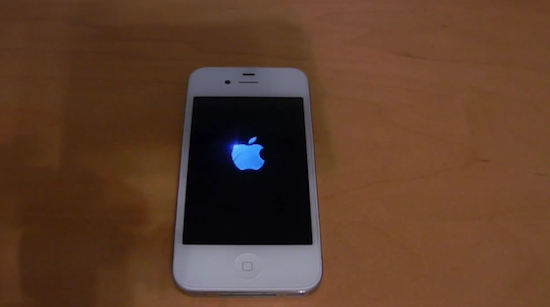
Among the changes spotted in the second iOS 5 beta seeded to developers on Friday, a couple of new additions had developers and Apple fans alike buzz with excitement over what could be coming in the final release of the OS expected this Fall. The first new, slight change in the iOS 5 code is a new startup animation that, upon a device’s first boot after it’s taken out of the box or restored from iTunes, will display a glowing Apple logo, before taking the user to the new Apple ID-based setup process with iCloud integration. The same setup process introduced in beta one has been overhauled to enforce the requirement of an Apple ID and visualize a device’s IMEI and ICCID codes. You can check out a video of the (brief) animation after the break.

A major change in iOS 5 could be the possibility of doing OTA software updates over 3G. Whilst Apple had already confirmed that iOS 5 would be capable of updating devices wirelessly, with delta updates, and even displayed an iPhone on 3G while doing so with an iOS 5.1 placeholder, there wasn’t any carrier support confirmation by Apple at the WWDC ‘11 keynote, leaving tech pundits wondering whether, especially in the much trafficked US networks, AT&T and Verizon could be demanding Apple to block even the smallest software updates over a cellular network. According to 9to5mac, some code strings in the iOS 5 beta seem to confirm Apple is baking the functionality to update a phone or iPad over 3G, though it’s obviously not clear whether the carriers could limit this feature.

Last, iOS 5 beta 2 has introduced a new CSS property that will allow web developers to build web apps powered by native-style momentum scrolling, as noted by Johan Brook. The code is the following:

overflow: scroll;

-webkit-overflow-scrolling: touch;

Brook writes:

This is huge for web apps. No more custom Javascript to fake the native behavior, like iScroll and lately Scrollability from Joe Hewitt. Even Apple has written their own internal web framework (“PastryKit”) to patch up things like scrolling and fixed positioned elements. Scrollability is the best fake-native scrolling I’ve seen so far, and the one in apps built with Sencha Touch is pretty sharp as well, but I don’t think they can beat this alternative provided by Apple.

There’s indeed a noticeable difference in momentum between scrolling in native apps and in web pages. It’s maybe the one single thing that makes you think: “Oh right, this is a web app”.

Daring Fireball’s John Gruber detailed the efforts Apple had been putting into creating a better JavaScript framework to improve behavior of web apps for iPhone in 2009, called PastryKit. The framework was aimed at bringing things such as position-fixed toolbars and momentum scrolling to Apple’s own web apps (video demos), features that the company is now baking into iOS 5.

The JavaScript source code has been minimized/optimized, but it’s not obfuscated, per se, so it’s easy to see that the framework is called PastryKit, and even a dilettante JavaScript hacker like me can follow along and see some of what’s going on. PastryKit accomplishes all three of the aforementioned things — hiding the MobileSafari address bar, providing fixed-position toolbars, and providing scrolling with momentum — by disabling regular scrolling and setting up its own view hierarchy and implementing its own scrolling.

Read more


New Apple Store Opens In Reading, UK

Reported earlier this week after a five-year wait that saw several rumors constantly claiming Apple had finalized work on the location, a new Apple retail store opened this morning in Reading, UK, at the Oracle Shopping Centre. The Oracle Reading centre “is located in Reading town centre on the banks of the River Kennet, just inside the A329 ring road”.

The Apple Store is located in the upper level of the building and, as usual with recent retail grand openings, saw a long line of Apple fans and customers for its debut this morning. ifoAppleStore, who broke the news this week, has some photos and a video of the new Store, and we’ve collected other shots from people who were there from Twitter.

Check out the photo after the break, and visit Apple’s official page for The Oracle Apple Store here. Read more


Apple Releases iOS 5 Beta 2

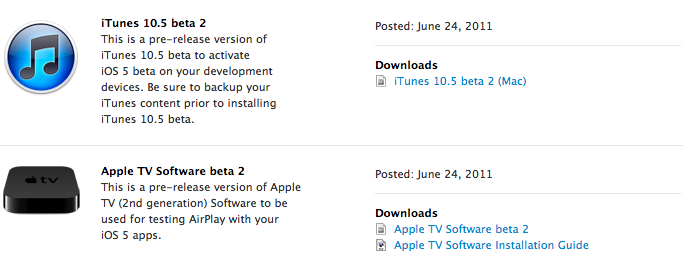
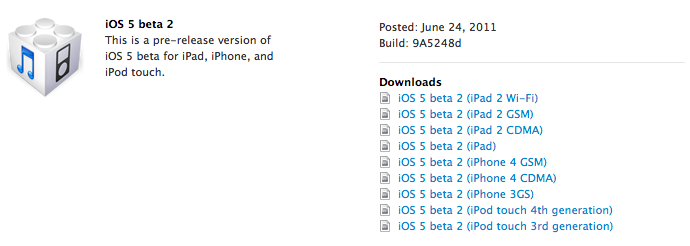
Less than three weeks after the first seed, Apple just released iOS 5 beta 2 to developers. Build 9A5248d is available now in the Dev Center for registered iOS developers.

From what we’ve been able to see in the release notes so far, it looks like iMessage on iOS 5 beta 2 won’t be able to communicate with iMessage users on beta 1, and the new iTunes 10.5 beta won’t be able to sync with devices running the old beta 1:

iMessage seed 2 will be unable to communicate with iMessage users on seed 1.

The version of iTunes that comes with beta 2 cannot sync devices that have the beta 1 software installed.

Read more


High Costs Slowing Down Adoption of AirPlay and Thunderbolt?

According to iLounge, developers of peripherals for iOS and OS X claim high licensing and production costs for the relatively new AirPlay and Thunderbolt standards will slow down the adoption of such technologies from third-party manufacturers.

AirPlay, officially introduced with iOS 4.2.1 in November 2010, allows iOS users to beam audio or video content to compatible AirPlay speakers, AirPort Express stations, and Apple TVs 2nd-gen. By working closely with a company called BridgeCo, Apple built a wireless system that directly interacts with iOS and Mac devices to receive audio streams, as well as artist’s information and other playback data. For video, AirPlay enables users to send video stored locally or from the web to an Apple TV on the same WiFi network. Since AirPlay’s announcement in September at the iPod event, both Apple and BridgeCo stressed how third-party adoption would bring hundreds of AirPlay-enabled products to the market. Until now, however, most of these products have been in high-end range of consumer prices, with Philips only recently exploring price points below $300. iLounge reports implementing AirPlay adds $100 to the final product’s price:

Our sources have described the AirPlay technologies as considerably more expensive to incorporate than Apple’s standard docking Made for iPod/iPhone/iPad Dock Connectors, and noted that Apple is very heavily pushing developers to adopt the wireless technologies despite the costs involved.

Similarly, the cost of adding a Thunderbolt port to an external drive is said to roughly match the price of a low-end drive, which we assume is somewhere below $99 as well. For this reason, it’s likely Thunderbolt will only find its way in high-end professional products in the immediate future, and quite possibly the factor behind Apple’s decision to leave the iPad 2 without a Thunderbolt port, rather relying on wireless sync introduced with iOS 5 (you might remember rumors before the iPad 2 announcement suggested the device could get Thunderbolt – back then codenamed Light Peak).

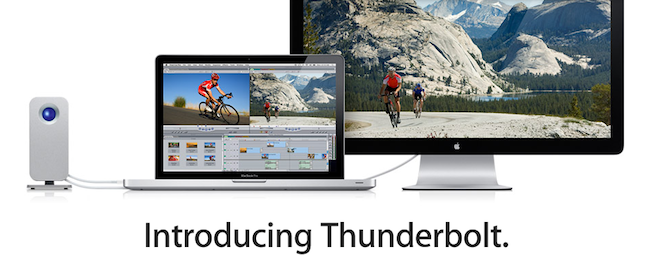
A variety of Thunderbolt products from LaCie and Promise, among others, were unveiled in the past months, with all of them seemingly oriented to the pro market and audio/video professionals. Thunderbolt is an I/O technology developed by Intel and Apple that allows for bidirectional 10 Gbps connection over a cable, plus a 10 Watt feed to power other devices and attached peripherals.


Skype for iPad Is Coming, Video Surfaces Online

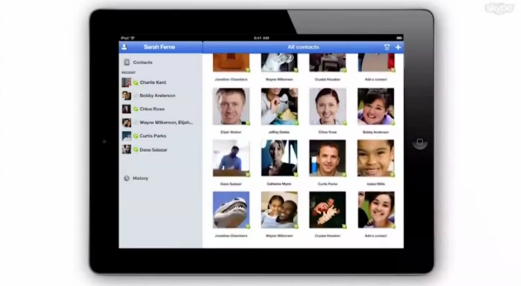
As reported by Italian website iPadevice [Google Translation], a video appeared earlier today on Skype’s official YouTube channel, and was later removed or set to private. The video demonstrates the official Skype application for iPad, which appears to be complete and launching soon. The video has no audio, and iPadevice managed to grab a copy before it was deleted to re-upload it to YouTube. The video says “Skype for iPad, available on the App Store”, though it’s not clear whether or not the app will be released as a universal update to the existing iPhone client, or as a standalone app. However, the video shows that Skype has taken its time to take advantage of the iPad 2 hardware to enable video calls both through the back and front facing camera, with a visual contact list made of profile pic thumbnails you can scroll, as well as the possibility of turning a video call into fullscreen mode.

The app will have options to call, video call and chat with a contact; it will work both on WiFi and 3G as a disclaimer at the beginning of the video says, and it will allow users to chat during a video call session from a popover menu at the bottom.

Skype was recently acquired by Microsoft for $8.5 billion, and although after the acquisition many feared Redmond would make the software exclusive for its devices, Microsoft’s Steve Ballmer was quick to reassure everyone that Skype was still committed to other platforms. Check out the video below.

Update: Here’s the alleged link of the private video, via RazorianFly.

Update #2: Twitter user @trackizmy1 has posted the following photo showing that the video indeed appeared on Skype’s channel:

Right now, Skype has 56 uploads on YouTube, whilst the screenshot shows 57 before the video was pulled.

Update #3: TUAW’s Mike Schramm has confirmed with Skype VP of Consumer and Product Design Rick Osterloh that the app is very real and hopefully coming soon depending on Apple’s approval. Skype says some desktop features like file sharing couldn’t be implemented, but called the iPad version a “solid release” and said Apple has been very supportive to them.

Osterloh says that the iPhone version of Skype burst out of the gate quickly, with a big launch and “a userbase that doubled in just a month’s time.” And he said the iPad version should “have a similar success,” especially since it’s basically the same in functionality: chatting, audio and video calling, and all of the other standard actions you can expect from Skype. The current app has been in testing for a few months now, and Osterloh is excited to unleash it on the public.

Read more


The New York Times’ Final Cut Pro X Q&A

The New York Times’ Final Cut Pro X Q&A

Following the much discussed backlash over the launch of the “revolutionary” Final Cut Pro X for Mac, The New York Times’ tech columnist David Pogue has compiled an interesting Q&A on the available/missing features of the application, with direct input from Apple.

The “missing features” generally fall into three categories: features that are actually there and have just been moved around, features that Apple intends to restore and features that require a third-party (non-Apple) add-on or plug-in.

Among the covered topics, Pogue reports Apple says re-enabling support for the multi-cam functionality is a “top priority” for the company.

Complaint: There’s no multicamera editing. In the old FCP, you could import the footage from various cameras that covered an event (say, a concert) from different angles simultaneously, and then easily cut back and forth between them while editing. It was a star feature of Final Cut, and it’s gone from FCP X.

Answer: Apple intends to restore this feature in an update, calling it “a top priority.” Until it does, here’s a stopgap facsimile of multicam editing: If you drag two clips into parallel timeline tracks, you can choose Clip->Synchronize Clips. By comparing their audio tracks, the program aligns the clips exactly. Now, each time you select a piece of the upper video track and press the V key (“disable”), you are effectively cutting to what’s on the lower video track.

Another feature that generated much disappointment in several Final Cut Pro X reviews on the Mac App Store is the impossibility of opening old FCP projects. Pogue confirms this:

Complaint: Can’t import old FCP files.

Answer: As I noted in my column, this is true; your old projects are stranded forever in the older FCP program. You’ll have to keep both programs on your hard drive, and edit the old projects in the old program. When you install the new FCP, your old copy is safely preserved.

Read the full, technical Q&A here. In the weeks leading to the release of Final Cut Pro many professional video editors suggested it would be difficult for Apple to ship a completely rewritten version usable since day one by large studios and production houses. As Final Cut Pro X has been re-imagined from the ground up, clearly Apple needed to cut some features out of the first release, but they’ve already confirmed they’re aiming at making the update cycle for FCP faster with releases every 6 months or so.

Permalink

OmniFocus for iPhone Gets Forecast View, Lots Of Fixes

Users of the OmniFocus application for iPad who also happen to have an iPhone and are tied to The Omni Group’s software ecosystem might want to check for updates in iTunes and download the latest version of OmniFocus for iPhone. Released a few minutes ago, OmniFocus 1.10 adds one major new feature: Forecast mode for overdue, due, and future actions. Forecast was one of the new OmniFocus features exclusive to the iPad version, and a hint of things to come in the much-anticipated OmniFocus 2.0 for Mac. Just like on the iPad, you’ll have a bar along the top displaying a summary of your upcoming week, as well as past tasks and stuff that needs to be taken care of sometime in the future. Forecast mode replaces the Due and Overdue lists and it provides an incredibly useful way to see what’s going on at a glance, without having to find your way around sections and taps. It’s a huge time saver.

OmniFocus 1.10 also comes with several refinements all around the UI and bug fixes, which you can read in detail here. Just to name a few, the first-run sync process has been redesigned to be more intuitive, and the Action and Project editors got “Go to Project” and “Go to Context” buttons. Overall, the app feels a lot faster and it’s clear The Omni Group set out to fix all those minor annoyances that are not so minor when you have to work with an app on a daily basis.

You can find OmniFocus for iPhone at $19.99 on the App Store.


Mac OS X 10.6.8 Now Available

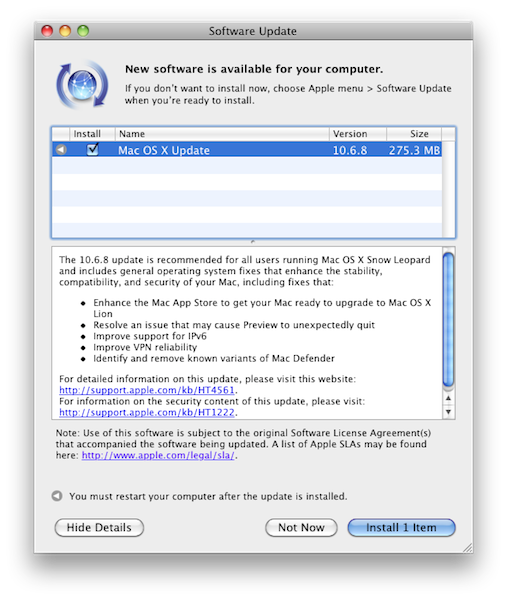
Apple has just released a new version of Mac OS X Snow Leopard, reaching version 10.6.8. The update is available now in the Software Update control panel, or Apple’s website. Among various bug fixes including issues with Preview and the well-known Mac Defender malware, 10.6.8 “enhances” the Mac App Store to get it ready for Lion in July.

Changelog:

  • Enhance the Mac App Store to get your Mac ready to upgrade to Mac OS X Lion
  • Resolve an issue that may cause Preview to unexpectedly quit
  • Improve support for IPv6
  • Improve VPN reliability
  • Identify and remove known variants of Mac Defender

Below are the direct links for all the updates (including Security) Apple released today:


Review: Pogoplug Software Puts Your Mac In The Cloud

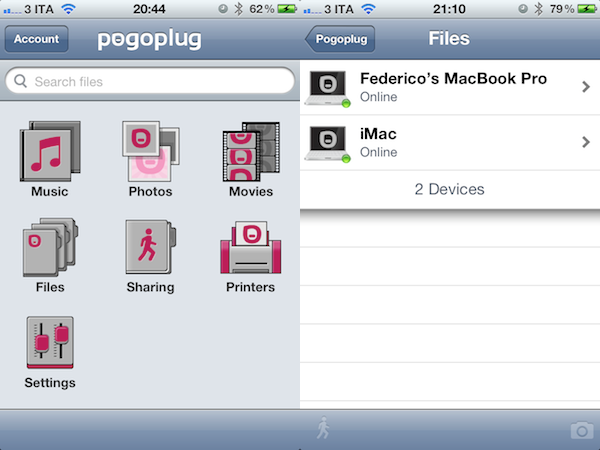
Yesterday, I scored a free Pogoplug Software Premium account thanks to the good folks over at The Next Web. I’m a big fan of well-done cloud services that allow me to access my stuff anywhere I go, and as I’m also always interested in desktop solutions aimed at securely mirroring your computers’ contents to the cloud, I was excited to install the new Pogoplug app on Lion and take it for a spin. The results are surprisingly good, but far from perfect.

Pogoplug became popular a few years ago thanks to a network-attached device that enables you to put media in it, and access it from a variety of devices and the web because it is actually connected to the Internet. Rather than forcing you to buy an additional piece of hardware to plug into your home router and waste space on your desk, though, the new Pogoplug Software product allows you to access your media in your personal cloud at $29 per year for unlimited computers and devices. That’s undoubtedly a great offer: once installed on your Mac, the Pogoplug app will scan your computer’s drive and default locations (like Music and Movies) for content, and make it available online. Once authenticated, you’ll be able to stream music, watch a movie, or read a PDF from an iPhone, iPad, or web browser. The concept is not too far away from what Jim Dalrymple at The Loop said Apple was working on to enable users to put files in the cloud. The solution turned out to be a little different as we know, yet Pogoplug Software holds up to this idea: it’s your Mac, mirrored to the cloud, and available anywhere. Read more