Federico Viticci

10767 posts on MacStories since April 2009

Federico is the founder and Editor-in-Chief of MacStories, where he writes about Apple with a focus on apps, developers, iPad, and iOS productivity. He founded MacStories in April 2009 and has been writing about Apple since. Federico is also the co-host of AppStories, a weekly podcast exploring the world of apps, Unwind, a fun exploration of media and more, and NPC: Next Portable Console, a show about portable gaming and the handheld revolution.

Inside Google+ Mobile Web App

Two days ago Google launched Google+, the company’s latest effort to get into the social networking space and build a platform to share content and connect people. For those who missed the coverage (you can find some detailed reports here and here), here’s the gist of Plus: it’s a social network connected to your Google account that looks a lot like Facebook but it’s got a cleaner design and a set of different “apps” tied together by the Plus brand. What does it mean for consumers? It means that whilst Circles, Huddle, Hangouts and Sparks could be seen as separate services and concepts, they’re in fact sections of the entire Google+ website. Yesterday, Google started allowing people to send invites to other users, which resulted in a massive explosion of invite requests on Twitter and thousands of new sign-ups. After a few hours, Google was forced to close invites due to “insane demand” and promise more coming in the next few weeks as the service scales to accomodate new users and more content.

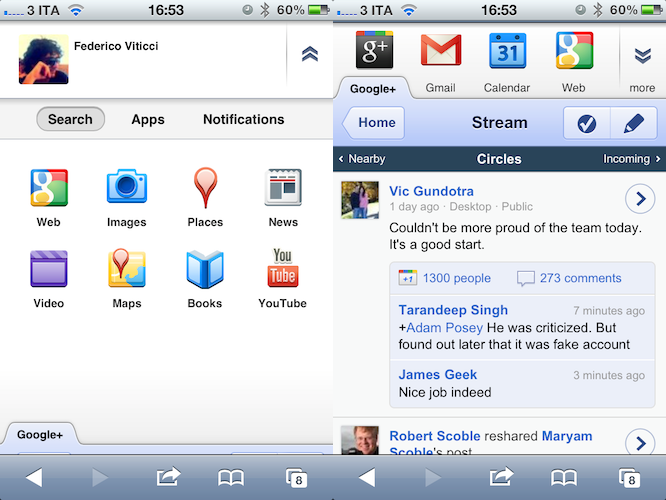
Google+ has a strong mobile counterpart, too. As the service aims at empowering Google users to share and connect at any time from anywhere, Google built native apps for Android and iOS devices to let users enjoy the Google+ experience on the go, and upload media such as photos and videos shot with their phones. Furthermore, the mobile apps get access to Huddle, a group messaging feature built into Google+ that some are already eyeing as Google’s response to iMessage, only it works on both iOS and Android. However, the official iPhone app is not available yet, and Google says it’s “coming soon”. In the meantime though, users can try a mobile optimized web app, which relies on Google’s recent mobile UI changes to lay out a unified interface to access Google+ and switch between various Google services.

Last night, I signed up for Google+ and played around with the website. Today, I decided to take a look at the mobile web app which, surprisingly enough, might just be the nicest thing Google has ever done on iOS’ Mobile Safari. Read more
The iPad: Now With 100,000 Apps Available

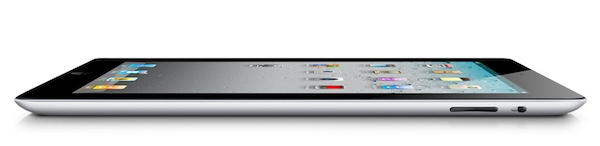
At the end of March we ran a story on the iPad App Store reaching the 75,000 apps milestone in less than 365 days since the original iPad came out in April 2010. Considering the competition the iPad had to face in the past year (though some people say there really isn’t a tablet market) and the options given to developers when it came to choosing which platform to develop for, seeing iPad users gaining access to almost 100,000 apps in roughly 12 months was a surprise – looking back at those statements from tech pundits who claimed the iPad was “dead in the water”, the 75,000 milestone surely helped putting things in perspective.

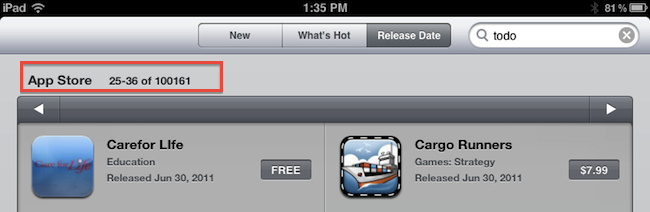
Yet Apple and third-party developers have set a new record: in 453 days since the original iPad came out on April 3, 2010, the App Store has more than 100,000 iPad-exclusive apps available. Either specifically targeting the tablet, or released as universal updates to existing iPhone apps, at the moment of writing this there are 100,161 iPad apps in the Store. How do I know? The App Store app itself on my iPad shows that.

Obviously, one could argue that the iPad’s development scene was “helped” by the success of the iPhone in the previous years. The original iPhone came out with no SDK in 2007, and developers were told to create web apps for it. Apple listened, and months later they released the first developer tools to create native apps for the iPhone. With the release of the iPhone 3G in 2008, Apple also launched the App Store, a unified marketplace to browse and download apps. The rest is history: a few graphical enhancements, sections, and 10 billion downloads later, the App Store is Apple’s crown jewel as far as digital downloads go. A success that has inspired the company to create an OS X version and name it Mac App Store which, unsurprisingly, is once again helping developers sustain their business because of the ease of use of the whole process. On the other hand, users love discovering and buying apps from the App Store because it’s simple, it’s full of apps, and it’s regularly updated. It’s a win-win scenario for Apple (who keeps a 30% cut off every transaction), the developers, and the users.

What’s next for the App Store and, more specifically, apps for the iPad? 100,000 is an important milestone, but don’t expect things to change dramatically in a short period of time. Considering how Apple rolls, the App Store will be slightly tweaked to accomodate new sections as it’s always been, more apps will be released in the next weeks, and users will keep buying apps and games. Don’t expect a revolution because Apple has reached 100,000 apps for the iPad. But that’s not to say the result isn’t remarkable or that new things aren’t coming: with iCloud going public this fall and Automatic Downloads already set in place, Apple wants to make the process of buying and syncing apps to iOS devices even simpler. With Lion approaching its public launch on the Mac App Store in July, it’s clear Apple is betting on the App Store brand as the de-facto solution for downloading software for iOS and OS X devices.

Congratulations, developers. Now onto 200,000 apps.


How The iPad Changed A 9-Year Old Girl’s Life

How The iPad Changed A 9-Year Old Girl’s Life

Evonne Barry at the Herald Sun tells the story of Holly Bligh, a 9-year old girl from Melbourne, Australia, whose life has been changed forever since she started using an iPad instead of regular paper and textbooks. As the publication reports, in fact, Holly has albinism, a condition that, alongside her skin, also affects her vision. Before the iPad, Holly’s parents and teachers were forced to print out papers with larger characters in order to let her read properly. The iPad, with its multitouch capabilities, changed that. Holly can now read her books with ease thanks to pinch and zoom, and her mother says the device is improving her ability to be independent from teachers as well.

But there’s more. Holly’s mother, Fiona, decided to send an email to Steve Jobs to personally thank him for producing a device that contributed so deeply to the betterment of her daughter’s life, and he replied.

Within hours of directly emailing multi-billionaire chief executive Steve Jobs, she was thrilled to receive a response.

“Thanks for sharing your experience with me. Do you mind if I read your email to a group of our top 100 leaders at Apple?” he wrote.

Mr Jobs signed off with “Thanks, Steve”, and asked for a high-resolution photo of Holly with her iPad.

This isn’t the first example of how the iPad as a revolutionary device changed the lives of children affected by different conditions and disabilities. Still, it’s always nice to hear a good story, rather than speculation on the next MacBook Air or Sandy Bridge CPU. Make sure to head over the Herald Sun for the full article.

Permalink

Tweetbot 1.3 Released with New Features & Favstar Support

It was only three weeks ago that we covered Tweetbot 1.2, an update to the popular Twitter client from Tapbots that added retweet undo options, old-style retweets, Pinboard support and a new user/hashtag picker in the compose screen. Today, another update to Tweetbot has been released, reaching version 1.3 and adding new design refinements, Twitter features, as well as general fixes aimed at improving the user experience.

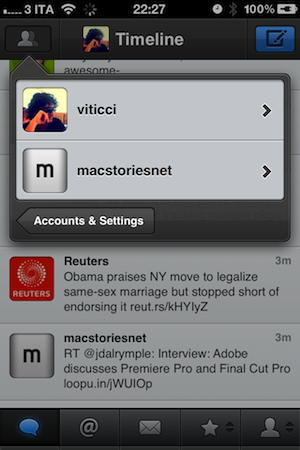
Tweetbot 1.3 comes with a new account switcher popover that adds one extra step to go back to the account screen, but should prevent users from accidentally hitting the button when touching the top timeline bar. Tapbots received several reports of users annoyed by the fact that the button was too close to the timeline selector, and rather than removing it or replacing it altogether, they figured out a way to quickly switch accounts or go back to the accounts & settings page. It is an extra step but the trade-off should be worth it. Also improved in Tweetbot 1.3 are direct messages: you can now delete entire threads and single messages, copy them and translate them, but also enjoy a new recipient selector when composing a new DM. Obviously, Tweetbot has already been updated to include Twitter’s recent policy changes and OAuth login to use direct messages (if you haven’t re-authorized the app, do it now).

Another new feature that had me excited to check out Tweetbot 1.3 is Favstar support: for those who don’t know, Favstar is a fantastic ego-booster service that lets you see how many people have retweeted and marked your tweets as favorite. It provides a “most recent” list, as well as an all-time chart to see your most successful 140-character messages ever. I’m addicted to Favstar, and Tweetbot now comes with handy integration to invoke the “award tweet of the day action” (tap and hold the favorite button in the tweet drawer) and open your Favstar profile (double tap your profile tab). I love this.

Other changes in Tweetbot 1.3 include:

  • Local trends
  • “Add to List” feature improved and renamed to “Manage List Memberships”
  • Added “go to user” feature in people search (shows when typing into the “Search People” box)
  • Gaps now load above or below depending on position of gap when button is invoked.
  • Compose Tweet from hashtag (by holding down on a hashtag in a tweet)
  • Drafts button now displays # of drafts.

It’s great to see Tweetbot getting better and more powerful on each release, and you can read more about the future of the app here. Or, you can check out more screenshots of version 1.3 below and download the app here. Read more


First Thunderbolt Tests: “Dramatically Faster” Than FireWire, Supports Booting from Disk

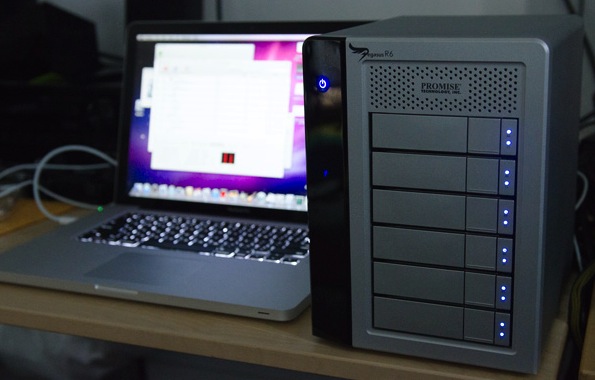
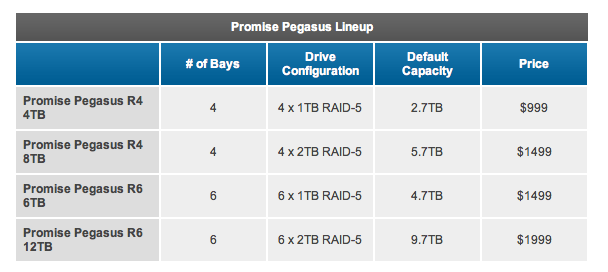
With the release of the official Thunderbolt cable from Apple earlier this week, the first Thunderbolt-enabled products also started appearing on the Apple online Store. As announced back in February soon after the introduction of the new MacBook Pros with Thunderbolt, Promise made available a set of four different RAID systems called Promise Pegasus R4 (4x1TB and 4x2TB configurations) and Promise Pegasus R6 (6x1TB and 6x2TB capacities). A few publications managed to get their hands on the newly released models and the first results are coming in, detailing how, indeed, the Thunderbolt technology is incredibly faster than regular USB 2.0, but also FireWire 400 and FireWire 800.

First off, AnandTech received a 6-bay 12 TB model of the Promise Pegasus and, whilst a full review will be available later this week, they have confirmed that booting OS X from an external Thunderbolt disk properly partitioned will be possible, unlike some reports in the past months suggested. Thanks to Thunderbolt’s high speed and possibility of daisy-chaining devices, it’ll be interesting to see how fast will Lion run when configured on an external (perhaps even SSD) drive with other peripherals connected.

All of the available Pegasus systems ship with 7200RPM 3.5” hard drives, although Promise mentioned that we will may see SSD enabled configurations in the future. The 12TB R6 we received uses six Hitachi Deskstar 7K3000 2TB drives (HDS723020BLA642) in a 9.7TB RAID-5 configuration. The 7K3000 spins its four platters at 7200RPM and buffers data with a 64MB on-board cache. The drive has a 6Gbps SATA interface although the Pegasus R4/R6 supports SAS drives as well. All of the Pegasus devices ship in RAID 5 however they do support RAID-0/1/5/50/6/10.

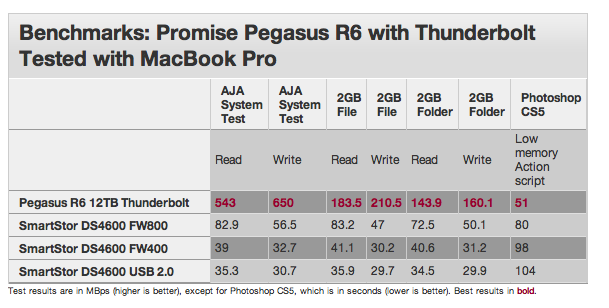
Similarly, Macworld received a Thunderbolt 6-bay 12TB Promise Pegasus RAID system and put it through a first round of tests to measure its speed against common standards like USB and FireWire. Unsurprisingly, Thunderbolt scored better reading times – between 6.8 and 11.5 times faster than a FireWire drive from Promise itself, while a copying process of a 2 GB file was 30 percent faster on the Thunderbolt-equipped R6.

We used two different systems to test the RAIDs: a 15-inch 2.2GHz Core i5 MacBook Pro with a 256GB solid-state drive and 4GB of RAM; and a 27-inch 2.7GHz Core i5 iMac with a 1TB hard drive and 4GB of RAM.

When connected to the MacBook Pro (which has a slower processor than the iMac, but a faster internal SSD), we see that the R6’s AJA System Test results are very similar to the results when the R6 is attached to an iMac. In our tests involving the 2GB file and 2GB folder of files, the R6 benefited from the solid-state drive in the MacBook Pro. Across the board in these tests, the R6-MacBook Pro/SSD combination outperformed the R6 attached to an iMac with an internal hard drive.

More benchmarks will be available this week as people get their hands on new Thunderbolt products.


Shine, Beautiful Weather App for iPhone, Goes International

When I reviewed the first version of Shine, a simple weather app for the iPhone, I noted how it was backed by a beautiful interface design but full international support was nowhere to be seen. The app looked great, but I couldn’t get forecasts and wind speeds to display correctly in Italy. Most of the times, they just weren’t there – clearly, Shine was aimed at US iPhone users looking for a neat weather solution.

After the release of iOS 5 beta and the introduction of the weather widget in Notification Center, I didn’t stop looking for great weather apps that would keep me updated on my favorite locations for the summer. After all, my town is only 45 minutes away from the beach and I like to check on weather conditions before I drive there. Shine 2.0, released today, finally allows me to use the app in a reliable way thanks to proper support for international countries. I can’t check on every single country in Europe (or worldwide, for that matter) but I can say that it seems to be working just fine in Italy. I can see current conditions, forecasts (whose UI has been tweaked to offer more detailed info) and wind speeds; data matches with weather info provided by other Italian websites and weather services.

Shine 2.0 won’t change anything if you’ve been using the app in the United States, but it finally allows people overseas to check on weather using this beautiful app they bought last month. You can download Shine at $0.99 from the App Store.


AirServer Now Available On iOS, Turns Devices Into AirPlay Receivers

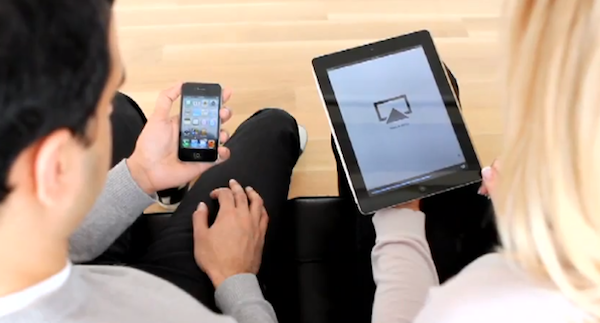
AirServer is a great Mac utility we’ve covered a couple of times in the past months which, of all the unofficial AirPlay solutions we’ve tried, impressed us because of its stability, steady flow of updates and overall support from the developers. For those who missed it, AirServer installs on your OS X machine as a menubar utility with a System Preferences panel that will make your Mac appear as an AirPlay receiver on your local network. This means you’ll be able to send music, videos and photos from any iOS device (or another computer) to your Mac, wirelessly through AirPlay. The app already supports OS X Lion and iOS 5, letting you send content back and forth between an iPad 2 running the latest iOS beta and a Mac powered by a Lion Developer Preview.

AirServer has now made the leap to iOS, and it’s available in the Cydia Store at $4.99. The concept is the same of the Mac version, except it runs on jailbroken devices: an iPhone, iPod touch or iPad can become an AirPlay receiver capable of displaying photos, videos from apps and Safari or music thanks to the AirPlay technology. Several apps on the App Store have tried to do this before, but Apple started pulling them after a few weeks so it makes sense for AirServer to go the Cydia way with a paid utility.

If you’re a fan of AirServer on the desktop and you have a jailbroken device, you should download AirServer for iOS to complete the picture and have AirPlay always available on any computer, iPhone or iPad. Check out the promo video after the break.
Read more


Postbox 2.5 Released: New UI, Faster, Lots Of New Features

Earlier today, we published an article detailing some of the interface changes set to be introduced in Postbox 2.5, a major update for the popular alternative email application for Mac and Windows that, among other things, was teased by the developers as one of the biggest rewrites of the app to date. With a series of blog posts, the Postbox team had in fact already announced that the client would get an overall improved interface, new toolbar icons on the Mac, a completely re-imagined message view, and a vertical pane view to take advantage of widescreen monitors – admittedly one of the glaring omissions from the previous versions of Postbox. Read more


Apple Announces Q3 2011 Conference Call For July 19

Apple has scheduled its Q3 2011 earnings call for July 19, 2011. The conference call will be streamed live on Apple’s website (audio-only) here.

Apple’s conference call webcast discussing Q3 - 2011 financial results will begin at 2:00pm PT/5:00pm ET on Tuesday, July 19, 2011.

Please note that comments made during this call may include forward-looking statements that are subject to risks and uncertainties, and that actual results may differ materially from these forward-looking statements. For more information on the factors that could influence results, please refer to Apple’s SEC filings.

In Q2 2011, Apple posted revenue of $24.67 billion, with 4.69 million iPads, 18.65 million iPhones and 3.76 million Macs sold. The company also reported quarterly revenue growth of 83% and profit growth of 95% with international sales were 59% for the quarter. In the year-ago quarter, Apple posted record revenue of $15.7 billion with 3.47 million Macs, 8.4 million iPhones, 9.41 million iPods and 3.27 million iPads sold.

The third quarter is set to provide some insight into the sales of the long-awaited white iPhone 4, and whether or not the lack of a new iPhone release this summer has affected the overall sales of the iPhone 4, now a 12-month old device.

We will provide live updates from the call on our site’s homepage on July 19 starting at 2 PM PDT.

[Thanks, Shawn]