Federico Viticci

10766 posts on MacStories since April 2009

Federico is the founder and Editor-in-Chief of MacStories, where he writes about Apple with a focus on apps, developers, iPad, and iOS productivity. He founded MacStories in April 2009 and has been writing about Apple since. Federico is also the co-host of AppStories, a weekly podcast exploring the world of apps, Unwind, a fun exploration of media and more, and NPC: Next Portable Console, a show about portable gaming and the handheld revolution.

Notes From iFixit’s iPhone 4S Teardown: 512 MB of RAM, New 3G Chip

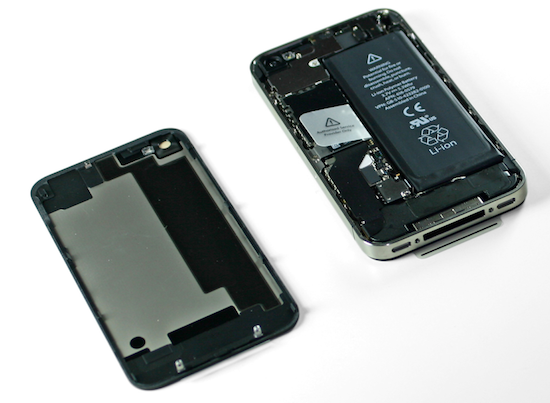
As usual with every new Apple gadget, the team over at iFixit has decided to tear down the latest iPhone 4S – which officially comes out tomorrow in seven countries, albeit some customers have already managed to get their hands on it – to take a peek inside the improved hardware of Apple’s new iPhone. As a quick recap, the iPhone 4S represents a significant change from the iPhone 4 in terms of internal components: whereas the design is the same of the old-generation model, the 4S comes with a dual-core A5 processor, a new wireless system with “intelligent” antenna design capable of switching between two antennas, world phone capabilities for GSM roaming, and a new 8 megapixel camera sensor with backside illumination. We have already discussed how the iPhone 4S appears to be a great mix of hardware and software – on the iOS side, in fact, the device comes with exclusive access to Siri, a new voice assistant.

In their teardown, iFixit notes the iPhone 4S’ battery has an extra .05 WHrs over the iPhone 4. The iPhone 4S has, however, much power-consuming hardware than the older generation unit, which leads iFixit to believe “power consumption seems rather efficient” with 8 hours of 3G talk time, 6 hours of 3G browsing, and up to 10 hours of video/40 hours of music. The iPhone 4’s battery, part of iFixit’s teardown last year, featured 5.25Whr; the iPhone 4S does 5.3Whr with the same 3.7V polymer battery.

The iPhone 4S’s logic board seems to bear “a close resemblance” to its Verizon iPhone 4 counterpart; indeed, the iPhone 4S also shares the same exterior design of the older CDMA iPhone 4, which has little differences from the GSM iPhone 4. In taking a look at the logic board, iFixit notes the two major components are the new CPU and new 3G chipset from Qualcomm, listed below.

  • Qualcomm MDM6610 chipset
  • Apple A5 processor

As previously rumored, iFixit confirms the iPhone 4S has 512 MB of RAM – a marking on the A5 chip (“E4E4”) seems to confirm this. There was much speculation surrounding the iPhone 4S’ RAM as other rumors in the past claimed the new iPhone would have 1 GB of RAM – clearly that’s not the case.

Other chips identified on the logic board:

  • Avago ACPM-7181 Power Amplifier
  • Qualcomm RTR8605
  • Skyworks 77464-20
  • Toshiba THGVX1G7D2GLA08 16 GB 24 nm MLC NAND flash memory

Other notes of interest:

  • Apple is using the same oscillating vibrator of the Verizon iPhone 4, rather than rotational electric motor found in the old GSM iPhone 4. This vibrator is softer and quieter than the GSM iPhone 4’s motor.
  • The display assembly is similar to the GSM iPhone 4.

We’ll update this post with more details as iFixit uncovers more components during the tear down. For now, keep in mind that the iPhone 4S has a much improved processor, camera, same amount of RAM and completely re-engineered 3G system.



Grand Theft Auto III Coming To iOS

Grand Theft Auto III Coming To iOS

Rockstar Games has announced that they’ll be porting Grand Theft Auto III to iOS and Android devices “later this fall” to commemorate the game’s tenth anniversary.

10 years ago, this month, the revolutionary open-world epic Grand Theft Auto III was released to the world – a game that set players loose as a small-time criminal at the bottom of the food chain in Liberty City, a sprawling metropolis where anything can happen – and probably will. To commemorate the game’s 10th anniversary, we’re proud to announce that Grand Theft Auto III will be coming to select new generation iOS and Android devices later this fall.

Ten years ago, I remember sitting in my friend’s room, watching him play GTA III on his PlayStation 2. Back then, the technology behind the game looked amazing: great graphics, a seemingly “open” environment and a “mature” plot gave us the illusion that we were really controlling the game’s world. Looking back, it’s easy to spot the tricks Rockstar pulled to let gamers think they were in control, and it’s interesting to consider how the GTA series evolved as hardware became more powerful and allowed for “real” decisions to take in-game. More importantly, a game like GTA III doesn’t look as impressive today as it did 10 years ago, so I guess Rockstar is betting on the “nostalgia effect” as it’s recently done on the Mac as well.

GTA III will be available for the iPad 2 and iPhone 4S. No word on whether the game’s graphics will be upgraded for the A5 processor and how controls will be ported to multitouch; Rockstar also says more devices will be announced soon, so keep an eye on their blog if you own an iPad 1 or iPhone 4. [via]

Permalink

WSJ: Apple Negotiating with Hollywood Studios Over Movie Streaming

According to an article published by The Wall Street Journal last night, Apple is reportedly in talks with Hollywood studios to add streaming of movies to the iTunes Store.

Apple Inc. is negotiating with Hollywood studios for deals that would let people who buy movies from the iTunes Store watch streaming versions of those movies on Apple devices such as iPads or iPhones without manually transferring them, according to people familiar with the matter.

The Los Angeles Times has a similar report:

Representatives of the iPhone and iPad maker have been meeting with studios to finalize deals that would allow consumers to buy movies through iTunes and access them on any Apple device, according to knowledgeable people who requested anonymity because the discussions are private. The service is expected to launch in late 2011 or early 2012.

With the just-launched iCloud platform for media and data syncing, there are a few differences to consider when covering the subject of “streaming” and online storage. Whereas the WSJ mentions “streaming versions” of movies, the LA Times (at least initially) simply refers to access on any device. Considering the current iCloud model, the rumor seems to fall in line with the LA Times’ report – iTunes in the Cloud, a feature of iCloud for iTunes Store content, lets users buy once, re-download at any time, and store previously purchased items in the cloud. With iTunes in the Cloud there’s no “streaming version” of a song or TV show, as iCloud is effectively enabling users to access items on any device from a unified interface (you can read more in our iCloud overview). However, in the same article, the LA Times also states:

Under the plan Apple is proposing, users could stream movies they buy via iTunes on any device the company makes, such as the Apple TV, iPhones and iPads, as well as on PCs.

You may remember that ahead of iCloud’s announcement in June, a number of reports suggested Apple was working on a music streaming service – such service didn’t materialize at WWDC as Apple unveiled iTunes Match, a music service that scans & match music, but doesn’t allow for streaming in a way companies like Rdio or Spotify do. iTunes Match matches songs with Apple’s servers and uploads the rest to a cloud locker, enabling users to download their music on any device.

Technically, the difference between streaming and access shouldn’t be taken lightly. Whereas devices like the iPhone and iPad can store downloads in their local storage after they’ve pulled media from iCloud, the Apple TV, which works with iCloud but has no local storage, streams everything from Apple’s iTunes Store, keeping small portions of data in a local cache.

There is a lot of confusion surrounding the technical difference between streaming and download. Movies in iCloud have been rumored since May, and Apple went ahead and launched a service with online storage for apps, music, TV shows and documents but no movies. It’s unclear how movies will be stored in iCloud when a deal between Hollywood and Apple eventually happens, but when it does, the technical aspect of the system shouldn’t matter to the end user.


iCloud: The Future of Apple’s Ecosystem

With the launch of iCloud, Apple is fundamentally challenging the old concepts of computing and “file”, changing the way people interact with computers and devices.

iCloud as a service presents itself as a very straightforward idea: iCloud stores your content and wirelessly pushes it to all your devices. iCloud works with the apps you use every day on your Mac, iPhone or iPad, so you don’t have to worry about syncing your music, photos, documents, contacts and calendars again. iCloud is the evolution of MobileMe, rebuilt from the ground up and re-engineered to take advantage of persistent connections and the concept of “push”, rather than visible, sometimes manual sync. iCloud is not just a big hard disk in the sky, as Steve Jobs joked at WWDC ‘11: iCloud is an invisible service that’s just there, and is now allowing Apple to virtually connect more than 200 million iOS devices.

It just works. Read more


iOS 5: Reminders


With iOS 5, Apple has decided to tackle the to-do and reminder app market by offering its own solution that’s tightly integrated with iCloud, calendars, and Address Book. Reminders, a new system app in iOS 5, allows users to easily and quickly jot down their to-dos and organize them in “lists” that are stored and backed up to the cloud in real-time. Reminders are constantly pushed across devices and the web on iCloud.com, and they come with a series of options to give them date-based alarms, a location, or notes.

Reminders is a straightforward app that can’t be compared to more complex to-do and project management solutions like OmniFocus or Things, but it doesn’t need to achieve or aspire to such complexity as it’s a utility aimed at making it extremely simple to quickly create a reminder, and forget about the existence of the app itself. You won’t spend time “tweaking” or “customizing” Reminders; you can’t assign “tags” to to-dos and move them around between folders. The app has got a single theme (as per Apple’s recent skeuomorphic trends, the app resembles an old leather-bound agenda with the heavy use of textures) and two functionalities besides reminder creation: lists and search. Read more


Aperture 3.2 Gets iCloud Integration with Photo Stream

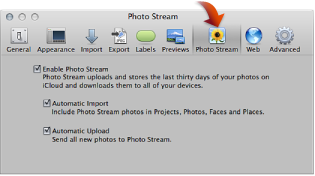
Following the release of iOS 5, OS X Lion 10.7.2 and iPhoto 9.2, Apple has also released Aperture 9.2, an update to the desktop photo editing software that adds iCloud capabilities and a number of new features. As Apple details in iCloud’s Help section, the new Aperture allows users to drag photos into the app’s library to upload them to Photo Stream. You can drag one or more photos from your library (Events, Photos, Places, or Faces) to your Photo Stream. Users can enable Photo Stream in Aperture’s Preferences -> Photo Stream and, similarly to iPhoto 9.2, choose whether they want to enable Automatic Upload and Import.

Other new features and fixes from the changelog:

  • Resolves an issue that could cause the “Loading” indicator to reappear in the Viewer when cropping a photo
  • Aperture now automatically relaunches into Full Screen mode if the application was in Full Screen mode when last quit
  • Pinch-to-zoom gesture now automatically activates Zoom mode in the Viewer
  • Left and right swipe gestures can now be used to navigate between photos in the Viewer
  • Microsoft Outlook can now be chosen in Preferences as the application used by Aperture for emailing photos
  • Fixes a problem that could cause Aperture, running on OS X Lion, to quit unexpectedly when using brushes to apply adjustments
  • Loupe now correctly displays magnification levels between 50-100%.
  • Fixes an issue that could cause Aperture, running on OS X Lion, to display the incorrect color profile on externally edited images
  • Import window now includes an option to delete photos from iPhone and iPad after they have been imported into Aperture
  • The Lift & Stamp tool now displays the correct cursor icons when being used in Split View and Viewer only modes

You can find Aperture at $79.99 on the Mac App Store.


iOS 5: Twitter Integration

With iOS 5, Apple is officially acknowledging the existence of external social networks besides Ping and Apple ID (one of the authentication options for iOS 5’s iMessage) and the result is direct Twitter support, unveiled after much speculation at the WWDC in June, and now available inside Apple’s Settings app. Twitter integration in iOS 5, however, goes beyond a couple of preferences and options to tweak – it’s a systemwide framework that will allow developers to build “official” Twitter support in their apps, as well as let users forget about having to log in with Twitter every time they want to try a new Twitter app.

Twitter is expecting a massive growth in the upcoming months thanks to integration with Apple’s devices, and rightfully so: with the new Twitter preference panel available in iOS 5’s Settings, users are able to sign in once with their Twitter account, and use that “single sign-on” to authorize other apps downloaded from the App Store to access their Twitter credentials. With this method, not only is Apple giving users support for Twitter at a system level, they’re also leveraging iOS technologies to make the experience of downloading and configuring Twitter apps (admittedly, quite many) as frictionless as possible. Read more


Apple Releases iPhoto 9.2 with Photo Stream Support

Apple today released a new version of its desktop photo management and editing software, iPhoto 9.2. The update, available now, brings a number of bug fixes and improvements to iPhoto, but more importantly it brings full compatibility with iCloud’s Photo Stream for iOS devices, Macs and PCs. Photo Stream is a new service that enables users to store their last 1,000 photos in the cloud, and have them automatically pushed to all devices configured with iCloud. Photo Stream stores new photos for 30 days, and it’s not possible to edit photos stored in Photo Stream. iCloud’s Photo Stream is a continuously updated “album” with all your most recent photos, which doesn’t need to be synced or manually copied to a Mac.

From the changelog:

iPhoto 9.2 supports compatibility with iCloud and iOS 5. This update also addresses minor stability, performance and compatibility issues, including:

Left and right swipe gestures can now be used to navigate between photos in Magnify (1-up) view

Previously imported photos are now displayed in a separate section of the Import window

Book/calendar themes and card categories can now be selected using a pop-up menu in the carousel view

Resolves an issue that could cause some pages of books to print incorrectly

Rebuilding a library now correctly preserves saved slideshows and books

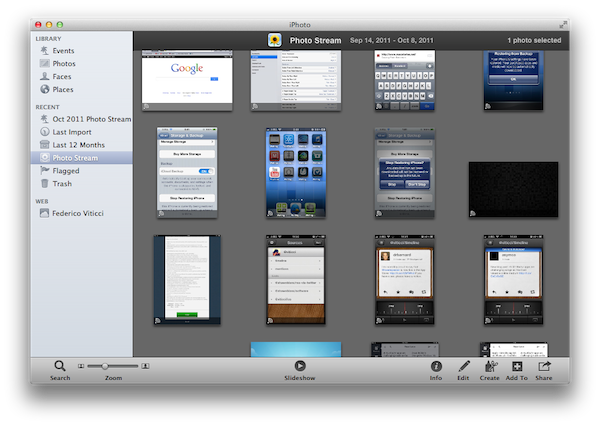
With the new iPhoto, users can enable Photo Stream directly in the app’s Preferences. Photo Stream can automatically fetch photos from the cloud, but there are two additional options to automatically import photos in Events, Photos, Faces and Places, and send all new photos from a Mac to iCloud. If Photo Stream photos are set to be automatically imported in Events, iPhoto will create single Photo Stream events as shown in the screenshot below; alternatively, users can also browse all photos in the Photos tab. Additionally, iPhoto will recognize Photo Stream items that have been already imported, and ask the user to edit the imported version upon trying to hit Edit in Photo Stream.

Photo Stream is located in iPhoto’s sidebar, and it offers the same set of controls of any album view. Users can play a slideshow of Photo Stream photos, zoom in/out, search, pinch to zoom, and quick look items by hitting the spacebar. An info panel on the right reveals additional metadata of a photo, such as location, size, file format and camera. Photo Stream items can be manually dragged out of iPhoto and onto the Finder – OS X will preserve the original file name, size, and metadata when copying photos from Photo Stream.

In my tests, iPhoto 9.2 has been fairly reliable at fetching photos and screenshots taken from an iPhone or iPad. On my home network, a photo snapped with an iPhone 4 (weighing 2 MB or less) would take around 20 seconds to appear on my Mac’s iPhoto; I assume on faster Internet connections an iPhone would take less to upload a new photo to iCloud, and even less seconds to push a photo back to the Mac.

iPhoto 9.2 is available now on Software Update. The new version is expected to be available shortly on the Mac App Store as well. You can find more iOS 5 coverage here. Read more


iOS 5: Notification Center


Notification Center is one of the key features of iOS 5, one that will profoundly change the way iPhone and iPad users approach the incoming stream of data and notifications on mobile devices. There is no doubt Notification Center is among the most anticipated new functionalities to land on iOS, but before we delve deeper into its advantages over the old notification system of iOS 4.x and its (very few) shortcomings, here’s a bit of background history that should better put Notification Center into context.

Looking at Notification Center now – and playing with it for at least a day – it’s clear the system is indisputably better than what we used to have on our devices in the pre-iOS 5 era. Criticized both by the tech press and average users alike, the old notifications had, really, one main problem: they became annoying with time. And by “became” I mean that they began to show their utter nature of a system built for non-connected applications as soon as the App Store turned into a platform for the always-on individual who’s constantly connected, even when he plays Angry Birds or is eating a new meal at a restaurant a friend suggested.

The old notifications were built for a different set of apps. Read more