Federico Viticci

10763 posts on MacStories since April 2009

Federico is the founder and Editor-in-Chief of MacStories, where he writes about Apple with a focus on apps, developers, iPad, and iOS productivity. He founded MacStories in April 2009 and has been writing about Apple since. Federico is also the co-host of AppStories, a weekly podcast exploring the world of apps, Unwind, a fun exploration of media and more, and NPC: Next Portable Console, a show about portable gaming and the handheld revolution.

Adobe Launches Creative Cloud, Proto, Collage for iPad, Updates Touch Apps

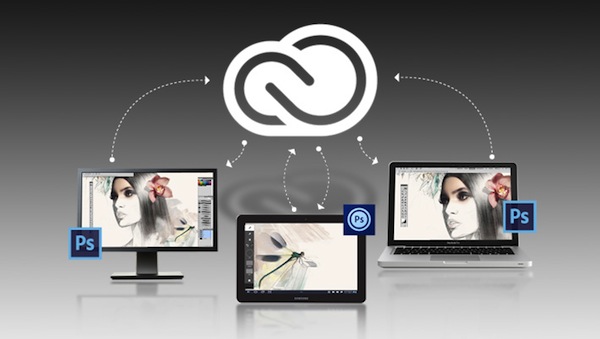
This morning, Adobe officially launched Creative Cloud, the company’s new subscription-based service that gives users access to CS6 applications, Touch apps, and other tools for a monthly fee. Described as a “digital hub” to download apps, access online services, and share files, Creative Cloud comes with various online storage options to store files directly on Adobe’s servers and access them at any time from connected apps, such as the Touch ones released or updated today.

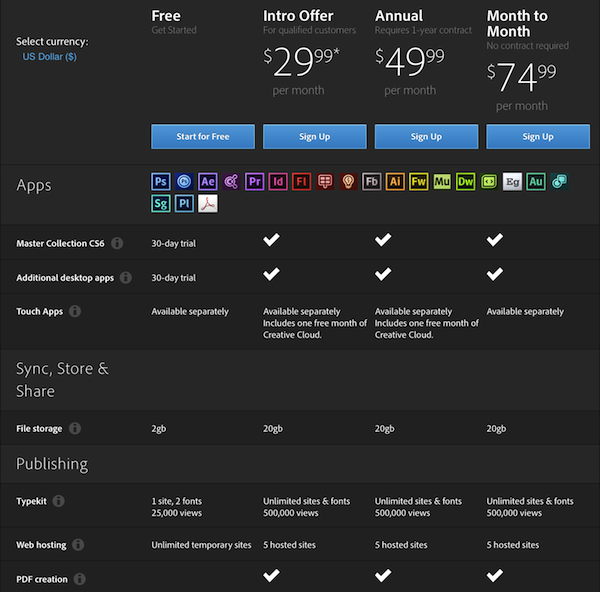
Creative Cloud starts at $29.99 per month with a one year contract for qualified customers (all registered users with CS3 or later); standard pricing, as detailed in the image below, starts at $49.99 per month with a one year contract, or $74.99 per month with no contract required. Unsurprisingly, Adobe maintained the same pricing scheme for European customers, with subscriptions starting at €29.99, €49.99 and €74.99. The Adobe Touch Apps, available on the App Store, will give users with an Adobe ID one free month of Creative Cloud with “2GB of cloud storage plus the ability to sync between tablet and desktop, access files from the web, and easily share with others.”

Read more


Read Later 2.1

Read Later 2.1

Speaking of Pocket, the best way to access a Pocket (or Instapaper) queue on OS X, Read Later, has been updated to include video support for the (rebranded) Pocket service inside the app. With the Pocket parser now capable of fetching videos from more sources, Read Later can, for instance, display YouTube or TED videos inline through your preferred reading style.

Formerly “ReadNow”, we covered Read Later when it hit 2.0 back in December:

Based on traditional RSS apps, ReadNow organizes your Instapaper and Read it Later articles for offline access, optimizing articles for a cleaner reading experience on your Mac. ReadNow features a custom article view that lets you style the article, change the line height and article width, and customize the font. Archiving and liking articles in the app will push those changes to the respective service in realtime. Unlike your favorite iOS apps, ReadNow lets you drag and drop articles into folders and tags to quickly move them from the reading list.

I particularly appreciate Read Later’s drag & drop support to easily move the Instagram photos I send to Pocket (via IFTTT) to a specific tag, and I use the app’s hotkey to quickly send a link from my pasteboard to Pocket. Support for video makes for a nice watching experience on OS X, and you can get the app for free on the Mac App Store.

Permalink

Pocket 4.1 Adds Dark Theme, Pagination, Refinements

Following a massive 4.0 update that saw Read It Later turn into Pocket (our review), founder Nate Weiner told us the new platform they had built would allow them to ”iterate and move faster than ever before”. Less than a month after Pocket’s launch, a major 4.1 update has been released today, bringing some new features and several refinements to the app that wants to make “save for later” mainstream.

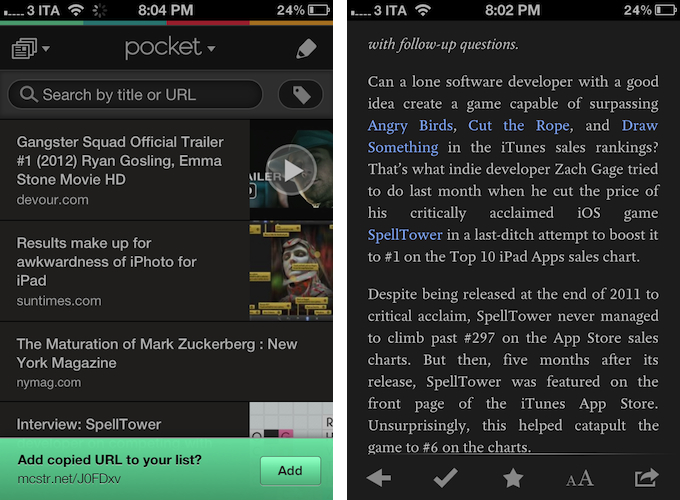
In my original review, I noted how there was no way to manually add links into Pocket, either with a “+” button or through automatic clipboard detection for URLs, like Instapaper does. Pocket 4.1 introduces a subtle, good-looking dialog for added URLs that gracefully slides up from the bottom of the screen every time you launch Pocket with a URL available in the iOS clipboard. I still think Pocket should also have a manual button to enter new URLs, but the addition of clipboard integration improved my app-switching workflow nevertheless.

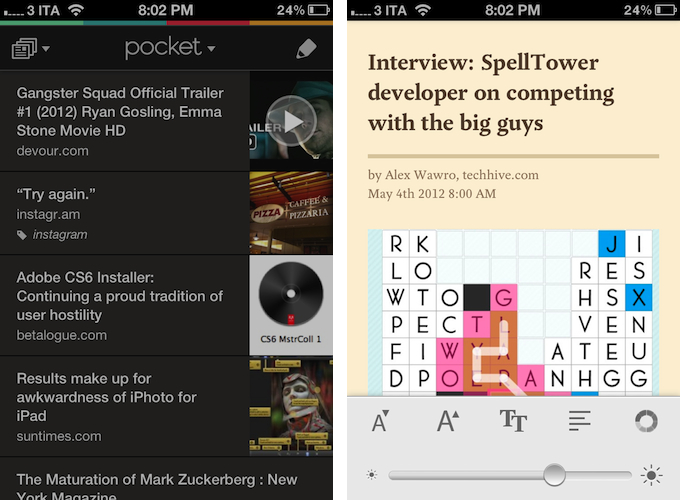
The most important changes in Pocket 4.1 are visual, as the app adds a bunch of new options to customize the look of the reading view and improve readability in different settings. New dark and sepia themes focus on high-contrast reading, and an application-wide dark option has also been enabled to make the UI easier on the eye for those who like to use Pocket at night. I like the new dark theme, as it really helps in navigating the inbox when I’m using Pocket while my girlfriend is sleeping and I don’t want to wake her with my iPhone’s display. Plus, the overall design of the theme is reminiscent of the old Read It Later in some way, which is a nice cameo. I am no fan of Sepia, but I guess it’s good to have options.

In the reading view itself, the Pocket team increased the maximum font size supported by the app – good for visually impaired users – and created a new pagination mode that lets you conveniently read long articles as single pages. Switching between “classic mode” and pagination isn’t a setting – rather, you can activate “page flipping”, as the team calls it, by swiping left or right on screen. The effect is pleasant, responsive, but I prefer to read my articles as #longreads I can scroll.

A minor change that I am deeply enjoying in version 4.1 is support for Devour and TED. For those not familiar with Devour, it is a website that collects “awesome videos” from YouTube every day, embedding them in a clean, neatly designed layout that is easy and fun to browse every day. Pocket 4.1 saves Devour.com URLs as video thumbnails, which support the fancy video player introduced in version 4.0.

Pocket 4.0 was a great app, but the improvements made to the service lately and this new version have turned the product into an experience that fits my reading and watching habits even more. You can find Pocket 4.1 on the App Store.


Apple Showcases Books “Made with iBooks Author”

Apple Showcases Books “Made with iBooks Author”

Every week on Thursday, Apple updates its various homepages across the iTunes Store, App Store, Mac App Store, and iBookstore to showcase new featured content and sections. This week, Apple has chosen to feature books “Made with iBooks Author” on the iBookstore’s homepage.

Made with iBooks Author, these books bring ideas and stories to life. Our handpicked collection features titles filled with 3D images, video, and interactive diagrams, galleries, maps, and more. To read Multi-Touch books, an iPad with the latest version of the free iBooks app is required.

The custom section, available here, showcases 40 titles that have been designed with iBooks Author to include rich media such as images and video alongside text. Featured books include Olivia Harrison’s “George Harrison: Living In The Material World” and DK Publishing’s “Story of the Titanic”. Links to download the iBooks app and browse more iBooks Author-made titles are also provided in the section, giving access to more content created using Apple’s software such as David Sparks’ “Paperless”.

Unveiled at an education event in January, iBooks Author is Apple’s latest entry in the OS X design and publishing offering. With an integrated interface to produce and lay out eBooks based on text, images, videos, and other interactive content, iBooks Author caught many’s attention with its new take on touch-enabled books that could bring innovation in an area that had been long dominated by static formats and outdated standards. iBooks Author was also in the middle of a debate due to a controversial End User License Agreement, which Apple eventually clarified.

Permalink

iTranslate Voice: A Siri-like Translator Powered by Nuance

According to Apple, Siri, the iPhone 4S’ virtual voice-based assistant, will gain support for additional languages in 2012. While international users are still waiting for Siri to support the creation of reminders, events, and messages in their preferred language – not to mention all the other functionalities that Apple enabled in the first “beta” of the assistant – it is still unclear if Siri will ever officially support a feature that has always seemed perfect for voice input and interactions: translations. iTranslate Voice, a new utility by Sonico Mobile, wants to fill this void with a Siri-like interface for an iPhone app powered by the same tech behind Apple’s solution: Nuance.

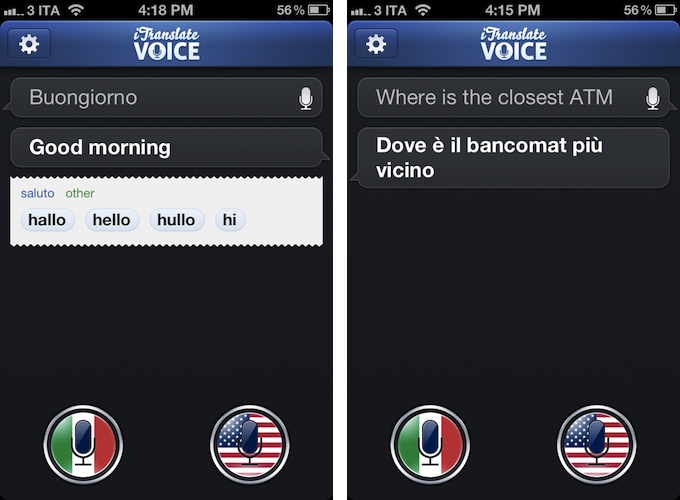
If Siri could do voice translations, I imagine they would look exactly like iTranslate Voice, as Sonico’s app borrows heavily from Siri in terms of overall interface design and style. Like Siri, iTranslate Voice displays ongoing voice interactions as conversations between you and the software; like Apple’s assistant, conversations are initiated by tapping on a circular, glowing microphone button that, however, in this app has been styled with flags. Conversations can be scrolled vertically, and tapping on single “bubbles” will you give you options to copy, share, or “speak” the words you dictated again. By tapping and holding the latest entry in a conversation, you can directly modify the words you said using the iPhone’s keyboard – this can be particularly useful to refine text input in case the app didn’t get some details right.

iTranslate uses Nuance’s speech recognition software to recognize and translate voices. iTranslate supports 31 languages, but only some of them support both voice recognition and text-to-speech. A complete list of supported languages (which also includes dictionary definitions, automatically displayed inline when available) is available on the developers’ website. Like Siri, iTranslate Voice requires an Internet connection to operate – something that, I presume, is related to some heavy server-side processing and sampling the app does in order to deliver high-quality and timely results without wasting the iPhone’s local storage.

In my tests, iTranslate Voice has been extremely accurate and reliable. I was surprised at first, but on second thought I realized that the fact that Nuance is delivering good translations in seconds as you talk to your phone shouldn’t really be a surprise at this point. I have tested the app with Italian-to-English translations (and vice versa), and the results have been more than decent – I actually think they are the best ones I have found on iOS to date, and this speaks clearly of Nuance’s strong position in the market. I don’t know if the developers are also enhancing Nuance’s results with their own engine of sorts, but the end result is what matters, and iTranslate Voice doesn’t disappoint here. The app recognized first names and terms like “ATM”, handled common expressions well, and it even understood spoken punctuation in Italian (“virgola” for comma, “punto interrogativo” for question mark, and so forth), adjusting the sentences and tone of software accordingly. Results are delivered in seconds both on WiFi and 3G, and the app also does a good job at detecting end of speech if you enable the option in the Settings.

I won’t judge Sonico’s decision to make iTranslate Voice look like Siri, but I will say that the system undoubtedly works, and makes it easy to speak to your phone to get instant, spoken translations. I can’t shake the feeling that this, like Siri, feels like the future of human-to-computer interactions being built right now, and regardless of whether Apple and Nuance will eventually bring this feature to Siri, iTranslate Voice is impressive and you can get it today.

iTranslate Voice is available on the App Store at $0.99.


MindNode 2.1

MindNode 2.1

One of my favorite apps for iOS, MindNode, has been updated this morning to version 2.1. Devoid of the iCloud integration that was previously teased on the developers’ website (iCloud continues to be a problem for several developers), the new version still sports some great improvements that will dramatically increase my usage of MindNode, especially on the iPad.

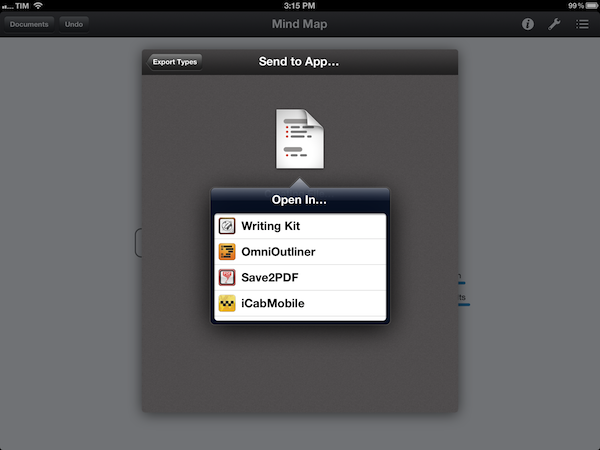
With Retina-ready graphics, 200% zoom level, and a new visual style, browsing and editing mind maps in MindNode now looks better than ever. I don’t rely on MindNode for the attractiveness of its graphics though, which is why I am welcoming the possibility of sending documents to other iOS apps installed on a device. Similar to the sharing menu The Omni Group has been using for quite some time in OmniOutliner for iPad, the new MindNode lets you export maps as FreeMind, PNG, text, OPML, or PDF documents. Automatically recognizing third-party iOS apps capable of receiving such files through the “Open in…” menu, MindNode 2.1 allows me to pass along maps as OPML files to CarbonFin’s Outliner or iThoughts HD, or send them as simple text files to my preferred text editor. Because MindNode can also open documents from any Dropbox folder, outlines I had already created in Outliner can easily be “visualized” and edited in MindNode. iOS could use a better way to let apps access the same version of a file, but with a plethora of importing and exporting options MindNode 2.1 provides a decent solution for now.

MindNode 2.1 comes with other bug fixes, and it retains the same simple-yet-powerful text entry and manipulation workflow of the previous versions. MindNode for iOS is $9.99 on the App Store.

Permalink

Bartender

Bartender

Really nice new Mac app by Surtees Studios: Bartender is a menubar app to hide other menubar apps. Providing its own custom bar to collect other icons from third-party apps, Bartender lets you organize your menubar apps while retaining the functionalities they come with. The app automatically finds third-party apps running in the menubar; it allows you to completely hide them, or show them in the Bartender bar. If you choose the latter option, your menubar apps will stil remain fully working with popover windows and keyboard shortcuts. I installed Bartender and I am using Fantastical and Delibar just fine; I only noticed a minor visual glitch with Take Five, and I believe the developers are adding support for more apps as we speak.

Furthermore, Bartender lets you assign a keyboard shortcut to the custom bar, and it even allows you to revert back and “show all menubar apps” with a separate hotkey. The Bartender bar can be placed anywhere at the top of the screen, and you can set apps that update (such as Sparrow’s menubar icon) to be shown in the regular menubar for only five seconds.

Neat utility, and only $7.50. A free trial is also available while the app is in beta.

Permalink

Latest Evernote Updates Show A Promising Future

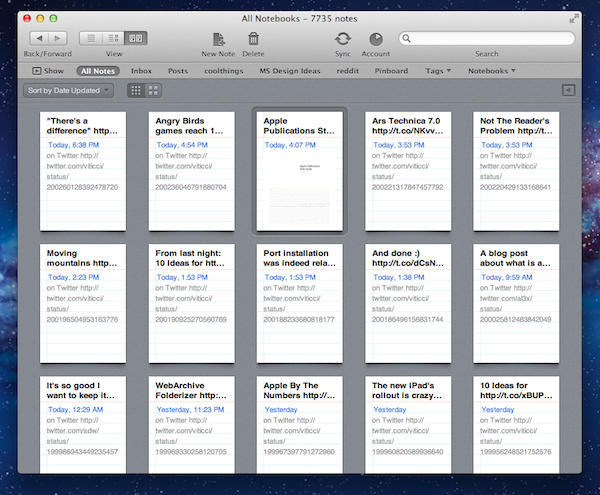
Yesterday, Evernote rolled out two major updates for its iOS and Mac apps. As a daily Evernote user who relies on the app to research posts, save PDFs, annotate images, and generally archive just about anything through IFTTT, I was pleased to see the improvements made in these versions are taking Evernote into a direction I like.

First, the iOS app. Focused on iOS 5 and the iPhone version, Evernote 4.2 brings a more accessible way of applying rich text and switching between editing and composing. Prior to version 4.2, users had to select text and hit a button in the top toolbar to bring up rich text editing – a process that was cumbersome and not as responsive and stable as one would expect from a top-notch iOS app. Evernote 4.2 abandons the separate text editing workflow and interface for a better, more integrated way of displaying text controls alongside the system’s keyboard. A new button will now let you easily switch between typing and editing, while retaining the same options that made Evernote a must-have among note-takers looking for rich text support. I like how selected text will remain selected if you switch between the keyboard and text formatting panel; surprisingly, however, Evernote still hasn’t managed to fit a Cancel button into the note editing screen. Read more


Rovio: Angry Birds Games Reach 1 Billion Downloads

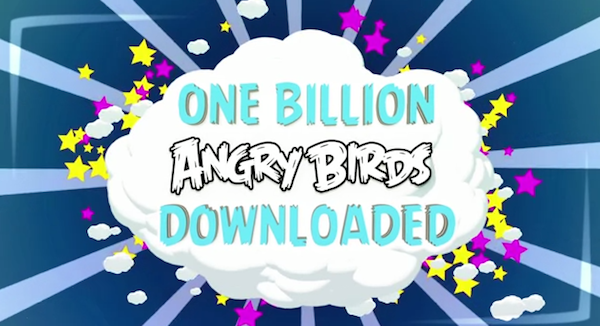
With a blog post and a video published this morning, Finnish game maker Rovio announced the Angry Birds franchise has reached 1 billion game downloads across all platforms. Just two weeks ago, Rovio said the latest entry in the series – Angry Birds Space – had become the fastest growing mobile game to date with 50 million downloads in 35 days. Today’s numbers mark an important milestone for Rovio, which earlier this week revealed its financial results for the year 2011 for the first time, hinting at a possible IPO in the future. In 2011, the company reported revenue of €75.4 million ($106,3 million), with earnings before tax of €48,0 million ($67.6 million) or 64% of total revenue in 2011, and hired 196 people.

Angry Birds downloads had reached 648 million by the end of 2011, confirming the company saw an additional 352 million downloads across all platforms in the first five months of 2012. The original Angry Birds for iPhone was launched in December 2009, and it took 6 months to reach 5 million downloads. Angry Birds is, according to Apple, the top paid iPhone app of all time, with other entries in the top free and paid charts for iPhone and iPad as well.

Angry Birds games are now available on a variety of platforms, including iOS, Android, OS X, Facebook, Google Chrome, and Sony’s PSP and Play Station 3. In November 2011, Rovio announced Angry Birds games had reached half a billion downloads.