Federico Viticci

10762 posts on MacStories since April 2009

Federico is the founder and Editor-in-Chief of MacStories, where he writes about Apple with a focus on apps, developers, iPad, and iOS productivity. He founded MacStories in April 2009 and has been writing about Apple since. Federico is also the co-host of AppStories, a weekly podcast exploring the world of apps, Unwind, a fun exploration of media and more, and NPC: Next Portable Console, a show about portable gaming and the handheld revolution.

Moving From iPhoto To Dropbox

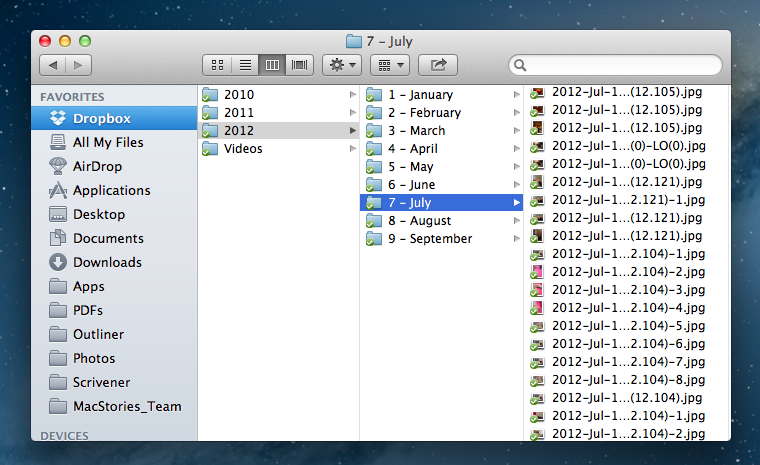
I like iPhoto on the Mac. The app’s interface sports Apple’s proverbial attention to polish and details, the Faces feature is nice, and I like the possibility to visualize photos on a map, just as I find Photo Stream very convenient for my blogging workflow. However, I realized that I don’t want to depend on iPhoto to store the photos that, twenty years from now, I’ll look back to as memories. I need my photos — moments captured as .jpeg files — to be photos, not a database. And at the same time, I need to be able to access them now from any device I have without having to worry about sync, apps, formats, and corrupted entries. I have decided to move all my photos from iPhoto to Dropbox.

This is something I have been thinking about for the past year. Do I want my photos to be stored inside someone else’s app? And if not, why not do the same for any other media I store on my computer? Should I also ditch Rdio and go back to neatly organized .mp3 files in the Finder?

I have come to the conclusion that photos are irreplaceable. Decades from now, I’ll probably be able to find a 2Pac record somewhere online or in a record store (will those still exist?). But not so with photos. If something — anything — happens to my photos, they’ll be gone forever. There won’t be anyone able to give me my memories back. Just as I do for text files — the words I write — I have chosen to store my photos — the things I experience — as .jpeg files, a format that should still be around for the foreseeable future. Read more


Paper 1.1 Now Available With Faster Ink, “Move”, “Duplicate” and “Easy Add” Features

2012 Apple Design Award winner Paper by FiftyThree has reached version 1.1 today, adding a number of much requested features and improvements to bring better organization of pages and smoother ink. Paper, a digital sketching app for the iPad, made headlines earlier this year as it somehow managed to make the process of drawing on screen fun and intuitive. With sharing built-in, a clever in-app purchase mechanism (you can buy single tools at $1.99 each, or the entire package at $6.99), and a simple multi-touch based interface, Paper has become for many the best way to take quick visual notes and draw sketches on iOS.

Today’s major update brings up to 3x faster virtual ink for every tool included in Paper, and users can now also draw with their fingers (or a stylus) to the edge of the screen, which wasn’t previously possible. In an interview with The Verge’s Ellis Hamburger, the Paper team shared some of the secrets behind their technology:

When you draw, you want strokes to appear at an even speed and even rate, which gives the system a reliable feel. If you hit the CPU or GPU at an even rate, the results end up being very smooth,” he says. Every brush inside FiftyThree’s “Expressive Ink Engine” has been fine tuned to be up to three times faster, and you can now draw all the way to the edge of the screen — a top request from users. The 1.1 update also saves battery, since requests are made to the iPad’s processor more consistently. The Rewind feature, which lets you undo brush strokes, also received some attention in Paper 1.1, and responds accordingly based on how quickly you move your two fingers in a circle.

The big new feature of this new version, however, is the improved organization. Relying once again on multi-touch to navigate the core elements of the app, users can now tap & hold with one finger to select a page from a notebook, then use the other hand to navigate other notebooks as they normally would; once in another notebook, the tap & hold can be released to drop the page in its new location. The “move” feature is a welcome addition that, alongside the new Duplicate function, should make for a much better experience for those who rely on Paper for wireframes, project templates, and more.

Paper 1.1 is a good update, especially thanks to the focus on better organization of pages, which was a huge downside of previous versions of the app. Check out Paper 1.1 on the App Store, and the official promo video below. (Also: pardon my poor drawing skills. But, yes, real coffee is Italian)
Read more


Twitter Archiving Tool Watermark Gets Dropbox Export Feature

Recently relaunched under a new name, Manton Reece’s Watermark is one of my favorite web services. Seamlessly integrated with Twitter, Watermark is an archiving tool that, through filters and custom collections, lets you archive and search your entire timeline. From our previous coverage:

Tweet Marker Plus was one of my favorite services to provide the kind of Twitter functionalities that Twitter the company always ignored: powerful search and filtering tools, collections, and additional browsing options. Like Cue, Tweet Marker Plus has proven to be a worthy addition to my workflow to retrieve tweets and leverage the information shared on the platform every day.

I use Watermark on a daily basis to retrieve tweets that have been shared in my timeline – status updates that would be hard to retrieve using Twitter’s web interface, let alone the official apps. Twitter never invested in powerful archiving and filtering tools, and Watermark provides a fantastic backup solution to know that, in the background and automatically, your timeline will be archived and made searchable for the future. This is important for online data preservation, a subject I’ve been exploring for the past year.

Today’s update to Watermark introduces yet another option to make sure your data will always be with you: automatic Dropbox export. Available in Watermark’s settings, once authorized with Dropbox the service will create archives of filters, collections, and your own tweets as .csv files. For your tweets, the 10,000 most recent ones will be saved, whereas filters and collections are limited to 1,000 for now. As Manton writes on his personal blog:

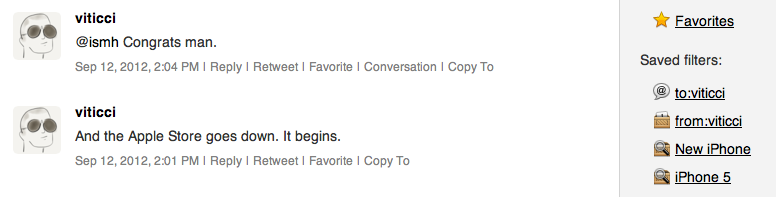
Dropbox sync fixes that. Watermark can now automatically copy tweets (and App.net posts) from your saved filters and custom collections to CSV files on Dropbox. For example, search Watermark for “iPhone 5”, click “Save as filter”, and the most recent 1000 tweets matching that query will appear in a file called “iPhone_5.csv” on Dropbox. It keeps running in the background, so the files are updated every hour as new tweets matching the search are downloaded by Watermark, even if you aren’t signed in.

Like I said, I use Watermark every day, and being a Dropbox fan as well, it’s great to see the two services coming together. I feel like Dropbox is becoming, for many, the de-facto “filesystem for the web”, and it only makes sense for a service like Watermark, which aims at freeing data from the pressure of Twitter, to gain an export option based on it. Right now, tweets are saved in .csv files with their ID, author’s username, date, service (Twitter or App.net), message, and original URL. In a future version, I hope Manton will consider some kind of plain text export option as well, though that might be tricky; right now, I’m comfortable with the structure of .csv archives.

Watermark is a service I highly recommend, and it’s only $5 per month.


Apple Details iOS 6 Feature Availability By Country

As noted by Horace Dediu, Apple has published an official list of iOS 6 feature availability on its website. While iOS 6 is officially coming out next week, on September 19th, not every feature will be available in every country.

The list focuses mainly on Siri, Maps, and Dictation. Availability of iTunes Store and App Store content is mentioned as well, but that’s not really new if you’ve been following the expansion of Apple’s digital storefronts in the past months. What’s interesting ahead of iOS 6’s launch is the list of features that, due to content limitations or the “beta” nature of Siri, won’t be available in some parts of the world.

For instance, Maps’ “standard” operation will be available from Afghanistan to Zimbabwe for a total of 181 supported countries. This should include the “standard” view of Maps – the new tiles that Apple is using after removing Google’s ones from iOS 6 entirely. Similarly, the Satellite view of Maps will be available in the same 181 countries worldwide. However, things start getting different with Maps’ Directions and and Turn-by-Turn navigation: the former will be available in 96 countries, the latter in 56. 3D buildings, another feature of Maps, will only be available in the United States at launch, whereas Traffic information will be available in 23 countries. Last, Maps Local Search will be available in 49 countries, and Business Reviews and Photos in 15.

Siri is even more limited. In spite of the voice assistant gaining support for more languages in iOS 6, several functionalities and integrations will be limited by the user’s location. So, for instance, while everyone will be able to set Siri to a supported language and issue commands, Sports data will be limited to 15 countries; Twitter and Facebook integration to 14; Local Search and Restaurant Information to 10, but Restaurant Reviews will only be available through Siri in 9 countries and Reservations in 3 (USA, Canada, Mexico). Another Siri integration, Movies, will be limited to 13 countries for Movie Information, 4 for Reviews, and only 3 for showtimes.

As Apple embraces more third-party services in its operating systems, it’s no surprise that some features will be restricted to only the countries where those services are fully operational. The same happened with the first version of Siri last year – some commands were only supported in the United States initially.

Check out the full list of iOS 6 feature availability here.


iPhone 5 Camera Tests and iPhone 4S Comparison

iPhone 5 Camera Tests and iPhone 4S Comparison

As usual with new iPhone releases, Apple has created a webpage showing “actual photos taken with the iPhone 5”. It is available here, and it features a gallery of six photos with an option to view them in full-size (the iPhone 5’s camera shoots photos at at 3264×2248 pixels).

Curiously enough, Dpreview’s Scott Everett recently took a photo of Big Sur in California (the location pictured above) with an angle very similar to Apple’s one for the iPhone 5 (also embedded above). Because of this, Dpreview was able to closely compare the picture quality of the devices with the same subject. While the camera may appear to be the same, there are some notable differences.

Looking at the EXIF data of the images confirms Apple’s assertion that this is a new sensor, despite the pixel count remaining the same. Close examination shows the iPhone 5 is using a 4.1mm lens to give a 33mm equivalent field of view, rather than the 4S’s 4.3mm lens, which gave a 35mm equivalent view. This means the new sensor is a tiny fraction larger. The iPhone 5 has also selected ISO 50, 1/3EV below the 4S’s minimum sensitivity of ISO 64.

Last year, a Sony camera was found in the iPhone 4S’ teardown. Check out the 4S/5 comparison shots at Dpreview, and more iPhone 5 photos over at Apple’s website.

Permalink

Developers, Apps, And The iPhone’s Taller Screen

Developers, Apps, And The iPhone’s Taller Screen

Matthew Panzarino of The Next Web reached out to some iOS developers asking about the technical changes involved with a taller screen on the iPhone. As it turns out, adopting existing applications to the iPhone 5 will depend on how a developer chose to put his software together.

Some apps, ones that use a ‘table view’ element, will likely be able to simply “stretch the middle”, letting the table spread out to the top and bottom of the screen. But even those types of apps will need some tweaking before they’re completely fit to ship on the new iPhone. Apps that use custom graphics all around, like those with bespoke interfaces or many 2D games, will need a full revamp.

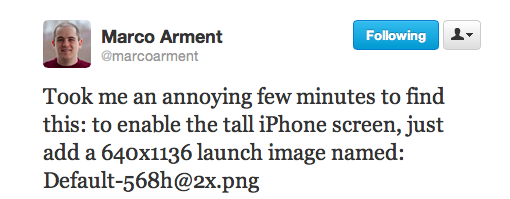
Apps that use “tables” – e.g. lists coded in the way Apple recommends – will be fairly easy to update. As several developers are already pointing out on Twitter, most apps will simply need a new “default image” that specifically targets the new iPhone’s 4-inch screen. However, other apps that present more custom elements such as 2D and 3D graphics will require more effort, as their entire interfaces will need to be redrawn for the extra pixels of the iPhone 5. It is likely that, for at least a few weeks, these apps will run in the “letterboxed” mode Apple announced today.

It’ll also be interesting to observe whether developers will slowly move away from placing UI elements at the top of the screen. First reports are suggesting the iPhone 5 is perfectly fine for one-handed use, but this could still become an issue for users with smaller hands who won’t be able to reach the area at the top.

Considering how this screen size will likely stay around for many years to come, developers surely have time to figure this out.

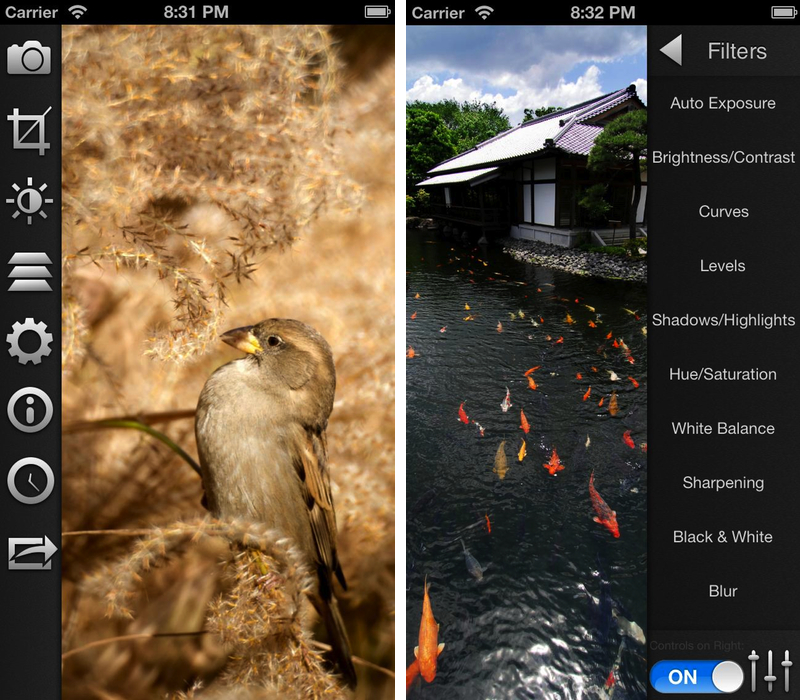
Update: Below, a simulation of an app updated for the new iPhone’s screen. The app is Filterstorm, and the screenshots were posted by its developer on Twitter.

Permalink

The iPhone 5’s Exclusive Feature: A Better Experience

What strikes me as different about the iPhone 5 announcement is that, for the first time in years, it doesn’t bring any new, big exclusive software feature.

The iPhone 4 introduced FaceTime. The iPad 2 had Photo Booth. The iPhone 4S got Siri. In Apple’s recent history, major updates to iOS devices were (almost) always complemented by some exclusive software functionality. Particularly with the iPhone, the company’s biggest source of revenue, Apple has always made sure since the 3GS (which got voice control, among other things) new iPhone models would have both new hardware and software to appeal to customers.

Not so with the iPhone 5.

If we exclude the five rows of icons on the Home screen, the possibility to take still photos while recording video, and face detection for 1080p HD video recording (both briefly mentioned here), the iPhone 5 doesn’t offer anything exclusive, software-wise, over the iPhone 4S.

I haven’t tried the iPhone 5 yet, so I can’t judge the capabilities of the device. But I can attempt to understand the reasoning behind this choice.

For now, Apple has got its software ecosystem pretty much figured out. There’s the Post-PC strategy, the App Store, feature parity between iOS and OS X, and a new iTunes coming out next month. Albeit slowly, Siri is evolving, and it is coming to more devices. iOS 6 will be released next week, and it’ll introduce previously-announced new features like Maps, Passbook, and Facebook integration. From a software standpoint, Apple is now performing the excellent art of iterating – or, this is how Apple rolls. Sometimes it’s more visible; other times things look the same. But they’re always changing.

And I believe this time things are changing with a different focus. The iPhone 4S leveraged Apple’s interplay of hardware and software – mentioned on several occasions during today’s keynote – to introduce one last big new iOS feature with a bang – Siri. If you look at iOS’ releases one by one, like we tech writers do every few months, it seems like they haven’t changed much. But it is only when you look back that you realize the differences were indeed palpable. And the iPhone 4S did have one big difference, software-wise.

With the iPhone 5, Apple is shifting from a “look at what’s new” mindset to a “look at how much better it is” approach. If you only looked at the screens of an iPhone 4S and iPhone 5 and used them without holding them in your hands, you wouldn’t notice much differences in the software. Sure, you’d see the bigger screen, but you wouldn’t be curious to immediately go check out that new app. But the thing is, we don’t use iPhones like that. We hold them in our hands, we touch them, we make calls with them and we stream content wirelessly from the Internet with them.

It’s not about the hardware alone. Because on that front, yes, things are new. It’s about how the hardware allows for a better experience without having to do anything new. It’s about refining what is already good. It’s about starting from scratch.

Ultimately, the iPhone 5 is about making the overall experience better through advancements in mobile technology. The iPhone 5 may not have new apps or iOS features for now, but it does offer an unparalleled experience. It does LTE with up to 8 hours of browsing. Reports are already coming in that, thanks to the A6 processor, everything feels snappier and more responsive. And if it really is comfortable to hold, the new 4-inch screen will show more content, which I see as a welcome improvement.

On a simple iOS feature-by-feature checklist, iPhone 5 loses. But on a scale of “Does this work better than before?”, I think it will be indisputably better than its predecessors. The interplay of hardware and software wasn’t functional to adding new features this time: the integration Apple prides itself upon should serve as a catalyst to make everything work better, without having to reinvent what we already know.

I think Apple’s Design webpage for the new iPhone sums it up best: ”if convention was standing in the way, we left it behind”.

iPhone 5 is about paradoxes. It’s bigger, but it’s slimmer. It’s got LTE, but longer battery life. It’s thinner, but it’s got a better camera, an redesigned speaker system, and new microphones. It’s new – but really, is it?

After the iPhone 5, new iOS devices won’t be judged by how many new apps they bring, but by how much they make the experience better.


Apple Posts September 12 Keynote Video

Apple Posts September 12 Keynote Video

Apple has posted a video for its September 12 Keynote that took place in San Francisco earlier today. The video can be streamed here, and a higher quality version should be made available in a few hours through iTunes. To avoid streaming errors, Safari is recommended for the best viewing experience.

Streaming from Apple Events’ website

Update: The keynote video is now available for download as well through iTunes.

Also, here’s a recap of our ongoing coverage for today’s event:

iTunes 10.7 Now Available

Apple Announces New iTunes for OS X, iPod Touch 5th Generation, and a New iPod Nano

iPhone 5: Our Complete Overview

The Numbers and Facts From Apple’s September 12 Event

We will post additional news on the site’s homepage, or tweet as @MacStoriesNet throughout the day.

Permalink