Federico Viticci

10763 posts on MacStories since April 2009

Federico is the founder and Editor-in-Chief of MacStories, where he writes about Apple with a focus on apps, developers, iPad, and iOS productivity. He founded MacStories in April 2009 and has been writing about Apple since. Federico is also the co-host of AppStories, a weekly podcast exploring the world of apps, Unwind, a fun exploration of media and more, and NPC: Next Portable Console, a show about portable gaming and the handheld revolution.

An iPad For Ben

Such a great story about an Apple retail store’s staff opening early to make a kid’s day feel special. Read the post to see why, look at the photos, and remember the importance of Apple’s work on Accessibility features for iOS:

Over the last few years Ben’s various vision team members have talked about how wonderful the iPad is as an assistive device. Kit researched and learned more about the amazing technology it has to help people with visual impairments, the list of apps great for kids with visual disabilities, even built in features like Siri can make a significant difference in the day to day lives of someone with a vision challenge. We just didn’t know how to make that happen with the budget, so it was something we kept in the back of our minds but hadn’t pursued. Once again little miracles started to fall into place with offers of help and surprises here and there and so much support and love from friends and family.

Permalink


The New Mac Pro Arrives Tomorrow

With a press release, Apple today announced that the new Mac Pro, originally introduced at WWDC, will be available tomorrow, December 19. From the PR:

The Mac Pro is available with a 3.7 GHz quad-core Intel Xeon E5 processor with Turbo Boost speeds up to 3.9 GHz, dual AMD FirePro D300 GPUs with 2GB of VRAM each, 12GB of memory, and 256GB of PCIe-based flash storage starting at $2,999 (US); and with a 3.5 GHz 6-core Intel Xeon E5 processor with Turbo Boost speeds up to 3.9 GHz, dual AMD FirePro D500 GPUs with 3GB of VRAM each, 16GB of memory, and 256GB of PCIe-based flash storage starting at $3,999 (US). Configure-to-order options include faster 8-core or 12-core Intel Xeon E5 processors, AMD FirePro D700 GPUs with 6GB of VRAM, up to 64GB of memory, and up to 1TB of PCIe-based flash storage.

As we wrote in October:

The new Mac Pro is all about being small, quiet, yet entirely capable of delivering performance for today’s audio and visual professionals. The Mac Pro, unlike desktop towers of old, has been designed into a compact round aluminum canister that sucks heat away from components using a single unified thermal core. While uniquely shaped, components in the new Mac Pro are user accessible, with connectivity to server racks and other peripherals being mitigated through an array of Thunderbolt 2 ports.

The new Mac Pro is Apple’s latest crown jewel, assembled in the US and packing an incredible amount of hardware innovations. More details are available at the Mac Pro’s official webpage.

Permalink


How Mac Experts Organize Their Files

My friend Lex Friedman asked me a few questions about the way I organize files on my Mac, and it was my pleasure to reply with some of my favorite apps and tricks. Notably, Hazel is the app that saves me so much time every day – I don’t know how I’d use my Mac without it.

The script shown in my Hazel screenshot comes from this post and it relates to the way I use CameraSync and Hazel to upload my iPhone’s photos to Dropbox and sort them automatically.

Make sure to check out how John Siracusa, Katie Floyd, and Casey Liss also organize their files here.

Permalink

Apple Posts “Best of 2013” iTunes Lists

Last night, Apple published its annual “Best of iTunes” list, which includes editorial picks for the best releases in music, movies, TV shows, apps, books, and podcasts of 2013. The special page, featured across the entire iTunes Store, can be viewed here.

For apps, as in previous years Apple has picked apps and games of the year, runner-ups, and other notable app releases of the year. The App Store category is organized in iPhone, iPad, and Mac apps; this year, Apple has included sub-sections as “Trends”, listing apps belonging to popular categories such as photo editing, productivity, and multiplayer games.

On iOS, Apple has picked Duolingo and Ridiculous Fishing as app and game of the year for iPhone, and Disney Animated and BADLAND on the iPad. For the Mac, Apple has chosen Wunderlist and XCOM: Enemy Unknown as app and game of the year; on the Mac App Store, Apple hasn’t included Trends, opting for a simpler “best apps” and “best games” organization.

Last year, Apple picked Day One and Deus Ex: Human Revolution as winners for the Mac; Paper and The Room for the iPad; and Action Movie FX and Rayman Jungle Run for the iPhone.

We have compiled the full list of apps below.

Read more


Apple Airs iPhone 5s Holiday Commercial Featuring AirPlay

Just in time for the holidays, Apple today aired and published a new iPhone 5s commercial focused on AirPlay and the impact that capturing memories can have on real life scenarios. The commercial, called “Misunderstood”, was first spotted by 9to5mac and subsequently posted by Apple on their official website and YouTube channel.

The commercial is interesting for a variety of reasons. The underlying theme is fairly straightforward: there’s a family gathering for Christmas, with parents, grandparents, kids, and other relatives getting together to celebrate the holiday. It’s snowing and kids are playing outside, running, building a snowman, and taking walks with their parents. Inside, adults are making preparations, cooking, talking by the Christmas tree – perhaps they’re seeing each other after months of work and normal life routine that prevents them from being always together, all the time. It’s a typical Christmas family reunion.

There’s a teenager with a 5s who in the first half of the commercial is shown constantly checking his iPhone: he’s holding the iPhone as he greets his relatives, he’s absorbed in the display and apps while everybody else is seemingly having a good time, and, again, he goes back to his iPhone while others are looking at the festive tree inside the house. At one point, his grandfather throws a hat towards his iPhone’s camera to grab his attention – “Put that thing down and come join us!”, the commercial seems to say. We’ve all seen (or been) this kid in our lives, full of electronic devices.

And then the commercial changes: as the entire family is gathered in the living room, the boy walks in, his iPhone in hand, and turns on an Apple TV connected to the television. He connects the iPhone to the Apple TV wirelessly with AirPlay, and he starts streaming a video. This is where Apple reveals the story behind the ad: the kid wasn’t just isolating himself from his family because he was bored and he needed his apps – he was making a home video for his family. The perspective changes: what, from the outside, looked like a teenager ignoring family members reveals photos and videos taken with the iPhone’s camera and (likely) edited with iMovie. There are touching clips of kids playing, people hugging, laughing, kissing, and just having the good time that everybody wants to have for Christmas – when life routine is far away in the city and you get to wake up late and take a walk with your kid in the snow. Heads turn in the living room – “How did you make this?”, you can almost hear people ask.

The iPhone shown in the first half of the commercial wasn’t being used as an escape device to kill boredom – it’s advertised as a creation device used to create memories, edit videos, and share a touching moment with family members that you don’t see much often anymore. From the iPhone’s camera point of view, now mirrored via AirPlay onto the big screen for others to see, everything makes more sense: seeing relatives and watching them talk, play, and share personal moments. The iPhone was used to record life rather than escape from it. The home video ends, notably, with a selfie; people are happy, the kid is happy. Cut to family house seen from outside. Happy holidays from Apple.

Apple’s new commercial may be deemed as unrealistic by some (an Apple TV at your grandparents’ house? Teens not using Snapchat?), but it’s good. It’s relatable, human, and it highlights the iPhone’s best features (the 5s’ camera, SloMo, powerful video editing, streaming, music) with the personal touch that Apple has been employing in the past years for commercials such as Photos, Music, and FaceTime Every Day. It’s a clever commercial in that it sells a product while telling a story that people know – but from the angle of technology empowering us in new ways.

The inclusion of the Apple TV and AirPlay is interesting. AirPlay, in its various forms, has long been considered one of Apple’s most undervalued features, and the company is trying to position it as an easy to use and useful companion to the main iPhone experience. There are no screens showing how AirPlay is activated or the Apple TV interface, but the message is there: there’s a way to show iPhone videos on the television. It’ll be interesting to see if Apple will follow-up to this in future commercials.

As Christmas approaches, Apple is once again advertising the iPhone as an experience more than a gadget. It’s not about the camera sensor, the faster processor, the apps, or wireless streaming taken individually – it’s about how all these elements, together, make technology (in this case, Apple’s technology) fit into our lives, empowering us.

You can watch the commercial below.


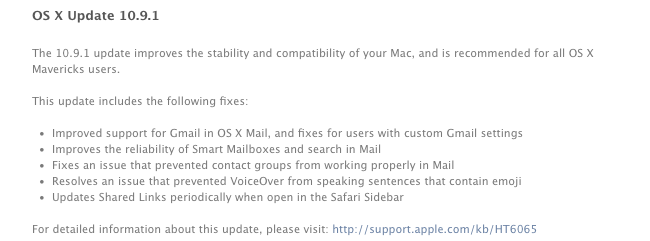
Apple Releases OS X 10.9.1

Today, Apple released the first update to OS X Mavericks, OS X 10.9.1. The new version, available for download on the Mac App Store through Software Update, brings improvements for Mail and Gmail compatibility and makes Smart Mailboxes and message search more reliable. Version 10.9.1 is the first public update to Mavericks, originally launched on October 22.

The built-in Mail app was heavily criticized after the launch of the free Mavericks update as changes made by Apple under the hood impacted the performance of the app when used with Gmail or with large mailboxes containing thousands of messages. In November, Apple released an initial standalone Mail update to improve the “general compatibility” with Gmail.

OS X 10.9.1 contains other improvements that Apple will detail in a document available here.


Ecoute 2 Review

Ecoute 2

Ecoute 2

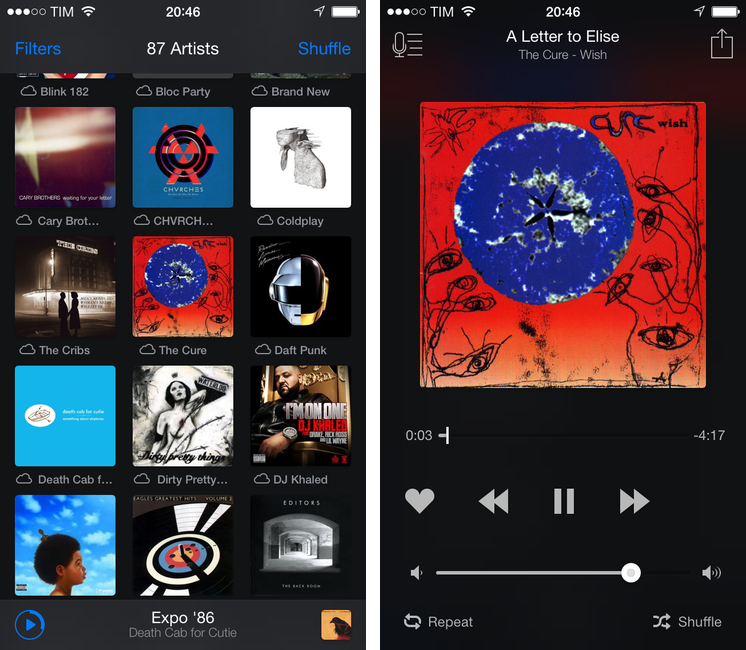
Last year, when we reviewed Ecoute, we called it the best music player for iOS. Apple’s Music app has never been packed with features when compared to iTunes on the Mac, but it’s the app that the majority of people use because it’s free and built into the operating system.

With iOS 7, Apple redesigned the Music app with some questionable choices for artist and album navigation and more advantages over third-party clients through the inclusion of iTunes Radio streaming and a special widget in Control Center to like songs and add them to your wish list. The Music app is, effectively, irreplaceable if you care about iTunes Radio and managing your music and playlists, but I think that the new Ecoute for iOS 7 does several things better than Apple’s app. Read more