Feb
3

Mozilla Working On Web Push Notifications for Firefox

Ryan Paul at Ars Technica reports about Mozilla’s “web push notification” project, which, in theory, would allow Firefox users to stay on top of websites like Twitter, Facebook, or Gmail using a push notification system similar to iOS:

Mozilla is developing a push notification system for the Firefox Web browser. It will allow users to receive notifications from websites without having to keep those sites open in their browser. The system will also be able to relay push notifications to mobile devices.

It’s important to note that this push notification system is distinct from the existing desktop notification mechanisms that are already defined in pending standards. The desktop notifications that websites like GMail and Seesmic Web display to Chrome users, for example, will only work when the website is left open in a tab. Mozilla’s push notification system moves beyond that limitation.

Jeff Balogh has written more about the project here, describing how notifications could be sent to any “Firefox device” including iPhones running Firefox Home:

Once the notification is in the system, we’ll deliver it to the recipient on all the devices they have Firefox installed, but we’ll try not to show duplicate notifications on different devices.

There’s a lot at stake here. On the one hand, desktop browsers have largely failed at delivering the kind of real-time connections and up-to-the-minute social/news updates you can expect from mobile apps on iOS and Android. Sure, there are extensions and add-ons, but they’re not nearly as integrated and “part” of the system. Push notifications almost seem “meant” for mobile devices. Furthermore, notifications are an area of mobile development both Google and Apple have been focusing on during the past years; on the desktop, apps have to rely on their own notification system or third-party apps, but browsers like Firefox sport no built-in push notification technology whatsoever. As far as “web notifications” go, Boxcar has been up to some interesting stuff including the desktop.

On the other hand, one could argue that we have enough notifications on our mobile devices, and having to see the red badge in our desktop browsers would be a terrible idea. I believe Mozilla’s project is worth of attention nevertheless, especially on the iOS side considering the existing Firefox Home app, and I look forward to seeing a first implementation, which hopefully will be available before Firefox 25 ships.

One of the next versions of Firefox, Firefox 12, may feature a series of new interface elements and functionalities that should both appeal to OS X Lion users and introduce new navigation options for those who dont’ want to save their-most accessed websites in a bookmarks bar anymore. As first noted by ExtremeTech, an early version of a proposed new tab page design snuck into a nightly version of Firefox; per Mozilla’s multiple channel releases, users of Firefox can test different versions of the browser, which range from Nightly to Aurora, Beta, Stable, and those uploaded directly to Mozilla’s FTP servers.

ExtremeTech wrote about the new tab page:

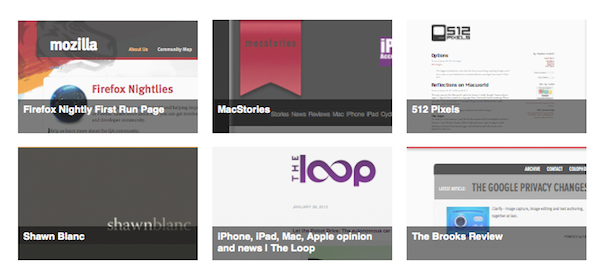
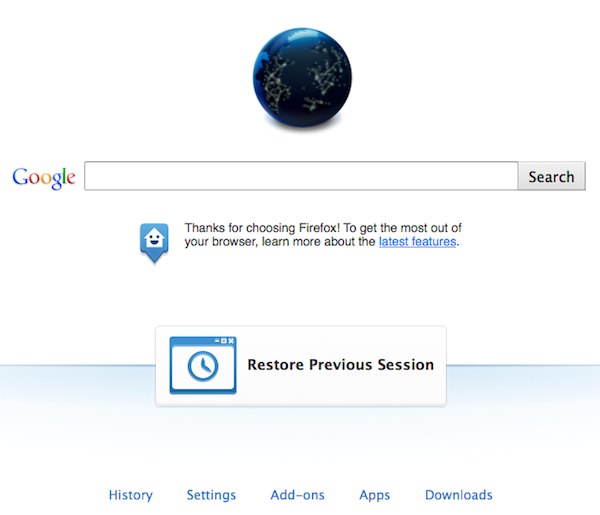
The Firefox home tab is a lot more exciting. Basically there are two phases: The first phase will add “launchers” at the bottom — one-click links to your downloads, settings, apps, and so on (pictured right). Phase two is a complete reworking of the home page paradigm, weaving in favorite apps, recent websites, and even instant messaging (pictured below). Phase one is expected to roll out with Firefox 12, but at the time of writing the code still hasn’t been committed.

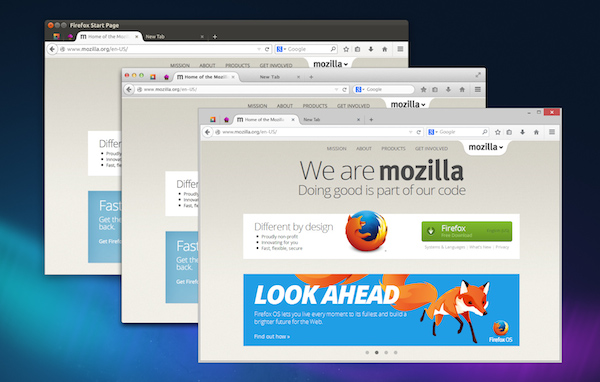
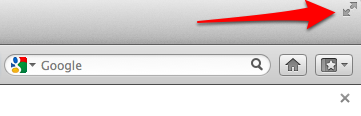
However, as also noted in an update to the original post, it appears Mozilla has pulled the functionality from the Nightly release of Firefox, leaving it in the “UX version” available for download on Mozilla’s servers. Upon comparing the standard Nightly build to the UX one, I noticed the latter already contains the grid design for top websites pictured above, and full-screen support for Lion.

I wasn’t able to activate ExtremeTech’s home tab page design with search, Top Apps, Top Sites and Chat in a single window; the current Firefox UX Nightly build features shortcuts along the bottom of the window to open History, Settings, Add-ons, Apps, and Downloads. A new “Restore Previous Session” button is also provided in case you haven’t set Firefox to automatically re-open previously open tabs on launch.

Changes that appear in Firefox Nightly builds typically carry over to the other stages of development and are further tweaked with refinements and bug fixes, but there could be changes in the features that Mozilla decides to implement once version 12 hits the beta channel. As for Lion support, Mozilla failed to deliver any significant optimization since the OS’ release back in July, unlike competitor Chrome which added new scrolling, full-screen support and gesture navigation (among other things) fairly quickly. A designer at Mozilla mocked up some ideas that the company could deliver in a future version of Firefox for Lion, but as of version 12 nightly (Firefox stable is currently at version 9) it seems those ideas haven’t been taken into consideration yet.

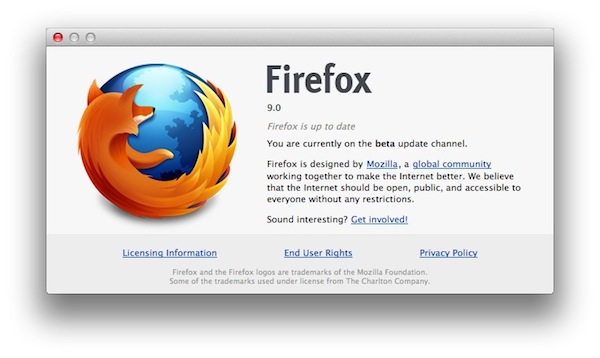
Two days after the release of Firefox 8, Mozilla has made available a first public beta of the next major Firefox update, Firefox 9. As expected due to the company’s fast release cycle, Firefox 9 will follow Firefox 8 in a few weeks, with Firefox 10 likely entering initial alpha testing soon.

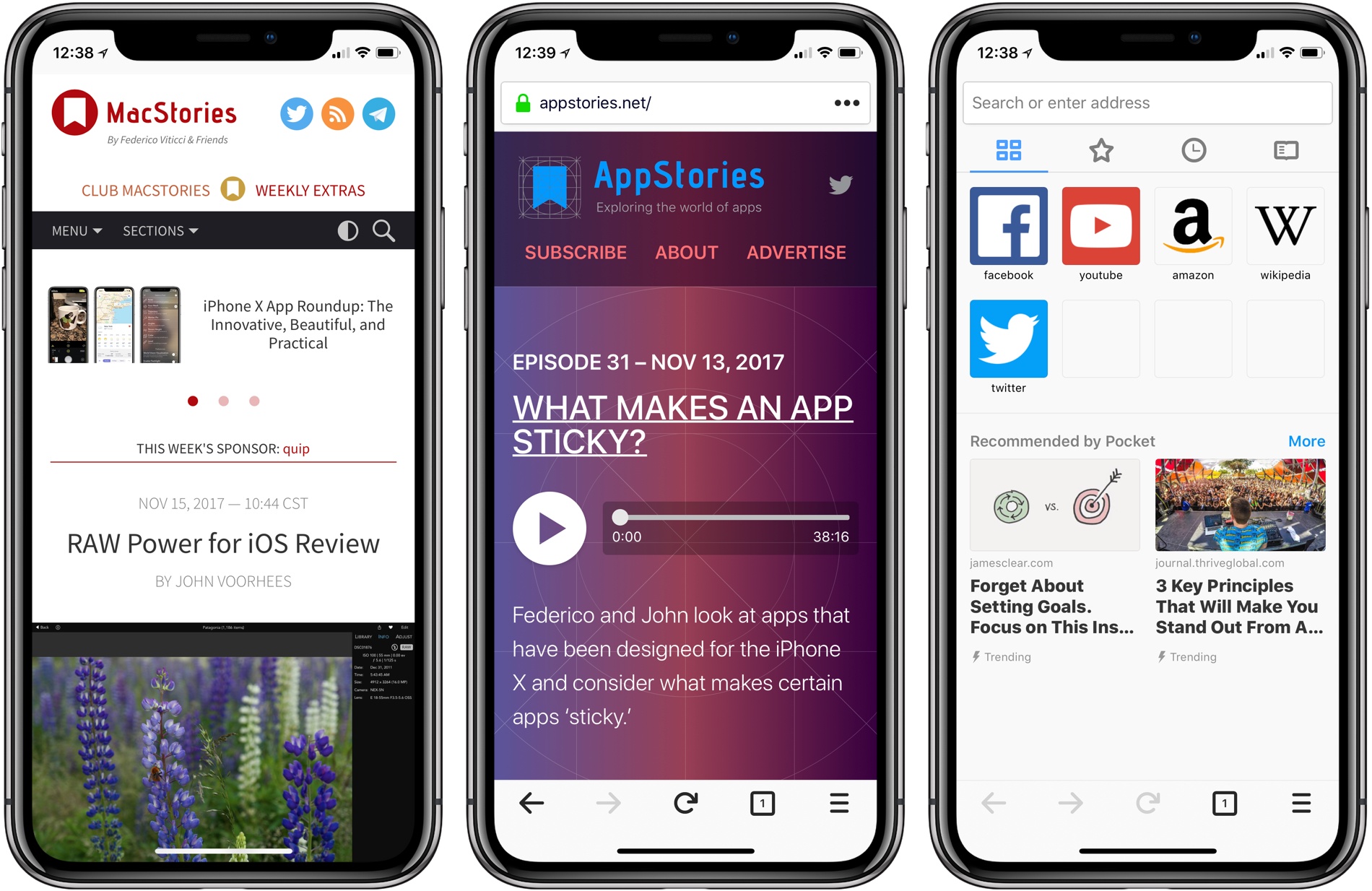
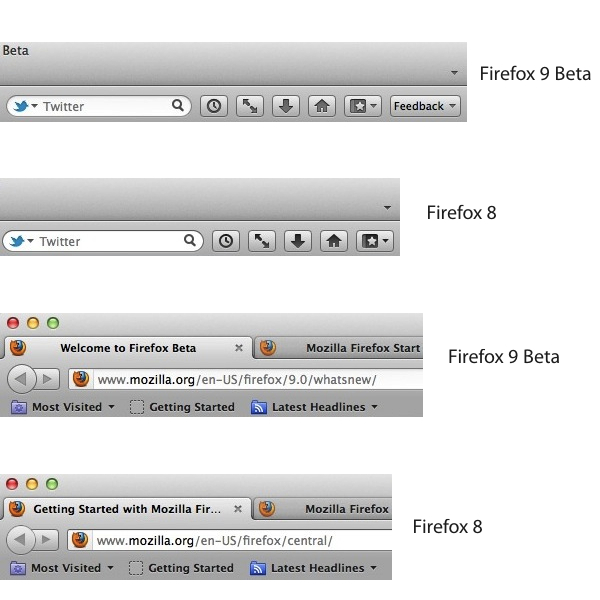
For the first time since the release of OS X Lion in July, Mozilla says they have included ”a new look that matches the Mac OS X Lion application toolbar and icon styles”. In the release notes, Mozilla refers to these changes as “improved theme integration for Mac OS X Lion”. For comparison, we have grabbed a series of screenshots to show the differences the “new look” brings between Firefox 8 and Firefox 9 beta. It is, however, possible that haven’t spotted all the differences between the two versions yet — MacStories readers are welcome to leave us a comment if they find more visual cues to the “new look” in Firefox 9 for Lion.

Mozilla mocked up some big Lion changes a few months back, and notably Firefox still hasn’t implemented several native Lion functionalities, like natural scrolling and full-screen mode.

Firefox 9 comes with other improvements for developers:

  • Type Inference: Firefox Beta adds Type Inference to make JavaScript significantly faster. To learn more about how rich websites and Web apps with lots of pictures, videos and 3D graphics will load faster in Firefox, check out this blog post.
  • Do Not Track JavaScript Detection: Firefox Beta enables JavaScript to show developers when users choose to opt-out of behavioral tracking with the Do Not Track privacy feature.
  • Chunked XHR Support: Firefox Beta supports chunking for XHR requests so websites can receive data that’s part of a large XHR download in progress. This helps developers make websites and Web apps faster, especially those that download large sets of data or via AJAX.

You can download Firefox 9 beta over at Mozilla’s website.

In late September Mozilla released version 7 of its Firefox browser, and as part of the company’s new fast release cycle we noted a few days after the release that a beta of Firefox 8 had already been seeded to developers. In the article, we noted Mozilla promised Firefox 8 would deliver better tab management, deeper Twitter integration, and new features for web developers.

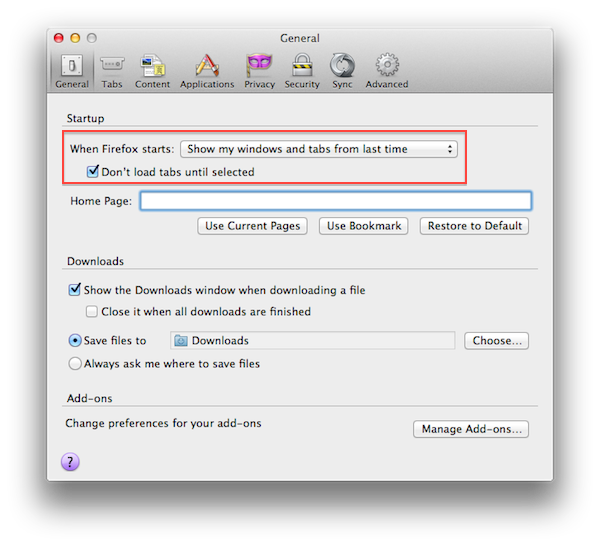
Uploaded to the company’s FTP servers a few days ago, Firefox 8 has been officially released today, with a blog post from Mozilla outlining the differences from the previous version. As with the Firefox 8 beta, Firefox 8 final comes with an option in the Preferences to load existing tabs (the pages you left open the last time you quit the browser) only when they’re selected. This should improve the browser’s startup times, as it’s no longer forced to reload all tabs upon launch.

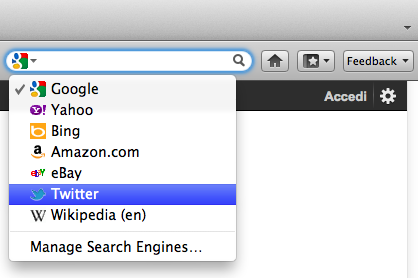
Another minor new feature is the addition of a Twitter icon in the app’s search box. Mozilla says “Twitter search is currently available in English, Portuguese, Slovenian and Japanese versions of Firefox”, and the new options basically just loads a new Twitter search page for anything you type in the search field — don’t expect Firefox to smartly recognize @usernames or #hashtags, and open Twitter profiles or hashtag pages instead of plain search.

Alongside better handling of third-party add-ons, security and stability fixes, Firefox 8 introduces a series of improvements for web developers:

Improved performance and memory handling when using <audio> and <video> elements

  • Added CORS support for cross-domain textures in WebGL
  • Added support for HTML5 context menus
  • Added support for insertAdjacentHTML
  • Improved CSS hyphen support for many languages
  • Improved WebSocket support

As far as Lion support goes, whereas Google updated Chrome to take advantage of the OS’ new native scrolling and full-screen mode, Mozilla’s browser still lacks any sort of Lion integration and support for new functionalities.

To read more about Firefox 8′s new features, head over Mozilla’s blog post on the update. Expect a beta of Firefox 9 to become publicly available soon; you can download Firefox 8 from Mozilla’s website here.

As Firefox 7 hit the public channel earlier this week, Mozilla has published a new blog post detailing some of the features of the new Firefox 8, now available in beta. Keeping true to their renewed schedule for Firefox updates, Mozilla aims to release a new version of their browser every six weeks, which has lead to some confusion among users as to whether it’s really necessary to call every update a major release when there are only minor differences to test.

Firefox 8 will deliver some improvements to tab management, allowing users to choose whether tabs should load at start-up, or only when they’re selected. This should allow for faster start-up times when windows with many tabs are restored; from a first test, it indeed appears Firefox 8 will restore the last opened tab, display other tabs’ titles and favicons, but load their contents only when the user clicks on them. Mac users can find this new option under Preferences -> General. Also, a new tab animation should make it easier to re-order tabs.

Another new feature of Firefox 8 is Twitter integration in the search box. By clicking on the search provider’s icon (by default it’s Google), users will have the option to choose Twitter and enter terms to look up on the social network’s Search page.

Firefox 8 also includes:

  • Enhanced control of add-ons: Users will receive a one-time notification to review and confirm third party add-ons they want to keep, disable or delete. When Firefox starts and finds that a third-party program has installed an add-on, Firefox will disable the add-on until the user has explicitly opted in, giving users better control over their Web experience.
  • CORS for WebGL textures: Cross-Origin Resource Sharing (CORS) enables Web developers to load textures from other domains for WebGL in a secure way.
  • WebSockets updates: Firefox now prevents the use of plaintext WebSockets when created from an SSL page, which improves security for users.
  • HTML5 Native Right Click Menu: Web developers can now add items directly to the Firefox right click menu using simple HTML5 markup.
  • HTML5 media elements: Developers can add a lot of video and audio elements to a website without impacting performance

Firefox 8 is expected to be available later this year. The first beta can be download from Mozilla’s website here.

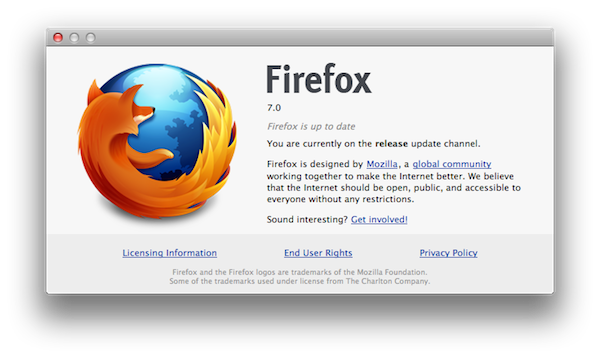
Last month Mozilla officially introduced a new version of its browser, Firefox 6, but we noted that work on Firefox 7 was already underway as part of Mozilla’s new six-weeks fast release cycle. Firefox 7 has been officially released today, adding a number of memory and engine improvements to make the app speedier, and more reliable. Mozilla says they have “drastically improved” memory handling — this is something that Mozilla announced back in August when they claimed that Firefox 7 would use 50% less memory to address memory leaks, crashes, and general instability with lots of different open tabs. On Windows machines, a new rendering backend is said to be increasing performances of Canvas operations, whilst all platforms are getting better password and bookmark sync with Mozilla’s built-in sync tool.

The most visible change in Firefox 7 is the lack of the http:// prefix in the address bar:

The new Firefox also brings some changes for developers:

New tools in Firefox make it easier for developers to build snappy Web experiences for users. A new version of hardware-accelerated Canvas speeds up HTML5 animations and games in Firefox. This allows developers to build more compelling and interactive Web experiences like Angry Birds or Runfield.

Firefox now supports the W3C navigation timing spec API so developers can measure page load time and website navigation against bandwidth speed, website traffic and other factors. This API allows developers to test user experiences remotely and easily and quickly optimize websites and Web apps for different types of users.

From the release notes:

  • Added support for text-overflow: ellipsis
  • Added support for the Web Timing specification
  • Enhanced support for MathML
  • The WebSocket protocol has been updated from version 7 to version 8
  • Added an opt-in system for users to send performance data back to Mozilla to improve future versions of Firefox
  • Fixed several stability issues
  • Fixed several security issues

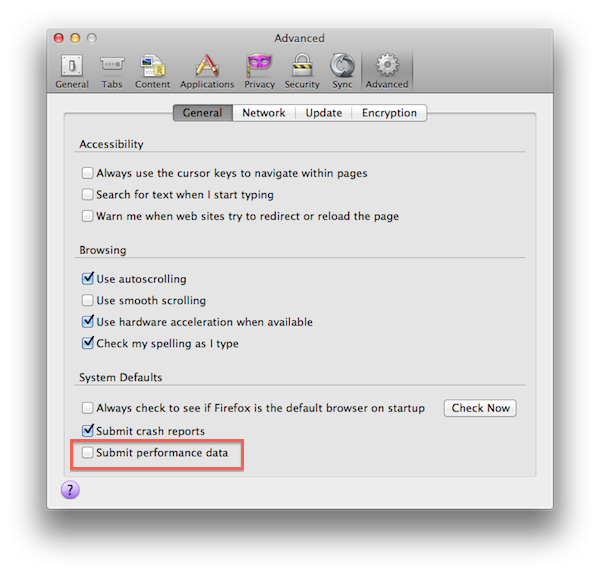
With version 7, Mozilla has also implemented a new usage statistic functionality called Telemetry that will help the company collect usage information (memory, CPU, startup speed) to improve future versions of Firefox.

Beginning with version 7, Firefox includes functionality that is turned off by default to send to Mozilla non-personal usage, performance, and responsiveness statistics about user interface features, memory, and hardware configuration. The only Potentially Personal Information sent to Mozilla when this functionality has been enabled is IP addresses. Usage statistics are transmitted using SSL (a method of protecting data in transit) and help us improve future versions of Firefox. Once sent to Mozilla, usage statistics are stored in an aggregate form and made available to a broad range of developers, including both Mozilla employees and public contributors. Once this functionality is enabled, users can disable it in Firefox’s Options/Preferences. Simply deselect the “Submit performance data” item.

Telemetry is off by default and needs to be manually enabled. The feature can also be deactivated from the Preferences.

Firefox 7 can be downloaded here. The latest version of the browser still doesn’t come with Lion-specific fixes and features, but mockups posted recently by Mozilla’s Product Visual Designer Stephen Horlander suggested the Firefox team is experimenting with new interface elements and navigation options for Firefox on OS X. (more…)

Firefox 5 was released less than two months ago and work on Firefox 7 is already underway, and to keep up with their “fast release cycle” promise Mozilla has officially released Firefox 6 today, making the browser 20% faster than Firefox 5 and improving the behavior of tab groups in Panorama, the functionality that allows users to get a quick glance at open tabs from an elegant bird’s eye view. With Firefox 6, released nearly five months after Firefox 4, Panorama comes with faster start-up times as tab groups are only loaded when selected; another noticeable improvement — bug fixes and speed optimizations aside — can be seen in the address bar, which now highlights domain names to give you a better idea of the website you’re on.

The new Firefox also brings important changes for developers:

The new “Web Developer” menu in Firefox provides easy access to tools that help developers build and debug websites directly in the browser. Developers will enjoy the new Scratchpad tool, which makes it simple to quickly enter, execute, test and refine JavaScript snippets in Firefox without needing to work in a one-line console. The Web Console is improved with an auto-complete feature and the ability to customize the console’s location to save developers time.

Whilst Mozilla is busy keeping up with three major releases in testing in their Aurora, Beta and Stable channels, recently posted mockups have shown that the company is interested in updating the browser’s interface in the future to fully take advantage of OS X Lion. The current versions of Firefox (in all the three channels available) don’t come with native Lion features such as full-screen or popover menus, though Mozilla’s Product Visual Designer Stephen Horlander suggested the Firefox team is experimenting with (or at least discussing) new interaction methods and graphical elements for Firefox on the Mac.

You can read more about changes in Firefox 6 here, and download the latest update from Mozilla’s website. Check out more screenshots after the break. (more…)

Like Matthew Humphries over at Geek.com, I was a big Firefox user back in the day. Before I had any care in the world about what a Mac was and before Google Chrome was in the pipeline, your three options were Opera, Firefox, and I.E. Firefox was great — I used it at home, loaded a portable version on a thumb drive so I could bypass the firewall at my high-school (yay proxy settings), and found it much more stable than Internet Explorer at the time. While I’ll occasionally return to Firefox, Chrome and Safari have dominated my work life, and unfortunately I’ve move on after slow browsing sessions and not wanting to deal with the memory hog Firefox has been (even after the quick turnaround in updates). Mozilla wants to change this perception however, and have started a project called MemShrink to deal with the runaway memory issues present in Firefox. According to Humphries,

Mozilla knows this problem exists and aims to fix it. By the time we see Firefox 7 available for download it will use as much as 50% less memory than any version that has gone before, as well as having those problematic memory leaks fixed.

Posting on his personal blog, Mozilla developer Nicholas Nethercote has stated that Firefox 7 will be noticeably faster. You will be able to leave it running overnight without issue, and closing tabs will free up memory.

Mozilla wants to do three things: improve speed, stability, and perception. Perception is important — while you don’t want to mask problem areas, making the user feel more engaged (instead of stalling) would be a terrific boon in usability. My problem with Firefox is that it feels like I’m always waiting for a webpage to load or for something to happen — maybe it’s slight and not as significant as I’m making it sound, but compared to Chrome (where everything loads as soon as I start typing), the difference is noticeable. Firefox 7 is slated for a 2011 release, so it shouldn’t be too long before we have a solid build in our hands. I’m looking forward to a faster and leaner Firefox.

[Mozilla Blog: Nicholas Nethercote via Geek.com]

Like Google’s Chrome browser, Mozilla announced earlier this year its intention to move to a fast release cycle for new major versions of its popular browser for Windows, Linux and Mac, Firefox. Following the launch of Firefox 4 in March — which brought major design changes from Firefox 3 — Mozilla moved up its schedule and released Firefox 5 in June, just three months after the previous upgrade, adding a “Do not track” feature for all browsers and platforms, as well as other HTML5 and CSS improvements, although the UI design remained largely unchanged from Firefox 4. As part of Mozilla’s new channel-based alpha and beta testing, Firefox 6.0 is already available as beta, whilst Firefox 7.0 has been made available as early developer preview (or alpha) in the Aurora channel. You can read more about Mozilla’s new “every six weeks” policy here.

While waiting for the future Firefox 6.0 and 7.0, Mozilla’s Product Visual Designer with the Firefox team, Stephen Horlander, has posted some mockups of what the future Firefox could look like on Windows and OS X machines. The images, posted as a presentation on Mozilla’s website, don’t necessarily reflect any upcoming feature in the next versions of Firefox, but they provide some kind of insight into the kind of discussions the team is having in regards of what could come next.

As you can see from the image above (more here), the proposed solution unifies Firefox’s top bar to accomodate tabs, a Home button, a new tab button, as well as integrated add-on manager that has its own tab (much like Google Chrome opens its settings in new tabs, rather than windows). The mockups have been built on top of OS X Lion, as you can tell from the window texture and the traffic lights in the upper left corner. Speaking of which, Horlander has also played around with Lion’s monochrome and popovers, implementing monochromatic icons for cut/copy/paste, bookmarks and tab controls inside a settings popover accessible from a gear icon next to the address bar. Another screenshot shows native full-screen support with minimal chrome when browsing a website. On the PC side, the proposed changes are similar, but based on Windows’ default theme.

It’ll be interesting to see whether these Lion-inspired changes for Firefox on the Mac will evolve into an actual release in the coming months. Meanwhile, Windows users can install this fan-made theme that takes some of Horlander’s UI elements, and applies them to the current version of Firefox.

Lion users trying to use Firefox 5 have seen the browser crash when loading a website that uses downloadable fonts, but a fix will be “coming soon” according to the Mozilla team. The bug in question has only been affecting users on OS X 10.7 Lion and as a result there will be a Mac-only update that will bump up the Firefox build number to 5.0.1.

According to Christopher Blizzard, the Mozilla Web platform director, they had alerted Apple to the problem in Lion but Apple did not fix the problem in the GM build released on July 1. Consequently Mozilla has “changed the font APIs that [they’re] using to newer versions which appear to fix the problem. He notes that the bug is serious enough that it is causing “severe crash problems” for Firefox 5 users on Lion.

Mozilla will also be updating Firefox 3.6 to completely disable downloadable web fonts when the browser runs on Lion because of a similar issue. Blizzard also ntoes that under Lion, 3.6 also has “scrollbar rendering issues” and urges users still running that version (which is set to enter ‘retirement’ soon) to upgrade to Firefox 5. If you are already on Lion, you can help Mozilla test the fix by downloading the latest build from the Aurora channel that already includes the fix.

[Via MacWorld]

In line with its more rapid release schedule, Firefox 5 was released just three months after Firefox 4, which had arrived earlier this year. According to the Mozilla Security Leader, Daniel Veditz, it also means that Firefox 4 will no longer be receiving any more updates, including any for potential security issues.

Several people have repeatedly said in public places (newsgroups, planning meeting, Monday meeting; could not find a blog or wiki page) that Firefox 5 will be the security update to Firefox 4, and that there will be no 4.0.2

Effectively this means that if you use Firefox, you are expected to be running the latest major version; otherwise you will face safety risks with using a browser that will no longer be receiving security patches. With this kind of a strategy, Mozilla has taken more than just the rapid release schedule from Google Chrome; it is also following the Chrome idea of only supporting the latest releases.

In some ways it does make sense, both Firefox 6 and Firefox 7 are expected to arrive this year. Supporting older versions would become very difficult whilst wasting resources that could be going into developing new features.

[Via Digitizor]

After a number of months in Aurora and Beta testing, the public release of Firefox 5 is expected to come sometime today, but ahead of schedule the downloads are already available now for all platforms.

Although the Firefox page has not yet been updated, notable new features in Firefox 5 include improved support for HTML5, MathML, XHR, more support for CSS animation, a ‘do not track’ option in the privacy pane and general speed and perfomance gains. There is also improved sync support, better add-on updates and improved spell checking for many languages.

You can download Firefox 5 here for Mac, Windows or Linux.

Update – Federico Viticci 5 PM GMT +1: Mozilla has announced the official release of Firefox 5, the first browser to enable the “Do not track” feature on multiple platforms. A full list of detailed changes to the browser can be viewed here.

The latest version of Firefox includes more than 1,000 improvements and performance enhancements that make it easier to discover and use all of the innovative features in Firefox. This release adds support for more modern Web technologies that make it easier for developers to build amazing Firefox Add-ons, Web applications and websites.

Here’s a direct link to Firefox 5.0 for Mac.