Posts tagged with "utility"

Paku: Hyper-Local Air Quality Tracking on Every Apple Platform

With millions of people facing a long, smokey summer here in the US, I thought it would be a good time to recommend Paku by Kyle Bashour, an iPhone, iPad, Mac, and Apple Watch app for tracking the air quality where you live.

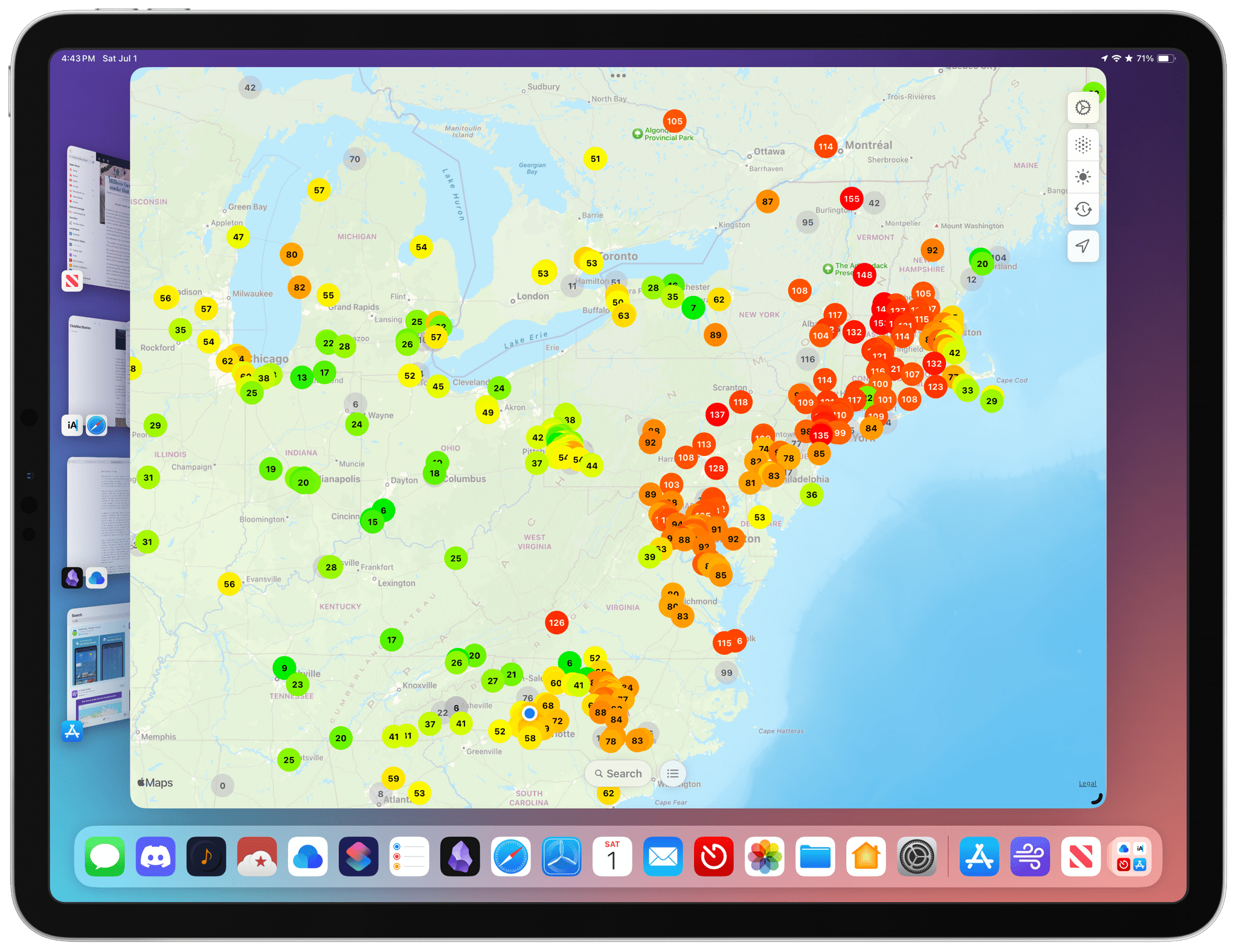
Paku on the Mac.

Paku on the Mac.

Paku combines Apple’s MapKit framework with public data from PurpleAir to track air quality globally. By default, the app displays Air Quality Index data as color-coded dots on its map UI. Just like Apple Maps, you can zoom out and pan around to see data in other areas or use the app’s search functionality, but the greatest value is in knowing what the air quality is in your neighborhood.
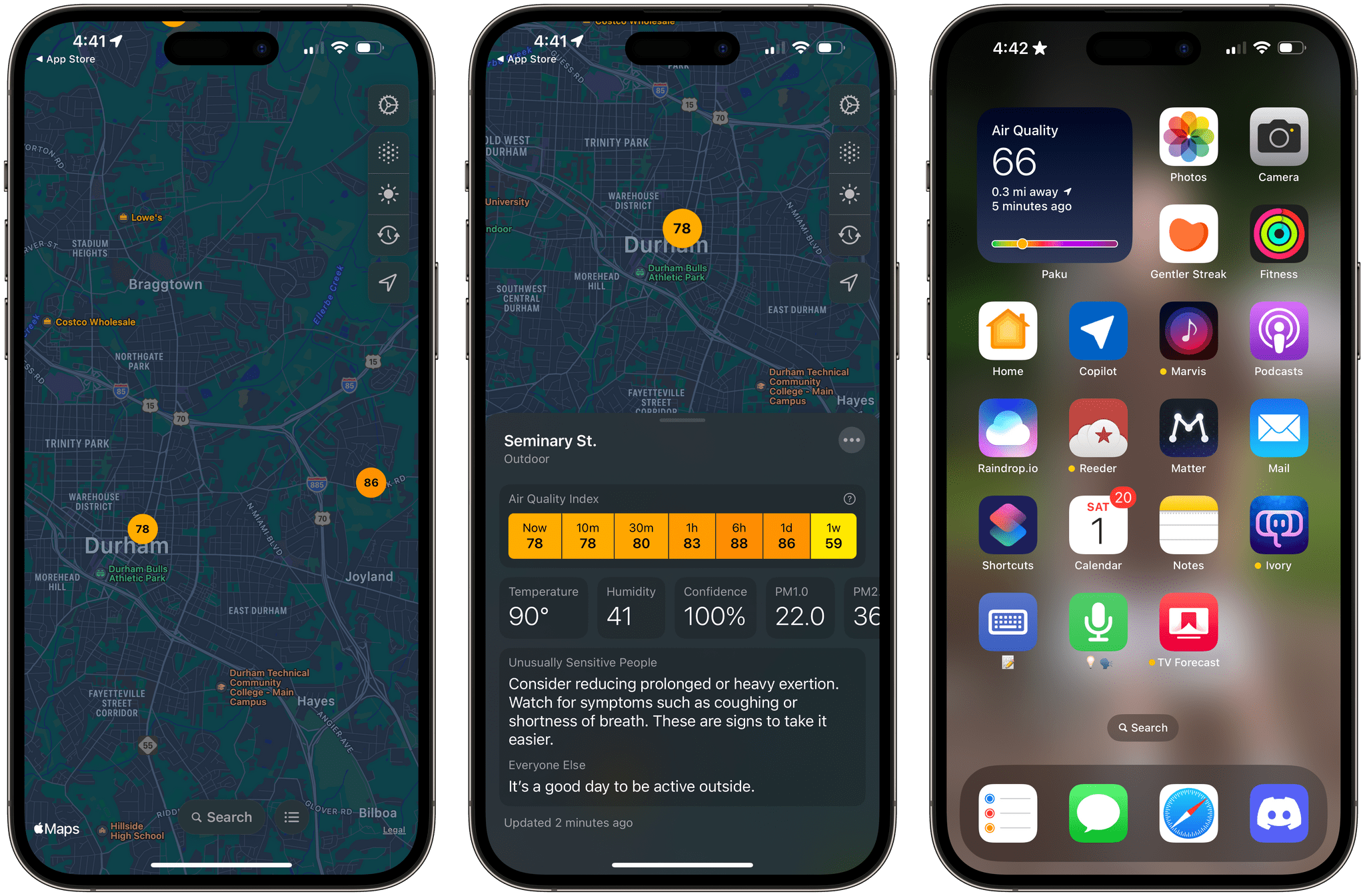
Paku running on the iPhone.

Paku running on the iPhone.

In addition to AQI data, Paku can display temperature, humidity, and PM1.0, PM2.5, and PM10.0 data, using the toolbar overlay on the app’s map. For more information about a station’s data, tap it, and you’ll get all the available data, historical context for the current reading, and an explanation of what precautions you should take if the air quality is bad. From the three-dot More button in the corner of a station’s data view, you can also favorite an air quality station, open the PurpleAir website, or hide a station.
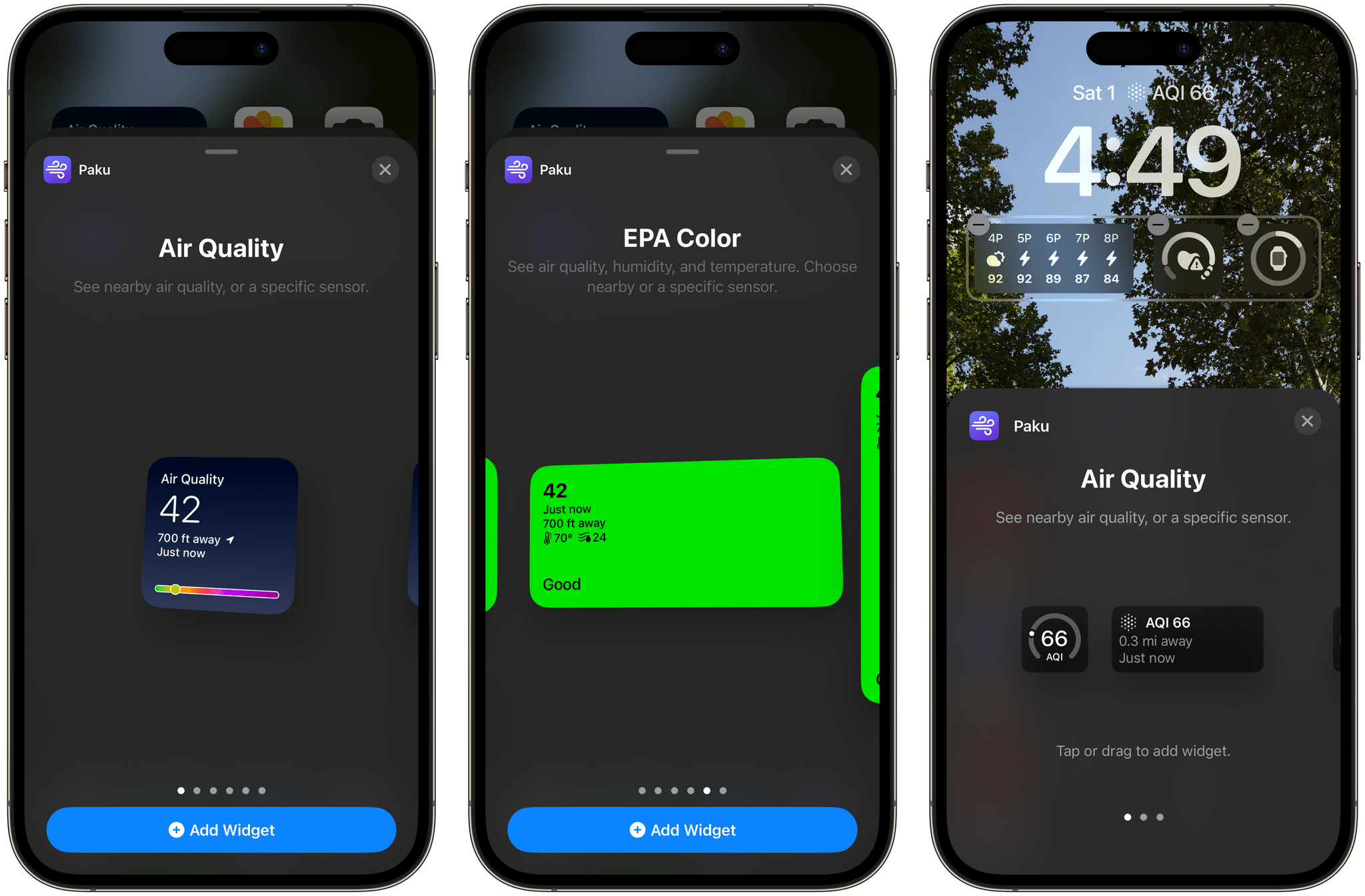
Examples of Paku’s widgets.

Examples of Paku’s widgets.

Paku includes Home and Lock Screen widgets too. For the iPhone’s Lock Screen, there are widgets to track air quality, temperature, and humidity. The same is true for Home Screen widgets, which feature the same types of data but use two designs. The first design uses a blue gradient background, big numerals for the primary data point, and a graphic that shows where your current air quality falls on the air quality scale. The other Home Screen widget design uses the EPA’s color scheme as the background of the widget to make the air quality reading even more glanceable.

Paku also supports a single Shortcuts action that opens the app, which is fine, but it would be better if the action returned the air quality, temperature, and humidity data instead.
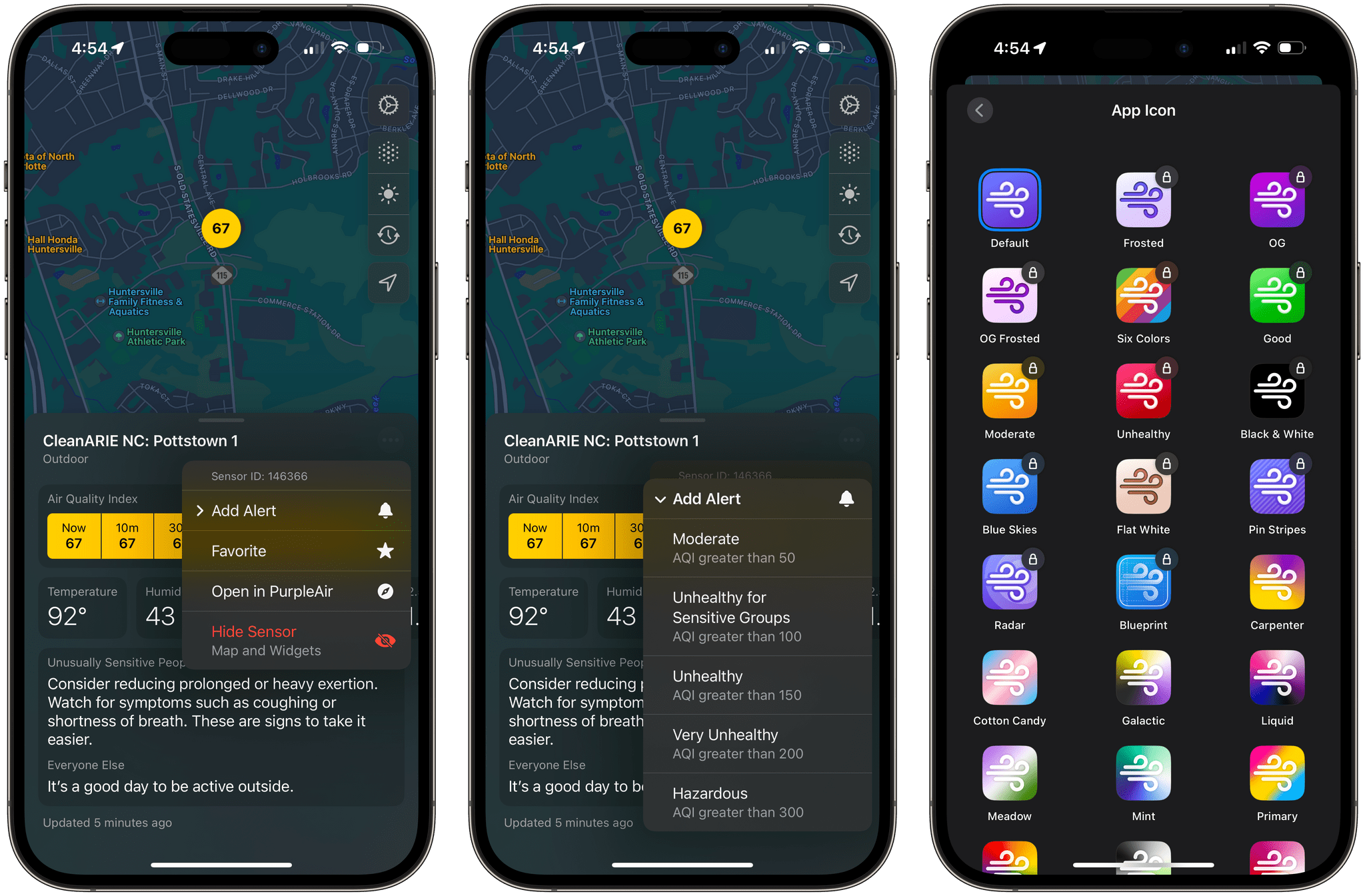
Air quality alerts and alternate icons are two of the Paku benefits that are subscriber-only.

Air quality alerts and alternate icons are two of the Paku benefits that are subscriber-only.

Paku is free to download but offers a subscription with additional features, including the ability to set alerts based on readings from a sensor when air quality reaches one of the scale’s thresholds, such as Unhealthy or Hazardous. Subscribers can also access data from private sensors you can install at your home and pick from a long list of alternative icons. Of those paid features, notifications strike me as the most useful unless you don’t have a nearby public air quality sensor that you can rely on. I’m fortunate in that there’s a sensor less than a quarter mile from my home, so I haven’t felt the need to install my own sensor.

When I moved to North Carolina, I was struck by how clean the air was compared to the Chicago suburbs. I’d tracked air quality on and off in my old neighborhood, but when I got to North Carolina, there wasn’t any reason to do so. Every day started and finished solidly in the green zone. That changed last week, and although there are areas with far worse air quality than here, Paku is back on my Home Screen, helping me decide whether I should get my exercise outside each day or do something indoors. I could use the AQI data from a full-blown weather app, but I love Paku’s clean, focused design and the fact that I can set its widgets to a sensor that’s just down the street from my house.

Paku is available on the App Store as a free download. Notifications, private sensors, and alternative icons require a subscription that is $1.99/month or $13.99/year.
Access Extra Content and Perks

Founded in 2015, Club MacStories has delivered exclusive content every week for nearly a decade.

What started with weekly and monthly email newsletters has blossomed into a family of memberships designed for every MacStories fan.

Learn more here and from our Club FAQs.

Club MacStories: Weekly and monthly newsletters via email and the web that are brimming with apps, tips, automation workflows, longform writing, early access to the MacStories Unwind podcast, periodic giveaways, and more;

Club MacStories+: Everything that Club MacStories offers, plus an active Discord community, advanced search and custom RSS features for exploring the Club’s entire back catalog, bonus columns, and dozens of app discounts;

Club Premier: All of the above and AppStories+, an extended version of our flagship podcast that’s delivered early, ad-free, and in high-bitrate audio.

Learn more here and from our Club FAQs.


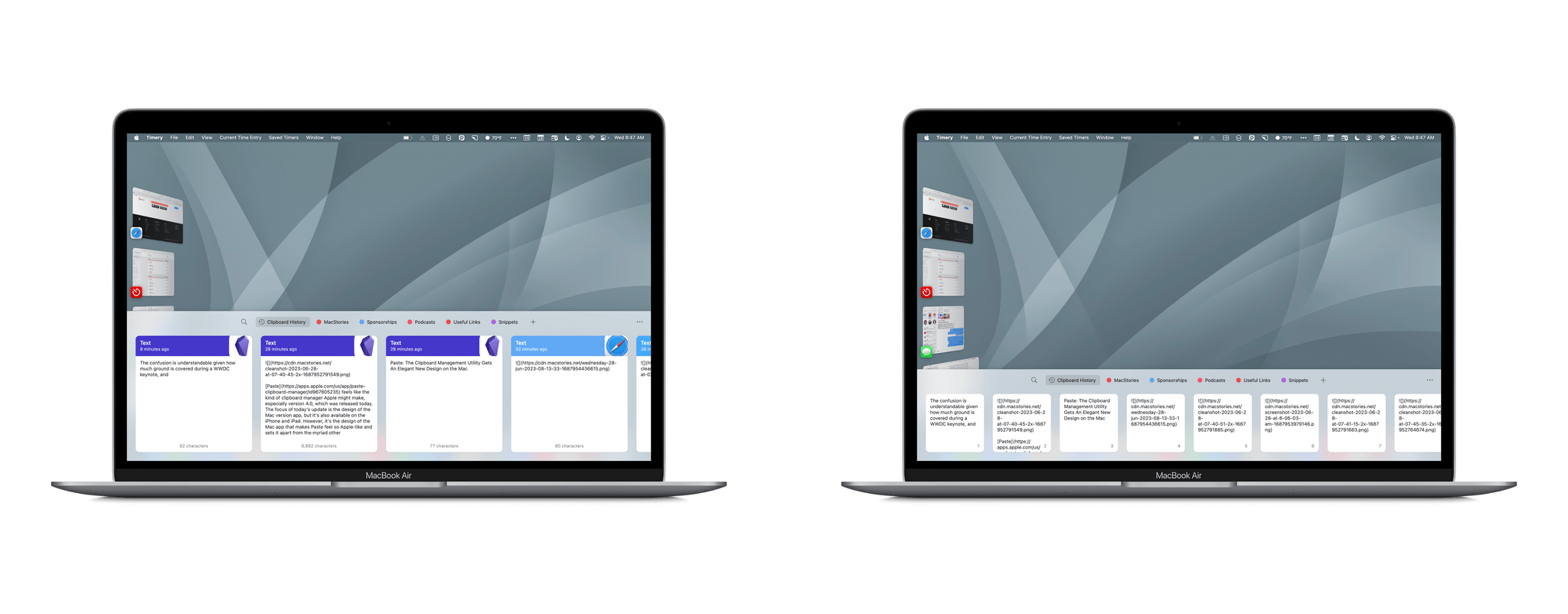
Paste: The Clipboard Management Utility Gets An Elegant New Design on the Mac

Paste feels like the kind of clipboard manager Apple might make, especially version 4.0, which was released today. The focus of today’s update is the design of the Mac version app, but it’s also available on the iPhone and iPad. However, it’s the design of the Mac app that makes Paste feel so Apple-like and sets it apart from the myriad other clipboard managers that are available.

Read more

Access Extra Content and Perks

Founded in 2015, Club MacStories has delivered exclusive content every week for nearly a decade.

What started with weekly and monthly email newsletters has blossomed into a family of memberships designed for every MacStories fan.

Learn more here and from our Club FAQs.

Club MacStories: Weekly and monthly newsletters via email and the web that are brimming with apps, tips, automation workflows, longform writing, early access to the MacStories Unwind podcast, periodic giveaways, and more;

Club MacStories+: Everything that Club MacStories offers, plus an active Discord community, advanced search and custom RSS features for exploring the Club’s entire back catalog, bonus columns, and dozens of app discounts;

Club Premier: All of the above and AppStories+, an extended version of our flagship podcast that’s delivered early, ad-free, and in high-bitrate audio.

Learn more here and from our Club FAQs.


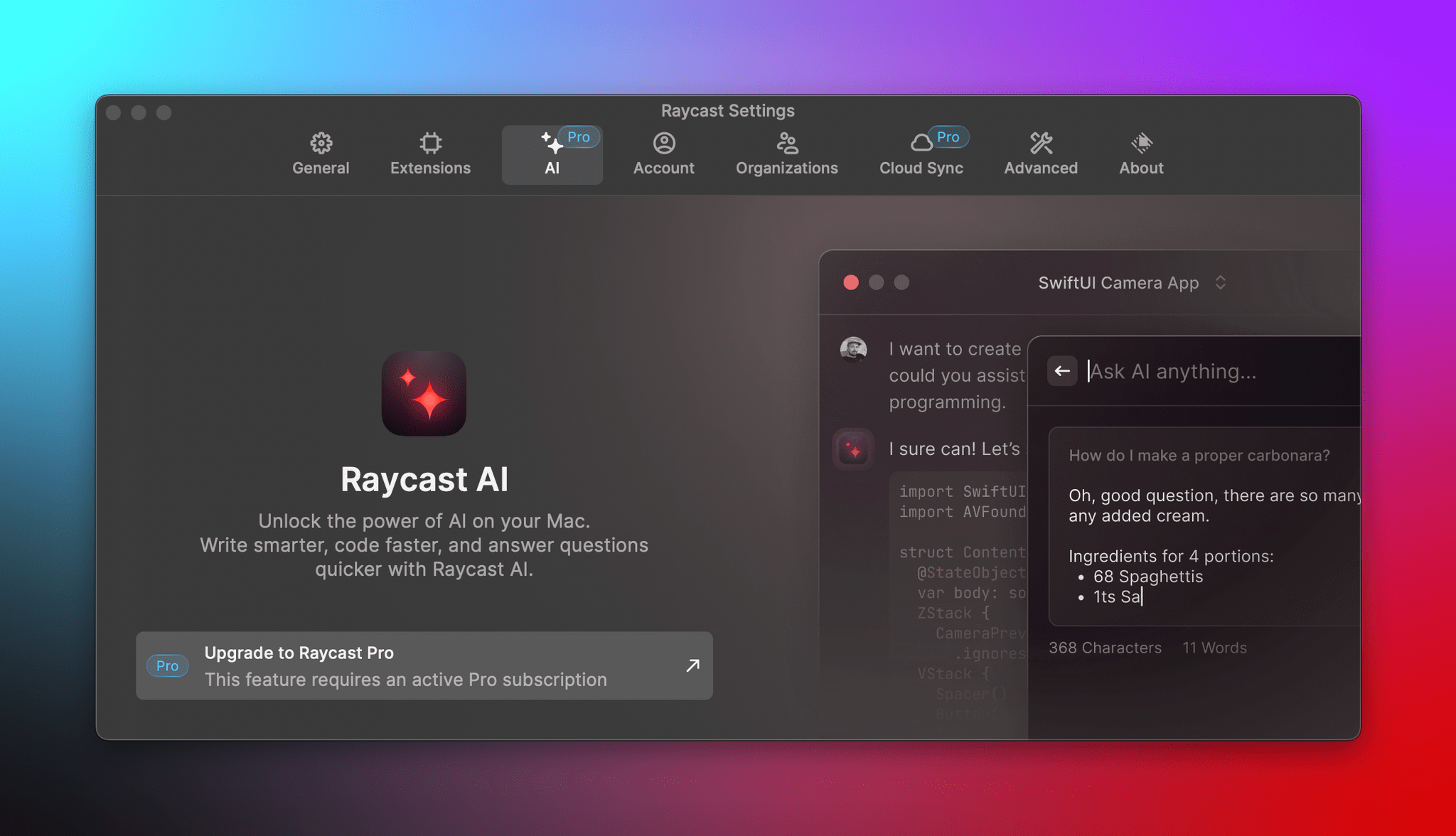
Raycast Introduces a Pro Subscription with New AI, Sync, Theming, and Clipboard Functionality

Raycast, the keyboard-driven launcher for the Mac, introduced a new subscription service today called Raycast Pro that adds AI, syncing, templating, and extended clipboard functionality to the app.

Raycast Pro, which is $8 per month when billed annually and is also included in Team plans, includes three artificial intelligence features:

  • Quick AI, which is meant to provide one-off answers that can be copied and pasted into whatever you’re working on
  • AI Chat, a chatbot window that floats onscreen, allowing for back-and-forth interaction
  • AI Commands, which include built-in commands for things like spelling and grammar checking, along with customizable commands

According to Raycast’s FAQs, the app uses OpenAI’s GPT 3 and GPT 3.5-Turbo large language models “as well as some other models” for their AI features and does not offer an option to use your own OpenAI API key.

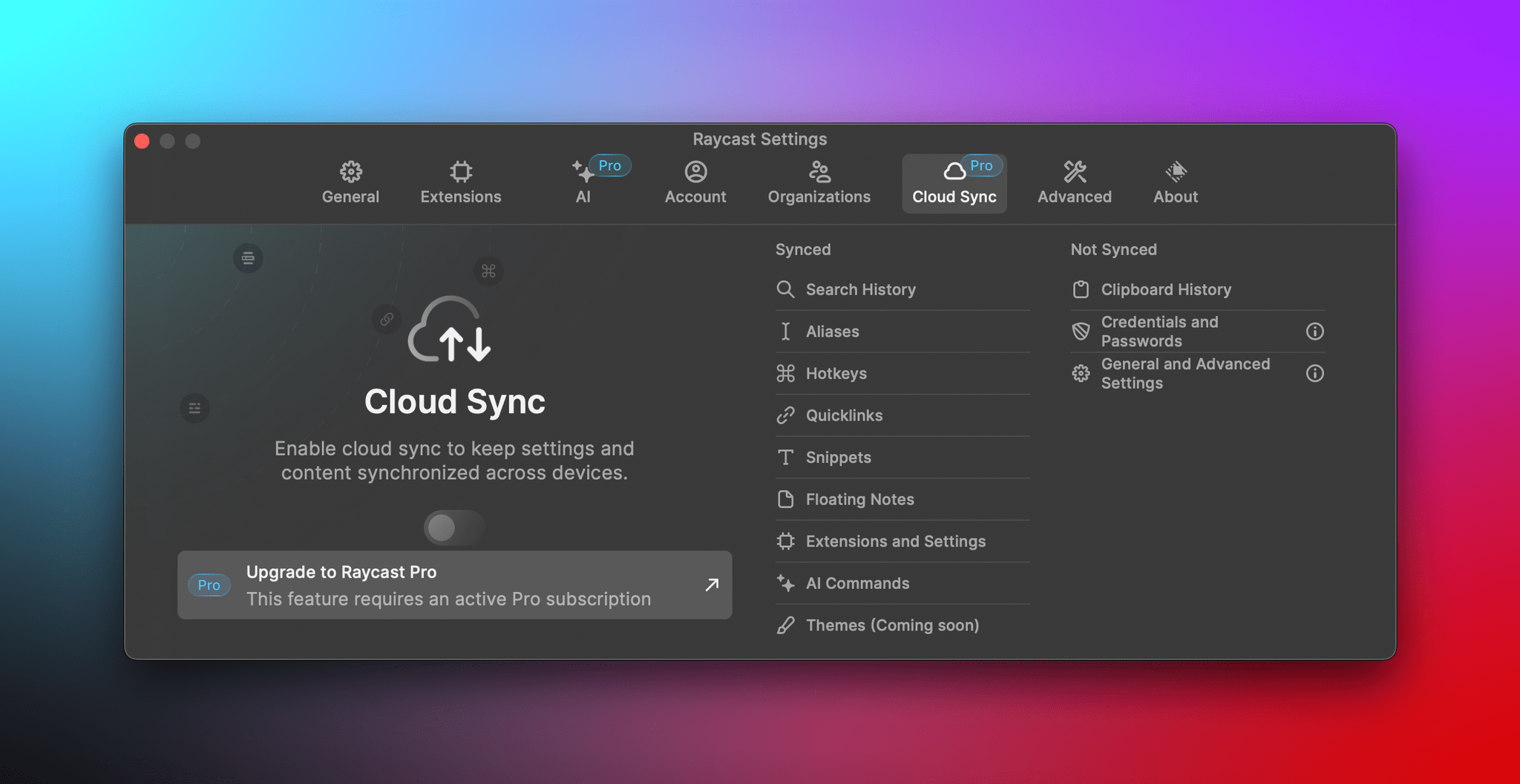
If you use Raycast on multiple Macs, a Pro subscription will allow you to flip a toggle to sync items like Extensions, Quicklinks, Snippets, and Hotkeys. Subscribers can customize Raycast with themes and build their own sharable themes in the app’s Theme Studio too. Finally, a subscription adds an unlimited clipboard history that is stored locally on your Mac and not synced as part of the app’s new sync features for security reasons. Free users are limited to a maximum of three months of clipboard history.

For anyone who relies heavily on AI for their work or has complex Raycast setups that they find hard to maintain across multiple Macs, a Raycast Pro subscription should be attractive. For everyone else, you can still take advantage of the free features, which haven’t changed. I’ve relied on Raycast for more than a year now and don’t need the Pro features myself, but I’m glad to see Raycast expanding its offerings and ways users can support the app’s continued development.

Access Extra Content and Perks

Founded in 2015, Club MacStories has delivered exclusive content every week for nearly a decade.

What started with weekly and monthly email newsletters has blossomed into a family of memberships designed for every MacStories fan.

Learn more here and from our Club FAQs.

Club MacStories: Weekly and monthly newsletters via email and the web that are brimming with apps, tips, automation workflows, longform writing, early access to the MacStories Unwind podcast, periodic giveaways, and more;

Club MacStories+: Everything that Club MacStories offers, plus an active Discord community, advanced search and custom RSS features for exploring the Club’s entire back catalog, bonus columns, and dozens of app discounts;

Club Premier: All of the above and AppStories+, an extended version of our flagship podcast that’s delivered early, ad-free, and in high-bitrate audio.

Learn more here and from our Club FAQs.


Automation April: Hyperduck Leverages the Power of URL Schemes to Control Your Mac from an iPhone or iPad

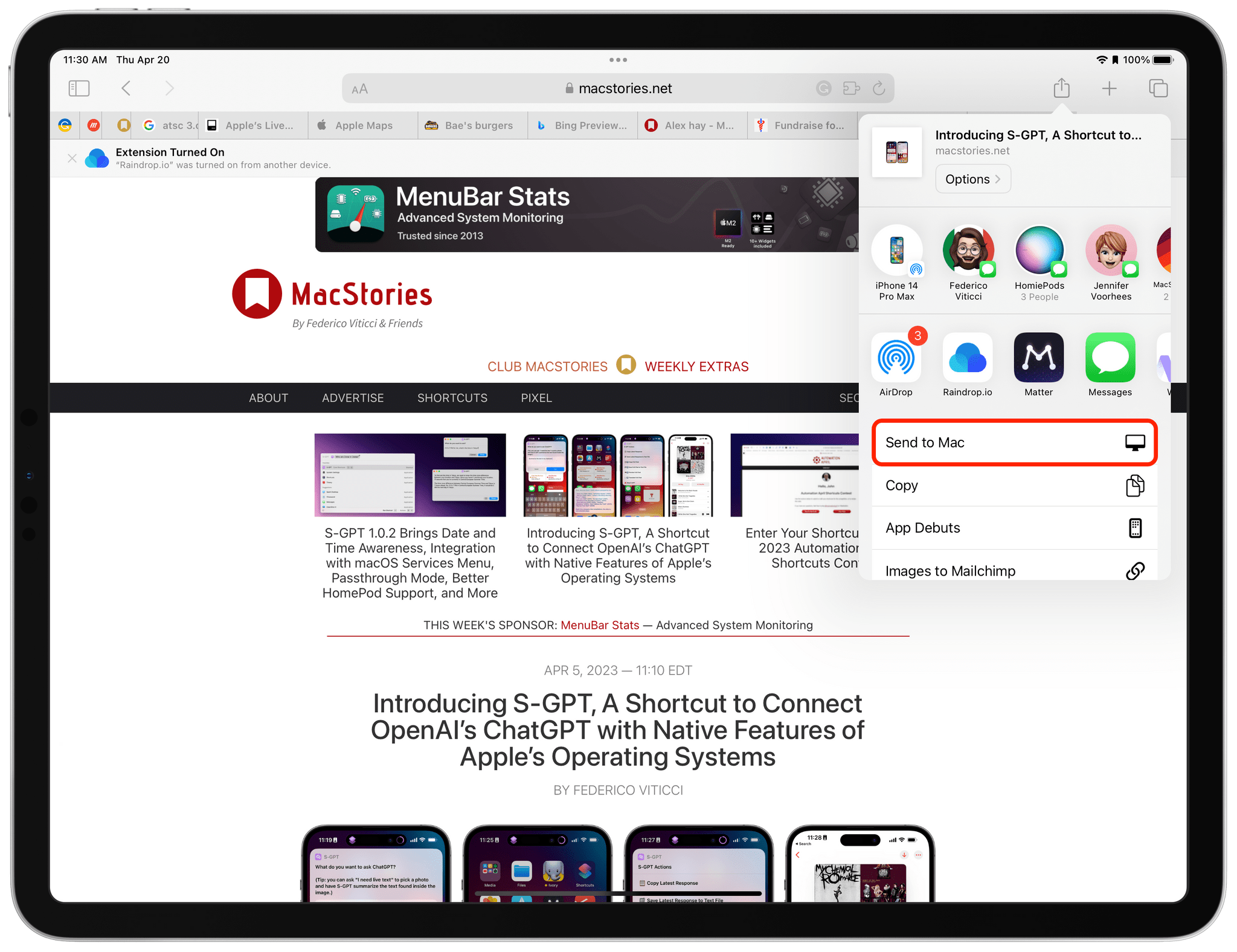
Hyperduck is a recent utility from Sindre Sorhus for sending URLs from an iPhone or iPad to your Mac that has some very interesting applications. Hyperduck hasn’t replaced my use of AirDrop, Handoff, and other Apple technologies that move data between devices, but it has extended those features in meaningful ways and has quickly worked its way into my everyday computing life.

Hyperduck does just one thing very well. It sends URLs from an iPhone or iPad to a Mac using iCloud. That’s different than how AirDrop works, which has some advantages.

Read more

Access Extra Content and Perks

Founded in 2015, Club MacStories has delivered exclusive content every week for nearly a decade.

What started with weekly and monthly email newsletters has blossomed into a family of memberships designed for every MacStories fan.

Learn more here and from our Club FAQs.

Club MacStories: Weekly and monthly newsletters via email and the web that are brimming with apps, tips, automation workflows, longform writing, early access to the MacStories Unwind podcast, periodic giveaways, and more;

Club MacStories+: Everything that Club MacStories offers, plus an active Discord community, advanced search and custom RSS features for exploring the Club’s entire back catalog, bonus columns, and dozens of app discounts;

Club Premier: All of the above and AppStories+, an extended version of our flagship podcast that’s delivered early, ad-free, and in high-bitrate audio.

Learn more here and from our Club FAQs.


Automation April: Mac Outliner Bike Adds Shortcuts Support

Last spring, I reviewed Bike, Jesse Grosjean of Hog Bay Software’s excellent outlining app for the Mac. The app’s simple, elegant design keeps the focus on the outline you’re creating, while its rich, keyboard-driven set of features enable ideas to be organized quickly and efficiently. Advanced features, like versioning, linking and grouping rows, and a long list of ways to view, navigate and edit your outlines, make Bike one of the best ways to create outlines on the Mac.

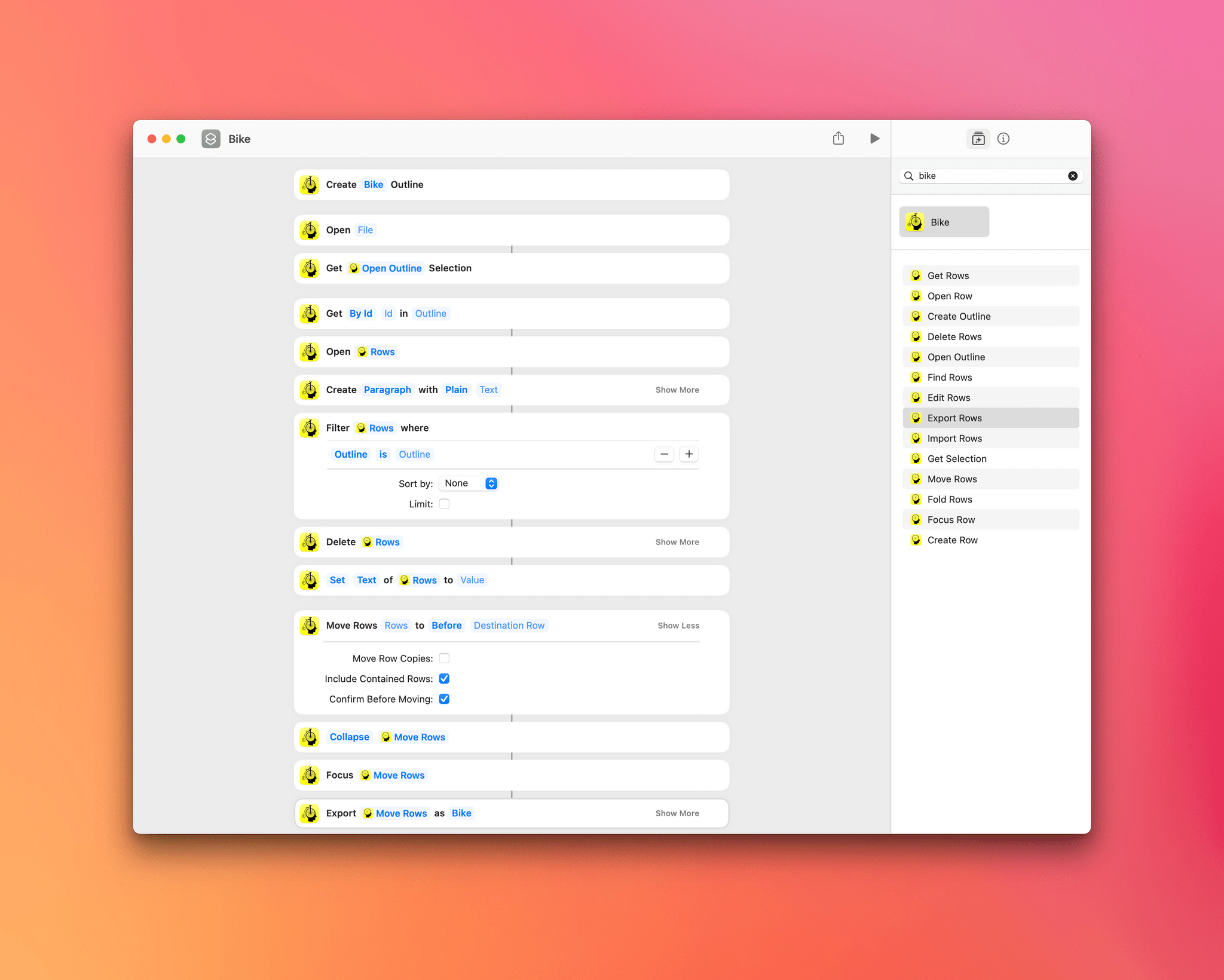
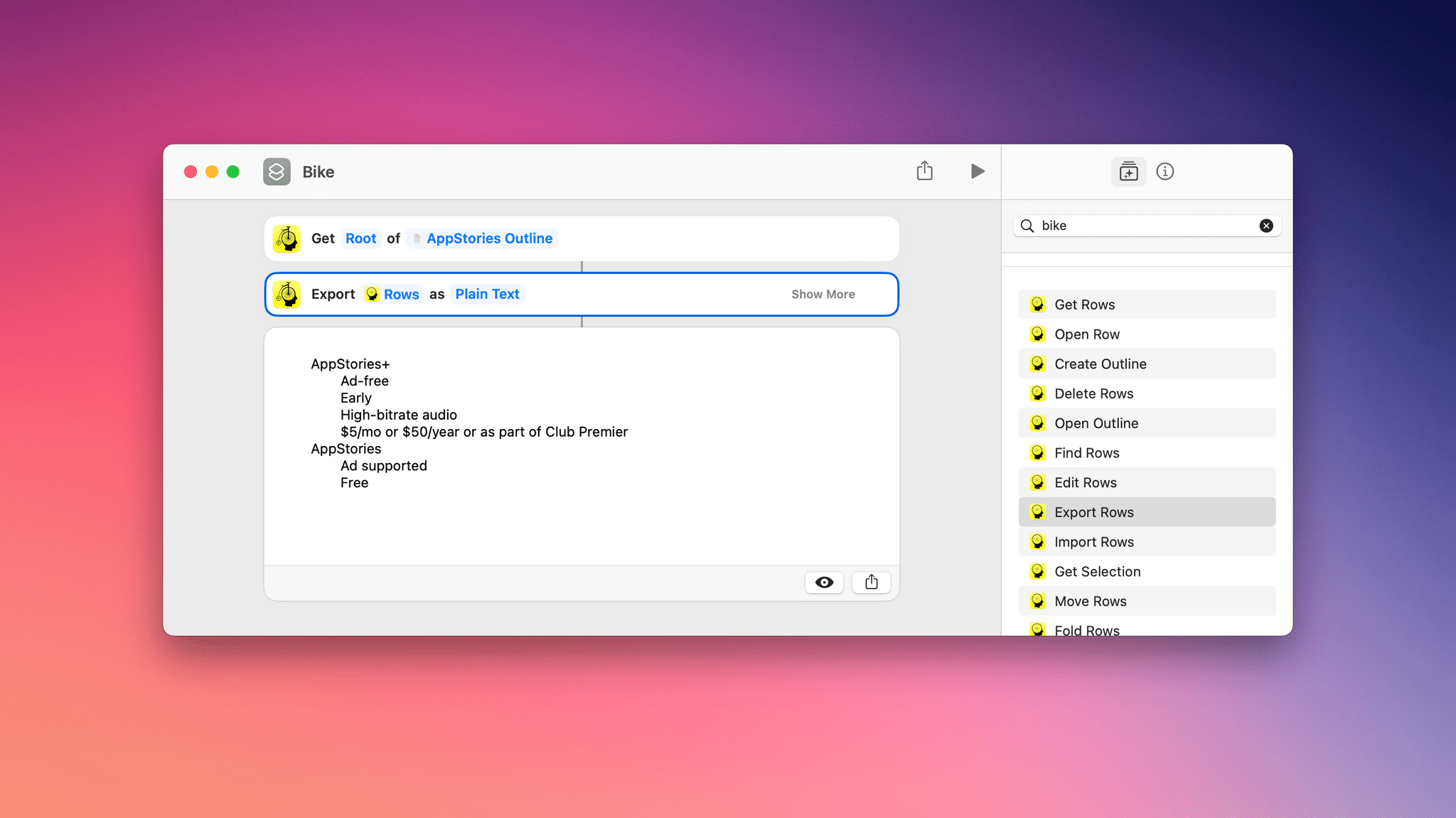
Bike has 14 Shortcuts actions.

Bike has 14 Shortcuts actions.

Bike’s focus on efficiency and extensive support for keyboard shortcuts and AppleScript make it the perfect candidate for Shortcuts support, which was added to the app today. Version 1.11 of Bike adds 14 Shortcuts actions to the app:

  • Create Outline
  • Open Outline
  • Open Row
  • Get Rows
  • Fold Rows
  • Focus Row
  • Edit Rows
  • Import Rows
  • Export Rows
  • Find Rows
  • Create Row
  • Delete Rows
  • Move Rows
  • Get Selection

The actions cover a lot of the functionality of Bike with a focus on outlines, text and row selections, and rows. Outlines can be created from scratch or existing ones opened, and Get Selection returns any selected text and its outline row.

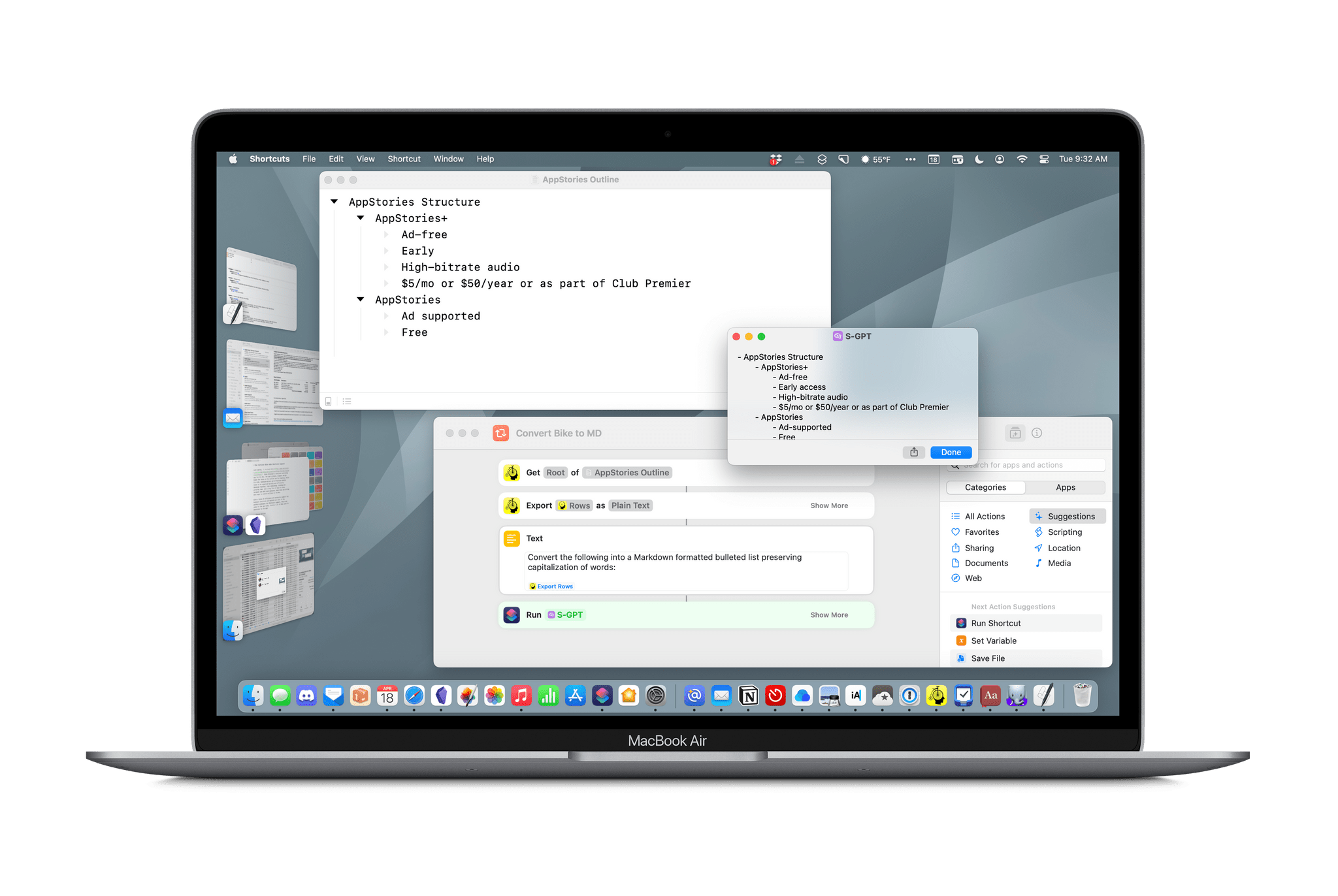
Exporting all rows as plain text.

Exporting all rows as plain text.

The remainder of Bike’s Shortcuts actions apply to rows, the building blocks of outlines. Rows can be opened in-app or retrieved in a variety of ways, such as by their root, row ID, focus, selection, ancestor rows, child rows, and descendant rows by using the Get Rows action. There’s also a Find Rows action that uses predicate filtering to allow rows matching multiple criteria to be located and sorted. Rows can be imported and exported in Bike, OPML, and plain text formats too.

Rows can also be created, edited, deleted, and moved within an outline with precision, thanks to a detailed set of action parameters. Actions for focusing on particular rows and folding and unfolding rows round out the available actions by allowing users to use Shortcuts to prepare their outline work environment automatically.

I’ve only just begun experimenting with Bike’s new Shortcuts integration, but it’s clear that thanks to extensive parameter and predicate filtering, the automation opportunities are extensive. Especially if you work with big outlines that require frequent, repetitive edits, Bike’s new Shortcuts integration could save you a lot of time.

Bike 1.11 is available on the App Store and directly from Hog Bay Software as a free download. Some features, including Shortcuts support, require a $2.99/month or $19.99/year subscription from the App Store or a one-time license purchase directly from Hog Bay Software, which comes with one year of updates.


You can also follow MacStories’ Automation April coverage through our dedicated hub, or subscribe to its RSS feed.

Access Extra Content and Perks

Founded in 2015, Club MacStories has delivered exclusive content every week for nearly a decade.

What started with weekly and monthly email newsletters has blossomed into a family of memberships designed for every MacStories fan.

Learn more here and from our Club FAQs.

Club MacStories: Weekly and monthly newsletters via email and the web that are brimming with apps, tips, automation workflows, longform writing, early access to the MacStories Unwind podcast, periodic giveaways, and more;

Club MacStories+: Everything that Club MacStories offers, plus an active Discord community, advanced search and custom RSS features for exploring the Club’s entire back catalog, bonus columns, and dozens of app discounts;

Club Premier: All of the above and AppStories+, an extended version of our flagship podcast that’s delivered early, ad-free, and in high-bitrate audio.

Learn more here and from our Club FAQs.


Drawing a Blank

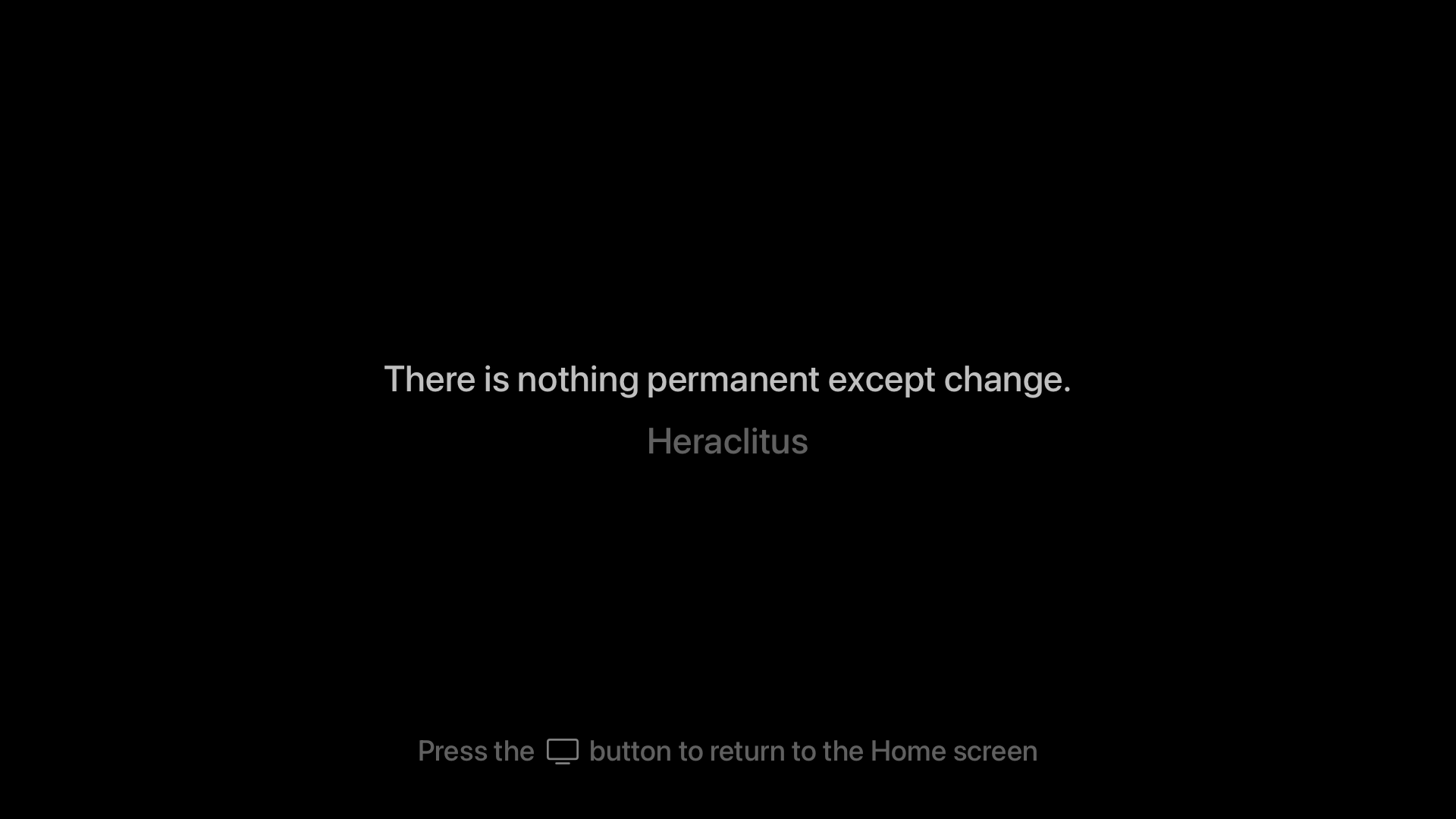
Source: furbo.org.

Source: furbo.org.

Yesterday, Craig Hockenberry announced a free Apple TV app he created called Blank. The app blanks out your TV screen until you press a button on the Apple TV remote. That way, you can listen to music or a podcast through an Apple TV without also watching the album art or screensavers.

Blank is a clever solution to something that’s been a problem ever since the second-generation Apple TV, which ditched its dedicated audio out port in favor of HDMI. How do I know that? Well, I tackled the same problem myself in 2016 in a far hackier way than Hockenberry, which I shared more than 300 issues ago in MacStories Weekly 25. As I said then, when the Apple TV’s flyover screensavers, and even HDMI, were brand new:

I enjoy the new flyover screensavers on the Apple TV, but whether you have a current generation Apple TV and use those, or use a different screensaver with any model of the Apple TV, the screensavers are a distraction when you throw a party and want to use the Apple TV for music. In my experience, people are drawn to the screensaver like moths, focusing on it instead of socializing.

My solution? Create a Photos album with a single 1080p image of a black rectangle and use it with the Apple TV’s ‘Sliding Panels’ screensaver. Blank is a far more elegant solution and even offers an inspirational quote that appears onscreen before the screen goes blank.

You can download Blank from the App Store for free.

Permalink

Dark Noise 3.0 Has a New Business Model and A Few Other Updates

Today, Charlie Chapman released Dark Noise 3.0, his iOS, iPadOS, and macOS ambient noise app, with a new business model, some remastered sounds, and other updates.

The biggest change to Dark Noise 3.0 is its new business model. Historically, Dark Noise has been a paid-up-front app, but with 3.0, the app is now free with an optional subscription that unlocks certain features.

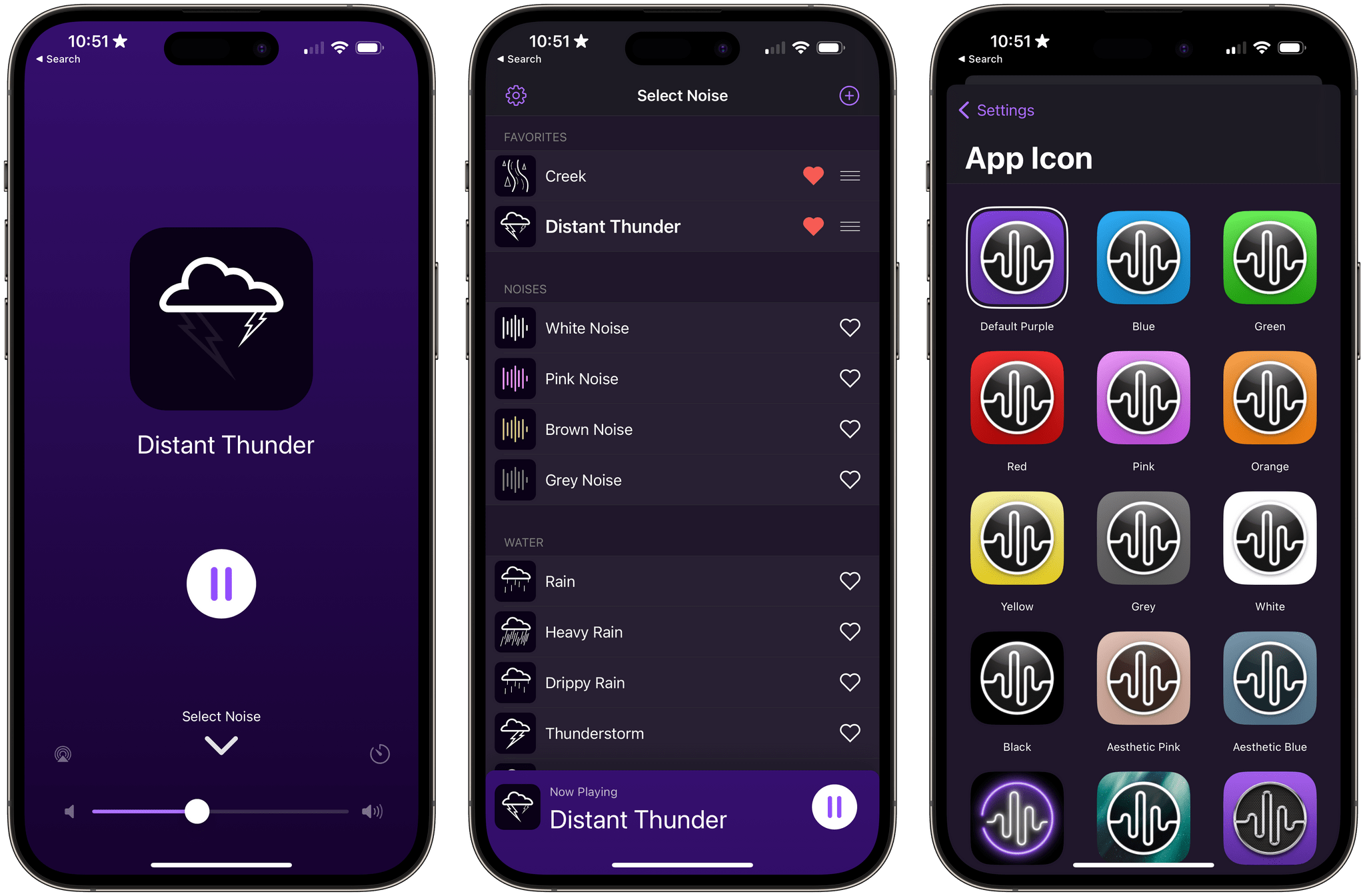
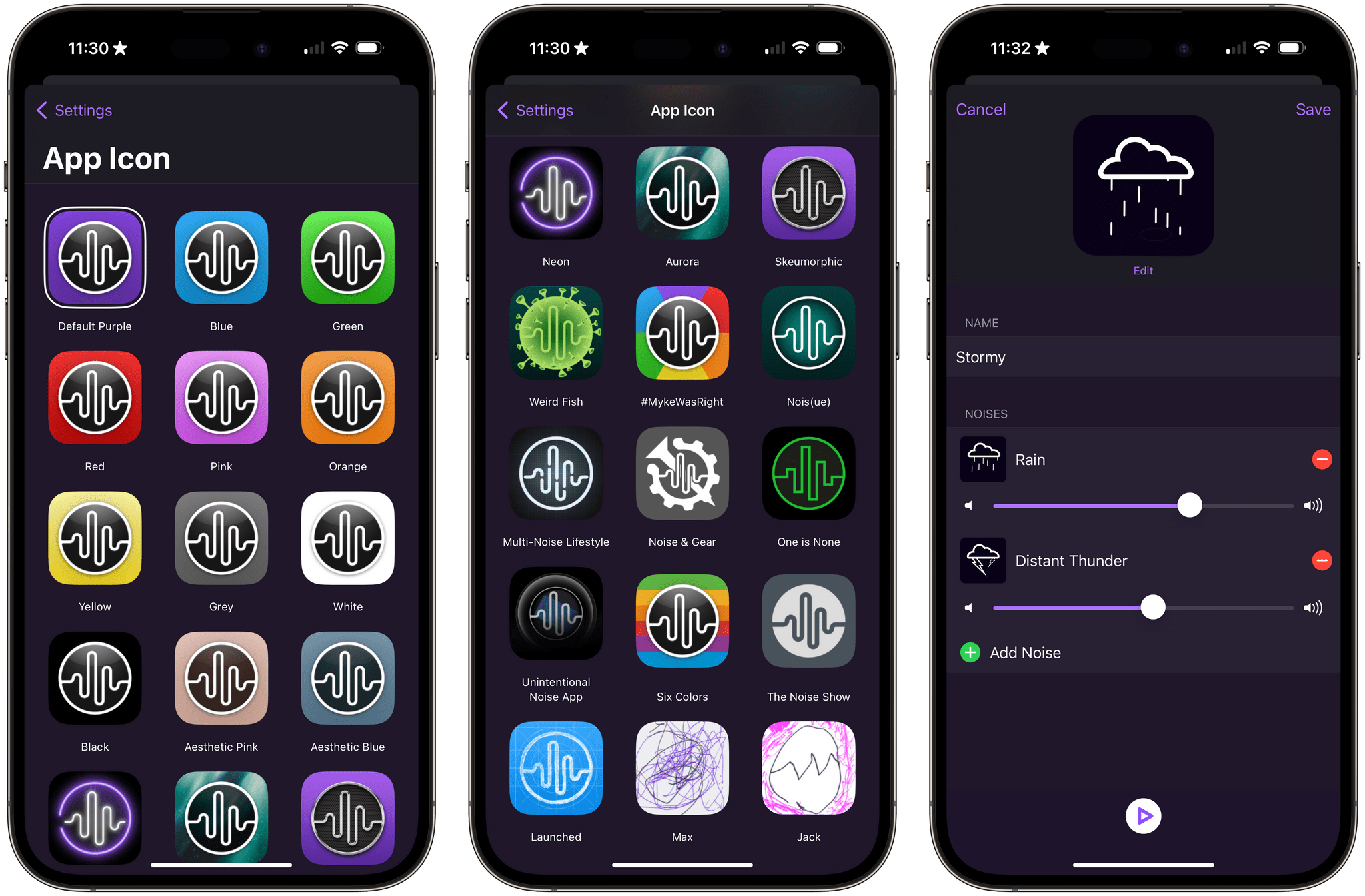
The free version of Dark Noise includes eight sounds, continuous sound looping, Shortcuts support, Siri integration, and a timer. The Pro subscription increases the number of sounds to over 50 and adds custom sound mixes, alternate app icons, themes, and Family Sharing. The Pro features are also available as a one-time purchase.

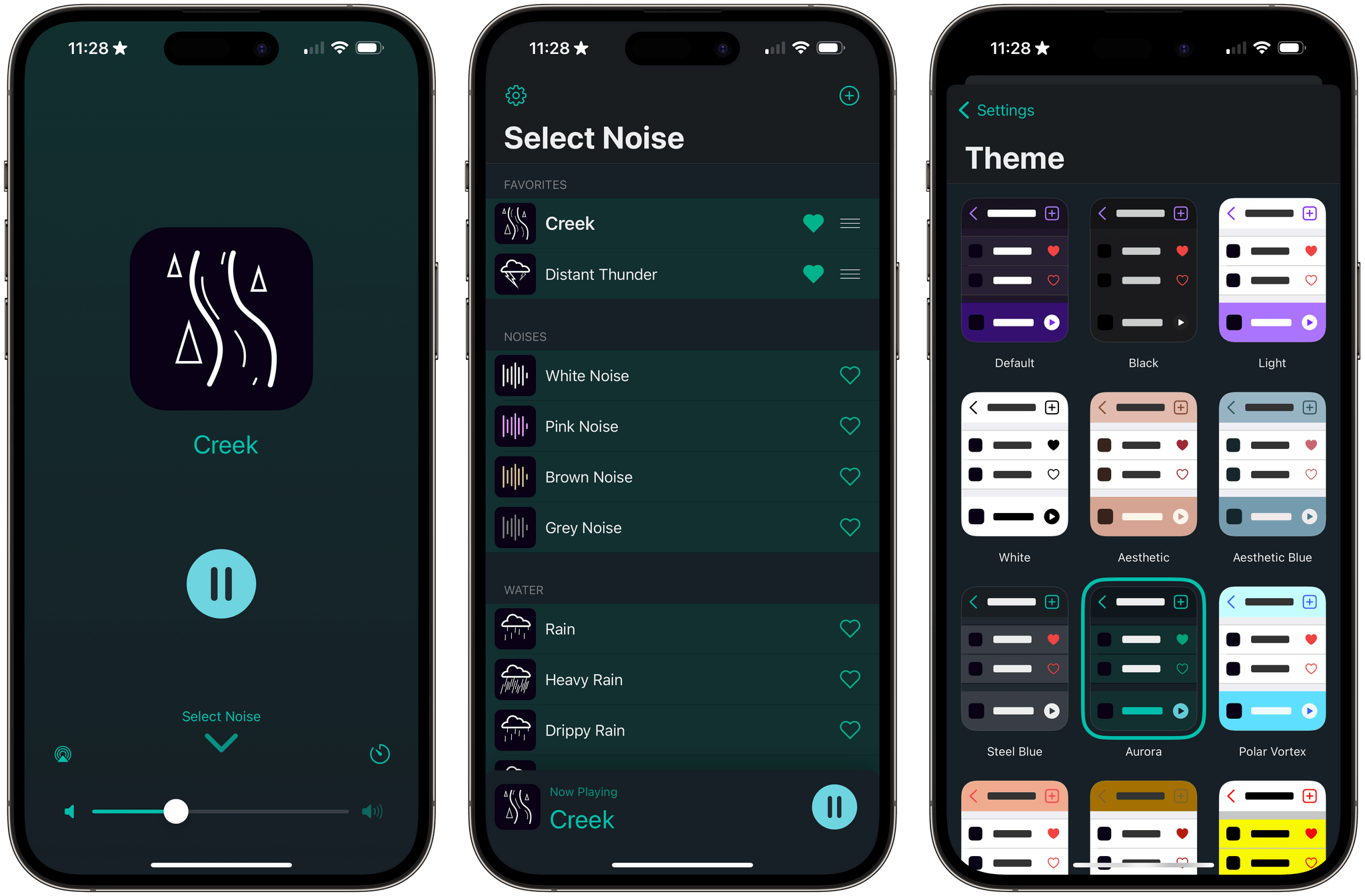
Alternative icons and sound mixing are two of the features available to Dark Noise Pro subscribers.

Alternative icons and sound mixing are two of the features available to Dark Noise Pro subscribers.

If you previously purchased Dark Noise, which included many of the features that are now part of a Pro subscription, you’re covered. Anyone who bought Dark Noise prior to the release of version 3.0 gets all of the features included in the Pro subscription. Pro subscribers may get new features in the future, but as of the release of version 3.0, existing users and subscribers have access to the same features, which I think is a fair way to transition to a subscription model.

I’m also glad to see that the core features of Dark Noise will be available for free for the first time. There are a lot of ambient sound apps on the App Store, but a lot aren’t very good. Dark Noise is excellent, and I expect having a free tier to show off what the app can do to new users will result in more paid users in the long run. I’m also a fan of the one-time payment option, which is a nice option for fans of the app who just don’t like paying subscriptions.

Dark Noise has a new green theme called Aurora.

Dark Noise has a new green theme called Aurora.

Version 3.0 also introduces remastered Rain, Beach, Airplane Interior, and Thunderstorm sounds that sound better when used with stereo speakers. The app’s icons have been tweaked a little, and there’s a new theme that uses shades of green called Aurora.

For more on everything Dark Noise can do, be sure to check out our reviews of version 1.0 and 2.0.

Dark Noise 3.0 is available as a free download on the App Store. The Pro subscription unlocks the features described above, for $2.99/month or $19.99/year with a three-day trial. Dark Noise 3.0 is also available as a one-time purchase for $49.99.

Access Extra Content and Perks

Founded in 2015, Club MacStories has delivered exclusive content every week for nearly a decade.

What started with weekly and monthly email newsletters has blossomed into a family of memberships designed for every MacStories fan.

Learn more here and from our Club FAQs.

Club MacStories: Weekly and monthly newsletters via email and the web that are brimming with apps, tips, automation workflows, longform writing, early access to the MacStories Unwind podcast, periodic giveaways, and more;

Club MacStories+: Everything that Club MacStories offers, plus an active Discord community, advanced search and custom RSS features for exploring the Club’s entire back catalog, bonus columns, and dozens of app discounts;

Club Premier: All of the above and AppStories+, an extended version of our flagship podcast that’s delivered early, ad-free, and in high-bitrate audio.

Learn more here and from our Club FAQs.


Sequel 2.0: An iPhone and iPad Media Tracker That Strikes an Elegant Balance Between Form and Function

Too often, media tracking apps feel like work. There’s too much effort involved in adding and browsing items, which makes them feel more like task managers than an inviting place that helps you decide how you want to spend your precious free time.

Apps in this category seem to take one of a couple of different approaches. Some apps specialize in one type of media, which can be great if you’re a huge book or videogame fan, for instance. As much as I like the media-specific approach of some apps, I’ve found that lately, I just want an app that’s easy to use, so ‘past me’ can recommend ‘tired and lazy me’ something to watch, play, read, or listen to. And, for the past couple of months, the app that has fit my needs the best has been Sequel 2.0 by Romain Lefebvre.

Read more

Access Extra Content and Perks

Founded in 2015, Club MacStories has delivered exclusive content every week for nearly a decade.

What started with weekly and monthly email newsletters has blossomed into a family of memberships designed for every MacStories fan.

Learn more here and from our Club FAQs.

Club MacStories: Weekly and monthly newsletters via email and the web that are brimming with apps, tips, automation workflows, longform writing, early access to the MacStories Unwind podcast, periodic giveaways, and more;

Club MacStories+: Everything that Club MacStories offers, plus an active Discord community, advanced search and custom RSS features for exploring the Club’s entire back catalog, bonus columns, and dozens of app discounts;

Club Premier: All of the above and AppStories+, an extended version of our flagship podcast that’s delivered early, ad-free, and in high-bitrate audio.

Learn more here and from our Club FAQs.


CleanMyMac X Adds Device Charging and Storage Monitoring and Management

CleanMyMac X has been updated, expanding its utility beyond the borders of your Mac by tracking the battery status of connected devices and adding management of outboard storage.

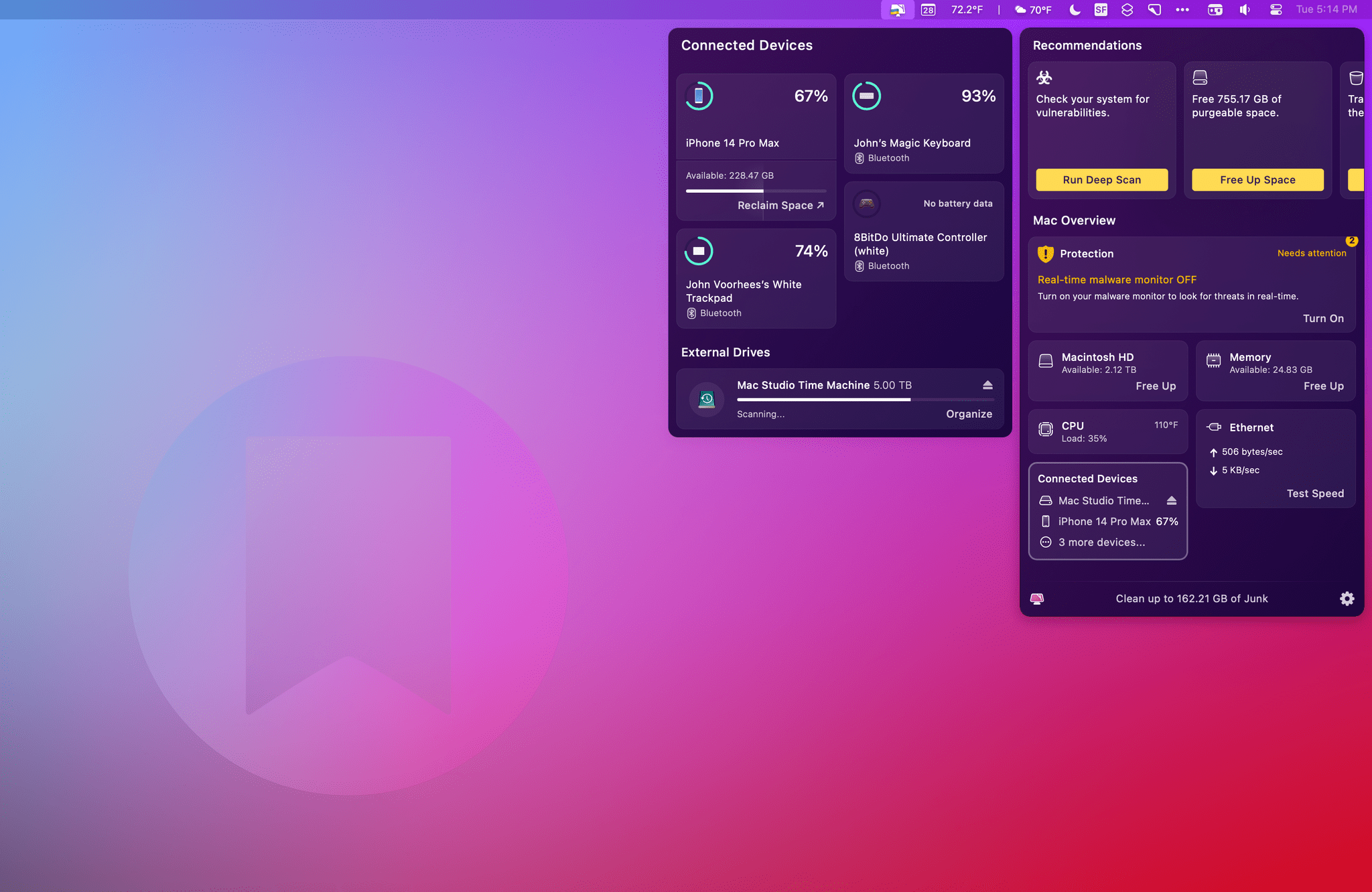
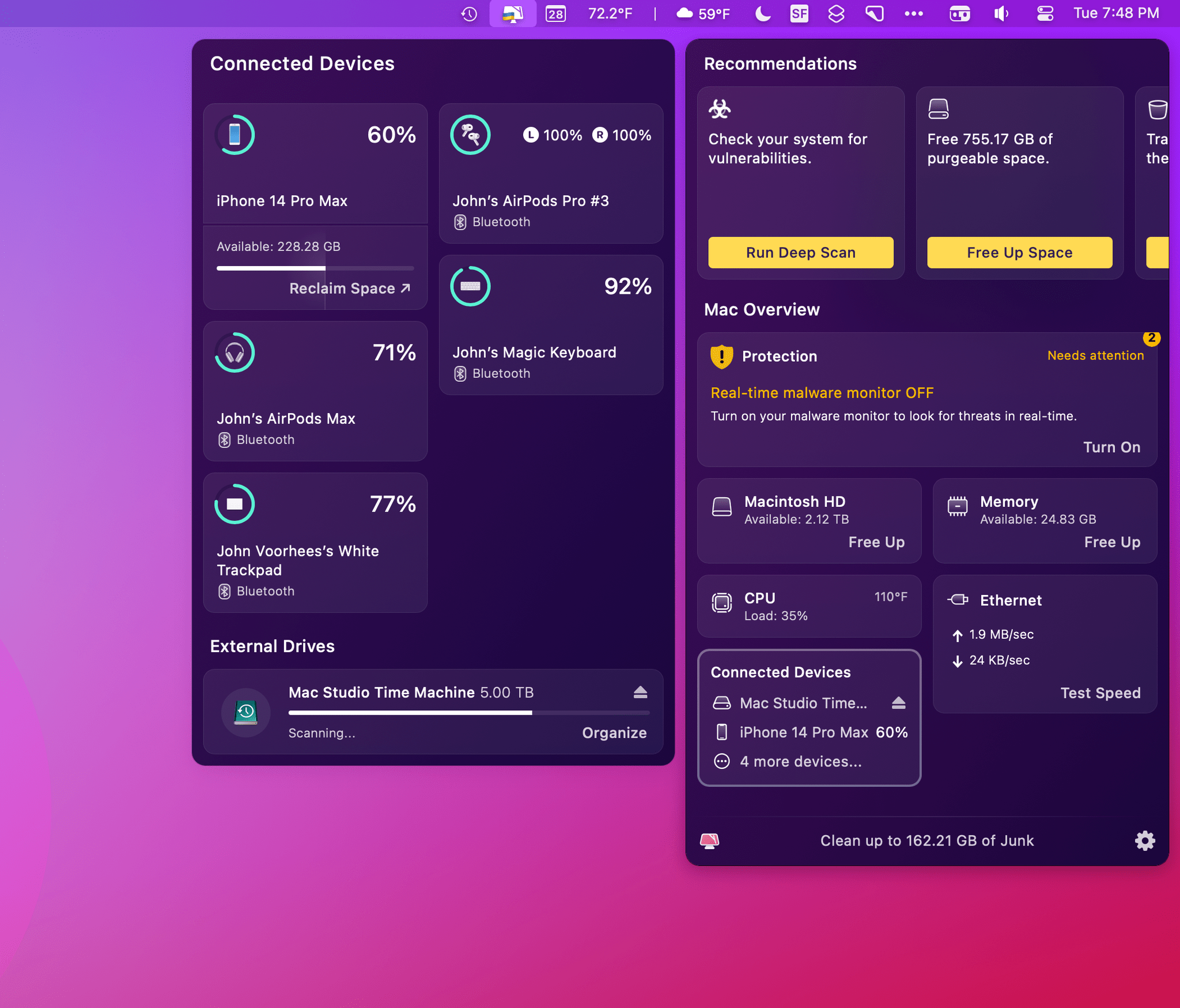
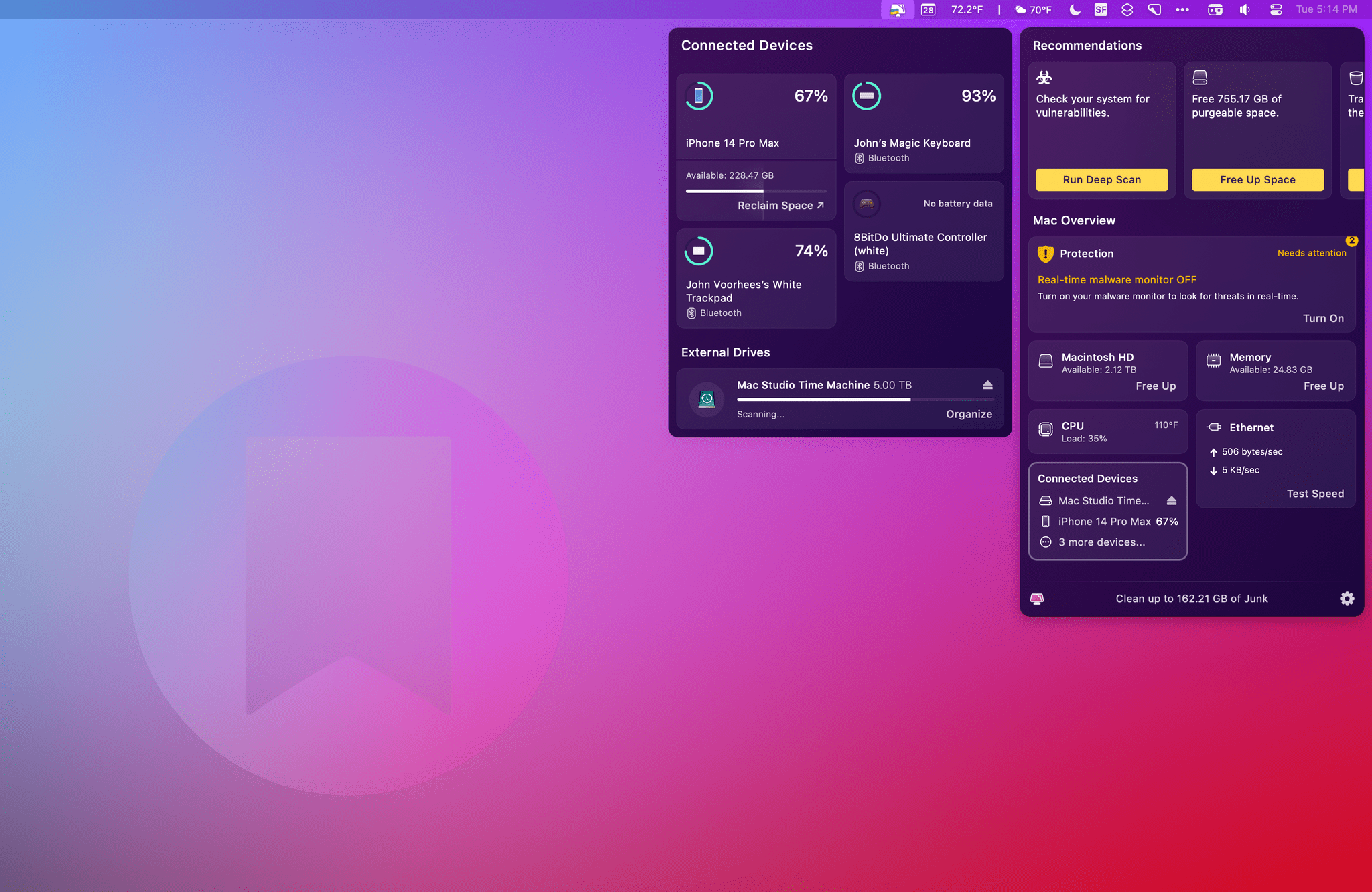
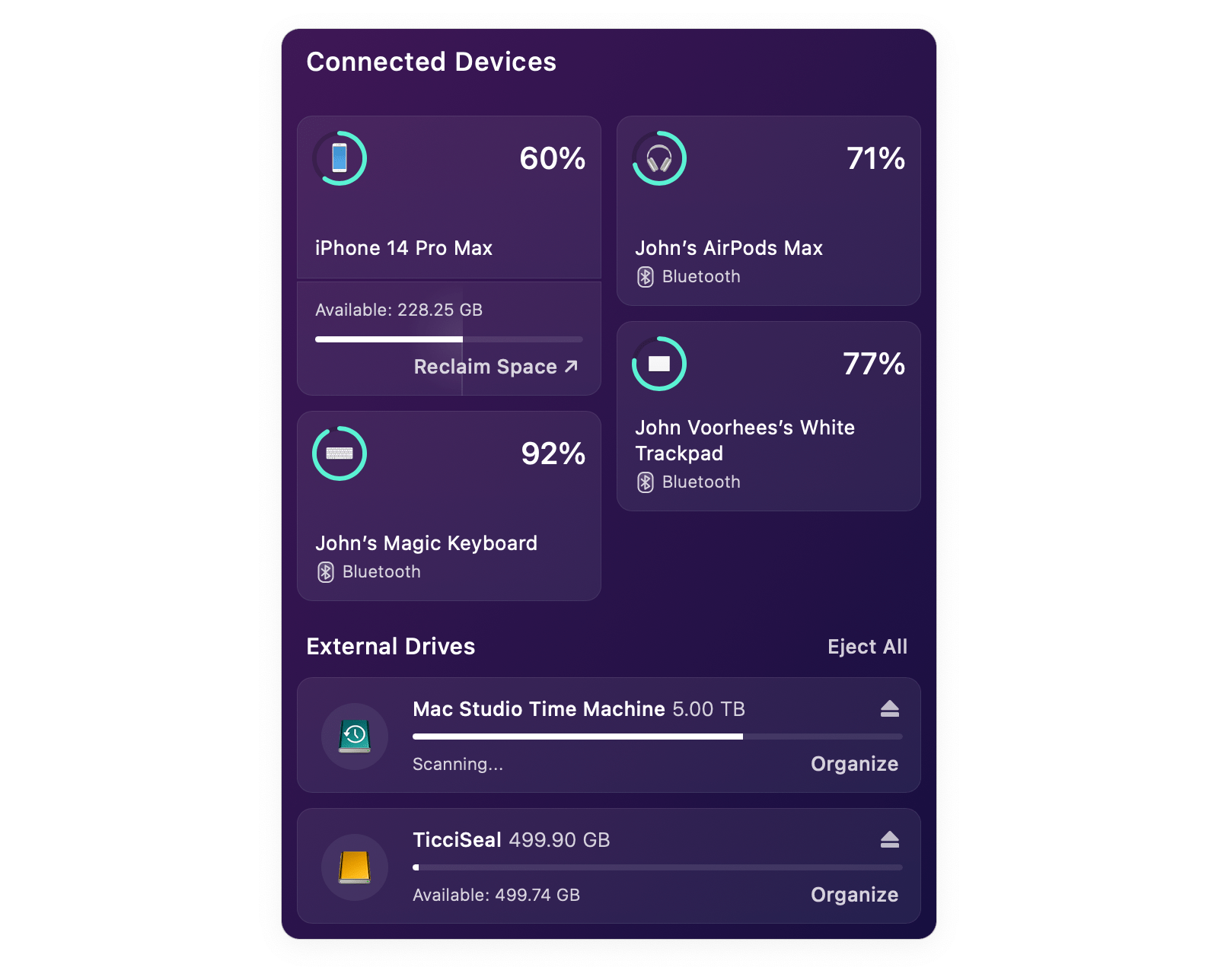
The new features, collectively called Connected Devices, are part of CleanMyMac X’s menu bar app. Click the app’s icon in the menu bar, and you’ll find a new summary tile that includes information about the charging status of Bluetooth devices, as well as information about connected drives, memory cards, and flash drives. Click on the tile, and it expands to the side of the menu bar app’s main window to display additional details.

Devices like iPhones and iPads don’t need to be connected to your Mac with a wire to show up in CleanMyMac X’s menu bar app. As long as they’ve been connected once and confirmed as trusted devices, they’ll show up in the app and display the remaining charge (but not whether they are currently charging) and available storage. It can sometimes take a while for a device to show up in CleanMyMac X’s menu bar app, but if you’re impatient, you can always grab a cable, plug your device into your Mac, and it will show up immediately. Beneath the storage information for each device, there’s also a ‘Reclaim Space’ link that opens a ‘How to free up iPhone storage’ page on MacPaw’s website.

CleanMyMac X works with wireless headphones like the AirPods Pro and some wireless game controllers.

CleanMyMac X works with wireless headphones like the AirPods Pro and some wireless game controllers.

CleanMyMac X supports other Bluetooth devices like the Magic Trackpad, Magic Keyboard, and at least some game controllers. I tried the app with 8BitDo’s Bluetooth Ultimate Controller and an Xbox controller, but only the 8BitDo model showed up in the app. CleanMyMacX’s menu bar app displayed my left and right AirPods Pro buds but not their case. Also, it’s worth noting that the app doesn’t seem to support Apple Watches.

For anyone who’s using CleanMyMac’s menu bar app, its new ability to monitor the charge status of devices is a nice addition. It has some limitations, but for my core devices, I’ve found that it gets the job done, just not quite as well as a dedicated Bluetooth device utility like AirBuddy.

CleanMyMac X's menu bar app works with external drives like this 500GB Samsung T3 drive too.

CleanMyMac X’s menu bar app works with external drives like this 500GB Samsung T3 drive too.

The other feature of Connected Devices is external storage monitoring and management. CleanMyMac X displays any external drives, memory cards, and flash drives and their storage capacity. The app also shows how much space is available, and if it determines after a scan that some of the data is junk, the app will list the amount of junk too. There’s an Organize button beneath each drive that opens the full CleanMyMac X app to the app’s Space Lens tab, which lets you drill through the drive’s folder structure, eliminating any junk or other unnecessary files. Drives can be ejected individually or all at once with the app too.

CleanMyMac X has come a long way from the days when it was primarily a tool for freeing up space on your Mac’s built-in drive. It’s still that and does an excellent job, but with tools like its menu bar app, CleanMyMac X is a far more robust way to monitor your Mac’s performance and fine-tune it for maximum speed and efficiency. With its new suite of Connected Devices functionality, CleanMyMac X has taken an important step towards extending beyond your Mac to the other devices and peripherals that you use with it.

CleanMyMac X is available directly from MacPaw as a $39.95 annual subscription or a $89.95 one-time payment. The app is also included as part of a Setapp subscription.

Access Extra Content and Perks

Founded in 2015, Club MacStories has delivered exclusive content every week for nearly a decade.

What started with weekly and monthly email newsletters has blossomed into a family of memberships designed for every MacStories fan.

Learn more here and from our Club FAQs.

Club MacStories: Weekly and monthly newsletters via email and the web that are brimming with apps, tips, automation workflows, longform writing, early access to the MacStories Unwind podcast, periodic giveaways, and more;

Club MacStories+: Everything that Club MacStories offers, plus an active Discord community, advanced search and custom RSS features for exploring the Club’s entire back catalog, bonus columns, and dozens of app discounts;

Club Premier: All of the above and AppStories+, an extended version of our flagship podcast that’s delivered early, ad-free, and in high-bitrate audio.

Learn more here and from our Club FAQs.