
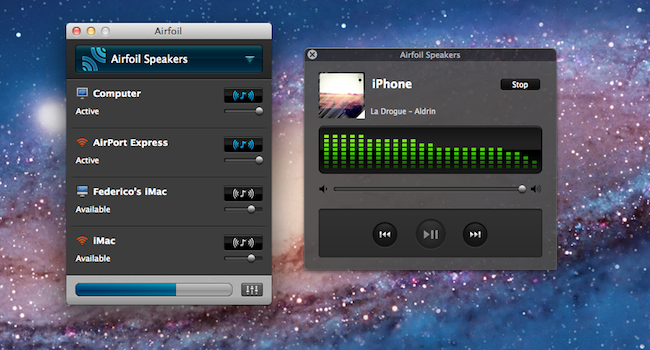
When I first covered the 4.5 update for Airfoil, which added extended AirPlay support and remote controls for compatible apps, a reader suggested an interesting hack or, better, workflow for wireless audio in the comments: given Airfoil’s capability of sending audio from a single source to multiple speakers or devices at once, it was possible to send audio from iOS to the Mac using AirServer, and then pass along data from AirServer (which acts as an AirPlay receiver on the Mac) to speakers recognized by Airfoil. Later, another reader chimed in to say that, considering Airfoil’s recent improvements, there was no need to install a separate app – Airfoil Speakers itself could handle the AirPlay stream from iOS to OS X, and then be used as an input source in Airfoil. When combined with an app like Reemote, this setup would allow you to send audio from an iPhone or iPad to the Mac wirelessly, from the Mac to another set of speakers or computers, and then control everything from iOS. Read more
Posts tagged with "music"
Airfoil, Reemote and AirPlay: A Multi-Speaker Wireless Setup
Records: A Jukebox for Your Mac

Records for the Mac is a brand new music player for your desktop from green&slimy software. Focused on creating quick playlists for parties and events, Records delivers a fullscreen interface on Snow Leopard that focuses on search and album artwork to identify music. Albums and songs are dragged into a tray to create a queue of tracks, and DJs will have the option of auto-mixing songs from their library for an instant queue. Queued tracks can be shuffled and played on repeat for random and continuing set lists. DJs can also add podcasts to the queue; podcasts like CLUBcast can be mixed with your own variety of tracks for near instant party playlists. Toss in keyboard shortcuts and Last.fm scrobbling, and Records is a fully functional, visual “audio browser” that makes finding music a cinch.
An Analysis Of Apple’s Adjustment Of International App Store Prices
UPDATED: Included a discussion on various sales taxes to clarify some of sections of the analysis, also corrected a mistake regarding Denmark prices.
For those of you who aren’t located in the United States, Wednesday’s news of Apple re-adjusting their prices in the App Store for international stores might have been pretty big news. For many the headline was welcome news, indeed when I woke up Thursday morning and saw they had finally re-calibrated the iTunes ‘exchange-rate’ I was pretty happy about it. We first discussed the great disparity in global iTunes prices back in January and I was pleased to see Apple eventually act and restore some fairness for international consumers.
Unfortunately I soon figured out it wasn’t all good news; Apple had only adjusted the iTunes ‘exchange-rate’ for apps. For their other stores such as for music, movies, TV shows and books the prices remained unchanged. Nonetheless I have revisited my January analysis, updating that data and doing some further analysis of what the price changes actually bring, what it means for individual countries and who is better or worse off.
Spotify Launching Today In The US, iPhone App Available In US App Store
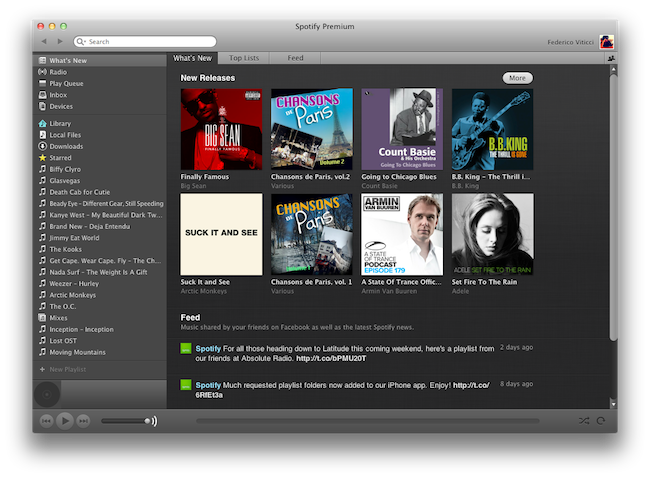
Popular music streaming service Spotify, after much speculation and rumors, is launching today in the United States with an invite-system (for those who signed up last week) and subscriptions to access the various functionalities offered by the European company. Unlike the iTunes Store, or Amazon’s MP3 Store, Spotify allows you to stream a catalog of songs you don’t own, and in spite of the latest version introducing a purchase option, the focus of the service clearly is on streaming, rather than downloading. You can create playlists online, share them with your friends, mark songs as favorite, and browse the latest releases from Spotify, which thanks to support of major music labels happen to be the same of other marketplaces like iTunes. Spotify runs on a variety of platforms including the Mac, and you can read more about the desktop client’s features in our previous coverage.
Whilst Spotify has announced that the service will be open for business today in the US starting at 8 AM ET, the iPhone app, previously available exclusively in some European countries, is now available in the US App Store as well. The app is free, it’s got no iPad counterpart yet, but it lets you stream all the songs you have in your Spotify library, provided you subscribe to Premium plan ($9.99 per month) that gives you access to ad-free music with offline caching capabilities and mobile app support. Read more
Review: Play by AOL Aggregates Music, Lets You Share & Discover
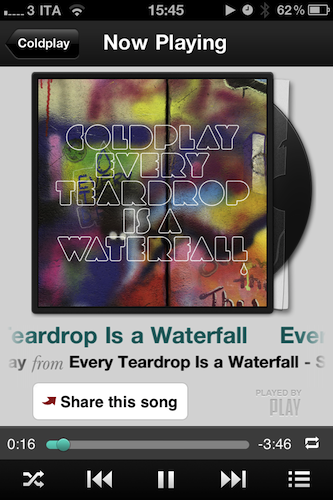
Play by AOL, the latest contendant in the social music discovery and sharing space, aims at providing a streamlined solution to what could be considered a common problem among iPhone and Android users: there is no unified system to share what you’re listening to and discover new music through the songs and albums your friends are liking. Ping by Apple failed at offering a solution truly meant for mobile with quick, instant access by being nothing but a mere social layer on top of the iTunes Store; on the other hand, apps like NowPlayer could be regarded as social attempts to get the music out of your device and onto the Internet (e.g. where your friends are), yet there’s always the issue with people finding tweets about #nowplaying annoying and, most of the times, out of context. Imagine if I tweeted all day about the music I’m listening to. That wouldn’t work. So that’s why in the past months we’ve seen the rise of SoundTracking (our review), a clever utility and social network by itself that lets you quickly share what’s playing on your device and send it off to an Instagram-like stream made by people you decided to follow within the app itself. Soundtracking can send items to Twitter and Facebook, but you don’t have to, as the app can live as a network on its own. Furthermore, sharing is made simple by a button that integrates with the iOS Music app to grab what’s playing in seconds, artist’s info and album artwork included. Read more
Hands on with Amazon Cloud Player for iPad→
Hands on with Amazon Cloud Player for iPad
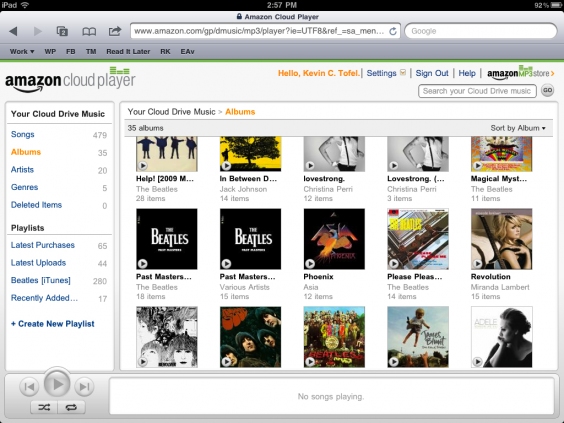
For all intents and purposes, outside of the track scrubbing, the Amazon Cloud Player site on iPad simulates a basic music application reasonably well. The music quality sounds no different from when I stream my tunes on a desktop browser, and thanks to iOS multitasking, I can use other apps on my iPad while streaming music over the web. I have noticed that the service runs best if it retains the focus, however. When using another app, the music tends to stop after a song or two. A quick return to the web page nudges the stream to start up right away: something I hope is addressed in the future.
Amazon’s extended support for Cloud Player for the iPad is quite nice: if you’re an Amazon customer, all of the music that you’ve purchased or will purchase is now immediately available for playback via an online browser.
Amazon is making some nice strides with their Amazon Cloud Player, but the biggest hurdle to get users into the service is that you have to upload all of your music to their storage locker, and you still can’t play that music well on your iPhone or iPod touch (the device you’re most likely to have with you all of the time). The act of uploading isn’t something I want to do — and iPads have more than enough storage to carry enough of your music if you’re arguably normal and don’t need to carry your 150 GB library with you at all times. Too, services like Spotify can put a damper on Amazon’s service. Unless you listen to a lot of local music or uncommon artists, Spotify (especially now that it’s coming to the US) is going to have all of your music already online and ready to stream at $5 to $10 a month.
I have nothing against Amazon — I think having the option is spectacular and their addition of unlimited music streaming is big move — but it’s going to be hard to hook and sink iPad users who want to browse the Internet while listening to music, or who want the instant gratification of competing online services. What Amazon really needs is an app, although I’m not sure Apple would allow that to happen.
Apple Releases iTunes Festival 2011 App with Live Shows and AirPlay
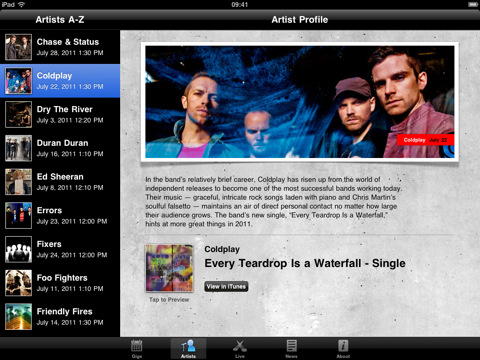
Kicking off on July 1 at the Roundhouse in London for 31 nights of consecutive live performances from 62 bands, the iTunes Festival 2011 has seen Coldplay, Beady Eye, Arctic Monkeys, Foo Fighters and Mogwai signing up for Apple’s annual initiative, among others. Today Apple released an official app for the iTunes Festival 2011 which, besides letting you check on the schedule for the venue and check out more information about the performing bands, will enable you to follow shows live or on demand “for a limited period from wherever you are in the world”, as well as beam video contents from your iPhone or iPad to an Apple TV or unofficial third-party receiver like MacStories staff favorite AirServer. This is the first time Apple is supporting both the iPhone and iPad with options for live streaming, AirPlay and Apple TV. Apple’s recent experiments with live streaming events include special media events and WWDC keynotes, though they have seemed to refrain from streaming announcements as of lately. It’ll be interesting to see how the app will allow users to watch live concerts come July 1.
You can download the iTunes Festival London 2011 app for free here.
Kickstarter: iBamboo Speaker Is A Really Cool Eco-Friendly iPhone Speaker
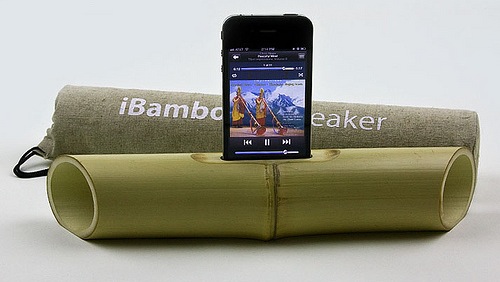
We’ve talked about a number of really cool Kickstarter projects over the past few months and today we’ve found another one; iBamboo speaker. Using just a foot of bamboo it uses the natural resonance to amplify the sound coming from an iPhone to create an ‘electricity-free’ speaker.
Merging the latest high tech with the simple beauty of nature, iBamboo is a100% eco-friendly speaker made from a whole length of bamboo.
Brilliant in simplicity, the iBamboo speaker is literally a foot of bamboo that has only had minor modifications; a slot for the iPhone, a flattened out base (so it sits flat on a surface) and the two edges of the bamboo tapered to direct the sound forward.
These speakers combine the high-tech of the modern day with the simplicity and aesthetics of nature. Since bamboo is a natural material, no two iBamboos are alike. Every piece has the same functional parameters, but each one is unique in its appearance and beauty.
You can support the project on Kickstarter from $5 and if you pledge $25 or more you’ll be pre-ordering your own iBamboo speaker. Jump the break for a video demonstration of the iBamboo speaker in action.
[Via Tree Hugger]
Read more
Shazam for iPhone Updated, Gets New LyricPlay Feature

Shazam, the popular music tagging application for iPhone that allows you to hold your device up to a speaker and instantly get to know what’s playing, has been updated earlier today to include a new functionality called LyricPlay that, according to the developers, will display lyrics for the song you’ve just tagged in a beautiful landscape view. It works like this: once Shazam (Encore or RED, as LyricPlay has only been added to the Premium versions) has found a song, it’ll be saved in the My Tags section as usual. In the section, there’s a new LyricPlay button that is capable of syncing lyrics with the song you’ve just tagged, quite possibly promising to start visualizing lyrics in the exact position you just tagged a song. Turn your iPhone in landscape, and lyrics will start flowing in real-time in a Star Wars-esque interface that’s actually quite nice and undoubtedly accurate as far as lyrics go (Shazam says they have access to 25,000 songs with Lyrics after the acquisition of Silicon Valley startup Tunezee).
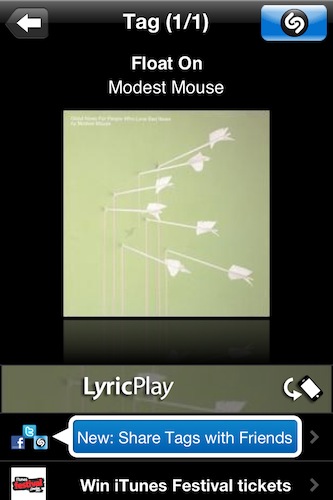
In reality, I found Shazam’s new LyricPlay feature somewhat unreliable, as it didn’t show up on most (old and recent) songs I have in my iTunes library (best way to run a quick Shazam experiment is to use your own songs), and when it did it definitely wasn’t “synced” with the position of the song. I’m not sure how a listener is supposed to follow the song and the lyrics running on screen, but there’s no doubt Shazam needs to make the whole thing more intuitive.
Overall though, the idea is pretty nice and it comes s a free update. I’m sure LyricsPlay will get better over time, so go download the app here and check out what Shazam has to say in the official press release below. Read more