

Here are today’s @MacStoriesDeals on iOS, Mac, and Mac App Store apps that are on sale for a limited time, so get them before they end!
Posts tagged with "mac"
#MacStoriesDeals - Thursday
BlackBerry Desktop Beta for Mac Adds PlayBook Sync
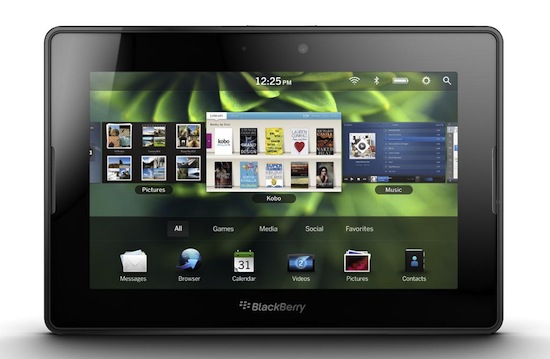
BlackBerry PlayBook owners who also happen to have a Mac have been waiting for a BlackBerry Desktop release with support for tablet sync, which since launch has been exclusive to Windows PCs with RIM promising a Mac release (alongside many other features like a proper email client) this summer. Electronista reports users of Beta Zone (RIM’s beta distribution channel for various programs and enterprise tools) have now access to the 2.1 beta version of BlackBerry Desktop for Mac that adds media sync for photos and videos, but excludes standard functionalities like backups.
It’s not clear whether the new beta version also comes with music sync, contacts and calendar sync with iCal and Entourage, or the switch wizard to migrate data from a BlackBerry smartphone to the PlayBook. The new desktop app can be downloaded by participating in BlackBerry’s Beta Zone here.
#MacStoriesDeals - Wednesday

Here are today’s @MacStoriesDeals on iOS, Mac, and Mac App Store apps that are on sale for a limited time, so get them before they end!
OS X Lion To Be Priced Aggressively, Offer iCloud Features for Free?

Ahead of the official Lion and iCloud announcements set for the WWDC keynote on June 6, AppleInsider reports today sources familiar with Apple’s plans claim the company will offer some iCloud features and services for free to users who decide to upgrade to Mac OS X Lion this summer. In the press release issued yesterday, Apple touted iCloud as “upcoming cloud services offering”, leading to speculation that Apple has built a series of services and not just a cloud-based music application for streaming to desktops and mobile devices. According to recent speculation, iCloud will offer a set of tools to replace MobileMe, which currently comes with calendar, email, storage, contact organization and photo gallery services. It was rumored before that a MobileMe revamp could also see Apple making more services free (besides Find my iPhone), though AppleInsider claims free functionalities will only be enabled for Lion users, with older OS X versions and Windows PCs getting access to iCloud for an unspecified fee.
People familiar with Apple’s plans indicated to AppleInsider that at least one of those secrets is expected to be that at least some of the services included in iCloud will be offered for free to Mac users who make the upgrade to Lion. iCloud is expected to replace the company’s existing MobileMe service, which offers e-mail and remote file storage, along with syncing of bookmarks, contacts and calendar events, at a price tag of $99 per year.
That price tag may remain for users who do not make the upgrade to Lion, or for Windows users. But it is expected that the cloud services will become free to Mac users who run the latest version of Mac OS X.
Music streaming is not expected to be offered for free, as Apple has been working closely with music labels and publishers to get deals done to launch a music service this year and, considering the licensing fees Apple will have to give back to them, users will likely have to pay an annual fee or monthly subscription in order to have their songs mirrored to the cloud and available for streaming on any device. Another report from March indicated the new MobileMe cloud music service would cost around $20 per year.
AppleInsider also reports a source “with an unproven track record” has said Apple will follow a similar pattern to Snow Leopard to price OS X Lion “aggressively” and persuade users to upgrade early without waiting for possible discounts or online deals. Snow Leopard was released with boxed copies priced at $29 as Apple considered it a “minor” upgrade to Leopard still worth purchasing and, if Lion will also be released digitally through the Mac App Store as recent speculation pointed out, Apple might try to cut the price of Mac App Store digital download and increase the price tag of boxed copies / (rumored) portable USB key distribution. Or, Apple could simply offer all versions of Lion at a lower price to convince all kinds of Mac users to upgrade early, get some iCloud features for free, and stay on the latest version of OS X. Apple has usually priced major OS X releases at $129 with Snow Leopard being the exception at $29. It’s unclear from today’s report whether “aggressive” pricing could refer to Lion being available at $29 as Snow Leopard, or simply below $129.
It’s possible that the lower price could also be tied to purchasing Lion through the Mac App Store. The company already does this by selling its professional photography software, Aperture, for $79.99 in the App Store – a price more $120 lower than the $199.99 Apple charges for a boxed copy of Aperture 3, and even $20 less than the $99 Aperture 3 Upgrade.
Whether Apple will choose to go with the same sub-$30 pricing of Snow Leopard when Lion goes on sale is unknown.
Mac OS X Lion was initially rumored to be scheduled for a summer release in late July or August, although a report from last week claimed the OS is nearing public release after widespread internal testing.
Update: 9to5mac reports iCloud could be offered for free to students and teachers with educational discounts tied to a Mac purchase. Apple could announce such an initiative as part of the Back to School promo rumored to be unveiled at WWDC next week.
A source with some success in the past has passed along that iCloud will have educational-tiered pricing, perhaps being free for students and teachers to a certain level or with the purchase of Apple products.
Example: Buy a Mac, get an iPod and two years of iCloud for free.
MindManager 9 for Mac Coming June 23, iOS Versions Due Mid-June

What is “Mind Mapping?” Well, if you want to take your analog thoughts and put them into the digital world, Wikipedia tells us that “a mind map is a diagram used to represent words, ideas, tasks, or other items linked to and arranged around a central key word or idea. Mind maps are used to generate, visualize, structure, and classify ideas, and as an aid to studying and organizing information, solving problems, making decisions, and writing.”
MindJet, who makes MindManager, one of the premiere apps in the market selling 1.8 million copies worldwide, is scheduled to ship MindManager 9 next month. It will cost $249 for new customers and $149 for current users wanting to upgrade. New features will include a presentation mode, “quick entry,” WYSIWYG priting, dynamic content like schedules and web links, offline import/export for iWork and Office, plus project management mode. For more info, read the Mac press release here. Read more
Pulp for Mac 2.0 Released with Cloud Sync
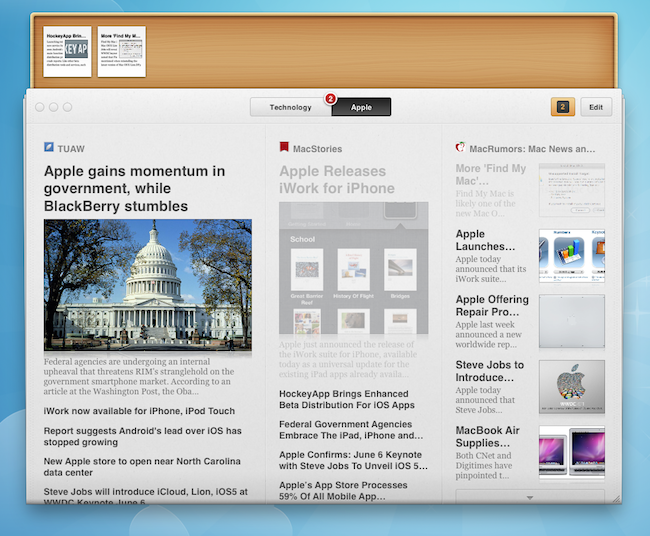
Times, the visual news reader for Mac that came to the iPad last year, received a major update earlier today which sees the application becoming Pulp for Mac 2.0 following the re-branding on the iPad version, and the introduction of a new cloud sync service to keep settings, articles and sources in sync across the Mac client and the tablet counterpart. I’ve been testing the new Pulp for Mac for a few months, and I’m positively impressed with the quality of cloud sync and reading experience the Acrylic Apps developers have built into this latest version. First off, the new Mac app looks just like Pulp for iPad, only running on a Mac: if you followed the development of Times / Pulp with our previous coverage, you know what to expect: you can create pages to organize content sources by topic, organize feeds and articles with different layouts, as well as import websites from Google Reader if you don’t feel like entering a website’s name manually (which takes seconds, by the way). More importantly, the release of Pulp for iPad brought the possibility of reading articles with the Magic Reader, a feature that strips away all the clutter from webpages and displays truncated RSS articles in their entirety without any manual fiddling. Pulp for Mac does everything the iPad version did, it’s got the shelf to save articles for later and syncs everything via the cloud.
The cloud service is free, and can sync ”your pages, feeds, read articles, and other settings in sync on all of your Macs and iPads”. It’s that simple: every change that’s either made on the iPad or Mac is pushed to the cloud instantly, and received on the second device in seconds. I have tested this with articles, pages and the shelf interface and it worked really well. The cloud sync can be enabled or disabled in the Settings.
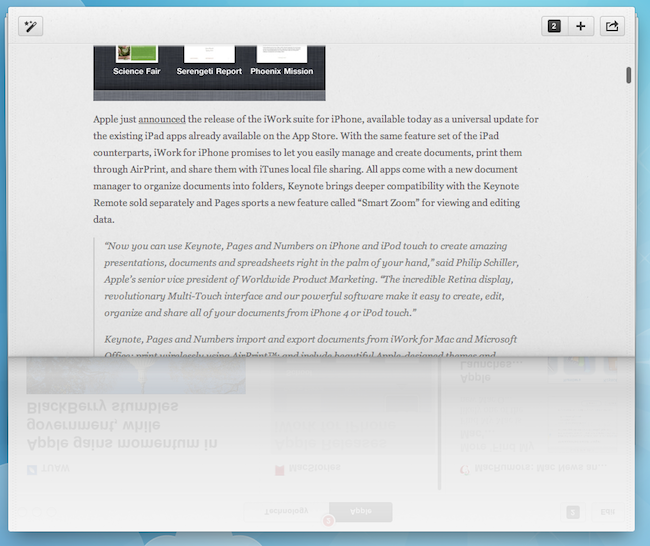
I don’t particularly appreciate the page-curling effect on the Mac as I believe it wastes too much real screen estate, but the rest of the interface is really minimal, elegant, and easy to scan through. Pulp can’t be compared to other news readers like Flipboard that plug into your social streams to deliver a magazine-like experience – instead, Pulp is more focused on single websites and RSS, and on letting you build a personalized newspaper that’s now in sync with the iPad, which also received a Pulp updated today to version 1.3. If you’re already a Pulp for iPad user, you should check out the free trial for Mac and see how cloud sync and the new app work for you. If you don’t own Pulp, I still recommend you start off with the iPad version, and later consider an upgrade to the desktop application which, by the way, is an excellent port of the iPad app.
Pulp for Mac is available at $9.99 in the Mac App Store.
#MacStoriesDeals - Tuesday

Here are today’s @MacStoriesDeals on iOS, Mac, and Mac App Store apps that are on sale for a limited time, so get them before they end!
Potion Factory’s The Hit List 1.0 Now Available
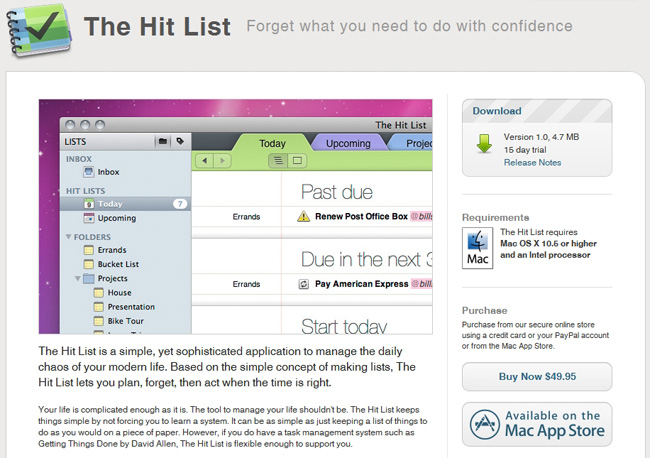
A unicorn has been born at the Potion Factory because The Hit List just went 1.0 and is ready for download via Potion Factory’s site (with a 15 day free trial) or the Mac App Store for $49.99. Back in 2009, people who purchased the MacHeist bundle got a license for the app when it was in beta and that license will still work today.
Many people doubted that it would ever see an official 1.0 release, but Andy Kim said “This, its iPhone companion app, and its sync service were the single most difficult undertaking of my life so far bar none. I hope that it won’t dissappoint and I hope that it will help you become more productive by taking the chore out of keeping track of what to do.”
More screens and iPhone news after the break.
Mozilla Releases Firefox 6.0 Alpha

Firefox 6, also referred to as Aurora, has just begun its development cycle and a rough alpha release is now available for testing and feedback. As with any alpha, it is in a very unfinished state at this point, but there are some notable new features that are included.
Those new features include new features for Panaorama, enhanced HTML5 support, new developer tools, improved add-ons manager and new permission manager window. The permissions manager is interesting in that it will allow users to give different sites varying amounts of permissions for cookies, pop-ups, offline storage and location access, giving users greater privacy controls. Whilst developers will likely be impressed with new features including a ‘Scratchpad’ that allows them to build and test JavaScript snippets on a site.
You may be scratching your head wondering why Aurora has gone into alpha when it was only in the past week or so that Firefox 5 went into Beta – that is all due to Mozilla’s development cycle where three major versions must be in active development at any one time. As a result, Firefox 4 is the mainstream and stable release build whilst version 5 is in Beta and now version 6 is in development as an alpha (or Aurora) build. You can download the Firefox 6 alpha here.
[Via Electronista]