

Here are today’s @MacStoriesDeals on iOS, Mac, and Mac App Store apps that are on sale for a limited time, so get them before they end!
Posts tagged with "mac"
#MacStoriesDeals - Friday
#MacStoriesDeals - Thursday

Here are today’s @MacStoriesDeals on iOS, Mac, and Mac App Store apps that are on sale for a limited time, so get them before they end!
Reeder for Mac: Now Available On The Mac App Store
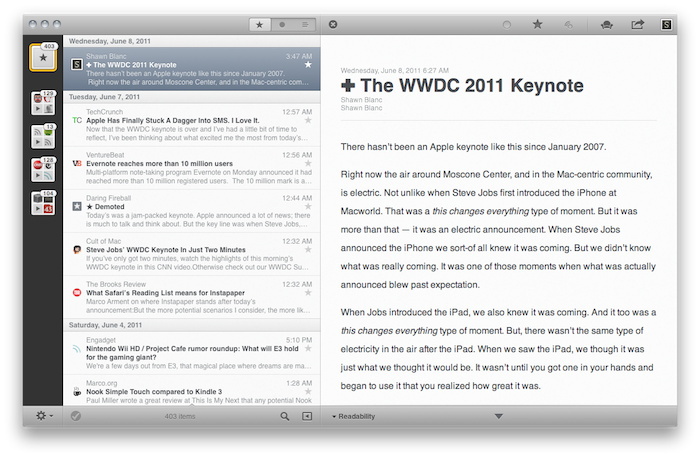
Over the past eight months, I’ve been following very closely the development of Reeder for Mac, a port of the popular Google Reader client for iOS to the OS X platform. As I was one of the first people to try the original Reeder for iPhone back in 2009, I immediately accepted Silvio Rizzi’s invite to join the beta testing group of Reeder for Mac in September 2010. Lots of things have changed since then. Sure, I never stopped using Reeder for Mac as my default desktop client, but there’s no doubt the app has gone through so many interface changes, design overhauls and feature additions I had to re-calibrate my workflow every time the developer updated something. That’s what you get by beta-testing things, but the evolution of Reeder for Mac was different: from our exclusive preview, to the first public beta and the one we reviewed last month, you can see how the app turned into something completely different from the experience I initially fell in love with. And that’s a good thing – the last full rewrite made Reeder for Mac insanely fast on Snow Leopard and ready to go on Lion. But enough with the beta talk. Read more
#MacStoriesDeals - Wednesday

Here are today’s @MacStoriesDeals on iOS, Mac, and Mac App Store apps that are on sale for a limited time, so get them before they end!
Flare for Mac Updated to 1.1 with Many New Features

Back in March when Flare first came out, we said that it “has a fast learning curve, looks great and makes adding effects as simple or complicated as you want.” Version 1.1 was just released and adds even more options to your user experience.
Version 1.1 adds six spanking new presets, including “Daguerreotype”; if you know anything about the history of photography, you’ve heard of this photographic processes from the 1800s. There are many new effects to Flare such as new borders, lightleaks, and more to make your own custom presets for your photos. The Flare blog has more information about all the new effects and presets in 1.1.
Flare is on sale for $9.99 (reg. $19.99) on the Mac App Store, if you want to try it before you buy it, go the Flare website for a free demo. The only limitations to the demo version is that it limits the size of the photo you can work with to something quite small. The registered version and the MAS version have no such limitation.
Outside of intense photo editors such as Adobe Photoshop or Lightroom, Flare is one of the best photo editors for the Mac, and so much easier to use too!
Full release notes can be found here.
Free Upgrade to Lion with a New Mac Purchase
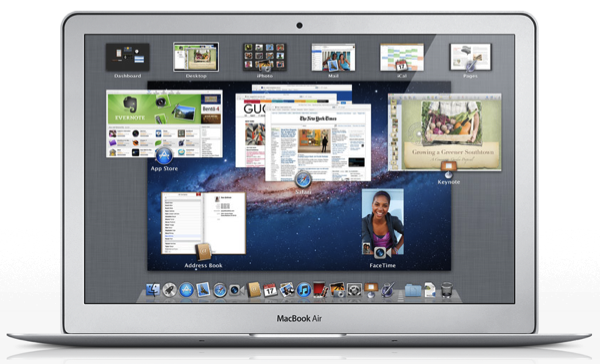
If you’re in the market for a new Mac, you’ll be eligible for a free upgrade to Lion once it hits the Mac App Store in July, thanks to Apple’s Up-To-Date program which keeps new customers on top of the latest technology. From the OS X Lion press release:
The Mac OS X Lion Up-To-Date upgrade is available at no additional charge via the Mac App Store to all customers who purchased a qualifying new Mac system from Apple or an Apple Authorized Reseller on or after June 6, 2011. Users must request their Up-To-Date upgrade within 30 days of purchase of their Mac computer. Customers who purchase a qualifying Mac between June 6, 2011 and the date when Lion is available in the Mac App Store will have 30 days from Lions official release date to make a request.
As MacRumors points out, you originally had to pay $9.95 for the installation DVD. However, as Lion is a download from the Mac App Store, there’s no longer going to be a charge to make up for packaging and shipping. Once Lion hits in July, you’ll have thirty days to request your free download through the program.
With new MacBook Airs around the corner, however, you might just want to wait to buy a shiny new Mac with Lion already installed.
[via MacRumors, OS X Lion Press Release]
#MacStoriesDeals - Friday

Here are today’s @MacStoriesDeals on iOS, Mac, and Mac App Store apps that are on sale for a limited time, so get them before they end!
Currencies for Mac Makes Conversion Simple, iOS-like
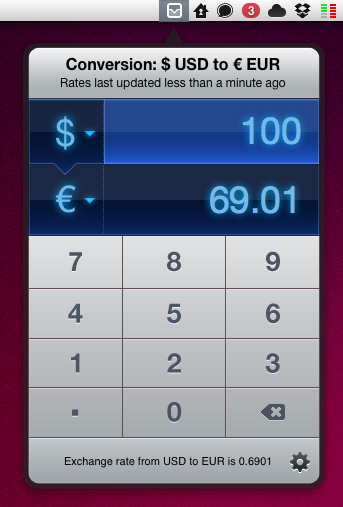
Being based in Italy, I have to deal with currency conversion on a daily basis. Most of my digital purchases are made on US websites, and either for work or personal purposes, more often that not I find myself going through my credit card billing statement to re-convert expenses from Euro to United States Dollars. As you can imagine, being able to easily and accurately convert currencies in seconds in the first place has become an essential part in my workflow. Currencies, a new app by Edovia released today on the Mac App Store, aims at making currency conversion super-simple from the OS X menubar with an interface design heavily inspired by iOS apps and multitouch.
In fact, Currencies for Mac comes from an iOS counterpart already available in the App Store. The app has been “converted” using The Iconfactory’s Chameleon engine, which allows developers to port the UIKit – the framework used to write apps for the iPhone and iPad – to the Mac. We’ve seen another example of Chameleon in action before, Carousel for Instagram. In a similar fashion, Currencies looks like an iPhone app inside an iPad popover menu running in the Mac menubar – a mix of interface schemes and devices that’s actually fun to use and once again hints at where the Mac platform is going. In the next few years, when Macs will be touch-enabled and even more similar to iOS devices, we’ll look back at this transition period, OS X Lion, iOS 5 and Chameleon.
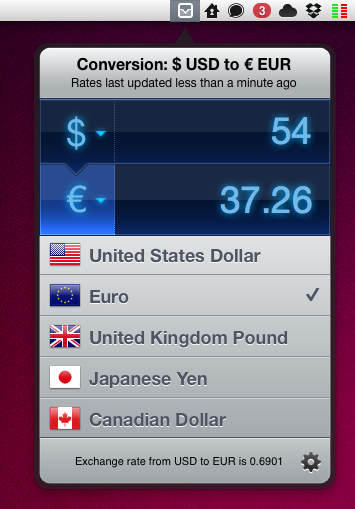
Currencies is very easy to use. One click on the menubar icon, and the app becomes visible to reveal two tabs for the currencies you’d like to convert. To type, you can either use the on-screen keyboard or your Mac’s one. To change currencies, hit the symbol and select a new one from the list – the design is nice and elegant. That’s it. The app has some preferences to choose a keyboard shortcut and a refresh time – the app relies on Yahoo for its conversion rates, supports 130 currencies and dots / commas for decimal separation.
Should you buy Currencies when your web browser takes seconds to open a currency converter and do the job for free? There’s no doubt you’ll be just fine converting units on a website like Yahoo Currency Converter or Xe.com, but if you care about good design, usability and are intrigued by the whole concept of iOS apps running in the Mac’s menubar, you should give Currencies a try. Go download the app here at $2.99 – you can find the iPhone version at the same price here.
CCleaner Coming To The Mac, First Beta Available Now
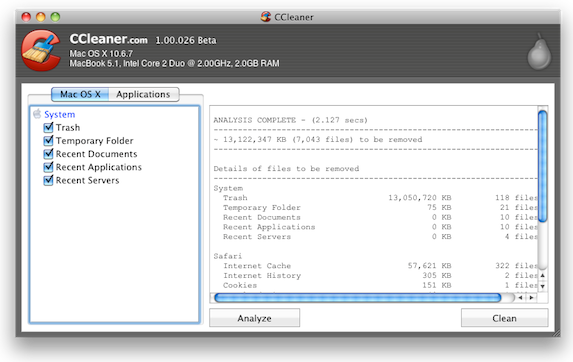
CCleaner, widely praised amongst Windows users, is making its way over to the Mac, with a first beta release available now. For those who are unfamiliar, CCleaner has been a Windows application that lets users easily delete and clean up their computer of temporary files, caches and other files that clog up their computer’s space, with many also using it for privacy, clearing out their browser data.
Being the first beta release, the OS X version has far less features than the current Windows version does. Nonetheless it still includes the core features of removing caches, cookies and history from either Safari or Firefox as well as clearing out the Trash, Recent Files and Servers and the Temporary folder.
Piriform, creators of CCleaner have said that they plan to release a full version within a few months, so expect more beta releases soon with support for more applications and more cleaning features. You can download the first beta release for OS X here.
[Via Lifehacker]