Posts tagged with "developers"

Post-Chat UI

Fascinating analysis by Allen Pike on how, beyond traditional chatbot interactions, the technology behind LLMs can be used in other types of user interfaces and interactions:

While chat is powerful, for most products chatting with the underlying LLM should be more of a debug interface – a fallback mode – and not the primary UX.

So, how is AI making our software more useful, if not via chat? Let’s do a tour.

There are plenty of useful, practical examples in the story showing how natural language understanding and processing can be embedded in different features of modern apps. My favorite example is search, as Pike writes:

Another UI convention being reinvented is the search field.

It used to be that finding your flight details in your email required typing something exact, like “air canada confirmation”, and hoping that’s actually the phrasing in the email you’re thinking of.

Now, you should be able to type “what are the flight details for the offsite?” and find what you want.

Having used Shortwave and its AI-powered search for the past few months, I couldn’t agree more. The moment you get used to searching without exact queries or specific operators, there’s no going back.

Experience this once, and products with an old-school text-match search field feel broken. You should be able to just find “tax receipts from registered charities” in your email app, “the file where the login UI is defined” in your IDE, and “my upcoming vacations” in your calendar.

Interestingly, Pike mentions Command-K bars as another interface pattern that can benefit from LLM-infused interactions. I knew that sounded familiar – I covered the topic in mid-November 2022, and I still think it’s a shame that Apple hasn’t natively implemented these anywhere in their apps, especially now that commands can be fuzzier (just consider what Raycast is doing). Funnily enough, that post was published just two weeks before the public debut of ChatGPT on November 30, 2022. That feels like forever ago now.
Permalink

A Peek Into LookUp’s Word of the Day Art and Why It Could Never Be AI-Generated

Yesterday, Vidit Bhargava, developer of the award-winning dictionary app LookUp, wrote on his blog about the way he hand-makes each piece of artwork that accompanies the app’s Word of the Day. While revealing that he has employed this practice every day for an astonishing 10 years, Vidit talked about how each image is made from scratch as an illustration or using photography that he shoots specifically for the design:

Each Word of the Day has been illustrated with care, crafting digital illustrations, picking the right typography that conveys the right emotion.

Some words contain images, these images are painstakingly shot, edited and crafted into a Word of the Day graphic by me.

I’ve noticed before that each Word of the Day image in LookUp seemed unique, but I assumed Vidit was using stock imagery and illustrations as a starting point each time. The revelation that he is creating almost all of these from scratch every single day was incredible and gave me a whole new level of respect for the developer.

The idea of AI-generated art (specifically art that is wholly generated from scratch by LLMs) is something that really sticks in my throat – never more so than with the recent rip-off of the beautiful, hand-drawn Studio Ghibli films by OpenAI. Conversely, Vidit’s work shows passion and originality.

To quote Vidit, “Real art takes time, effort and perseverance. The process is what makes it valuable.”

You can read the full blog post here.


Is Electron Really That Bad?

I’ve been thinking about this video by Theo Browne for the past few days, especially in the aftermath of my story about working on the iPad and realizing its best apps are actually web apps.

I think Theo did a great job contextualizing the history of Electron and how we got to this point where the majority of desktop apps are built with it. There are two sections of the video that stood out to me and I want to highlight here. First, this observation – which I strongly agree with – regarding the desktop apps we ended up having thanks to Electron and why we often consider them “buggy”:

There wouldn’t be a ChatGPT desktop app if we didn’t have something like Electron. There wouldn’t be a good Spotify player if we didn’t have something like Electron. There wouldn’t be all of these awesome things we use every day. All these apps… Notion could never have existed without Electron. VS Code and now Cursor could never have existed without Electron. Discord absolutely could never have existed without Electron.

All of these apps are able to exist and be multi-platform and ship and theoretically build greater and greater software as a result of using this technology. That has resulted in some painful side effects, like the companies growing way faster than expected because they can be adopted so easily. So they hire a bunch of engineers who don’t know what they’re doing, and the software falls apart. But if they had somehow magically found a way to do that natively, it would have happened the same exact way.

This has nothing to do with Electron causing the software to be bad and everything to do with the software being so successful that the companies hire too aggressively and then kill their own software in the process.

The second section of the video I want to call out is the part where Theo links to an old thread from the developer of BoltAI, a native SwiftUI app for Mac that went through multiple updates – and a lot of work on the developer’s part – to ensure the app wouldn’t hit 100% CPU usage when simply loading a conversation with ChatGPT. As documented in the thread from late 2023, this is a common issue for the majority of AI clients built with SwiftUI, which is often less efficient than Electron when it comes to rendering real-time chat messages. Ironic.

Theo argues:

You guys need to understand something. You are not better at rendering text than the Chromium team is. These people have spent decades making the world’s fastest method for rendering documents across platforms because the goal was to make Chrome as fast as possible regardless of what machine you’re using it on. Electron is cool because we can build on top of all of the efforts that they put in to make Electron and specifically to make Chromium as effective as it is. The results are effective.

The fact that you can swap out the native layer with SwiftUI with even just a web view, which is like Electron but worse, and the performance is this much better, is hilarious. Also notice there’s a couple more Electron apps he has open here, including Spotify, which is only using less than 3% of his CPU. Electron apps don’t have to be slow. In fact, a lot of the time, a well-written Electron app is actually going to perform better than an equivalently well-written native app because you don’t get to build rendering as effectively as Google does.

Even if you think you made up your mind about Electron years ago, I suggest watching the entire video and considering whether this crusade against more accessible, more frequently updated (and often more performant) desktop software still makes sense in 2025.

Permalink

WWDC 2025 Scheduled for June 9-13 Along with Special Event at Apple Park

Source: Apple.

Source: Apple.

WWDC25 will be held from June 9 - 13 this year and include an in-person experience on June 9 that will provide developers the opportunity to watch the keynote at Apple Park, meet with Apple team members, and take part in special activities. Space will be limited, and details on how to apply to attend can be found on the Apple Developer site and app.

Apple has announced that WWDC 2025 will primarily take place online again this year from June 9-13 2025. However, the company said that it simultaneously will hold a corresponding limited in-person event at Apple Park for developers, students, and press like last year.

In a press release issued by today, Susan Prescott, Apple’s Vice President of Worldwide Developer Relations and Enterprise and Education Marketing, said:

We’re excited to mark another incredible year of WWDC with our global developer community. We can’t wait to share the latest tools and technologies that will empower developers and help them continue to innovate.

Apple also had this to say about events that will be held at Apple Park during the conference:

To celebrate the start of WWDC, Apple will also host an in-person experience on June 9 that will provide developers with the opportunity to watch the Keynote and Platforms State of the Union at Apple Park, meet with Apple experts one-on-one and in group labs, and take part in special activities. Space will be limited; details on how to apply to attend can be found on the WWDC25 website.

As time passes, fewer of the people I used to count on seeing at WWDC attend. I suppose that’s to be expected now that the event is primarily online. However, I’m just as excited as ever for this year’s event. It’s a chance to preview new technology and meet many of the developers whose work we cover. However, with rumors of new hardware on the horizon and a design refresh for all of Apple’s OSes, I’m sure this year’s WWDC will be as interesting as always.

Of course, MacStories readers can expect the same kind of comprehensive WWDC coverage we do every year. We’ll have extensive coverage on MacStories, AppStories, and MacStories Unwind, which will extend to Club MacStories too.


App Store Vibes

Bryan Irace has an interesting take on the new generation of developer tools that have lowered the barrier to entry for new developers (and sometimes not even developers) when it comes to creating apps:

Recent criticism of Apple’s AI efforts has been juicy to say the least, but this shouldn’t distract us from continuing to criticize one of Apple’s most deserving targets: App Review. Especially now that there’s a perfectly good AI lens through which to do so.

It’s one thing for Apple’s AI product offerings to be non-competitive. Perhaps even worse is that as Apple stands still, software development is moving forward faster than ever before. Like it or not, LLMs—both through general chat interfaces and purpose-built developer tools—have meaningfully increased the rate at which new software can be produced. And they’ve done so both by making skilled developers more productive while also lowering the bar for less-experienced participants.

And:

I recently built a small iOS app for myself. I can install it on my phone directly from Xcode but it expires after seven days because I’m using a free Apple Developer account. I’m not trying to avoid paying Apple, but there’s enough friction involved in switching to a paid account that I simply haven’t been bothered. And I used to wrangle provisioning profiles for a living! I can’t imagine that I’m alone here, or that others with less tribal iOS development knowledge are going to have a higher tolerance for this. A friend asked me to send the app to them but that’d involve creating a TestFlight group, submitting a build to Apple, waiting for them to approve it, etc. Compare this to simply pushing to Cloudflare or Netlify and automatically having a URL you can send to a friend or share via Twitter. Or using tools like v0 or Replit, where hosting/distribution are already baked in.

Again, this isn’t new—but being able to build this much software this fast is new. App distribution friction has stayed constant while friction in all other stages of software development has largely evaporated. It’s the difference between inconvenient and untenable.

Perhaps “vibe coding” is the extreme version of this concept, but I think there’s something here. Creating small, low-stakes apps for personal projects or that you want to share with a small group of people is, objectively, getting easier. After reading Bryan’s post – which rightfully focuses on the distribution side of apps – I’m also wondering: what happens when the first big service comes along and figures out a way to bypass the App Store altogether (perhaps via the web?) to allow “anyone” to create apps, completely cutting out Apple and its App Review from the process?

In a way, this reminds me of blogging. Those who wanted to have an online writing space 30 years ago had to know some of the basics of hosting and HTML if they wanted to publish something for other people to read. Then Blogger came along and allowed anyone – regardless of their skill level – to be read. What if the same happened to mobile software? Should Apple and Google be ready for this possibility within the next few years?

I could see Google spin up a “Build with Gemini” initiative to let anyone create Android apps without any coding knowledge. I’m also reminded of this old Vision Pro rumor that claimed Apple’s Vision team was exploring the idea of letting people create “apps” with Siri.

If only the person in charge of that team went anywhere, right?

Permalink

Where’s Swift Assist?

Last June at WWDC, Apple announced Swift Assist, a way to generate Swift code using natural language prompts. However, as Tim Hardwick writes for MacRumors, Swift Assist hasn’t been heard from since then:

Unlike Apple Intelligence, Swift Assist never appeared in beta. Apple hasn’t announced that it’s been delayed or cancelled. The company has since released Xcode 16.3 beta 2, and as Michael Tsai points out, it’s not even mentioned in the release notes.

Meanwhile, developers have moved on, adopting services like Cursor, which does much of what was promised with Swift Assist, if not more. A similar tool built specifically for Swift projects and Apple’s APIs would be a great addition to Xcode, but it’s been nine months, and developers haven’t heard anything more about Swift Assist. Apple owes them an update.

Permalink

On Apple Offering an Abstraction Layer for AI on Its Platforms

Source: Apple.

Source: Apple.

I’ve been thinking about Apple’s position in AI a lot this week, and I keep coming back to this idea: if Apple is making the best consumer-grade computers for AI right now, but Apple Intelligence is failing third-party developers with a lack of AI-related APIs, should the company try something else to make it easier for developers to integrate AI into their apps?

Gus Mueller, creator of Acorn and Retrobatch, has been pondering similar thoughts:

A week or so ago I was grousing to some friends that Apple needs to open up things on the Mac so other LLMs can step in where Siri is failing. In theory we (developers) could do this today, but I would love to see a blessed system where Apple provided APIs to other LLM providers.

Are there security concerns? Yes, of course there are, there always will be. But I would like the choice.

The crux of the issue in my mind is this: Apple has a lot of good ideas, but they don’t have a monopoly on them. I would like some other folks to come in and try their ideas out. I would like things to advance at the pace of the industry, and not Apple’s. Maybe with a blessed system in place, Apple could watch and see how people use LLMs and other generative models (instead of giving us Genmoji that look like something Fisher-Price would make). And maybe open up the existing Apple-only models to developers. There are locally installed image processing models that I would love to take advantage of in my apps.

The idea is a fascinating one: if Apple Intelligence cannot compete with the likes of ChatGPT or Claude for the foreseeable future, but third-party developers are creating apps based on those APIs, is there a scenario in which Apple may regain control of the burgeoning AI app ecosystem by offering their own native bridge to those APIs?

Read more


The M3 Ultra Mac Studio for Local LLMs

Speaking of the new Mac Studio and Apple making the best computers for AI: this is a terrific overview by Max Weinbach about the new M3 Ultra chip and its real-world performance with various on-device LLMs:

The Mac I’ve been using for the past few days is the Mac Studio with M3 Ultra SoC, 32-core CPU, 80-core GPU, 256GB Unified Memory (192GB usable for VRAM), and 4TB SSD. It’s the fastest computer I have. It is faster in my workflows for even AI than my gaming PC (which will be used for comparisons below; it has an Intel i9 13900K, RTX 5090, 64GB of DDR5, and a 2TB NVMe SSD).

It’s a very technical read, but the comparison between the M3 Ultra and a vanilla (non-optimized) RTX 5090 is mind-blogging to me. According to Weinbach, it all comes down to Apple’s MLX framework:

I’ll keep it brief; the LLM performance is essentially as good as you’ll get for the majority of models. You’ll be able to run better models faster with larger context windows on a Mac Studio or any Mac with Unified Memory than essentially any PC on the market. This is simply the inherent benefit of not only Apple Silicon but Apple’s MLX framework (the reason we can efficiently run the models without preloading KV Cache into memory, as well as generate tokens faster as context windows grow).

In case you’re not familiar, MLX is Apple’s open-source framework that – I’m simplifying – optimizes training and serving models on Apple Silicon’s unified memory architecture. It is a wonderful project with over 1,600 community models available for download.

As Weinbach concludes:

I see one of the best combos any developer can do as: M3 Ultra Mac Studio with an Nvidia 8xH100 rented rack. Hopper and Blackwell are outstanding for servers, M3 Ultra is outstanding for your desk. Different machines for a different use, while it’s fun to compare these for sport, that’s not the reality.⁠⁠

There really is no competition for an AI workstation today. The reality is, the only option is a Mac Studio.

Don’t miss the benchmarks in the story.

Permalink

App Store Connect Adds New Tools for Developers to Promote Their Apps

Source: Apple.

Source: Apple.

App Store Connect, the web app that developers use to submit their apps to Apple’s App Store and manage them, was updated yesterday with new tools developers can use to promote their apps.

Source: Apple.

Source: Apple.

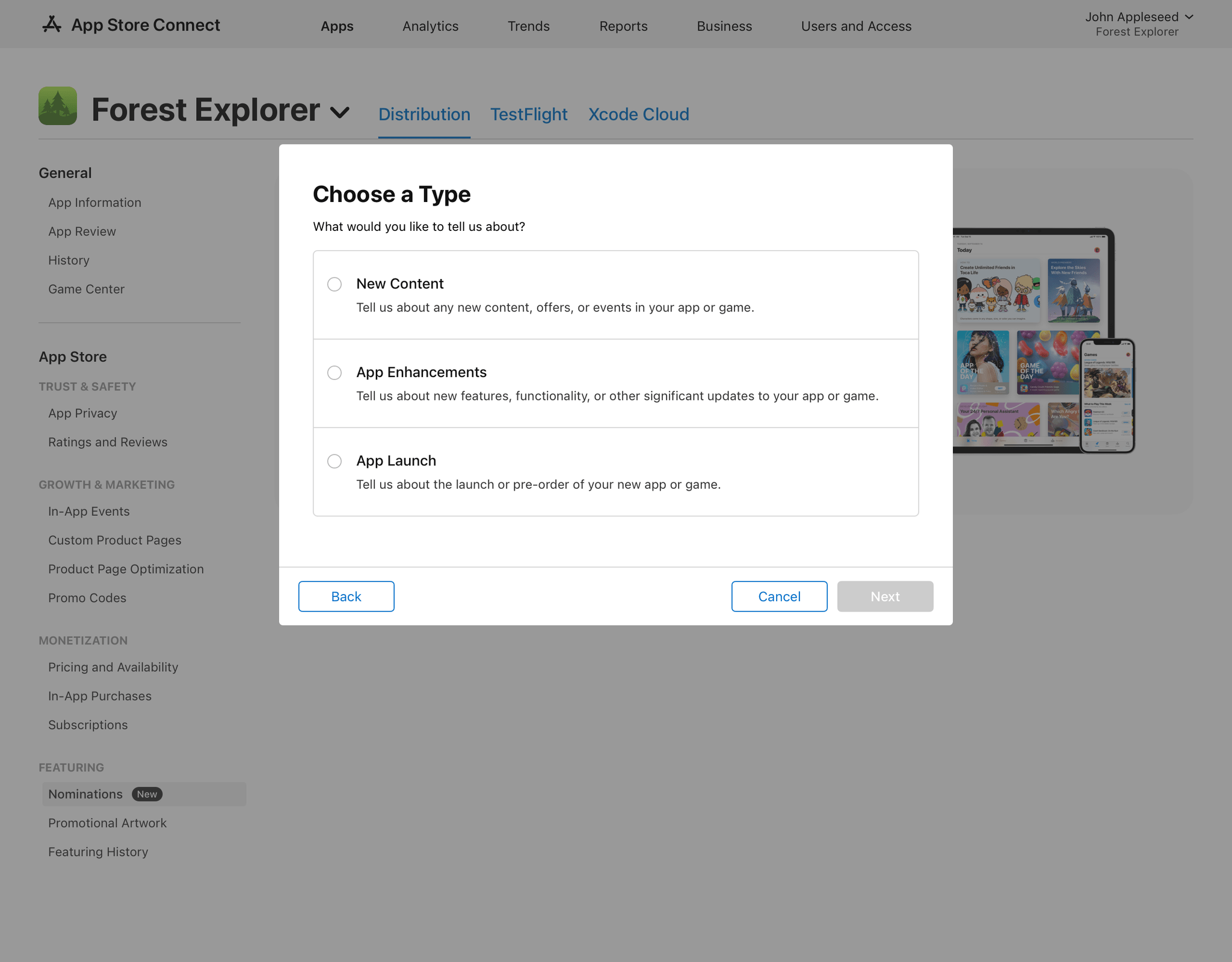
Developers have been able to submit promotional requests to Apple for quite some time, but the new Featuring Nomination process is now baked right into App Store Connect. Developers can submit nominations from App Store Connect where they will be asked for information about their app. Nominations can be made for events such as a new app launch or adding in-app content and features. When an app is chosen by the App Store editorial team for a feature, developers will be notified in App Store Connect, too.

App Store Connect has also added the ability to generate promotional materials. The assets created can be used on social media and other platforms to promote app launches and other significant events.

These new App Store Connect tools promise to make promoting apps more convenient by including the Featuring Nomination process alongside other aspects of app submission. However, I expect it’s the ready-made promotional assets that are the more significant addition for smaller developers who may not have the budget or skills to create the materials themselves.