

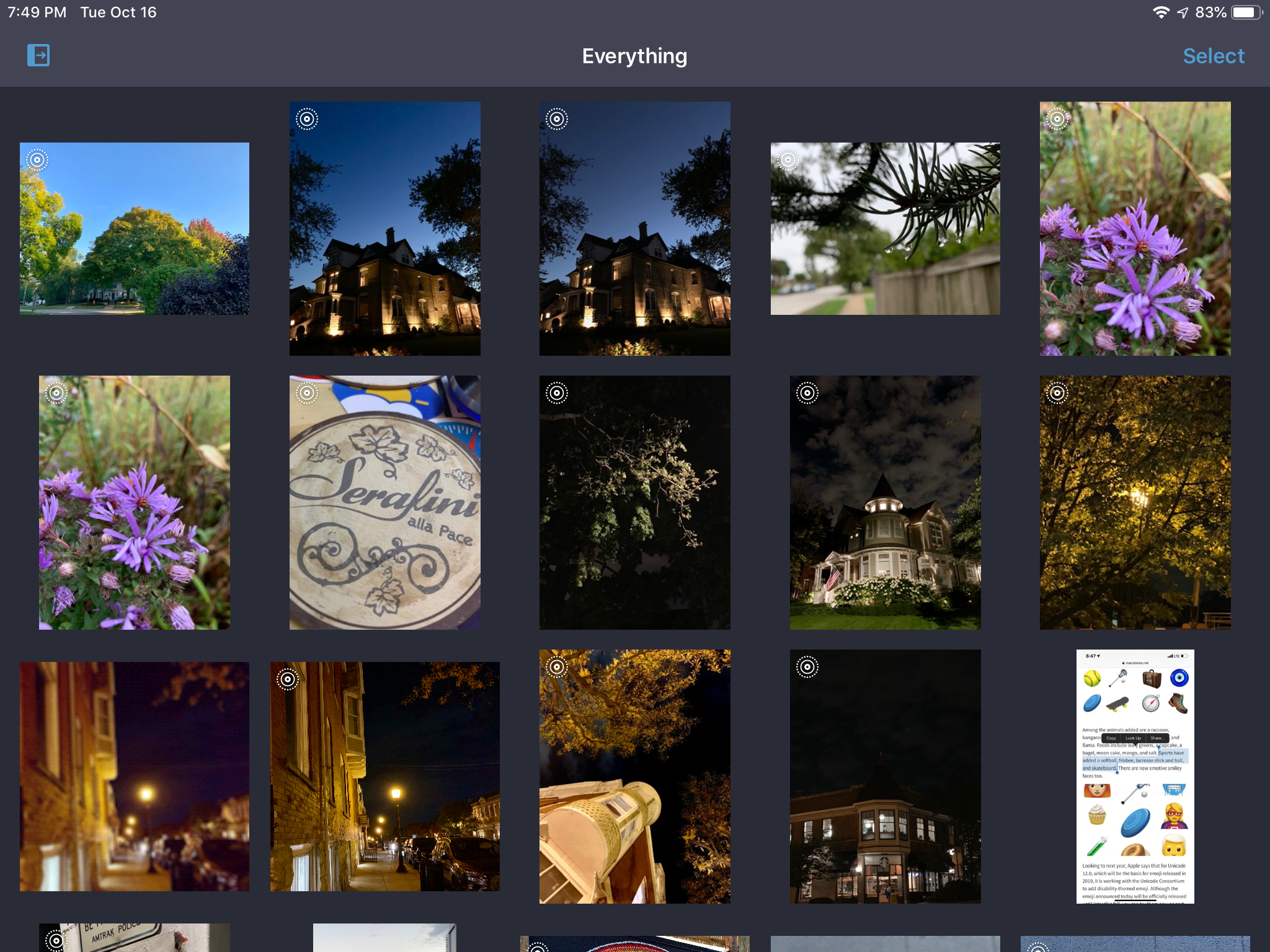
BestPhotos, a photo management app from Chicago-based Windy Software that we’ve covered on Club MacStories before, was updated today with new features for quickly and efficiently organizing your photos. I take thousands of pictures each year and sometimes it feels like I take even more screenshots. Sifting through to find the best shots and discard old screenshots, duplicates, and just plain bad photos takes a lot of tapping and time in Apple’s Photos app. BestPhotos is a better solution that streamlines the whole process.
BestPhotos Offers Streamlined Photo Management
App Bundles Are Coming to the Mac App Store→
In a brief post on Apple’s Developer news site, the company announced that it is adding support for app bundles to the Mac App Store. According to the post:
…now, you can create app bundles for Mac apps or free apps that offer an auto-renewable subscription to access all apps in the bundle.
The post points to developer documentation on creating app bundles that that has been revised to mention Mac apps. The process for setting up a bundle, which will allow developers to offer up to 10 Mac apps as a single purchase, appears to be the same as it is for iOS developers. Unfortunately for those developers with iOS and macOS apps, it does not appear possible to create a mixed bundle of iOS and Mac apps.
AppStories, Episode 83 – Frequently-Used Shortcuts, Part 1→
On this week’s episode of AppStories, we discuss some of our most frequently-used shortcuts for work and our personal lives.
Sponsored by:
- Luna Display - The only hardware solution that turns your iPad into a wireless display for your Mac. Use promo code APPSTORIES at checkout for 10% off.
- CleanMyMac X - Your Mac. As good as new.

AppStories Episode 83 - Frequently-Used Shortcuts, Part 1
0:00
35:05
35:05






Developers Show What They Could Make if Apple Opened Up Watch Face Development
Last week we linked to Marco Arment’s article critiquing Apple’s watch faces and calling for Apple to open up watch face design and development to third parties. By the next day, Steve Troughton-Smith had an Xcode project up and running that uses SpriteKit to simulate custom watch faces. Troughton-Smith posted pictures of the watch faces he created on Twitter, which drew a lot of interest from other developers.
Troughton-Smith uploaded his watch face project to GitHub, and in the days that followed, developers, including David Smith, who’s been making Apple Watch apps for his health and fitness apps since the Series 0 was introduced, began playing with Troughton-Smith’s code. Writing about the experience on his website Smith said:
There is something delightful about solving a problem that is superficially so simple and constrained. The constraint leads to lots of opportunities for creative thinking. Ultimately you just need to communicate the time but how you do that can take countless different forms. It reminds me of the various ‘UI Playgrounds’ that have existed in app design. For a while it was twitter clients, then podcast players and weather apps.
I spent the weekend following along as Troughton-Smith, Smith, and others designed all manner of personalized watch faces. The experience reminds me of the flurry of activity and excitement during the first months after the iPhone was released when developers reverse-engineered Apple’s APIs to create the first jailbroken apps even before there was an App Store. Let’s hope that history repeats itself and Apple opens up watch face development to third parties like it did with apps.
Below and after the break, we’ve collected tweets following Troughton-Smith’s work and showing off some of the designs that have been created over the past several days.
https://twitter.com/stroughtonsmith/status/1049733933175369729
https://twitter.com/stroughtonsmith/status/1049739746967203840
https://twitter.com/stroughtonsmith/status/1050010561151475712
https://twitter.com/stroughtonsmith/status/1050022867738484736
Running a Mac from an iPad or iPhone with Remote Control for Mac
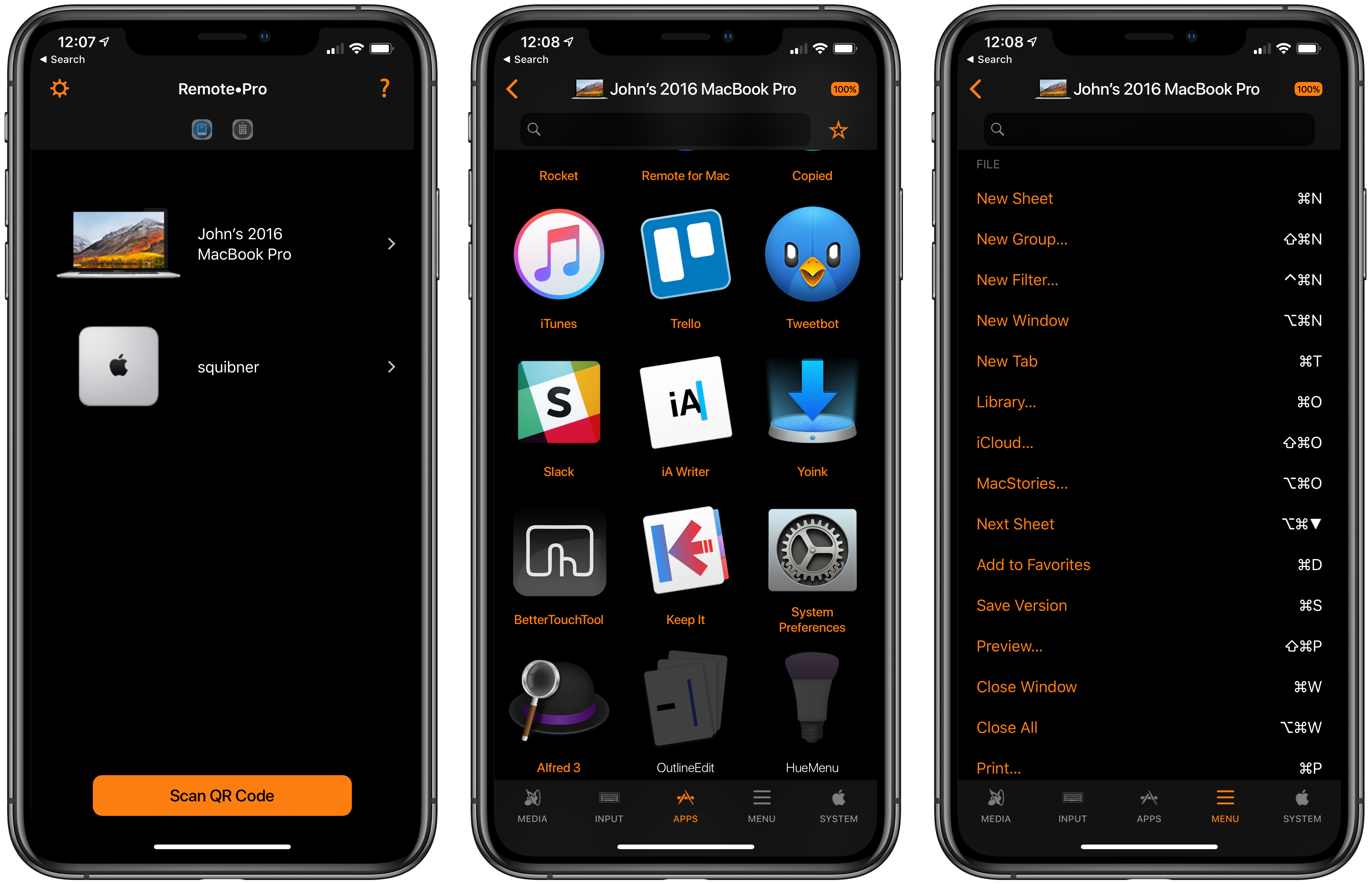
Evgeny Cherpak’s iOS app, Remote Control for Mac, has been updated with Siri shortcut support, which opens up some interesting ways to control a Mac with shortcuts. I’ve been using the app’s new Siri shortcuts for about a week and, as I covered on AppStories today, the shortcuts I’ve created that incorporate Remote’s functionality are already ones that I use every day.
Creating Shortcuts with Invisible Names for the iOS Home Screen and Widget
I’ve spent the past two weeks updating my iPhone’s home screen setup for the XS Max and, as I shared in the latest episode of AppStories, part of the process involved gaining easier access to some of the shortcuts I use on a regular basis. While I’m not a fan of the shortcuts-only home screen approach described by CGP Grey in episode 75 of the Cortex podcast (at some point, I believe you just end up swapping app folders for shortcuts), I do like the idea of adding a couple of frequently used custom shortcuts to the home screen. And as I detailed on AppStories, I also like to use “shortcut launchers” – effectively, shortcuts to launch other shortcuts.
Project Gemini Is a New iPad Illustration App Coming from Adobe→
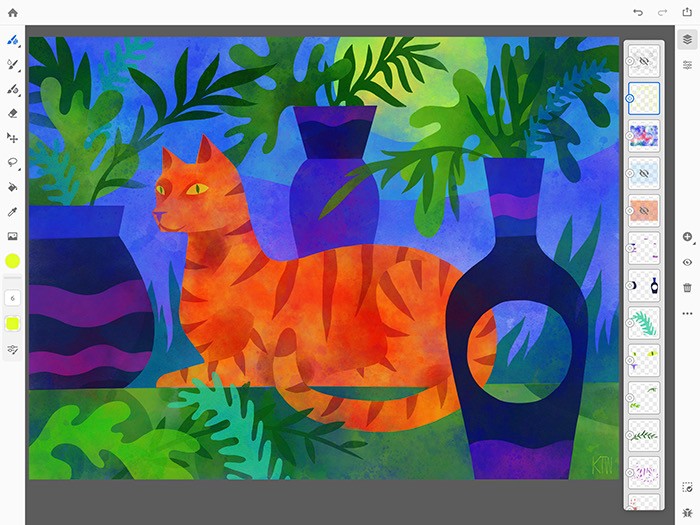
Along with details about the forthcoming Photoshop for iPad, Adobe has announced another brand new iPad app coming soon, dubbed Project Gemini:
Today we announced Project Gemini—a focused new app focused specifically on drawing and painting. Building on Photoshop’s powerful brush engine, this new app combines powerful Photoshop brushes, precise and scalable vector brushes, and an entirely new category of groundbreaking Live oil and watercolor brushes – you’ve never seen anything like them. In addition, layers, selections, and masks enable the most modern non-destructive drawing and editing workflows.
Most importantly, though, we’ve built Project Gemini with the illustration community.
Kyle Webster, of KyleBrush.com, joined Adobe in 2017 to help build Gemini and act as an ambassador and advocate for the illustration community. Along with Kyle, a group of illustrators with diverse styles and backgrounds have been working closely with us to help Gemini achieve its potential.
According to the announcement post, the genesis of this new app was advancements in hardware that enabled Adobe’s team to build more powerful tools than were previously possible. They highlight “selection and masking tools, combined raster and vector drawing capabilities” as some examples.
I’m not in the target market for this app, but I’m excited to see Adobe continue to rethink how modern iPads can enable more powerful, yet accessible app experiences than before.
If you’d like to join the Gemini beta when it begins, Adobe has a short survey available for interested testers.
The State of Gaming on the Apple TV→
Samuel Axon of Ars Technica published an article over the weekend about the state of gaming on Apple TV, inspired by the recent demise of Minecraft on the platform. In it he shares quotes from notable iOS and tvOS game developers about Apple’s problems with the Apple TV as a gaming platform.
On the subject of Minecraft, Team Alto developer Ryan Cash said:
“If I were in charge of the game…I think I’d really try to stay there. While the platform certainly isn’t the biggest, it continues to grow, and it’s a great way for certain types of audiences to experience gaming, often for their first time.”
Strange Flavour’s CEO Aaron Fothergill expressed similar sentiments, highlighting how easy it is to port a game from iOS to tvOS. He did, however, share one common request for the platform:
“I…like the idea of game controllers (ideally Apple ones) being bundled with the Apple TV as an actual Apple option. So there’s an Apple TV being sold specifically for games.”
Finally, developer Patrick Hogan shared three things he believes Apple should do:
- Include an Apple-branded, full-featured controller with every Apple TV.
- Market the Apple TV as a gaming platform.
- “Spend a lot of money on funding platform exclusives, ports, and presence at every major gaming expo and conference to break the chicken-egg problem of getting customers to make it viable to devs.”
Gaming is clearly an area where Apple could have more success if it wanted to. Producing a controller to bundle with the Apple TV, even if it were just included with certain SKUs of the device, wouldn’t be that difficult for the company. Clearly it’s just something that the execs in Cupertino don’t want to pursue at this time.
It could be challenging bridging the gap between the touch-first games of iOS and potential controller-first titles on the Apple TV, but if Nintendo can walk that line successfully with the Switch, I don’t doubt that Apple could do the same. Until such a strategy shift takes place though, Apple TV gaming is likely to remain stuck in mediocrity.
Adobe Unveils Photoshop for iPad, Launching in 2019
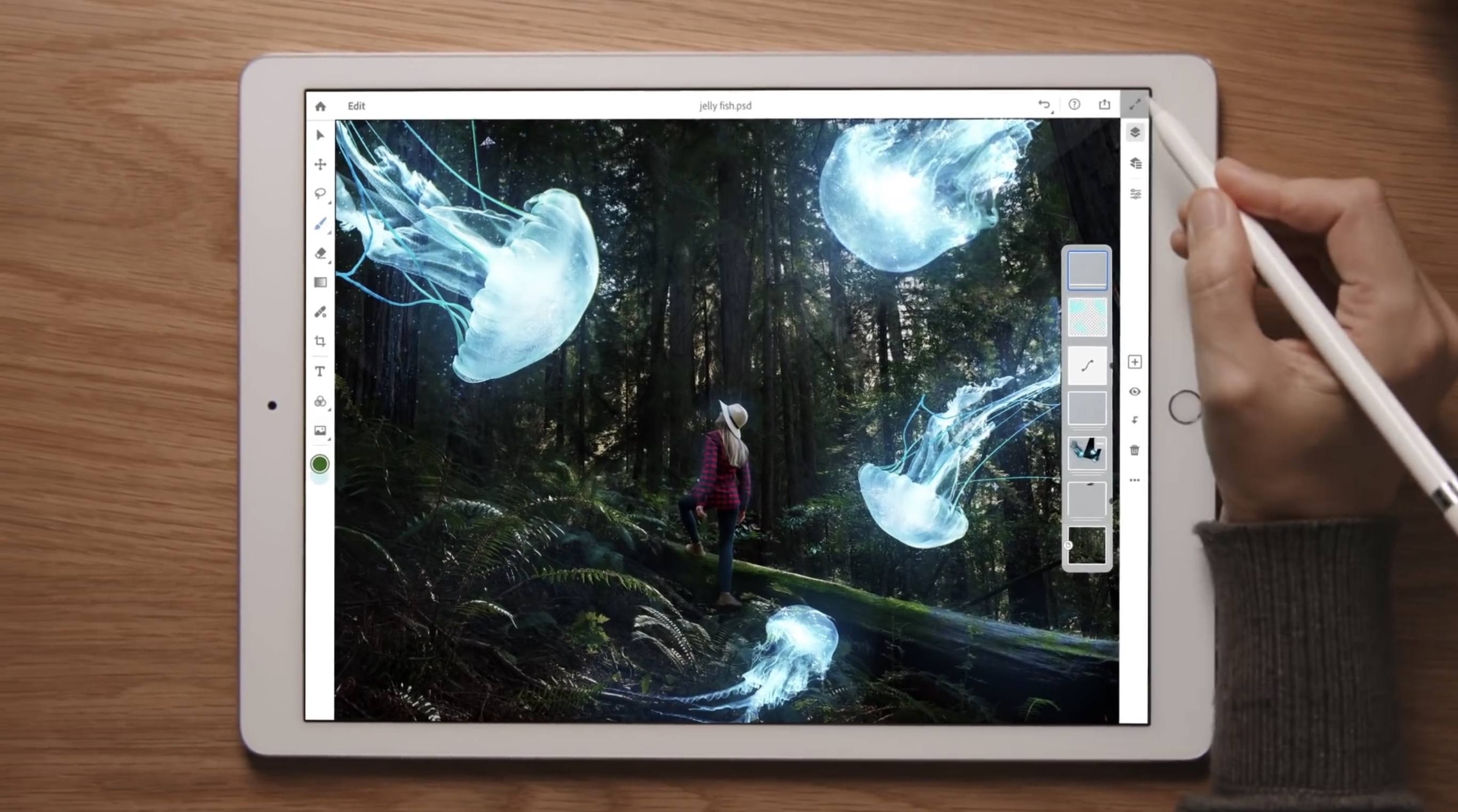
Earlier this year Adobe confirmed that it was working on a full-featured version of Photoshop for the iPad, but no real details on the product were given. Today that changed, however, as the app’s official announcement arrived alongside the kickoff of Adobe’s MAX conference.
Photoshop for iPad won’t arrive until some time in 2019, but when it does launch it will differ drastically from Adobe’s current lineup of Photoshop-related iOS apps. Rather than focusing on an individual subset of desktop features, like Adobe’s existing Photoshop Fix, Express, and Mix do, the aim with this forthcoming app is to provide the full desktop Photoshop experience on an iPad.
As part of its iPad efforts, Adobe has brought the same underlying codebase of Photoshop for desktop to iOS, and it has also worked to modernize PSD files for the cloud. These new Cloud PSDs will be the default file format on the new iPad app, offering a seamless file experience across multiple devices. Adobe’s chief product officer, Scott Belsky, told The Verge:
“Cloud PSDs, when we ship Photoshop on the iPad, will also run and automatically show up on your desktop…Suddenly, you’ll have this cloud-powered roundtrip experience akin to a Google Docs experience, where literally the source of truth of your Photoshop creation is in the cloud.”
Cloud PSDs will eliminate the need for importing or exporting files, removing a major friction point that currently stands in the way of working with Adobe’s apps on the iPad. With Creative Cloud’s automatic syncing of all files, you should be able to pick up editing on any device at any time without needing to do a thing.
When manual importing or exporting does make sense to your workflow, those options will still be available in Photoshop for iPad. The app will support file providers like iCloud Drive, Dropbox, and more. Based on the preview version of the app, it appears to support Files.app’s document providers, and I’m hopeful that iOS 11’s drag and drop features will be supported as another option for importing and exporting.
The Verge was granted a week of hands-on time with Photoshop for iPad, and has a great video that demonstrates the app in action. It appears very similar to Photoshop on desktop, with some adaptations made for OS differences like iOS’s lack of a menu bar. There are sure to be touch-optimized improvements offered too though, such as a gesture the video highlights where you can tap with two fingers on the screen to undo.
Though Adobe’s goal is full feature parity between desktop and iPad versions of Photoshop, the 1.0 release of Photoshop on iPad will lack certain features that will be added over time with future updates. That full list of missing features is unavailable at this time, but we’re sure to learn more as the launch approaches.
Photoshop for iPad will be available free to all Creative Cloud subscribers, but there’s no word currently on whether a standalone purchase or iPad-only subscription will be possible. It would be a strong vote of confidence in iPad-first users to make the app available for non-CC subscribers, but based on Adobe’s history that appears unlikely.
Today’s announcement highlights what an exciting time it is to be an iPad user. With new iPad Pro models expected to be announced in the coming weeks, and a reported focus on significant iPad features coming in iOS 13, there’s no time like the present for the full power of Photoshop to make its way to Apple’s tablet.