Apple Heavily Promotes the Amazon Echo’s Apple Music Integration

At the end of November, Amazon announced on its blog that Apple Music would be coming to Echo devices the week of December 17th. The music streaming service showed up on Echos a little earlier than expected last Friday, December 14th.

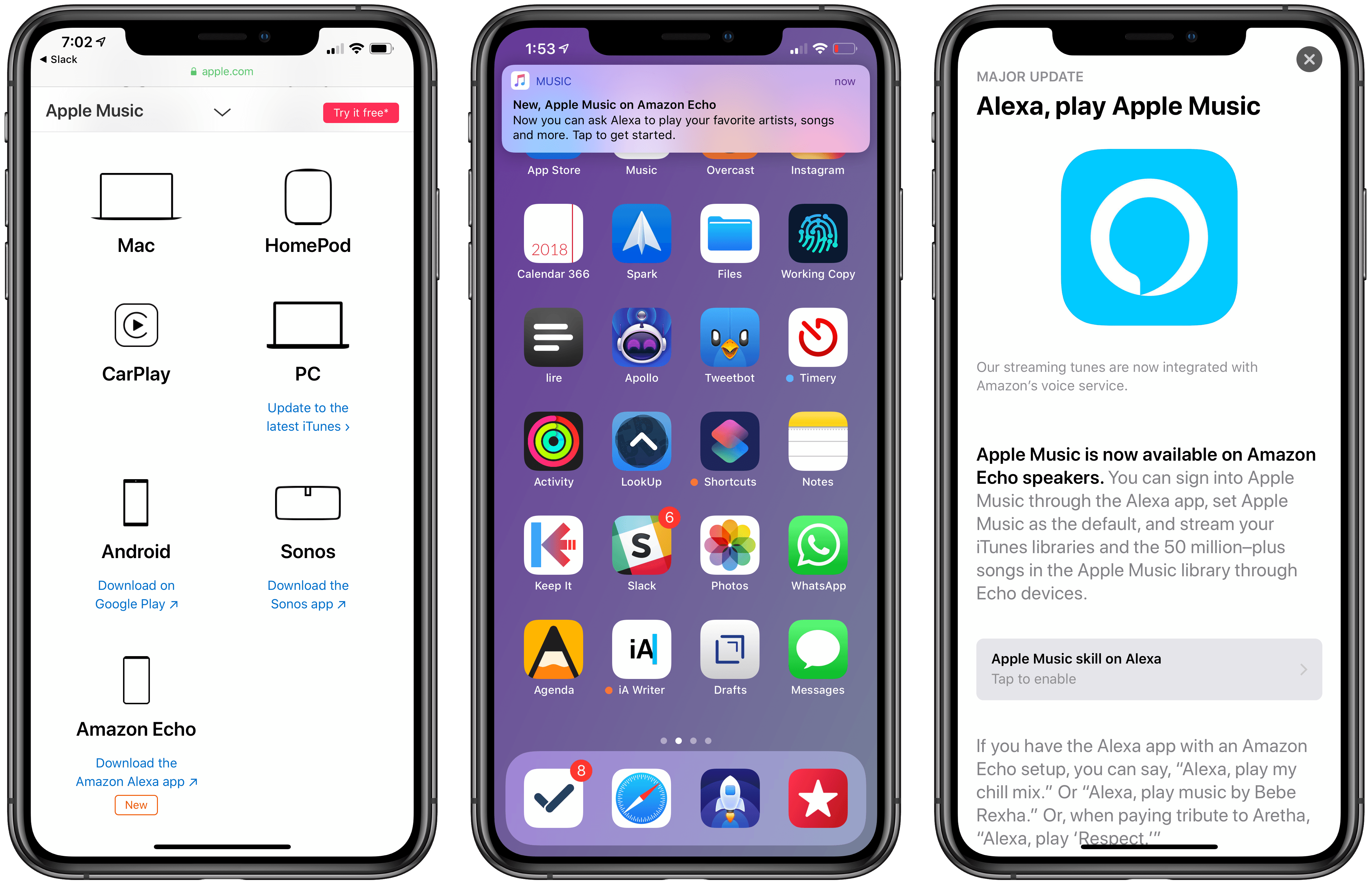
Today, Apple began promoting Apple Music’s availability on Echo devices through three different channels. The Echo integration first appeared on the App Store, which gave the Alexa app top billing in a Today tab story that highlights the new feature. Apple is also promoting the Echo integration on the Apple Music features page of its website along with other third-party devices like PCs, Android devices, and Sonos music players. Finally, late in the day US time, the Apple Music app began delivering push notifications highlighting the Echo feature.1

Amazon’s Echo devices aren’t the first third-party hardware to get Apple Music support as the Apple Music website demonstrates, but it is unusual for Apple to promote another company’s hardware alongside Apple Music to this degree. It’s also surprising because, in the two weeks that followed Amazon’s announcement, Apple said nothing. Nor did it acknowledge the change four days ago when the Alexa app was updated.

I wouldn’t be surprised if promoting the Echo was part of a bigger deal that got Apple products back on Amazon shelves in early November. Whether or not that’s the case, it’s still interesting to see Apple, which offers the competing HomePod, put so much promotional weight behind Amazon’s smart home speaker.


  1. I’m not a fan of promotional push notifications like these, which violate App Review Guideline 4.5.4 against using push notifications for advertising and promotional purposes. Unfortunately, that’s a rule that Apple has violated itself before and one that it has never meaningfully enforced against third parties. 

AutoSleep 6: Effortless Sleep Tracking More Accessible Than Ever

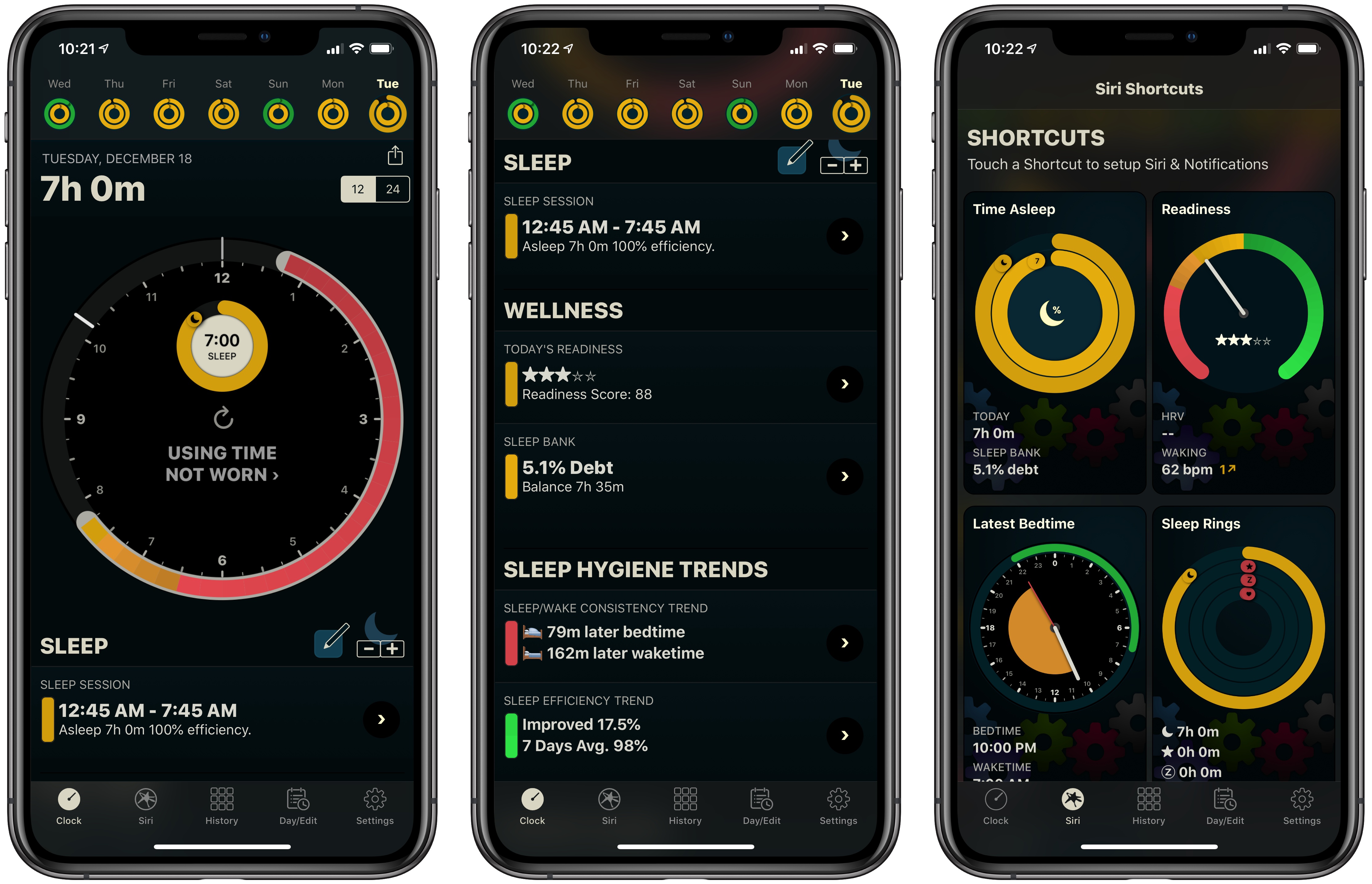
If you’ve followed MacStories for long, you probably already know that AutoSleep is one of our favorite sleep tracking apps on iOS. The app stands out for offering a frictionless, effort-free experience. Where other sleep trackers may require you to start and stop sleep tracking manually, AutoSleep takes the burden of remembering those tedious tasks off your plate. If you wear an Apple Watch to sleep, the app will automatically detect your sleep patterns even without a separate Watch app installed. If you don’t have a Watch, or simply don’t wear it to bed, the app will track your sleep through other methods. Whatever your habits are, AutoSleep has you covered.

Today marks the debut of AutoSleep’s latest major iteration: version 6.0, which introduces new wellness features, refined graphs and color schemes, sleep hygiene trends, Siri shortcuts, an improved Watch app, and more. It’s an extensive update that simplifies some aspects of the app while branching out into fresh, innovative areas of health tracking.

Read more


Launch Center Pro 3.0 Review: Universal Version, New Business Model, NFC Triggers, and More

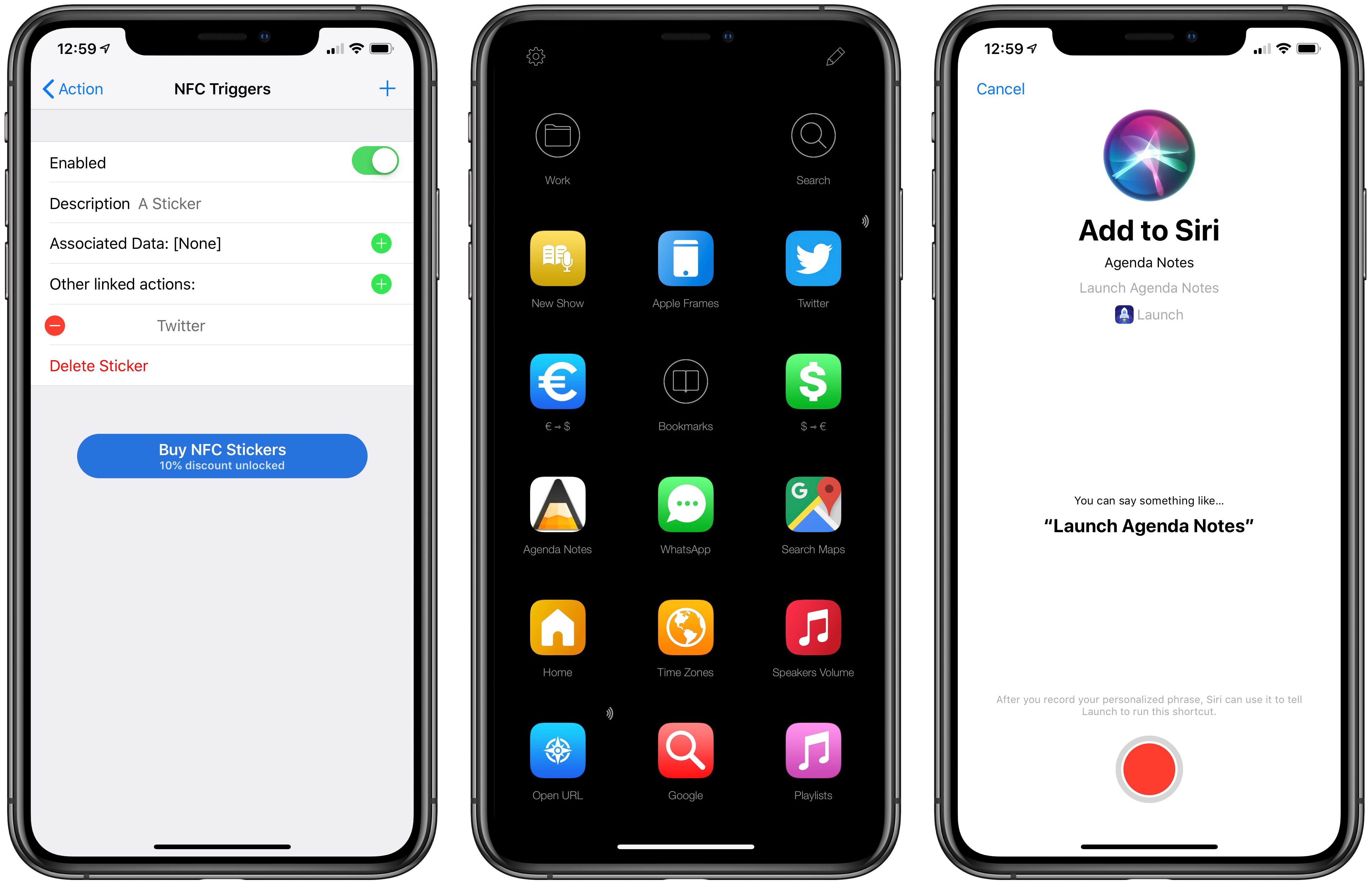
Launch Center Pro, Contrast’s popular launcher for iPhone and iPad, has been updated to version 3.0. It may be hard to believe, but Launch Center Pro 2.0 came out five years ago (in 2013), before Workflow, when Pythonista, Editorial, and Drafts were the only other apps pushing forward the idea of iOS automation thanks to URL schemes and x-callback-url.

The iOS automation landscape is vastly different five years later. While Apple still hasn’t shipped a native automation framework for inter-app communication and URL schemes are still the only way to let apps exchange data with one another in an automated fashion, the evolution of Workflow into the Shortcuts app now provides users with an easier, more integrated solution to craft complex workflows. Not to mention how, thanks to its widget, ‘Open URL’ action, and ability to add custom launchers to the home screen, Shortcuts alone can supplant much of the functionality the likes of Launch Center Pro and Launcher have become well known for. Apple may not necessarily think about the Shortcuts app as “iOS automation” (they never used this expression in public), but it’s undeniable that Workflow (then) and Shortcuts (now) are a superior, more powerful alternative to perform actions that were previously exclusive to Launch Center Pro.

For this reason, I believe it’s best to think of Launch Center Pro in 2018 as a companion to Shortcuts – a more intuitive, perhaps simplified, versatile front-end to launch actions and apps in different ways, using triggers that aren’t supported by Apple and which can complement Shortcuts rather than replace it. And with version 3.0 released today, Contrast is embracing this new role of Launch Center Pro as well, doubling down on what makes it unique compared to Shortcuts, and expanding the app’s launcher capabilities in a handful of interesting ways.

Read more


Darkroom 4.0: The MacStories Review

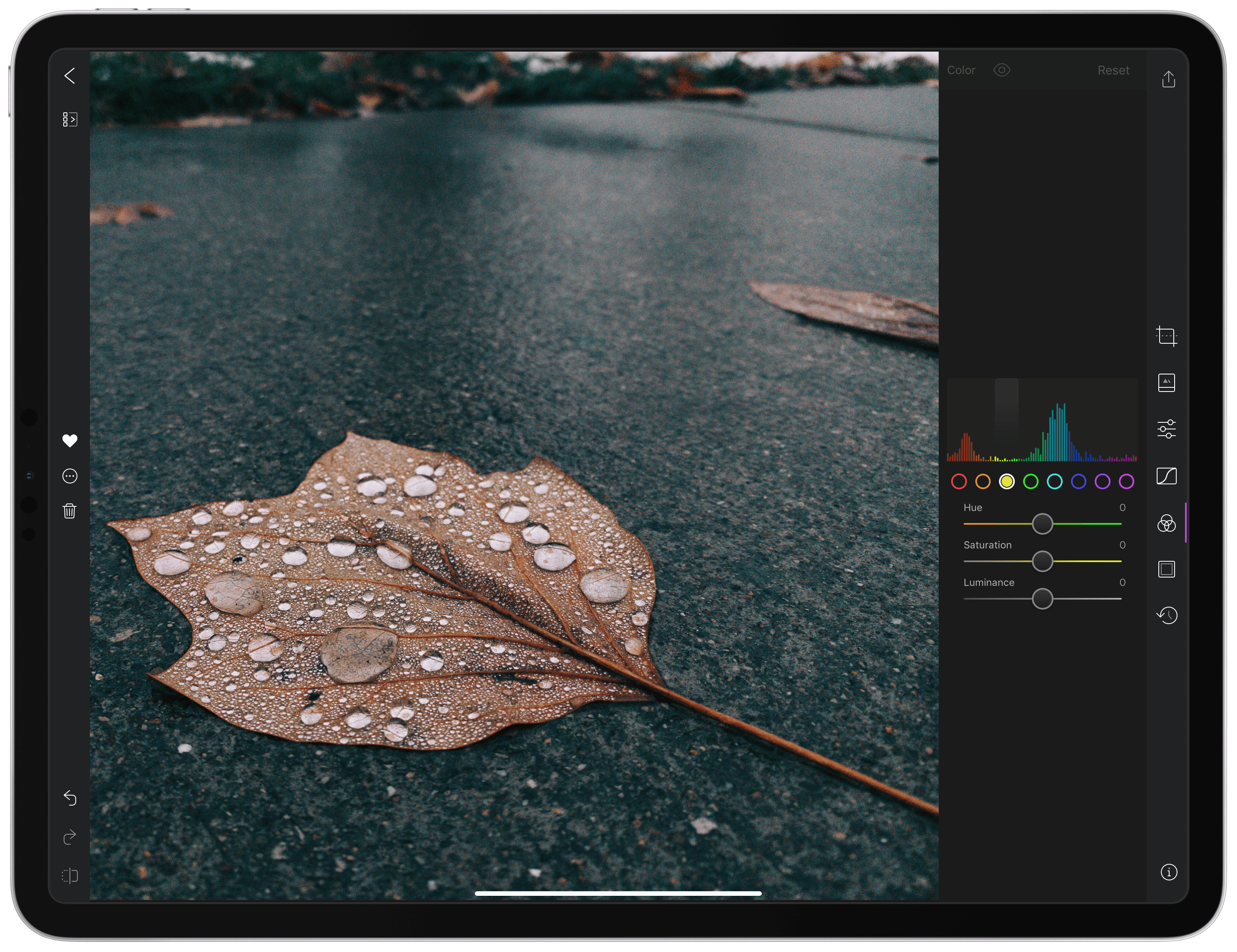
With version 4.0 released today, Darkroom has emerged as a photo editing force to be reckoned with on iOS. The highlight of the release is a brand-new iPad app, which is the version I’ll focus on in this review. I ran into a couple of bugs and would like to see Darkroom push its photo management and a few other tools even further in the future. However, the app’s combination of thoughtful design and platform-aware functionality together enable Darkroom to scale its full suite of tools gracefully from iPhone to iPad, which makes it an excellent choice for mobile photo editing.

Read more


Affinity: Super-Fast, Powerful, Professional Apps for Modern Creative People [Sponsor]

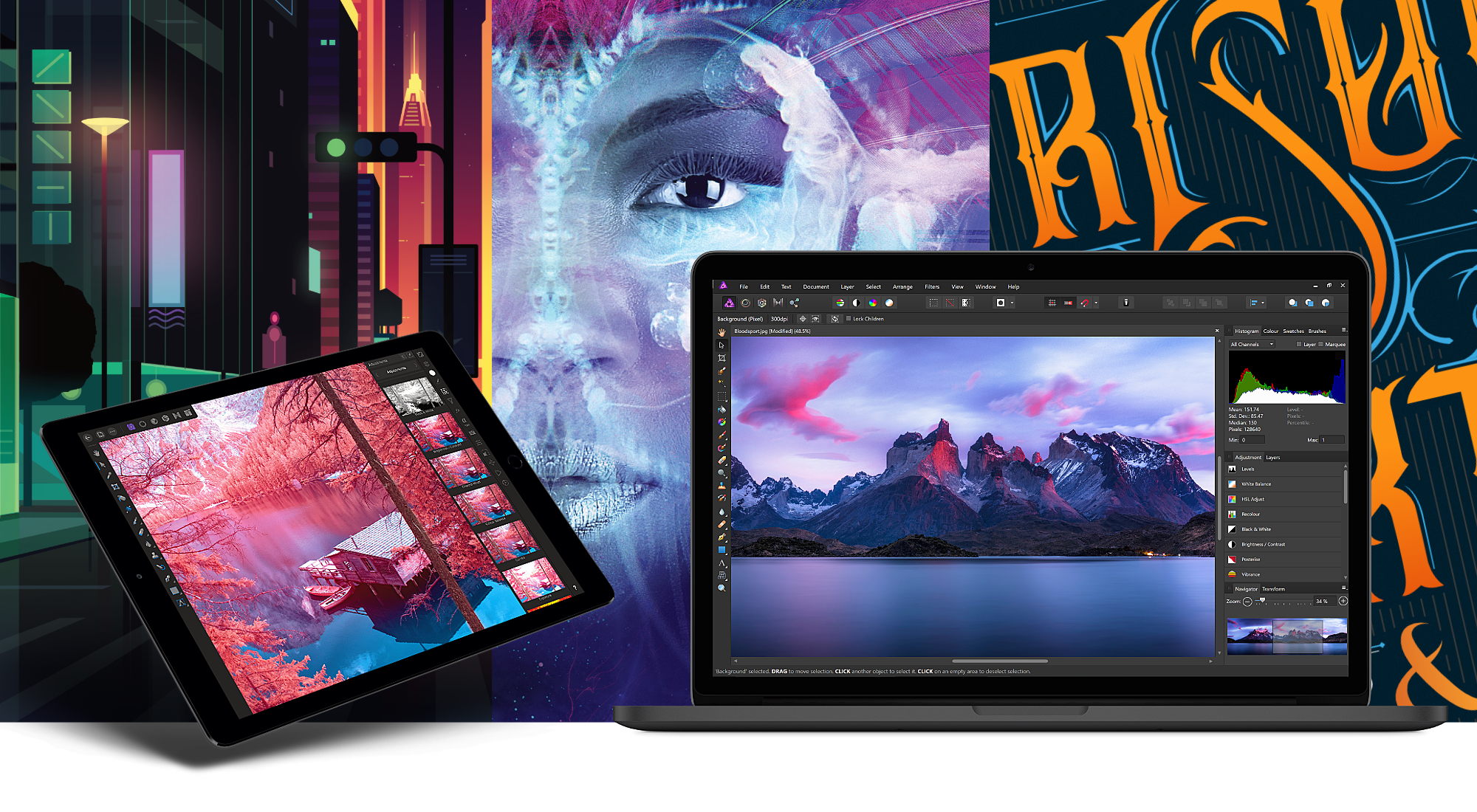
Serif, the maker of Affinity Photo and Affinity Designer, is one step closer to completing its trio of apps for creative professionals with the desktop publishing app Affinity Publisher, now available as a free public beta. From the earliest days, Serif’s vision has been to build the Affinity apps as an unrivaled trio of sleek, super-modern apps that work with the latest technologies, are ultra-fast, and completely stripped of feature-bloat. With the launch of the Affinity Publisher’s public beta, Serif is on the cusp of realizing that vision.

Affinity Publisher is set to revolutionize desktop publishing in the same way Affinity Photo and Affinity Designer have shaken up the worlds of professional photo editing and graphic design. The app will boast full integration with Affinity Designer and Affinity Photo, allowing owners of all three to edit vector designs and images inside one app in a stunning new way. Although not enabled in the current version of the beta, switching to Photo or Designer from within Publisher will be as easy as clicking a button in the app’s toolbar.

Affinity Publisher, which is free to download and try, is the result of thousands of hours of development by Serif’s award-winning team, which also launched the fully-featured vector graphics app Affinity Designer on iPad this year. Publisher includes advanced typography, linked text frames, master pages, facing page spreads, dynamic photo frames, tables, baseline grids, linked resources, end-to-end CMYK support, and much more. The beta is currently available on the Mac and Windows and an iPad version to follow later. This is an excellent opportunity to get an advance look at Publisher and provide Serif with feedback, suggestions, and requests on their dedicated Publisher forum.

If you haven’t tried the Affinity apps yet, see what the future of professional creative work looks like today by visiting the Affinity store where you’ll find the Affinity apps, workbooks, brush packs, and merchandise on sale with a 20% discount throughout the holiday season.

Our thanks to Affinity for sponsoring MacStories this week.


AppStories, Episode 92 – Introducing the 2018 MacStories Selects

On this week’s episode of AppStories, we unveil the MacStories team’s 2018 MacStories Selects for Best New App, Best New Game, and Best App Update.

Sponsored by:

  • Outcast – The best standalone podcast player for Apple Watch.
  • Luna Display – The only hardware solution that turns your iPad into a wireless display for your Mac. Use promo code APPSTORIES at checkout for 10% off.

AppStories+ Deeper into the world of apps

AppStories Episode 92 - Introducing the 2018 MacStories Selects

0:00
37:52

AppStories+ Deeper into the world of apps

Permalink

Game Day: Tropico for iPad

Tropico is a franchise that’s been around since 2001, but today marks its first time on an iOS device courtesy of Feral Interactive. Ruling a banana republic in the Caribbean as El Presidente is a natural fit for the iPad’s touch interface. Whether you’re navigating around your island nation or building out its infrastructure, touch makes the interaction with the game’s environment feel natural and tactile in a way that pointing and clicking with a mouse or trackpad can’t. Add a steady pace of challenges to overcome as a leader, and the results are terrific.

Read more


Connected, Episode 222: Green Monday, Yellow Wednesday, Purple Thursday

Myke struggles to use Amazon’s website, Stephen checks his heartbeat and Federico tinkers with keyboards for the iPad Pro.

On last week’s episode of Connected, we talked about ECGs on the Apple Watch and my story about the different setups of the 2018 iPad Pro. You can listen here.

Sponsored by:

  • Luna Display: The only hardware solution that turns your iPad into a wireless display for your Mac. Use promo code CONNECTED at checkout for 10% off.
  • Squarespace: Make your next move. Enter offer code CONNECTED at checkout to get 10% off your first purchase.
  • Simple Contacts: Contact lens prescriptions from home: Use offer code CONNECTED20 for $20 off your first order of contact lenses.
Permalink

Introducing MacStories Selects: The Best New Apps, App Updates, and iOS Games of 2018

Over the course of a year, the MacStories team tries hundreds of apps. We test them, live with them, poke, prod, and break them, and then we write and talk about them. Collectively, it amounts to thousands of hours of thought and analysis that on a macro level seeks to answer the question: what makes a good app? There’s no single factor or simple formula; if there was, nearly every app would achieve greatness. But after evaluating as many apps as we have, each of us has a fine-tuned instinct for standout apps when they come onto our radar.

We write about lots of terrific apps, but every year a handful stand out as exceptional. The precise quality that sets an app apart is often harder to identify than the app itself. Some are apps that push the boundaries of Apple’s OSes into new territory, while others are fresh takes on old problems. Despite the millions of apps on the App Store, every so often an app emerges that is truly inventive and opens up a whole new category of apps.

This year, we’re starting something new to celebrate those apps that stand out from the pack with a new feature we call MacStories Selects. For this inaugural year, we are covering three app categories: Best New App, Best App Update, and Best New Game. Along with a top pick for each category, we have selected runners-up that also stood out from the crowd. Before the end of the year, we’ll reveal two other components of MacStories Selects as well:

  • Federico’s App of the Year, which will be published as part of his annual Must-Have iOS Apps of 2018; and
  • Picks for our favorite new hardware accessories of 2018.

In making today’s app picks, we only looked at titles released in 2018. In addition, for Best App Update we evaluated each stand-alone update independent from any others, as opposed to aggregating updates from throughout the year.

Selects is something new for us here at MacStories that we expect to grow over time. We hope you enjoy. Now, on to our picks…

Read more