AppStories, Episode 119 – You Downloaded What?

On this week’s episode of AppStories, we look at our strange assortment of recently-downloaded apps.

Sponsored by:

  • Pingdom: Start monitoring your websites and servers today. Use offer code APPSTORIES to get 30% off.
  • Astropad Studio: Turn your iPad into a professional graphics tablet. Get started today with a 30-day free trial.

AppStories+ Deeper into the world of apps

AppStories Episode 119 - You Downloaded What?

0:00
34:10

AppStories+ Deeper into the world of apps

Permalink

Apple Brings Back Texas Hold’em

When the App Store opened for business in 2008, Apple released Texas Hold’em, the company’s first and only iOS game and successor to an iPod version that debuted in 2006. The game, which Stephen Hackett profiled for MacStories last year was short-lived, disappearing from the App Store in 2011.

In the eight years since the game’s release, Apple has left the iOS game market to third-party developers, with the exception of Warren Buffett’s Paper Wizard. Today, however, the company released an updated version, which was spotted by an eagle-eyed 9to5Mac reader. Strangely, the game’s description says the release is meant to celebrate the App Store’s 10th Anniversary, which occurred last July 10th, not quite 11 years ago today.

In any event, Texas Hold’em is back with new graphics to support the resolution and screen sizes of modern iPhones along with new characters and ‘more challenging gameplay.’ The app, which originally sold for $4.99, is now free too.

Launching the game for the first time in many years, brought an instant wave of early App Store nostalgia. Even if card games aren’t your thing, Texas Hold’em is worth a look because so much of the original feel of one of the earliest iPhone games is preserved in this update.

Texas Hold’em is available as a free download on the App Store.


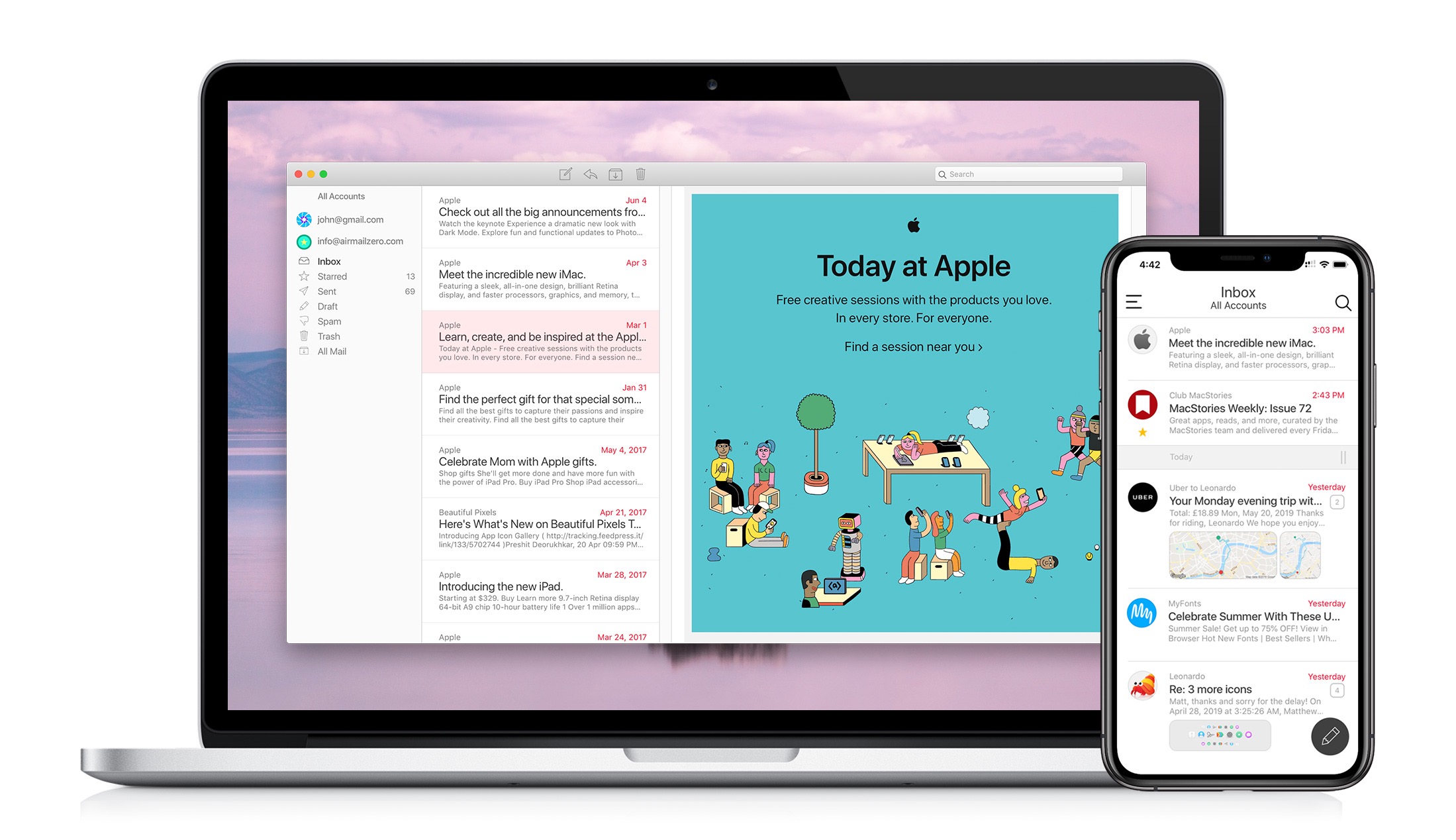
Airmail Zero: Blazingly-Fast Gmail Triage for the Mac and iPhone [Sponsor]

The makers of the Apple Design Award-winning app Airmail are back with Airmail Zero, a brand-new take on Gmail for the Mac and iPhone.

Speed is critical to getting through a mountain of email messages, and you don’t want your email client slowing you down. That’s why Bloop, designed Airmail Zero, the successor to Airmail, from the ground up with speed and efficiency as a top priority.

Airmail Zero is built on an all-new Swift codebase for lightning-fast app launches, and instantaneous message handling. The app has been architected to use virtually zero storage, memory, and CPU to keep everything working smoothly throughout. Sync is speedy, the app works exceptionally well with virtual private networks, and it communicates over HTTPS connections too.

The emphasis on speed extends to Airmail Zero’s design, which is brought to life with custom animations. Email messages are presented in a clean, easy-to-read card interface with simple, intuitive controls for rapidly triaging an overflowing inbox. Add to that a rich set of keyboard shortcuts on the Mac and you’ll find yourself with an empty inbox in no time.

The Mac and iPhone versions of Airmail Zero are free to use with one Gmail account. Subscribe for $0.99/month or $9.99/year and you add multiple Gmail accounts organized in a unified inbox, plus live help from the Airmail Zero support team.

Spend your time answering email instead of managing your email client by giving Airmail Zero a try today on the Mac and iPhone.

Our thanks to Airmail Zero for supporting MacStories this week.


Connected, Episode 250: Tonight Will Be in the Future

On this week’s episode of Connected:

Federico reminds everyone that it’s okay to not have strong feelings about Jony Ive leaving Apple, while Stephen feels tempted by iOS 13. Meanwhile, Eddy Cue talks about rumors of Tim Cook meddling with Apple TV+ scripts and Project Catalyst continues to make news.

You can listen below (and find the show notes here).

AppStories+ Deeper into the world of apps
0:00
01:25:39

Connected, Episode 250

AppStories+ Deeper into the world of apps

Sponsored by:

  • Squarespace: Make your next move. Enter offer code CONNECTED at checkout to get 10% off your first purchase.
  • Away: Thoughtful luggage for modern travel. Get $20 off a suitcase with promo code connected.
  • Astropad Studio: Turn your iPad into a professional graphics tablet. Get started today with a 30-day free trial.
Permalink


GoodNotes Transitioning Mac App to Catalyst

Today on its blog GoodNotes shared that the upcoming macOS version of GoodNotes 5 would be based on the iPad app using Catalyst:

Earlier this year, we launched our all-new iOS app GoodNotes 5. It has been rewritten from scratch with a much more stable and flexible internal architecture, paving the way for the future of GoodNotes. Rewriting the iOS app also meant that we had to rewrite the MacOS companion because the new GoodNotes 5 was no longer compatible with the outdated existing Mac app. A lot of people were disappointed that we didn’t launch a Mac app together with the iOS version because they still had to stick with GoodNotes 4 if a Mac version was crucial to their workflow. Thanks to the hard work of our Mac team, we released an early-access version shortly after the iOS launch. This beta version is available for everyone who signs up for access. We shipped updates with new features and improvements on a regular basis and were almost ready to launch it publicly when Apple officially announced the start of “Project Catalyst” during their annual developer’s conference in June. It’s a framework that allows developers to bring their iPad apps to the Mac, with a relatively low effort. It still requires a lot of work to create a great Mac app but at least developers don’t have to rewrite significant portions of the code, as it was the case previously.

We believe that it is a great opportunity for us to unify the GoodNotes experience between iOS, iPadOS, and MacOS and will launch the new GoodNotes for Mac using Apple’s new framework.

GoodNotes is a noteworthy Catalyst app not just because it’s a very popular iPad app, but because it already has an existing Mac app. Catalyst makes the most sense for iPad apps that don’t currently have Mac counterparts, but GoodNotes’ plans demonstrate the advantages offered to other apps too. By adopting Catalyst and moving toward a more unified codebase, GoodNotes ensure that users on the Mac will never be left behind again, because new features can be developed and shipped on both iOS and macOS with little added effort.

Our John Voorhees, in his recent Catalyst story, listed GoodNotes as an example of a Mac app that’s fallen behind its iOS version feature-wise, so it’s great to find out that will change in the near future. The only real drawback, as noted in GoodNotes’ post, is that Catalyst apps will require macOS Catalina to run, so users on older versions of macOS won’t be able to download the new GoodNotes 5 for Mac.

Permalink

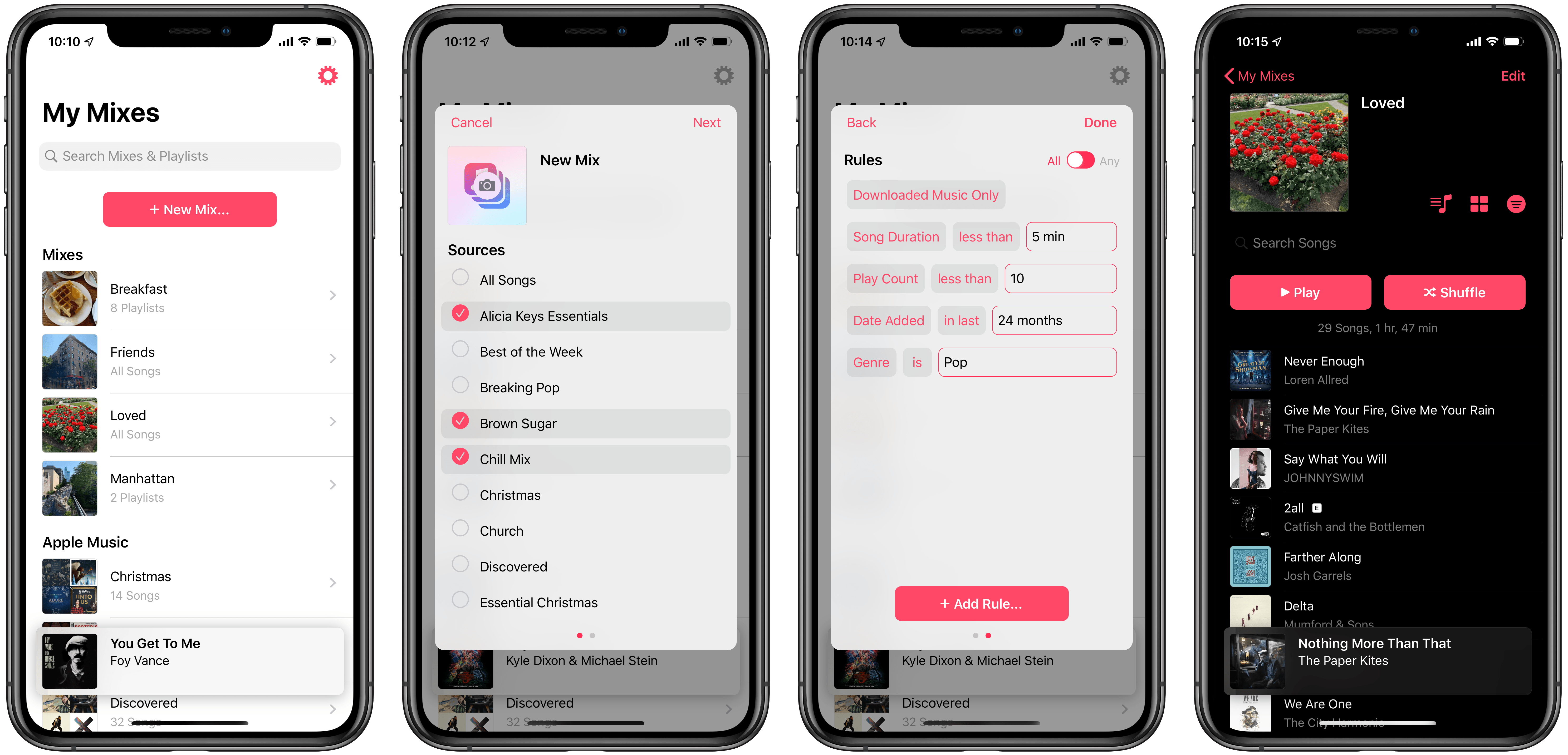
Miximum Review: Smart Apple Music Playlists on iOS

Leading up to WWDC last month, rumors indicated that iTunes on the Mac was being split into multiple apps, including standalone Music, TV, and Podcasts apps. It was expected that Apple might use its Catalyst technology (formerly known as Marzipan) to base the new Music app on Music for iPad, or vice versa. The hope among many iPad users was that the iPad might benefit from a more robust Apple Music client featuring power user features already available on the Mac, such as Smart Playlists.

WWDC came and went, and that wish was left unfulfilled. While macOS Catalina does introduce a new Music app, it wasn’t built using Catalyst, and as a result the iPad version of Music is light on meaningful improvements this year.

Filling the void left by Apple, however, is a new third-party app called Miximum, which is an Apple Music-integrated utility dedicated to smart playlist creation on iOS.

Read more


AppStories, Episode 118 – Reminders in iOS 13

On this week’s episode of AppStories, we continue our series of episodes on the new and updated apps coming from Apple in the fall with Reminders.

Sponsored by:

  • Direct Mail – Create and send great-looking email newsletters with Direct Mail, an easy-to-use email marketing app designed exclusively for the Mac.
  • Astropad Studio – Turn your iPad into a professional graphics tablet. Get started today with a 30-day free trial.

AppStories+ Deeper into the world of apps

AppStories Episode 118 - Reminders in iOS 13

0:00
31:09

AppStories+ Deeper into the world of apps

Permalink

Screenwriting, Novels, Apps, and More with John August (Part 1)

Today on Dialog, we published the latest interview of Season 1 featuring screenwriter and author John August.

John August is a screenwriter whose credits include films like Go, Big Fish, Charlie’s Angels, Titan A.E., Charlie and the Chocolate Factory, Corpse Bride, and Frankenweenie. He also wrote and directed The Nines and is the author of the Arlo Finch series of middle-grade fiction books. John is the co-host of the podcast Scriptnotes, the maker of the Highland text editor for the Mac and Weekend Read for iOS, and commissioned the Courier Prime typeface too.

A common thread across the wide variety of projects August has been involved in is dissatisfaction with the status quo. That’s led him beyond writing to projects like app development and commissioning a font. First and foremost though, August is a writer, which is where our conversation begins.

In this week’s episode of Dialog, we talk to August all about screenwriting: how he got started, how screenwriting differs from other forms of writing, his process for getting started, dealing with getting stuck, his writing environment, and more. We also talk about Arlo Finch, his middle-grade fiction trilogy and the role of luck, hard work, and privilege in his success.

Next week, we’ll cover more about August’s podcast, Scriptnotes, his apps, Highland and Weekend Read, as well as Courier Prime, the font he commissioned because he wasn’t satisfied with other Courier variants.

You can find the episode here or listen through the Dialog web player below.

Sponsored by:

  • Astropad Studio – Turn your iPad into a professional graphics tablet. Get started today with a 30-day free trial.
  • Working Copy – Git client for iOS that works well with other apps.
Permalink