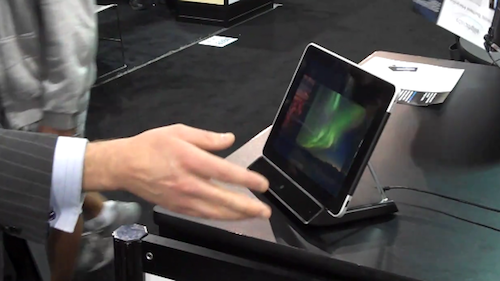
Touchless Gestures for iPad Demoed at CES [Video]

A few weeks ago, a Norway-based company called Elliptic Labs made the rounds of the Internet as they promised they would demo a touchless gesture technology for iPad at CES. The prototype is based on a docking station for the tablet, which has got an ultrasound system built-in that can pick frequencies out of the human range and, through a complex set of reflection calculations, determine the position of your hands in space in front of the device. This means you’ll be able to perform touch-based gestures such as swipe and scroll, without really touching anything.

The unit seen in the video is still a prototype, but it’s already been deployed in a Norwegian hospital where surgeons can control the iPad’s screen without touching it – clever implementation considering surgeons most likely have protective gloves on their hands. The system will also gain support for more gestures in the future, including multi-touch inspired ones. Right now, the demo shows how to flip through a photo gallery by just waving your hands, but the creator says it will be useful for say, changing music and control the iPad when driving. We bet it’s going to be interesting to see this in use in the kitchen, too.

In the video below, courtesy of the folks over at TUAW, you can see the prototype in action via a WiFi station and a custom iPad app. We think this is really cool, and we can’t wait to see version 2.0 of the prototype at CES next year. Read more

Apple Launching “Custom Configure” Service for Macs

As noted by 9to5mac, a new service has been recently introduced in a number of Apple Stores: “personal setup” for Mac computers. The personal setup service for iOS devices has been around for a quite a while now; to better introduce customers to the OS X ecosystem, Apple is now rolling out this new service to help new users get around the basics of a Mac, the Mac App Store, iTunes and email accounts.

This is minor news for Mac aficionados but will be very helpful for people new to the Mac and for the wider range of consumers. The service will go live in some stores as soon as Tuesday but we’ve heard that other stores will be launching the service in the next few weeks. The new service is very similar to the “setup room” that is currently featured at Apple’s Covent Garden store in London.

The service was actually launched a few days after Christmas in some Apple Stores, we’ve been told from a separate source. The internal name for the service is “Custom Configure” – “personal setups” are actually One to One data transfers. It is unclear whether or not the service will be branded “Personal Setup” in the future. As part of the equation, Apple is also going to feature dedicated “Mac stations” to better help customers through this Mac setup process and Stores will soon replace some iPod and iPod touch tables for “personal setup tables”, we’re told.

This new personal setup service for Macs is going to be a big part of the experience at Apple Stores. Just like the Genius Bar for customer support, Apple wants to offer easy and immediate help to people who just bought a new Mac. We think it’s a great idea.


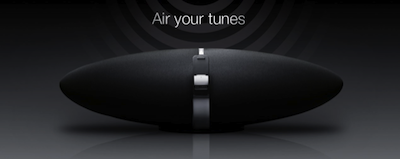
AirPlay Devices To Explode in 2011

AirPlay Devices To Explode in 2011

Engadget reports some statements from an interview with BridgeCo’s VP of Sales and Marketing Jordan Watters. BridgeCo is the company behind AirPlay that has signed an exclusive deal with Apple.

According to Jordan Watters, AirPlay devices could ultimately dwarf “made for iPod” audio docks by 2x to 4x.

“The ecosystem is already there,” he said smiling. And unlike iPod docks which are usually sold at a rate of one per iOS device, Watters sees consumers purchasing multiple AirPlay devices for every iOS device sold in order to enable whole-home distributed audio. In fact, growth could come as a “step function ramp sucking into the market,” Jordan enthused. In other words, he expects AirPlay growth to be explosive.

Personally, I agree with him. Since my first iPod, I haven’t felt the need of multiple docking systems as much as I’d like several AirPlay-enabled devices in my house and office now. I have an audio system plugged in my AirPort Express right now, and that’s it. As soon as Apple figures out a way to extend video through AirPlay to all apps and external devices, we’re going to see even more kinds of AirPlay devices.

Permalink

Tweak Brings Mail Rules to iOS | Cydia Store

One feature iPhone (and iPad) owners have been asking Apple to implement in iOS for a while now is the possibility to create “rules” for the Mail application, just like on the desktop. On Mac OS X, users can assign rules to incoming messages on Apple Mail so that certain pre-defined actions will be applied to messages that meet specified criteria. Rules allow users to quickly process emails and mark messages from frequent sources as important, for example. The customization offered by rules on the Mac made many users wish the feature would find its way to iOS. It never happened.

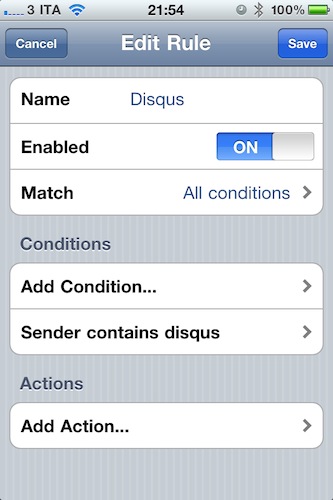
Luckily for us, Cydia developers have (once again) fixed what Apple didn’t want to. Or maybe is just waiting to implement in iOS 5. Whatever the reason is, Mail Rules is a package sold at $1.99 in the Cydia Store that allows you to play around with a pretty decent list of rules to assign to your incoming mail messages, organized by account. This tweak doesn’t come with the plethora or criteria and actions found in Apple Mail for the Mac, but it provides a good amount of options that should be enough on the iPhone and iPad. The Rules options can be accessed directly from the iPhone Settings app, and they support the following criteria: Sender, Recipient, Account, Headers, Subject. Actions you can apply to messages include: Delete Messages, Mark as read and unread, Copy or Move to folder. Setting up a new rule takes seconds.

Mail Rules works fine on the iPhone and iPad and, most of all, rules really go through. I’ve been running the tweak for over a week now, and the few rules I created allowed me to keep a cleaner inbox, when possible, thanks to actions that automatically delete or mark certain messages as read. At $1.99 in the Cydia Store, it should be a no-brainer if you’ve always wanted to have Rules on iOS.


What The Mac App Store Effect Looks Like

The Mac App Store is off to a great start. More than 1,000 apps already available, some of them ports of old and popular Mac applications, some of  them new ones specifically built and designed for the new Store. Some long-time Mac developers even decided to ditch their previous distribution systems and go Mac App Store-exclusive. More than 1 million downloads happened on the Mac App Store’s first day, and the first sales numbers show that the effect on the popularity of existing Mac apps has been incredible.

The developers of Alfred, an application launcher and Spotlight replacement for OS X, reported thousands of new downloads in the first 24 hours, while Evernote, a cross-platform “memory tool” and digital assistant, announced a 1800% increase of sign-ups through the Mac client, released for free in the Mac App Store. But a picture, as they say, is worth a thousand words, so here’s the Mac App Store effect visualized in a simple graph. Read more


Spotted: History of Apple’s Devices

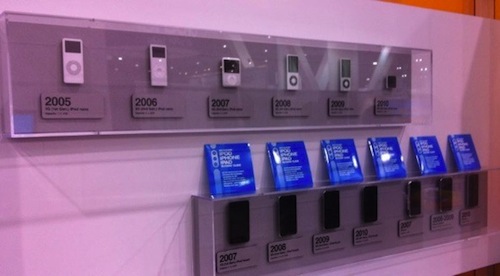
Spotted by TUAW at iLounge’s CES booth, here’s a gallery of Apple’s mobile devices through the years. The collection starts from the original iPod in 2001 and goes straight to the latest iPhones and iPods released in 2010, with the exception of the iPad, which is probably not considered a mobile device by iLounge either.

Looking at the photos, it’s clear how much is changed in 10 years. Even more than iTunes’ interface. Look at the original iPod, or a model from 2005 and 2006 and then take a look at the devices listed under 2007 and 2008. The difference is enormous. Sure, the iPod Classic is still alive and kicking (I have a 160 GB one right here), but we know the majority of consumers are buying iPod touches or Nanos now. These photos are the best example of Apple’s evolution and refinement process from 2001, and then 2007,  through today.

Check out the full gallery here.


Happy Birthday! iTunes Turns 10

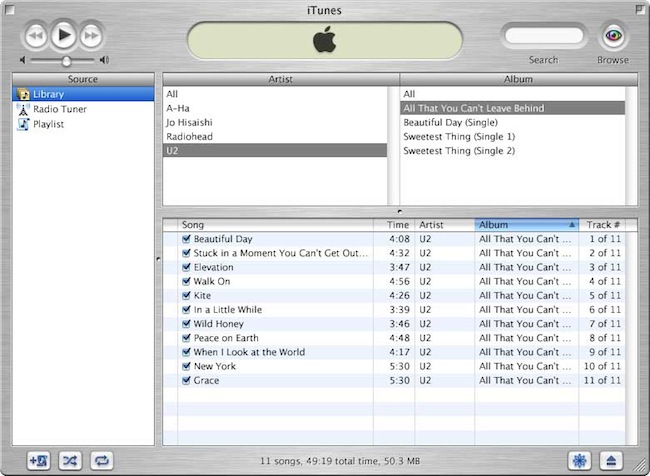
On January 9, 2001 Steve Jobs announced the first version of a new music player and organizer called iTunes at the Macworld Expo. Ten years later, iTunes has reached version 10.1.1 and it has evolved into media organizer and aggregator capable of storing music, movies, podcasts, apps, books, radio stations and playlists. Some say iTunes is bloated, and maybe it is. But truth is, it looks nothing like the brushed metal, young and tiny version we first saw 10 years ago.

iTunes has become the center of our “digital lifestyle”, a strategy Apple CEO Steve Jobs started in 2001 with the “Digital Hub” revolution. And looking back at those promises, there’s no doubt a single software running on our Macs has become the most important part of our workflow. We sync iPhones, iPods and iPads to iTunes, we store media in it, we stream content from iTunes to a variety of speakers and devices. Feature-rich or bloated, it’s undoubtedly deeply integrated with the Mac and iOS ecosystem.

So here’s to iTunes, and the digital lifestyle that’s now synced and stored on our computers and mobile devices. It’s been 10 incredible years, and we look forward to what’s next. Happy Birthday, iTunes. Read more


CoverSutra: A Fistful of Dollars


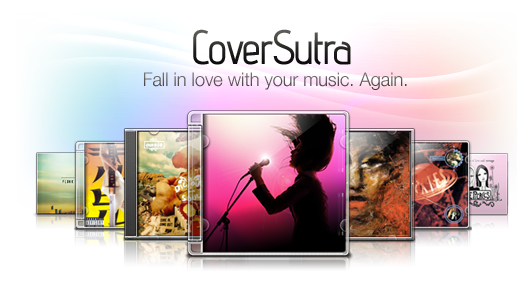
Developer Sophia Teutschler is having a hard time trying to deal with her most popular application for the Mac, CoverSutra, becoming a Mac App Store exclusive. As we discussed here, the latest CoverSutra 2.5 version is only available in the Mac App Store at $4.99, instead of the $20 it used to be on Sophia’s website. The problem is, years ago Sophia promised to customers who bought a license for CoverSutra 2.0 that they would get the 3.0 upgrade for free; CoverSutra’s development slowed down, Sophia got involved in more projects and won an Apple Design Award in the meantime, Apple introduced the Mac App Store. CoverSutra 3.0 isn’t out yet, but the 2.5 version is a paid app in the Mac App Store. Clearly, that is not the free upgrade until 3.0 Sophia once promised.

This is a very serious issue that doesn’t originate specifically from Sophia, but provides a good example when looking at CoverSutra because of the way Sophia decided to handle things. As you may be aware of, Apple is not offering trials, upgrade policies and existing customer migration on the Mac App Store. You can release apps, for a price or for free. That’s it. You have been selling apps on your website all this time? Good for you. But there’s no way to migrate people who already bought a license to the new Store. Read more


Social Radio Reads Your Friends’ Status Updates Aloud

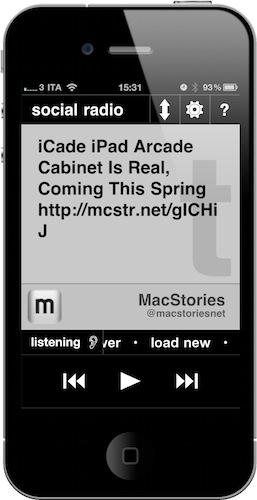
Social Radio for iPhone is a new app developed by @anshuchimala which is available at $0.99 in the App Store. And it has to be one of the weirdest, most original and useful utilities for Twitter and Facebook I’ve seen in a while. Or should I say “listened to”. This app, in fact, once granted authorization to access your Twitter and Facebook timelines, can read your friends’ status messages aloud. And, you can control the app with your voice, too. That’s it.

What’s cool about Social Radio, besides the fact that it’s developed by our friend Anshu, is that it looks minimal, it’s got Helvetica and it really reads Twitter and Facebook with iOS’ built-in accessibility features. I also appreciated the fact that each status updates comes with the original author, so you’ll listen to the app say something like “Federico Viticci wrote”. Usernames will be spoken aloud, http:// links will be excluded. Smart. The app plays a continuos stream of messages from your timeline starting from the most recent ones, until you hit pause or tell it to stop. You can swipe on the screen to move between status updates or just let Social Radio do its job and auto-play them.

Social Radio may look like a silly experiment to get iOS to read Twitter and Facebook messages. If you think about it, though, the app can be very useful for the visually impaired (just set it up once, then listen to it) or for when you’re driving and you really want to stay on top of your social networks.

Social Radio is a cool app that can be yours for just .99 cents. Give it a try.