
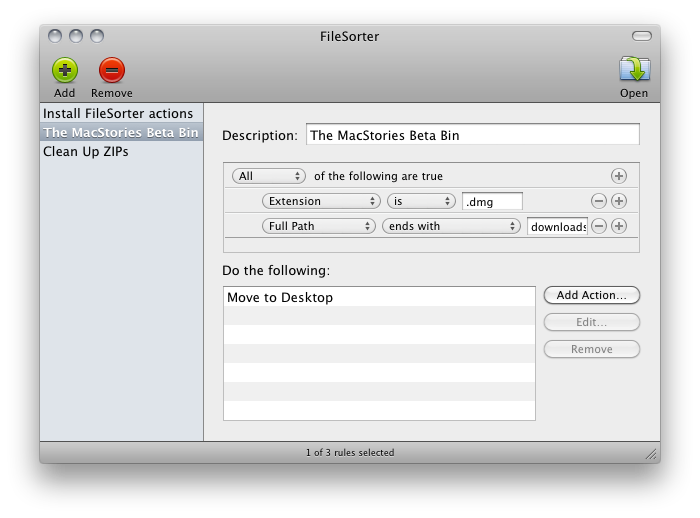
If you’re constantly struggling to manage or automate simple tasks like moving files out of your downloads folder, keeping files in your documents folder organized, or simply need an extra hand to batch automate certain tasks, FileSorter may be of some help. While it’s not as powerful as Hazel, it provides a decent middle ground for users who don’t need Hazel’s background automation. FileSorter applies rules to files much like how you’d apply rules to e-mail: simply specific what kinds of files (by name or extension for example) you’d like to manage, then apply rules to move, copy, or even delete files. After your rules are created, you can simply open the folder you’d like to manage to apply the rules you’ve created – I open my home folder and use rules to specify where FileSorter should look instead of opening everything individually. DMGs get moved to the desktop, folders SpeedDownload creates get removed, and instantly processes are tidied up thanks to the custom rules I’ve created. It’s $7.99 in the App Store, and its manual functionality will be the deciding factor of whether this app is right for you.
FileSorter for OS X Applies Rules To Files, Folders
1 Megapixel Rear Camera On The iPad 2?
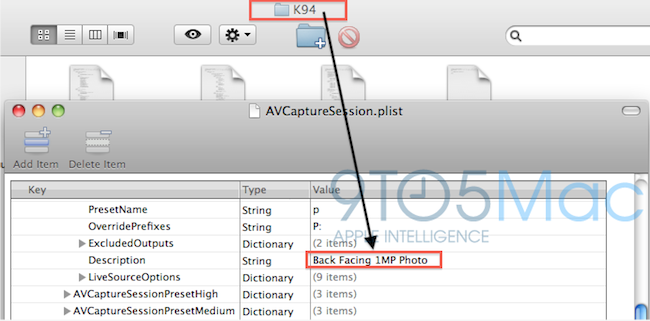
Several rumors are pointing to the next generation iPad as a slight redesign of the original iPad, with tapered edges, flat back, bigger speaker and front / rear facing cameras. According to 9to5mac, which has done further digging into the latest iOS 4.3 SDK, the iPad 2 will have a 1 MP rear camera capable of shooting photos and videos, and a VGA front-facing one for FaceTime and other camera functionalities.
We’ve done some digging in the latest SDK it looks like Apple’s much rumored second-generation iPad will not feature some fancy 5 megapixel camera, but will instead shoot your flicks and take your pics with something close to a 1 megapixel camera. That’s awfully close to the fourth-generation iPod touch’s 0.7 megapixel back camera so we speculate they could be the same thing. That means you’ll be able to take some unwieldy 720P video with your iPad (whether you’ll be able to view that 720P video natively is another question).
The aforementioned SDK files reference to this device carrying a 1 MP camera as K94 and K95; the site speculates these codenames might refer to the next generation iPad. The current one, for instance, has codename K48. Multiple codenames for the iPad 2 might suggest that different versions are in the works, like iPad WiFi, CDMA and GSM. Other references found in iOS 4.3 beta seem to suggest the same thing.
A 1-megapixel camera on the iPad 2 would be significantly lower than the one found on the iPhone 4; we also have some doubts on the actual photo quality that would result from such a camera lens, which will have to display pictures on a 10-inch screen. Previous rumors indicated Largan Precision as the supplier of camera lenses for the next iPad, and a report in November also confirmed Largan was set to ship “5-megapixel lens modules for tablet PCs”.
Angry Birds Valentine’s Edition, Coming February 14

In December we reported Rovio was working on a new update to its incredibly successful series Angry Birds, a new Valentine’s-themed version that was rumored to be scheduled for a February release.
At the end of the video below, you can see the first exclusive footage of Angry Birds Valentine’s Edition (not an official name), which sports lots of hearts, pink-colored birds and clouds. It would be very romantic if the concept of the game wasn’t to kill pigs. I guess from Rovio’s standpoint, that makes sense though.
Still, prepare to see this game become #1 in the App Store. [Electricpig via 9to5mac] Read more
The Kork™ iPad Case

The Kork™, by A PRODUKT, is an eco-friendly iPad case. It’s made from 100% natural leftover cork, then formed into a uni-body shell for the iPad. It gives great protection and is ergonomically designed to fit in your hand, just like the iPad. It has a very natural grip and feel and is very light weight while leaving easy access to all the buttons and ports. “The Kork™ is a fine blend of Technology and Nature.”
FEATURES and TECH SPECS:
- Recycled and Recyclable Natural Cork
- Easy access to all Buttons and Inputs
- Ergonomic Natural Shape and Feel
- Angled Audio Output for Front Projected Sound
- Larger Dock Connection Extra Space for Connectors
- Extra Space for Bigger Jack Input
- Angled Mic. Wall for User Directed Sound Caption
- Very Light Weight
Video after the break. Read more
These Are Real-Life Fruit Ninjas

Fruit Ninja is an insanely successful game for iPhone, iPad and Android I think you might have heard of. In the game, you have to slice fruit to get the highest score or simply slice more fruit as possible in a certain amount of time. It’s got several multiplayer options and it’s also quite addictive.
Now, the problem is Fruit Ninja is a game. A game that, if you think about it, doesn’t really make any sense at all: why would you be a ninja to slice fruit with a knife? I don’t know. Still, some shirtless dudes tried to replicate Fruit Ninja in real life, and there is video proof of the hilarious experiments. The videos embedded below might be slightly NSFW – but if your boss is a Fruit Ninja fan you might just go ahead and let him watch them.
Also: please don’t try this at home. Just keep playing the iPhone game. [via Kotaku] Read more
Video: Apple Universal Bumper for Verizon & AT&T iPhone
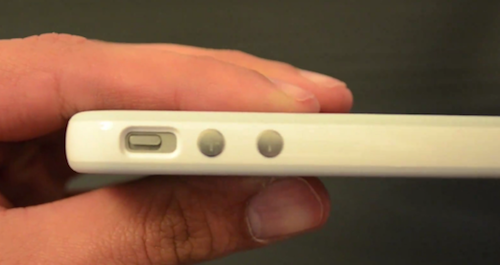
Shortly after the official announcement of the Verizon iPhone two weeks ago, bloggers and journalists who attended the media event in New York noticed that the CDMA iPhone had a slightly different design for the volume keys and mute switch button on its left side. And when it comes to the iPhone, different design means one thing: some cases won’t fit. Like Apple’s own bumper, for instance.
It appears, though, that Apple already had a solution ready for Verizon’s day one on February 10: a universal bumper that fits both the Verizon and AT&T iPhone. With narrower, but longer volume and mute switch holes, the new bumper easily adapts itself to standard GSM and CDMA iPhone 4’s.
Video from @Alerio25 embedded below. [Thanks, Mario!] Read more
Apple Adds iPhone 5 Suppliers, Launch “During Summer At The Earliest”
We’ve heard rumors about the next-generation iPhone that suggest the device might get NFC capabilities, a dual-core processor and a brand new redesign, but we didn’t know much about the actual release date. Apple usually unveils new iPhone models at the WWDC in June, with US launch to follow after a few weeks; according to a report from Digitimes this morning, launch of the iPhone 5 will happen “during summer at the earliest”.
Apple has also added new suppliers to the iPhone 5 production chain:
Foxconn will become the iPhone 5’s new earphone supplier. Japan’s Foster was the previous supplier, but a strengthening yen has spurred Apple to look for more cost-effective sources, the report said, noting that related orders are estimated at NT$5 billion (US$171.7 million). Foxlink will produce earphone jack sockets for the iPhone 5.
With a shortage of HDI boards, Apple has also newly added GCE as a supplier, but will continue to source from Compeq Manufacturing and Unimicron Technology as well.
In October, rumors suggested the iPhone 5 had hit “EVT” testing stage.
Flight Control Lands Nearly 4 Million Sales

Firemint, which recently acquired Infinite Interactive has posted on it’s blog some sales statistics of it’s popular Flight Control game that is currently featured in Apple’s Top Paid Apps of all time. As of the post it had sold 3,881,634 copies and has raked in $3.8 million dollars and that’s after Apple 30% take.
As demonstrated by the graph it released that is shown above (click for larger size) it’s pretty clear that Christmas and big feature updates really helped increase sales of the game. In particular the addition of Game Center support led to a peak of 120,000 sales, the largest peak since the release of the app. The new maps update and Retina display support were the other notable peaks.
Also notable is the sales by country, as the graph below the break shows, the US has the lion’s share followed by Great Britain, Australia and Germany.
The iPad Screen Resolution Rumor Merry-Go-Round
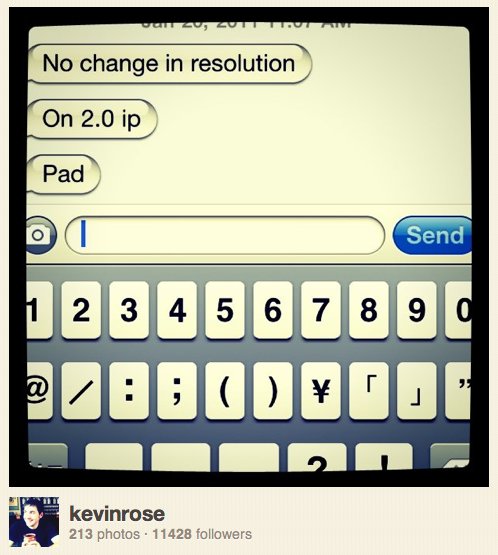
Well in the past 24 hours we’ve had another two rumors regarding the iPad 2’s screen resolution. First there was DigiTimes that reported Apple would up the iPad’s screen resolution to that oft-reported figure of 2048 x 1536. Then Kevin Rose who had previously stated the iPad 2 would have a Retina Display reversed his position with a picture of text messages from his supposed source who said “no change in resolution” which he posted on Instagram.
Then there was also the suggestion that floated across various blogs and publications that Moore’s law suggested the iPad 2 wouldn’t have a retina display. Both DigiTimes and Kevin Rose have dubious accuracy regarding Apple rumors and this vicious back and forth contradictions of rumors regarding the display are certainly odd.
UPDATE: Oddly, Kevin Rose seems to have removed the Instagram photo which is now unaccessible and does not appear in his Instagram feed.
So readers, what are your thoughts on this whole high resolution/retina display on the iPad 2 rumor merry-go-round?
[Via Cult of Mac, DigiTimes]