This Notification System Would Look Good on iOS 5 [Mockup]

One of the key areas users would like Apple to focus on for iOS 5 is the notification system. Currently, notifications on iOS are far from useful and unobtrusive: they get in the way too much, there’s no way to access a log of past notifications, if you’re playing a game and quickly dismiss a notification’s alert because you’re busy / concentrated, there’s no way to get that notification back. Many says notifications are the less Apple-like feature in iOS.

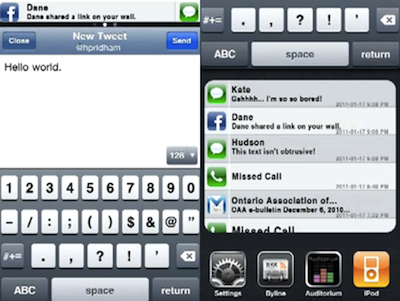
In the past, we have covered several alternative solutions to improve iOS’ notification system, like Notified. All these tweaks are available for jailbreakers in Cydia, and require a bit of manual hacking and configuration. The following mockup, realized by Youtube user hustn, shows a few ideas that we think might be a good fit for the next major update of iOS. Notifications that don’t get in the way but appear in a bar at the top, even multiple ones; possibility to tweak the settings with quiet times and display order; an additional section above the multitasking tray that shows the most recent notifications from all apps. It looks pretty good and interesting. As the creator explains:

This is a mockup of my current side project of designing an improved iPhone notification system. Unlike other attempts at improving the iPhone’s notification system, my approach is to use design direction from the current iPhone UI to create a seamless interface for the user.

This is purely theoretical. There is no code behind this; I’ve mocked this all up in Flash and Photoshop.

What do you think? The system looks a bit like the notifications seen in Palm’s webOS, and undoubtedly borrowing a few ideas from Palm wouldn’t be so bad for Apple. Especially considering that former Palm Senior UI Designer Rich Dellinger now works at Cupertino. [via Reddit]
Read more

New Cydia Feature: Theme Center

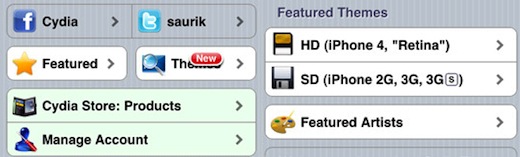
In his attempt to make Cydia faster, richer and truly competitive feature-wise with Apple’s own App Store, Jay Freeman, a.k.a. saurik, added a new feature to the alternative store a few hours ago: Theme Center. It was only three days ago that Freeman implemented a new account management system that allows users to easily check on previously installed packages; now, thanks to the new database / index put in place by saurik called “Whole Package Index”, users will be able to browse featured themes optimized for Retina and Non-Retina iOS devices.

The selection of themes right now is limited to top-selling Cydia themes and the ones picked by staff of MacCiti and ModMyi. Soon, users will have the option to pick the best themes in Cydia and vote them to have them featured in Theme Center.

We think Cydia keeps getting better on every release and update, and saurik’s support is exceptional. Apple should took a few elements from the Cydia Store and port them to the App Store.


Game Center Achievements…For A Camera App

Achievements are that sort of thing that keeps gamers going even when frustration and disappointment take over the initial excitement for a new game. You beat the game, you can’t have any more quests, but you want all the trophies / achievements. Many friends of mine do this on their PS3 and Xbox 360 – I’ve never been a fan of achievements, personally. Clearly I must be an exception, as even Apple itself implemented the functionality in Game Center. Not to mention other gaming networks for iOS like OpenFeint and Plus+, which have been offering achievements and leaderboards for quite some time now. Read more


Toggle Any Twitter Client On Your Mac

Toggle Twitter is a simple and useful script created by Daniel Jalkut of Red Sweater Software which can toggle and make visible most any Twitter client for OS X. Well, at least it comes with built-in support for the most popular ones. The concept behind the script goes like this: we try a lot of Twitter clients every week, or month. Many of us even use multiple clients throughout the day. The problem is, not every client has support for a general hotkey to toggle the visibility of the app.

So if you’re using Twitterrific or Twitter for Mac and you assigned the same keyboard shortcut to both the apps to show them when active, you’d be disappointed to find that other Twitter clients don’t allow you to assign a hotkey. This script comes with a list of popular Twitter apps, but you can add your favorite ones manually with a bit of AppleScript Editor. The ones supported “out of the box” are:  Twitter, Tweetie, Kiwi, Ostrich, Twitterrific, Hibari and YoruFukurou. Read more


AT&T and Verizon Finally Together In Apple’s New Ad

So Apple has a new iPhone 4 coming out on February 10 in the U.S., under Verizon’s network. We guess you know everything about it at this point. Well, Apple wants you to take a look at the big picture: iPhone on two carriers is better than iPhone on one carrier. It’s pure and simple Jobsian mathematical art. The iPhone 4 on Big Red and AT&T is something worth launching a new commercial for.

Or, as a commenter on Youtube says, “AT&T and Verizon both in the same commercial? I’m surprised the universe didn’t explode.”

Indeed, think about 3 months ago when this was all rumors.


A Better Way To Search The Mac App Store

The Mac App Store is great and everything, but searching for a specific app might be an annoying procedure for many: open the Mac App Store, place the cursor in the search box (or hit CMD + F), type, wait, scan results. Wouldn’t it be great to do it from the keyboard, in seconds, from the app launcher / Spotlight replacement you use every day?

I use Alfred, and this tip has incredibly improved how I search for apps in the Mac App Store. In Alfred, in fact, you can create custom search queries for any website / search engine and assign them to a quick shortcut that can associate terms to the query. Like “google MacStories” will open a tab in your default browser with a Google search for MacStories, and so forth. With this same method, you can create a Mac App Store search query that will let you search for an app’s name directly in Alfred and have the search results page open automatically in the Mac App Store. Read more


App Store: 10 Billion Apps Downloaded

It’s official: 10 billion apps have been downloaded from the App Store for iPhone, iPad and iPod touch. The competition Apple launched to celebrate the new milestone has ended, and Apple is now projected towards the next milestones, 15 billion apps and 20 billion apps.

The App Store was launched in 2008, when the only iPhones available were the original iPhone and the 3G. In January 2010 App Store downloads topped 3 billion; the downloads became 5 billion during summer 2010. Thanks to the enoermous success of the iPad and iPhone, Apple added another 5 billion downloads in 6 months.

Will we see 20 billion apps by the end of 2011?


View Instagram’s Most Popular Photos on Instagreat!

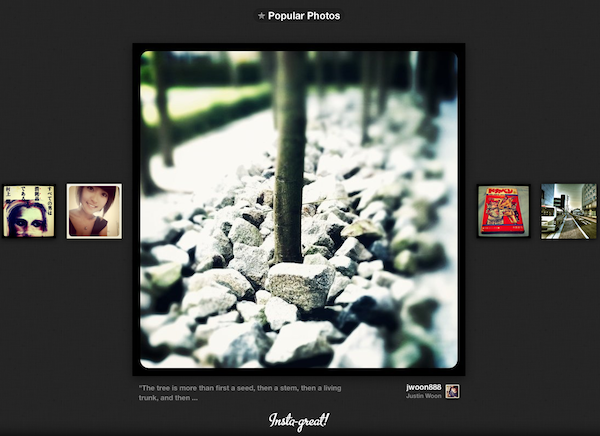
Instagram has been a massive success but it is largely an experience that has been exclusive to its iPhone app. Not anymore though, web developers Elliott Kember and Hector Simpson have created Insta-great, a site that showcases all the most popular photo’s from Instagram.

The brilliantly designed site allows you to also drill down to photos by a specific person, in a specific place, on a specific date or photos using one of Instagram’s filters. Plus Elliot (who has a game of Snake running on top of his site!) and Hector added keyboard navigation which is another great touch to a really finessed site.

If you’re a fan of Instagram like I am, definitely check the site out, you’ll find yourself just scrolling through the photos for ages.

[Via Cult of Mac]


DoublePane, The Keyboard-Only Version of Cinch

With Cinch you can grab windows from anywhere in the desktop and drag them to various edges to snap them left or right, or make the windows fullscreen. With DoublePane, keyboard shortcuts dictate all of your happy snapping, with the same abilities using your control, option, and arrow keys. The keyboard shortcuts are static, which may cause incompatibilities in apps like Linkinus that also use those keyboard shortcuts. I would like to see an option in the future to return the window (or undo) position with the down arrow, and for custom shortcuts. The app is a lightweight addition to your Mac which will certainly improve your workflow, and it can be had for only $2.99 on the App Store.