Apple Awarded Patent for Keyboard with Motion Gesture Recognition

Apple is awarded many fascinating patents each year and a lot of those give potential insights into future technologies in Apple’s ‘next big thing’. One of the recurring themes in some of Apple’s patents for the past few years has been relating to various innovations surrounding input devices such as the recent multi-touch display on a Magic Mouse.

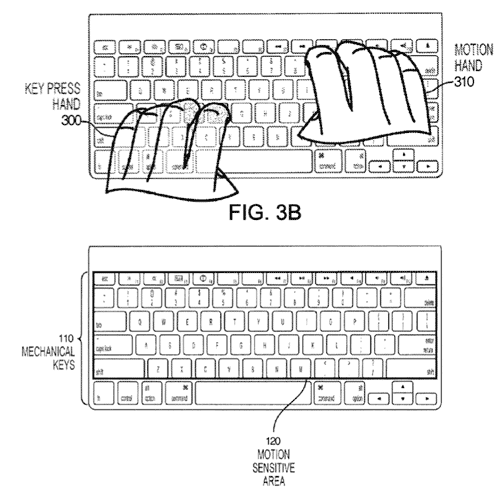
A new Apple patent uncovered by MacRumors that is authored by John Elias (co-founder of FingerWorks, a company Apple acquired in 2005) covers the technology and ideas surrounding a physical keyboard that also has motion-sensitive input. Prior to being acquired the FingerWorks, the multi-touch technology company, produced several touch sensitive keyboards, which although receiving praise were unsuccessful, likely due to the lack of tactile response.

Read more


MacStories Product Review: Sonos S5 Wireless Music System

I can’t live without my music. Every day, I need to get my “fix” either through iTunes, Youtube (it’s good for rare live performances) or Spotify. I also scrobble the songs I listen to towards last.fm, although I’m no huge fan of the service as a social platform. I just keep an archive of my musical tastes in there. Still, as far as music is concerned, most of the times it’s not the system or the platform that really matters. It’s the quality. And for quality, you need good gear.

Over the years, I’ve always tried to save money and purchase great-quality earbuds to ensure high-fidelity playback while on the go. I’m still happy with my Sennheiser CX 300 bought years ago, but home stereo systems have been a dilemma for me, in spite of my obsession for top-notch hardware. I’ve changed setups too many times, jumped from speakers to stereos and all-in-one solutions without really sticking to one for more than 6 months. When music becomes an obsession, good gear is a necessity. Recently, the audio technologies implemented by Apple in iOS forced me to reconsider everything once again.

See, wireless streaming spoiled all the fun I had accomplished. First came audio via Bluetooth, then Airport Express stations and AirPlay. I changed devices: I went from a classic iPod to an iPod touch to iPhone + iPad. I subscribed to Spotify Premium to use the mobile app (with streaming and offline access), I became addicted to Apple’s own iPod app and third party replacements like My Artists, or external controllers like Coversutra, Bowtie and SongSwiper. Put simply: music became deeply integrated with iOS, and iOS grew at the same time to accomodate features like AirPlay. Music became connected.

So when I was offered the chance to review the Sonos S5, I immediately said “yes” and eagerly started waiting for the two review units to show up at my doorstep. The Sonos S5, for those unaware of this mythical gadget, is a wireless speaker internally powered by a series of amps that a) provides great sound quality and b) is truly connected with iOS, OS X and the Internet. The S5 offers the best of both worlds: local playback backed up by high-quality manufacturing and remote functionalities that allow users to “log into” the speaker and customize the entire experience. After the break, you’ll find my impressions of two months with two Sonos S5 units and a Sonos ZoneBridge connector. Read more


White iPhone 4 Shows Up On AT&T’s Online System

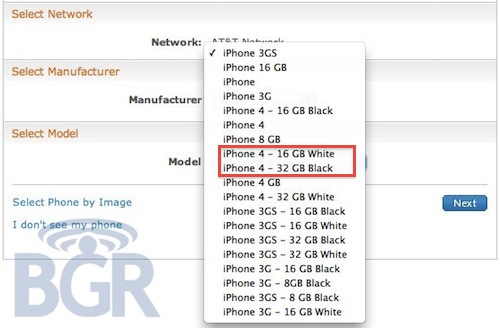
Here we go again. After a brief appearance on Verizon’s website right after the official announcement of the new CDMA iPhone 4, the mythical white iPhone 4 has been spotted on AT&T’s online management system, BGR reports.

It looks like Best Buy isn’t the only retailer with white iPhones popping up in its system. AT&T is now showing two versions of Apple’s unicorn-colored iPhone. The entries appear in AT&T’s Online Account Management system (OLAM), and read as “iPhone 4 – 16GB White” and “iPhone 4 – 32GB White.

Of course, this may just be a mistake or a prank from an AT&T employee – we don’t know what to think about the white iPhone at this point. Still, it keeps showing up. Read more


Multimedia JFK Biography Hits the iPhone and iPad

On the 20th of January 1961, John F Kennedy became the 35th President of the United States, now fifty years later there’s a new iPhone and iPad app that commemorates his life and achievements.

Historian and publisher Marc Schulman who developed the app whilst writing the text biography told Reuters “The paper book is limited, in that you can’t see all the supporting documents, videos and photographs.” The app, JFK Historymaker for iOS however is a rich multimedia experience full of videos, documents and includes the retrospective biography of the President.

The app comprises of many key sections including those documenting his family, him as a Congressional Candidate, the Space Program, Cuban Missile Crisis and his Assassination. Schulman emphasized that it enables the reader to do their own research so they don’t have to “rely just on my voice as the biographer.”

According to a November Gallup poll, JFK remains America’s most popular President with an 85% approval rating. Whether you approve of him and want to know more or you simply want to learn something about a pretty significant historical individual, JFK Historymaker undoubtedly seems like a treasure trove of information for the price of $4.99.

[Buy on iTunes]

[Via Reuters]


The Incident Gets Recreated In Real Life

Last week there was the real life Fruit Ninja, today another iOS game, The Incident has been emulated (or technically “sweded”) in real life and the video is just comical and begs to be watched. The Incident is of course the iOS game that makes you run and dodge objects falling from the sky.

The fans of The Incident that created this video were pretty ingenious in the way they put it together obviously avoiding actually dropping anvils from the sky, and the errrr “music” that accompanies it is just awesome. There really isn’t much else to say, just watch the video after the break!

Read more


iPad Retina Display? Maybe With iPad 3…

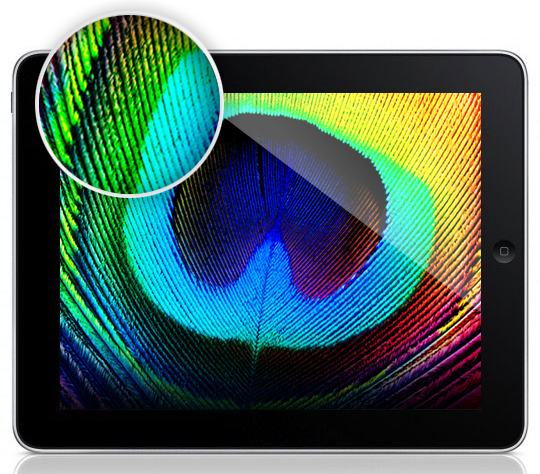
With the iPad 2 set to come out sometime in April and Apple reportedly about to announce a media event to unveil the new device in February, the Apple rumor mill is in fully-working state. And when it comes to the next-generation iPad, two are the kinds of rumors that blogs and publications are reporting: Retina Display and faster processor. Lately, we have noticed a rapid increase in the presence of “iPad Retina Display” rumors on the Internet. Read more


Woman Tries To Commit Suicide Because She Lost Her iPhone

You can file this in the “just wrong” category we have seen appear from time to time here on MacStories. Mrs. Wong, iPhone 4 owner from Hong Kong, was really happy about her purchase; she was so glad she got an iPhone, in fact, that when she accidentally lost it she went asking her husband to immediately get a new one. Her husband is a bus driver, and the couple has two daughters to think about, too. For an average family, getting two iPhones in the same week might be a little too much.

So her husband said no, and Mrs. Wong went crazy about it. She left home at 6 in the morning, only to try to jump from the 14th floor of the building. All of this because she was upset about the lost iPhone. Luckily, her husband noticed her weird behavior, called the police and went up to the 14th floor to stop her.

Now, I’m not here to judge people, but this is just wrong. Wrong. Committing suicide for an iPhone? For as much as I love Apple device, I would never put my life at risk because I lost one. Also: the free Find My iPhone works great. [iPhoneShine via OrientalDaily]


FolderWatch Monitors and Syncs Folders On Your Mac

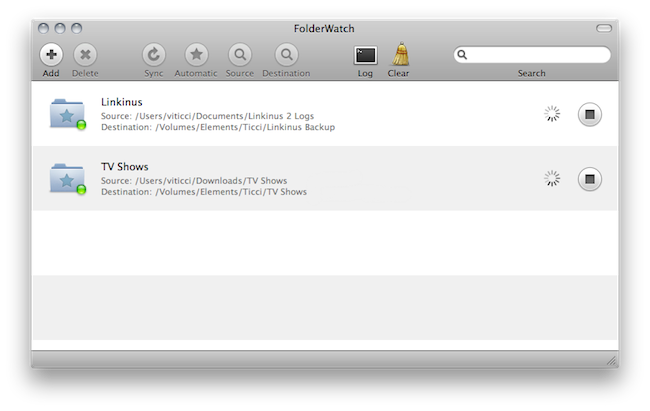
Available at $2.99 in the Mac App Store, FolderWatch is an easy-to-use yet powerful utility that can monitor any folder on your Mac and sync it back to a different location. In FolderWatch, you can specify an unlimited amount of “sources” (e.g. folders) that the app will monitor for changes, like new files or folders within them. Once a “destination” is set, FolderWatch will run in the background and make a carbon copy of the source to the other folder, server or external drive you have set.

FolderWatch, indeed, can copy files to any location that can be added to your Mac’s Finder. Any networked drive, local server, FTP location mounted in the Finder can be selected as a destination. Personally, I am sending backups of media and Linkinus chat logs on to an external USB drive connected to the AirPort Extreme that powers my home network. Everything happens automatically, in the background;  you can choose to make these copy sessions persistent on each change in the destination (backup will start as soon as a new or updated file is recognized) or trigger them manually with the “Sync” button.

The app can also skip files through filters you can create / delete when adding a new rule, and delete files in the destination folder that do not exist in the source. This will let you easily achieve some sort of sync between folders on your OS X machine that’s quite handy. It’s not as complex and feature-rich like FileSorter and Hazel, but it all works smoothly and requires  a very few clicks to be set up.

FolderWatch is available at $2.99 here. More screenshots below. Read more


Oh, Satire: An App Store for App Stores

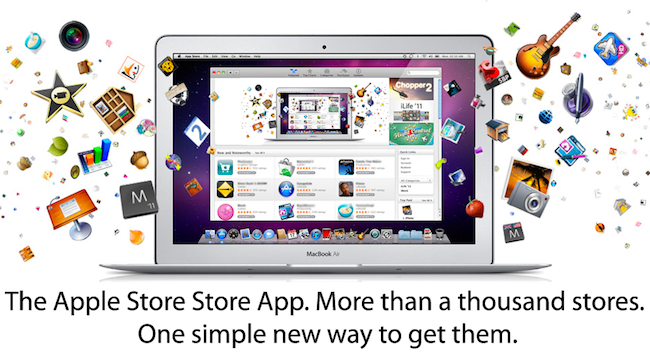
What’s better than Apple’s App Store with its 350,000 apps available for iPhone, iPad and iPod touch? An App Store to download other App Stores. Chris Genetti at Draconum has imagined the following scenario: an App Store for iOS and OS X that lets you download, manage and update a variety of stores like the App Store itself, the Android market and the Kindle store.

The problem is, he may actually be right. We’re surrounded by app stores. Anyway, pretty funny.