Sending Emails From @mac.com Accounts Will Soon Be Impossible

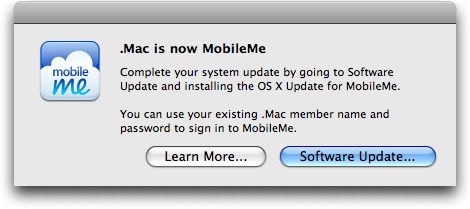
According to a recent thread on Apple’s Discussion boards and a support document on Apple’s website, users of @mac.com email addresses who upgraded to iOS 4.2 are no longer able to send email messages through a @mac.com account unless it was setup prior to updating to iOS 4.2. Alternatively, the @mac.com account details can be synced through iTunes on the desktop, but this won’t enable push for emails.

A user on Apple Discussions explains:

Because of this unannounced development, I had a sneaking suspicion that Apple may be planning to do the same in the future for sending email from @mac.com addresses via www.me.com and a desktop email client.

It appears my suspicion was true. Here are the relevant sections from a Chat Session I’ve just finished with a very nice MobileMe Support agent.

Read more


Amid outcry, Apple says it monitors work conditions in China

Amid outcry, Apple says it monitors work conditions in China

Apple restated its pledge to provide safe working conditions for workers assembling of its products after environmental groups in China released a report criticizing the tech company for failing to be transparent about its suppliers.

“Apple is committed to ensuring the highest standards of social responsibility throughout our supply base,” said Apple spokeswoman Carolyn Wu in a statement. The company requires all suppliers to sign up to Apple’s code of conduct before the contracts are made. Compliance is then monitored through factory audits and measures to correct violations.

However, Apple would not directly comment on the report, which had the backing of 36 environmental groups from China. Titled “The Other Side of Apple,” the report faulted the tech giant for failing to respond to inquiries related to the working and environmental conditions at its suppliers, while also refusing to disclose who the company’s suppliers are. The 26-page document pointed to suppliers reportedly connected to Apple that had violated environmental regulations or poisoned workers due to working conditions.

Apple came dead last in the list of 28 companies reviewed from the Institute of Environmental and Public Affairs, which included Hewlett Packard and Sony (companies at the top of the list). Apple’s products are lauded to be environmentally friendly, though the Chinese have something different to say about that.

Permalink

SyncPad: The Collaborative Online Whiteboard For iPad. Review & Giveaway!

Inspiration hits us often at MacStories, and we’ll usually collaborate by sharing sketches thanks to Skitch and iChat. Imagine, however, if we didn’t rely on static images and browser refreshes to share content collaboratively over the Internet: SyncPad is an answer to our clunky workflow, thanks to immediately accessible online sketch rooms available via the Internet or SyncPad’s reader component for the iPad. In realtime, you can watch as the creators create instant wireframes, sketch over photos, markup PDFs (yes!), or draw the “OctoTicci” as I’ve done screwing around when I first tried the app with Federico. Below you’ll find many a 4th grader’s sketch (read: my terrible finger painting), an overview, and a little something for our readers who’d like to win one of ten copies. We can’t keep all of this collaborative-ness to ourselves after all.

Read more


FileSorter for OS X Applies Rules To Files, Folders

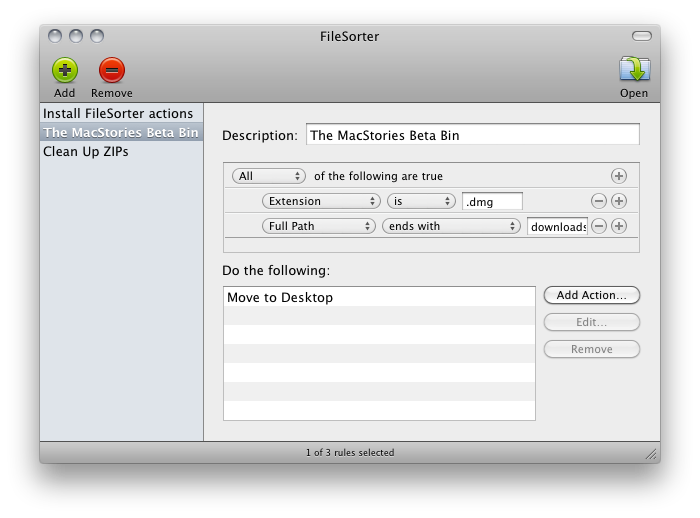
If you’re constantly struggling to manage or automate simple tasks like moving files out of your downloads folder, keeping files in your documents folder organized, or simply need an extra hand to batch automate certain tasks, FileSorter may be of some help. While it’s not as powerful as Hazel, it provides a decent middle ground for users who don’t need Hazel’s background automation. FileSorter applies rules to files much like how you’d apply rules to e-mail: simply specific what kinds of files (by name or extension for example) you’d like to manage, then apply rules to move, copy, or even delete files. After your rules are created, you can simply open the folder you’d like to manage to apply the rules you’ve created – I open my home folder and use rules to specify where FileSorter should look instead of opening everything individually. DMGs get moved to the desktop, folders SpeedDownload creates get removed, and instantly processes are tidied up thanks to the custom rules I’ve created. It’s $7.99 in the App Store, and its manual functionality will be the deciding factor of whether this app is right for you.


1 Megapixel Rear Camera On The iPad 2?

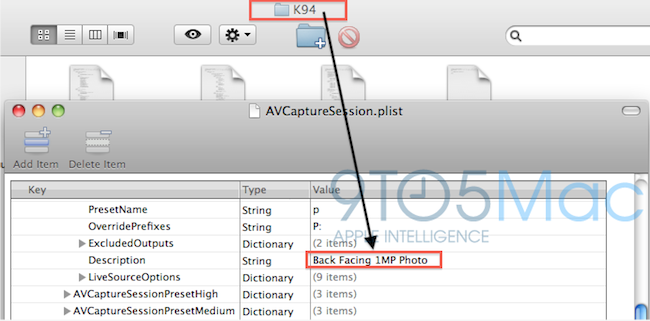
Several rumors are pointing to the next generation iPad as a slight redesign of the original iPad, with tapered edges, flat back, bigger speaker and front / rear facing cameras. According to 9to5mac, which has done further digging into the latest iOS 4.3 SDK, the iPad 2 will have a 1 MP rear camera capable of shooting photos and videos, and a VGA front-facing one for FaceTime and other camera functionalities.

We’ve done some digging in the latest SDK it looks like Apple’s much rumored second-generation iPad will not feature some fancy 5 megapixel camera, but will instead shoot your flicks and take your pics with something close to a 1 megapixel camera. That’s awfully close to the fourth-generation iPod touch’s 0.7 megapixel back camera so we speculate they could be the same thing. That means you’ll be able to take some unwieldy 720P video with your iPad (whether you’ll be able to view that 720P video natively is another question).

The aforementioned SDK files reference to this device carrying a 1 MP camera as K94 and K95; the site speculates these codenames might refer to the next generation iPad. The current one, for instance, has codename K48. Multiple codenames for the iPad 2 might suggest that different versions are in the works, like iPad WiFi, CDMA and GSM. Other references found in iOS 4.3 beta seem to suggest the same thing.

A 1-megapixel camera on the iPad 2 would be significantly lower than the one found on the iPhone 4; we also have some doubts on the actual photo quality that would result from such a camera lens, which will have to display pictures on a 10-inch screen. Previous rumors indicated Largan Precision as the supplier of camera lenses for the next iPad, and a report in November also confirmed Largan was set to ship “5-megapixel lens modules for tablet PCs”.


Angry Birds Valentine’s Edition, Coming February 14

In December we reported Rovio was working on a new update to its incredibly successful series Angry Birds, a new Valentine’s-themed version that was rumored to be scheduled for a February release.

At the end of the video below, you can see the first exclusive footage of Angry Birds Valentine’s Edition (not an official name), which sports lots of hearts, pink-colored birds and clouds. It would be very romantic if the concept of the game wasn’t to kill pigs. I guess from Rovio’s standpoint, that makes sense though.

Still, prepare to see this game become #1 in the App Store. [Electricpig via 9to5mac] Read more


The Kork™ iPad Case

The Kork™, by A PRODUKT, is an eco-friendly iPad case. It’s made from 100% natural leftover cork, then formed into a uni-body shell for the iPad. It gives great protection and is ergonomically designed to fit in your hand, just like the iPad. It has a very natural grip and feel and is very light weight while leaving easy access to all the buttons and ports. “The Kork™ is a fine blend of Technology and Nature.”

FEATURES and TECH SPECS:

  • Recycled and Recyclable Natural Cork
  • Easy access to all Buttons and Inputs
  • Ergonomic Natural Shape and Feel
  • Angled Audio Output for Front Projected Sound
  • Larger Dock Connection Extra Space for Connectors
  • Extra Space for Bigger Jack Input
  • Angled Mic. Wall for User Directed Sound Caption
  • Very Light Weight

Video after the break. Read more


These Are Real-Life Fruit Ninjas

Fruit Ninja is an insanely successful game for iPhone, iPad and Android I think you might have heard of. In the game, you have to slice fruit to get the highest score or simply slice more fruit as possible in a certain amount of time. It’s got several multiplayer options and it’s also quite addictive.

Now, the problem is Fruit Ninja is a game. A game that, if you think about it, doesn’t really make any sense at all: why would you be a ninja to slice fruit with a knife? I don’t know. Still, some shirtless dudes tried to replicate Fruit Ninja in real life, and there is video proof of the hilarious experiments. The videos embedded below might be slightly NSFW – but if your boss is a Fruit Ninja fan you might just go ahead and let him watch them.

Also: please don’t try this at home. Just keep playing the iPhone game. [via Kotaku] Read more