Toys R’ Us To Sell The iPad 2 Next Month?

Despite the continuing shortages of the iPad 2, modmyi is today reporting that Toys R’ Us will next month begin selling the iPad 2 in the United States. If it comes to fruition, Toys R’ Us will join other third party retailers such as Best Buy, Walmart and Target in selling the iPad 2.

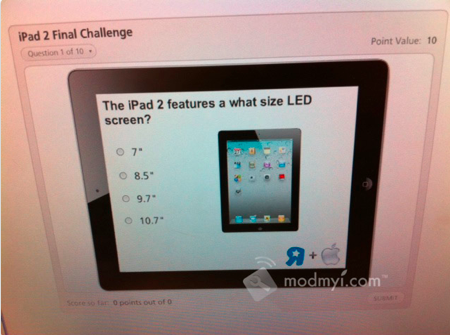
The source, an employee working at Toys R’ Us, also revealed to modmyi a series of employee training materials that have been distributed to ensure employees are up to scratch of the features of the iPad 2. Amongst the materials include a photo of the iPad with its various features noted including its two cameras, A5 processor and the home button and how it is “instant on”. There is also a quiz for employees to complete, which includes questions such as asking what size screen the iPad 2 has. Jump the break for a picture of the training diagram on the iPad 2’s features.

Read more


US Privacy Investigation Targeting Smartphone App Developers

Federal prosecutors in New Jersey are reportedly investigating whether various smartphone applications are illegally obtaining and transmitting data from users without their consent or knowledge. In the US it is a violation of federal computer fraud laws for companies to collect information about a user without notice or authorization.

The prosecutors are investigating whether various apps on smartphones such as the iPhone and various Android phones are not notifying users what data is being collected and why such data is required by the app. This data being collected ranges from a users location to the unique identification data for that device and even personal information. The Wall Street Journal tested 101 apps and discovered that 56 of those transmitted the unique identification number for the device without letting users know, 47 transmitted the phones location and 5 sent a users age, gender and other personal information. Worryingly 45 of the apps tested did not have any privacy policy either in the app or on their website.

Read more


FileBrowser for iPad Lets You Access Computers, Network Drives, Shared Folders

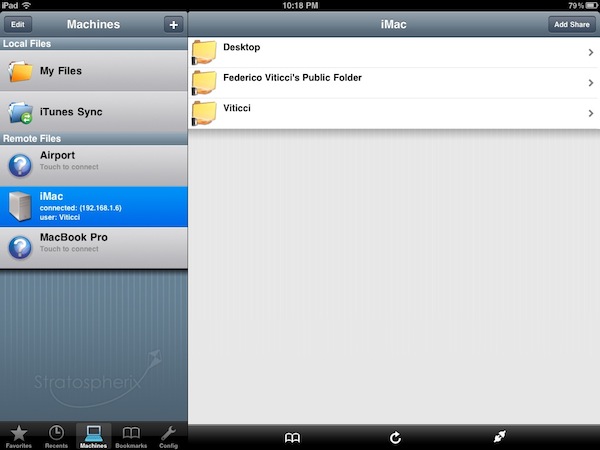
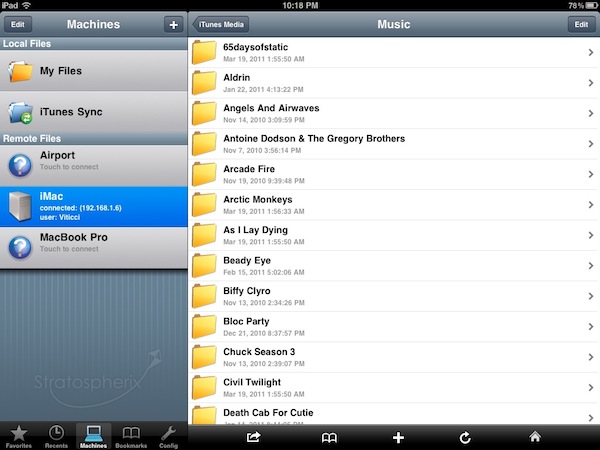
Earlier today I mentioned (again) Cloud Connect Pro, a universal $24.99 app that enables you to access online services like iDisk and Dropbox, local and remote computers, AirPort Disks and much more. Cloud Connect is a pricey app, but it also packs a whole screensharing app, runs on iPhone and iPads and it’s got the possibility to navigate a computer’s filesystem with a Finder-like interface. For quite some time, however, I’ve been using a cheaper alternative to Cloud Connect called FileBrowser that runs only on the iPad, it doesn’t have screensharing functionalities or Dropbox / iDisk / Google Docs integration but enables you to connect to your computers, shared folders and network drives just fine.

FileBrowser uses the CIFS and SMB protocols to connect to Windows and Mac computers, and NAS drives. Linux is also partially supported but you can’t connect using Apple File Sharing (AFP) or FTP. Once File Sharing is enabled on your Mac, FileBrowser should be able to see your machine on a local network. There’s no support for automatic computer discovery, but you can easily add a new computer by typing “username.local” in the “Name or Address” field – where “username” is the actual name you chose for your Mac’s Home folder. With the same .local domain, FileBrowser can connect to an AirPort Extreme station (and thus open the contents of a shared drive) or recognize the folders you’ve decided to share (besides Home) in your Mac’s System Preferences. This app is quite powerful in the way it lets you remotely connect to a machine using a DynDns hostname, enter username and password in the Settings (to avoid being asked every time), or tweak the Advanced Settings to change the SMB port number and pipelining.

FileBrowser can also open and preview a variety of file types, including music files and video formats supported by the iPad (no, it won’t do live conversion for your AVIs like Air Video). Songs can play in the background and be shared through AirPlay, but the app goes fullscreen when playing them and there’s no way to keep browsing or creating a queue. I’m okay with having videos in fullscreen, but the developers should find another implementation for music playback. The app can load images and documents like PDFs too, plus every file can be saved as a “bookmark” for quick access or emailed as an attachment. Again, these files come from your computer and network drives, not the iPad itself. There’s a temporary file cache that you can “purge” from the Settings, alongside many other options to enable admin shares or change the remote permissions for file creation / deletion, for example. There’s a lot of stuff to play with to turn FileBrowser into a powerful app, finely tuned to connect to your computers and network drives. FileBrowser doesn’t have the best interface the iPad has ever seen, but as far as functionality is concerned we have a great piece of software here. Fast, stable, feature-rich and being actively developed by Stratospherix.

At $3.99 in the App Store, FileBrowser gives you the tools you need to access and browse computers and drives from your iPad. Make sure to also check out NetPortal for iPhone, from the same developers, which brings most of the functionalities of FileBrowser to the iPhone.

Read more


Office for Mac’s SP1 Update Bringing iCal, Tasks, and Notes Syncing

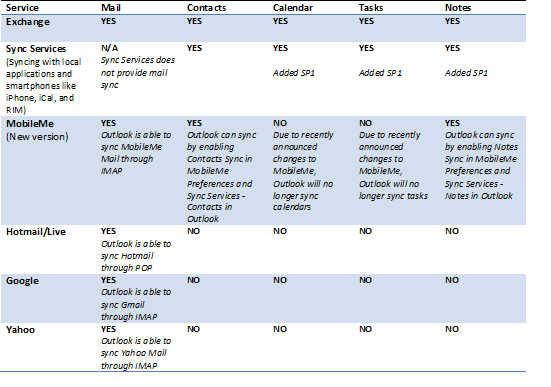
When I wrote the tutorial on how to get Gmail working inside Microsoft Outlook for the Mac, one of the things they didn’t include was Google Calendar syncing (even after a quick stability update). To be frank, they didn’t include any kind of syncing outside of the mail services provided by Exchange or IMAP. While the first service pack (arriving next week) will not be brining Google Calendar syncing to Outlook, Microsoft will be delivering a substantial update that will tie into your Mac’s Sync Services, meaning iCal calendars, tasks, and mail notes should be fair game. While it isn’t supported directly, you should be able to sync your Google Calendars with iCal, then to Microsoft Outlook. It’s a busy solution, but that’s not to say we’re out of options. For those asking (begging) me about writing something up about Google Calendar support, you’ll have the option to do it through iCal as of the SP1 update. In other words: bananas.

I also wanted to note a couple of the other new features coming with SP1:  Outlook support for Exchange based server-side rules; Outlook Redirect button (you can redirect the message to the intended recipient and the replies will go to the original sender); Outlook Resend button; Outlook edit of existing messages; and Solver integration support in Excel.

MobileMe syncing has be axed unfortunately, as MobileMe will no longer require Sync Services to communicate with your Mac. However, you will be able to sync notes down from MobileMe if anyone uses those.

[Office for Mac Blog via The Loop]


Atari Introduces “Greatest Hits” App with 100 Retro Games

If you love retro gaming as much as I do, Atari’s latest app for the iPhone and iPad (which will launch in the US App Store later today) might as well be a dream come true: with Atari’s Greatest Hits, you’ll have access to 100 old Atari games from a single app that presents them in a beautiful interface with arcade cabinets and original box arts. That’s right, 100 games in a single universal app. Where’s the catch? The app is free and comes bundled with PONG, but if you want to download the other included games you’ll have to choose between some in-app purchases options. The huge deal is the following: games have been organized in 25 game packs; each game pack will cost you $0.99 via in-app purchase. Alternatively, you can buy all the packs (and thus 100 games) together with a single purchase at $14.99. Which brings us to: 15 bucks for 100 old Atari games, on the iPhone. Some of them have even been updated to include local Bluetooth multiplayer. I won’t be missing this offer as soon as the app goes live, for sure.

The app is available now in the New Zealand store and will go live at this link in the US tonight. Full list of included games after the break. [via Touch Arcade] Read more


Grades 2: The Student’s Record Book to Success

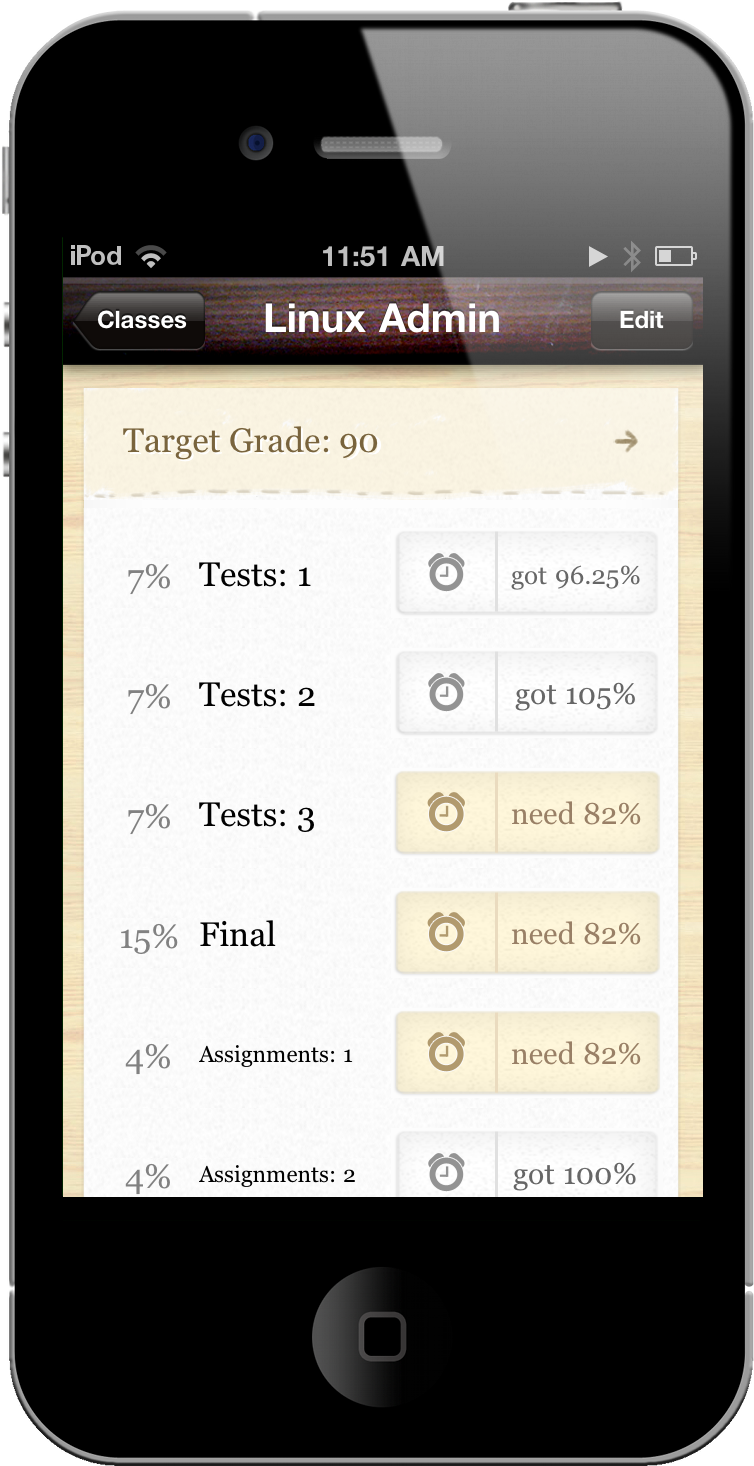
As ambitious as we are as students, we’re not always guaranteed good grades or perfect scores despite long nights and exam crams. With nothing more than a few syllabi and red ink, keeping track of your grades and measuring your performance with a calculator is outdated and unnecessary. Weighted grades and a failed exam can turn a trip to the calculator into a worrisome mess of numbers and unmet expectations. In your pocket, however, you already have all the tools necessary for instant grade-ification. Grades 2 is your personal performance record that crunches all of the numbers so you don’t have to, providing near instant feedback on what you need to aim for to maintain your target grade (preferably an A). Jeremy Olson is at it again, refining the user experience from Grades and delivering a free update that adds a GPA calculator and due dates to keep you on schedule.

Read more


#MacStoriesDeals - Wednesday

If you didn’t already know, we’ve set up a new twitter account for Deals, it’s @MacStoriesDeals. We’ll tweet the daily deals there as well as exclusive weekend deals too. Help spread the word! Here are today’s deals on iOS, Mac, and Mac App Store apps that are on sale for a limited time, so get ‘em while they’re hot!

Read more


iAd Gallery Violates Apple’s Own Guidelines

iAd Gallery, a free iPhone app Apple released yesterday in the App Store, has generated several debates on the Internet about its rather “limited” feature set: the app, good-looking and responsive, does only one thing: it’s a collection of advertisements you can browse and “love.” By aggregating the best campaigns recently launched on the iAd network, iAd Gallery only lets users interact with a spinning wheel featuring ads from different brands, view information and “launch” them to experience the rich functionalities of iAds. Basically, it’s a free ad collector for iPhone. Not exactly the kind of “productive” (or at least entertaining) software most users would expect from Apple.

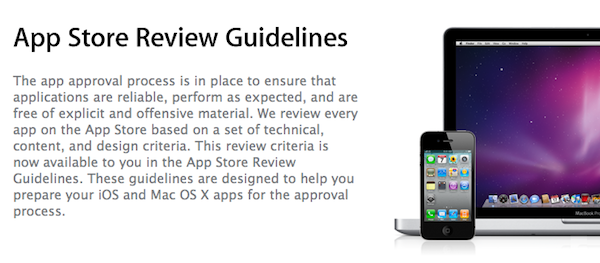
As noted by Dan Frommer at Silicon Alley Insider, it is kind of ironic that iAd Gallery may be violating Apple’s own Review Guidelines for iOS apps and should have been rejected by Apple itself. In the 2.13 section of the Guidelines, the company explains:

Apps that are primarily marketing materials or advertisements will be rejected

iAd Gallery indeed is based on marketing materials and doesn’t do anything but enabling you to browse various ad campaigns. Sure, you can read details about a specific campaign and learn more about the agency behind it, but that’s not really a “functionality” in our opinion. The app also lets you get in touch with the iAd team with a Contact button: perhaps the App Review Team at Cupertino thought that was enough to let the app through the App Store gates.

The truth is, of course Apple won’t reject its own app because it violates one of the Guidelines. They manage and have the ultimate word on the App Store, and they can release whatever they want under the Apple, Inc. name. But looking at the big picture, it is kind of funny that Apple is distributing an app that would have been rejected if it came from someone else.


Apple Orders 12 Petabytes (That’s 12 Million Gigabytes) For iTunes Store Video

After all the theories surrounding Apple’s new data center in North Carolina, and the rumors surfaced in the past months pinpointing a complete revamp of iOS and MobileMe with extensive cloud features, here comes an interesting tidbit suggesting that Apple is looking to improve capacity of the iTunes Store by ordering 12 petabytes of storage from Isilon Systems. As reported by AppleInsider, the additional storage will be used for hosting video content on the iTunes Store – although it is not clear whether this storage will also be dedicated to video streaming, future iOS or MobileMe functionalities, or just downloads for the existing iTunes Store. Currently, the iTunes Store hosts thousands of movies, TV shows and video podcasts that are available both in standard and high definition, can be streamed to an Apple TV or downloaded locally on Windows PCs and Macs. Read more