Flare for Mac Updated with External Editor Support

Iconfactory’s Flare version 1.2 has just dropped in the Mac App Store and with it comes a very handy new feature - external editing support. Flare can now be configured to be your Mac’s external editor for Aperture, iPhoto and Lightroom. All you have to do is designate Flare as your external editor in one of the apps, edit your photos from within Flare, then jump back to that app when you’re done.

For any of these new apps that support external photo editing, all you have to do is open iPhoto, Aperture or Lightroom and open the preferences tab and make Flare your new default image editor. There are more specific details on the Flare page.

See iPhoto.app preference setting after break.

Read more


Footnotify Safari & Chrome Extension Turns Footnotes into Popovers

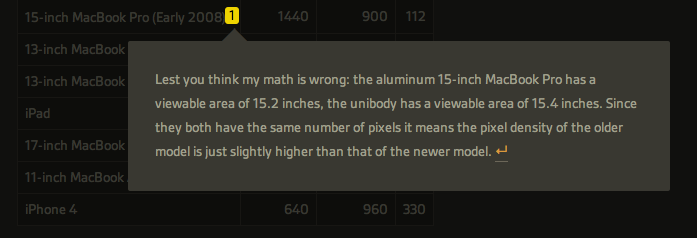
As an avid reader of John Gruber’s Daring Fireball, Ben Brooks and Shawn Blanc, I often find myself scrolling entire articles to reach the end and read the footnotes the authors decided to include. Anchor-linked footnotes are often used online as an alternative to the more classic parenthesis to elaborate on thoughts or data that won’t fit the main article’s body, but are still relevant to its context. Because I want to know immediately what these guys are referring to with a footnote, and because the only way to read footnotes is by interrupting the flow of an article and manually “jumping” to them, I’m forced to click on an anchor-linked note, read it, and scroll back to where I left off.

Footnotify, an extension for Safari and Google Chrome, makes the entire process of quickly reading footnotes faster, more intuitive and good-looking by displaying a footnote inside a popover that will overlay the page you’re reading without automatically scrolling to the end of the article, thus “disrupting” your reading flow. Once installed, Footnotify will fade in footnotes keeping the original style of the website, allowing you to click outside the popover to dismiss a footnote.

Footnotify can be downloaded over at Ideon Open Ideas, and it worked very well with every website from my RSS subscription list that used footnotes in blog posts. You can try it now here, or here.


Firefox 6 Officially Released

Firefox 5 was released less than two months ago and work on Firefox 7 is already underway, and to keep up with their “fast release cycle” promise Mozilla has officially released Firefox 6 today, making the browser 20% faster than Firefox 5 and improving the behavior of tab groups in Panorama, the functionality that allows users to get a quick glance at open tabs from an elegant bird’s eye view. With Firefox 6, released nearly five months after Firefox 4, Panorama comes with faster start-up times as tab groups are only loaded when selected; another noticeable improvement – bug fixes and speed optimizations aside – can be seen in the address bar, which now highlights domain names to give you a better idea of the website you’re on.

The new Firefox also brings important changes for developers:

The new “Web Developer” menu in Firefox provides easy access to tools that help developers build and debug websites directly in the browser. Developers will enjoy the new Scratchpad tool, which makes it simple to quickly enter, execute, test and refine JavaScript snippets in Firefox without needing to work in a one-line console. The Web Console is improved with an auto-complete feature and the ability to customize the console’s location to save developers time.

Whilst Mozilla is busy keeping up with three major releases in testing in their Aurora, Beta and Stable channels, recently posted mockups have shown that the company is interested in updating the browser’s interface in the future to fully take advantage of OS X Lion. The current versions of Firefox (in all the three channels available) don’t come with native Lion features such as full-screen or popover menus, though Mozilla’s Product Visual Designer Stephen Horlander suggested the Firefox team is experimenting with (or at least discussing) new interaction methods and graphical elements for Firefox on the Mac.

You can read more about changes in Firefox 6 here, and download the latest update from Mozilla’s website. Check out more screenshots after the break. Read more


The Size Of Apple’s New “Spaceship” Campus in Cupertino

The Size Of Apple’s New “Spaceship” Campus in Cupertino

Ever since Apple CEO Steve Jobs first explained to the Cupertino City Council the company’s intention to build a new “spaceship-like” campus on the area Apple bought from HP last year, Mayor Gilbert Wong said “there’s no chance” the city of Cupertino would say no to Apple’s proposed plan – Apple is the biggest taxpayer in Cupertino, and the project is admittedly impressive with a 4-story building hosting 13,000 employees, a 1,000 seat new auditorium, its own power center and a slew of modern architectural advancements built with green technologies in mind. Beautiful renderings aside, Apple even went as far as promising they would restore the area’s native vegetation by teaming up with Stanford University.

But just how big would Apple’s new headquarters be? John Martellaro over at The Mac Observer did some math based on official drawings, Google Maps and scale marks and came away with the conclusion that the whole building is big. Very big. According to Martellaro, Apple’s spaceship would cover the Pentagon with a diameter of 492 meters:

Given that comforting sanity check, I measured the diameter of the Apple spaceship as 1615 ft, plus or minus a few ft., depending on where one places the ruler. That’s a radius of 807.5 ft.

So, if one could magically fly the future Apple spaceship to Arlington, VA and hover over the Pentagon, it would just slightly cover it.

Martellaro also compared the campus’ size to a nuclear aircraft carrier and WWII battleship in an interesting image you can check out here. Progress on Apple’s proposal to the Cupertino City Council can be tracked here.

[image via Cupertino.org]

Permalink

Google Launches Catalogs App for iPad

In an effort to make shopping “more engaging, social and creative” and, at the same time, connected and interactive in the digital era, Google is launching Google Catalogs for iPad today, a brand new (and free) app to browse and interact with shopping catalogs from popular brand directly on the iPad’s screen. Said to be coming to Android tablets as well, Google Catalogs is now exclusive to the iPad and it offers access to hundreds of different catalogs slightly reworked to take advantage of the iPad with tags, photo albums and videos, as well as the possibility of zooming on product shots, and a button to see whether an item is available in a nearby shop.

Users can organize items they find interesting in Favorites, or create a “collage” with custom themes and resizable photographs to share with fellow Google Catalogs users. Google is touting this feature as a way to shop digitally using the iPad’s intuitive gesture-based system, and be creative.

For the launch of the Catalogs app, Google has partnered with the following brands:

  • Anthropologie
  • Bare Escentuals
  • Bergdorf Goodman
  • Crate and Barrel
  • L.L. Bean
  • Lands’ End
  • Macy’s
  • Neiman Marcus
  • Nordstrom
  • Pottery Barn
  • Saks Fifth Avenue
  • Sephora
  • Sundance
  • Tea Collection
  • Urban Outfitters
  • Williams-Sonoma

Google says more brands will be added soon, and merchants with a shopping catalog can contact the Google Catalogs team right away to apply for inclusion in the app. From the promo video embedded below, you can see how Google Catalogs seems to heavily rely on sliding animations, pop-ups and links placed directly on a product’s photo or description – rather than forcing users to navigate to a specific page like printed catalogs often do, the app enables them to have more information quickly available in a new window.

Google Catalogs for iPad is available for free on the App Store.

Read more


HTC Sues Apple Over Patent Infringement

As reported by Reuters, smartphone maker HTC is suing Apple claiming infringement of three patents owned by the company. The lawsuit, filed in the U.S. District Court in Delaware, relates to patents allegedly infringed by Apple with its Mac computers, iPhones, iPads and “other products”. Details are scarce right now – we’re sure Florian Mueller at FOSS Patents is already looking into this – but the Taiwan-based company is seeking a ban on the infringing products in the United States, plus “triple damages for willful infringement, and other remedies”.

In July, Apple filed an ITC complaint against HTC, looking to block the sale of several HTC products infringing Apple’s patents – that was the second complaint against HTC, as Apple was apparently looking for “a second try” with stronger patents, according to Florian Mueller.

We will update this post with more news and details on HTC’s lawsuit as they become available.

MacRumors details the patents addressed by the lawsuit:

7,765,414: Circuit and operating method for integrated interface of PDA and wireless communication system
7,672,219: Multipoint-to-point communication using orthogonal frequency division multiplexing
7,417,944: Method for orderwire modulation

Apple first sued HTC back in March, with an International Trade Commission judge finding HTC guilty of infringing on two of Apple patents in July – one of them, patent 5,946,647, said to be “fundamental” to the Android platform. HTC is however arguing they have a “strong case” against Apple’s claims, and said they will appeal the ITC ruling.



Tweetbot 1.5: Muting is Forever


Well, it’s finally here. You asked for it — you wagged your finger about it — you hate the people you follow on Twitter so much that you don’t want to hear another peep out of them, yet deep down you don’t really want to get in one of those uncomfortable, “Why did you unfollow me!?” moments. Or maybe someone’s had a little too much caffeine and you just need a break. With Tweetbot 1.5, you can mute those pesky over-tweeters and keep meme-esque hashtags from cluttering your #pantsfree timeline. Although I hear there’s a self desctruction mechanism built in if you ever mute #tweetbot.

Read more


TextExpander for iOS Updated with Dropbox Sync, Tweetbot Support

If you own an iPhone or iPad and you’re used to typing a lot using Apple’s virtual keyboard for iOS (which will soon receive some interesting updates with iOS 5 on the iPad), you might also be a TextExpander user. Developed by Smile and available both on the Mac and iOS, TextExpander is a fantastic utility that allows you to create “snippets” to type frequently-used text using short abbreviations. Personally, I use TextExpander on a daily basis on my Mac to type “http://” in Twitter for Mac (which for some reason doesn’t allow you to copy links), personal information in websites I visit every day, or sentences I often write down in email responses. Whilst TextExpander for Mac is tightly integrated into the operating system and works with every app, because of the different nature of iOS third-party developers have to manually integrate their apps with TextExpander once installed on a user’s device. Currently, more than 100 apps for the iPhone and iPad sport TextExpander integration.

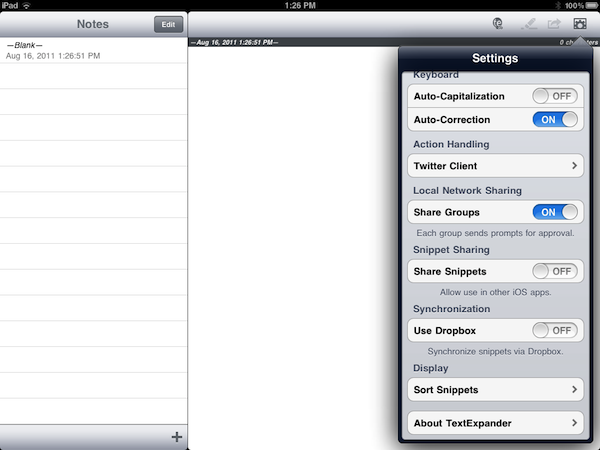
With an update released today, Smile has added Dropbox support to TextExpander for iOS, allowing users to sync snippets created on the Mac through the popular online service. Dropbox integration in TextExpander for Mac has been around for months as an alternative to MobileMe and local sync to share snippets “over the air” on multiple Macs. The same functionality is now available in the new TextExpander for iOS, which will require you a couple of taps to authorize with your Dropbox account, and import snippets into the app. The Dropbox sync option is available in the Settings, and it works both on the iPhone and iPad. In the Settings, there’s also a new option to sort snippets – version 1.2 brings “other fixes and improvements” as well.

You can try the new Dropbox sync functionality by downloading the latest TextExpander for iOS on the App Store. Apps that support TextExpander snippets include Second Gear’s Elements (recently updated to version 2.0), and Tapbots’ powerful Twitter client, Tweetbot.