Iomega’s “Mac Companion Hard Drive” Combines USB, FireWire, and iPad Charger

Iomega today announced a new Mac Companion Hard Drive which incorporates a large capacity desktop hard drive (2 TB or 3 TB models are available) with two USB ports to connect a printer or another external drive, two FireWire ports and an additional high-powered USB charging port for an iPad or iPhone.

With the new Iomega Mac Companion Hard Drive, Mac users now have a convenient and stylish way to quickly charge their iPads with the bonus of plenty of new storage capacity for their Mac computer,” said Jonathan Huberman, president of Iomega Corporation. “With more than nine million iPads sold in the last quarter alone, the new Mac Companion Hard Drive is the perfect complement for all those iPad owners.

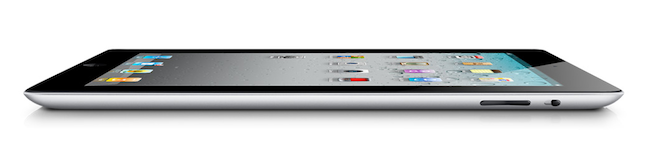
Iomega has made special effort to make a device that matches and suits Macs, which is most notable in the design and stylings of the device – not only is it sleek with its metal enclosure but the very shape of the Mac Companion Hard Drive has been sculpted so that it sits perfectly on the iMac or Thunderbolt Display stand, tapering out at the back. The whole device is fairly simplistic but stylish in design and it hides all but the high-powered USB port at the back of the device. Iomega has left the three visible sides with nothing but the high-powered port on the right hand side of the device and four LED lights on the front panel of the device to indicate HDD capacity.

The charging port is a high-powered 2.1 Amp hookup that makes it easy and convenient to charge your iPad and other portable Apple devices so they’re ready to go when you are.

The hard drives are also pre-formatted as HFS+ so that they are compatible out of the box with Mac OS X, and whilst the lack of Thunderbolt is a little disappointing, this device looks like a solid option for anyone looking for an external hard drive for their Macs. The Iomega Mac Companion Hard Drive will initially be exclusive to Apple online and retail stores at a cost of $195 for the 2 TB model and $295 for the 3 TB model.

Jump past the break for some more pictures of the device.

Read more


iCloud Storage: International & Competitor Pricing Comparison

Last night, Apple launched a first developer beta of iCloud.com, a set of web apps based on the iCloud functionality originally introduced in iOS 5 beta that mimic the appearance of Apple’s Lion desktop apps like Address Book and iCal, or the Mail app for iPad. The new web apps, seen as replacements for MobileMe’s existing web offerings, have been completely rewritten to take advantage of iCloud’s faster and invisible sync of content between devices, and they also include a new web-based version of iWork that, however, isn’t live yet. Screenshots (and videos) of the iCloud web apps have surfaced online and partially on Apple’s website too; early screenshots of the login page had been leaked ahead of the WWDC in June.

The iCloud web apps provide an alternative to their iOS and OS X counterparts – being entirely web-based, they can come in handy “if you happen to be away from home without your computer or one of your iOS devices” so that “you can access your mail, contacts, and calendar — ad-free — from any computer at icloud.com”. Read more


US Retailers Begin To Reduce iPhone 4 Prices

In recent days there have been reports of various retailers beginning to reduce the price of the iPhone 4 as the release of an iPhone 5 draws ever closer. Rumors on when exactly the next iPhone will be released have varied quite substantially from an August release to a September release and most recently, suggestions from AllThingsD of a late October launch.

Whenever the release is, US retailers Radio Shack and Target have both cut the price on the iPhone 4 models. Radio Shack is currently offering the 16GB model for $169.99 and the 32GB for $269.99 whilst also offering $100 credit with the trade-in of previous iPhone models. Meanwhile Target is now offering the 16GB iPhone 4 for $149.99 and the 32GB model for $249.99. Unfortunately these discounted iPhone 4’s still come attached with a two-year contract with either AT&T or Verizon.

These iPhone 4 prices being offered by Radio Shack and Target are reduced from the standard $199 for the 16GB model and $299 for the 32GB model that AT&T, Verizon and Apple are still offering.

[Via Ars Technica]


Skype for iPad Released

Skype for iPad, first “leaked” online back in late June, has finally been released for free in the App Store as a standalone app, as noticed by TUAW. The app isn’t a universal update for the iPhone version, meaning you’ll have to download it as a separate app on your iPad, and it’s not yet available in the US App Store. The app will likely be released in the US Store later today, perhaps in a few hours.

Skype for iPad features an all-new interface design with larger contact pictures, a buddy list on the left, and possibility of starting a new video-calling session in full-screen with video being captured from the iPad’s rear or front-facing cameras. The app can do video and audio calling both on WiFi and 3G, much like the iPhone version already can.

A list of features from the iTunes page:

  • Talk face-to-face or show what you’re seeing with front and back-facing cameras.
  • Use Skype for iPad to call anyone else on Skype – and enjoy near CD quality (SILK) sound.
  • Instant message and add emoticons to personalize your messages.
  • Make cheap calls to landlines or mobiles from your iPad.
  • Get an Online Number from Skype so people can call you on your iPad.
  • Pay As You Go with Skype Credit - great for when you’re using Skype every now and again.
  • Pay monthly with a subscription – best if you use Skype a lot.

We will update this story with more details on the app and first impressions as soon as we get our hands on it. More screenshots and original “leaked” promo video below.

Update: Skype for the iPad is now live in the United States. Download it here.

Update 2: We have first impressions and some screenshots up past the break.

Update 3: Skype has pulled the app from the App Store, saying that it went live “prematurely”.

Update 4: It appears the app is back and can be downloaded from the App Store.

Read more


Apple Seeds iWork for iOS Beta Apps With iCloud Support

Following the launch of iCloud.com beta to developers, Apple updated its iCloud beta for Developers page including special versions of the iWork for iOS apps. Labelled “iWork for iOS beta apps” by Apple, the package includes new versions of Pages, Keynote and Numbers for iOS that will allow developers and testers of iCloud to start working on a new document on a device, and find it after a few seconds on another iCloud-connected device or the web counterpart, which also comes with web apps to edit documents.

The functionality was first demoed by Apple at the WWDC in June, and an iOS developer program membership is required to test the new iWork beta apps.


Apple’s iCloud Beta Goes Live on the Web

Apple’s finally done something pretty awesome with their iCloud domain — this evening the iCloud.com website has gone live giving developers access to their mail, contacts, calendars, and iWork documents through the web. Developers testing iCloud’s features can log in and play around with a gorgeous interface that mimicks a lot of iOS interface elements. For example, if you type in the wrong password at the login, you’ll get iOS-style dialog boxes in the browser. It’s cool stuff!

Visit www.icloud.com

Read more


TweetFire: A Lightweight and Fast Twitter Companion for iPhone

In my review of the first version of Tweetbot, I asked whether it was still possible to bring innovation to Twitter clients for iPhone, a category of apps that have offered more or less the same features for quite some time now, with the focus now being on interface design to make an app feel “unique”. With different takes on the same concept (interacting with Twitter) and with the company itself advising against “regular” third-party client apps that most users won’t install (they say people fire up the App Store, download Twitter’s official app, and that’s it), mine was a legitimate question. Is there still room for something new?

As Tweetbot’s successful launch has proved, there’s a niche of users willing to try out what’s new in the Twitter ecosystem. Tapbots have managed to build a loyal new userbase of customers interested in their unique spin on Twitter clients – these people have stuck around long enough to wait for push notifications and the consequent rapid rollout per Twitter’s own API approval. But I also take a look at Twitterrific from The Iconfactory, another third-party client that has built its own ecosystem across the Mac and iOS and which, from what I’m hearing, is about to introduce great new features in an upcoming update. I’ve mentioned Tweetbot and Twitterrific so far, but there are dozens of clients from both big and smaller indie companies that are thriving in spite of Twitter’s official free tools for the iPhone, iPad, and Mac.

And then there’s Apple’s initiative with Twitter and iOS 5, which will bring native Twitter access (single sign-on, contact lookup, tweet integration) to its mobile operating system. Users will be able to tweet photos and webpages, addresses in Maps and cool videos they find on YouTube. But they won’t be able to read their timelines, or receive push notifications through Apple’s native implementation. For these reasons, and because it is my job to look out for what’s next, I believe innovation in Twitter clients is far from done (that is, unless Twitter adopts changes that will make it impossible for developers to keep creating third-party tools), and we just need to keep looking to find the next app that may, in some way, improve the way we share information on Twitter from a smartphone or tablet. Read more


Changing OS X Lion’s Mission Control and Dashboard image backgrounds

Changing OS X Lion’s Mission Control and Dashboard image backgrounds

As soon as I installed Mac OS X Lion I began playing around with all the new features. Naturally, Mission Control and Dashboard were two of the first things I tried. I immediately hated the image backgrounds Apple chose to use and began searching for a way to alter them. It didn’t take long, and it’s quite simple to do.

The linen texture is unpopular with a lots of people, often being designated as, “The new pinstripes”. Personally I like the linen texture as it provides nice contrast against bright and floating desktops and apps, but I’m not sure why it didn’t carry over to the dashboard. The dashboard, featuring a lego-like texture, oddly stands on its own from the rest of OS X as some kind of ugly stepchild. It’s bad enough the dashboard still retains that metallic widget-bar, and Apple reinforces its distinctness from the system with a background that reminds me of diamond-plate — it’s simply unappealing. In the meantime, you have a choice in whether you want to look at it (or linen) through a nine step process that allows you to swap out those gross backgrounds for bubbles, stiching, denim, or whatever floats your boat.

Permalink

Safari’s Growth Outshines Dulled Chrome in July

Browser Wars - it’s not surprising that competition for the best browser is always fueled by which is the fastest, most reliable and doesn’t suck up all your resources on your desktop and mobile machines.

According to Net Applications newest report, July was a great month for Apple’s Safari browser. July boasted the largest increase ever, with Safari being used by 8.1 percent of all web users.

Apple’s iOS devices (iPad, iPhone and iPod Touch) make up for more that a third of the usage for Safari. The growth rate surpassed (and doubled) Chrome as well, jumping .6 percent for July while Google’s Chrome only grew .3 percent.

Statistics say that Safari has had continual growth for 17 months now while Microsoft’s own Internet Explorer has been declining. IE still has 52.8% of the market but solid declines month to month help Apple and others cut in to Microsoft’s dominance in the browser market. IE 9 is being used more with Windows 7 adopters but the overall browser share for IE is still declining.

If Apple and Chrome are growing and IE is shrinking, where is Firefox and Opera in all of this? Numbers show that Opera is down to a minimal 1.7% of the web market - this is where it was back in 2007. Firefox is mostly steady but had a slight decline from 23% a year ago to 21.5% now.

Safari isn’t King of the Jungle yet but is making great strides. Apple’s strength in mobile devices and increases in Mac sales will help Safari continue to grow and grow. Safari had a major update 2 weeks ago with version 5.1 that supports full screen mode and gestures (Mac), Reading List and more. The upcoming iOS 5 adds some great new features for Apple’s mobile version like tabbed browsing, Reader and Reading List as well as an improved performance on all iOS devices.

[via TUAW]