Verizon Promotes The 3G iPad 2 In New Commercial

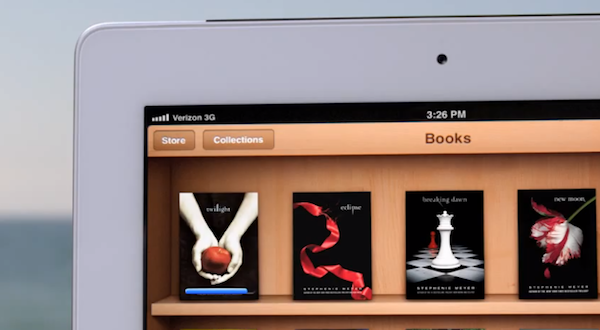
It certainly doesn’t have the flair and emotional connection of one of Apple’s iPad adverts, but Verizon has aired its own iPad 2 commercial, promoting the use of the device with their 3G network. It highlights a few specific iPad features that are made functional with Verizon’s network such as downloading a new book from iBooks at the beach and tweeting at a campsite. Consistent with other Verizon adverts, specific mention is also made towards the end of the advert of Verizon’s network coverage across the US, stating that it is “America’s largest and most reliable network”.

Salesperson: It’s faster, thinner and lighter and with the power of Verizon you can stay connected almost anywhere. Lets say you want to download a best-seller at the beach. Done. Or if you want to stay connected when your miles away from WiFi. No problem! You can even tweet when you’re nowhere near your followers… and you can post pictures too! So what do you think?

Customer: I’ll take it.

Narrator: The iPad 2, on America’s largest and most reliable network. Verizon.

Jump the break to have a watch of the Verizon iPad commercial for yourself, as well as one of Apple’s own iPad adverts, to see for yourself some of the differences. [via 9to5 Mac]

Read more


Facebook for iPhone 3.5 Released With New Sharing Options, Wall Design

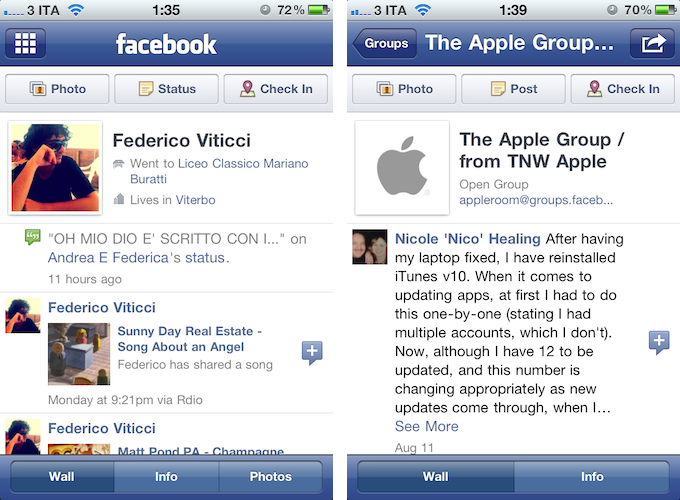
A major update to the official Facebook app for iPhone was released earlier today, adding new sharing options from the compose screen and privacy controls that match the options set on Facebook’s website. First off, Facebook 3.5 brings a new design for Profile and Group walls; the app appears to be more streamlined and in line with Facebook’s recent changes to its web UI.

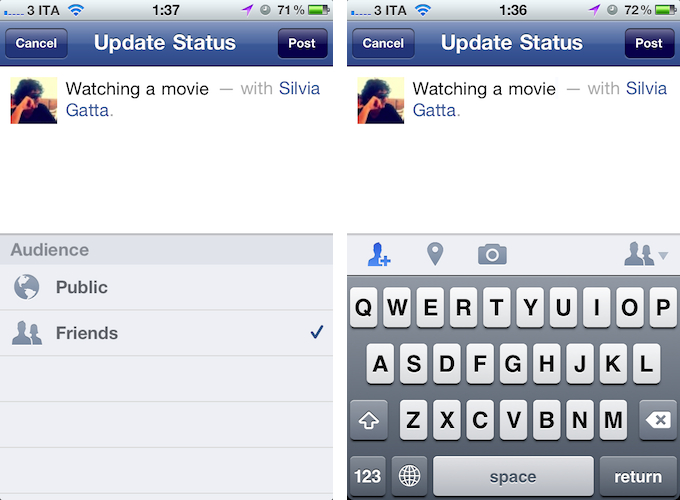
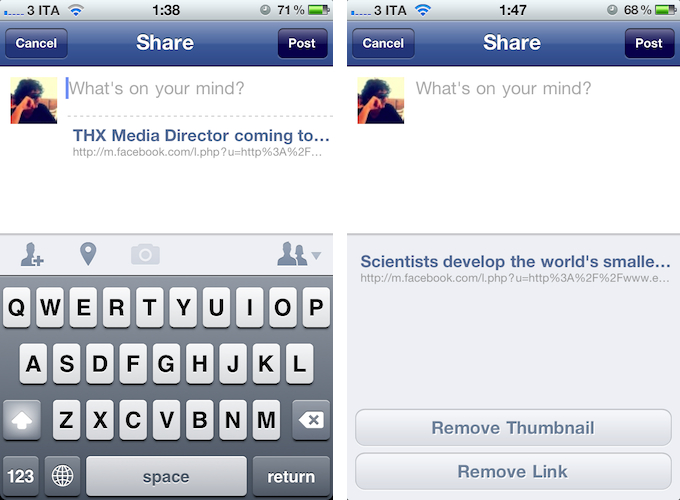
Perhaps more importantly, Facebook for iPhone now lets you tag friends and places in posts, and share links from a web view opened through Facebook. The updated compose screen has got buttons to add friends from a list (and even search), tag a place, or add a new photo or video. As for sharing links, Facebook now lets you open a webpage in-app, and instantly reshare it (with an optional comment) with your friends. When sharing a webpage from a web view, tapping on its link in the compose screen will enable you to remove the link entirely, or just its thumbnail.

Facebook 3.5 also comes with bug fixes, as mentioned in the changelog:

  • Improved Notifications speed
  • Fixed a number of Chat bugs
  • Made it easier to select filters in News Feed
  • Fixed a bug with the Notifications bar disappearing
  • Fixed a number of Photos bugs
  • Improved performance and stability overall

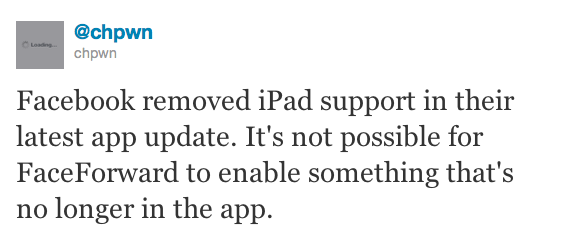
An official iPad app from Facebook is expected to be officially unveiled soon, likely at the upcoming f8 conference on September 22. The iPad client was discovered inside the iPhone application back in July, although it appears the latest version removes iPad elements, thus making it impossible for Cydia tweaks like FaceForward to force-enable the yet unofficial iPad app.

Facebook for iPhone is a free download on the App Store.


Screentaker Helps You Take Beautiful iOS Screenshots

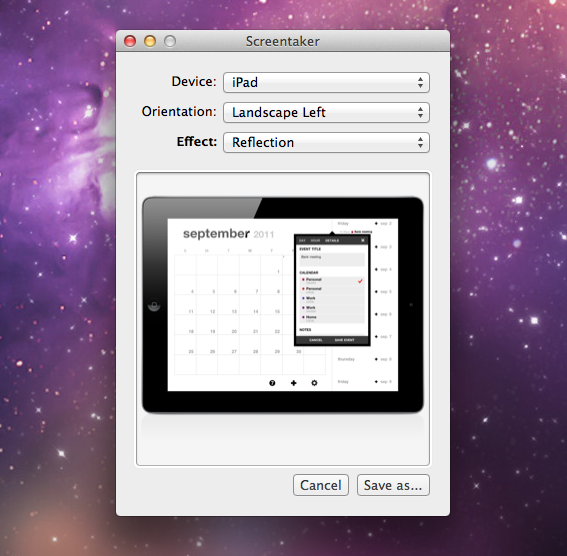
I first mentioned iPhone Screentaker from developer Fabian Kreiser in a post from January 2010, in which I collected some of the tools we used at MacStories to produce beautiful high-quality screenshots of iPhone apps for our articles. We were big fans of Fabian’s side projects, and although he updated the app on his website with support for the original iPad, he never included an iPhone 4 template we could use for our iPhone screenshots. But fortunately for us, and any designer/developer who wants to create better iOS screenshots than a device’s original output, 13 months after the release of the iPhone 4 a completely revamped version of iPhone Screentaker is out, and available on the Mac App Store under a new name.

Screentaker for iOS Apps is available at $4.99, and it’s a very niche app. In fact, my guess is that Kreiser created it to scratch his own itch for better screenshots to present on websites and blog post – Screentaker is an app that might appeal to people like me, who take screenshots of iOS apps every day, or website designers that don’t want to create their own iPhone, iPod touch and iPad templates. Read more


Sprint Hints at iPhone In Lawsuit Against AT&T / T-Mobile

Earlier today, U.S. carrier Sprint filed a lawsuit again the AT&T / T-Mobile merger, citing “competitive advantages” and an entrenched duopoly that would make it difficult for Sprint to compete against giants such as Verizon and AT&T. In the document filing – which claims the acquisition would violate Section 7 of the Clayton Antitrust Act – This is my next has dug out an interesting tidbit in which Sprint seems to be hinting at Apple’s iPhone.

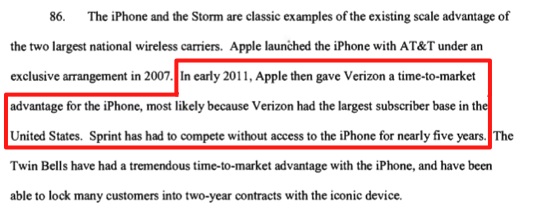
According to Sprint, “Apple gave Verizon a time-to-market advantage for the iPhone” in early 2011, whereas “Sprint has had to compete without access to the iPhone for nearly five years” (emphasis added). The curious wording is no confirmation of Sprint getting the iPhone after it first launched in 2007, although from a speculative standpoint it might suggest the company will soon be able to get access to the iPhone after nearly five years. Verizon actually got the iPhone four years after AT&T (the original exclusive partner in the United States), and as Nilay Patel notes, a time-to-market advantage “would only be an actual advantage if other carriers like Sprint and T-Mobile were set to get the device later on”.

Obviously, this piece of information is only worth reporting as a follow-up to The Wall Street Journal’s recent report of Verizon, AT&T, and Sprint getting the next-generation iPhone in mid-October. For a timeline of iPhone 5 news and speculation, check out our rumor roundup and retrospective.


Google+ iOS App Adds “Reshare” Option and Fixes

Ever since the official Google+ app for iPhone came out in July, we’ve followed the development as Google’s new social experiment added more features, and seemingly dropped in traffic as the novelty effect wore off for many. I was pretty satisfied with the 1.0 release, albeit the custom UI and lack of functionalities turned an highly anticipated launch into a discussion as to whether Google should be focusing on making its iOS apps more native to iOS and less Android-ish. An update in August brought support for iPod touch and iPad in compatibility mode – two options that were mysteriously absent in the first release.

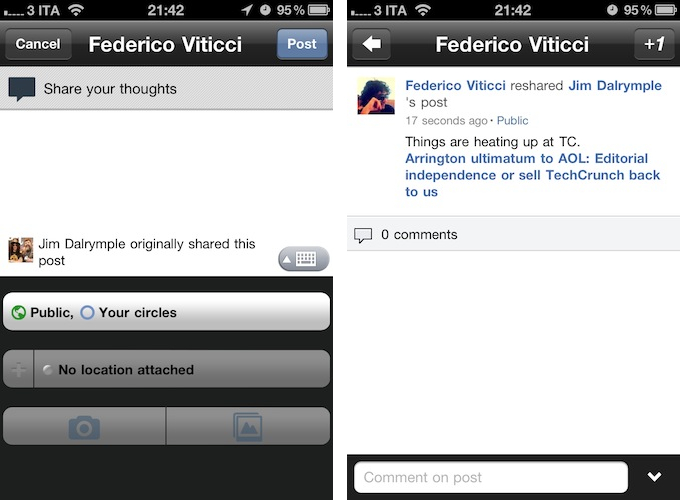
A new version of Google+, as noted by The Next Web, was pushed to the App Store a few minutes ago, adding support for “reshares”, as well as bug fixes and performances improvements. From my first tests, I’m happy to see the app doesn’t crash on iOS 5 beta 7 and everything seems to be quite snappy and responsive while navigating between sections, the stream, and comments. As for resharing others’ posts, it works just like on the Google+ website – once you’ve selected a post, you can hit the “arrow button” at the bottom to bring up a menu to reshare, mute, or report a post. Reshare will open a new window populated with the original post and author, and a text field to add your own thoughts, set location and circles. Reshared posts will be nicely formatted both for the web and iOS app.

From the release notes:

  • Reshare support
  • Set your profile photo
  • Improved autocomplete in Huddle
  • Properly refresh notifications when returning to the app
  • Create new circle from Circles destination
  • Fixed 2-step verification issues

You can download Google+ for iOS for free on the App Store.


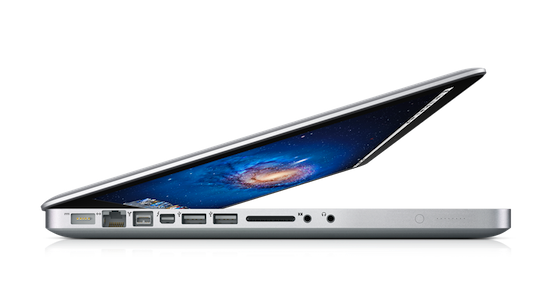
Shake-To-Undo On A MacBook Pro

Shake-To-Undo On A MacBook Pro

Paul Horowitz at OS X Daily writes:

The tiny app works by activating Command+Z when movement is detected by the SMS.

If you’re concerned about accidental undos from moving your Mac laptop around, you can prevent this by enabling the ‘Confirmation Overlay’ from Shake To Undo.app’s menubar.

This is basically useless unless you’re really into shaking your MacBook while writing, but the technology behind it is what intrigues me. I first learned about Sudden Motion Sensors (SMS) last year, when I opened my MacBook Pro to install a brand new SSD, and had done a bit of research online before replacing my hard drive. It turns out, this sensor was first implemented by Apple in a refreshed PowerBook line in 2005, and later in the July 2005 iBook. Since then, every portable Mac came with a Sudden Motion Sensor, albeit with differences between G4 laptops and Intel MacBooks.

The SMS acts as a security measure for the spinning hard drive. By calculating sudden acceleration in real time through an accelerometer, the SMS can “predict” when a computer is about to drop off a surface or your lap, and thus tells the hard drive to disengage the drive’s heads from the platters. In theory, this should prevent data loss or at least make for less damages to the drive.

As you can imagine, a number of hacks have arisen around SMS – tilt-based games and utilities like Shake To Undo. If you want to try it out for yourself, you can download the app over at GitHub. I don’t recommend it (it’s bad for your hard drive), but it sounds so ridiculous it might just be fun to test for an afternoon.

Permalink

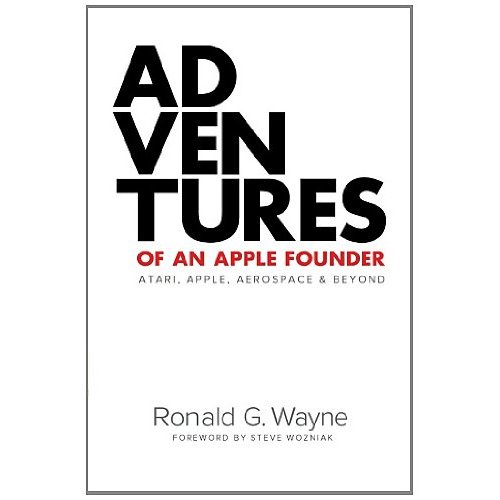
Ronald Wayne’s “Adventures of an Apple Founder” Now On iTunes

In the history of Apple, Inc. the role of the company’s third co-founder, Ronald Wayne, is often overshadowed by the genius of Steve Jobs and Steve Wozniak, who built the very first Apple I personal computer and unveiled it at the Homebrew Computer Club. Ronald Wayne was the “adult supervisor” in the early days of Apple, the middle-man between Jobs and Wozniak whom they could trust in case of any disagreement. Wayne contributed to the first Apple logo, and drafted the initial partnership agreement to establish the company. He was given a 10% stake in Apple which, however, he sold for $800 after a few weeks. He later received an additional $1500 for giving up on any claim of ownership in Apple, thus bringing his original 10% to $2300 worth of “profit”, whereas if he stayed on Apple until today his 10% would be worth $35 billion.

Today’s Ronald Wayne says he doesn’t regret his decision, made “with the best information available at the time”. This, and another anecdotes from Wayne’s past and subsequent ventures are detailed in Adventures of an Apple Founder, an autobiography available for $9.99 on the iBookstore, as well as Amazon in paperback format. From the iTunes description:

In the spring of 1976 while working as chief draftsman and product development engineer at the video game maker Atari, Ron assisted a co-worker with the subtle intricacies of forming a small business.It was with Ron’s natural sensibilities, experiences, and skills honed over a lifelong career in many disciplines that he offered himself openly as a resource to two much-younger entrepreneurs: Steve Jobs & Steve Wozniak. These same traits would drive Ron’s decision to leave a short time later.

Adventures of an Apple Founder offers insight into the experiences that define the man whose passion for engineering and design spans over three quarters of a century, half a dozen industries, and a lifetime of adventures!

Wayne recently appeared in an interview alongside Steve Wozniak following Steve Jobs’ resignation as Apple CEO. As a side note, Steve Jobs’ official biography by Walter Isaacson recently got a classic cover and it will be released in November 2011, including details on the resignation. [via setteB.IT]


My Artists 2.0 Brings 8tracks Internet Radio, iTunes Integration, Better Controls

When I first stumbled upon My Artists last year, what I found was a great companion for iOS’ native iPod app that allowed users to play songs they had synced on their iPhones with a different interface that, among other things, came with Wikipedia and YouTube integration. My Artists’ main goal, in fact, was to provide users with more information about songs and albums they were listening to, pulling data from the web as a way to showcase videos and songs from the same artist that, however, were not available on the device. My Artists 1.0 was a discovery tool for music already synced on an iPhone; version 1.1 brought several interface improvements, whilst 1.2 focused on Last.fm support as in-app purchase, and made the app independent from iPod.app in that users could see My Artists’ icon in iOS 4’s multitasking tray.

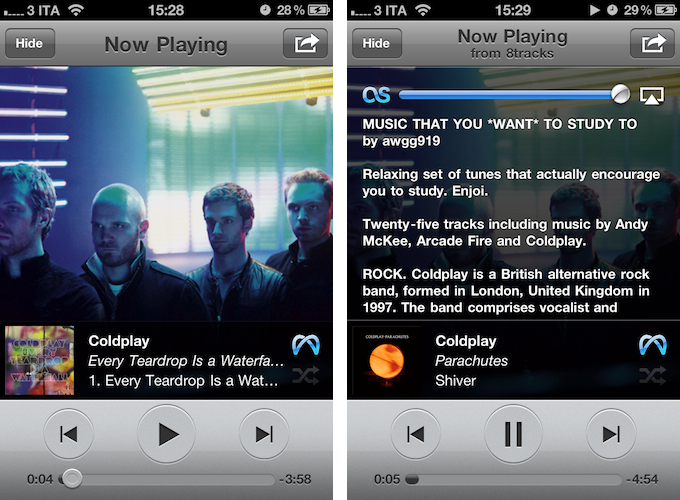
My Artists 2.0, released today, takes the whole concept a step further to become a full-featured music player and discovery system for all kinds of artists, not just the ones you already know and have on iTunes. Thanks to built-in integration with 8tracks, the “handcrafted Internet radio”, users can now listen to a personalized radio station with easy controls to jump through live-streaming songs from the popular online service. Whereas previous versions of My Artists wanted to put more information about your music at your fingertips – by displaying artists’ bios, related music, and videos – My Artists 2.0 brings actual new music to the mix thanks to an 8tracks button that’s always accessible from the main list view, which as usual pulls beautiful and high-res artist pics and album artworks from the web.

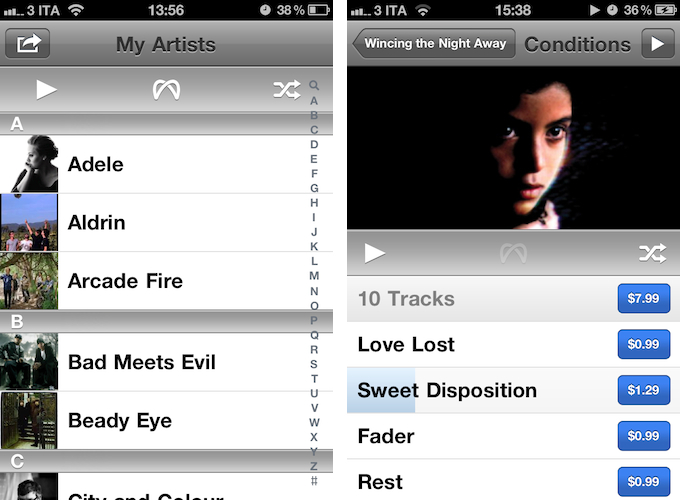
The new control bar in the list view has also got buttons for quick play all and shuffle, surely a welcome addition for those who don’t always want to navigate to an artist’s page to start playing music. Once you hit the 8tracks button, My Artists will open a new window, and start streaming a random playlist within seconds. The playlists are user-generated on 8tracks.com, and you can skip and pause songs with the app’s regular playback controls. Tapping on the album artwork of a song streaming from 8tracks will display an overlay with the playlist’s information, although you can also use the sharing button in the upper right corner to open 8tracks’ website in-app. As with older versions, the sharing button has additional options to “explore” (opens Wikipedia, YouTube, or related artists and genres), open an artist’s profile or album details. And when you check out the details for an album you don’t own or have on your device, that’s where another new feature of 2.0 comes to light: native iTunes Music Store integration.

As you can see in the screenshot, alongside a nice inline playing indicator (available both for local and streaming songs) there’s a blue Buy button next to each song belonging to the album you’re listening to through 8tracks. My Artists 2.0 enables you to preview iTunes Store songs without leaving the app or, alternatively, tap on the purchase button to open iTunes and start downloading right away. No matter how you get to an album or song you don’t own, whether it’s an 8tracks streaming session or Last.fm-based “discovery” for related artists, the app will have an iTunes button next to music you don’t have synced.

Speaking of Last.fm: gone is the in-app purchase from version 1.2. Last.fm scrobbling is now free for every My Artists customer, and it needs to be enabled through a login page the first time you hit the Last.fm button. From there on, My Artists will scrobble songs – be them “local” or coming from 8tracks – to Last.fm.

For me, My Artists 2.0 nears perfection. I still miss the ability of displaying lyrics alongside artists’ bios in the now playing overlay, and it’d be nice to be able to “forward” discovered songs to Rdio or Spotify, besides the iTunes Store. But other than that, for someone who listens to music every day, all day (well, almost), My Artists 2.0 offers a fantastic combination of local music playback (enhanced with better, up-to-date artworks and a fresh UI) and Internet-based discovery.

You can get My Artists 2.0 at $1.99 on the App Store.