


Here are today’s @MacStoriesDeals on iOS, Mac, and Mac App Store apps that are on sale for a limited time, so get them before they end!
#MacStoriesDeals - Monday
OmniFocus Updated with iOS 5 Location Reminders
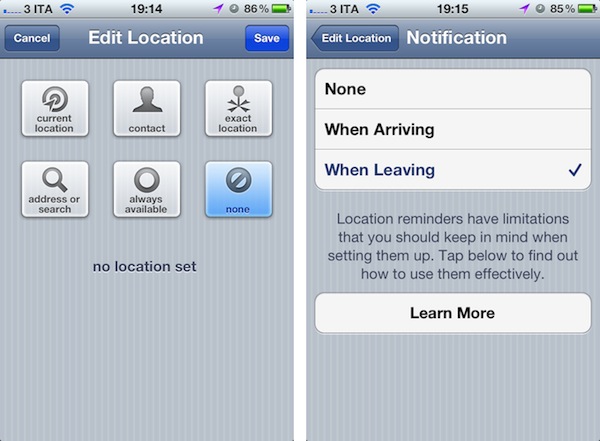
The Omni Group released two updates for its OmniFocus app for iPhone and iPad today, adding several bug fixes and improvements, iOS 5 compatibility, and a new Location Reminders feature that leverages iOS 5’s geo-fencing APIs to send you a reminder when you’re in the right area to complete an action. The same technology is used by Apple in Reminders, a new native app in iOS 5.
The new Location Reminders in OmniFocus require an iPhone 4 or iPad 2 3G with iOS 5 installed. iOS 5 isn’t coming out until Wednesday, October 12th, but I’ve been able to test the functionality on my iPhone 4 running the Golden Master release of iOS 5. In the new OmniFocus, location needs to be assigned to a Context from the context editing view. The location settings have more options than Apple’s Reminders app – you can assign a location to a context by fetching the current location via GPS, selecting a contact’s address (like Reminders), or pinpointing your exact location. You can also manually search for an address, select “always available”, or choose to skip location altogether by choosing “none”. Once you’ve set a location for a context, you can select how you should be notified for an available task: when you leave or when you arrive. In this screen, The Omni Group warns that Apple’s geo-fencing technology in the first version of iOS 5 has a series of limitations to keep in mind – opening the app’s Help screen reveals that location-based reminders might not be 100% accurate, especially if you quickly leave/re-enter a location, or quickly pass by one (example: while driving on the highway). This is something The Omni Group can’t really address on its own as it’s a set of APIs provided by Apple, and if anything it shows that the developers are committed to providing an optimal experience by offering even more location options than Apple’s Reminders. In my tests, I can confirm OmniFocus’ (and Reminders, too) location alerts haven’t been accurate all the time – current location would work with a specified area, but not a manually-entered address. Similarly, the distance settings offered by OmniFocus sometimes failed in reminding me to do something when I was leaving a location; the app offers three different dots to determine distance, a small one for about 200 meters (600 feet), a middle-sized circle for 500 meters (1500 feet) and a big circle for 10 kilometers (6 miles). Again, these are options that Apple doesn’t provide in its native Reminders app.
It’s too bad location technology for reminders in iOS 5 still needs some optimizations, because I believe OmniFocus’ support for the feature is just great. The user interface is simple and elegant, the context-based system is meaningful to the concept of context itself, and OmniFocus is still a fantastic piece of software (with several bug fixes that you can check out in iTunes’ changelog). There’s no doubt Apple will improve location reminders over time, and please note, too, that there’s a chance the functionality will work perfectly for you, and addresses in my area simply don’t want to cooperate with Apple and OmniFocus.
You can get the updated OmniFocus in the App Store here (iPhone) and here (iPad).
First iPhone 4S Hands On Video Shows Siri Settings, Early Benchmarks
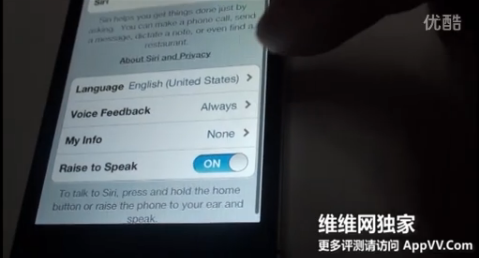
The iPhone 4S will be officially launched later this week on Friday, October 14th, but it appears someone has got access to a unit early and posted a video online showing initial browser benchmarks and Siri’s preference panel in the iOS Settings app. Siri’s preferences, located in Settings -> General, contain options to set the assistant’s language (English for Australia, United Kingdom and United States, plus French and German) and two menus for “Voice Feedback” and “My Info”. The video shows that these two options can be set to “Always” and “None”, respectively. Interestingly enough, Canada isn’t included in the list of English-supported countries, raising doubts as to whether it’ll be “officially” supported in Siri when the iPhone 4S comes out this week (Canada is a launch country, and it seems like Siri recognizes different accents fairly well). Last on the list is Raise to Speak – an option that should allow users to talk to Siri by simply raising the iPhone to their ear. Alternatively, Siri can be activated by pressing and holding the Home button.
As MacRumors also notes, Sunspider benchmarks show a score of 2222.1ms and a BrowserMark score of 89567. The iPhone 4 with an A4 chip running iOS 5 is believed to score 44856 in BrowserMark, thus making the iPhone 4S from the video twice as fast as the old-generation iPhone. The iPhone 4S comes with an A5 chip for improved performances and faster graphics.
The iPhone 4S is set to come out in seven countries on Friday, October 14th, and pre-orders have topped 1 million in the first 24 hours. It’s unclear how the person in the video below got an iPhone 4S early, but it appears to be from China as the carrier’s settings show China Unicom.
Read more
Apple: 1 Million iPhone 4S Pre-Orders in First 24 Hours
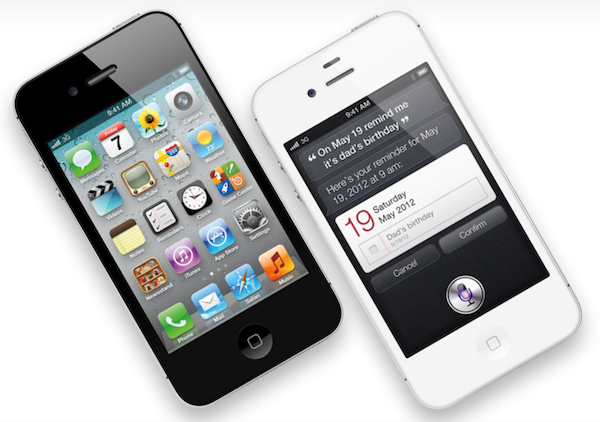
Apple just confirmed through a press release that iPhone 4S pre-orders have topped one million units in the first 24 hours of availability:
Apple today announced pre-orders of its iPhone® 4S have topped one million in a single day, surpassing the previous single day pre-order record of 600,000 held by iPhone 4. iPhone 4S is the most amazing iPhone yet, packed with incredible new features including Apple’s dual-core A5 chip for blazing fast performance and stunning graphics; an all new camera with advanced optics; full 1080p HD resolution video recording; and Siri™, an intelligent assistant that helps you get things done just by asking.
“We are blown away with the incredible customer response to iPhone 4S,” said Philip Schiller, Apple’s senior vice president of Worldwide Product Marketing. “The first day pre-orders for iPhone 4S have been the most for any new product that Apple has ever launched and we are thrilled that customers love iPhone 4S as much as we do.
Just last week, following the pre-orders that went live on Apple.com and carriers’ websites on Friday, October 7th, AT&T reported 200,000 pre-orders for the iPhone 4S in the first 12 hours, and US carrier Sprint said they were very pleased with initial demand . The iPhone 4S’ pre-orders set a new record for Apple – the iPhone 4 saw 600,000 pre-orders in 24 hours last year. Initial pre-orders for the iPhone 4S went live in the seven countries that will get the device this week – US, UK, France, Germany, Canada, Japan and Australia. iPhone 4S will roll out worldwide to 22 more countries by the end of October including Austria, Belgium, Czech Republic, Denmark, Estonia, Finland, Hungary, Ireland, Italy, Latvia, Liechtenstein, Lithuania, Luxembourg, Mexico, Netherlands, Norway, Singapore, Slovakia, Slovenia, Spain, Sweden and Switzerland. Furthermore, Apple has confirmed that 245 retail stores in the United States will begin selling the iPhone 4S at 8 am local time on Friday, October 14th, offering customers who purchase the device a free Personal Setup service for setting up email accounts, the App Store, and more.
The iPhone 4S comes with iOS 5, a major update to Apple’s mobile operating system with over 200 new features including Notification Center, iMessage and iCloud. The iPhone 4S will get exclusive access to Siri, a voice-based personal assistant that was officially announced at the Let’s talk iPhone media event last week. To further put things in perspective, Apple also said that the iPhone 4 has sold better than all previous iPhone models combined; over 100 carriers worlwide will offer iPhone by December.
Meanwhile, shipping times for the iPhone 4S on Apple’s US Store are still 1-2 weeks five days ahead of the device’s launch. For the first time, iPhone 4S also comes in three different versions: 16 GB, 32 GB and 64 GB.
Verbs IM Client Gets Native iPad Version
Since the original iPad came out last year, we’ve seen the device’s app platform mature and evolve into a rich marketplace for desktop-class apps like OmniFocus, 1Password, Reeder and Twitterrific. However, for as much as there are hundreds of thousands of apps for the iPad and many of them are fantastic pieces of software, users have always felt the lack of a beautiful, functional IM client for the iPad. There’s a number of apps in the Store to access AIM, Facebook Chat and Google Talk from a unified interface, but none of them have sported the typical attention to detail, simplicity and intuitive interface that you would expect from a native Apple app, in our case the iChat for iOS that was never released.
Verbs, the IM app that we’ve covered several times in the past here on MacStories, gained a universal iPad update earlier today, adding a new, great-looking iPad UI that will feel instantly familiar if you’ve used Verbs for iPhone.
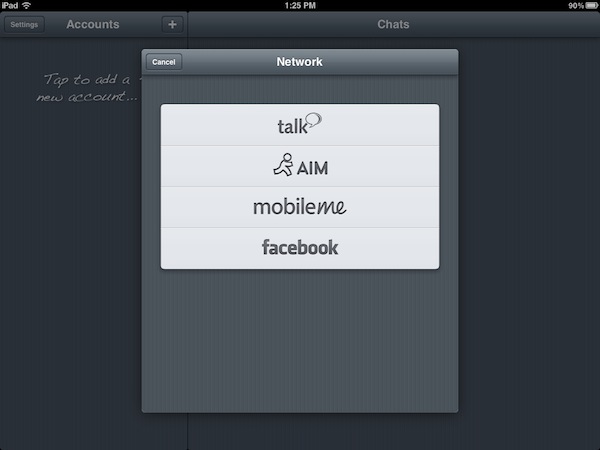
Verbs for iPad retains the same interaction schemes, color palette and features of its iPhone counterpart. You can log in with Google Talk, AIM, MobileMe and Facebook, and set up multiple accounts; you can configure file sharing through CloudApp or Droplr so you’ll be able to upload images from a chat, and have them available elsewhere as well. You can browse your buddy list in a sidebar or inside a popover menu (Verbs for iPad supports both landscape and portrait orientations) and tap on a contact to start chatting. You can pinch on the chat window to open the Chats view, which lets you swipe between multiple open conversations so you can stay on top of everything. And just like the iPhone app, Verbs for iPad sells you a $4.99 in-app “Pro” purchase to unlock notifications and idle times up to 7 days. With the upcoming iOS 5 and Notification Center, receiving push notifications from an IM app like Verbs doesn’t sound annoying at all – Notification Center will help you keep track of all your missed chats. And if you’ve already purchased Verbs Pro on the iPhone, you can unlock it for free on your iPad too.
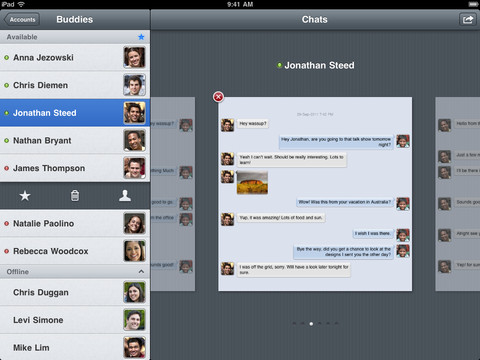
All the other features of Verbs for iPhone have been ported to the iPad: you can email conversations, send links to Instapaper, and view iWork documents right within the app.
Verbs is the only IM client I use on my iPhone, and starting today I’ll be keeping the app on my iPad’s home screen. Verbs looks great, it’s easy to use and doesn’t overwhelm you with information; it also lets me share files with my coworkers on the go thanks to CloudApp integration. I have no doubts many have been looking forward to today to start using an IM client on their iPad. Verbs is only $0.99 on the App Store.
AT&T Sees 200,000 Pre-orders Of The iPhone 4S, Sprint Very Pleased With Demand
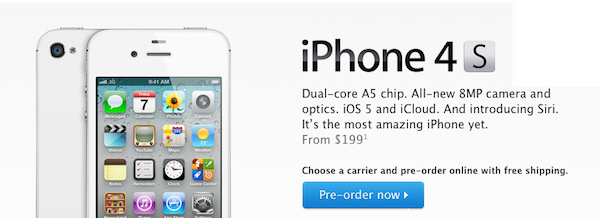
AT&T said late yesterday that it has seen 200,000 pre-orders of Apple’s iPhone 4S, breaking its record for first-day pre-orders. Speaking to AllThingsD, an AT&T representative said “AT&T has seen extraordinary demand for iPhone 4S, with more than 200,000 preorders in the first 12 hours alone, the most successful iPhone launch we’ve ever had”.
Sprint, who is selling the iPhone for the first time this week, was also pleased with results although they didn’t reveal numbers. “We are very, very pleased with the initial first day of iPhone 4S preorders,” Sprint Vice President of Product Development Fared Adib said in a statement. “Today’s sales and the overall customer experience greatly exceeded our expectations.”
Meanwhile if you are now looking to pre-order the iPhone 4S from the online Apple Store, you’ll have to put up with delayed shipping times. Apple now claims that new orders (of any model) will take 1-2 weeks for shipping (from the October 14th date).
[Via AllThingsD]
Apple To Release AirPort Utility for iOS?
In the early betas of iOS 5, it was reported the operating system gained a new functionality to set up AirPort stations on a local network. AppleInsider posted screenshots of the feature, and wrote:
Under Wi-Fi Networks, a new option reads “Set up an AirPort Base Station…” In setting up a Time Capsule, users are given the option to create a Wi-Fi network, complete with password, or “Do something different.” Selecting the latter option gives users the option to join an existing network, or to replace a base station. Users are also given appropriate error messages or details on how to fix any issues directly from the iOS Settings application.
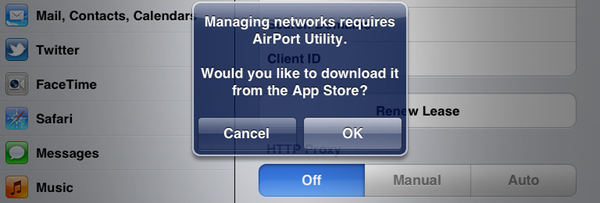
As noted by Twitter user @SonnyDickson and a forum poster on MacTalk.com.au, it appears Apple is now preparing to release a dedicated AirPort Utility app for iOS, which should soon be available in the App Store, perhaps as early as next week when iOS 5 will be publicly released. In the iOS 5 GM release, a button named “Manage this Network” in the WiFi settings for an AirPort-based network will ask users if they want to download AirPort Utility from the App Store. The dialog box will then launch an iTunes link, which is not live yet, to download the app on the Store.
It’s unclear whether iOS 5 will have basic AirPort setup functionalities built-in, or if the features spotted in the early betas have all been moved to a separate App Store download. One of the key features of iOS 5 is PC Free, a set of tools that will allow iOS owners to set up their devices without using a Mac or PC – being able to configure an AirPort network directly from an iPhone or iPad would certainly be in line with Apple’s willingness to “cut the cord” and let iOS devices be independent from desktop computers. iOS 5 and iCloud will debut next Wednesday, October 12th, and Apple is also set to release another App Store app on that day, Cards.
Sony Rumored To Be Looking For Steve Jobs Movie Rights

Sony Pictures is apparently “in the process” of making a large offer for the feature movie rights of the upcoming biography of Steve Jobs by Walter Isaacson, according to Mike Fleming of Deadline. The move isn’t surprising, and Sony has recent history of turning business success books into successful drama movies in The Social Network and Moneyball.
I’m hearing the deal is $1 million against $3 million and that Mark Gordon will be the biopic’s producer. But this will be an MG360 project, which is the movie production partnership between Gordon and Management 360.
The release of Walter Isaacson’s authorised biography of Steve Jobs was this week moved forward to October 24th after Steve Jobs passed away this past Wednesday. Based on over 40 interviews and over 100 conversations with friends, family and competitors, the biography covers 448 pages. Walter Isaacson’s previous biographies include those of Albert Einstein, Henry Kissinger and Benjamin Franklin.
[Via The Next Web]
New Apple TV Model References Found in iOS 5
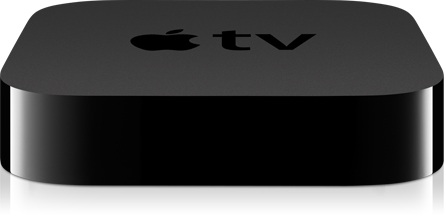
In our “Let’s talk iPhone” event rumor roundup, we noted Apple could announce a new Apple TV on stage. Earlier this year, a number of separate reports have suggested Apple was working on a new Apple TV with A5 CPU (the same of iPad 2 and iPhone 4S) to enhance the device’s processing capabilities and allow for full 1080p playback. The current Apple TV model packs and A4 processor (iPad, iPhone 4) and plays back video up to 720p, but as we know the October 4th event didn’t see any Apple TV updates among iPod, iOS 5, iCloud and iPhone 4S announcements. A rumor from July even suggested Apple was working on a new video format called HD+ to launch this fall in the iTunes Store alongside a new Apple TV model.
According to a code string found in iOS 5 by 9to5mac, a new AppleTV3,1 is in the works, and it should be an updated version with upgraded internals such as the aforementioned A5 processor. The existing Apple TV model is referenced as AppleTV2,1 – Apple typically uses this kind of references to prepare iOS for upcoming devices. References in the iOS filesystem are never 100% accurate, but new devices found in the past through code strings have turned out to be real most of the time.
With Apple pushing towards 1080p video content with the new iPhone 4S camera and AirPlay Mirroring made possible by the A5 CPU, it wouldn’t be a surprise to see a refreshed Apple TV with faster CPU and more powerful video processing capabilities. As a side note, Apple recently started selling the current-gen Apple TV in more European countries.