This Week's Sponsor:

Mindspace

A Private All-in-One Journal App Made for iPad, Offering 50% Off Your First Year.


New MacBook Pro Part Numbers Suggest A Minor Refresh Soon

According to 9to5 Mac, supply for all current MacBook Pro models are constrained in anticipation of an imminent refresh. They claim that new part numbers have appeared in Apple’s inventory system for all three MacBook Pro sizes. The new model numbers are K90IA for the updated 13 inch model, K91A for the 15 inch and K92A for the 17 inch.

These model numbers, combined with last month’s rumour of a refresh, suggest that these models will be just a minor specification bump - rather than the rumoured redesign of the MacBook Pro. MacRumors reported earlier this year that such a redesign will probably debut sometime after Intel’s Ivy Bridge line of processors is released.

[Via MacRumors]


iPhone 4S Lines Around The World

As the iPhone 4S begins its international rollout, lines have begun forming at Apple retail stores in preparation of tomorrow’s product launch. The iPhone 4S, announced at a media event last week, will go on sale tomorrow at 8 am in seven countries: US, Canada, UK, France, Germany, Japan and Australia. The device will be available in two colors (black, white) and three storage sizes (16 GB, 32 GB, 64 GB); in the United States, it will be available on carriers AT&T, Verizon and, for the first time, Sprint. Soon after the pre-orders for the device started online, Apple announced they had already topped 1 million; those who haven’t been able to pre-order an iPhone 4S, or have decided to avoid the online process altogether, are now camping out hoping to get one tomorrow morning.

As we did with our iPad 2 coverage earlier this year, we’re collecting some of the best photos and videos people waiting in line at Apple stores are posting online. We’ll be updating this post throughout the next 24 hours, so make sure to come back later for the latest updates and photos from around the globe.

If you want to send us photos or videos from your local Apple store line, send us an email at: tips at macstories.net

Read more


Instacast 1.4: This Is What iCloud Can Do

Instacast with iCloud

Instacast with iCloud

If you have a day job and had just started upgrading your iOS devices when you got home yesterday evening, it’s likely haven’t even spent a few hours with iCloud yet. The premise is pretty amazing, even if the initial majority of it is between iOS devices. If you think automatically syncing spreadsheets and documents across iCloud from your iPad to iPhone is cool, that’s just the tip of the iceberg. Beyond document syncing, iCloud opens up a world of added convenience that wasn’t available previously. Just think about being able to sync your Angry Birds progress between devices. But we can take that even further. What if we could sync something like RSS feeds between devices? Now you’re thinkin’.

Instacast goes beyond simply syncing your lists of podcasts. It remembers to update which episodes you’ve marked as played, it remembers to add new podcasts you’ve subscribed to across devices, and it even remembers what episode you were listening to. The last item is the magical part: it syncs track position and loads that episode you were listening to in the now playing window if you pause the podcast and want to pick up from another device later. Resuming a podcast is as simple as tapping the up arrow after a refresh. Now this? This is amazinger.

This is one of the best use cases for iCloud. Instacast syncs lots of data to keep everything in sync. While there’s not much I can add beyond Martin’s blog post on Vemedio, the wow-factor can’t be emphasized enough.

With the amount of data being synced, there are some things to remember about Instacast’s iCloud sync. Geeks will immediately try, two devices in hand, to see how instant syncing is. If you don’t allow Instacast to get its data in the cloud, you may run into conflicts where your impatience could overwrite the changes you wanted to save. I imagine this is more true for big podcast libraries. You treat it like you treat Tweet Marker — it’s all designed to be very casual. With that said, syncing shouldn’t take five minutes, but I wouldn’t expect it to be split-second instant. A pull-to-refresh will sync changes down from iCloud while uploading takes place automatically.

Instacast 1.4 has a new audio engine inside for iOS 5 compatibility, bringing back scrolling titles on the lock screen (a bigger deal if you were an early iOS 5 adopter) and adding Apple TV support for AirPlay. If you want to get caught up on what Instacast does and how great it really is, check out our previous reviews.

You can read more about the 1.4 update on Vemedio, and download the update for free from the App Store (it’s only $1.99 for new customers).


Notes From iFixit’s iPhone 4S Teardown: 512 MB of RAM, New 3G Chip

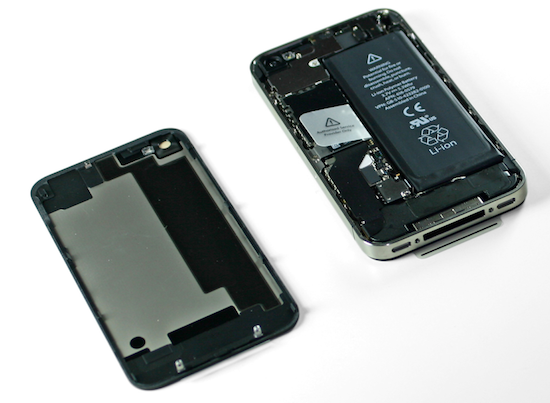
As usual with every new Apple gadget, the team over at iFixit has decided to tear down the latest iPhone 4S – which officially comes out tomorrow in seven countries, albeit some customers have already managed to get their hands on it – to take a peek inside the improved hardware of Apple’s new iPhone. As a quick recap, the iPhone 4S represents a significant change from the iPhone 4 in terms of internal components: whereas the design is the same of the old-generation model, the 4S comes with a dual-core A5 processor, a new wireless system with “intelligent” antenna design capable of switching between two antennas, world phone capabilities for GSM roaming, and a new 8 megapixel camera sensor with backside illumination. We have already discussed how the iPhone 4S appears to be a great mix of hardware and software – on the iOS side, in fact, the device comes with exclusive access to Siri, a new voice assistant.

In their teardown, iFixit notes the iPhone 4S’ battery has an extra .05 WHrs over the iPhone 4. The iPhone 4S has, however, much power-consuming hardware than the older generation unit, which leads iFixit to believe “power consumption seems rather efficient” with 8 hours of 3G talk time, 6 hours of 3G browsing, and up to 10 hours of video/40 hours of music. The iPhone 4’s battery, part of iFixit’s teardown last year, featured 5.25Whr; the iPhone 4S does 5.3Whr with the same 3.7V polymer battery.

The iPhone 4S’s logic board seems to bear “a close resemblance” to its Verizon iPhone 4 counterpart; indeed, the iPhone 4S also shares the same exterior design of the older CDMA iPhone 4, which has little differences from the GSM iPhone 4. In taking a look at the logic board, iFixit notes the two major components are the new CPU and new 3G chipset from Qualcomm, listed below.

  • Qualcomm MDM6610 chipset
  • Apple A5 processor

As previously rumored, iFixit confirms the iPhone 4S has 512 MB of RAM – a marking on the A5 chip (“E4E4”) seems to confirm this. There was much speculation surrounding the iPhone 4S’ RAM as other rumors in the past claimed the new iPhone would have 1 GB of RAM – clearly that’s not the case.

Other chips identified on the logic board:

  • Avago ACPM-7181 Power Amplifier
  • Qualcomm RTR8605
  • Skyworks 77464-20
  • Toshiba THGVX1G7D2GLA08 16 GB 24 nm MLC NAND flash memory

Other notes of interest:

  • Apple is using the same oscillating vibrator of the Verizon iPhone 4, rather than rotational electric motor found in the old GSM iPhone 4. This vibrator is softer and quieter than the GSM iPhone 4’s motor.
  • The display assembly is similar to the GSM iPhone 4.

We’ll update this post with more details as iFixit uncovers more components during the tear down. For now, keep in mind that the iPhone 4S has a much improved processor, camera, same amount of RAM and completely re-engineered 3G system.


Grand Theft Auto III Coming To iOS

Grand Theft Auto III Coming To iOS

Rockstar Games has announced that they’ll be porting Grand Theft Auto III to iOS and Android devices “later this fall” to commemorate the game’s tenth anniversary.

10 years ago, this month, the revolutionary open-world epic Grand Theft Auto III was released to the world – a game that set players loose as a small-time criminal at the bottom of the food chain in Liberty City, a sprawling metropolis where anything can happen – and probably will. To commemorate the game’s 10th anniversary, we’re proud to announce that Grand Theft Auto III will be coming to select new generation iOS and Android devices later this fall.

Ten years ago, I remember sitting in my friend’s room, watching him play GTA III on his PlayStation 2. Back then, the technology behind the game looked amazing: great graphics, a seemingly “open” environment and a “mature” plot gave us the illusion that we were really controlling the game’s world. Looking back, it’s easy to spot the tricks Rockstar pulled to let gamers think they were in control, and it’s interesting to consider how the GTA series evolved as hardware became more powerful and allowed for “real” decisions to take in-game. More importantly, a game like GTA III doesn’t look as impressive today as it did 10 years ago, so I guess Rockstar is betting on the “nostalgia effect” as it’s recently done on the Mac as well.

GTA III will be available for the iPad 2 and iPhone 4S. No word on whether the game’s graphics will be upgraded for the A5 processor and how controls will be ported to multitouch; Rockstar also says more devices will be announced soon, so keep an eye on their blog if you own an iPad 1 or iPhone 4. [via]

Permalink

iOS 5: Newsstand Overview

Sitting on every user’s iPad, iPhone or iPod touch when they update to iOS 5 is a new “app” called Newsstand which organises all of your magazine and newspaper subscriptions in one place. Whilst this might sound pretty underwhelming at first, it is actually a fairly significant feature addition that actually contains a lot of ‘behind-the-scenes’ changes to how iOS devices and the App Store deals with magazines and newspapers.

I called it in “app” in quotes because visually it looks no more than an iOS folder with a new skin that turns it into something that looks like iBooks with its cedar bookshelves. In fact all it does is store all your magazines and newspapers so that they can be found in a centralised location, as well as give users a shortcut to the Newsstand section of the App Store.

Jump the break to read our overview of Newsstand and how it’s much more than just a pretty iOS folder.
Read more


WSJ: Apple Negotiating with Hollywood Studios Over Movie Streaming

According to an article published by The Wall Street Journal last night, Apple is reportedly in talks with Hollywood studios to add streaming of movies to the iTunes Store.

Apple Inc. is negotiating with Hollywood studios for deals that would let people who buy movies from the iTunes Store watch streaming versions of those movies on Apple devices such as iPads or iPhones without manually transferring them, according to people familiar with the matter.

The Los Angeles Times has a similar report:

Representatives of the iPhone and iPad maker have been meeting with studios to finalize deals that would allow consumers to buy movies through iTunes and access them on any Apple device, according to knowledgeable people who requested anonymity because the discussions are private. The service is expected to launch in late 2011 or early 2012.

With the just-launched iCloud platform for media and data syncing, there are a few differences to consider when covering the subject of “streaming” and online storage. Whereas the WSJ mentions “streaming versions” of movies, the LA Times (at least initially) simply refers to access on any device. Considering the current iCloud model, the rumor seems to fall in line with the LA Times’ report – iTunes in the Cloud, a feature of iCloud for iTunes Store content, lets users buy once, re-download at any time, and store previously purchased items in the cloud. With iTunes in the Cloud there’s no “streaming version” of a song or TV show, as iCloud is effectively enabling users to access items on any device from a unified interface (you can read more in our iCloud overview). However, in the same article, the LA Times also states:

Under the plan Apple is proposing, users could stream movies they buy via iTunes on any device the company makes, such as the Apple TV, iPhones and iPads, as well as on PCs.

You may remember that ahead of iCloud’s announcement in June, a number of reports suggested Apple was working on a music streaming service – such service didn’t materialize at WWDC as Apple unveiled iTunes Match, a music service that scans & match music, but doesn’t allow for streaming in a way companies like Rdio or Spotify do. iTunes Match matches songs with Apple’s servers and uploads the rest to a cloud locker, enabling users to download their music on any device.

Technically, the difference between streaming and access shouldn’t be taken lightly. Whereas devices like the iPhone and iPad can store downloads in their local storage after they’ve pulled media from iCloud, the Apple TV, which works with iCloud but has no local storage, streams everything from Apple’s iTunes Store, keeping small portions of data in a local cache.

There is a lot of confusion surrounding the technical difference between streaming and download. Movies in iCloud have been rumored since May, and Apple went ahead and launched a service with online storage for apps, music, TV shows and documents but no movies. It’s unclear how movies will be stored in iCloud when a deal between Hollywood and Apple eventually happens, but when it does, the technical aspect of the system shouldn’t matter to the end user.



iOS 5: Tips, Tricks & Hidden Features

As exciting as every new major iOS release is, there’s just as much if not more excitement in finding the little things that no one knows about. Apple spends a lot of time creating major additions and changes for their releases, and then lets the users try to figure out all the small stuff. Well, not everyone has time to figure them out or doesn’t want to go through the effort to do so. This is where MacStories comes in. We know our readers are all about the details, so we went on to scan, search and pry our way through iOS 5 to find many of the hidden treasures that will make your iOS experience even better.

More iOS 5 coverage here.

Read more