This Week's Sponsor:

HomeSnap

A Private, Read-Only Window Into Your HomeKit Home


MindNode 2.1

MindNode 2.1

One of my favorite apps for iOS, MindNode, has been updated this morning to version 2.1. Devoid of the iCloud integration that was previously teased on the developers’ website (iCloud continues to be a problem for several developers), the new version still sports some great improvements that will dramatically increase my usage of MindNode, especially on the iPad.

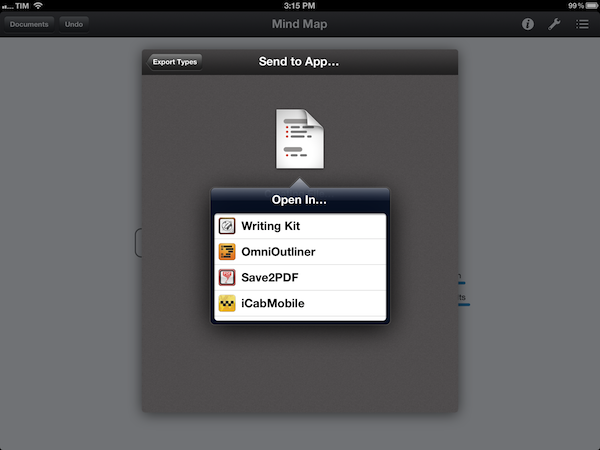
With Retina-ready graphics, 200% zoom level, and a new visual style, browsing and editing mind maps in MindNode now looks better than ever. I don’t rely on MindNode for the attractiveness of its graphics though, which is why I am welcoming the possibility of sending documents to other iOS apps installed on a device. Similar to the sharing menu The Omni Group has been using for quite some time in OmniOutliner for iPad, the new MindNode lets you export maps as FreeMind, PNG, text, OPML, or PDF documents. Automatically recognizing third-party iOS apps capable of receiving such files through the “Open in…” menu, MindNode 2.1 allows me to pass along maps as OPML files to CarbonFin’s Outliner or iThoughts HD, or send them as simple text files to my preferred text editor. Because MindNode can also open documents from any Dropbox folder, outlines I had already created in Outliner can easily be “visualized” and edited in MindNode. iOS could use a better way to let apps access the same version of a file, but with a plethora of importing and exporting options MindNode 2.1 provides a decent solution for now.

MindNode 2.1 comes with other bug fixes, and it retains the same simple-yet-powerful text entry and manipulation workflow of the previous versions. MindNode for iOS is $9.99 on the App Store.
Permalink

The Magic Of Words, Or: Why I Am Addicted to SpellTower

I still remember the day when Chris recommended this game to me – SpellTower. When I looked at the game’s website for the first time, I asked myself whether it could be a new subject for my Inspiring UI series. Although I concluded that it would not fit the series, the website nevertheless looked like the game could be worth my time. Zach Gage, the developer, promotes SpellTower with a nice scrollable site, containing some lovely designed icons and symbols, large, mono-colored backgrounds, and some moving CSS3 flavour. It is a lovely website you should take a look at – whether you’re interested in games or not – just for the sake of admiring Zach’s work as a web designer.

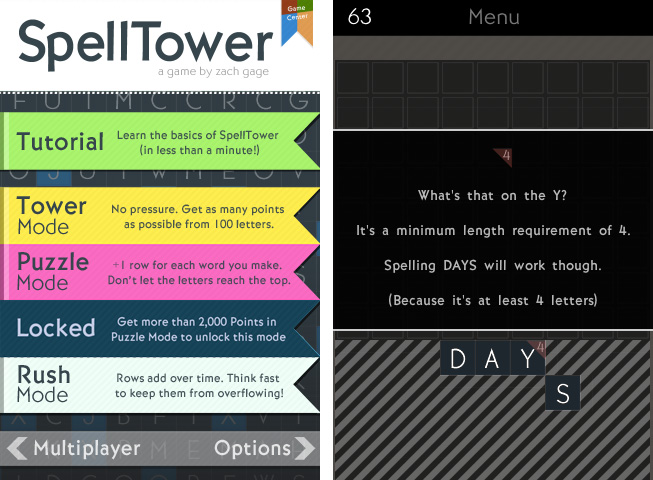
But since I am interested in iOS games and I was curious to see if the game could live up to the site’s promise, I downloaded SpellTower for the ludicrously low price of $1.99 (actually, it’s currently on sale for $0.99, so please head over to the App Store to get it first, then continue reading afterwards). Allow me now to shortly recap what playing SpellTower is all about (the app features a one-minute tutorial, which also interactively explains the game’s concept). To summarize it in one sentence: to me, SpellTower is like Tetris with words.

Random blocks with letters arranged in twelve rows cover the screen, and you have to connect letters located abreast of each other. Some letters need to be included into certain minimum lengths, indicated by a small number in the top right of their square block, and words touching black boxes without letters will delete them. Blue colored letters included in a word (these are letters which are hard to incorporate into words, like “Z” or “J”) delete a whole row and generate a lot of points. Apart from those special features, the game follows one simple rule: the more letters a word has, and the more rare those letters are (a “Q” is obviously more valuable than an “E”), the more points you earn. That’s all there is to say about the game’s concept: you can start playing SpellTower within seconds, a prior condition a game needs to get you addicted to it.

This principle is translated into five different game modes, two of which you can unlock by reaching extraordinary results in the two basic ones: tower mode, where the screen is completely filled up with letters and the goal is to make as many points with them as possible; and the more tactical puzzle mode, which starts off with five rows, adding one row for each word you spell until the letters reach the top and the game ends. You can also play rush mode, which is the closest match to the idea of Tetris: rows add over time (whether you spell words or not), and you need to quickly eliminate them to prevent a letter from reaching the top. While I’m not the best at puzzle and rush mode — I do not even reach the 1000 points mark, and to unlock the fifth mode you need more than 2000 points — playing the tower mode always is a lot of unconstrained fun and makes me coming back again and again.

So, how exactly is this addiction accomplished? I think it’s a combination of three factors that Zach managed to mix perfectly: UI design, highscore competition, and a vocabulary learning process. Read more


Facebook Introduces App Center

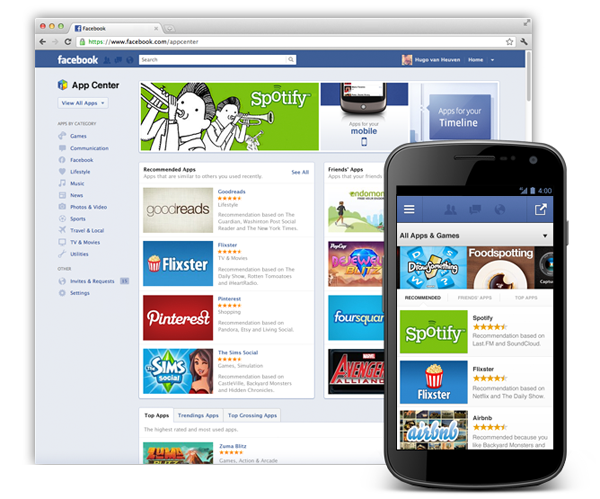
Facebook has introduced App Center, a new way to distribute Facebook apps to more than half a billion users in order to centralize existing apps and easily allow developers to publish new ones in the future.

Today, we’re announcing the App Center, a new place for people to find social apps. The App Center gives developers an additional way to grow their apps and creates opportunities for more types of apps to be successful.

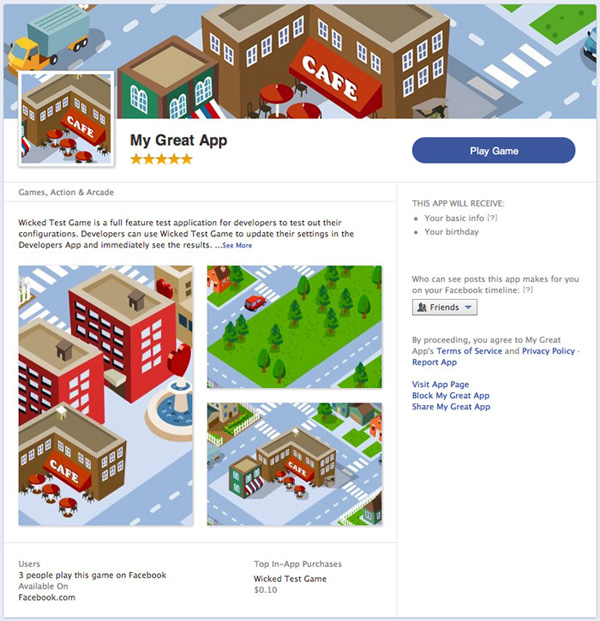
With today’s introduction, Facebook has opened a beta phase for all developers. Starting today, developers can create and lay out their app’s detail page within the App Center (see example above) using predetermined guidelines. If you’re really fast and submit a finished layout before May 18, your app will be listed with higher priority when App Center launches. The submitted apps are checked and controlled with fixed quality perceptions in mind, and if they get approved, they’ll be available at the initial launch of App Center — Facebook didn’t specify a fixed launch date though.

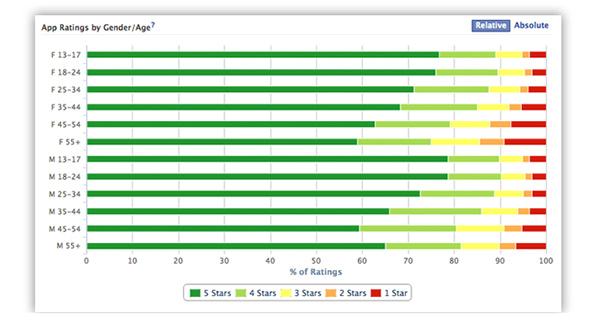
Additionally, there’s a new feature added to their statistics app Insights: it’s a user feedback monitoring tool that uses a new, visual app ratings metric (see image below).

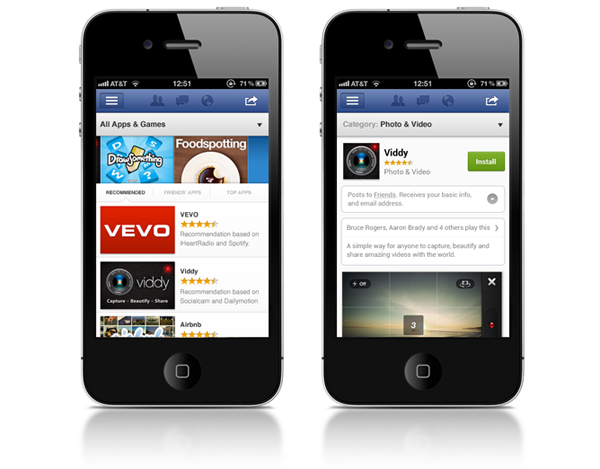
App Center will also go mobile through the iOS app, using a layout comparable to its possible future competitor, Apple’s App Store:

The App Center is designed to grow mobile apps that use Facebook – whether they’re on iOS, Android or the mobile web. From the mobile App Center, users can browse apps that are compatible with their device, and if a mobile app requires installation, they will be sent to download the app from the App Store or Google Play.

To make your app ready for iOS or Android, the app just needs to use Facebook login. For the first time, there will also be the possibility to offer paid apps through App Center.

Many developers have been successful with in-app purchases, but to support more types of apps on Facebook.com, we will give developers the option to offer paid apps. This is a simple-to-implement payment feature that lets people pay a flat fee to use an app on Facebook.com.

As of now, developers can visit the new App Center tab on the developer website to create their app’s detail page for the new Facebook App Center.


10.7.4 OS X Update Now Available: Fixes “Stuck Reopen Windows” Bug [Update: Safari 5.1.7 also Released]

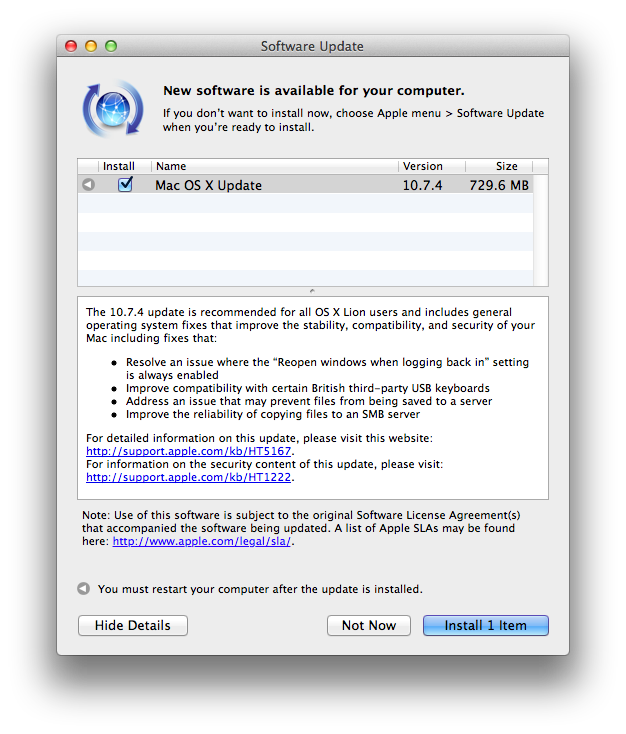
Apple has released 10.7.4 for OS X, which brings significant bug fixes, network improvements, and Safari 5.1.6 (a performance and stability update). Release notes for the 730 MB download can be found on Apple’s support pages.

Download links for the 10.7.4 update have been posted below:

The OS X Lion v10.7.4 Update includes fixes that:

  • Resolve an issue in which the “Reopen windows when logging back in” setting is always enabled.
    Improve compatibility with certain British third-party USB keyboards.
  • Addresses permission issues that may be caused if you use the Get Info inspector function “Apply to enclosed items…” on your home directory. For more information, see this article.
  • Improve Internet sharing of PPPoE connections.
  • Improve using a proxy auto-configuration (PAC) file.
  • Address an issue that may prevent files from being saved to an SMB server.
  • Improve printing to an SMB print queue.
  • Improve performance when connecting to a WebDAV server.
  • Enable automatic login for NIS accounts.
  • Include RAW image compatibility for additional digital cameras.
  • Improve the reliability of binding and logging into Active Directory accounts.
  • The OS X Lion v10.7.4 Update includes Safari 5.1.6, which contains stability improvements.

Also released, contrary to the 10.7.4 release notes, is a separate download for Safari 5.1.7. This update disables out-of-date versions of Adobe’s Flash Player to address security concerns, but a manual fix is provided if you’d like to reenable the outdated Flash Player installed on your system. Information about Safari 5.1.7 can be found on the following support page. You can check Software Update, or download 5.1.7 from Apple’s website.

Safari 5.1.7 for OS X Lion and Safari 5.1.7 for OS X Snow Leopard disable out-of-date versions of Adobe Flash Player.

Out-of-date versions of Adobe Flash Player do not include the latest security updates and will be disabled to help keep your Mac secure. If Safari 5.1.7 detects an out-of-date version of Flash Player on your system, you will see a dialog informing you that Flash Player has been disabled. The dialog provides the option to go directly to Adobe’s website, where you can download and install an updated version of Flash Player.


Bartender

Bartender

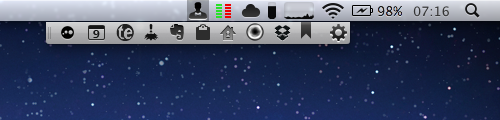
Really nice new Mac app by Surtees Studios: Bartender is a menubar app to hide other menubar apps. Providing its own custom bar to collect other icons from third-party apps, Bartender lets you organize your menubar apps while retaining the functionalities they come with. The app automatically finds third-party apps running in the menubar; it allows you to completely hide them, or show them in the Bartender bar. If you choose the latter option, your menubar apps will stil remain fully working with popover windows and keyboard shortcuts. I installed Bartender and I am using Fantastical and Delibar just fine; I only noticed a minor visual glitch with Take Five, and I believe the developers are adding support for more apps as we speak.

Furthermore, Bartender lets you assign a keyboard shortcut to the custom bar, and it even allows you to revert back and “show all menubar apps” with a separate hotkey. The Bartender bar can be placed anywhere at the top of the screen, and you can set apps that update (such as Sparrow’s menubar icon) to be shown in the regular menubar for only five seconds.

Neat utility, and only $7.50. A free trial is also available while the app is in beta.

Permalink

Latest Evernote Updates Show A Promising Future

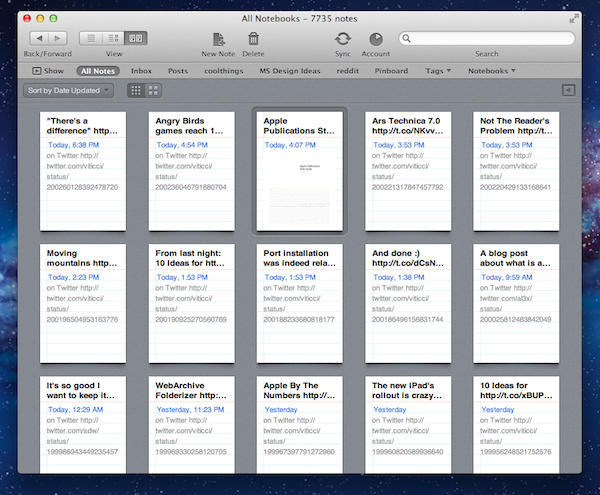
Yesterday, Evernote rolled out two major updates for its iOS and Mac apps. As a daily Evernote user who relies on the app to research posts, save PDFs, annotate images, and generally archive just about anything through IFTTT, I was pleased to see the improvements made in these versions are taking Evernote into a direction I like.

First, the iOS app. Focused on iOS 5 and the iPhone version, Evernote 4.2 brings a more accessible way of applying rich text and switching between editing and composing. Prior to version 4.2, users had to select text and hit a button in the top toolbar to bring up rich text editing – a process that was cumbersome and not as responsive and stable as one would expect from a top-notch iOS app. Evernote 4.2 abandons the separate text editing workflow and interface for a better, more integrated way of displaying text controls alongside the system’s keyboard. A new button will now let you easily switch between typing and editing, while retaining the same options that made Evernote a must-have among note-takers looking for rich text support. I like how selected text will remain selected if you switch between the keyboard and text formatting panel; surprisingly, however, Evernote still hasn’t managed to fit a Cancel button into the note editing screen. Read more


Rovio: Angry Birds Games Reach 1 Billion Downloads

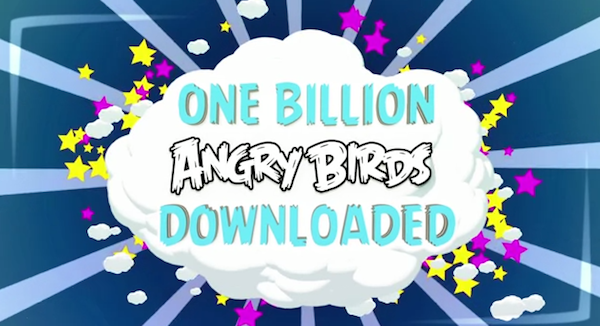
With a blog post and a video published this morning, Finnish game maker Rovio announced the Angry Birds franchise has reached 1 billion game downloads across all platforms. Just two weeks ago, Rovio said the latest entry in the series – Angry Birds Space – had become the fastest growing mobile game to date with 50 million downloads in 35 days. Today’s numbers mark an important milestone for Rovio, which earlier this week revealed its financial results for the year 2011 for the first time, hinting at a possible IPO in the future. In 2011, the company reported revenue of €75.4 million ($106,3 million), with earnings before tax of €48,0 million ($67.6 million) or 64% of total revenue in 2011, and hired 196 people.

Angry Birds downloads had reached 648 million by the end of 2011, confirming the company saw an additional 352 million downloads across all platforms in the first five months of 2012. The original Angry Birds for iPhone was launched in December 2009, and it took 6 months to reach 5 million downloads. Angry Birds is, according to Apple, the top paid iPhone app of all time, with other entries in the top free and paid charts for iPhone and iPad as well.

Angry Birds games are now available on a variety of platforms, including iOS, Android, OS X, Facebook, Google Chrome, and Sony’s PSP and Play Station 3. In November 2011, Rovio announced Angry Birds games had reached half a billion downloads.


New iPad Launches In 30 Additional Countries This Week

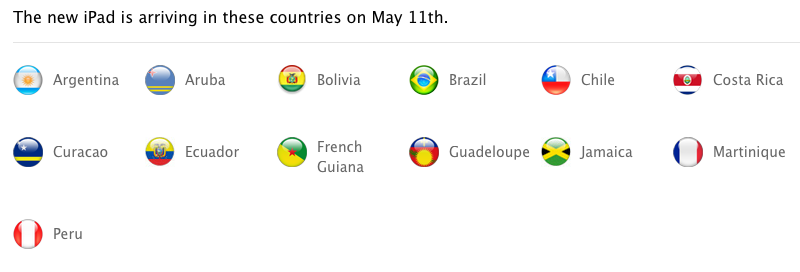
Off to a “tremendous start”, Apple’s new iPad has also become the company’s fastest rollout to date, adding 56 launch countries in 42 days, and, later this week, 30 additional countries with two separate rollouts during the weekend. As confirmed by Apple’s Latin America website (via MacRumors), the new iPad will launch in 23 countries on Friday, May 11; MacRumors also examined other international Apple websites in the Middle East, and confirmed Apple will also roll out the new iPad in 7 countries (including Egypt and United Arab Emirates) on Saturday, May 12.

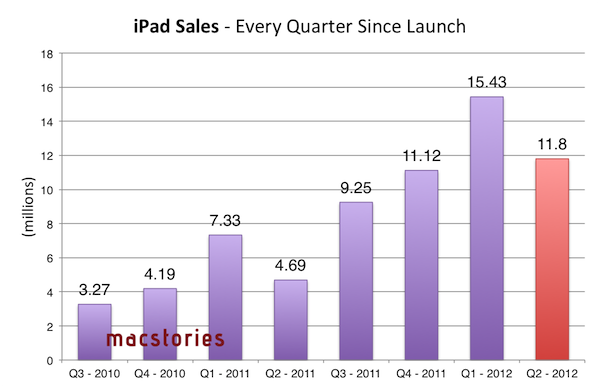
As usual, here’s a recap of the iPad’s launch dates, plus units sold until Q2 2012.

March 16 (10 countries): United States, Australia, Canada, France, Germany, Hong Kong, Japan, Singapore, Switzerland and the UK.

March 23 (25 countries): Austria, Belgium, Bulgaria, Czech Republic, Denmark, Finland, Greece, Hungary, Iceland, Ireland, Italy, Liechtenstein, Luxembourg, Macau, Mexico, The Netherlands, New Zealand, Norway, Poland, Portugal, Romania, Slovakia, Slovenia, Spain and Sweden.

April 20 (12 countries): South Korea, Brunei, Croatia, Cyprus, Dominican Republic, El Salvador, Guatemala, Malaysia, Panama, St Maarten, Uruguay and Venezuela.

April 27 (9 countries): Colombia, Estonia, India, Israel, Latvia, Lithuania, Montenegro, South Africa and Thailand.

May 5: Turkey (quiet launch).

May 11 (23 countries): Argentina, Aruba, Bolivia, Botswana, Brazil, Cambodia, Chile, Costa Rica, Curaçao, Ecuador, French Guiana, Guadeloupe, Jamaica, Kenya, Madagascar, Malta, Martinique, Mauritius, Morocco, Peru, Taiwan, Tunisia and Vietnam.

May 12 (7 countries): Bahrain, Egypt, Jordan, Kuwait, Qatar, Saudi Arabia and United Arab Emirates.

With this week’s launches, the new iPad will be available in 87 countries worldwide (including Turkey) after 57 days. With 12 million units sold in the past quarter, Apple said the new iPad is “off to a great start”.