Why My iPad Is Not My Laptop

Why My iPad Is Not My Laptop

John Carey, who you might know from all the excellent photographs he posts on his (equally awesome) fiftyfoodshadows blog, today wrote a piece entitled “Why My iPad Is Not My Laptop”. It’s effectively a counter-argument from Carey on why the iPad just isn’t a laptop replacement for many people, particularly those in the professional creative community - yet.

I would say a good 90 percent of the debate on the iPads usefulness as a computer is coming from writers and casual users and this is where I find the debate getting a little one sided. Of course a writer would like the iPad. The tools most needed to get their work done are right there for the taking, you can hunt and gather all day long and it does make a fantastic, distraction free space to write in.

Carey doesn’t dispute that the iPad is a ‘personal computer’ - in fact he asks “what is there to even to debate” on that question and he says it’s all about the software, not the input device. For creatives, he says there are a number of nice apps for sketching, image editing and so on, but they don’t have anywhere near the “horsepower or precision that it takes to complete a finished product” - likewise for others such as web designers, coders, industrial designers and so on.

When it comes to many jobs within the professional creative community the iPad is still more or less incapable of handling any honest workload. At least as far as things stand at this point in time. There are no designers that I am aware of using it to create much outside of concepts.

Some might question Carey’s premise, is the iPad ever meant to replace a laptop for such professional tasks? Perhaps that is why the laptops (or trucks as you may call them) are going to stick around for the key purpose of satisfying these people. But I’m not so sure, I think the iPad can evolve to be a suitable PC for most of these tasks undertaken by creative professionals - I don’t think it will completely replace the need for a laptop or desktop, but I think it will eventually replace the laptops of these professionals. As Carey said, it’s all about the software and whilst we have made giant leaps and bounds in just over two years — we have a long way to go.

But when it comes to honest creative work I can not help but find the iPad as little more than a sidekick. I can say with certainty though, that this is far from the last word on this. I can clearly see a future where touch screen devices such as the iPad become more and more viable for the kind of things I have discussed here today. It is still new territory being explored and I for one can not wait to see where it takes us.

One particular point that Carey talks about quite a bit in his piece is about the filesystem - or rather lack thereof in iOS. His arguments resonate with me, particularly surrounding photo management on iOS which in some ways has gotten worse with iPhoto - “a black hole within a hole where edited photos from your “camera roll” somehow end up in limbo within the app and you have to send edited versions back to the photo roll to do anything else with them”.

For such a supposedly simple to use device the iPad it sure makes it complicated to move files around. In this case, Apple is entirely responsible with their rebellious idea to avoid traditional file structures. I can not fathom why it would be so difficult to have a system level file management area that is as convenient to use as the notification system they have so diligently been working on. Something which is not so flawed and cumbersome as the hidden data that lives within each app.

You may not agree with everything Carey says, but I encourage you to read his full article, I think he makes some very good points and the personal examples of where he has tried to use the iPad as a laptop are an excellent addition.
Permalink

Ivy Bridge Macs

Ivy Bridge Macs

Alex Brooks at World Of Apple has published an interesting and detailed analysis of Intel’s Ivy Bridge processors and Apple’s possible timeframe for Mac refreshes this year.

In 2012 Intel’s new architecture is named Ivy Bridge, on a technical level the architecture marks a huge leap from the previous Sandy Bridge taking advantage of a 22 nm die shrink process. Some other headline improvements over Sandy Bridge include PCI Express 3.0 support, integrated USB 3.0 and the use of tri-gate transistors (sometimes known as 3D transistors) which offer the same performance as their “2D” counterparts but are said to offer up to 50% less power consumption. Apple may choose not to be cutting edge with all the technologies available in Ivy Bridge as the company tends to enjoy setting its own trends.

Brooks’ post includes a list of candidates for the new CPUs in the Mac mini, iMac, Mac Pro, MacBook Air, and MacBook Pro product lines. Check it out here.

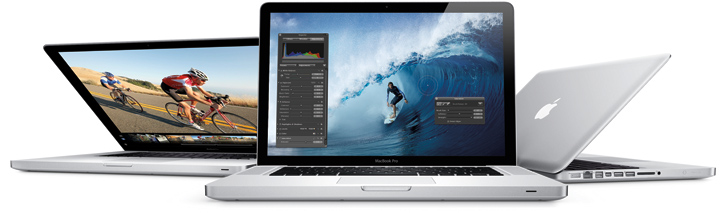
This year’s much rumored Mac hardware upgrade would be, according to ongoing speculation, a thinner, completely redesigned 15-inch MacBook Pro that was originally reported last year ahead of the iPad 2’s launch. The rumor of a 15-inch MacBook Air/redesigned MacBook Pro has constantly surfaced throughout 2011, with most recent rumors indicating such machine carrying an Ivy Bridge CPU was “inbound” for April. Meanwhile, tests performed on the Ivy Bridge processor likely to be used in the MacBook Pro family showed significant improvements.

For first impressions on Ivy Bridge, check out AnandTech’s review of Intel’s Core i7 3770K CPU.

Permalink

Twitpic Releases iPhone App

Twitpic Releases iPhone App

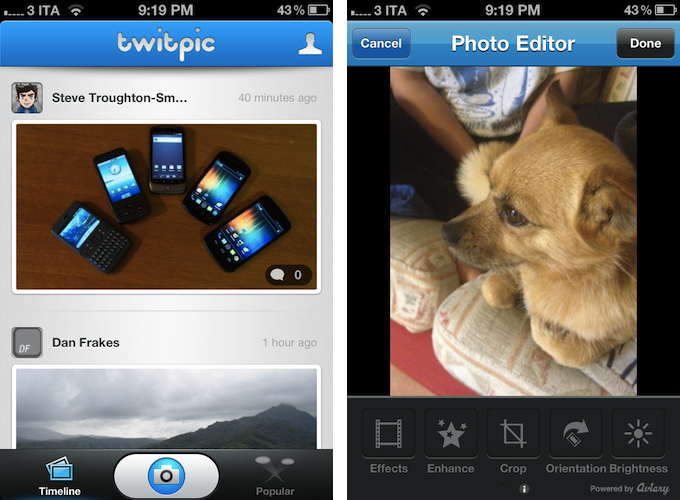
Popular Twitter photo sharing service Twitpic announced today the release of its first official iPhone app, available for free on the App Store. Unsurprisingly, the app comes with a dedicated “editing” interface to apply filters to photos.

The built-in photo editor allows you to craft your perfect photo with simple editing tools and photo filters.

I have tried the app, and it is very streamlined. Because a number of Twitter apps in the past used Twitpic by default, it is likely you already have several photos uploaded to Twitpic (which automatically connects to Twitter). In accessing Twitpic with iOS’ Twitter integration, Twitpic automatically pulled old photos I used to upload to the service years ago. Photos come with captions, comments (as tweets), and views. From the Timeline view, you can check out Twitpics from the people you follow on Twitter.

The shooting process is also simple, but somewhat custom in the way Twitpic implemented camera controls on screen. An “add effects” button hidden in the upper right corner of a photo (you can take photos or videos, or import them from the Camera Roll) lets you quickly crop, rotate, or enhance an image before posting, and it’s powered by Aviary.

Twitpic for iPhone is free on the App Store. [via The Next Web]

Permalink

Invy Is An Iconic Date Planner For iPhone

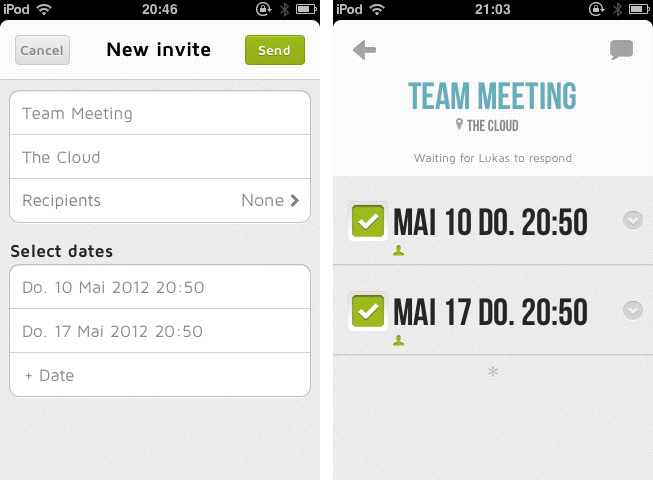
What do you prefer when it comes to apps: functionality or ease of use? Most people would answer “a combination of both, a good compromise”. It might be true in many cases, but sometimes the balance between those two sides is not the right goal, and to meet a specific niche you need to move into more extreme directions. Invy, a new iPhone app by Bread & Pepper, helps you to set up meetings or dates and inviting friends, family or colleagues to them, and it’s a good example how such a hard decision can turn out pretty well.

Creating appointments and inviting other people to them is nothing new; it’s more or less integrated in any sophisticated calendar or even mail application. Because of this, often developers cannot focus on functionality while creating new apps in this area anymore; they either need to create a gorgeous design to convince users to buy their product, or they need to make one specific feature a must-have. Here lies the reason why I chose writing about Invy: it has got both.

When firing up Invy for the first time, you’ll need to register your email address from which you’ll send out invites to other people. To create a new event, just tap the create button at the top, set the date’s description and location, invite recipients, set day and time and hit send. Within seconds, everyone you invited will get the same information in their inbox (emails are designed similarly to the app; see image below). Invitees can accept or refuse to participate: those who have Invy installed on their iPhone will be brought to the app, while everyone else can confirm the date via the Invy website.

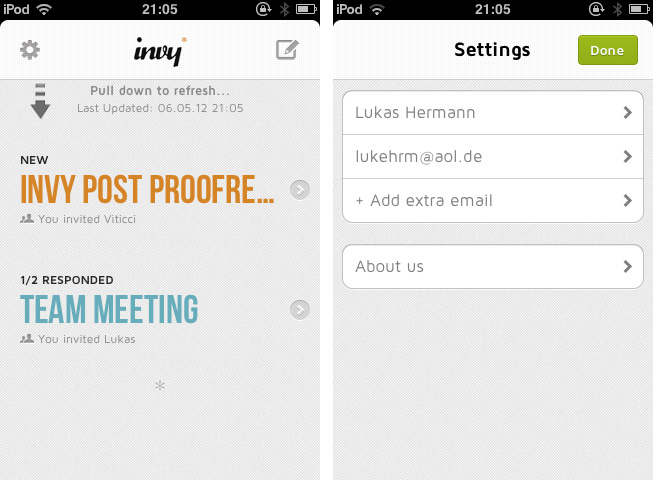
All your set dates are displayed in a very elaborately designed list view in the app’s main window. By tapping one of them you can investigate all the attached details and how many people already answered the invite. If you set up the date, you can modify and fix it, and Invy automatically saves the appointment in iCal — and thus on every device with iCloud sync. Invy is intuitive and serves exactly one need: setting appointments and dates easily, and with style.

Responsible for Invys good UX is its clean and bright design, which is centered around the use of big, colored sans-serif typography and white background to automatically focus on the most important information: the dates you set. The big date descriptions change their color when they go through the process of sent invites, answered invites and fixed dates moving from a light blue (just sent) to red (fixed and saved date). This doesn’t just look good, it also ensures a fast recognition of whether a date already is important to you or not.

So Invy is a great date planning app, but nothing more. It has a really focused feature set, and serves those features in a fast, easy and good-looking way. I recommend Invy as a way to plan dates within small groups of people, like in businesses or families, especially when all members have got an iPhone and are likely willed to pay $1.99 for Invy on the App Store.


Apple Releases iOS 5.1.1 [Direct Links]

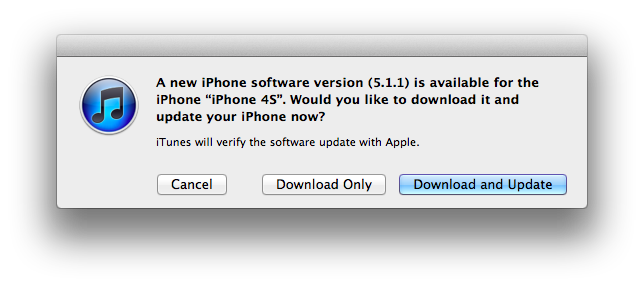
Apple has just released a new version of iOS, 5.1.1. The new version is showing up now on iTunes, and should be propagating shortly to Apple’s servers. iOS 5.1.1 includes “improvements and bug fixes”; as reported from the official changelog:

  • Improves reliability of using HDR option for photos taken using the Lock Screen shortcut
  • Addresses bugs that could prevent the new iPad from switching between 2G and 3G networks
  • Fixes bugs that affected AirPlay video playback in some circumstances
  • Improved reliability for syncing Safari bookmarks and Reading List
  • Fixes an issue where ‘Unable to purchase’ alert could be displayed after successful purchase

Apple’s last major update to iOS, version 5.1, was released in March.

iOS 5.1.1 direct download links below (build number 9B206).


Adobe CS6 Available Today, Creative Cloud Coming This Friday

Adobe CS6 Available Today, Creative Cloud Coming This Friday

Adobe today announced the release of Creative Suite 6, the latest iteration of the company’s design and publishing product line. As previously detailed, CS6 includes updated versions of Photoshop, InDesign, lllustrator, Dreamweaver, Adobe Premiere Pro, After Effects, Flash Professional and other products. Adobe also launched four suite versions: Creative Suite 6 Design & Web Premium; Creative Suite 6 Design Standard; Creative Suite 6 Production Premium; and Creative Suite 6 Master Collection. CS6 apps are also available as one-year or month-to-month subscriptions.

Estimated price for the suites is $2,599 for CS6 Master Collection, $1,899 for CS6 Production Premium, $1,899 for CS6 Design & Web Premium, and $1,299 for CS6 Design Standard, with upgrade, education pricing, and volume licensing available as well.

In officially announcing CS6 back in April, Adobe wrote:

Creatives get a ton of innovation across CS6, with milestone releases of all our flagship products,” said David Wadhwani, senior vice president, Digital Media Business, Adobe. “With CS6 and Creative Cloud, we’re also introducing new products, new mobile workflows and advanced publishing capabilities that show we are laser-focused on ensuring design, Web and video pros have everything they need for the delivery of high-impact content and apps.

Adobe’s new service Creative Cloud, also officially announced in the company’s press release today, will launch on Friday, May 11, as a $49.99 monthly subscription. The “digital hub” is aimed at “making, sharing and delivering creative work” by connecting Adobe’s CS apps with the company’s Touch Apps and other online services.

Check out Creative Cloud’s Tech Specs page for details on supported languages and services, the Buying Guide for a comparison table, and visit Adobe’s “Switch to the cloud” page to save $20/month on the first year of Creative Cloud (offer available to all registered users with CS3 or later). A demo video of Creative Cloud is available here.

Permalink

Rovio’s 2011 Numbers

Rovio’s 2011 Numbers

In a statement published today, game developer Rovio reported its official financial results for the full calendar year 2011. The company reported revenue of €75.4 million ($106,3 million), with earnings before tax of €48,0 million ($67.6 million) or 64% of total revenue in 2011.

Rovio CEO Mikael Hed said:

The heavy investments made in 2011 to all business areas will be seen in future products. To ensure continuous success we need to be creative and stay focused on entertaining our millions of fans by continuously developing new and innovative products and services.

This is the first time Rovio, maker of multi-platform hit Angry Birds, is reporting annual results, with speculation already suggesting the company may be considering an IPO in its future. At the end of April, Rovio announced the latest entry in the Angry Birds franchise, Space, had become the fastest growing mobile game ever with over 50 million downloads in 35 days. Besides raw numbers, Angry Birds gained the appreciation of several key figures of the gaming industry, including Nintendo’s game design guru Shigeru Miyamoto.

Other interesting tidbits have been revealed in today’s statement: for instance, Rovio hired 196 people in 2011, and the total number of game downloads reached 648 million by the end of the year, with over 200 million monthly active users (Rovio publishes for a variety of platforms including iOS, Android, OS X, Windows, and Sony PSP). These numbers, however, were generated by three games (Angry Birds, Angry Birds Rio, Angry Birds Seasons), whilst other revenue came from Merchandising and Licensing, as Rovio is working with over 200 partners to develop new products for the Angry Birds franchise.

Permalink

Evernote Acquires Penultimate, Will Remain A Separate App

With a blog post published this morning, Evernote has announced the acquisition of Penultimate, a digital handwriting app for iPad developed by independent studio Cocoa Box. Penultimate, which we have covered on several occasions on MacStories in the past, is one of the richest – and best selling – handwriting apps for iPad, featuring smooth virtual ink to create notes users can send to a variety of services including Dropbox and Evernote. The latter was only added in January, and clearly caught Evernote’s attention as the company, after raising another funding round last week, is now focused on expanding its ecosystem of connected apps and services to new areas and platforms.

The acquisition will let Penultimate live on as a separate app, but more connected to Evernote, similarly to how Skitch – also part of the Evernote family – works now. It appears Penultimate will soon come to more devices, and gain deep Evernote search capabilities as well as a new synchronization option.

From Penultimate’s blog post:

Importantly, Penultimate is not going away: it remains an independent application, and will continue to espouse the virtues of ease of use, elegance, and “that special something” that have kept you coming back. But I also think you’ll be thrilled, and even surprised, by how much more the app will be able to do for you as we work together to improve it and connect more profoundly with Evernote’s capabilities.

Evernote, on the other hand, writes:

Penultimate is hugely popular. In fact, according to Apple, it’s the #4 best-selling paid iPad app of all time. When you have such a great product, the last thing you want to do is mess with it. That’s why Penultimate creator, Ben Zotto, is joining Evernote to head up future app development. Penultimate will stay a separate, elegant application and will get many much-requested Evernote-y improvements including full search and synchronization. Ben will also lead the effort to put handwriting and digital ink functionality into other Evernote products and platforms, so you’ll see handwriting cross-pollination popping up everywhere.

Penultimate isn’t the only handwriting and note-taking app for iPad to feature Evernote integration – others like Noteshelf and Notability also have basic support for Evernote – yet due to its elegant interface and simple approach to handwriting, Penultimate has always managed to maintain its top position in the App Store’s charts.

In its goal to build a “company for the next 100 years”, Evernote has been spending the past year revamping its ecosystem of services and apps that connect to Evernote accounts to bring together text, audio, images, and documents to help people “remember things”. The company acquired Skitch and iOS text editor Essay, launched two new iOS apps (Hello and Food), a browser extension (Clearly), and recently announced it is working on a task-management application following the acquisition of another iOS app, Egretlist. With the acquisition of Penultimate, it’ll be interesting to see whether Evernote will also make changes to its own iPad app to include deeper integration with the standalone handwriting software, and if the main Evernote interface will gain new filtering tools to better organize text notes and handwritten ones (which already support optical character recognition for search when saved to Evernote).

Check out a video featuring Evernote’s Phil Libin and Penultimate’s Ben Zotto after the break.
Read more