This Week's Sponsor:

HomeSnap

A Private, Read-Only Window Into Your HomeKit Home


The Humble Indie Bundle V

Humble Indie Bundle V features five incredible, best-selling games plus their soundtracks (in both FLAC and MP3 formats). ”Experience the fear and paranoia of Amnesia: The Dark Descent; the intensity and impact of LIMBO; the zany characters of Psychonauts; the future-retro, audiovisual concoction of Superbrothers: Sword & Sworcery EP; and, for customers who pay more than the average price, the exquisitely crafted action-RPG, Bastion.” If you bought these games separately, it would cost around $110, but they are letting you set the price. Pay a $1 or more and you can optionally get a key to redeem the games on Steam (for Mac and Windows). The games work great on a Mac but if you need to check system requirements, they are here.

The Humble Indie Bundle V includes lots of great titles and their accompanied soundtracks, giving you plenty of unique Indie gaming to keep you out of the summer heat. You can find links to all the great games below.

There’s fourteen days left to donate, so you have plenty of time to cash in your paycheck and donate to a worthy cause; donate to the developers, the Child’s Play Charity, or the Electronic Frontier Foundation. If you like this deal, Humble Bundle is also accepting tips. They have already sold over 26,000 copies in the first 30 minutes! Be sure to check out The Humble Indie Bundle V official launch video after the break and get amped up!

Note: The Mac edition of S:S&S EP will also be popping up on Steam sometime today, plus it’ll show up on the Mac App Store before the “summer solstice”.

Read more


Quotebook 2.0

Quotebook 2.0

Last year, I reviewed Quotebook, an iPhone app to save your favorite quotes, and organize them by tags, authors, and sources. I wrote:

Quotebook’s greatest strength is that it’s built for quotes, and nothing else. It doesn’t want or need to be a replacement for your notes and daily thoughts. The interface has been designed to make it easy to jot down a quote, and set correct attribution like author and source, or perhaps fiddle with ratings. The app goes one step further and makes it super-simple to import quotes found in your iPhone’s clipboard, and plays nicely with @author names, automatically opening a Twitter profile within a web view. That’s very nice of the developers — this got me started on saving some tweets I find inspiring. Quotes can be searched and filtered, shared on Twitter, Facebook and Tumblr, or browsed by author and tag using the buttons in the bottom toolbar. Pretty standard stuff for an iPhone app.

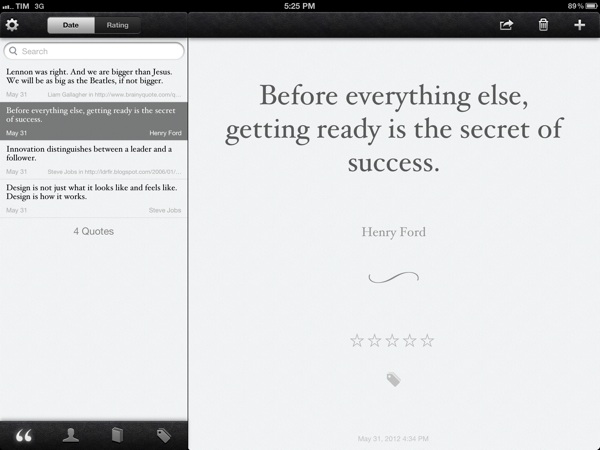
Months in the making, Quotebook 2.0 has been released today, and it’s a major update that makes the app universal, and fully iCloud-enabled so you’ll be able to keep your Quotebook archive in sync across the iPhone and iPad.

I have tested the new version, and it’s a solid update that you should definitely check out regardless of whether you’re a new user, or haven’t launched Quotebook in a while (in that case, you’ll get version 2.0 for free). iCloud sync has been implemented reliably, with fast sync times across devices and clear, and visible settings to indicate if iCloud is turned on or disabled. The app syncs full quote information, including ratings and tags. An export feature is still available to back up your database on a computer, and of course you can share quotes on a variety of networks including Facebook, Tumblr, and Twitter (with iOS 5 integration). The iPad interface is simple and elegant, with a purposeful focus on content and a subtle leather texture that, I believe, is functional to the app’s core concept – being a notebook for your favorite quotes.

Quotebook is $2.99 on the App Store.

Permalink

Timer

Timer

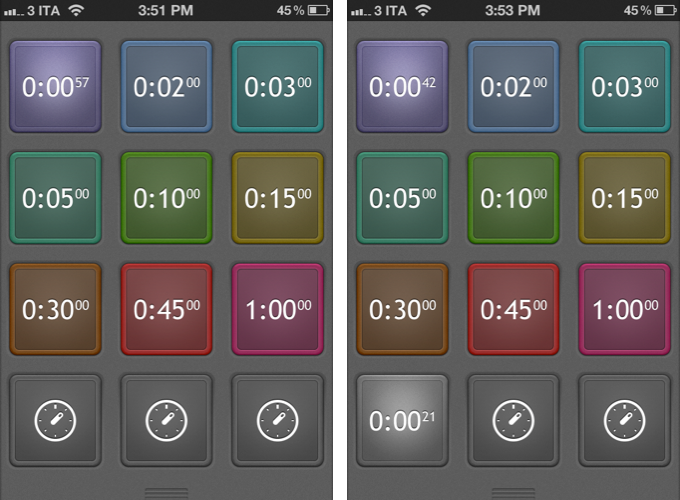
Designed for function and intuitiveness, Timer is a new app by AppCubby, makers of Launch Center and Tweet Speaker. Timer is simple – dramatically so – and it was born out of a need to focus on one feature: touch. David Barnard writes:

I’ll leave the in-depth discussion to past and future posts, but suffice it to say — HUGE buttons are incredibly well suited to quickly taking action on touchscreen devices. For all the love complex, nebulous gestures have gotten in recent months, tapping a HUGE button is still the ultimate — and often overlooked — gesture.

So that’s Timer in a nutshell. Twelve HUGE buttons designed to scratch my own itch.

The twelve buttons will start a timer upon tap, and they can be customized (tap & hold) to turn off the preset, change color, and alert tone. By default, twelve buttons are presets, and three at the bottom are  alerts you can set manually with the numeric keyboard. I have been testing Timer, and I am a big fan of the app’s extreme simplicity and focus on doing one thing right. I often need to set up the same quick timers – especially in the kitchen – and Timer is just faster than Siri and Apple’s Clock app thanks to its preset implementation.

Timer is $0.99 on the App Store.

Permalink


Apple To Acquire Italian Digital Music Editing Company Redmatica

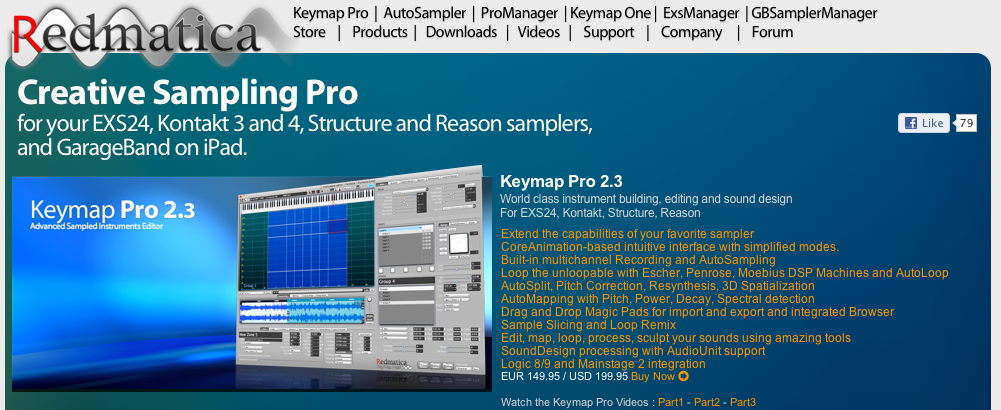
As noted by Italian website Fanpage [Google Translation] and reported by TechCrunch, Apple has filed documentations with Italian authorities to acquire Italian company Redmatica. Based in Correggio, Italy, Redmatica specializes in “digital audio workstation” software – notably, the company is well known for Mac audio editing and mixing editors such as KeyMap Pro, AutoSampler, and ProManager. Based on Apple technologies such as CoreAnimation, Redmatica’s software integrates with popular desktop editors and tools such as Logic, Reason, MainStage, and even GarageBand for iPad.

The acquisition of “DAW” (Digital Audio Workstation) assets by Redmatica has been reported by Italian regulator AGCOM in an official document available here. The document notes how Redmatica’s worldwide revenue in 2011 has been under €1 million, with, surprisingly, no revenue (“fatturato”) coming from Italy. Apple, on the other hand, reported, according to the document, approximately €77,6 billion revenue worldwide in the fiscal year 2011 (2010/2011 as noted in the document), €19.9 billion in the European Union, and “over €1 billion” in Italy alone.

As for the DAW software, the AGCOM filing notes how Redmatica holds a share less than 1%, while Apple holds around 10/15% among “several and qualified competitors”. The document explains how DAW software may fall under the category of “business software”, as DAW applications allow for recording, editing, mixing, and playback of digital music, and are typically used by sound professionals, but also “prosumers” (“expert amateur users” in the document), musicians, and DJs.

The AGCOM document doesn’t say Apple has acquired Redmatica. Rather, provided a description of both companies, the nature of the acquisition, and the aforementioned numbers and stats, the filing goes on to note how Apple isn’t a big player in the area of DAW software, and thus the acquisition should be safe for competition. In the document, in fact, Italian law n. 287/90 (art. 16, comma 4) is mentioned as a possible factor that could prevent Apple from acquiring the company. Specifically, law n. 287/90 (art. 16, comma 4) notes how, in case of competitive disadvantages (explained in art. 6), authorities may begin an investigation (detailed in art. 14) for a proposed acquisition or merger (“operazione di concentrazione”).

The AGCOM document ends noting how AGCOM deliberated an investigation won’t be necessary; AGCOM’s conclusions have been forwarded to Apple, Redmatica, and the Italian Minister of Economic Development of Infrastructure and Transport. It is safe to assume that, considering AGCOM’s position, the acquisition will be given the final go-ahead by Italian authorities soon. It is obviously unclear how much Apple is willing to spend to acquire Redmatica’s assets, or how Apple plans to integrate its software in its existing suite of digital audio applications.

We have reached both Apple and Redmatica for comment, and we’ll update this story with more details when available.


Quip: A New iPad Twitter App With A Focus On Conversations

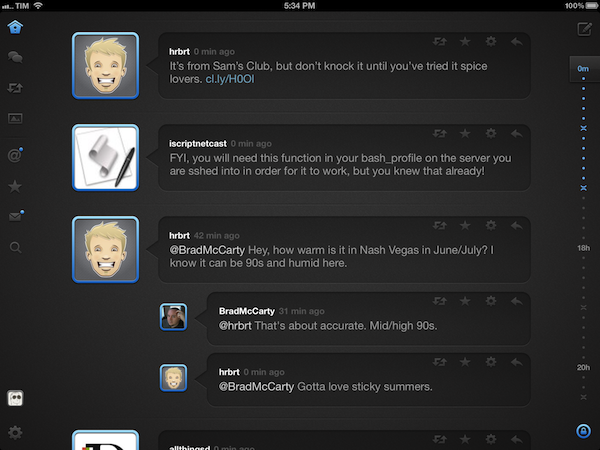
I have often written about the need for developers of third-party Twitter clients to focus on different, fresh experiences aimed at providing a new take on mobile tweeting. On iOS, as I have previously argued, apps like Tweetbot, Twitterrific, and Twitter’s official client have managed to capture a large portion of a devoted userbase split in those seeking a wide array of functionalities, a streamlined interface, or the free price tag. Quip, a new Twitter app by Glasshouse Apps (makers of The Early Edition), takes a unique approach at filtering the typical Twitter timeline by conversations, images, and retweets.

I have been testing Quip since its early beta versions, and the app has been no replacement for Tweetbot on my iPad. But that’s exactly Quip’s greatest strength and, I believe, one of its most valid points alongside a care for beautiful UI design and ease of use. While capable of being an average user’s primary iPad client because of its support for basic Twitter functionalities such as direct messages, search, and favorites, I think Quip works best as an attractive companion for catching up on Twitter and browsing certain sections/tweets that could otherwise get easily lost in a “regular” timeline. Quip doesn’t support Twitter lists, its search features are limited, and you won’t find the same degree of link and tweet manipulation options of Tweetbot.

Rather than contributing to the app’s possible detriment when compared to more advanced clients, however, Quip’s extremely specific feature set catalyzes the convenience of those Twitter-based functionalities that Glasshouse implemented. Read more


Fantastical 1.3 Adds Reminders Integration

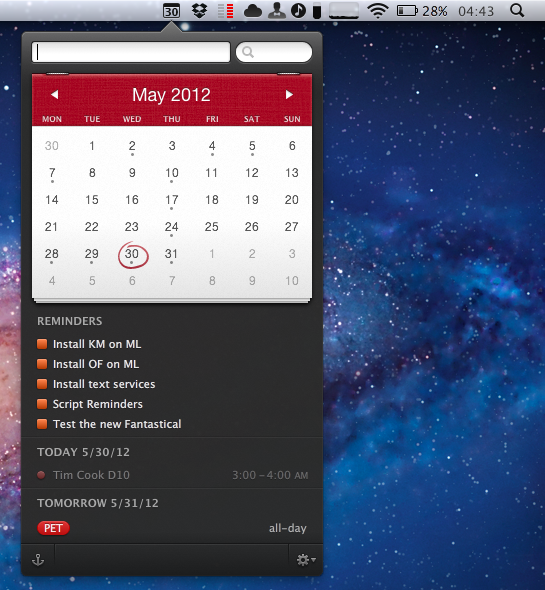
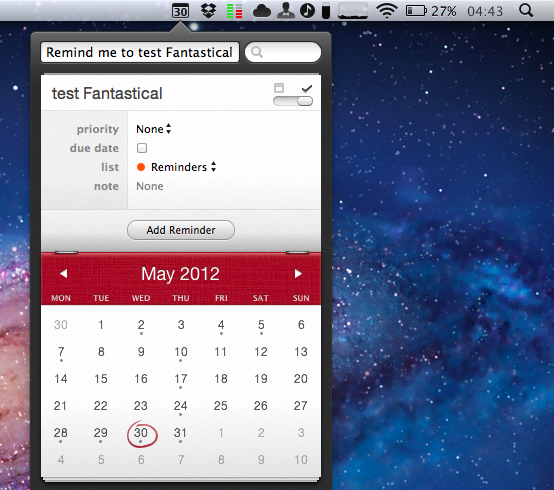
Flexibits’ Fantastical, a menubar-based calendar application to quickly enter new events with natural language recognition, has today been updated to include native integration with Reminders, a feature that Apple rolled out with its own app in iOS 5 last year. I have been testing the new Fantastical (version 1.3) for the past weeks, and its integration with calendars, reminders, and natural language input is as solid as ever.

One of Fantastical’s biggest advantages over similar apps to quickly add items to synced calendars is its built-in CalDAV engine, which ensures the app can directly communicate with online calendars without having to leave iCal open in the background. As with events, Fantastical 1.3 lets you create reminders with a few keystrokes, using reminder lists already configured in your calendar app of choice, such as iCal or Outlook. Because Fantastical is capable of directly communicating with the syncing engine behind Reminders – not just the calendar application that displays them on the desktop – you’ll be able to add reminders in Fantastical and have them synced across devices without leaving iCal open. In my tests, Fantastical 1.3 indeed took reminders I added from the menubar, and synced them to iCloud.com and other iOS devices within seconds. If iCal opens, as Flexibits explains in the FAQ, it’s because of a Lion default setting related to push; switching iCal’s refresh rate to 30 minutes doesn’t compromise Fantastical’s ability to create events and reminders independently of iCal.

Fantastical can create, edit, and delete reminders with natural language recognition. In testing the app, I told Fantastical to “remind me to take out the trash”, and the app intelligently parsed the command as just “take out the trash”, interpreting the initial portion of the sentence as a reminder input. Similarly, commands like “remind” and “todo” will trigger reminder creation in Fantastical 1.3, which, generally speaking, tries to associate every new item without a date to a reminder list. This, however, can be reverted at any time, as the interface to switch between reminders and events includes a handy switch to jump through both options.

Reminders can be given a specific date or priority, assigned a note, but they don’t support location and time-based alerts, as those features are exclusive to iOS’s Reminders and Siri. In the app’s UI, reminders are displayed alongside calendar events, and they use the same floating popover windows for modifications.

In testing Fantastical 1.3 with my iCloud calendar and reminders, I found the app to be remarkably fast and reliable. As you would expect from Fantastical, adding new reminders takes seconds thanks to keyboard navigation and shortcuts, and the syncing engine didn’t miss a beat when communicating with iCloud and iOS. Unsurprisingly considering previous versions of the app, the parser doesn’t disappoint when it comes to automatically switching between event and reminder creation (try to add a date to a reminder, and check out the animation).

Fantastical 1.3 is a great update if you’ve been looking forward to Reminders integration, and another solid release for an app we’ve previously recommended. Fantastical is $19.99 on the App Store.


Tim Cook at D10 [Updated with Highlights and Storify Recap]

A dapper Tim Cook will be sitting down with Walt Mossberg and Kara Swisher this evening in Racho Palos Verdes, California, where AllThingsDigital’s D10 Conference will be held for the next three days as tech industry heavyweights are invited to speak and demo new products. Since last August, Tim Cook has continued to drive Apple’s success with new product launches of the iPhone 4S and the iPad 3. Apple has given stock dividends, joined the Fair Labor Association, and has reported its best quarter ever since Cook was promoted to CEO. We expect most of tonight’s interview to focus on his tenure at Apple, what’s in the company’s future, and how Cook views the tech industry and the pace of innovation that’s currently happening.

All Things Digital has made available an iPhone/Android app so readers can stay updated on upcoming events and interviews during the conference. Livestreams will be made available for certain speakers, and Twitter users can follow the conversation around D10 through the hashtag #atd10. A livestream for Tim Cook’s talk will not be available, but there should be a recorded session available by Wednesday.

As the conversation with Tim Cook gets underway, we’ll be highlighting some of the key takeaways and sharing thoughts and opinions from around the web that occur as a result of what Tim Cook says or doesn’t say. We’re looking forward to the interview, and hope you’ll tune in with us at 9:00 EST as we quietly follow along with the live transcripts.

Update 9:23: Tim Cook is on stage! We’ll be posting highlights past the break.

Read more