

I don’t play guitar as often as I used to, but I’ve always enjoyed trying to pick out the chords of my favorite songs. The trouble is, that can be hard to do unless you have a well-trained ear, which I don’t. That is exactly where Capo touch can help. The app can analyze a song, pick out the chords and help you practice it a little at a time at a comfortable pace until you figure out how to play it. This week, Capo touch got a big update that streamlines the learning process and brings powerful features over from Capo for macOS.
Posts in reviews
Capo touch 2.5 Review

Access Extra Content and Perks
Founded in 2015, Club MacStories has delivered exclusive content every week for nearly a decade.
What started with weekly and monthly email newsletters has blossomed into a family of memberships designed for every MacStories fan.
Club MacStories: Weekly and monthly newsletters via email and the web that are brimming with apps, tips, automation workflows, longform writing, early access to the MacStories Unwind podcast, periodic giveaways, and more;
Club MacStories+: Everything that Club MacStories offers, plus an active Discord community, advanced search and custom RSS features for exploring the Club’s entire back catalog, bonus columns, and dozens of app discounts;
Club Premier: All of the above and AppStories+, an extended version of our flagship podcast that’s delivered early, ad-free, and in high-bitrate audio.
Streaks 3 Review
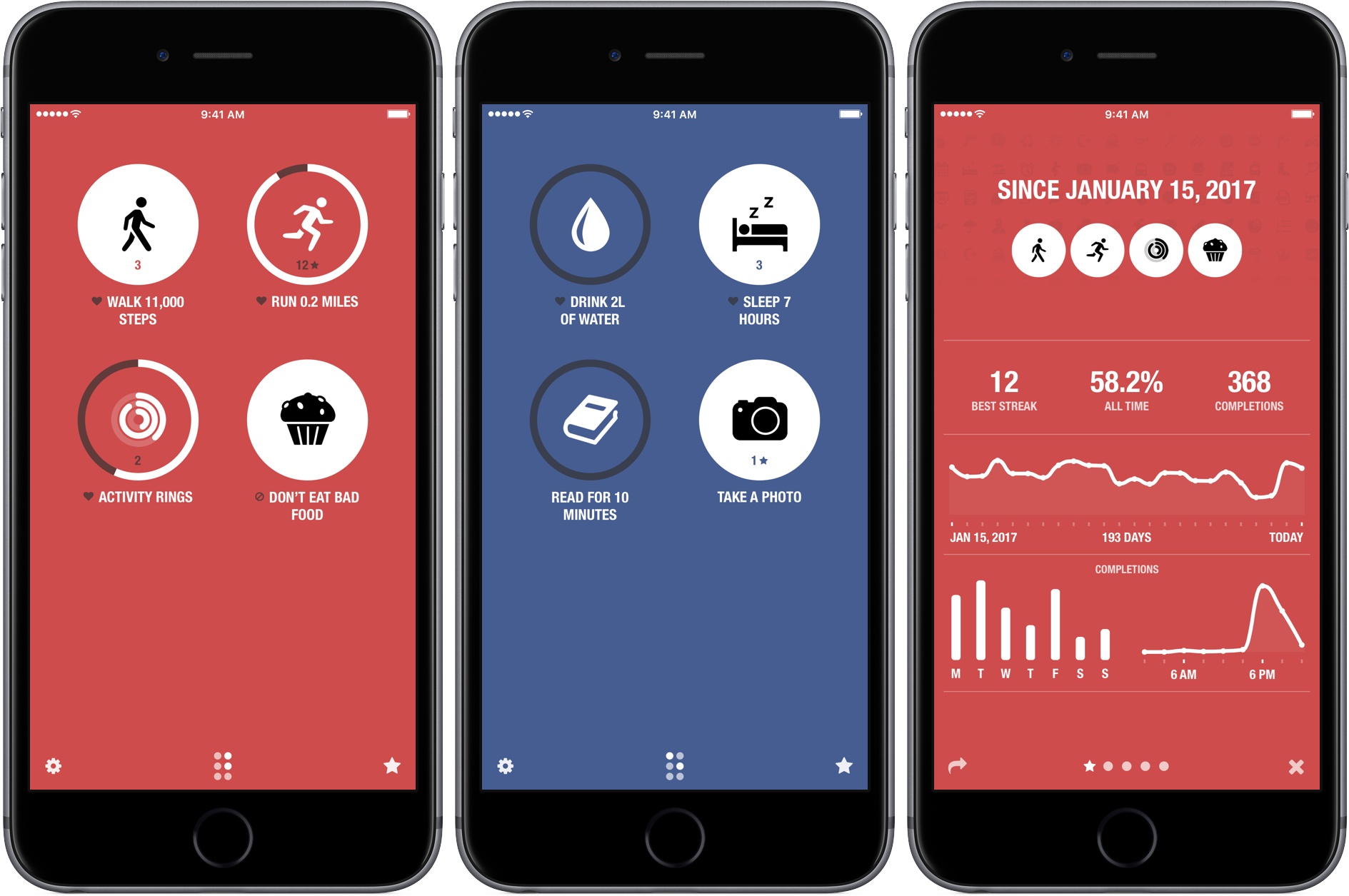
Streaks helps you set personal goals and stick to them using a combination of reminders and tracking. One of the hallmarks of the app, and what undoubtedly won it an Apple Design Award in 2016, is its obsessive attention to ease-of-use. By the very nature of its mission, Streaks is an app in which you shouldn’t spend a lot of time. Whether it’s in the main app, widget, or Apple Watch app, Streaks is designed to remove the friction of turning goals into habits by tracking tasks in a way that doesn’t become tedious, which makes it important to be able to mark items as completed quickly and easily.
It’s been interesting to watch Streaks evolve. As Streaks has added functionality and customization options with each version, the simplicity of its design has remained the app’s core design principle. One of the app’s most opinionated design decisions from the start was to limit users to tracking just six goals. Limiting the number of goals was meant to constrain users to an achievable number of goals and helped reduce complexity.
When I heard that Streaks was doubling the number of goals that can be tracked and adding in-depth statistics and other customizations, I immediately wondered whether that could be pulled off while maintaining Streaks’ signature design. The answer is a resounding ‘yes.’ Version 3.0 of Streaks not only remains true to its roots, but it’s also the best version of the app yet.
Access Extra Content and Perks
Founded in 2015, Club MacStories has delivered exclusive content every week for nearly a decade.
What started with weekly and monthly email newsletters has blossomed into a family of memberships designed for every MacStories fan.
Club MacStories: Weekly and monthly newsletters via email and the web that are brimming with apps, tips, automation workflows, longform writing, early access to the MacStories Unwind podcast, periodic giveaways, and more;
Club MacStories+: Everything that Club MacStories offers, plus an active Discord community, advanced search and custom RSS features for exploring the Club’s entire back catalog, bonus columns, and dozens of app discounts;
Club Premier: All of the above and AppStories+, an extended version of our flagship podcast that’s delivered early, ad-free, and in high-bitrate audio.
Game Day: Color Magnet
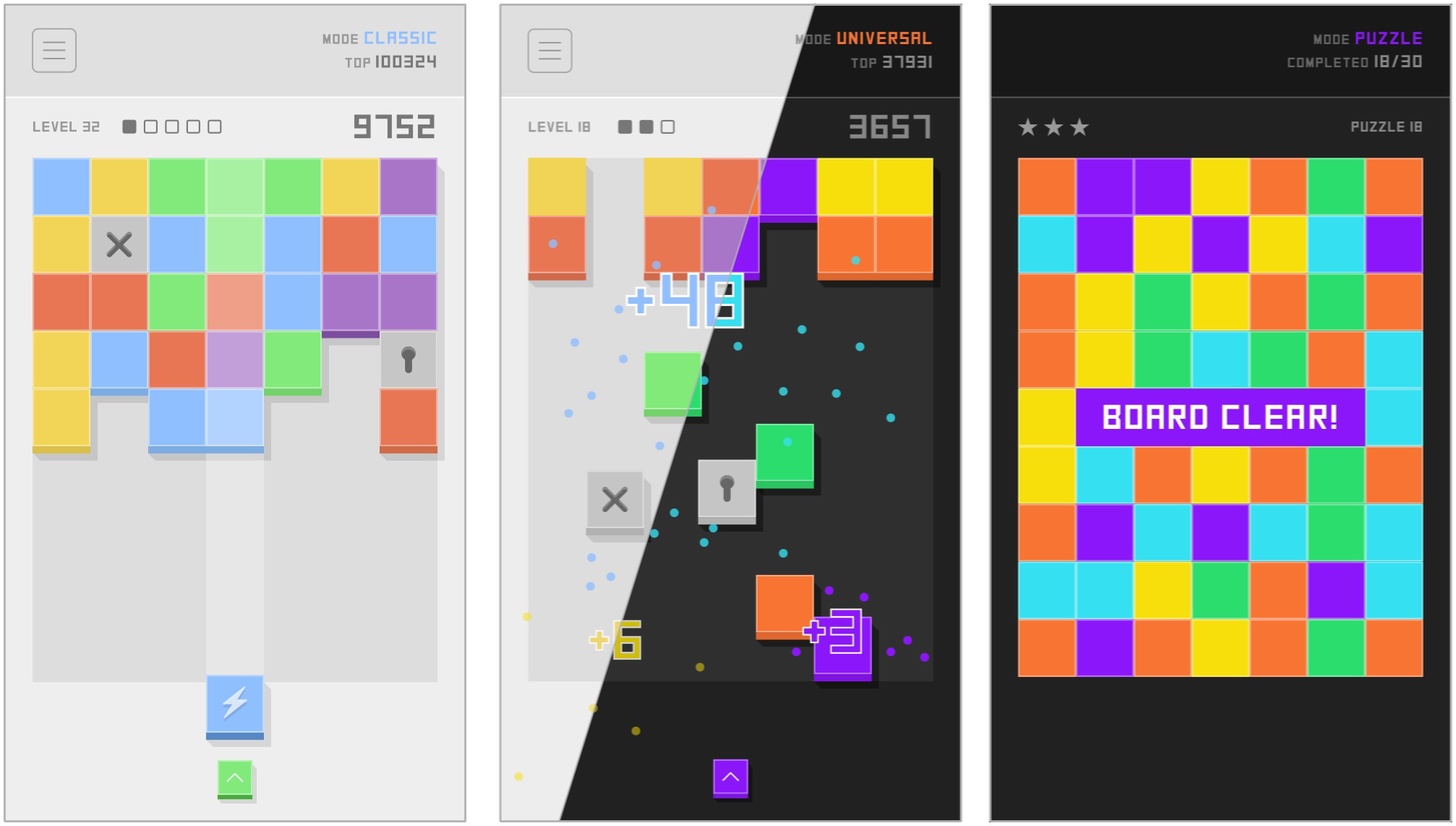
Color Magnet, by The One Pixel, is a classic color-matching puzzle game with a twist. A grid of colors blocks advances down the screen as you drop in strategically placed new blocks to make color matches. The blocks are magnetically attracted to other blocks of the same color. When placed on the grid, the blocks between the newly placed piece and the closest piece horizontally or vertically of the same color change to match the color of the block you placed. Match five or more blocks to clear them and the ones below them on the board.
Gameplay is complicated by locked and cross blocks. A locked block is unlocked by matching colors nearby or clearing a cluster of blocks next to it. Once unlocked, a block becomes a random color. Cross blocks can only be destroyed by clearing blocks above them in the stack. It’s not nearly as complex as it sounds, though it requires careful planning and strategy.
Color Magnet looks and sounds great, pairing a palette of pastel colors with a playful soundtrack. There are also light and dark themes for comfortable late-night binge playing in bed.
Replay-value is enhanced by three game modes. Classic mode challenges players to beat their high score. Universal mode pits you against the rest of the Color Magnet-playing world with the same sequence of puzzles presented to everyone. Puzzle mode has 30 unique puzzles that challenge you to clear the entire board.
The magnet mechanic and depth added by the trio of gameplay modes takes what might have been a ‘me-to’ matching puzzle game and gives it a unique spin that’s fun and addicting in the same way Threes is. If games like Threes are your thing, Color Magnet won’t disappoint.
Color Magnet is available on the App Store.
Access Extra Content and Perks
Founded in 2015, Club MacStories has delivered exclusive content every week for nearly a decade.
What started with weekly and monthly email newsletters has blossomed into a family of memberships designed for every MacStories fan.
Club MacStories: Weekly and monthly newsletters via email and the web that are brimming with apps, tips, automation workflows, longform writing, early access to the MacStories Unwind podcast, periodic giveaways, and more;
Club MacStories+: Everything that Club MacStories offers, plus an active Discord community, advanced search and custom RSS features for exploring the Club’s entire back catalog, bonus columns, and dozens of app discounts;
Club Premier: All of the above and AppStories+, an extended version of our flagship podcast that’s delivered early, ad-free, and in high-bitrate audio.
CARROT Weather 4.0: Simply Delightful
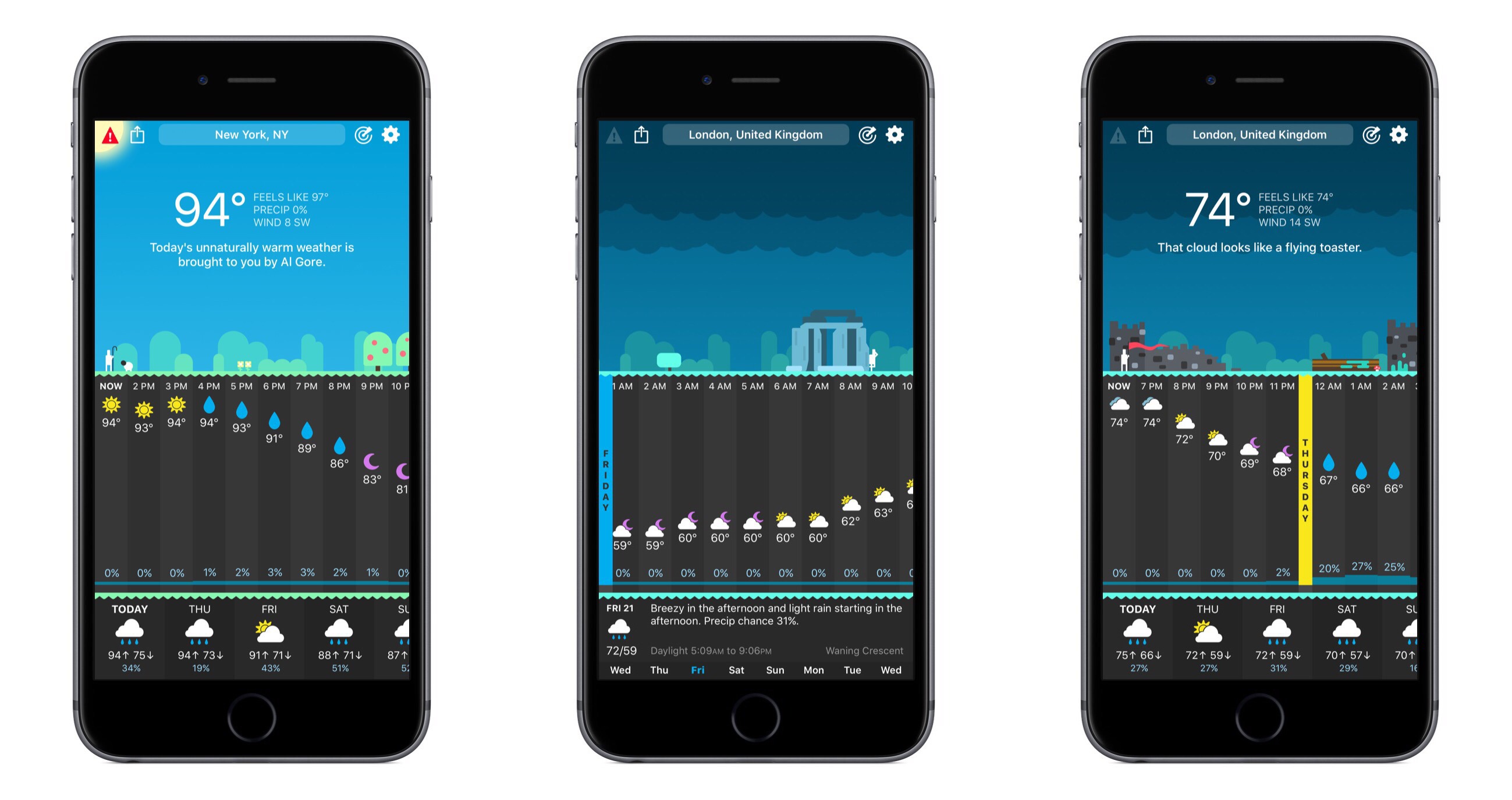
The snarkily clever weather app, CARROT Weather, was updated to version 4 today, and with that update comes a full redesign. The core piece of CARROT’s identity – its sarcastic A.I. – is still here, as are the beautiful graphics of past releases, but outside of that a lot has changed.
Access Extra Content and Perks
Founded in 2015, Club MacStories has delivered exclusive content every week for nearly a decade.
What started with weekly and monthly email newsletters has blossomed into a family of memberships designed for every MacStories fan.
Club MacStories: Weekly and monthly newsletters via email and the web that are brimming with apps, tips, automation workflows, longform writing, early access to the MacStories Unwind podcast, periodic giveaways, and more;
Club MacStories+: Everything that Club MacStories offers, plus an active Discord community, advanced search and custom RSS features for exploring the Club’s entire back catalog, bonus columns, and dozens of app discounts;
Club Premier: All of the above and AppStories+, an extended version of our flagship podcast that’s delivered early, ad-free, and in high-bitrate audio.
iMazing Mini Simplifies iOS Device Backups
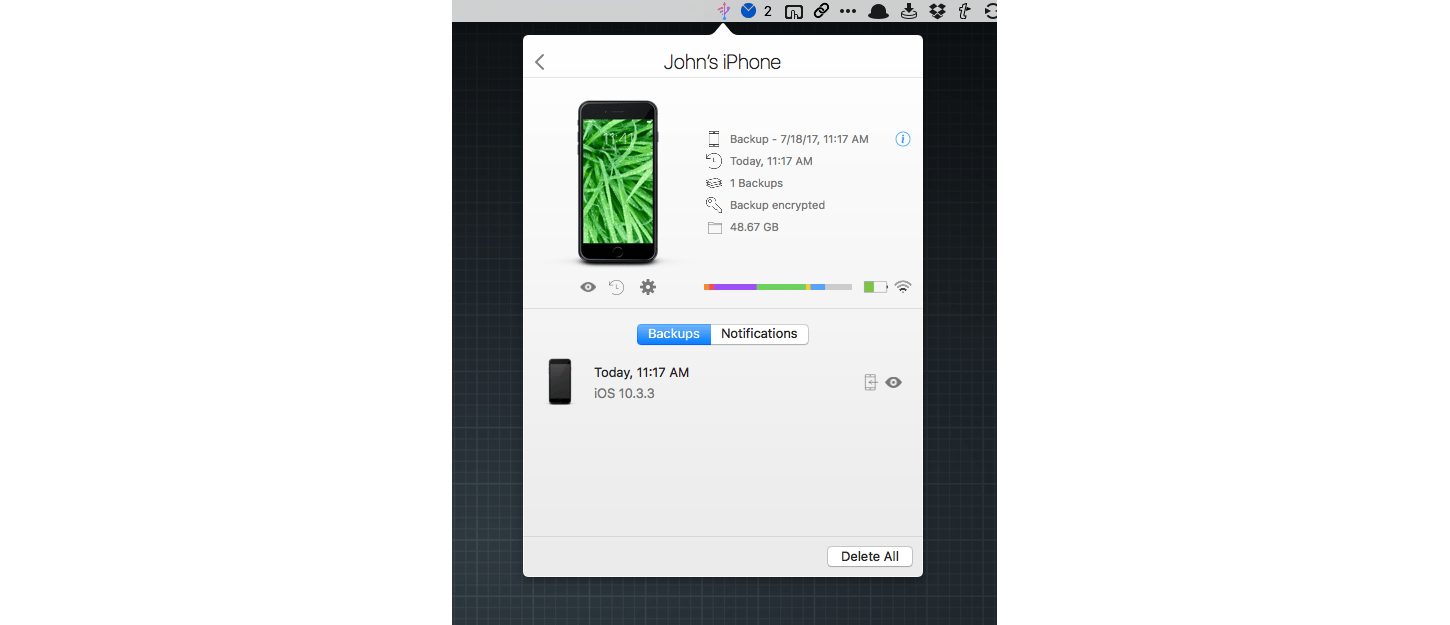
iMazing is a macOS utility for transferring files to and from iOS devices and backing them up. This week, DigiDNA, the maker of iMazing, introduced a menu bar app called iMazing Mini that offers the core backup features of the full iMazing app for free.
Access Extra Content and Perks
Founded in 2015, Club MacStories has delivered exclusive content every week for nearly a decade.
What started with weekly and monthly email newsletters has blossomed into a family of memberships designed for every MacStories fan.
Club MacStories: Weekly and monthly newsletters via email and the web that are brimming with apps, tips, automation workflows, longform writing, early access to the MacStories Unwind podcast, periodic giveaways, and more;
Club MacStories+: Everything that Club MacStories offers, plus an active Discord community, advanced search and custom RSS features for exploring the Club’s entire back catalog, bonus columns, and dozens of app discounts;
Club Premier: All of the above and AppStories+, an extended version of our flagship podcast that’s delivered early, ad-free, and in high-bitrate audio.
Tempo Creates a Beautiful Training Log for Runners With Health App Data

I love running with my Apple Watch, but I’m not a fan of most running apps; too many want to update me constantly about my progress while running. Other apps want me to share my runs on social networks. That’s not for me. I’d rather have an app parse the data collected after I’m home and can spend some time with it, which is precisely why I’ve enjoyed using Tempo.
Access Extra Content and Perks
Founded in 2015, Club MacStories has delivered exclusive content every week for nearly a decade.
What started with weekly and monthly email newsletters has blossomed into a family of memberships designed for every MacStories fan.
Club MacStories: Weekly and monthly newsletters via email and the web that are brimming with apps, tips, automation workflows, longform writing, early access to the MacStories Unwind podcast, periodic giveaways, and more;
Club MacStories+: Everything that Club MacStories offers, plus an active Discord community, advanced search and custom RSS features for exploring the Club’s entire back catalog, bonus columns, and dozens of app discounts;
Club Premier: All of the above and AppStories+, an extended version of our flagship podcast that’s delivered early, ad-free, and in high-bitrate audio.
Halide Review: Instantly Better Photography
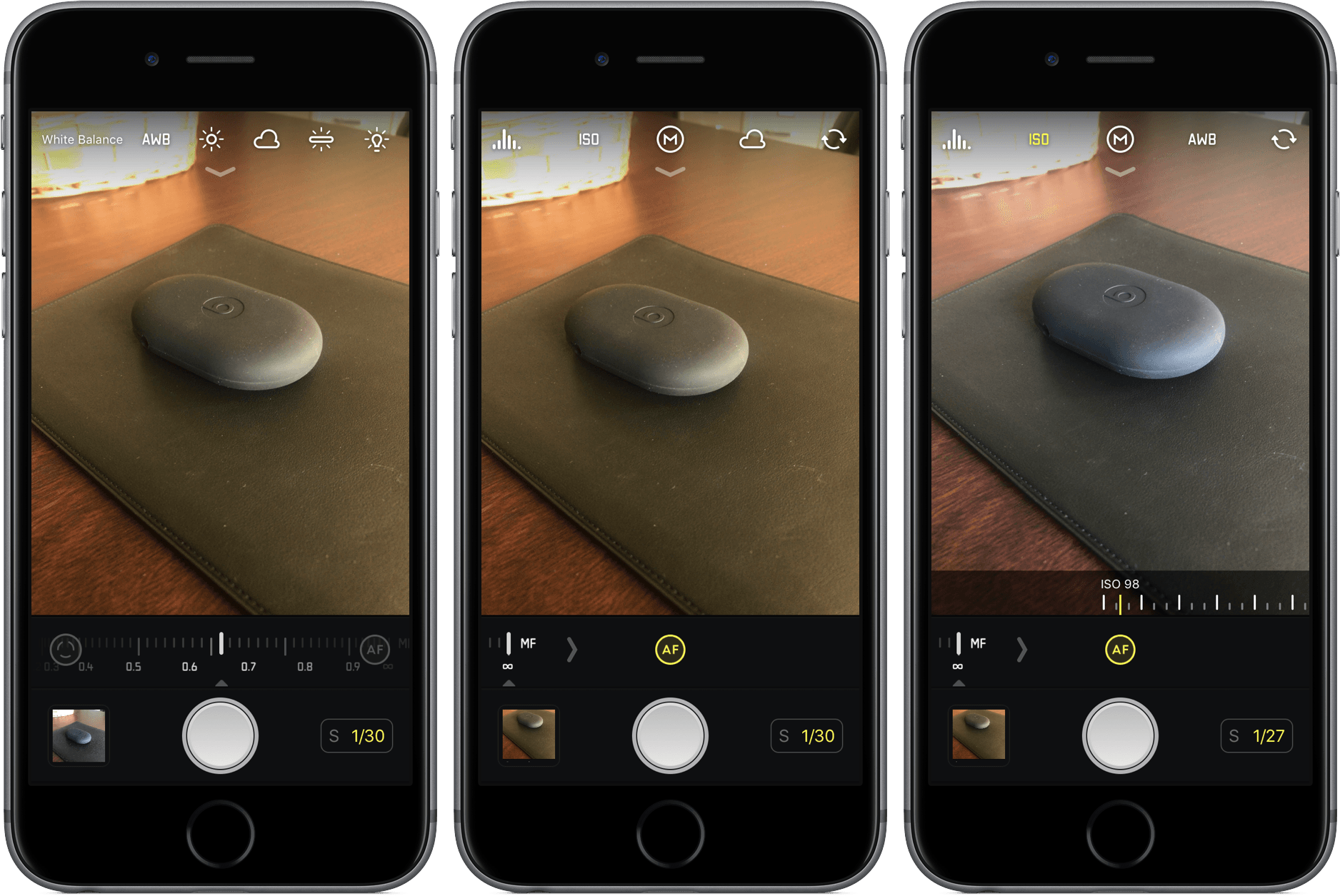
Photography isn’t my specialty, and more often than not, my lack of knowledge stops me from getting the shot I have set up in my mind. They say the best camera is the one you have with you at all times, but the stock iPhone 7 camera can only do so much with my limited skill set.
So when a tool comes along that makes taking great photos so much easier, it’s hard to pass it up. That’s Halide, which offers real-time, user-driven changes in your camera’s viewfinder to help you get the picture you want.
As you line up your shot in Halide, you’ll have the opportunity to make adjustments – focus, ISO, white balance, and exposure – that will change the way your picture will look. These aren’t pre-packaged filters, but rather manual options that can give your photo a unique look and feel. For different occasions, environments, and lighting, you’ll appreciate the control.
What I love so much about Halide is that I don’t have to have the deepest understanding of these tools to take advantage of them. Instead of focusing on numbers, I can see my changes as they are made. Halide offers the benefits of a complex photo app without the learning curve.
Much of how you edit in Halide is by sliding your finger, either arbitrarily up and down or along a scale, left to right. For white balance, you can select from presets, which drastically alter the mood of the photo without making it look unrealistic. Aside from focus, all of these options work on the front camera, too, so your selfies can be even more artistic.
Halide can capture your photos in either RAW or JPEG, but it’s up to you to select the latter in the “Quick Bar”, an extra set of buttons that appears by pulling down at the top of the screen. Also in the Quick Bar is an on/off switch for flash, a grid tool, and location management.
Conclusion
When I’m inexperienced in a certain field, I want apps to enable and teach me, not leave me confused and incapable. Halide undoubtedly accomplishes the former, putting the control back in my hands instead of in the camera.
And that’s what I can’t seem to shake about Halide – it’s empowering, a $4.99 investment into better photos without much work. For quick, simple shots, I’m probably still going to choose Camera for its convenience; for everything else, I’m choosing Halide.
If you’d like to give Halide a try, you can pick it up in the App Store for $4.99 (iPhone only).
Access Extra Content and Perks
Founded in 2015, Club MacStories has delivered exclusive content every week for nearly a decade.
What started with weekly and monthly email newsletters has blossomed into a family of memberships designed for every MacStories fan.
Club MacStories: Weekly and monthly newsletters via email and the web that are brimming with apps, tips, automation workflows, longform writing, early access to the MacStories Unwind podcast, periodic giveaways, and more;
Club MacStories+: Everything that Club MacStories offers, plus an active Discord community, advanced search and custom RSS features for exploring the Club’s entire back catalog, bonus columns, and dozens of app discounts;
Club Premier: All of the above and AppStories+, an extended version of our flagship podcast that’s delivered early, ad-free, and in high-bitrate audio.
Game Day: Resynth
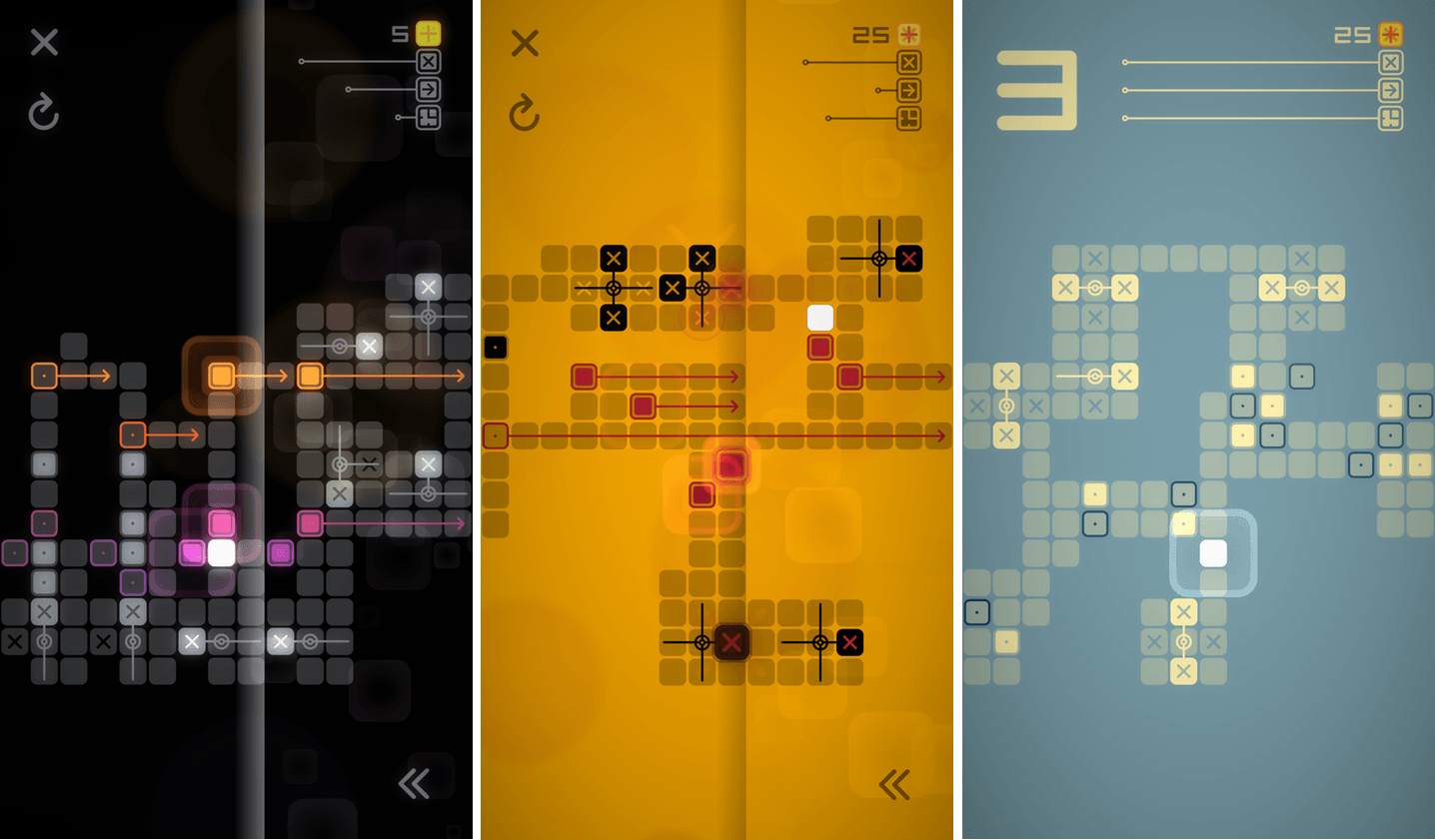
Resynth creates a novel experience by fusing synthesizer tunes with a puzzle game. Stripped of the musical components, Resynth would be a fairly standard puzzle game that requires you to push blocks into positions and flip switches on a map to move to the next level. What makes Resynth unique though, is its music.
Each level begins with a looping synthesizer track. As you move blocks into the correct positions and toggle switches, notes are added to the loop, evolving the music. The changes to the music provide an added sense of accomplishment as you play. Pack 1 includes 36 puzzles. Pack 2 has another 36 puzzles that can be unlocked by earning stars or with an In-App Purchase.
Throughout each level, a white line loops across the screen in time with the synth loop, adding a sense of motion to the music. Also, once a block is pushed into position, it pulses to the beat. The approach reminds me of Sound Shapes, a musical platformer available on the Sony PS4 and Vita that combines music and motion in a similar way. Although Resynth is a very different game, the effect is similar, adding a sense of progress and motion to each level.
The mechanics are straightforward. You push blocks around the map by swiping. Moving around faster can be accomplished by swiping and holding. The levels get progressively harder requiring more complex maneuvers like moving two blocks in tandem. The maps become more complex too, limiting the space available for moving blocks into position. If you get a block stuck in a place where you can’t complete a puzzle, there are undo and restart buttons, which I appreciate with this type of game.
The challenge is mostly in the puzzles themselves, with one qualifier. There is a star system tied to each level. Stars are earned based on time to complete the puzzle and the number of moves it takes you to do so. Fortunately, it’s easy to ignore this, which I’ve been doing because I prefer the low-stress approach to this sort of puzzle game. The one downside to ignoring the star system is that unless you earn enough stars, you won’t be able to unlock the Pack 2 puzzles unless you buy the In-App Purchase. Still, challenging puzzles combined with an excellent soundtrack make Resynth an excellent way to unwind over the weekend.
Resynth is available on the App Store.
Access Extra Content and Perks
Founded in 2015, Club MacStories has delivered exclusive content every week for nearly a decade.
What started with weekly and monthly email newsletters has blossomed into a family of memberships designed for every MacStories fan.
Club MacStories: Weekly and monthly newsletters via email and the web that are brimming with apps, tips, automation workflows, longform writing, early access to the MacStories Unwind podcast, periodic giveaways, and more;
Club MacStories+: Everything that Club MacStories offers, plus an active Discord community, advanced search and custom RSS features for exploring the Club’s entire back catalog, bonus columns, and dozens of app discounts;
Club Premier: All of the above and AppStories+, an extended version of our flagship podcast that’s delivered early, ad-free, and in high-bitrate audio.
Yoink is the macOS Shelf Utility I Want on iOS Too
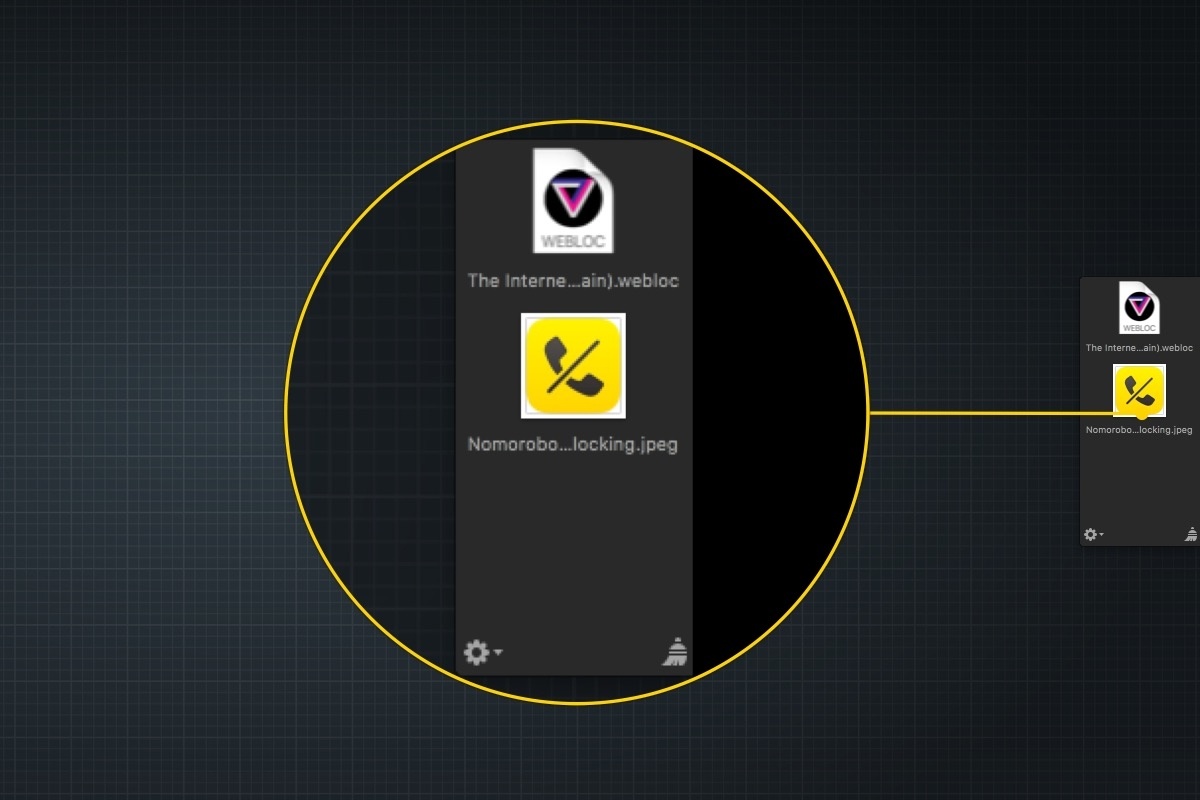
At WWDC, I was disappointed that the iOS 11 announcements didn’t include a shelf where content can be temporarily parked. When Federico and Sam Beckett made an iOS 11 concept video earlier this year they included a shelf, which felt like a natural way to make touch-based drag and drop simpler. I found the omission in the iOS 11 beta somewhat surprising. On the Mac, people use the Desktop as a temporary place to stash items all the time, and without a Desktop on iOS, a shelf that slides in from the edge of the screen seemed like a natural solution. In fact, it’s a solution that has an even more direct analog than the Desktop on macOS that makes a solid case for implementing something similar on iOS: Yoink, from Eternal Storms Software.
Access Extra Content and Perks
Founded in 2015, Club MacStories has delivered exclusive content every week for nearly a decade.
What started with weekly and monthly email newsletters has blossomed into a family of memberships designed for every MacStories fan.
Club MacStories: Weekly and monthly newsletters via email and the web that are brimming with apps, tips, automation workflows, longform writing, early access to the MacStories Unwind podcast, periodic giveaways, and more;
Club MacStories+: Everything that Club MacStories offers, plus an active Discord community, advanced search and custom RSS features for exploring the Club’s entire back catalog, bonus columns, and dozens of app discounts;
Club Premier: All of the above and AppStories+, an extended version of our flagship podcast that’s delivered early, ad-free, and in high-bitrate audio.