This Week's Sponsor:

Dropzone 5

Improve your Drag-and-Drop Workflow


Posts in reviews

Review: Shazam Player Brings Lyrics, Discovery To Your iOS Music Library

Shazam, a popular music recognition software with free and paid apps for the iPhone and iPad, launched today a new application called Shazam Player to provide an alternative to Apple’s own Music app for iOS devices.

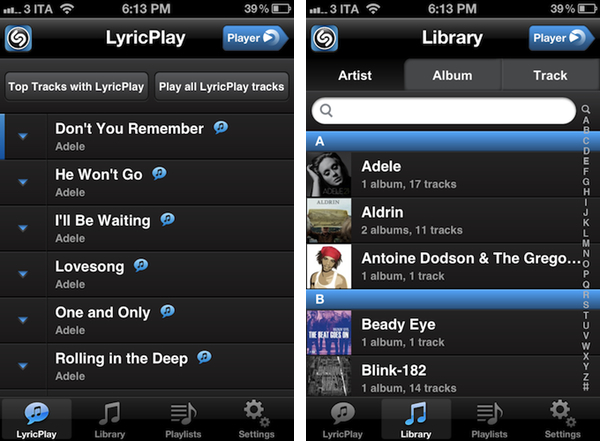
Available for free on the App Store, Shazam Player is built atop Apple’s music API for iOS, which enables third-party developers to plug directly into a user’s music library synced with iTunes or iCloud. Shazam Player borrows several functionalities from the standalone Shazam app – such as LyricPlay, artists’ bio and related YouTube videos – and blends them together with songs from the native Music app. Whereas Shazam (free, Encore) forces users to tag songs beforehand and then try the LyricPlay functionality, Shazam Player is meant to serve as a full replacement for Music.app, only with more features that existing Shazam users are likely already accustomed to.

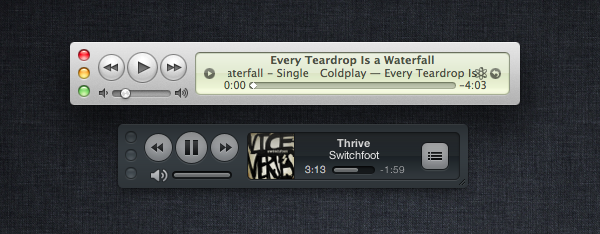
Upon first launch, Shazam Player will ask you to scan the Music library synced on your device. This is required for the app to match your songs with available LyricPlay tracks, whose information is stored on Shazam’s servers. You can read more about Shazam’s support for lyrics in my overview from last week. Once the scanning process is complete (it might take several minutes depending on how many tracks you have synced on your device), you’ll be brought to Player’s main UI, which is heavily resembling of Shazam’s typical interface (that is, it could use some polish here and there) but adds a couple of new design elements and interaction patterns. Read more


Quick Review: Werdsmith for iOS

In the past couple of weeks, I’ve seen an increasing number of developers implement iCloud’s documents & data storage in iOS and Mac apps. From preference syncing (Consume, Instacast) to actual library storage (Day One), it appears developers are now fully realizing the potential of iCloud as an automatic syncing solution across Apple’s devices (iCloud isn’t without its flaws, many developers say, and I hope the upcoming release of iOS 5.1 will also bring this kind of fixes).

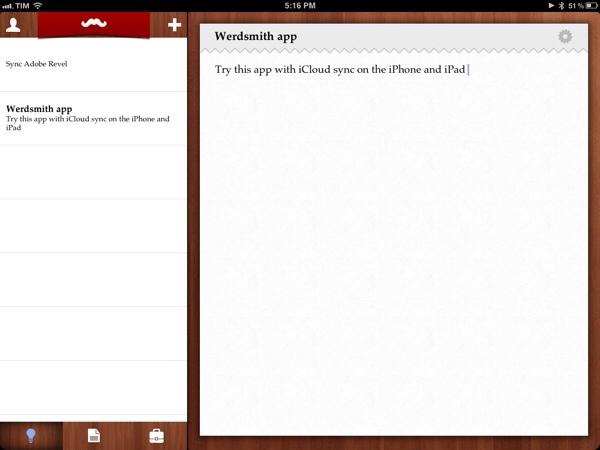
An area that’s been strangely absent from my App Store watch list of iCloud-enabled apps is that of text editors. Wildly popular when it comes to Dropbox sync (just to name a few: Elements, Notesy, Notely, Nebulous Notes), there hasn’t been a full-featured text editor to show up with iCloud sync yet. Instead, what I’m seeing is a trend towards simpler note-taking applications that allow you to jot down quick notes and have them synced on iOS and, sometimes, Mac clients with iCloud support. Such app is Werdsmith from Australian developer Nathan Tesler, free with in-app purchase to unlock more space and available as a universal app for iPhone and iPad (no Mac version yet).

Werdsmith features a very peculiar interface with a wooden tab bar and a creepily awesome ‘mustache banner’ at the top. This banner slides down when your list of ideas and projects is empty, but otherwise it’s got no specific use in the app. Overall, the design of the app is very clean, and reminds me of Wunderlist. There is an annoying bug with scrolling long lists on the iPhone that sometimes requires a complete restart of the app; I hope it’ll be fixed with an update.

In Werdsmith you can save ‘ideas’ and turn the most complex ones into ‘projects’. Werdsmith is aimed at writers, so a project will basically consist of a single note with a title and a goal – the latter being a minimum word count for your next essay, journal entry or blog post. You can save ideas as quick notes and leave them in your inbox, or you can make one a project and start writing against that word count. A percentage will indicate how far you’ve gone into completing your project, and when you’re done you can tap on ‘Finish’ to archive it.

Werdsmith is really simple, perhaps a little too simple for my tastes. You can’t export notes in any format (only email sharing, and that’s it), there is no support for Markdown formatting (a must-have these days) and you can’t tag, search, or move notes around. Keep in mind, though, that Werdsmith isn’t meant to be a text editor – rather, I see it as an iCloud-based scratchpad for writers, and it’s pretty decent at that. Werdsmith works fairly well if you’re up to accept its nature of simple utility; I’d like to see, however, the iCloud syncing engine rewritten to be more like Day One, as it’s not really immediate in this 1.1 version.

Even if you’re accustomed to more powerful solutions, you should take Werdsmith for a spin – it’s free and it works with iCloud. You can download Werdsmith here.


Day One 1.5 for iOS: Now With iCloud Sync

Earlier this year, I started using Day One. Not just another text editor with Mac and iOS versions and support for Markdown formatting, Day One is at the same time a flexible and focused solution to archive your thoughts, memories, experiences into a well-built interface that keeps everything in sync across Macs and iOS devices. A fresh take on the old paper journal, Day One takes advantage of modern technologies such as local reminders to tell you when it’s time to write your journal; on the iPhone and iPad, the app supports different font sizes and Markdown, so you’ll be able to write nicely formatted documents that you can easily export to HTML. On the Mac, Day One comes with a standalone menubar application that makes it incredibly fun and quick to jot down thoughts whenever you want.

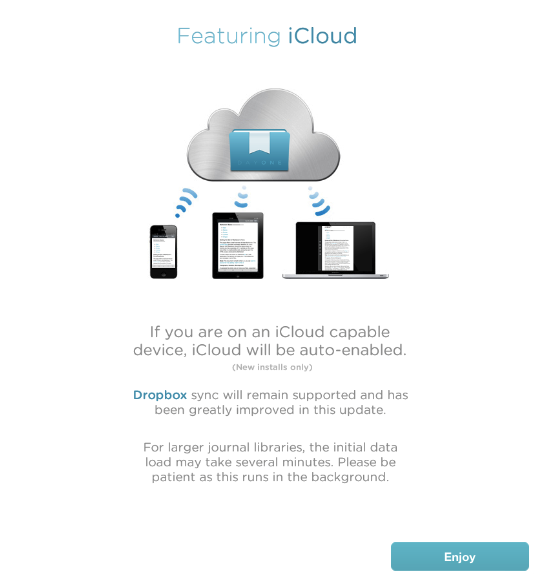
Day One’s 1.5 update for iOS, released today on the App Store, brings a more powerful Dropbox sync for iPhones and iPads (Day One can store its database in Dropbox, and it allows you to export notes on the Mac via File>Export) and the long-awaited iCloud sync, which I’ve been able to test on my iPhone 4S and iPad 2 (Day One 1.5 for Mac isn’t live yet, but it’s been submitted to the Mac App Store).

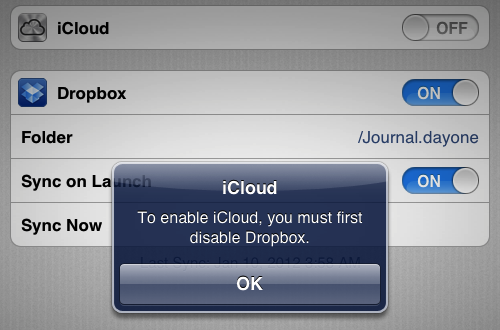
I came from an old installation of Day One with a Dropbox database synced to my iPhone and iPad. As I upgraded to version 1.5 and launched the app on both devices, I was asked to disable Dropbox sync if I wanted to use iCloud. I disabled Dropbox, and waited a few minutes for the initial iCloud background sync to finish (it had to pull at least 50 entries to begin with).

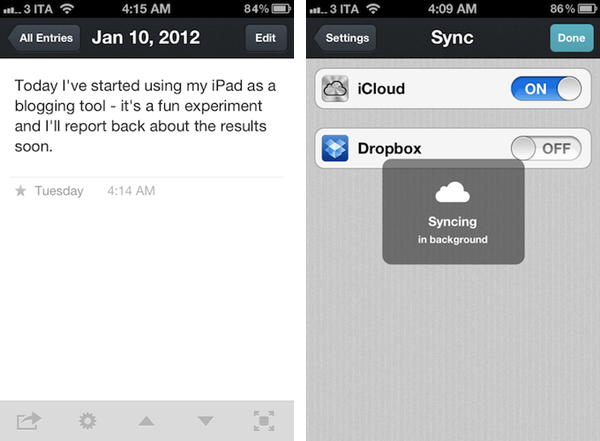
Once iCloud is up and running in Day One, it is extremely reliable, fast, and invisible. Unlike Dropbox, it’s not manual sync you have to initiate or automatically perform upon launch and quit – it’s push technology that constantly sends changes back and forth between devices. As an example, I started writing a new entry on my iPhone and it showed up after a few seconds on my iPad, which was running Day One. The main list of notes on the left basically refreshes to accomodate a new note – no manual sync needed. For the same reason, notes are pushed with iCloud as you write them – typos included.

Day One 1.5 clearly fits in a much bigger picture with the Mac client constantly receiving changes from the cloud, but this doesn’t mean you can’t enjoy Day One 1.5 for iOS now. In fact, I often find myself writing my journal on iOS devices rather than the Mac, so iCloud support (with this kind of invisible push technology) is more than welcome.

Day One for iOS is $1.99 on the App Store.


Calendr for iPhone: Fast and Elegant Event Creation

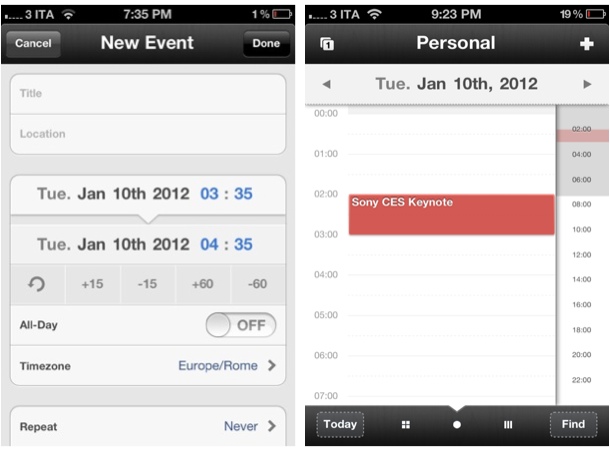
I’ve never been a dedicated user of calendar software on my Mac and iOS devices, but I’ve always been interested in checking out well-made applications capable of working with Google Calendar, MobileMe and, more recently, Apple’s iCloud. Whereas Apple’s Calendar app (iCal on the desktop) has taken quite the skeuomorphic turn with the latest iOS and Lion upgrades (in spite of the iPhone version still lacking the leather and stitches Apple seems to love so much), other utilities like the excellent Fantastical (our review), QuickCal, Week Calendar and Agenda have all offered their unique takes on event creation, quick reminders, access to multiple calendars, and more. I may not be entering events in my “Personal” iCloud calendar all day long, but I enjoy trusting a fine app when I need to schedule that Sony CES keynote or NBA game and don’t want to even look at iCal. To me, calendar has always been a system I’ve wanted to use more – perhaps the right app is key to this.

Chocomoko’s Calendr, which I discovered in the App Store last week, is yet another iPhone client that comes with built-in integration with iOS calendars; unlike other apps that focus on supercharging the iPhone’s native calendar experience with features (Week Calendar, QuickCal) or interface approaches (Agenda) different from Apple’s, Calendr caught my attention because it doesn’t come with hundreds of alternative functionalities, focusing instead on two key elements: navigation and touch-based event creation. Read more


Finding Song Lyrics On Mac & iOS

In spite of iOS devices having good support for song lyrics in Apple’s Music app and the Mac surely not lacking access to song information with iTunes and a variety of third-party apps, until last week I didn’t have a quick and effortless way to check on the lyrics of the songs I was listening to through my setup. The problem with lyrics, in fact, is that whilst iTunes allows you to import them and have them properly synced to an iPhone or iPad, those of you who, like me, have decided to shift their listening habits to streaming services like Rdio and Spotify might be out of luck when it comes to humming along the latest Coldplay hit.

Being all about access, services like Rdio and Spotify (and MOG and Deezer, to name a few alternatives) often forgo the need of having a “complete package” for the music you’re paying a monthly fee for, focusing on streaming and leaving additional information like artists’ bio, photos, videos and, yes, lyrics as second citizens on the feature checklist. Which may be regarded as a rather anachronistic choice, considering the interconnectedness these web-based services offer through APIs, web apps and add-ons. Probably also because of lyric rights being treated differently from music streaming rights by labels and publishers, services like Rdio still don’t provide users with an integrated way to check on the lyrics of the song (or entire album) they’re streaming.

The flourishing of streaming services and their obvious lack of lyrics integration has lead, I believe, to a decent if not considerable increase in Google queries for lyrics websites, which are many, often ugly, yet still the best option you’ve got if you want to know what a song is saying. These websites are generally crammed with ads, ringtone adverts, and a plethora of additional information most users looking for the latest Adele single won’t ever need. These websites are awful to navigate. The fact that a Google suggestion for “lyrics website without ads” even exists is telling.

For the reasons listed above, and because I’ve been on a Rdio collection-and-playlist building spree lately, last week I set out to find the simplest iPhone, iPad and Mac apps to give me lyrics for the songs I listen to every day. My requirements were pretty basic:

  • Rdio support
  • iTunes support (just in case)
  • Decent UI
  • Easy to use
  • A search box

As it turns out, I’ve only found three apps that might work for me in the long term. As I tweeted yesterday, the big player in the iOS music-recognition scene, Shazam, doesn’t offer the same amount of functionality of its popular iPhone app (I use Encore) in its iPad client, which is surprisingly poor and limited. You’d expect Shazam to have some kind of deal or API integration with Spotify and Rdio (and, again, possibly others), but they don’t. Shazam offers a “Play on Spotify” command, but to me it looks like they’re missing big time on the music streaming front by only providing access to microphone recognition and manual search. The same is true for Shazam’s biggest competitor, SoundHound; I could be wrong about the API offered to developers by the likes of Spotify and Rdio, but I’m firmly convinced these companies should figure out a solution together if they want to reach the millions of users that are increasingly streaming music, and want to know more about it. Still, both Shazam Encore and SoundHound (universal app) offer basic lyrics support with manual searches; the third app I’ve installed is a very simple utility called Instalyrics, which is a paid app that works on the Mac and iOS with integration between the two.

Here’s a quick look at how these three apps provide lyric access. Read more


Launch Center: An Action and Shortcut Hub for your iPhone

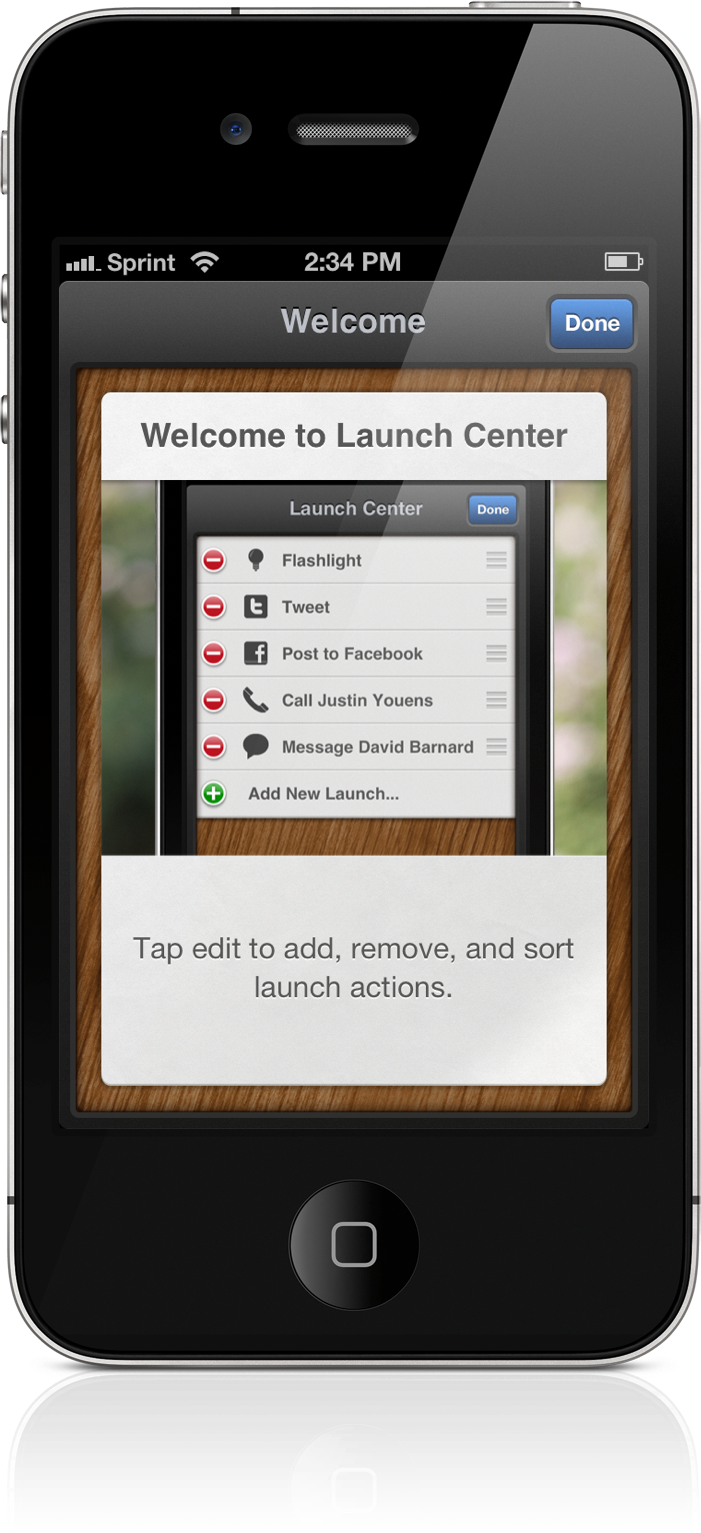
Shortly before the Christmas holiday, a few apps got a lot of attention in Apple media after being barred from the App Store for inappropriate use of the Notification Center. These apps, App Switcher, Launch Center, and Quickpick, were submitted with the intent of using the Notification Center as a way to access a list of customized commands (shortcuts) that take advantage of Apple’s and third party URL schemes. App Switcher and Quickpick were pulled, and Launch Center simply didn’t get approval. The three apps removed this feature and are now available on the App Store as standalone applications.

If you jailbreak your iOS devices, these apps probably aren’t going to find their way into your standard toolkit. Paid and free utilities available through Cydia will mirror features available on Android through widgets, the lock screen, and the Notification Center. Purists, however, could find some value in automating common tasks and reducing the time it takes to perform custom actions. Jeff Broderick’s Settings is free, but the icons are fixed and I decided I only want access to a few. There’s also Icon Project, but I have no desire to fiddle with making icons. Of the apps noted above, Launch Center looks polished and simply presents a clean list of actions.

Read more


MacStories Apps Of 2011: Reader’s Choice Winners

We’ve had a great response to our search for the best iPhone App, iPad App, Mac App and iOS/Mac Game with votes numbering in the thousands and people really excited about the huge giveaway that we ran alongside the vote. We’ve given away most of the codes but the final winners will be emailed over the next few days, so keep your eyes peeled for that.

We’ve tallied the votes and figured out who you, our readers, have deemed as the best apps and games of iOS and Mac. The winners may be largely what is expected, but it is interesting to see who the runner-ups were - there are a few interesting results there.

Just a quick note to all those who voted; thank you! We didn’t know whether you would embrace this idea or not, and we’re thrilled that so many of you voted and that we got such a large sample of our reader’s opinions on the best apps and games of 2011.

Jump the break to find out who all those winners and runner-ups all are.

Read more


Evernote Releases Skitch for iPad

Skitch is a popular tool for annotating screenshots and images with the ability to quickly share them with others. It was purchased by Evernote back in August of this year and today they are proud to present Skitch for iPad.

Skitch is the amazingly fun and surprisingly powerful way to move your ideas and projects forward using fewer words. With Skitch, annotate and draw on just about anything that you see, whether it’s a new or existing photo, a webpage, screenshot, map, or a blank canvas. Then, share your work with friends, colleagues or save it all to Evernote. It couldn’t be simpler.

Skitch for iPad has a handful of useful features as well as some not so useful features, all of which are housed in the very common “home screen” style interface. I am not personally a fan of apps that lump their main features in to a grid of large square icons. I think it is a lazy approach to user experience on a touch screen device. The fonts, colors and images used for the layout elements makes the entire app feel like a cartoon. After all the featured icons are the thumbnails of the drawings you have added. To remove them you have to tap and hold like you would expect to do on a home screen except the icons don’t jiggle as an indication. Because of this, it feels like an unfinished implementation. When you are finished removing images you can’t just tap in an empty area of the screen like you would with an actual home screen, you have to find the tiny Done button on the bottom corner of the screen. These are certainly not a huge issues, just more like disappointments and it all goes back to the lack of thought that went in to the design of this app.

Read more


QuickShot 1.7: Back in Action With Better Dropbox Integration

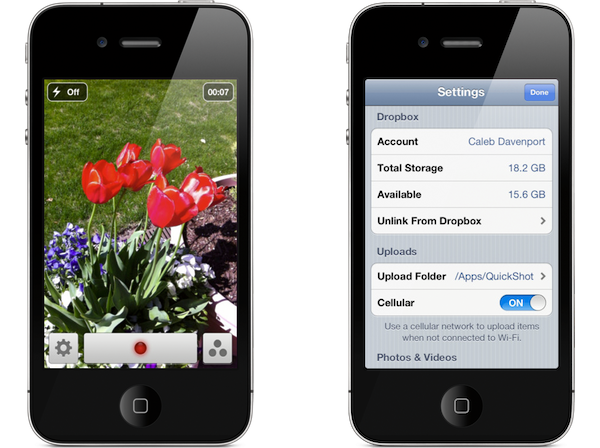
QuickShot 1.7 is not just a maintenance release, but a big update if we look at the changes made to the back end. QuickShot, which instantly saves photos to Dropbox, fixes many of the bugs that were present in the earlier version (1.6.3). The bigger story here, however, is the switch to the new Dropbox SDK. Aside from a big performance boost (apps updated to use the new Dropbox SDK use less system resources in the background), the biggest new feature is a single-sign-on system.

With current Twitter apps, you only need to sign into your Twitter accounts via the Settings app in iOS. Twitter apps will look for those accounts and request access so you don’t have to sign in each time. Dropbox now works similarly; With the Dropbox app installed on your iPhone or iPad, simply logging into their app provides access for other apps using the new SDK. This of course makes logging into and using Dropbox much easier — you’re simply redirected to the Dropbox app and asked whether you’d like to accept or cancel the app link. The feature is pretty cool and it’s the first time I’ve seen Dropbox authentication like this in an iOS app.

With QuickShot, you can easily upload photographs to a Dropbox shared folder to quickly share images and videos for events, parties, and get-togethers. We think it’s a splendid little camera app, and you can give QuickShot a try for only $0.99 on the App Store.