
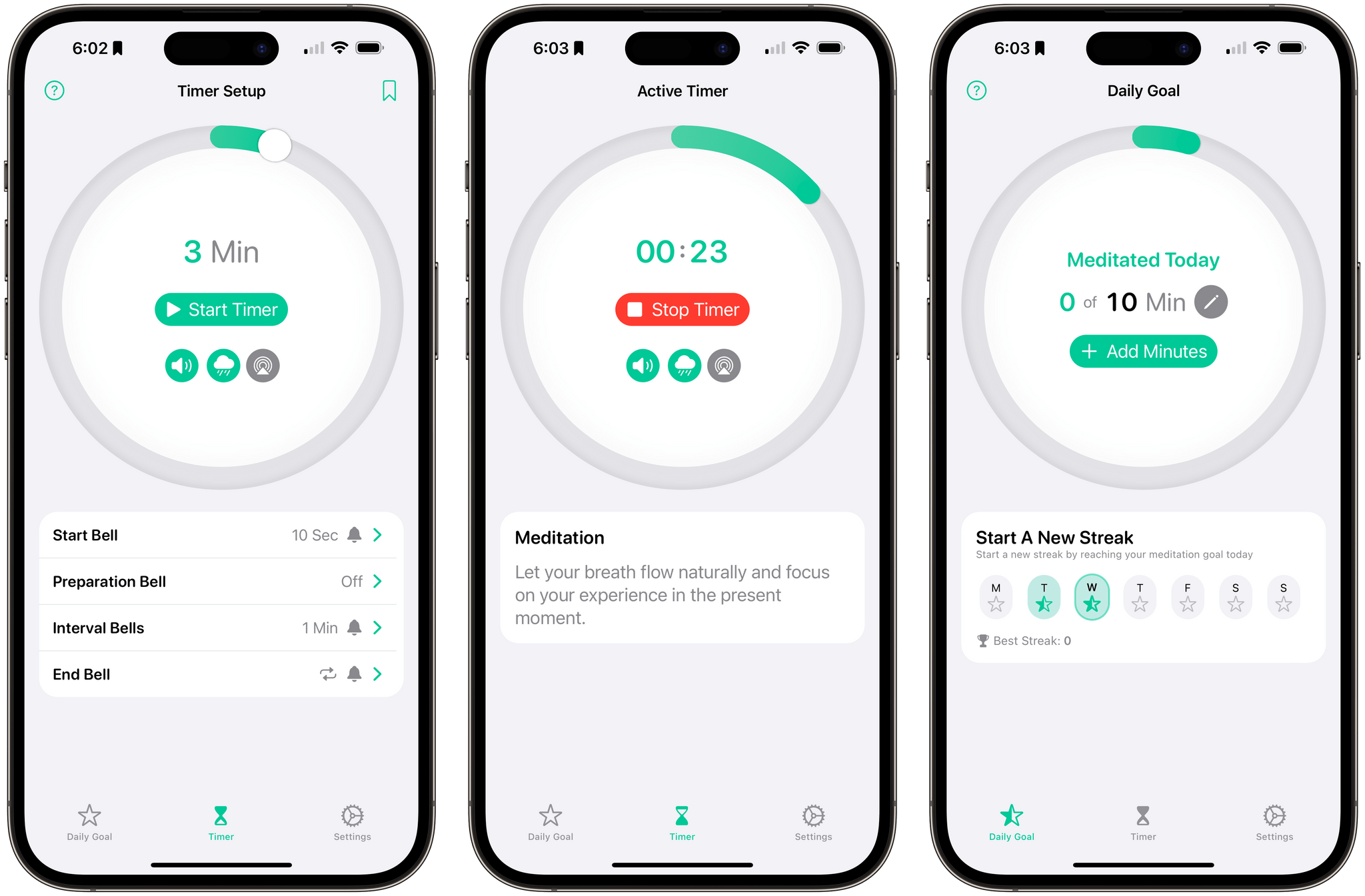
Zenitizer 1.2, an iOS, iPadOS, and watchOS meditation app by Manuel Kehl, was released yesterday, adding iCloud sync support. The update means that progress toward your meditation goals and routines you create on any version of the app will sync across all devices for the first time. I recommended Zenitizer to Club MacStories readers not long ago when version 1.0 was released, but it’s such a well-designed and thought-out app, I wanted to go a little deeper today on everything it has to offer.
Posts in reviews
Zenitizer: An Simple, Elegant Way to Practice and Track Meditation Sessions

Access Extra Content and Perks
Founded in 2015, Club MacStories has delivered exclusive content every week for nearly a decade.
What started with weekly and monthly email newsletters has blossomed into a family of memberships designed for every MacStories fan.
Club MacStories: Weekly and monthly newsletters via email and the web that are brimming with apps, tips, automation workflows, longform writing, early access to the MacStories Unwind podcast, periodic giveaways, and more;
Club MacStories+: Everything that Club MacStories offers, plus an active Discord community, advanced search and custom RSS features for exploring the Club’s entire back catalog, bonus columns, and dozens of app discounts;
Club Premier: All of the above and AppStories+, an extended version of our flagship podcast that’s delivered early, ad-free, and in high-bitrate audio.
Finalist: A Notepad-Inspired Task Manager
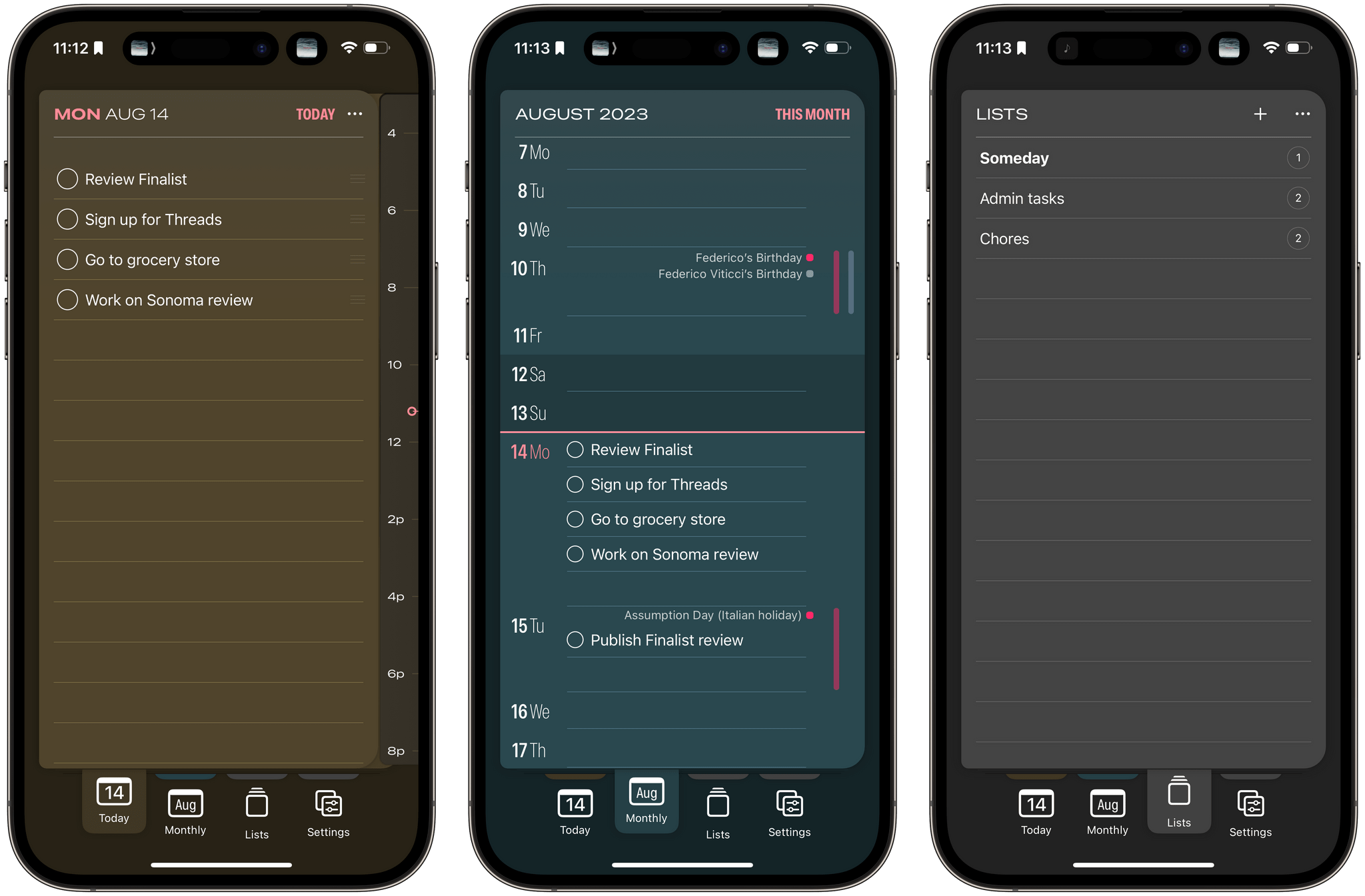
Finalist is a new iPhone and iPad task manager that combines elements of note-taking apps, Kanban boards, and calendar apps in a unique and interesting way. The result is a lightweight app that’s simple and quick to use but unlikely to replace a fully-featured task manager for most users.
Access Extra Content and Perks
Founded in 2015, Club MacStories has delivered exclusive content every week for nearly a decade.
What started with weekly and monthly email newsletters has blossomed into a family of memberships designed for every MacStories fan.
Club MacStories: Weekly and monthly newsletters via email and the web that are brimming with apps, tips, automation workflows, longform writing, early access to the MacStories Unwind podcast, periodic giveaways, and more;
Club MacStories+: Everything that Club MacStories offers, plus an active Discord community, advanced search and custom RSS features for exploring the Club’s entire back catalog, bonus columns, and dozens of app discounts;
Club Premier: All of the above and AppStories+, an extended version of our flagship podcast that’s delivered early, ad-free, and in high-bitrate audio.
Söka: An AI Assisted App to Track Your Bucket Lists
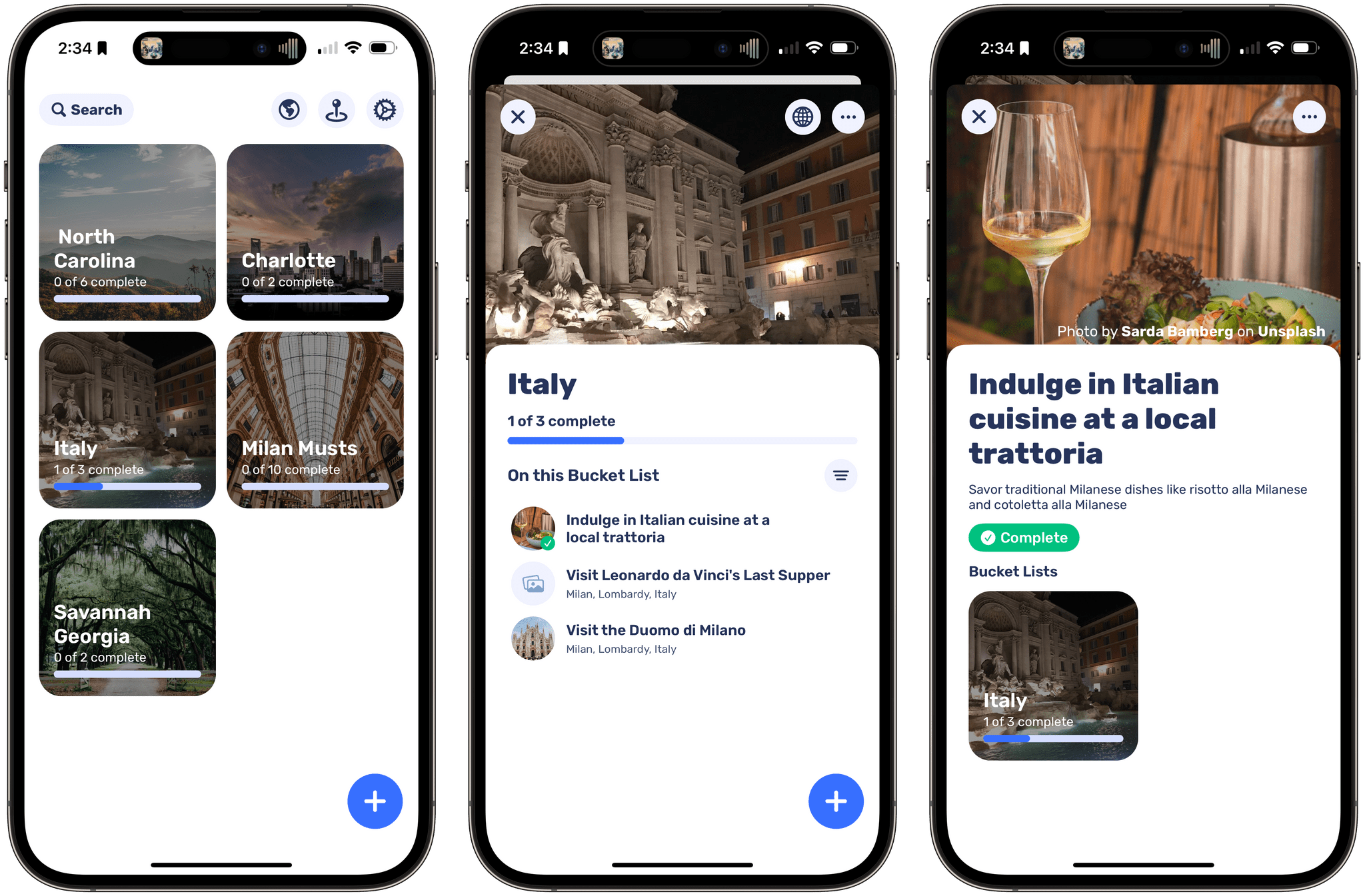
Just before I hopped on a plane to head to WWDC, I noticed a new app called Söka, an iOS and iPadOS bucket list tracker by Roddy Munro. I didn’t have time to dig into the details or test it, but there was something about it that caught my eye, so I made a note to revisit it later in the summer. I’m glad I did because it’s one of the best integrations of artificial intelligence that I’ve seen in an app.
Söka takes the friction out of building travel bucket lists with the help of AI. I’ve been using Söka as a way to create travel lists of places I want to visit in North Carolina and Italy, for example. Whether it’s for travel like Söka or media like Sofa, there are a lot of apps built on the idea of creating ‘someday’ lists and tracking your progress. What makes Söka unique is the way it uses AI to remove the friction from the list-building part.
Access Extra Content and Perks
Founded in 2015, Club MacStories has delivered exclusive content every week for nearly a decade.
What started with weekly and monthly email newsletters has blossomed into a family of memberships designed for every MacStories fan.
Club MacStories: Weekly and monthly newsletters via email and the web that are brimming with apps, tips, automation workflows, longform writing, early access to the MacStories Unwind podcast, periodic giveaways, and more;
Club MacStories+: Everything that Club MacStories offers, plus an active Discord community, advanced search and custom RSS features for exploring the Club’s entire back catalog, bonus columns, and dozens of app discounts;
Club Premier: All of the above and AppStories+, an extended version of our flagship podcast that’s delivered early, ad-free, and in high-bitrate audio.
Callsheet Provides Movie and TV Details with an Uncluttered Native Interface
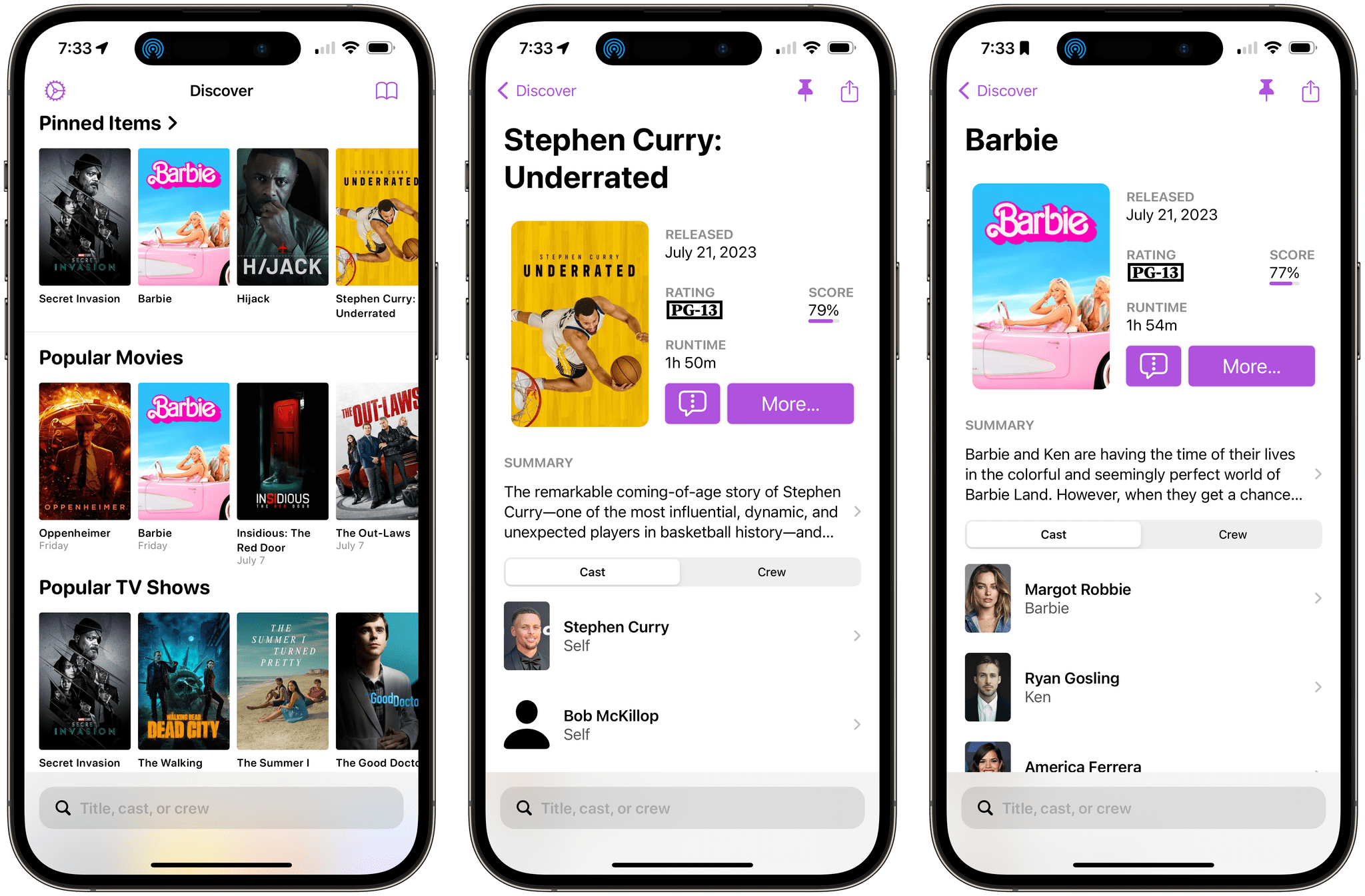
Today, Casey Liss released a brand new app called Callsheet for looking up cast and crew information about movies and TV shows. The app, which works on the iPhone and iPad, has a lot in common with movie and TV show tracking apps that I’ve covered, except for one very big difference. Callsheet isn’t a tracking app. Instead, it’s an app front end for The Movie DB, a website that offers a crowd-sourced movie and TV show database and an API for developers.
That’s an important distinction to understand. Callsheet is designed for those times that you want to know more about the people behind a movie or TV show but find the ads in apps and on websites, like IMDb, frustrating. If that resonates with you, and you’re not interested in tracking what you’ve watched, Callsheet offers a better experience for finding cast and crew information.
Access Extra Content and Perks
Founded in 2015, Club MacStories has delivered exclusive content every week for nearly a decade.
What started with weekly and monthly email newsletters has blossomed into a family of memberships designed for every MacStories fan.
Club MacStories: Weekly and monthly newsletters via email and the web that are brimming with apps, tips, automation workflows, longform writing, early access to the MacStories Unwind podcast, periodic giveaways, and more;
Club MacStories+: Everything that Club MacStories offers, plus an active Discord community, advanced search and custom RSS features for exploring the Club’s entire back catalog, bonus columns, and dozens of app discounts;
Club Premier: All of the above and AppStories+, an extended version of our flagship podcast that’s delivered early, ad-free, and in high-bitrate audio.
Chronicling: A Flexible Event Tracker with Modern Features and A Top-Notch Design
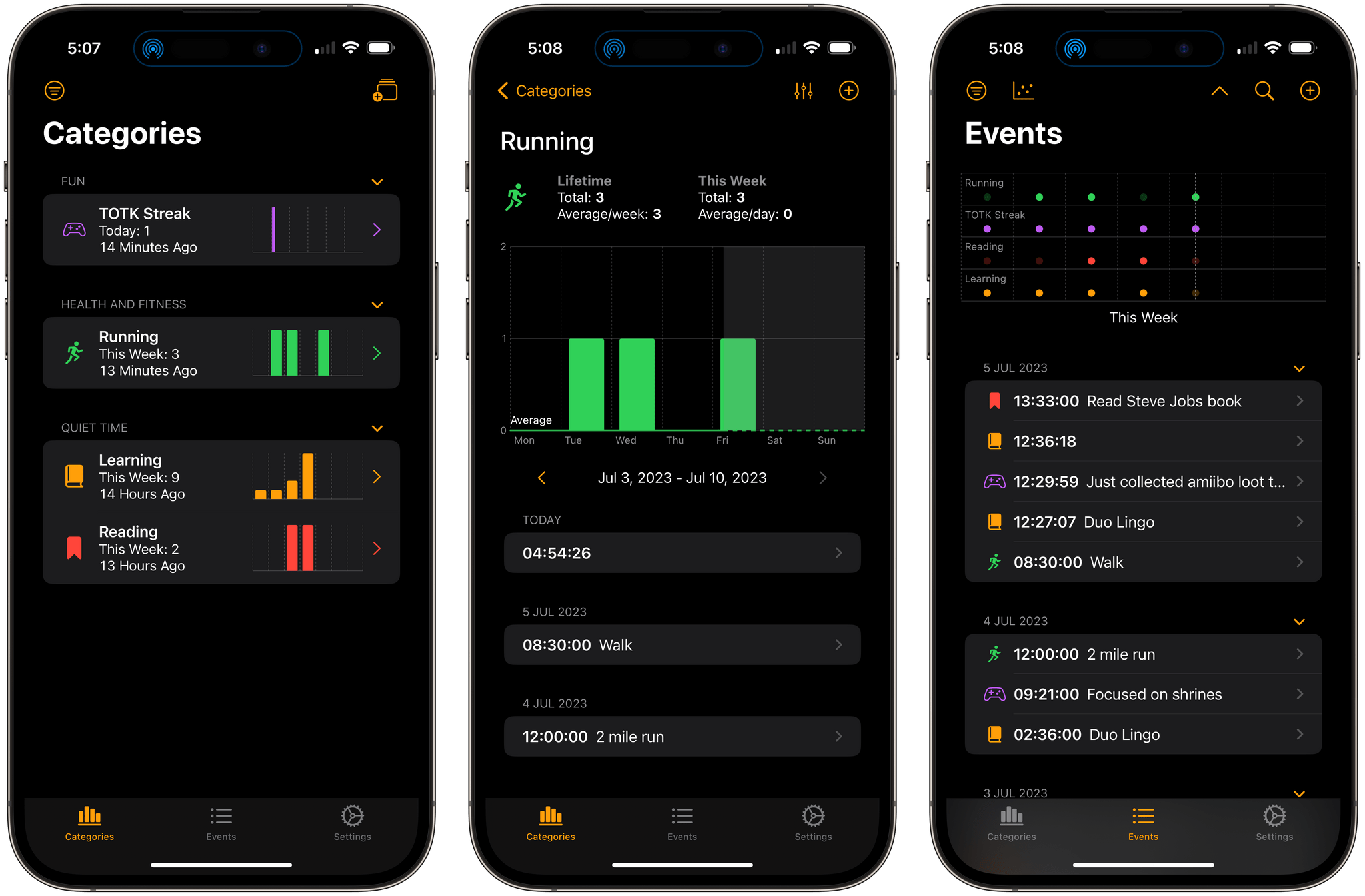
Chronicling is a brand-new event tracking app for iOS and iPadOS by Rebecca Owen. The App Store is full of apps for tracking everything from the very specific, like caffeine consumption, to apps like Chronicling that can be used to track nearly anything. What makes Owen’s app unique, though, is it’s one of the best examples of modern SwiftUI design that I’ve seen that incorporates the still relatively new Swift Charts and other recent Apple technologies to deliver a great user experience.
Trackers like Chronicling are the perfect fit for the iPhone. Most people have the device with them all the time, which makes it perfect for collecting data frequently, but it’s what you do with that data that matters the most. Maybe you’re trying to learn a new language and want to track how often you practice to hold yourself accountable. Or maybe your knee has been bothering you, and you want to keep track of when it flares up to see if it corresponds to an activity in your life. The point is, whether you’re trying to form a new habit or find patterns in things that happen throughout your day, part of the process is gathering the data. The other half of the equation is breaking the data down in a meaningful way. Chronicling does both well.
Access Extra Content and Perks
Founded in 2015, Club MacStories has delivered exclusive content every week for nearly a decade.
What started with weekly and monthly email newsletters has blossomed into a family of memberships designed for every MacStories fan.
Club MacStories: Weekly and monthly newsletters via email and the web that are brimming with apps, tips, automation workflows, longform writing, early access to the MacStories Unwind podcast, periodic giveaways, and more;
Club MacStories+: Everything that Club MacStories offers, plus an active Discord community, advanced search and custom RSS features for exploring the Club’s entire back catalog, bonus columns, and dozens of app discounts;
Club Premier: All of the above and AppStories+, an extended version of our flagship podcast that’s delivered early, ad-free, and in high-bitrate audio.
TV Forecast 2.0 Adds Movie Tracking
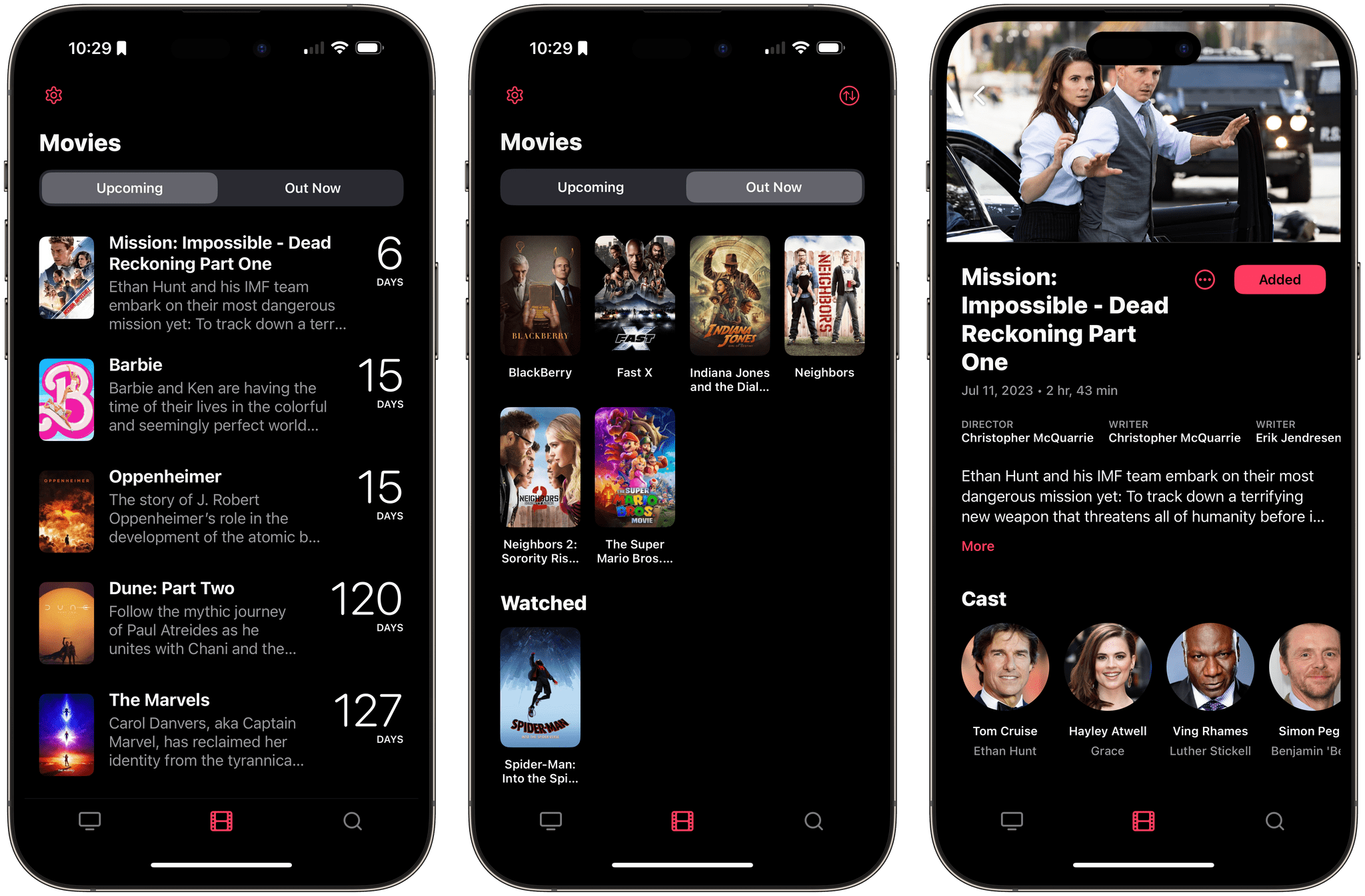
The App Store is full of apps for tracking the media you enjoy, and at least for TV shows and movies, many use Trakt.tv as a data source and tracking service and Just Watch to list where you can watch something. That results in a degree of sameness in the category. What’s harder to find on the App Store is a well-designed TV show and movie tracker. There’s a lot of data available about what we watch, and as a result, too many apps wind up with cluttered, confusing interfaces. TV Forecast 2.0 by Matt Comi isn’t like that, which is why it’s been one of my favorite TV trackers for a long time, and with an update today, it’s one of my favorite movie trackers too.
I reviewed TV Forecast in 2020, and what I said about the app is just as true today as it was then:
When I stopped to consider what it is about TV Forecast that has made it stick for me in a way that no other TV tracking app has, I keep coming back to its balanced design. It has a simple elegance that makes tracking shows feel effortless and natural. For supporting an activity that I use as a relaxing escape, that’s exactly the type of app I value. When all I want to do is quickly check off a few episodes or add a show that a friend recommends, I can. Just as easily, though, I can wander from one linked show to another discovering new ones along the way. It’s that balance between utility and exploration that makes TV Forecast my favorite TV tracker.
For more on TV Forecast’s overall design and functionality for TV shows, be sure to check out my 2020 review.
Access Extra Content and Perks
Founded in 2015, Club MacStories has delivered exclusive content every week for nearly a decade.
What started with weekly and monthly email newsletters has blossomed into a family of memberships designed for every MacStories fan.
Club MacStories: Weekly and monthly newsletters via email and the web that are brimming with apps, tips, automation workflows, longform writing, early access to the MacStories Unwind podcast, periodic giveaways, and more;
Club MacStories+: Everything that Club MacStories offers, plus an active Discord community, advanced search and custom RSS features for exploring the Club’s entire back catalog, bonus columns, and dozens of app discounts;
Club Premier: All of the above and AppStories+, an extended version of our flagship podcast that’s delivered early, ad-free, and in high-bitrate audio.
Paku: Hyper-Local Air Quality Tracking on Every Apple Platform
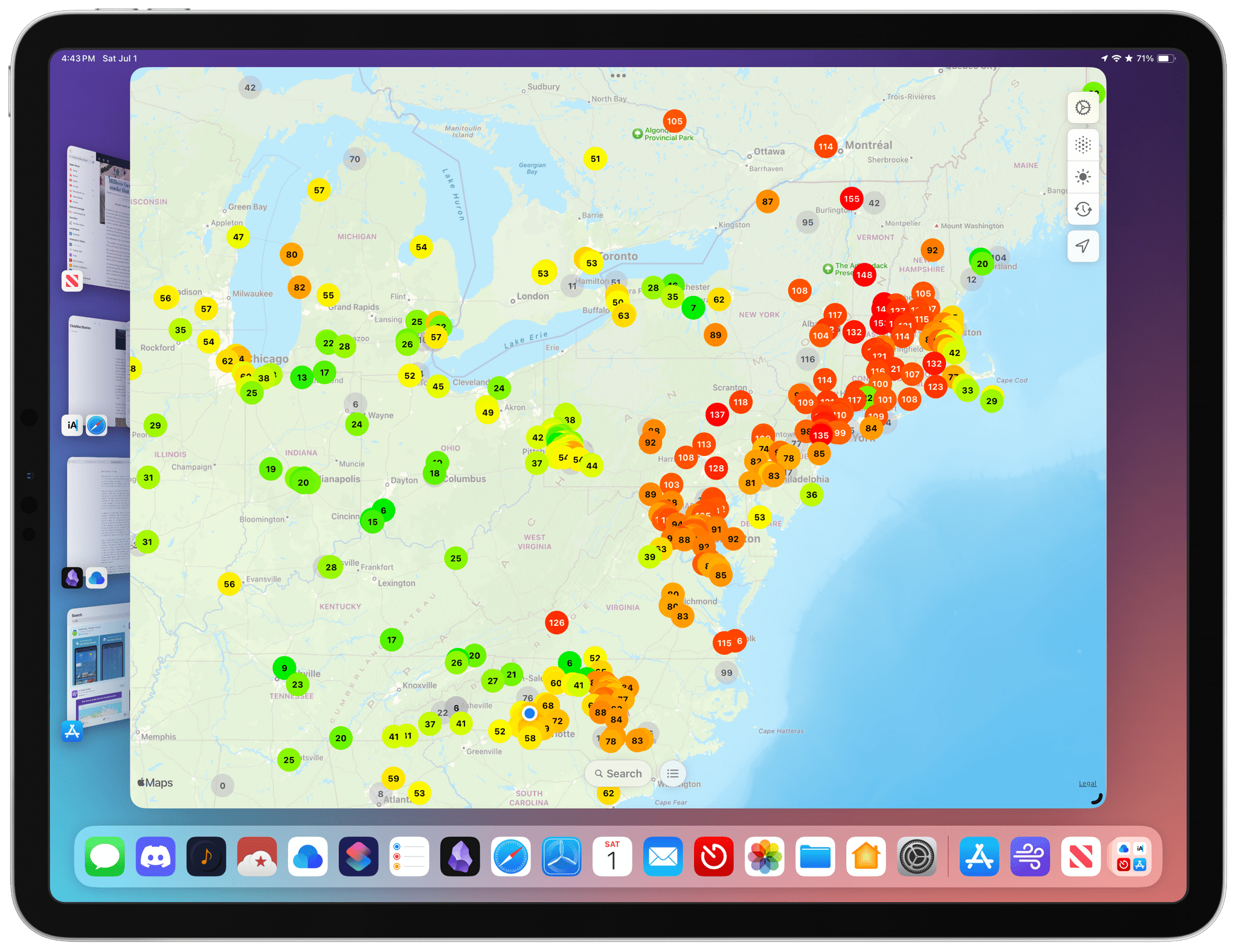
With millions of people facing a long, smokey summer here in the US, I thought it would be a good time to recommend Paku by Kyle Bashour, an iPhone, iPad, Mac, and Apple Watch app for tracking the air quality where you live.
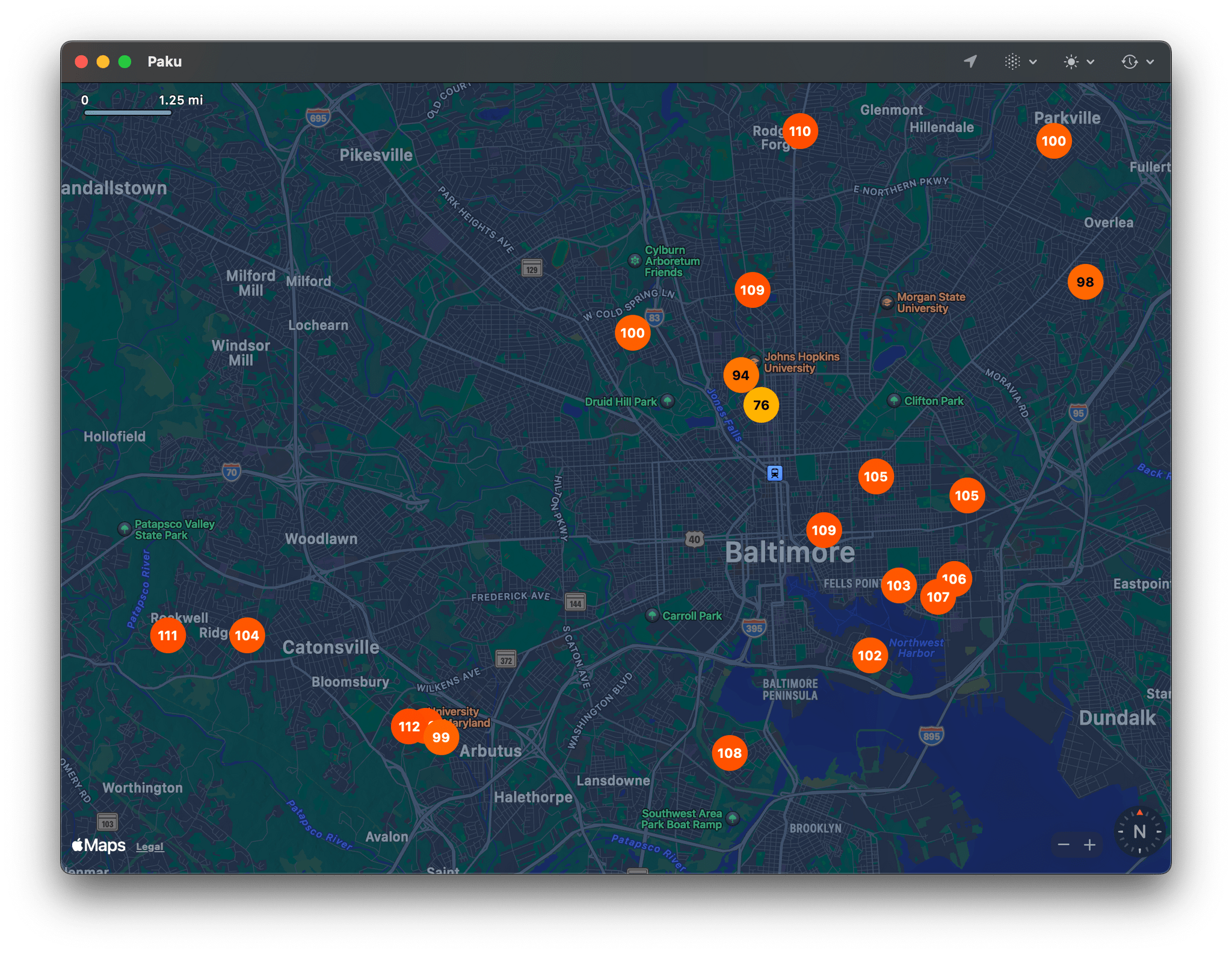
Paku combines Apple’s MapKit framework with public data from PurpleAir to track air quality globally. By default, the app displays Air Quality Index data as color-coded dots on its map UI. Just like Apple Maps, you can zoom out and pan around to see data in other areas or use the app’s search functionality, but the greatest value is in knowing what the air quality is in your neighborhood.
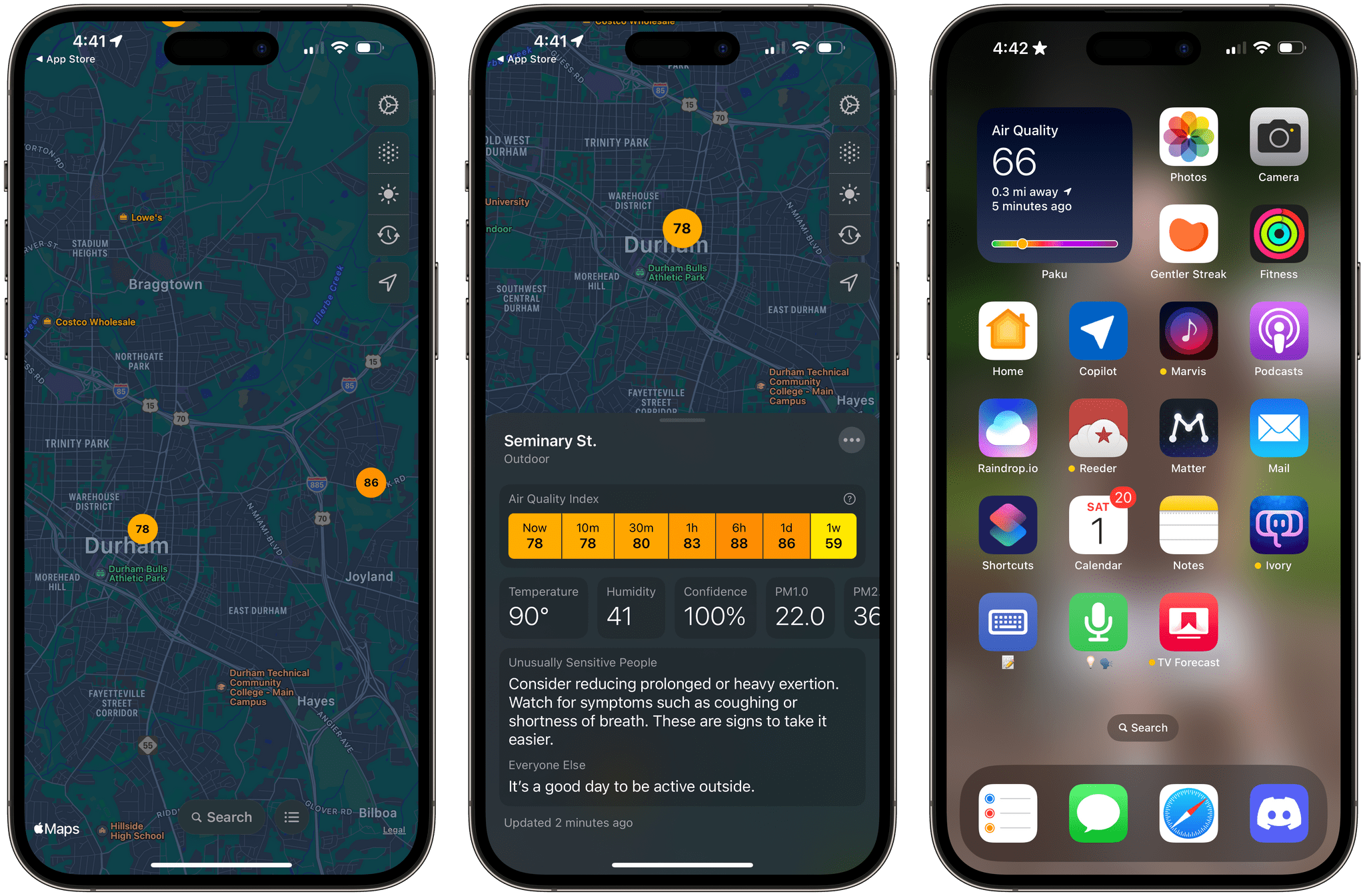
In addition to AQI data, Paku can display temperature, humidity, and PM1.0, PM2.5, and PM10.0 data, using the toolbar overlay on the app’s map. For more information about a station’s data, tap it, and you’ll get all the available data, historical context for the current reading, and an explanation of what precautions you should take if the air quality is bad. From the three-dot More button in the corner of a station’s data view, you can also favorite an air quality station, open the PurpleAir website, or hide a station.
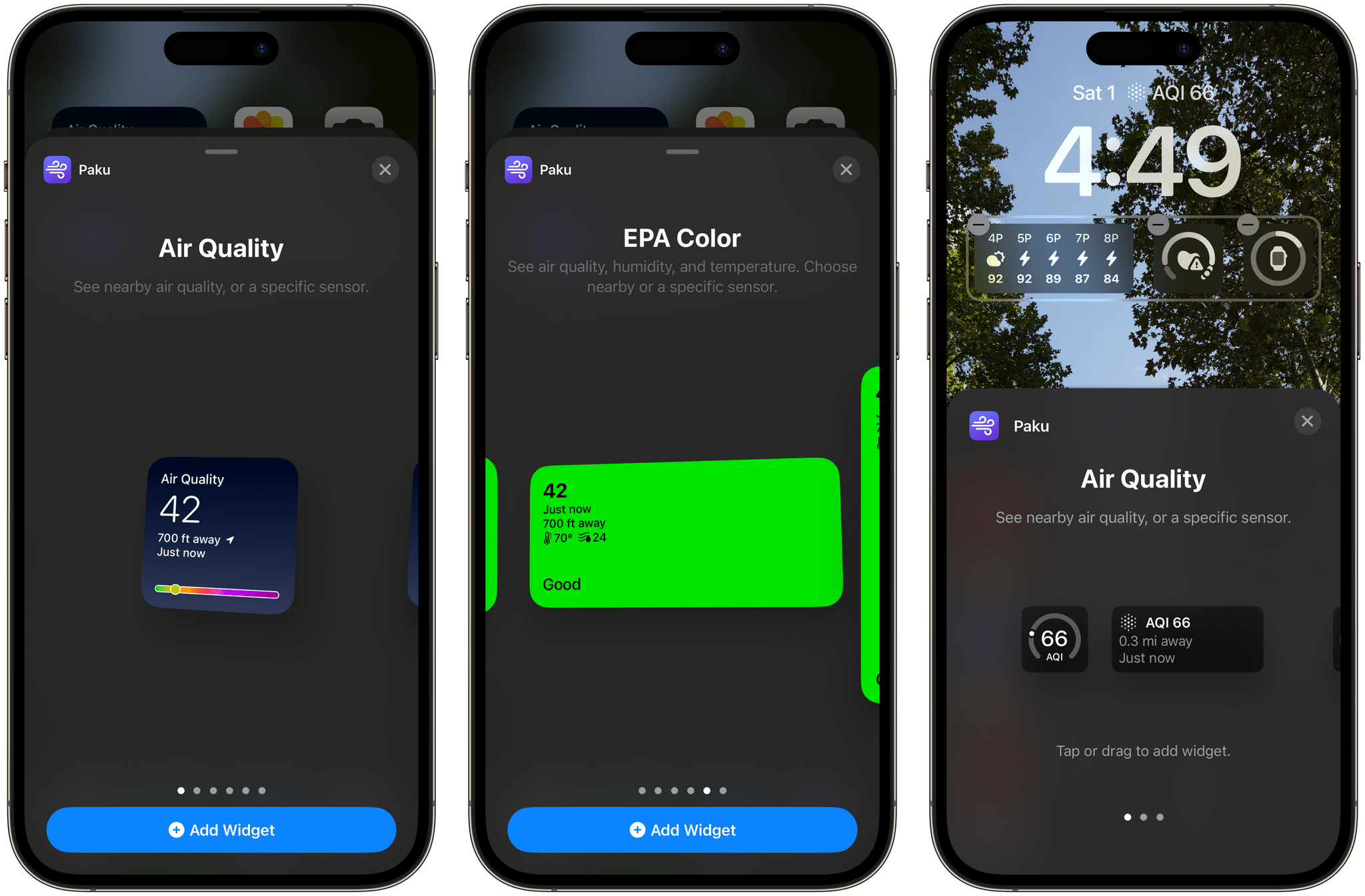
Paku includes Home and Lock Screen widgets too. For the iPhone’s Lock Screen, there are widgets to track air quality, temperature, and humidity. The same is true for Home Screen widgets, which feature the same types of data but use two designs. The first design uses a blue gradient background, big numerals for the primary data point, and a graphic that shows where your current air quality falls on the air quality scale. The other Home Screen widget design uses the EPA’s color scheme as the background of the widget to make the air quality reading even more glanceable.
Paku also supports a single Shortcuts action that opens the app, which is fine, but it would be better if the action returned the air quality, temperature, and humidity data instead.
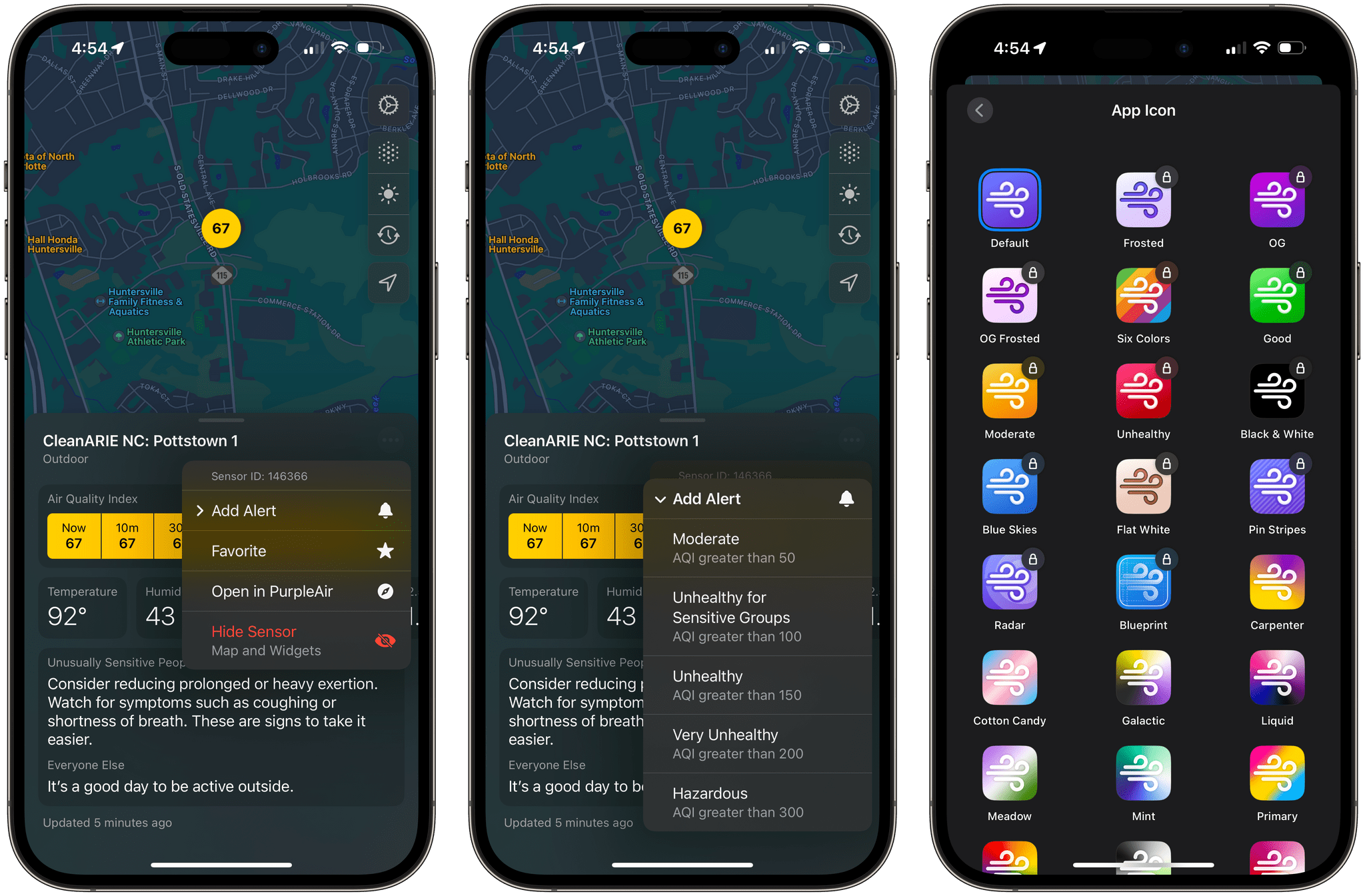
Paku is free to download but offers a subscription with additional features, including the ability to set alerts based on readings from a sensor when air quality reaches one of the scale’s thresholds, such as Unhealthy or Hazardous. Subscribers can also access data from private sensors you can install at your home and pick from a long list of alternative icons. Of those paid features, notifications strike me as the most useful unless you don’t have a nearby public air quality sensor that you can rely on. I’m fortunate in that there’s a sensor less than a quarter mile from my home, so I haven’t felt the need to install my own sensor.
When I moved to North Carolina, I was struck by how clean the air was compared to the Chicago suburbs. I’d tracked air quality on and off in my old neighborhood, but when I got to North Carolina, there wasn’t any reason to do so. Every day started and finished solidly in the green zone. That changed last week, and although there are areas with far worse air quality than here, Paku is back on my Home Screen, helping me decide whether I should get my exercise outside each day or do something indoors. I could use the AQI data from a full-blown weather app, but I love Paku’s clean, focused design and the fact that I can set its widgets to a sensor that’s just down the street from my house.
Paku is available on the App Store as a free download. Notifications, private sensors, and alternative icons require a subscription that is $1.99/month or $13.99/year.
Access Extra Content and Perks
Founded in 2015, Club MacStories has delivered exclusive content every week for nearly a decade.
What started with weekly and monthly email newsletters has blossomed into a family of memberships designed for every MacStories fan.
Club MacStories: Weekly and monthly newsletters via email and the web that are brimming with apps, tips, automation workflows, longform writing, early access to the MacStories Unwind podcast, periodic giveaways, and more;
Club MacStories+: Everything that Club MacStories offers, plus an active Discord community, advanced search and custom RSS features for exploring the Club’s entire back catalog, bonus columns, and dozens of app discounts;
Club Premier: All of the above and AppStories+, an extended version of our flagship podcast that’s delivered early, ad-free, and in high-bitrate audio.
Paste: The Clipboard Management Utility Gets An Elegant New Design on the Mac
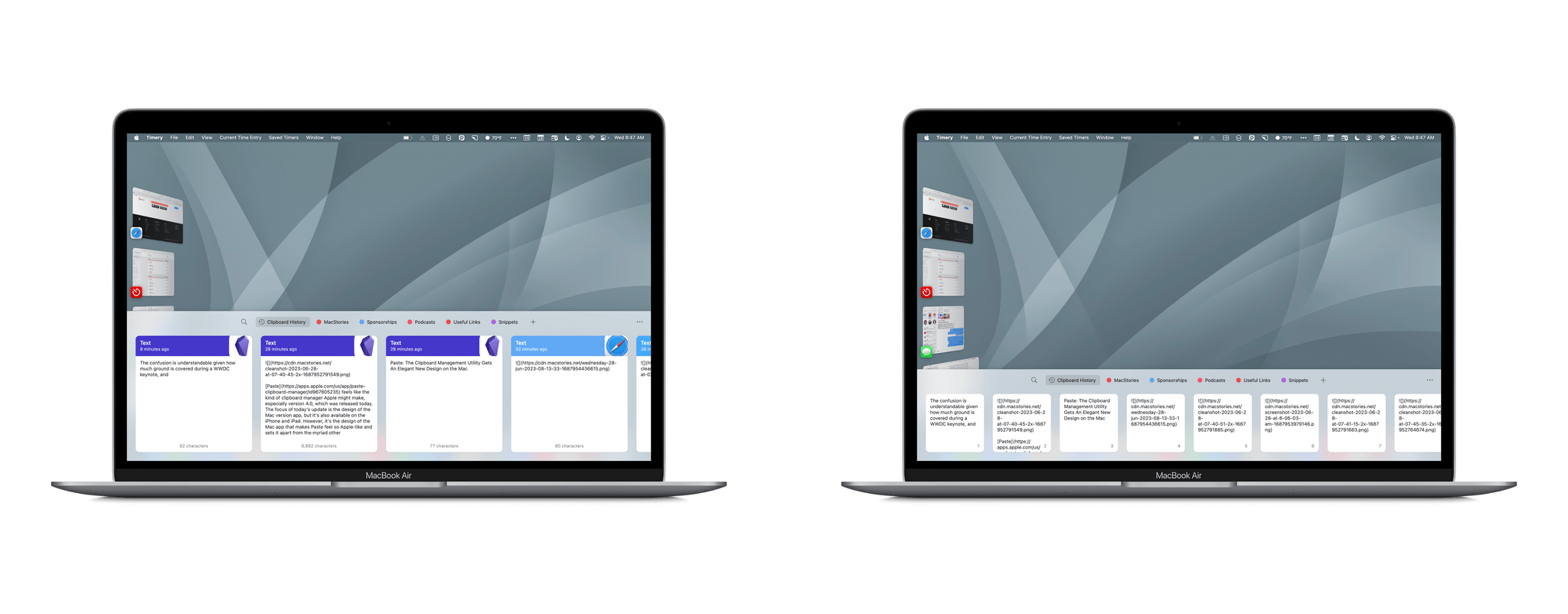
Paste feels like the kind of clipboard manager Apple might make, especially version 4.0, which was released today. The focus of today’s update is the design of the Mac version app, but it’s also available on the iPhone and iPad. However, it’s the design of the Mac app that makes Paste feel so Apple-like and sets it apart from the myriad other clipboard managers that are available.
Access Extra Content and Perks
Founded in 2015, Club MacStories has delivered exclusive content every week for nearly a decade.
What started with weekly and monthly email newsletters has blossomed into a family of memberships designed for every MacStories fan.
Club MacStories: Weekly and monthly newsletters via email and the web that are brimming with apps, tips, automation workflows, longform writing, early access to the MacStories Unwind podcast, periodic giveaways, and more;
Club MacStories+: Everything that Club MacStories offers, plus an active Discord community, advanced search and custom RSS features for exploring the Club’s entire back catalog, bonus columns, and dozens of app discounts;
Club Premier: All of the above and AppStories+, an extended version of our flagship podcast that’s delivered early, ad-free, and in high-bitrate audio.
Working Remotely with Belkin’s BoostCharge Pro
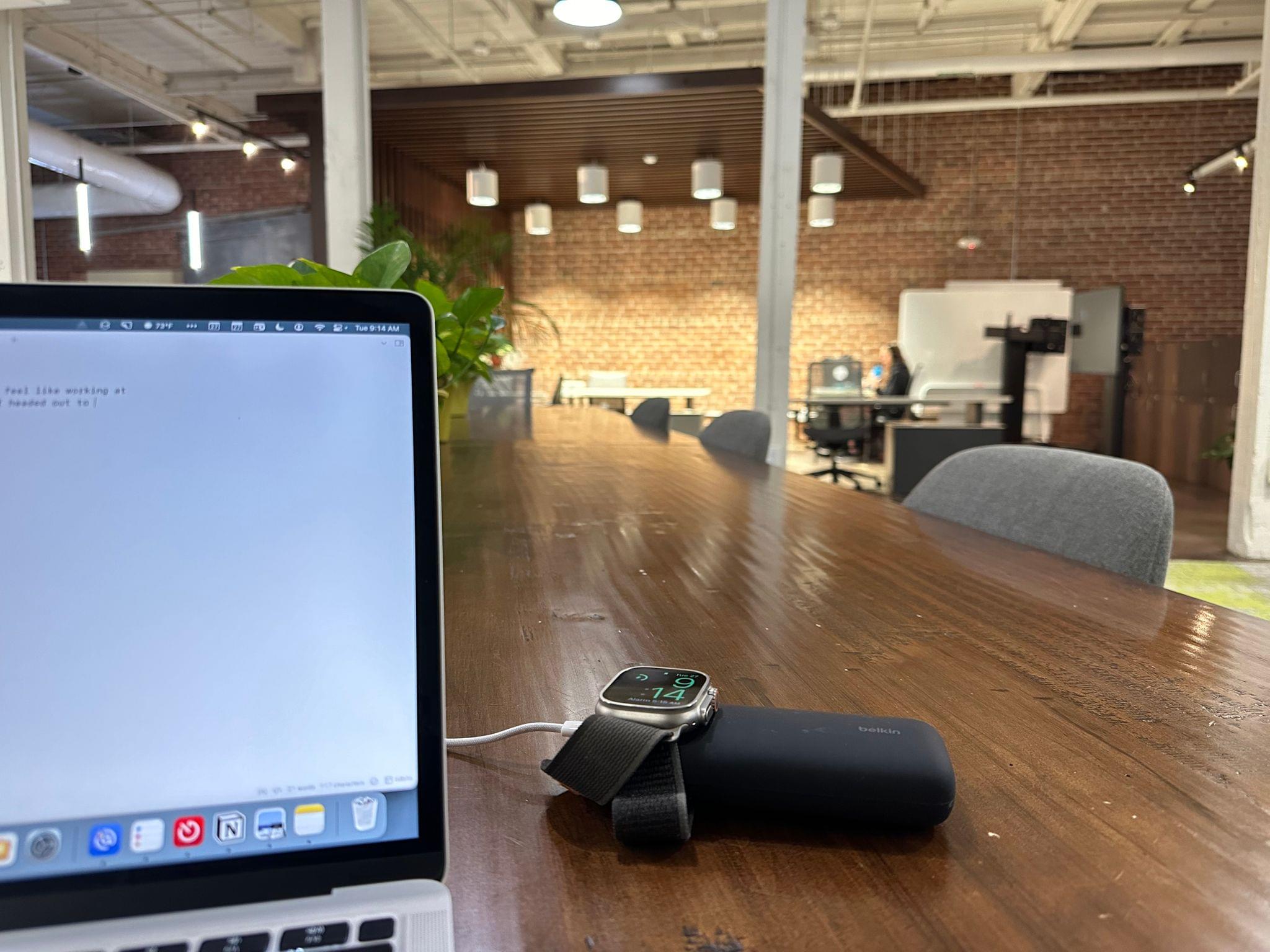
Update (October 14, 2024): The Belkin BoostCharge Pro Wireless Charger has been recalled and should not be used. Details here.
It’s Tuesday morning, and I didn’t feel like working at home today, so after breakfast, I headed out to the co-working space I joined in the spring. As I got ready, I realized my MacBook Air’s battery was a little low. I used it a lot yesterday and didn’t charge it overnight. My Apple Watch Ultra battery was a bit low, too, thanks to the extra drain of the watchOS 10 beta.
With plans to spend most of the day away and on foot, I wanted to travel light, so instead of grabbing my big 25,600 mAh Anker battery, I went for the Belkin BoostCharge Pro charger. The compact charger, which Belkin sent me for testing about a week ago, seemed perfect for this kind of scenario. The charger is compact and lightweight compared to larger options and has the added benefit of a built-in Apple Watch charging pad.
Access Extra Content and Perks
Founded in 2015, Club MacStories has delivered exclusive content every week for nearly a decade.
What started with weekly and monthly email newsletters has blossomed into a family of memberships designed for every MacStories fan.
Club MacStories: Weekly and monthly newsletters via email and the web that are brimming with apps, tips, automation workflows, longform writing, early access to the MacStories Unwind podcast, periodic giveaways, and more;
Club MacStories+: Everything that Club MacStories offers, plus an active Discord community, advanced search and custom RSS features for exploring the Club’s entire back catalog, bonus columns, and dozens of app discounts;
Club Premier: All of the above and AppStories+, an extended version of our flagship podcast that’s delivered early, ad-free, and in high-bitrate audio.