Posts in news

Mac Sales Up 27% In First Quarter of 2011

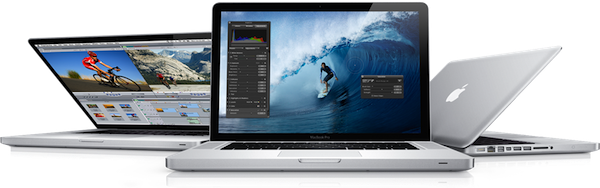
Quoting a research note issued by Piper Jaffray’s Gene Munster to clients this morning, BusinessInsider reports the Mac platform has seen a terrific rise in sales during the first quarter of 2011 in the United States. By summarizing data from NPD, the report details how the release of the new MacBook Pros in late February drove a 47% increase in sales year-over-year in the month of March, with an average 27% growth in the first quarter.

That 47% uptick followed growth of 20% in January and 12% in February, for average of 27% over the first quarter of 2011. That stands in stark contrast to the 3.2% drop in worldwide sales reported last week by IDC.

Bottom line: Munster expects Apple (AAPL) to report Mac unit sales in the range of 3.6 to 3.7 million, ahead of the Street’s consensus of 3.6 million.

So while the worldwide PC industry was seeing a serious decrease in sales in Q1 2011, Apple apparently managed to achieve a 27% growth with (allegedly) high Mac sales in the US. Like previous reports suggested, however, overall iPod sales should be down from last year – quite possibly because of the media playback capabilities of iPhones and iPads.

Analysts polled by Fortune two weeks ago claimed Apple could have sold nearly 4 million Macs in the second fiscal quarter of 2011 (which ended on March 26). Apple is set to announce the Q2 2011 financial results on April 20th.


Microsoft Releases New iPhone App To Create Panoramic Photos

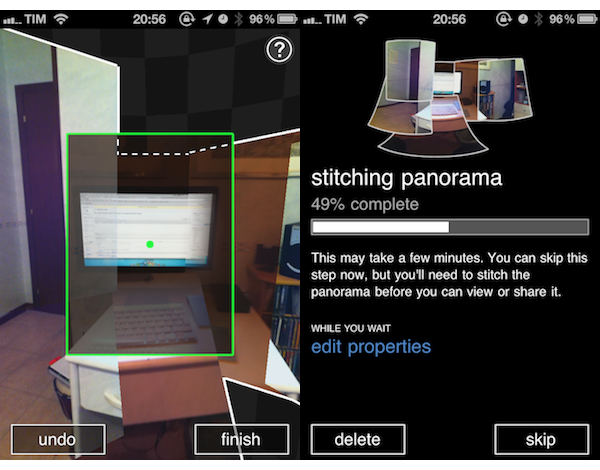
In its ongoing effort to support the iOS platform with a steady flow of new releases and updates, Microsoft released earlier today a new app for iPhone called Photosynth which is aimed at letting you create panoramic, 360-degree photos with your device’s camera. The concept and overall execution are very similar to Occipital’s 360 Panorama for iPhone: you hold your iPhone, and rotate it to capture what’s around you. The app will then “stitch” the panorama to offer a zoomable image that you can pan with your fingers to see the complete result. Unlike Occipital’s software, Microsoft’s application comes with sound effects for each photo (in fact, Photosynth does nothing but capturing a series of photos and making a collage after processing them) and simpler on-screen guides. I’ve used the app for a couple of hours now and, lack of gyroscope aside, it seems to me that Occipital’s app still produces better panoramas both in direct sunlight and low-light conditions. There’s some serious overlapping of photos in Photosynth, and the underlying processing algorithm doesn’t look very smart to me.

However, if you’re a fan of Microsoft’s new Metro style, the Photosynth app will please you with Windows Phone 7-like menus and buttons. The animations are quite nice, but not exactly “iOS native.” Photosynth also comes with several sharing functionalities: you can send panoramas to the Photosynth.net service (requires a Windows Live ID login), Facebook and even Bing Maps. Microsoft actually encourages you to share through Bing Maps, as “millions of people could see your panoramas on maps and in search results for locations you’ve captured.”

Photosynth is an interesting experiment, and I look forward to future updates. Get the app here.


iHub: A USB Hub with Apple Appeal

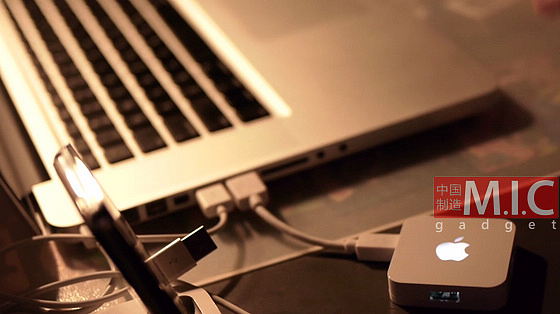
M.I.C. Gadget is now selling the second revision of their iHub; a small, 4-port USB hub with a bit of Apple branding on it. The iHub has a light-up Apple logo on top that’s reminscent of many Apple laptops. Version 2 of their iHub looks very nice and could almost pass for a legitimate Apple accessory, even the packaging looks familiar.

Video and another picture after the break. Read more


Apple Using New App Store Ranking Algorithm?

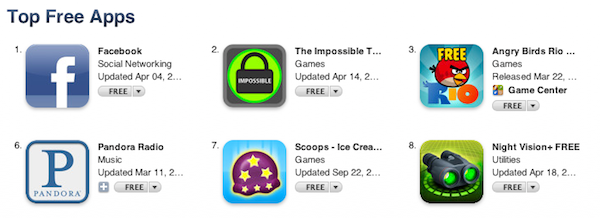
According to Inside Mobile Apps, Apple may have recently tweaked the algorithm that determines ranking of iOS apps in the App Store embracing more factors than simple download numbers to present the most popular free and paid apps. Noticing a sudden change in how the Facebook iPhone app jumped to #1 after months of sitting between the #10 and #20 spots, the website contacted various mobile advertising networks inquiring about the possibility of a new algorithm put in place by Apple in the past week. While it’s not clear which new factors Apple is using to generate the App Store charts, Inside Mobile Apps speculates the Store’s backend may now be heavily based on ratings and active usage of an app, rather than download stats.

We’ve been noticing changes in the Top Free rankings for at least three days now,” said Peter Farago, vice president of marketing at Flurry, which serves 80,000 applications with its analytics product. “From our point of view, Apple is absolutely considering more than just downloads, which we believe is the right direction go to measure true popularity of an app.” Other pay-per-install networks tell us they’ve been detecting these changes too.

Apple also recently adjusted the App Store mobile experience by allowing users to browse the top 300 apps from a mobile device. Still, this rumor doesn’t address specific aspects of the story like how it would be possible for Apple to track usage, and what kind of ratings are being considered exactly. It’s well known that positive reviews in the App Store have always helped developers in gaining more exposure and better rankings, so it’s unclear how Apple could have tweaked its algorithm to influence the position of apps in the charts through ratings. Furthermore, besides leaving a rating and a review in the App Store, users can also mark others’ reviews as “helpful.” Is this factor being considered by Apple in its (allegedly) new ranking system? We don’t know.

If the rumor’s true, however, this would lead iOS developers to create better, more engaging apps that result in a better experience on a user’s end – who is likely to leave a positive review in the App Store and use an app more. If Apple’s really tweaking its algorithm to promote quality, rather than raw numbers, it’ll be interesting to see how this will play out for the thousands of iPhone and iPad developers out there. [via 9to5mac]


GoodReader for iPad Adds AirPlay for Video, Encryption, Better PDF Annotations

GoodReader, the popular file manager and document previewer for iOS, received an update last night in its iPad version that, reaching version 3.6, adds support for enterprise-class encryption for files and documents, alongside many other features and bug fixes aimed at improving the performances and stability of the app.

Encryption in the new GoodReader for iPad is based on Apple’s implementation of data protection (introduced with iOS 4.2) that requires a passcode to unlock an iOS device. To put it simply, whilst Apple’s passcode feature is responsible for encrypting and decrypting files as soon as a device is locked / unlocked, GoodReader can apply an additional security measure in the form of app-specific password and documents’ passwords. GoodReader doesn’t encrypt data – iOS’ encryption functionalities do that – but with this update the app integrates Apple’s advanced security with its own restricted access features in a single package. So while iOS will do all the work of encrypting your files when a device is locked (and until it stays so, not even a jailbreak can decrypt those files with direct access to the filesystem), GoodReader now takes full advantage of iOS’ capabilities to protect your documents and folders in case of a stolen or lost iPad (the iPhone version hasn’t been updated to version 3.6 yet).

On the server side of things, GoodReader 3.6 features better support for all online services like iDisk and Dropbox, more stable SugarSync connections and faster SFTP downloads. In case you haven’t tried the app, GoodReader is a pretty sweet way to gain access to files stored in the cloud, download them locally, and edit them.

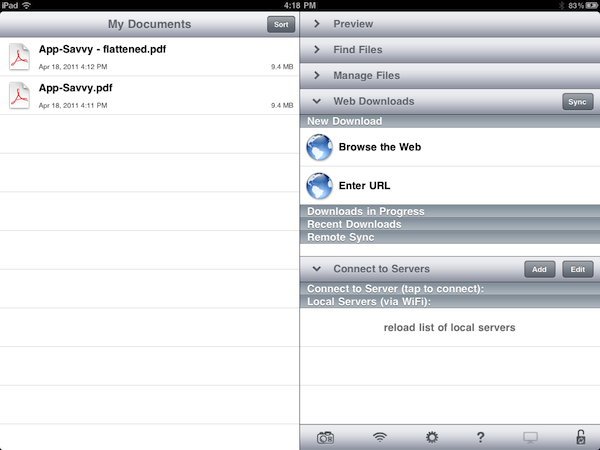
The biggest new feature of 3.6, however, is the improved support for PDF annotations. GoodReader for iPad now offers an option to “flatten annotations”, meaning that all the drawings and annotations you take on a document – like a PDF – can be flattened into the main body of the file and previewed by Apple’s own iOS apps like Mail, Safari or iBooks. Previously, annotations were only visible in desktop apps like Preview and Acrobat Reader as iOS can’t read by default the annotations’ metadata. GoodReader now offers a workaround to save a flattened copy that’s nothing but the original file with all annotations applied within a page. You can send these annotated documents to other apps with the Open In menu, or share them via email with anyone (GoodReader will even ask you if you want to flatten a document upon hitting the share button – just to make sure).

Last, GoodReader 3.6 can stream videos to an Apple TV in your room thanks to AirPlay support, which requires iOS 4.3 or later. GoodReader might not have the most elegant interface design seen on iOS, but it sure is packed with features, and it’s an app that keeps getting better and more powerful on each release. Get it in the App Store at $4.99.


Rumor: iPhone 5 Won’t Feature “All-New Design”

As reported by AppleInsider, analyst Ming-Chi Kuo with Concord Securities issued a note to investors this morning including details of the next-generation iPhone, allegedly scheduled for a Fall 2011 launch with a possible announcement at Apple’s usual September media event. According to Ming-Chi Kuo, the iPhone 5 won’t feature an all-new design marking a departure from the current iPhone 4 industrial hardware design – rather, it will be a “slight modification” with the addition of the Apple A5 processor, and a Qualcomm baseband for CDMA and GSM models.

His checks with supply chain sources indicated that the next handset from Apple will not feature an all-new-design, but rather only “slight modifications” from the iPhone 4.

Specifically, Kuo has heard that the iPhone 5 will include the faster A5 processor already found in the iPad 2, as well as a higher resolution 8 megapixel rear camera. He has also been told that Apple will switch to a Qualcomm baseband for both GSM and CDMA models, along with an improved antenna design.

The analyst believes “trial production” of the new device will start in August, with massive production for retail distribution in September. Whilst Ming-Chi Kuo has a good track record when it comes to Apple rumors (he pinpointed the rumored white iPhone 4 release in April, and the fact that the iPad 2 would feature a 1024 x 768 display with iPod touch-like cameras), it is worth noting that several reports in the past weeks indicated the iPhone 5 wouldn’t ship until this Fall, or that Apple was considering an updated design with a metal back and a redesign antenna system. Among other rumors, NFC capabilities and a bigger screen to face competition from Android handsets which come with bigger displays than the iPhone’s.

Last, Ming-Chi Kuo claims the biggest selling point of the iPhone 5 will be the new operating system, iOS 5, Apple will unveil in the next months. iOS 5 is set to be previewed at the WWDC in June, and previous speculation suggested it would be a heavily cloud-based OS with new social, location and music features built on top of a “locker” for media Apple will include in a future (quite possibly free) version of MobileMe.


Droplist, The Dropbox-based Todo App, Gains Native iPad Interface

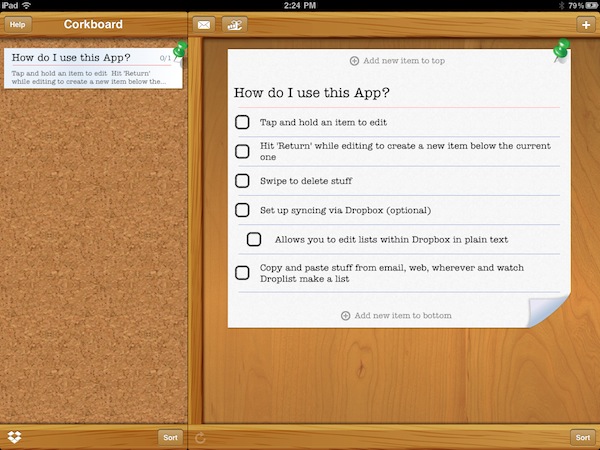
A few weeks ago I reviewed Droplist, a Dropbox-based “list creation app” that allowed you to quickly create todos and lists on the iPhone and have them available anywhere thanks to the Dropbox integration that turned these files into plain text documents. Droplist is an easy to use app that’s powered by a nice design, and it’s now available on the iPad as well thanks to the latest update that made the app universal for all iOS devices.

The iPad app retains the same functionalities we’ve seen on the iPhone: you can create lists on the desktop by following simple formatting rules, and save them to Dropbox to make them available in Droplist. If you prefer to turn an email or a message into a list with its own actions, Droplist allows you to paste items and see them becoming a list in a few seconds. The UI design is, of course, different as it takes advantage of the iPad’s bigger screen, but you’ll feel right home if you’ve used Droplist.

Droplist is available at $1.99 here, and it’s the easiest way to create lists on Dropbox.


Dropbox 1.4 Brings Tabs Back, Direct Uploads from Other Apps

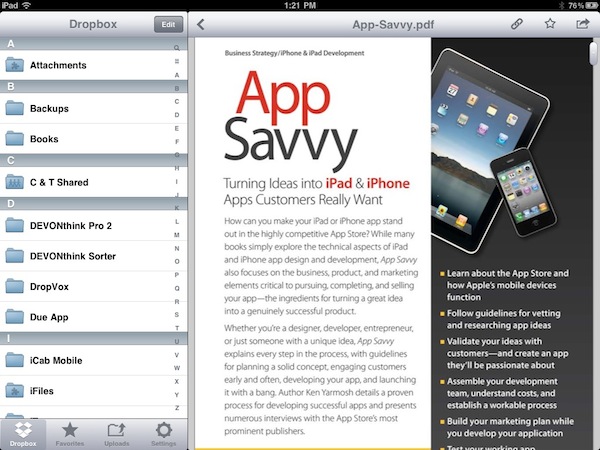
A major update to the official Dropbox app for iOS was released night in the App Store, and it adds important new functionalities to the uploading aspect of the app. Originally released last May on the iPad (a  month after the iPad 1 went on sale), the app was often criticized because of its unintuitive navigation and limited upload features that didn’t allow users to interact with external applications or navigate between folders and starred items with ease. The latest update, version 1.4, aims at fixing these usability issues by bringing tabs back. Instead of having to tap on buttons in the top toolbar, Favorites, Uploads and Settings are accessible alongside the main Dropbox folder in a series of tabs at the bottom.

The most notable feature, however, is the complete revamp of uploads. Not only can Dropbox upload multiple photos and videos at once from your camera roll, it can also accept direct uploads from external apps thanks to the “Open In” menu. For example, you can select a document from apps like Mail and iFiles, send it to Dropbox, and have Dropbox automatically open the upload interface letting you pick a destination for the document you’re importing. It’s fast and works really well.

Dropbox 1.4 is available for free in the App Store. Read more


Rejoice, The Easter Update To Angry Birds Seasons Is Here!

Remember hearing about that “amazing” Easter update for the Angry Birds Seasons game? Well just a few hours ago that update for Angry Birds Seasons went live (for the iPad version too) with version 1.4.0 and its full of 15 new Easter-themed levels, and of course some more of those golden eggs!

The new Easter-themed levels (jump the break for screenshots and a video) look just like you would expect with the strong prominence of the Spring sun, chocolate eggs and of course Easter bunnies. Intriguingly the update also brings the ability to send some Angry Birds and Easter themed cards to others.

EASTER EGGS FOR ANGRY BIRDS!
Spring is upon us and the time is ripe for some chocolate eggs and easter bunnies! So shed the winter gear and get in – Easter Eggs have never been this delicious! If you think St. Patrick’s Day was a blast, well, you ain’t seen nothing yet! This episode will again prove that Angry Birds is the most generous update giver of them all!

New Features in version 1.4.0:

- 15 LEVELS FULL OF SPRING
- NEW THEME TO FIT THE MOOD
- GOLDEN EGGS A-PLENTY
- LISTEN TO THE TWITTER OF BIRDS TO GET MORE

Read more