Posts in news

iPhone and iPad Dominate Smartphone and Tablet Choices for Small and Medium Businesses

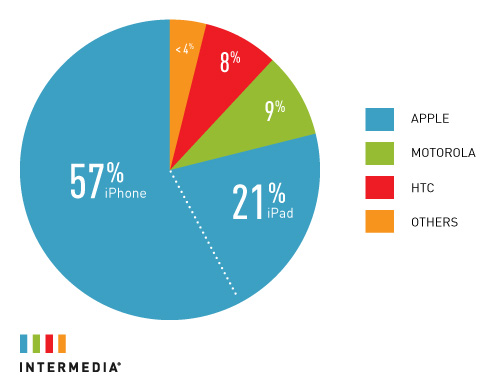
The iPhone and iPad are leading the charge in small and medium-sized businesses (SMB) for smartphones and tablets according to Intermedia. In a study by Intermedia, who handles 350,000 premium hosted Microsoft Exchange servers, Apple’s iOS devices are dominating the stats when it comes to ActiveSync activations performed by the company. The iPhone has an overwhelming 57% coverage in this bracket and the iPad has 21% as well. That leaves only about 22% for competitors such as Motorola, HTC and others. The nearest competition to the iPad’s 21% is Motorola with only 9%. See above graphic for full stats.

The graph data compares the use of ActiveSync devices in Intermedia’s clientele. ActiveSync is the syncing protocol that smartphones use to sync email and other information with Microsoft Exchange. Intermedia supports email, contact and calendar syncing for smartphones, including iPhone, Android, BlackBerry and Windows 7 phones.

Read more


Twitter begins rolling out new HTML5 interface for iPads

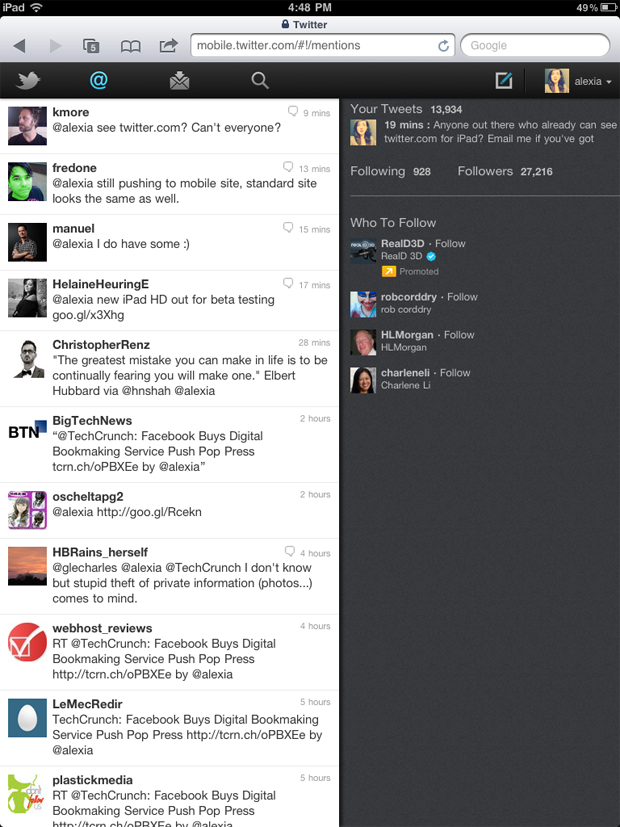
It doesn’t matter if you’re using a native app or a web app if you want to use Twitter right? Right. So as long as you have options, an overhauled iPad interface can’t hurt. Twitter has already rolled out an updated HTML5 interface for phones (with a nifty tab bar on the top), and the new iPad interface follows suit. Heck, it even includes the dual panes you’re so used to on the desktop version of the app, showing your timeline on the left as single tweet views and miscellaneous information displayed on the right. The feature is rolling out as we speak (I don’t have the new goodies yet), but hopefully we can get some more screenshots soon for those waiting. The redesigned interface may take a week to reach your account, but don’t worry, you still have Twitter’s speedy native iPad app to hold you over.

[Twitter via Techcrunch]

Image via Techcrunch


Keep Your Lion Computer Protected with Witness

A few months ago I reviewed Witness for Mac, an OS X utility from the creators of Undercover – a tracking app for stolen computers – aimed at letting you remotely lock/unlock a machine, and see who’s using it thanks to webcam integration. The Witness app, available on the Mac as a System Preferences panel, iOS and the web, leverages the Mac’s built-in FaceTime camera (nèe iSight) to send you “mugshots” of whoever is using a locked computer – Witness can also detect motion in front of your screen and send you a push notification as soon as something happens.

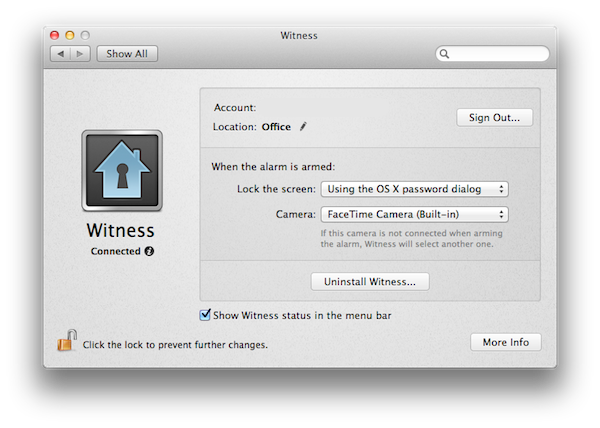
When I upgraded to Lion GM on my two Macs, I was disappointed to see the new OS broke Witness, which simply stopped working with Lion’s new Screen Saver and login screen. I could send the lock command from my iPhone or iPad, but the app would only freeze to a lockscreen. With a series of updates, the Orbicule developers have updated Witness to fully integrate with OS X Lion and its new authentication window, which in version 1.2 is used instead of the old screensaver method. Now, you can choose to lock your Mac either using Witness’ own lock system, or through the default login screen in Lion.

The screensaver/login screen triggered by Witness on Lion

For what it’s worth, Witness’ notifications already play nice with iOS 5 beta, which will list alerts of “detected motion” in its new Notification Center. Witness is a great addition to the Mac, with minimal footprint on memory and an optional menubar icon to trigger the alarm system and open the Settings.

You can create a Witness account here ($39 with student licenses available) and download the free Witness Remote app from the App Store.


Facebook Acquires Award-winning iOS Publishing Platform Push Pop Press

It was only last February that Push Pop Press started teasing a brand new kind of digital books for the iPhone and iPad, promising to revolutionize the way users interact with text, images, and video on a multi-touch screen. Started by former Apple employees, Push Pop Press built a unique publishing platform and physics engine that was best demonstrated in Our Choice, Al Gore’s book ported over to Push Pop Press’ platform, released on the iPhone and iPad and winner of an Apple Design Award in June.

With an update on their website, Push Pop Press has announced that they’ve been acquired by Facebook. It’s unclear how the technology will be integrated into the “world’s largest book”, but the blog post says “although Facebook isn’t planning to start publishing digital books, the ideas and technology behind Push Pop Press will be integrated with Facebook, giving people even richer ways to share their stories”. Push Pop Press’ first book Our Choice will remain available for sale with profits donated to The Climate Reality Project; future books planned with Push Pop Press’ closed beta won’t be published following this acquisition.

Now we’re taking our publishing technology and everything we’ve learned and are setting off to help design the world’s largest book, Facebook.

TechCrunch also reports a statement from Facebook:

We’re thrilled to confirm that we’ve acquired Push Pop Press, a startup whose groundbreaking software changes the way people publish and consume digital content. We can’t wait for co-founders Mike Matas and Kimon Tsinteris to get started, and for some of the technology, ideas and inspiration behind Push Pop Press to become part of how millions of people connect and share with each other on Facebook.

You can read our original review of Push Pop Press’ Our Choice here. Whilst Facebook apparently has no plans to enter the publishing market, Push Pop Press’ interaction methods and innovative engine might be a good fit for Facebook’s iPhone and upcoming iPad app.


Google Chrome’s Latest Stable Turns Instant Pages on by Default for Faster Googling

If you want faster Internet browsing, be sure to hit the About section in Google Chrome to check for the latest update if Chrome isn’t getting you up to speed automatically: the latest stable version of Google Chrome turns Instant Pages (Google’s take on pre-fetching) on by default so as you type, Google figures out which web pages you want to visit and begins loading the search results up. Yes, your Google searches just got supercharged. The omnibox (that universal address and search bar) has been upgraded with some new tricks as well, including being able to jump back to previous web pages you’ve visited if you begin to type that website’s address. Start typing, hit the down arrow if you want to select something from your history, and immediately the webpage is loaded into view. If Google made the call, they’d argue it was faster than clicking the back button. Video after the break.

[via the Google Chrome Blog]

Read more


Lion DiskMaker Automatically Creates Bootable Lion Media

Have a thumb drive, sd-card, a stack of dvds, or an external hard disk drive lying around? Great! Because if extracting files from your Lion download and installing the image onto external media sounds tricky to you, then we have a solution that better automates the process. Lion DiskMaker by Guillaume Gete proposes to take your Lion download and create a bootable installer on your media of choice.

There are few caveats, including that you’ll need to have the Lion download handy in the /Applications folders (the Lion DiskMaker is best used right after the download finishes from the Mac App Store). Lion DiskMaker will also completely erase any media it makes bootable, so be careful not to overwrite any important information. The author recommends simply picking up a cheap 4 GB USB key from the store (your local Staples, Target, or Best Buy would do) since they’re dirt cheap.

Lion DiskMaker has both French and English info pages on Serial Serveur if you want to get familiar with the software, or you can always use Google Chrome with its automatic Google Translate features built in if you want to read up. The software is simple to use: just run the app, select the media you want to make bootable, and let it do its thing.

And don’t forget, we have a huge Q&A that answers your Lion installation questions.

[Serial Serveur (US page) via Cult of Mac]


Iomega’s “Mac Companion Hard Drive” Combines USB, FireWire, and iPad Charger

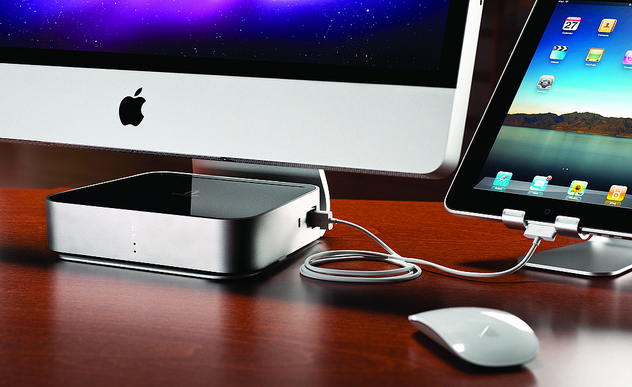
Iomega today announced a new Mac Companion Hard Drive which incorporates a large capacity desktop hard drive (2 TB or 3 TB models are available) with two USB ports to connect a printer or another external drive, two FireWire ports and an additional high-powered USB charging port for an iPad or iPhone.

With the new Iomega Mac Companion Hard Drive, Mac users now have a convenient and stylish way to quickly charge their iPads with the bonus of plenty of new storage capacity for their Mac computer,” said Jonathan Huberman, president of Iomega Corporation. “With more than nine million iPads sold in the last quarter alone, the new Mac Companion Hard Drive is the perfect complement for all those iPad owners.

Iomega has made special effort to make a device that matches and suits Macs, which is most notable in the design and stylings of the device – not only is it sleek with its metal enclosure but the very shape of the Mac Companion Hard Drive has been sculpted so that it sits perfectly on the iMac or Thunderbolt Display stand, tapering out at the back. The whole device is fairly simplistic but stylish in design and it hides all but the high-powered USB port at the back of the device. Iomega has left the three visible sides with nothing but the high-powered port on the right hand side of the device and four LED lights on the front panel of the device to indicate HDD capacity.

The charging port is a high-powered 2.1 Amp hookup that makes it easy and convenient to charge your iPad and other portable Apple devices so they’re ready to go when you are.

The hard drives are also pre-formatted as HFS+ so that they are compatible out of the box with Mac OS X, and whilst the lack of Thunderbolt is a little disappointing, this device looks like a solid option for anyone looking for an external hard drive for their Macs. The Iomega Mac Companion Hard Drive will initially be exclusive to Apple online and retail stores at a cost of $195 for the 2 TB model and $295 for the 3 TB model.

Jump past the break for some more pictures of the device.

Read more


US Retailers Begin To Reduce iPhone 4 Prices

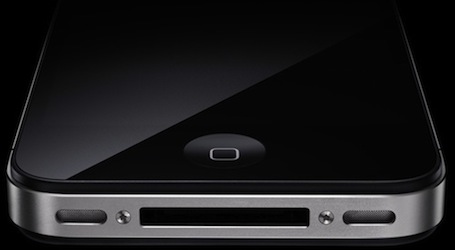
In recent days there have been reports of various retailers beginning to reduce the price of the iPhone 4 as the release of an iPhone 5 draws ever closer. Rumors on when exactly the next iPhone will be released have varied quite substantially from an August release to a September release and most recently, suggestions from AllThingsD of a late October launch.

Whenever the release is, US retailers Radio Shack and Target have both cut the price on the iPhone 4 models. Radio Shack is currently offering the 16GB model for $169.99 and the 32GB for $269.99 whilst also offering $100 credit with the trade-in of previous iPhone models. Meanwhile Target is now offering the 16GB iPhone 4 for $149.99 and the 32GB model for $249.99. Unfortunately these discounted iPhone 4’s still come attached with a two-year contract with either AT&T or Verizon.

These iPhone 4 prices being offered by Radio Shack and Target are reduced from the standard $199 for the 16GB model and $299 for the 32GB model that AT&T, Verizon and Apple are still offering.

[Via Ars Technica]


Skype for iPad Released

Skype for iPad, first “leaked” online back in late June, has finally been released for free in the App Store as a standalone app, as noticed by TUAW. The app isn’t a universal update for the iPhone version, meaning you’ll have to download it as a separate app on your iPad, and it’s not yet available in the US App Store. The app will likely be released in the US Store later today, perhaps in a few hours.

Skype for iPad features an all-new interface design with larger contact pictures, a buddy list on the left, and possibility of starting a new video-calling session in full-screen with video being captured from the iPad’s rear or front-facing cameras. The app can do video and audio calling both on WiFi and 3G, much like the iPhone version already can.

A list of features from the iTunes page:

  • Talk face-to-face or show what you’re seeing with front and back-facing cameras.
  • Use Skype for iPad to call anyone else on Skype – and enjoy near CD quality (SILK) sound.
  • Instant message and add emoticons to personalize your messages.
  • Make cheap calls to landlines or mobiles from your iPad.
  • Get an Online Number from Skype so people can call you on your iPad.
  • Pay As You Go with Skype Credit - great for when you’re using Skype every now and again.
  • Pay monthly with a subscription – best if you use Skype a lot.

We will update this story with more details on the app and first impressions as soon as we get our hands on it. More screenshots and original “leaked” promo video below.

Update: Skype for the iPad is now live in the United States. Download it here.

Update 2: We have first impressions and some screenshots up past the break.

Update 3: Skype has pulled the app from the App Store, saying that it went live “prematurely”.

Update 4: It appears the app is back and can be downloaded from the App Store.

Read more