Posts in news

Apple Preparing The Ability To Merge Multiple Apple IDs

According to MacRumors, Apple is currently working on the ability to merge multiple Apple IDs into a single ID. Currently those who have (for whatever reason) multiple Apple IDs are unable to merge them, even when contacting Apple support directly.

In an article posted yesterday however, it is revealed that a MacRumors reader had emailed Apple CEO Tim Cook and promptly received a phone call from an Apple executive relations employee regarding the issue. According to their account, the employee contacted the team responsible who said that they were aware of the issue and were concerned with iCloud exacerbating the problem. It was noted by the executive relations employee that they are working on it and in the meantime to pick a single account to use for all future purchases.

In an update to their article, MacRumors notes that a second reader has come forward, noting that they received a similar response over the issue. This prompt reaction by Tim Cook in responding to email from a customer is not his first and is consistent with his dedication to work.

[Via MacRumors]


Further Reports Of Two New iPhone Models, Supply Issues For The iPhone 5?

As the official announcement of the iPhone 5 inevitably creeps closer there has also been a flurry of activity in the past 24 hours with more rumors, supposed leaks and speculation from a wide variety of sources. Most recently, Nick Bilton of the New York Times wrote that a “fairly different” iPhone 5 with 8 MP camera is just weeks away.

Bilton’s suggestions are by-and-large consistent with most frequent of past rumors regarding the iPhone 5. Noting this, 9to5 Mac last night reported that they have heard that there will be two different iPhone models coming next month - a low-end, iPhone 4 look-alike and the new iPhone 5.

The iPhone 5 itself is a sight to behold, we’ve been told.  It is impossibly light, yet much firmer than Samsung Galaxy phones which are backed in plastic.  The camera rivals point and shoot cameras and will be a major marketing point for this device.

There isn’t anything inherently unique in their report either, claiming that Apple’s lower-end iPhone will be similar to the current iPhone 4 whilst the iPhone 5 will be tear-drop shaped, which has been claimed before. However they do say that this lower-end iPhone (the iPhone 4S if you will), is already being produced in high quantities, with 10 million expected on launch day. The iPhone 5 though, is apparently seeing “continued design and production delays, at least on one assembly line” with 9to5 Mac speculating there could be slight delays and shortages until 2012.

[Via 9to5 Mac]


“Fairly Different” iPhone 5 with 8 MP Camera, A5 Processor “Just Weeks Away”

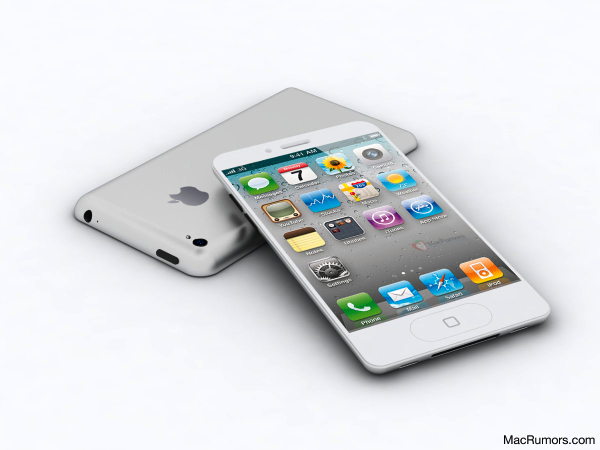
In reporting about today’s allegedly “leaked” iPhone 5 design per Case-Mate’s product pages (later pulled), The New York Times’ Nick Bilton says an announcement of Apple’s next iPhone is “just weeks away”.

We’re just weeks away from the announcement of the new Apple iPhone 5, according to an Apple employee who asked not to be named because he was not allowed to speak publicly for the company.

Bilton then reports that according to descriptions he’s heard from Apple employees, the images posted today by Case-Mate looked “potentially authentic”. The cases indeed seemed to show an iPhone 5 in line with recent speculation surrounding the new device such as tapered edges, and thinner form factor. In the same article, Bilton mentions “an engineer familiar with the new iPhone” said the iPhone 5 would look “fairly different” from the previous-gen model. According to the engineer the iPhone 5 will feature an 8-megapixel camera as previously rumored, the faster A5 processor also seen on the iPad 2, and possibly NFC functionalities for mobile payments. NFC on the iPhone 5 was rumored before, too, but most recent speculation indicated Apple might save the feature for a future “iPhone 6” next year.

As I’ve written in the past, two people with knowledge of the inner workings of Apple’s next-generation iPhones say either the iPhone 5 or iPhone 6 will include a new chip that is made by Qualcomm.

Plenty of rumors posted in the past months failed to indicate whether Apple will soon announce a completely redesigned iPhone 5, and iPhone 4-like device with slightly improved specs, or both to address different market segments. You can read more on this in our iPhone 5/4S rumor roundup and retrospective. [image via]


Kensington’s BungeeAir Helps You Find Your iPhone

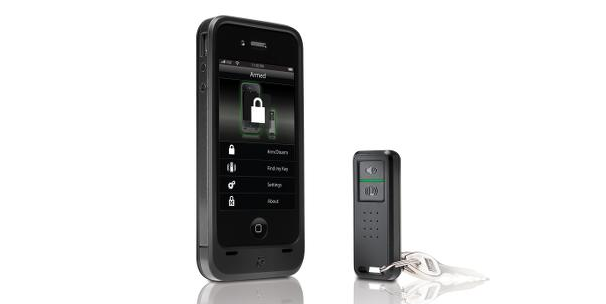
Accessory maker Kensington announced earlier this week the BungeeAir, a hybrid case/iPhone tracker/backup battery solution to protect an iPhone 4, increase its battery life, and, more importantly, find a paired device nearby. The BungeeAir, in fact, works in combination with a compact key fob, which through a 2.4 GHz wireless connection (the one supported by the iPhone 4) will alert users when they’re separated  from their device – Kensington is touting this as a convenient way to never leave an iPhone behind in public places, or simply find it again in your house. The BungeeAir comes bundled with a free app on the App Store, which besides support for alarms and vibration when the “wireless tether” is broken, adds a number of security features such as passcode protection for a lost iPhone, or a two-way “find” functionality to locate either the case (and thus, the iPhone) or the fob by pressing “Find” button.

BungeeAir is perfect for the professional on-the-go who relies on their iPhone to be productive throughout the day. Simply place the iPhone in the protective case and attach the BungeeAir fob to your keys, purse or badge and it will remind you if ever leave your phone behind, before it can get out of your sight. A convenient companion app lets you customize the security settings, and with the added feature that it can help you find your fob and attached misplaced keys.

Kensington’s BungeeAir might sound similar to Apple’s free Find My iPhone service, but it’s quite different in the way it’s meant for a much more “local” use – BungeeAir doesn’t have an online counterpart to track and geo-locate a lost or stolen iPhone, and the app allows you to customize the distance between the fob and the case after which you’d like to be alerted.

Kensington is offering two different versions of the BungeeAir. The BungeeAir Power Wireless Security Tether for iPhone acts as tether, battery, and case and is available for pre-order at $99 or on Amazon. The BungeeAir Protect Wireless Security Tether doesn’t have a battery, and can be yours for $20 less at $79.99. Check out Kensington’s three promo videos for the BungeeAir’s Remind, Find, and Secure features below. [via Macworld] Read more


Twitterrific 4.4 Improves Tweet Marker Support, Adds Fixes

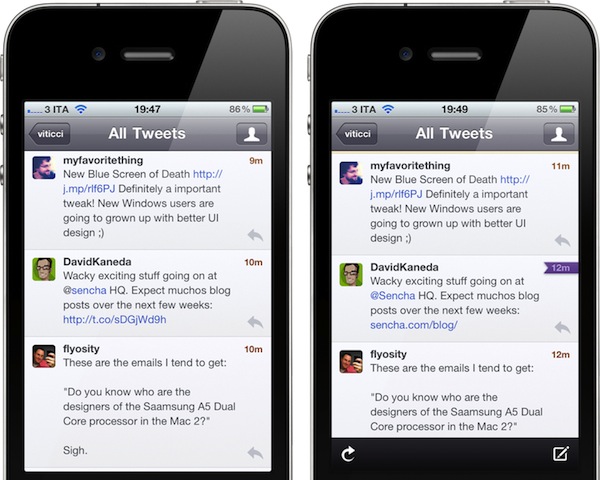
The Iconfactory’s Twitterrific, a Twitter client for iOS and OS X, was updated earlier today to version 4.4, adding better integration with Tweet Marker, and a number of bug fixes and improvements. Following Twitter’s recent changes to how links are wrapped inside its own t.co shortening system and displayed in third-party clients, The Iconfactory tuned Twitterrific to display unwrapped t.co links whenever possible, as the API currently allows. This means Twitterrific shouldn’t show anonymous t.co links in the timeline anymore, fetching the original shortened link or domain (example: mcstr.net or apple.com) instead. You can see a comparison between Twitterrific 4.3 Vs. 4.4 in the screenshots below.

Twitterrific 4.4 with an unwrapped t.co link on the right

Twitterrific 4.4 improves and unifies support for Tweet Marker across its Mac and iOS versions, as well as other third-party iOS apps that have implemented the service. Notably, Twitterrific 4.4 can sync Twitter lists with Tweetbot, which recently introduced such functionality through Tweet Marker. This update also brings Tweet Marker sync to saved searches (both lists and saved searches will have a separate “saved status”, outside the main timeline) and it greatly improves how the OS X version handles sync when a computer goes to sleep, or a link is clicked. For instance, Twitterrific 4.4 will sync back to Tweet Marker (if enabled in the Preferences) when a Mac goes into sleep mode, wakes up, or goes into power saver mode. Marked tweets are synced when the app is quit or links are clicked – the latter is true when links aren’t set to open in the background.

Twitter lists have seen some enhancements in Twitterrific 4.4 as well. For one, they now have a Load More button to fetch missing tweets. They are now sorted by type and then alphabetically, they show retweets alongside regular tweets, and a bug that would make a list “un-selected” in the Finder has been fixed. The same Load More button has been improved throughout the entire app, as it now loads missing tweets in timeline gaps, and generally keeps Twitterrific scrolled to bottom while loading more tweets. These are minor changes, but important ones if you, like me, wake up every morning willing to “catch up” on Twitter, and see what people have posted overnight. The improved Load More behavior certainly helps in making timeline gaps more reliable.

Other features include improved handling of non-image Camera+ URL’s (such as user profiles), and a new Shift-spacebar shortcut to manually navigate to a previous tweet, as opposed to spacebar for “next tweet”.

Both on the Mac and iOS, Twitterrific keeps unifying the Twitter experience and its own app ecosystem on each update. You can download Twitterrific 4.4 on the App Store now at $4.99 for the Mac version, or upgrade the free iOS app for $4.99 through in-app purchase.



Skype for Mac Beta Gets Facebook Integration

With a blog post published a few minutes ago, Skype has announced a new beta version of its desktop client for OS X, which adds Facebook integration for chat, news feed, and friends’ posts. The new Skype for Mac 5.4, available for download here, allows users to connect with Facebook directly within the app – without having to open Facebook’s website – to start chatting with Facebook friends, like their posts, or read and update the News Feed.

Once authenticated with Facebook in-app, Skype 5.4 will display an additional Facebook tab in the Contacts view, enabling you to filter the buddy list down to only people who are available for IM through Facebook. The cross-platform IM solution seems pretty reliable in this regard, in that I was able to easily find a Facebook friend, and start chatting with her while I was using Skype 5.4 for Mac. She received my messages correctly on Facebook’s website. When another friend tried to contact me on Facebook via chat, a new message showed up in Skype’s sidebar next to his name (the Mac version of Skype also supports Growl notifications).

Similarly, I was able to read posts from my news feed, like them, and even post a status update using Skype 5.4.

Skype has also confirmed this release brings a new advertising platform to the app, although I haven’t been able to personally verify this yet:

We are also introducing an advertising platform in this new release, but if you are a paying Skype consumer or have Skype Credit, you won’t see any display ads; similar to the model that is currently being used in our Skype for Windows client.

Skype 5.4 beta for Mac can be downloaded here. After Microsoft’s acquisition, the company recently brought HD video calling to the Mac with version 5.3, and released a native client for the iPad.


Apple Releases Mac mini, MacBook Pro EFI Firmware Updates

Two days ago we reported Apple was moving closer to the release and retail distribution of Thunderbolt Displays (announced in July) with an EFI firmware update for the MacBook Air, which improved performances in Lion Internet Recovery and added a number of Thunderbolt-related fixes. Today Apple has released two additional EFI firmware updates for the Mac mini and MacBook Pro.

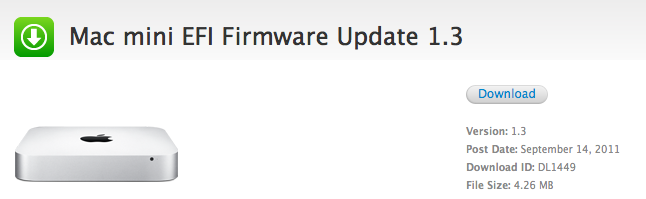
Mac mini EFI Firmware Update 1.3

This update includes fixes that enhance the stability of Lion Recovery from an Internet connection, and resolve issues with Apple Thunderbolt Display compatibility and Thunderbolt Target Disk Mode performance on Mac Mini (mid 2011) models.

Macbook Pro EFI Firmware Update 2.2

This update enables Lion Recovery from an Internet connection and includes fixes that resolve issues with Apple Thunderbolt Display compatibility and Thunderbolt Target Disk Mode performance on MacBook Pro (early 2011) models.

Notably, Apple has enabled Lion Internet Recovery in the new MacBook Pro models introduced back in February. Lion Internet Recovery debuted alongside Lion in July, but it was exclusive to the updated mini and Air models; the feature allows Mac users to reinstall Lion over the air from Apple’s servers.

Both updates are available on Apple’s website or through Software Update. Direct links below. The Thunderbolt Display, priced at $999, is shipping in 2-3 weeks from Apple’s website.


Epson Unveils “MegaPlex” Projectors with iPhone, iPad Support

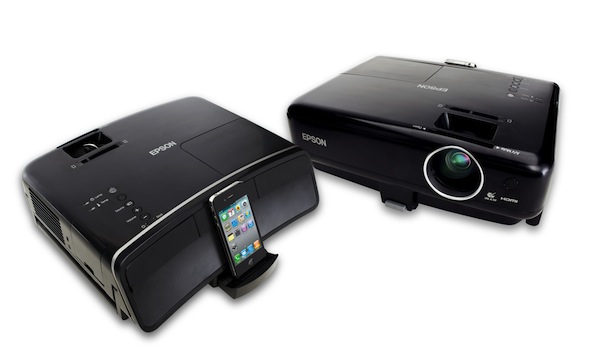
Earlier today Epson officially announced “MegaPlex”, a new line of projectors that are compatible with iOS devices, as well as computers, tablets and other smartphones thanks to standard HDMI, USB, and VGA ports. The MegaPlex MG-850HD and MegaPlex MG-50 come with a rear-facing dock for iPhones, iPods and iPads, enabling users to view their photos and videos and listen to music on a bigger screen. Epson says they want to make it easy for iOS users to browse and display content, charge a device, and share the experience with friends and family. Similarly, the MegaPlex projectors can accept media from a variety of non-Apple devices.

MegaPlex is the ideal big screen projector for the new digital lifestyle. Enabling consumers to share multimedia content from their iPod, iPhone, iPad and a wide assortment of other digital devices, MegaPlex is changing the way movies, gaming, slideshows, presentations, music, and more are viewed by eliminating the confinement of a smaller screen,” says Jason Palmer, product manager, Epson America. “With the high-quality, versatility and portability of Epson’s MegaPlex solutions, consumers can literally dock their iPad, iPhone or iPod, click and immediately share multimedia content on a big screen wherever they may be.

Both projectors are powered by 3LCD technology to deliver “vibrant colors”, though only the MG-850HD offers 720p video output at 2,800 lumens. The MegaPlex MG-50 will deliver 540p video and up to 2,200 lumens of color and white light output. Both systems feature two 10W stereo speakers, and a microphone.

The Epson MegaPlex MG-850HD and MegaPlex MG-50 will be available later this month through select retailers and Epson’s online store at $799 and $699, respectively.


iMessage for OS X To Be Integrated with iChat?

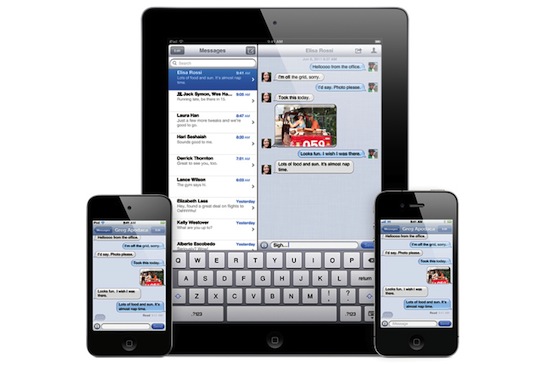
According a series of code strings found by MacRumors in the current version of iChat for OS X Lion, Apple may be building support for the new messaging system first announced at WWDC for iOS 5 devices inside its IM desktop application. The properties found in iChat’s code refer to “read” and “delivery” receipts, two iMessage features that inform users when a message has been read or simply delivered to another device, respectively. These code strings can’t be found in earlier versions of iChat, apparently, and MacRumors believes they can relate to iMessage support being built inside iChat for Lion.

The “timeDelivered” and “timeRead’ fields indicate the tracking of delivery and read receipts for instant messages. These features, however, are not supported in any of iChat’s native messaging protocols, while the same features are offered in Apple’s iMessage protocol. These properties were also not present in previous versions of iChat prior to OS X Lion. We believe the only reason Apple would have added these properties was to build in cross compatibility with their new iMessage protocol.

Ever since its introduction in June, many have wondered whether Apple could support iMessage, a free messaging protocol for iOS devices, on the desktop as well, allowing iOS users to send text messages to Mac users in their Address Book, and vice versa. Unlike FaceTime, iMessage works on both WiFi and 3G, but similarly to Apple’s video-calling solution it’s completely free of charge and works with email addresses and phone numbers – if an iOS user is already in your Address Book and he’s using the same phone number or email, iMessage will work. The service will be iOS 5-only when it launches this Fall, and Apple hasn’t revealed plans for OS X or Windows versions yet. iMessage has been compared to other free messaging solutions, like RIM’s BlackBerry Messenger, or Google’s Huddle.

A few code strings are no confirmation of Apple’s plans to build iMessage for Mac, but if history is of any indication, it would make sense for Apple to support its new app on multiple platforms. Whereas iChat as an app is still nowhere to be seen on iOS, FaceTime as a service was ported to the OS X and later built into every new Mac. For this reason, many are speculating iMessage could follow a similar trend, perhaps as a standalone app, or a service plugin for iChat.

In the past months, a number of fan-made mockups have tried to imagine what an hypothetical iMessage for Mac would look like. Just like the theories floating around, some imagined the service being supported in existing apps like iChat or Mail, others created videos showing iMessage working as a separate app for effortless Mac-iOS communication. Below, we’re embedding an iMessage concept by Jan-Michael Cart.

iMessage is currently available for iOS 5 beta testers, and it’ll publicly launch with iOS 5 and iCloud this Fall.
Read more