Posts in news

Samsung Files Preliminary Injunction Against The iPhone 4S In Australia & Japan

Samsung today filed for a preliminary injunction against the iPhone 4S in Australia and Japan. This is the latest development in the complex legal battle between Apple and Samsung which has spread across the world since Apple originally revealed it was suing Samsung over the “look and feel” of it’s Galaxy devices.

The Wall Street Journal reports that the Japan filing (which is also attempting to halt sales of the iPhone 4 and iPad 2) cites infringements in technology and user interface patents, whilst in Australia Samsung is claiming that Apple has infringed on patents related to wireless telecommunication standards. The move comes after Samsung was dealt a blow in Australia last week, with the preliminary injunction against its Galaxy Tab 10.1 was upheld. A Samsung spokesperson said that this latest legal action is them “now counterattacking Apple again”.

Florian Mueller of FOSS Patents believes that the attack on the iPhone 4S in Australia  is “doomed to fail” because the patents Samsung is using in the filing are related to 3 patents declared as essential to the 3G telecommunications network. As he explains, it would be unlikely that an Australian judge would take a significantly different approach as occurred last week in the Netherlands:

…a Dutch judge already made it clear that Samsung can’t seek an injunction based on such patents, and I’d be extremely surprised if an Australian judge took a different perspective on FRAND (fair, reasonable and non-discriminatory) licensing commitments… The odds are very long against Samsung overcoming all of Apple’s defenses.

Speaking on the situation in Japan, FOSS Patents says it is less clear what will happen as Samsung’s filing there also relates to user interface patents that “are presumably not subject to FRAND licensed commitments”. This means Samsung could seek injunctions on them and it would be up to Apple to contest their validity. The patents apparently relate to “the display of a flight mode icon, the utilization of homescreen space, and an app store menu structure”.

[Via The Wall Street Journal, FOSS Patents]


There Are Some Siri Limitations Outside The US

As the iPhone 4S launches today in seven countries (US, Canada, Japan, Australia, UK, France, Germany – our launch coverage here), many customers are finding out for the first time that Siri, the voice assistant Apple announced and demoed at the Let’s Talk iPhone media event last week, has some limitations outside the United States.

Several websites reported that Yelp integration for local businesses wouldn’t be available outside the US initially. Siri is still in beta, available in a few languages, and Apple has already announced that more languages and services will be available soon. On Apple’s website, the Siri page reports in a footnote: “Siri is available in Beta only on iPhone 4S and requires Internet access. Siri may not be available in all languages or in all areas, and features may vary by area. Cellular data charges may apply.” Some of the early reviews of the iPhone 4S briefly touched on the subject of limitations outside the United States and mentioned Siri could have some issues with some very specific accents (albeit the software does recognize the difference between U.S. English, UK and Australia); as customers get their hands on the iPhone 4S today, features that have been omitted from the first version of Siri outside the US  are starting to surface online.

Electricpig was first to report maps and directions wouldn’t be available to Siri except for US customers; today, a number of users have confirmed that both businesses (with Yelp integration) as well as maps/traffic data aren’t available outside the United States. When asked for Maps information in the UK, Siri says “I can only look for businesses, maps, and traffic in the United States, and when you’re using U.S English. Sorry about that.” (thanks, Sam).

Rene Ritchie of TiPb has also got his iPhone 4S, and confirmed Siri can’t “provide maps and directions in Canada” and “look for places in Canada”. From the screenshots, it appears Siri fetches the current location, but can’t provide additional information through Maps or Yelp integration yet. Furthermore, we’ve received a number of reports from French and German users unable to look up data on Wolfram Alpha through Siri, suggesting that Wolfram integration is only available to English-speaking countries for now. Read more


New MacBook Pro Part Numbers Suggest A Minor Refresh Soon

According to 9to5 Mac, supply for all current MacBook Pro models are constrained in anticipation of an imminent refresh. They claim that new part numbers have appeared in Apple’s inventory system for all three MacBook Pro sizes. The new model numbers are K90IA for the updated 13 inch model, K91A for the 15 inch and K92A for the 17 inch.

These model numbers, combined with last month’s rumour of a refresh, suggest that these models will be just a minor specification bump - rather than the rumoured redesign of the MacBook Pro. MacRumors reported earlier this year that such a redesign will probably debut sometime after Intel’s Ivy Bridge line of processors is released.

[Via MacRumors]


iPhone 4S Lines Around The World

As the iPhone 4S begins its international rollout, lines have begun forming at Apple retail stores in preparation of tomorrow’s product launch. The iPhone 4S, announced at a media event last week, will go on sale tomorrow at 8 am in seven countries: US, Canada, UK, France, Germany, Japan and Australia. The device will be available in two colors (black, white) and three storage sizes (16 GB, 32 GB, 64 GB); in the United States, it will be available on carriers AT&T, Verizon and, for the first time, Sprint. Soon after the pre-orders for the device started online, Apple announced they had already topped 1 million; those who haven’t been able to pre-order an iPhone 4S, or have decided to avoid the online process altogether, are now camping out hoping to get one tomorrow morning.

As we did with our iPad 2 coverage earlier this year, we’re collecting some of the best photos and videos people waiting in line at Apple stores are posting online. We’ll be updating this post throughout the next 24 hours, so make sure to come back later for the latest updates and photos from around the globe.

If you want to send us photos or videos from your local Apple store line, send us an email at: tips at macstories.net

Read more


Notes From iFixit’s iPhone 4S Teardown: 512 MB of RAM, New 3G Chip

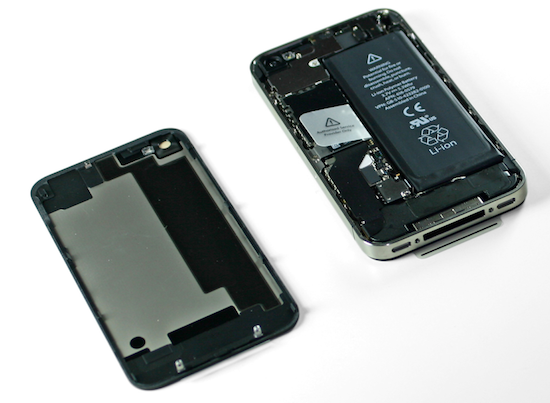
As usual with every new Apple gadget, the team over at iFixit has decided to tear down the latest iPhone 4S – which officially comes out tomorrow in seven countries, albeit some customers have already managed to get their hands on it – to take a peek inside the improved hardware of Apple’s new iPhone. As a quick recap, the iPhone 4S represents a significant change from the iPhone 4 in terms of internal components: whereas the design is the same of the old-generation model, the 4S comes with a dual-core A5 processor, a new wireless system with “intelligent” antenna design capable of switching between two antennas, world phone capabilities for GSM roaming, and a new 8 megapixel camera sensor with backside illumination. We have already discussed how the iPhone 4S appears to be a great mix of hardware and software – on the iOS side, in fact, the device comes with exclusive access to Siri, a new voice assistant.

In their teardown, iFixit notes the iPhone 4S’ battery has an extra .05 WHrs over the iPhone 4. The iPhone 4S has, however, much power-consuming hardware than the older generation unit, which leads iFixit to believe “power consumption seems rather efficient” with 8 hours of 3G talk time, 6 hours of 3G browsing, and up to 10 hours of video/40 hours of music. The iPhone 4’s battery, part of iFixit’s teardown last year, featured 5.25Whr; the iPhone 4S does 5.3Whr with the same 3.7V polymer battery.

The iPhone 4S’s logic board seems to bear “a close resemblance” to its Verizon iPhone 4 counterpart; indeed, the iPhone 4S also shares the same exterior design of the older CDMA iPhone 4, which has little differences from the GSM iPhone 4. In taking a look at the logic board, iFixit notes the two major components are the new CPU and new 3G chipset from Qualcomm, listed below.

  • Qualcomm MDM6610 chipset
  • Apple A5 processor

As previously rumored, iFixit confirms the iPhone 4S has 512 MB of RAM – a marking on the A5 chip (“E4E4”) seems to confirm this. There was much speculation surrounding the iPhone 4S’ RAM as other rumors in the past claimed the new iPhone would have 1 GB of RAM – clearly that’s not the case.

Other chips identified on the logic board:

  • Avago ACPM-7181 Power Amplifier
  • Qualcomm RTR8605
  • Skyworks 77464-20
  • Toshiba THGVX1G7D2GLA08 16 GB 24 nm MLC NAND flash memory

Other notes of interest:

  • Apple is using the same oscillating vibrator of the Verizon iPhone 4, rather than rotational electric motor found in the old GSM iPhone 4. This vibrator is softer and quieter than the GSM iPhone 4’s motor.
  • The display assembly is similar to the GSM iPhone 4.

We’ll update this post with more details as iFixit uncovers more components during the tear down. For now, keep in mind that the iPhone 4S has a much improved processor, camera, same amount of RAM and completely re-engineered 3G system.


WSJ: Apple Negotiating with Hollywood Studios Over Movie Streaming

According to an article published by The Wall Street Journal last night, Apple is reportedly in talks with Hollywood studios to add streaming of movies to the iTunes Store.

Apple Inc. is negotiating with Hollywood studios for deals that would let people who buy movies from the iTunes Store watch streaming versions of those movies on Apple devices such as iPads or iPhones without manually transferring them, according to people familiar with the matter.

The Los Angeles Times has a similar report:

Representatives of the iPhone and iPad maker have been meeting with studios to finalize deals that would allow consumers to buy movies through iTunes and access them on any Apple device, according to knowledgeable people who requested anonymity because the discussions are private. The service is expected to launch in late 2011 or early 2012.

With the just-launched iCloud platform for media and data syncing, there are a few differences to consider when covering the subject of “streaming” and online storage. Whereas the WSJ mentions “streaming versions” of movies, the LA Times (at least initially) simply refers to access on any device. Considering the current iCloud model, the rumor seems to fall in line with the LA Times’ report – iTunes in the Cloud, a feature of iCloud for iTunes Store content, lets users buy once, re-download at any time, and store previously purchased items in the cloud. With iTunes in the Cloud there’s no “streaming version” of a song or TV show, as iCloud is effectively enabling users to access items on any device from a unified interface (you can read more in our iCloud overview). However, in the same article, the LA Times also states:

Under the plan Apple is proposing, users could stream movies they buy via iTunes on any device the company makes, such as the Apple TV, iPhones and iPads, as well as on PCs.

You may remember that ahead of iCloud’s announcement in June, a number of reports suggested Apple was working on a music streaming service – such service didn’t materialize at WWDC as Apple unveiled iTunes Match, a music service that scans & match music, but doesn’t allow for streaming in a way companies like Rdio or Spotify do. iTunes Match matches songs with Apple’s servers and uploads the rest to a cloud locker, enabling users to download their music on any device.

Technically, the difference between streaming and access shouldn’t be taken lightly. Whereas devices like the iPhone and iPad can store downloads in their local storage after they’ve pulled media from iCloud, the Apple TV, which works with iCloud but has no local storage, streams everything from Apple’s iTunes Store, keeping small portions of data in a local cache.

There is a lot of confusion surrounding the technical difference between streaming and download. Movies in iCloud have been rumored since May, and Apple went ahead and launched a service with online storage for apps, music, TV shows and documents but no movies. It’s unclear how movies will be stored in iCloud when a deal between Hollywood and Apple eventually happens, but when it does, the technical aspect of the system shouldn’t matter to the end user.


Apple Launches ‘iTunes Movie Trailers’ for iOS

No, not a website! Apple has released an app to preview upcoming movies in the vein of Movies Now. Featuring the same previews you’d find at iTunes Movie Trailers on the web, the iOS app allows you to preview beautiful movie posters, find movies at local movie theaters (either by theater or by movie), and check on upcoming releases by previewing a built-in calendar. Per trailer, movie details can be reveleaed that contains the cast and synopsis for the films you’re interested in seeing. You can tweet or email to share, or add the film to your favorites for later recollection.

You can download the universal application from the iTunes App Store for free. More screenshots past the break.

Read more


Aperture 3.2 Gets iCloud Integration with Photo Stream

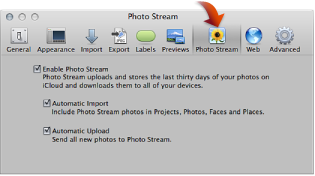
Following the release of iOS 5, OS X Lion 10.7.2 and iPhoto 9.2, Apple has also released Aperture 9.2, an update to the desktop photo editing software that adds iCloud capabilities and a number of new features. As Apple details in iCloud’s Help section, the new Aperture allows users to drag photos into the app’s library to upload them to Photo Stream. You can drag one or more photos from your library (Events, Photos, Places, or Faces) to your Photo Stream. Users can enable Photo Stream in Aperture’s Preferences -> Photo Stream and, similarly to iPhoto 9.2, choose whether they want to enable Automatic Upload and Import.

Other new features and fixes from the changelog:

  • Resolves an issue that could cause the “Loading” indicator to reappear in the Viewer when cropping a photo
  • Aperture now automatically relaunches into Full Screen mode if the application was in Full Screen mode when last quit
  • Pinch-to-zoom gesture now automatically activates Zoom mode in the Viewer
  • Left and right swipe gestures can now be used to navigate between photos in the Viewer
  • Microsoft Outlook can now be chosen in Preferences as the application used by Aperture for emailing photos
  • Fixes a problem that could cause Aperture, running on OS X Lion, to quit unexpectedly when using brushes to apply adjustments
  • Loupe now correctly displays magnification levels between 50-100%.
  • Fixes an issue that could cause Aperture, running on OS X Lion, to display the incorrect color profile on externally edited images
  • Import window now includes an option to delete photos from iPhone and iPad after they have been imported into Aperture
  • The Lift & Stamp tool now displays the correct cursor icons when being used in Split View and Viewer only modes

You can find Aperture at $79.99 on the Mac App Store.


Apple Releases iPhoto 9.2 with Photo Stream Support

Apple today released a new version of its desktop photo management and editing software, iPhoto 9.2. The update, available now, brings a number of bug fixes and improvements to iPhoto, but more importantly it brings full compatibility with iCloud’s Photo Stream for iOS devices, Macs and PCs. Photo Stream is a new service that enables users to store their last 1,000 photos in the cloud, and have them automatically pushed to all devices configured with iCloud. Photo Stream stores new photos for 30 days, and it’s not possible to edit photos stored in Photo Stream. iCloud’s Photo Stream is a continuously updated “album” with all your most recent photos, which doesn’t need to be synced or manually copied to a Mac.

From the changelog:

iPhoto 9.2 supports compatibility with iCloud and iOS 5. This update also addresses minor stability, performance and compatibility issues, including:

Left and right swipe gestures can now be used to navigate between photos in Magnify (1-up) view

Previously imported photos are now displayed in a separate section of the Import window

Book/calendar themes and card categories can now be selected using a pop-up menu in the carousel view

Resolves an issue that could cause some pages of books to print incorrectly

Rebuilding a library now correctly preserves saved slideshows and books

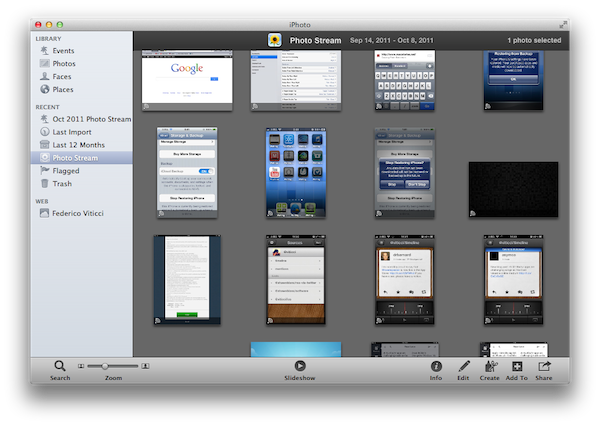
With the new iPhoto, users can enable Photo Stream directly in the app’s Preferences. Photo Stream can automatically fetch photos from the cloud, but there are two additional options to automatically import photos in Events, Photos, Faces and Places, and send all new photos from a Mac to iCloud. If Photo Stream photos are set to be automatically imported in Events, iPhoto will create single Photo Stream events as shown in the screenshot below; alternatively, users can also browse all photos in the Photos tab. Additionally, iPhoto will recognize Photo Stream items that have been already imported, and ask the user to edit the imported version upon trying to hit Edit in Photo Stream.

Photo Stream is located in iPhoto’s sidebar, and it offers the same set of controls of any album view. Users can play a slideshow of Photo Stream photos, zoom in/out, search, pinch to zoom, and quick look items by hitting the spacebar. An info panel on the right reveals additional metadata of a photo, such as location, size, file format and camera. Photo Stream items can be manually dragged out of iPhoto and onto the Finder – OS X will preserve the original file name, size, and metadata when copying photos from Photo Stream.

In my tests, iPhoto 9.2 has been fairly reliable at fetching photos and screenshots taken from an iPhone or iPad. On my home network, a photo snapped with an iPhone 4 (weighing 2 MB or less) would take around 20 seconds to appear on my Mac’s iPhoto; I assume on faster Internet connections an iPhone would take less to upload a new photo to iCloud, and even less seconds to push a photo back to the Mac.

iPhoto 9.2 is available now on Software Update. The new version is expected to be available shortly on the Mac App Store as well. You can find more iOS 5 coverage here. Read more