Posts in news

iPad 3 To Launch In March with LTE, Retina Display, Quad-Core Processor

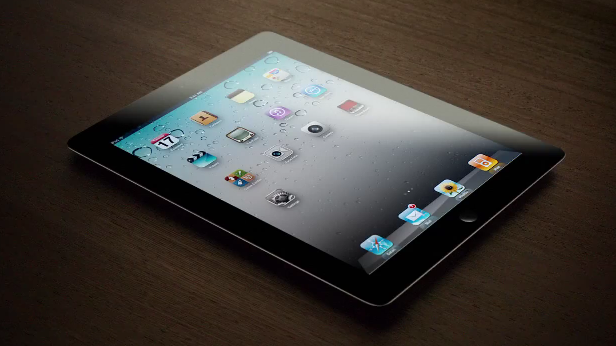
According to a rumor posted by Bloomberg this afternoon, production for Apple’s next generation iPad, unofficially dubbed ‘iPad 3’, has ramped up and will reach full volumes in February. Several rumors in the past months have tried to pinpoint the exact hardware features of the iPad 3; Bloomberg claims the device will sport a quad-core processor, LTE compatibility and a sharper screen with ‘greater resolution’.

Apple Inc. (AAPL)’s next iPad, expected to go sale in March, will sport a high-definition screen, run a faster processor and work with next-generation wireless networks, according to three people familiar with the product.

Since the introduction of the iPad 2 last year, many industry observers in the Apple community have noted the iPad 2 hardware wouldn’t have been able to manage an increased number of pixels on screen, which require faster processing power. A quad-core CPU, however, would enable Apple to support a ‘Retina’ 2048x1536 screen resolution (thus doubling pixels on screen as the with the transition from iPhone 3GS to iPhone 4), faster app switching and smoother video playback. Support for LTE would allow for faster data connections in regions where 4G is available, and it’ll likely be added through new chips by Qualcomm. According to Bloomberg, LTE will be introduced on the iPad first as the device has got a bigger battery than the iPhone, and LTE is widely known to require a larger amount of power than GSM and CDMA chips.

Bloomberg adds the iPad 3 is ‘expected’ to become available in March, a timeframe that would resemble last year’s iPad 2 launch with a press conference in early March and product rollout in the following weeks. From a design standpoint, recent rumors have suggested the iPad 3 will be either thicker or thinner than the iPad 2 due to the addition of the Retina display, so we’d take this speculation with a grain of salt. Bloomberg’s report seems to fall in line with several separate rumors from the past months, suggesting that the iPad 3 will be a not so minor upgrade with new screen, LTE and quad-core CPU (like A6 processor from Apple).


App Store Search Results Get “Quick Look” Previews

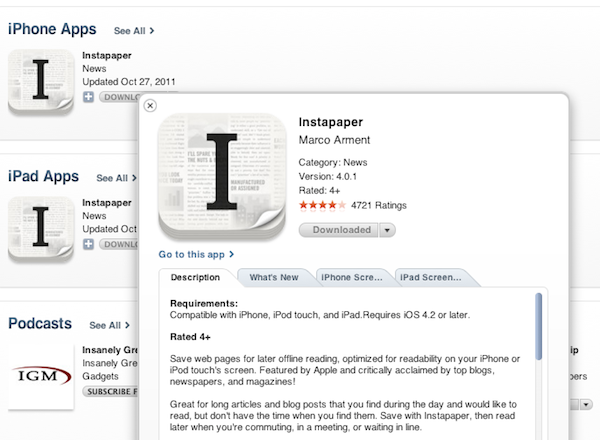
As first noticed by iSpazio [Google Translation], it appears Apple has introduced sometime earlier today a new “quick look” preview feature for App Store search results on iTunes. When searching for apps in the desktop application, in fact, users are now able to click on a small “i” button next to an app’s icon to get a modal preview with additional information about the app. The new preview window organizes Description, What’s New and Screenshots in multiple tabs, and separates iPhone screenshots from iPad screenshots when the app is universal, as with the example above.

You can try the new app preview system by starting a new search in iTunes (here’s a search for Instapaper).

Personally, I believe this minor addition greatly improves usability and app discovery in iTunes. Not only it makes app descriptions more readable (it’s easier to scan information and changelog with tabs), it also allows users to browse top charts and categories without having to go back and forth between the main results and a single app page (often losing view options like “sort by release date” in the refresh process). Recently, Apple also introduced a minor update to the iPad App Store that made swiping through apps more intuitive.


Skype 5.5 Beta Released with New Call UI, Call Answering and Quality Improvements

The folks over at Skype have been hard at work on the next version of Skype 5.5 Beta for Mac and today they have released a new version of the app that adds some very nice functionality. Among the new features you will find a tweaked call interface that provides quick and easy access to several new features.

The improved discoverability of Skype’s Call allows Mac users to easily mute their microphone, send video, share their screen, send files and even add more people during a call.

They have also added the ability to accept calls with or without video which will certainly be a welcomed addition to Mac app. Various optimizations including an increase in call quality and stabilization were also reported to have been improved in this release.

Skype 5.5 Beta for Mac is available for download on their website.


ZeroNinetyNine’s Second Mac App Store 24-Hour “Bundle”

ZeroNinetyNine had great success with its first bundle, which we covered last month. In the first ZeroNinetyNine deal, 11 apps from 8 independent developers participated. During the 24 hours of December 1, 2011, every app in ZeroNinetyNine received a place in the Top 20 of Paid Apps in US Mac App Store, and also conquered the tops of Mac App Stores in France, Russia, China, Canada, UK - all over the world. Partners in ZeroNinetyNine sold more than 100,000 apps in just 24 hours! These are very good numbers and now they are trying to do better by offering a second “bundle.”

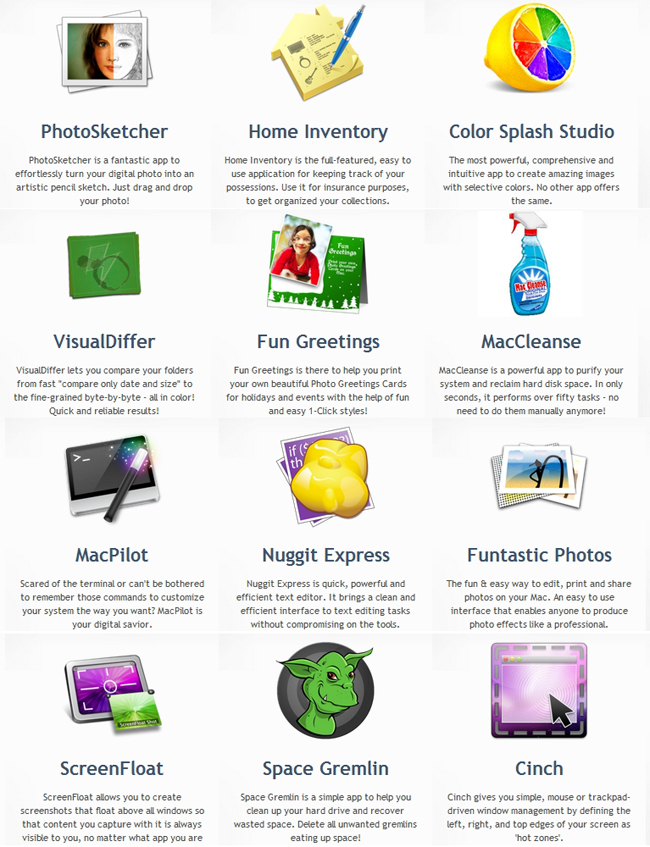
The second ZeroNinetyNine 24-hour “bundle” includes 12 apps for 99¢ before they return back to their everyday prices. Since the Mac App Store doesn’t allow apps to be bundled and sold together, ZeroNinetyNine has found a unique way to do so by designing a well-designed holding page with all the applications in their “bundle”. Several independent developers have simultaneously dropped the price of their apps for one day sale on Mac App Store for just 99¢ per app.

The apps that are included in this one-day 99¢ sale are:

Some of the apps retail for as much as $34.99.

If you have a few dollars sitting around or some iTunes credit left over from the holidays, check out these killer deals. Also, be sure to sign up on the ZeroNinetyNine page to be notified when the next deal will be coming out.


A5 Jailbreak “A Matter Of Days”

According to a new blog post published by jailbreak hacker pod2g, the long awaited jailbreak for A5 devices (iPad 2, iPhone 4S) should be “a matter of days” now. The blog post reveals that developers @planetbeing and @saurik (the creator of Cydia, marketplace for unofficial iOS apps) made their contributions to finding an exploit for the A5 chip, which has been a major issue for hackers trying to figure out a way to hack into Apple’s system in the past months.

pod2g, creator of the iOS 5.0.1 jailbreak for A4 devices, notes that there “should be nothing left” blocking the release of the A5 version. A precise release date, however, hasn’t been provided in the blog post.

For updates, you can head over pod2g’s blog and Twitter account. The A5 jailbreak has seen a “dream team” of hackers like Saurik, Planetbeing, pod2g, MuscleNerd (iPhone Dev Team) and p0sixninja (Chronic Dev Team) working together to find a way to break out of Apple’s sandbox and release a public version of the jailbreak.


Sonora Public Beta Now Available

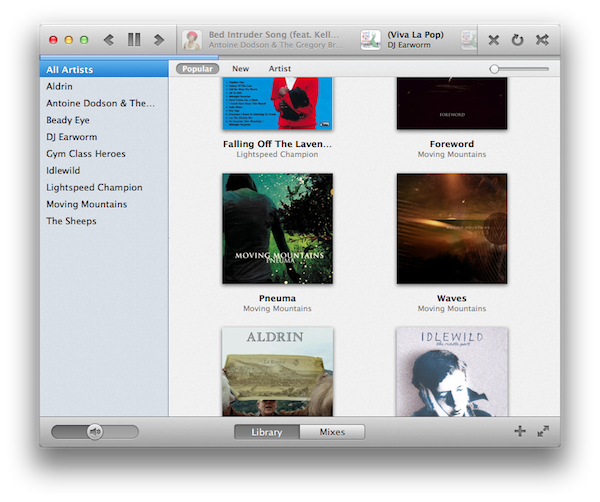
Just a few hours ago I listed Sonora, a new music player for OS X, among the new Mac apps to watch in 2012. I did not know Sonora was ready for the public beta, which is now available for everyone.

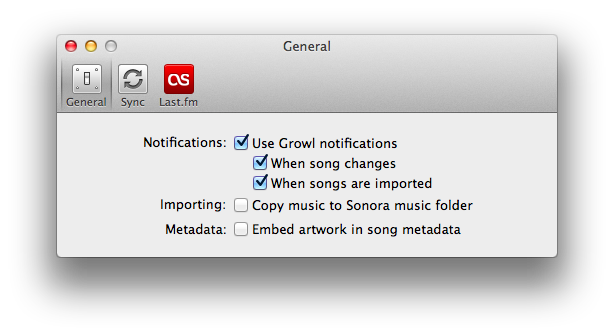
Being a beta, don’t expect the app to not crash sometimes, display strange errors, and lack the amount of polish you’d expect from a finished product. Still, some functionalities exclusive to Sonora have already been implemented and they’re working: full-screen mode for Lion, built-in Last.fm scrobbling, iTunes importing, music and queue controls from the top bar. I particularly appreciate the design of the icons in the navigation bar, which is very iOS-like for some reason (same for the popover controls). Songs you add to Sonora’s queue can be rearranged, or you can clear the queue entirely. The app supports Growl notifications and album artwork can be embedded in the song metadata.

That’s it for the first public beta of Sonora. Clearly we still don’t have an iTunes competitor here – the road ahead is very long when you consider the amount of stuff you can do with iTunes – but Sonora 0.6 shows some interesting ideas with a lot of potential. We’ll be following the development of this app in the next months very closely.

Download Sonora’s first public beta here.


Apple Confirms: Media Event In New York On January 19

According to The Loop, Apple has just sent out invitations to the press confirming the rumored media event for January. The event will take place in New York at the Guggenheim Museum on January 19. As provided by The Loop, the invitation reads “Join us for an education announcement in the Big Apple” of what appears to be a chalkboard background.

Earlier this month, it was reported Apple was working with publishers in the educational market for a “big media announcement”. Speculation has arisen suggesting that the event will see the unveiling of a new textbook option in iTunes and iBooks, something that was also hinted by Steve Jobs himself, more or less, in the authorized biography by Walter Isaacson. Of course, several rumors have appeared in the past weeks claiming that there will be a series of announcement regarding iBooks and eBooks in general, albeit today’s invitation email from Apple seems to be pretty clear about the fact that the event will be focused on education.

Speaking of iBooks, a notable omission in Apple’s eBook line up is a dedicated Mac app which, many have suggested, could only make sense for textbooks on portable Mac computers.

We’ll cover Apple’s media event on January 19 with a liveblog on the site’s homepage.


Adobe Releases Lightroom 4 Beta, Carousel To Become “Adobe Revel”

Released as a free update on labs.adobe.com, Lightroom 4 beta is the next major version of Adobe’s solution for photographers and professionals aimed at making it easy to import, adjust and catalogue photos on the desktop. Whilst Adobe obviously recommends to work with backups and advises against running beta software on a main computer, Lightroom 4 appears to be fairly stable to provide a good indication of features to come once the app goes public.

The Lightroom team is proud to introduce the fourth major version of the product designed for and by photographers. It was 6 years ago today when we introduced the very first public beta of Lightroom at MacWorld on January 9, 2006. (Yes, it was Mac only, smaller in footprint than most raw files and didn’t have a crop tool!) Since 2006 we’ve been hard at work improving an application that’s intended to be as easy to use as it is powerful. This release builds on the fundamental performance architecture and image quality improvements in Lightroom 3 to provide a truly complete workflow solution.

Adobe says Lightroom 4 focuses on image quality and output options. The app now features additional tools to get the most out of highlights and shadows while preserving image quality – Adobe calls this functionality “Highlight and shadow recovery” and goes alongside white balance brush to adjust white balance in specific sections of an image. Long release notes with technical details on image adjustments, supported file formats, known issues and minimum system requirements are available on Adobe’s official blog post.

Alongside image refinements and extended, robust video support for organizing, editing and sharing videos on Flickr and Facebook (again, make sure to check out Adobe’s blog for the full details on video adjustments), Lightroom 4.0 beta features photo book creation with over 180 page design layouts, drag & drop support with layout guides, background graphics and integration with the Blurb book printing service. Adobe says photo books have grown in the popularity in the last couple of years, and I have no doubt this is a good move on Adobe’s side (assuming the service is impeccable) at the light of Apple’s moderate success with iPhoto photo books. Lightroom photo books can also be exported to PDF; in this beta, Blurb books are limited to 160 pages.

Similarly to iPhoto, Lightroom 4.0 now allows users to organize and browse photos by location. Thanks to a new Google Maps module (which obviously requires an Internet connection), Lightroom 4.0 will determine a a photo’s location if the camera that created the file supports GPS coordinates; otherwise, users can manually drop photos onto a location and create saved locations for future usage.

Lightroom’s release notes also reveal Adobe is planning on adding significant functionality to Adobe Carousel (my review) and changing its name to Adobe Revel. Lightroom 4 will feature an Adobe Revel export option, and I expect Revel to gain much needed fixes and improvements that I mentioned in my original review of the subscription-based service.

Adobe plans to change the name of Adobe Carousel to Adobe Revel. We originally chose the name Adobe Carousel because it was descriptive of core functionality in the product, in that photographs were viewed in a circular manner, like a carousel. However, we now plan to offer additional photography solutions on this platform, including but not limited to the ‘carousel’ feature. Our rapidly expanding charter for this new platform requires a name that is less narrowly descriptive of the current product features.

Other features of Lightroom 4.0 include:

  • Publish Collections can now include rendered video publishing
  • Enhanced output model for saving/storing settings applied in Web, Slideshow, Print and Book. Efforts are now clearly visible in Collections panel.
  • New Zoom ratios (1:8 and 1:16)
  • Noise reduction adjustment is always displayed regardless of zoom level
  • Collapse the tether toolbar down to the shutter button by Option or Alt clicking the close button
  • Module picker can be customized via right-click option
  • Filter and search images by a saved or unsaved metadata property
  • Additional Metadata controls on export
  • Disk burning now available on Windows 64-bit systems
  • Stacking is now possible in collections
  • Flash galleries are now color managed

Lightroom 4 for Mac and Windows can be downloaded here. Check out a video after the break and Adobe’s YouTube channel for more information on the beta. [via setteBIT]

Read more


MacHash Apple News Aggregator Gets iOS 5 Twitter Support, Podcasts

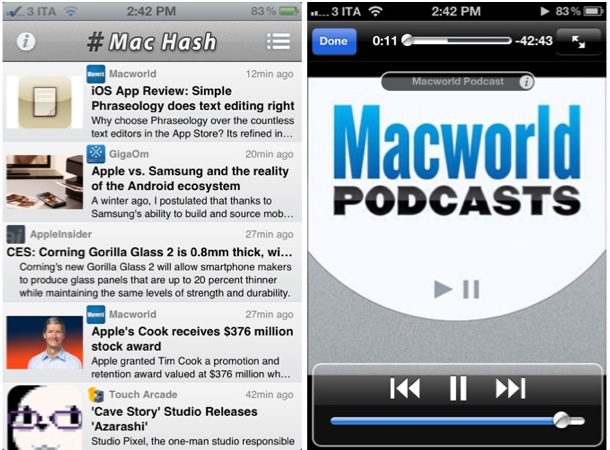
I’ve been a huge fan of MacHash since I started using the service last year. With a straightforward web interface that aggregates the latest Apple headlines from websites like ours, MacRumors, TUAW, Macgasm, AppStorm, iMore and many others and an iOS client that offers more customization options alongside an in-app browser, MacHash has become my go-to place to stay on the top of the latest Apple news and commentary from the community. I’ve already covered MacHash for iPhone and iPad in Episode 5 of App Journal.

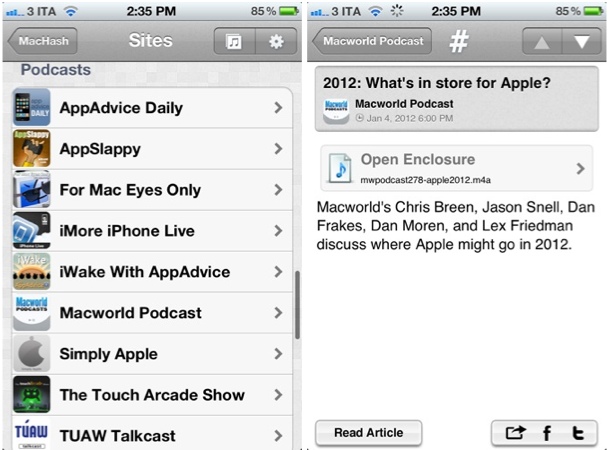
An update to MacHash for iOS released last night (version 3.2) brings a variety of bug fixes and technical improvements, as well as support for native Twitter sharing on iOS 5 and a podcast directory. The latter option is something I’ve been looking forward to since it was teased with the 3.0 update: in the Site Browser, MacHash now lists a series of Apple-themed podcasts and allows you to listen directly within the app without using a separate podcast app such as Instacast or Downcast. You won’t find podcast features as deep as the ones from Instacast our review, but you’ll still be able to run audio in the background and listen without having to keep MacHash open.

Currently, MacHash comes with the following podcasts:

  • AppAdvice Daily
  • AppSlappy
  • For Mac Eyes Only
  • iMore iPhone Live
  • iWake With AppAdvice
  • Macworld Podcast
  • Simply Apple
  • The Touch Arcade Show
  • TUAW Talkcast

I expect the selection of podcasts available inside the app to grow in the next weeks; in this version, audio functionalities are pretty limited, but I like the fact that Apple news and podcasts coexist within the same application.

Aside from MacHash, the same developers (MobileInfocenter) have also released an update to Tech News Tube last night, reaching version 3.2 and adding podcast support and bug fixes. Tech News Tube is a more tech-oriented version of MacHash, aggregating general tech news from Engadget, The Verge, paidContent, Techmeme, ReadWriteWeb, and many more. The app is very similar to MacHash both in terms of design and functionality, so make sure to check it out if you’ve been looking for a much broader news aggregator with an iOS app.

You can find MacHash and Tech News Tube for free on the App Store.