Posts in news

Apple: Two Million iPhone 5 Pre-Orders In First 24 Hours

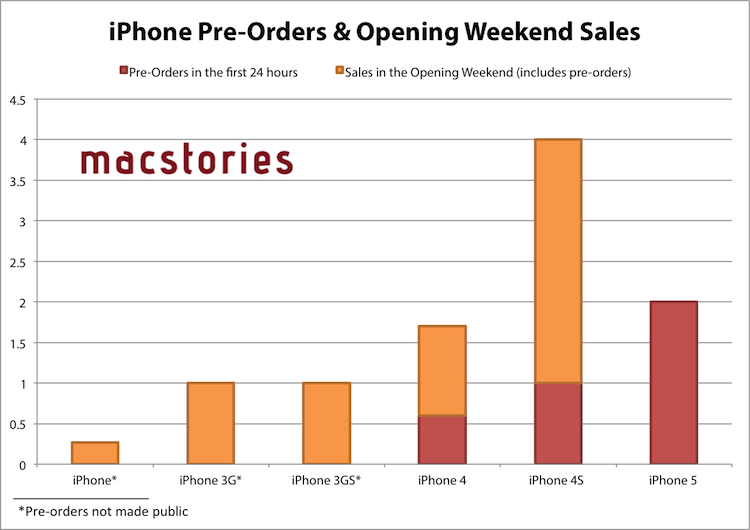
With a press release, Apple announced that the iPhone 5 topped two million pre-orders in the first 24 hours. The new device has doubled the record previously set by the iPhone 4S, which set 1 million pre-orders in the first 24 hours.

Apple has been doubling pre-orders for new iPhones every year: in 2010, the iPhone 4 saw 600,000 pre-orders in the first 24 hours, the iPhone 4S saw over 1 million, and, now, the iPhone 5 is seeing over 2 million in the same timeframe.

Apple today announced pre-orders of its iPhone 5 topped two million in just 24 hours, more than double the previous record of one million held by iPhone 4S. Demand for iPhone 5 exceeds the initial supply and while the majority of pre-orders will be delivered to customers on September 21, many are scheduled to be delivered in October. iPhone 5 is the thinnest and lightest iPhone ever, completely redesigned to feature a stunning new 4-inch Retina display; an Apple-designed A6 chip for blazing fast performance; and ultrafast wireless technology*—all while delivering even better battery life.**

“iPhone 5 pre-orders have shattered the previous record held by iPhone 4S and the customer response to iPhone 5 has been phenomenal,” said Philip Schiller, Apple’s senior vice president of Worldwide Marketing. “iPhone 5 is the best iPhone yet, the most beautiful product we’ve ever made, and we hope customers love it as much as we do.”

Last weekend, Apple said that it was blown away by the success of initial pre-orders, and this morning U.S. carrier AT&T confirmed the iPhone 5 has been the most successful device (in terms of pre-order numbers) to date. Pre-orders for the iPhone 5 began in the initial launch countries (US, Canada, UK, France, Germany, Australia, Japan, Hong Kong, Singapore) on Friday, September 14th, for a release set on the 21st. On September 28th, more countries will follow (Austria, Belgium, Czech Republic, Denmark, Estonia, Finland, Hungary, Ireland, Italy, Liechtenstein, Lithuania, Luxembourg, Netherlands, New Zealand, Norway, Poland, Portugal, Slovaki, Slovenia, Spain, Sweden, Switzerland) though it’s still unclear whether those countries will get online pre-orders as well.
(click for full size)

Furthermore, Apple is targeting 100 countries and 240 carriers by December 2012 for iPhone 5 availability.

The iPhone 5 is a major upgrade featuring a taller screen, new CPU, improved camera processing, faster performance, 4G LTE, and more. Check out our complete overview for all the details.


Paper 1.1 Now Available With Faster Ink, “Move”, “Duplicate” and “Easy Add” Features

2012 Apple Design Award winner Paper by FiftyThree has reached version 1.1 today, adding a number of much requested features and improvements to bring better organization of pages and smoother ink. Paper, a digital sketching app for the iPad, made headlines earlier this year as it somehow managed to make the process of drawing on screen fun and intuitive. With sharing built-in, a clever in-app purchase mechanism (you can buy single tools at $1.99 each, or the entire package at $6.99), and a simple multi-touch based interface, Paper has become for many the best way to take quick visual notes and draw sketches on iOS.

Today’s major update brings up to 3x faster virtual ink for every tool included in Paper, and users can now also draw with their fingers (or a stylus) to the edge of the screen, which wasn’t previously possible. In an interview with The Verge’s Ellis Hamburger, the Paper team shared some of the secrets behind their technology:

When you draw, you want strokes to appear at an even speed and even rate, which gives the system a reliable feel. If you hit the CPU or GPU at an even rate, the results end up being very smooth,” he says. Every brush inside FiftyThree’s “Expressive Ink Engine” has been fine tuned to be up to three times faster, and you can now draw all the way to the edge of the screen — a top request from users. The 1.1 update also saves battery, since requests are made to the iPad’s processor more consistently. The Rewind feature, which lets you undo brush strokes, also received some attention in Paper 1.1, and responds accordingly based on how quickly you move your two fingers in a circle.

The big new feature of this new version, however, is the improved organization. Relying once again on multi-touch to navigate the core elements of the app, users can now tap & hold with one finger to select a page from a notebook, then use the other hand to navigate other notebooks as they normally would; once in another notebook, the tap & hold can be released to drop the page in its new location. The “move” feature is a welcome addition that, alongside the new Duplicate function, should make for a much better experience for those who rely on Paper for wireframes, project templates, and more.

Paper 1.1 is a good update, especially thanks to the focus on better organization of pages, which was a huge downside of previous versions of the app. Check out Paper 1.1 on the App Store, and the official promo video below. (Also: pardon my poor drawing skills. But, yes, real coffee is Italian)
Read more


iPhone 5 Now Available for Pre-order

The iPhone 5 is now available for pre-order at Apple.com. Fortunately, it does not require missiles or the Morph Ball to obtain.

Ordering the iPhone 5 tonight? Your best bet is Apple’s Online Store. Even better is the Apple Store app, which might fetch you a new iPhone faster than the guy who’s waiting for the web server to respond to his order request. Last year lots of people had good luck with the carrier’s online stores for the 4S, Sprint (after a short delay) and Verizon especially. We’ve listed the United State’s carrier’s stores below so you can hopefully order without hassle.

The iPhone 5 is an awesome power-up for anyone on the iPhone 3GS or the iPhone 4. The iPhone 5 is super thin and lightweight, has a larger 4-inch display, and has twice as much horsepower as the iPhone 4S thanks to its A6 processor. Available in white and black in 16 GB, 32 GB, and 64 GB models ($199, $299, $399 respectively) on AT&T, Sprint, and Verizon, the iPhone 5 is equipped to utilize the incredible speed of LTE wireless networks without sacrificing battery life. With an improved 8 MP camera that takes pictures 40% faster than the iPhone 4S, includes wideband audio for clearer calls (carrier support coming soon), an even more vibrant Retina display, and packaged with Apple’s completely redesigned EarPods, the iPhone 5 isn’t just a incremental upgrade. It’s redesigned from the ground up.

* * *

Don’t know if you want to upgrade? The iPhone 5 is bound to be a fantastic phone, but having the latest and greatest isn’t necessary, especially if you have the iPhone 4S (and you guys bought that knowing you would be locked in for the two-year long haul… riiiight?). The iPhone 5 has no differentiating features in iOS 6 over the 4S — you’ll have Panorama and all of Siri’s latest features. Having LTE would be nice, as would be having apps launch faster and games look prettier, but I’m betting you’ll see the upgrades you care about — more battery-life and a significantly improved camera — with the iPhone 5S or whatever the heck Apple names it. (After all, they did break the space-name-time-continuum by naming their 6th phone the iPhone 5.) Plus, you’ll feel good when you leap-frog the iPhone 5 owners next year. Boom. Circle of life.

If you have an iPhone 3GS or iPhone 4 (most of you) that’s due for an upgrade, of course you should upgrade — the iPhone 4S was a significant update a year ago, so you guys are really gonna feel how much faster iOS is with an even newer iPhone. No questions asked, do it. I can’t help you with picking a color though.

If you happen to be someone who got a free 3GS or a $100 iPhone 4 recently (and will be locked-in to a contract for a while), you can at least have some solace: you’ll still be getting iOS 6, but not necessarily all of the features (no Siri). Depending when your contract ends or full upgrade eligibility begins, I recommend waiting for Apple’s next flagship iPhone and ordering it then. That way, you’ll get on Apple’s cycle, won’t have to worry as much about being out of date, and won’t be behind the curve on software if Apple pulls another feature-X-won’t-work-on-older-phones bit as Apple did with Siri between the iPhone 4 and 4S.


Twitter Archiving Tool Watermark Gets Dropbox Export Feature

Recently relaunched under a new name, Manton Reece’s Watermark is one of my favorite web services. Seamlessly integrated with Twitter, Watermark is an archiving tool that, through filters and custom collections, lets you archive and search your entire timeline. From our previous coverage:

Tweet Marker Plus was one of my favorite services to provide the kind of Twitter functionalities that Twitter the company always ignored: powerful search and filtering tools, collections, and additional browsing options. Like Cue, Tweet Marker Plus has proven to be a worthy addition to my workflow to retrieve tweets and leverage the information shared on the platform every day.

I use Watermark on a daily basis to retrieve tweets that have been shared in my timeline – status updates that would be hard to retrieve using Twitter’s web interface, let alone the official apps. Twitter never invested in powerful archiving and filtering tools, and Watermark provides a fantastic backup solution to know that, in the background and automatically, your timeline will be archived and made searchable for the future. This is important for online data preservation, a subject I’ve been exploring for the past year.

Today’s update to Watermark introduces yet another option to make sure your data will always be with you: automatic Dropbox export. Available in Watermark’s settings, once authorized with Dropbox the service will create archives of filters, collections, and your own tweets as .csv files. For your tweets, the 10,000 most recent ones will be saved, whereas filters and collections are limited to 1,000 for now. As Manton writes on his personal blog:

Dropbox sync fixes that. Watermark can now automatically copy tweets (and App.net posts) from your saved filters and custom collections to CSV files on Dropbox. For example, search Watermark for “iPhone 5”, click “Save as filter”, and the most recent 1000 tweets matching that query will appear in a file called “iPhone_5.csv” on Dropbox. It keeps running in the background, so the files are updated every hour as new tweets matching the search are downloaded by Watermark, even if you aren’t signed in.

Like I said, I use Watermark every day, and being a Dropbox fan as well, it’s great to see the two services coming together. I feel like Dropbox is becoming, for many, the de-facto “filesystem for the web”, and it only makes sense for a service like Watermark, which aims at freeing data from the pressure of Twitter, to gain an export option based on it. Right now, tweets are saved in .csv files with their ID, author’s username, date, service (Twitter or App.net), message, and original URL. In a future version, I hope Manton will consider some kind of plain text export option as well, though that might be tricky; right now, I’m comfortable with the structure of .csv archives.

Watermark is a service I highly recommend, and it’s only $5 per month.


Apple Details iOS 6 Feature Availability By Country

As noted by Horace Dediu, Apple has published an official list of iOS 6 feature availability on its website. While iOS 6 is officially coming out next week, on September 19th, not every feature will be available in every country.

The list focuses mainly on Siri, Maps, and Dictation. Availability of iTunes Store and App Store content is mentioned as well, but that’s not really new if you’ve been following the expansion of Apple’s digital storefronts in the past months. What’s interesting ahead of iOS 6’s launch is the list of features that, due to content limitations or the “beta” nature of Siri, won’t be available in some parts of the world.

For instance, Maps’ “standard” operation will be available from Afghanistan to Zimbabwe for a total of 181 supported countries. This should include the “standard” view of Maps – the new tiles that Apple is using after removing Google’s ones from iOS 6 entirely. Similarly, the Satellite view of Maps will be available in the same 181 countries worldwide. However, things start getting different with Maps’ Directions and and Turn-by-Turn navigation: the former will be available in 96 countries, the latter in 56. 3D buildings, another feature of Maps, will only be available in the United States at launch, whereas Traffic information will be available in 23 countries. Last, Maps Local Search will be available in 49 countries, and Business Reviews and Photos in 15.

Siri is even more limited. In spite of the voice assistant gaining support for more languages in iOS 6, several functionalities and integrations will be limited by the user’s location. So, for instance, while everyone will be able to set Siri to a supported language and issue commands, Sports data will be limited to 15 countries; Twitter and Facebook integration to 14; Local Search and Restaurant Information to 10, but Restaurant Reviews will only be available through Siri in 9 countries and Reservations in 3 (USA, Canada, Mexico). Another Siri integration, Movies, will be limited to 13 countries for Movie Information, 4 for Reviews, and only 3 for showtimes.

As Apple embraces more third-party services in its operating systems, it’s no surprise that some features will be restricted to only the countries where those services are fully operational. The same happened with the first version of Siri last year – some commands were only supported in the United States initially.

Check out the full list of iOS 6 feature availability here.


Apple Posts September 12 Keynote Video

Apple Posts September 12 Keynote Video

Apple has posted a video for its September 12 Keynote that took place in San Francisco earlier today. The video can be streamed here, and a higher quality version should be made available in a few hours through iTunes. To avoid streaming errors, Safari is recommended for the best viewing experience.

Streaming from Apple Events’ website

Update: The keynote video is now available for download as well through iTunes.

Also, here’s a recap of our ongoing coverage for today’s event:

iTunes 10.7 Now Available

Apple Announces New iTunes for OS X, iPod Touch 5th Generation, and a New iPod Nano

iPhone 5: Our Complete Overview

The Numbers and Facts From Apple’s September 12 Event

We will post additional news on the site’s homepage, or tweet as @MacStoriesNet throughout the day.

Permalink

Apple To Developers: Submit Your iOS 6 Apps Today

Following the introduction of the new iPhone 5, new iPods and an upcoming new iTunes earlier today, Apple has now sent an official mail to its third-party developers. In it, Apple asks its developers to submit updates of their apps or completely new ones built with the newest iOS 6 SDK and APIs.

iOS 6 will soon be in the hands of hundreds of millions of customers. Take advantage of beautifully designed and smooth panning maps using the new vector based engine in MapKit. Provide tickets, loyalty cards, and other passes with Passbook. Integrate sharing capabilities for Facebook. Explore new camera APIs and new features for Reminders, In-App Purchase, and Game Center to create your best iOS apps yet.

To prepare your apps for submission, download the GM seeds for iOS 6 and Xcode 4.5 and test your existing apps for compatibility. Be sure to review the updated App Store Review Guidelines and the iOS 6 Readiness Checklist, and submit your apps today.

Developers can now head over to the Apple Developer website to download the new GM seeds for iOS 6 and Xcode 4.5.


iTunes 10.7 Now Available

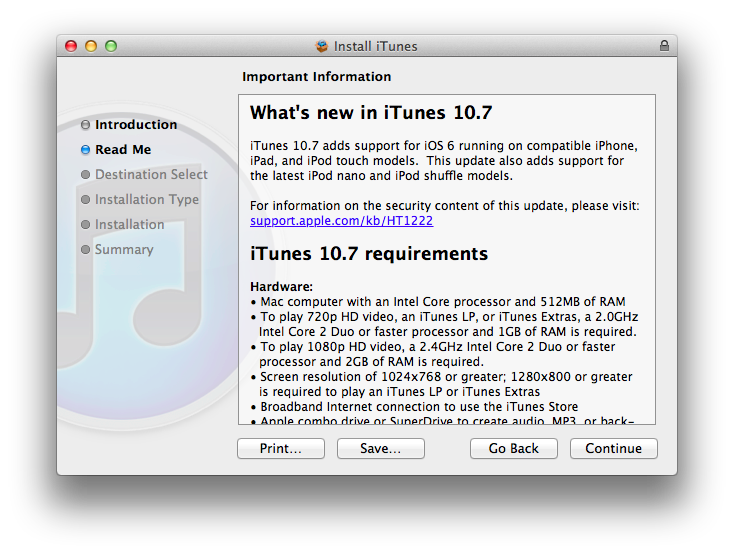
While a major new version of iTunes (coming in October) was announced at today’s media event in San Francisco, Apple has already released version 10.7 of the software. Labelled as “coming soon” on its website, iTunes 10.7 is actually available for download from the iTunes Download webpage.

iTunes 10.7 is a minor compatibility update for iOS 6 (which is coming next week) and the new iPods announced today.

iTunes 10.7 adds support for iOS 6 running on compatible iPhone, iPad, and iPod touch models. This update also adds support for the latest iPod nano and iPod shuffle models.

You can download iTunes 10.7 from Apple’s website.