Posts in news

Sponsor: MacPaw

Our thanks to MacPaw for sponsoring MacStories this week with CleanMyMac 2.

CleanMyMac 2 is the successor to MacPaw’s award winning system utility, rebuilt and redesigned from the ground up to make it easier than ever to remove the cruft that’s taking up unnecessary storage space on your Mac. CleanMyMac 2 scans your hard drive, looking for unneeded temporary files, unused caches, forgotten files, and even cleans up application-specific trash in applications like iPhoto. It can also optimize your iPhoto library, removing original versions of images that you’ve since modified while editing. CleanMyMac 2 even helps you take care of plug-ins and widgets, while ensuring applications are completely uninstalled.

CleanMyMac 2 is free to try, and a single license is available for only $39.95. A license for up to five Macs is only $89.95.

For families with PCs in addition to Macs there’s also CleanMyPC, which brings the same easy-to-use interface to the Windows desktop.
Sponsor: CrashPlan

My thanks to CrashPlan for sponsoring MacStories this week.

CrashPlan lets you backup your data to your own computers and hard drives or friends & family with no storage limits. CrashPlan gives you the peace-of-mind that only comes with continuous, minute-to-minute backup. CrashPlan has been a favorite of the Mac community for years because of its “set it and forget it” ease of use and ability to provide continuous, minute-by-minute backup without interfering with normal Mac operations. Using sophisticated byte pattern analysis and data de-duplication to detect file changes, CrashPlan preserves multiple versions of files; if you don’t want to always use your Mac, the files you were just working on minutes ago can be accessed from our phone or tablet using CrashPlan’s free mobile apps.

Find out more about CrashPlan here.


Sponsor: Doxie

My thanks to Apparent for sponsoring MacStories this week with Doxie.

Doxie is an award-winning scanner that works anywhere – no computer required – and then syncs to your Mac, iPad, and various cloud services. Doxie’s small and portable hardware comes in two models: Doxie One and Doxie Go. The Doxie’s scanning process is simple: just push a button and insert your sheet of paper to save it thanks to the Doxie’s built-in battery and memory chip.

I have been using a Doxie Go since January 2012. My paperless workflow consists of scanning quick receipts with the iPhone’s Camera and larger documents with the Doxie Go. The Doxie provides high-quality scans that I import with the Doxie Mac app, which provides an option to save PDFs with or without OCR; on the Mac, I then save everything to Evernote directly from the Doxie app. The Doxie Go is the only scanner I’ve ever owned and I’m very happy with it.

Learn more about Doxie here.


How to Enable Two-Step Verification for Your Apple ID

About Two Step Verification

About Two Step Verification

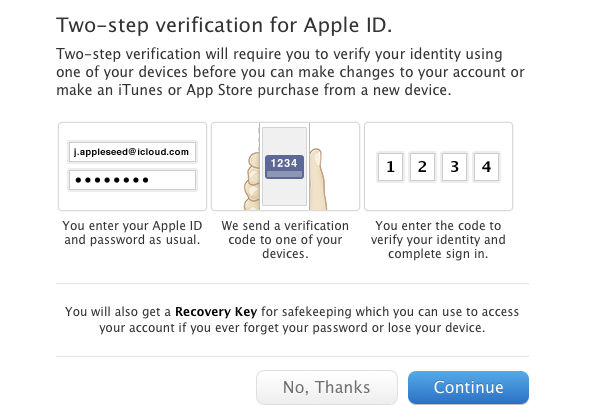
Today, as originally reported by 9to5Mac, Apple has rolled out two-step verification for Apple IDs. Two-step verification makes it more difficult for someone to compromise your Apple ID by adding an additional layer of security. In this case, it’s an iOS device you own such as your iPhone (iPads and iPod touches also apply). As you make a purchase from iTunes on a new device or after you log into your account with your username and password, you’ll be asked to authenticate with a short code four-digit code. Currently, two-step verification is available for Apple customers living in the United States, the United Kingdom, Australia, Ireland, and New Zealand.

Using two-step verification is completely optional — you’re not required to use the extra security measure if you don’t want to. For those who opt-in, Apple gives fair warning that you’ll need your trusted device with you to access your account information. Apple does provide a printable Recovery Key in case you lose your iOS device or forget your password, but they won’t be able to help you if you lose it. I recommend storing the Recovery Key in 1Password for safe keeping. If you do lose the Recovery Key, you can generate and print a new key if you can log into your account.

If you won’t be enabling two-step verification, it might be a good idea to revisit your security questions. Instead of using likely answers, generate less guessable, complex words with 1Password instead for added security. Here’s a quick guide.

How to Enable Two Step Verification

How to Enable Two Step Verification

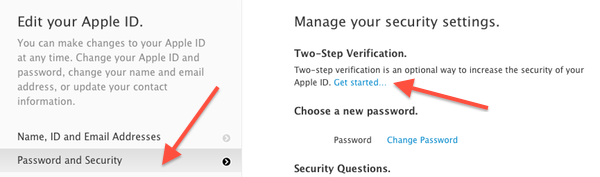
Setting up two-step verification starts by visiting appleid.apple.com. Upon logging in, click on the Password and Security tab. After entering a couple of answers to your security questions, you can find the option to turn two-step verification on at the top of the page. Simply click Get started… to begin setup.

Read more


FlightPath, TestFlight’s New Mobile Analytics Tool, Launches as a Private Beta

Today TestFlight is announcing FlightPath, a new mobile analytics tool that makes it easy for developers to gain insights on how their customers are using their apps in real-time.

Launching as a private beta, FlightPath shows what you care about on a single, easy-to-read living page. A simple chart provides a high-level overview of an app’s status and usage in real-time. Developers can click on various points to filter data into specific metrics, such as session length, that can be combined with other data points and saved off as preset segments for easier tracking. Preset segments, such as Loyal Users and Flight Risks, give developers a head start on gaining valuable insights. Developers already using the TestFlight SDK can easily take advantage of FlightPath by adding a single line of code.

FlightPath appears to be the Squarespace of analytics tools: it’s easy to get started, everything is a click away, and more nuanced data is available if developers want it. FlightPath aims to solve common frustrations with analytics tools by reducing complexity and by delivering up-to-date information now, not later.

Developers can sign up for the FlightPath beta by signing up at www.flightpathapp.com.


Sponsor: Smile

Our thanks to Smile for sponsoring MacStories this week with PDFpen 6.

PDFpen makes it easy to sign PDFs, make edits to text and images, and perform OCR on scanned documents. Fill out interactive forms, adjust resolution and contrast for better legibility, and mark up PDFs for proofreading and note-taking. Export documents to Evernote and share PDFs through iCloud or Dropbox to edit your files on the go with PDFpen on the iPhone and iPad.

PDFpen 6 is optimized for the Retina Display and now takes advantage of Versions and Auto Save available in Lion and Mountain Lion, which better saves your edits from accidental loss. Take advantage of the improved resolution with the easier to use editing bar. Lastly, export your PDFs to Word documents for convenient sharing with coworkers.

PDFpen 6 is now available on the Smile Store and the Mac App Store. For a limited time, PDFpen 6 is available for only $29.99, normally retailing for $59.95.

Learn more about PDFpen 6 here.


Apple Releases iOS 6.1.3 With Passcode Bypass Fix

iOS 6.1.3 Update

iOS 6.1.3 Update

Today Apple released iOS 6.1.3. It is an incremental improvement to iOS that includes a security patch for the previously publicized vulnerability that allowed access to the Phone app even when the screen was locked. The release notes also mention improvements to the Maps app for users in Japan. Perhaps some of our kind Japanese readers can give us some insight in to the changes Apple might have made to the Maps app. Finally The Next Web is reporting that some of the vulnerabilities required to jailbreak iOS devices have in fact been patched which means that the cat and mouse game between Apple and the jailbreak community continues.

The update is now available through iTunes and iOS’ Software Update panel and it is assumed that the update will ship to all iOS devices that are iOS 6 compatible.


Apple Releases OS X 10.8.3

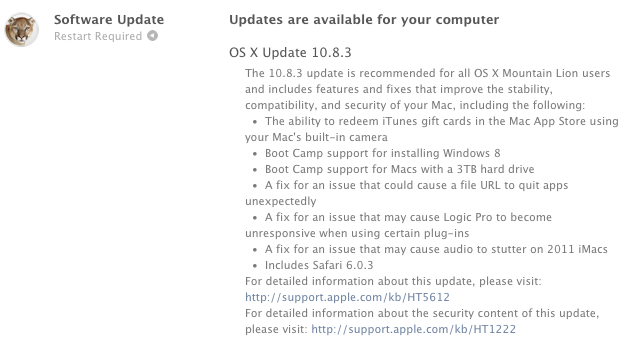
After nearly four months in testing and thirteen betas seeded to developers, Apple has today released OS X Mountain Lion 10.8.3. As with previous software updates, the new version is available on both the Mac App Store and Apple’s website.

10.8.3 includes some new features and bug fixes. Notably, the update comes with the usual stability improvements, but, this time, also a fix for the notorious File:/// URL bug that could crash certain Mac apps. Safari 6.0.3 is also part of the update, with improvements for scrolling on Facebook.com, fixes for zoom, restoring position, and bookmarks issues that could cause bookmarks to be duplicated on iOS devices.

As far as new features go, Boot Camp now comes with support for Windows 8 and Macs with a 3 TB hard drive. Introduced in late November 2012 with iTunes 11, Mac App Store gift cards can now be redeemed using a computer’s camera.

Detailed release notes can be found here. The software can be downloaded with the links below:

OS X Mountain Lion Update v10.8.3 (540.46 MB)

OS X Mountain Lion Update v10.8.3 Combo (793.69 MB)


A Better Chrome To Safari Bookmarklet

pythonista

pythonista

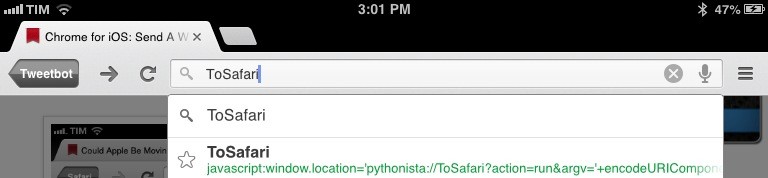
In January, I tried to put together a bookmarklet to send the webpage currently open in Google Chrome for iOS to Apple’s Safari. That turned out to be a surprisingly complex effort as Google didn’t think offering an “Open In Safari” option would be a good idea, and the app’s URL scheme produced some interesting results when opening and closing Chrome.

I was reminded of the bookmarklet this morning by reader @CNWLshadow, and I realized that I never posted the solution I settled with. It consists of a browser bookmarklet and a Pythonista script, and it works with just one tap.

Read more