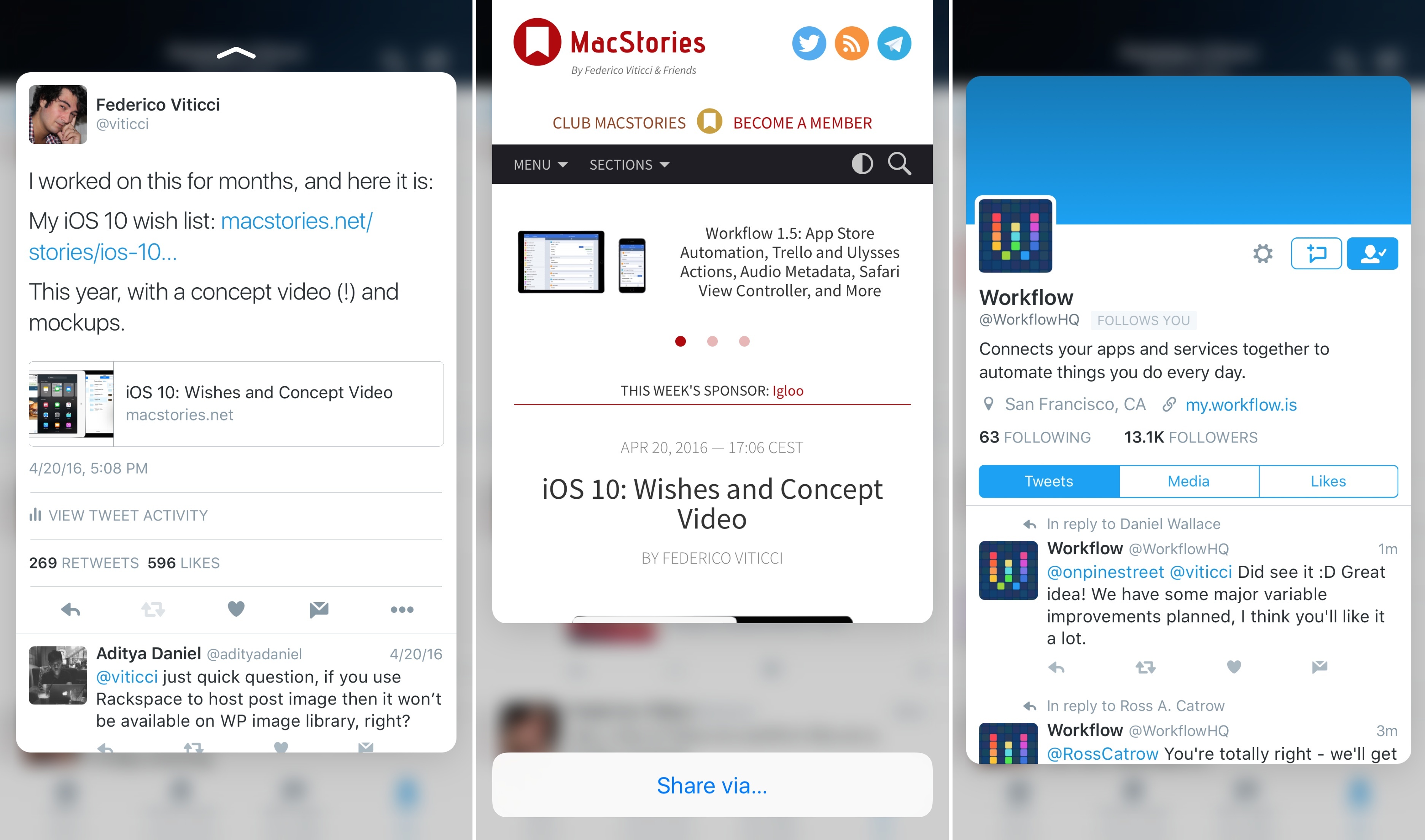
With an update released earlier today on the App Store, Twitter has extended integration with 3D Touch in their iPhone app (previously limited to quick actions on the Home screen) to peek and pop previews in the timeline and other sections of the app.
With the latest version of Twitter for iPhone, you’ll be able to press on tweets, links, pictures, and profiles to bring up a 3D Touch preview of the content. By swiping a peek upwards, you’ll also gain access to shortcuts to either share via direct message and iOS extensions or, in the case of profiles, mute, block, and report a user.
Twitter’s extended 3D Touch support isn’t as advanced as Tweetbot – for instance, peek and pop previews don’t seem to work in the Notifications tab – but it’s a step forward regardless.
You can get the latest version of Twitter for iPhone from the App Store.
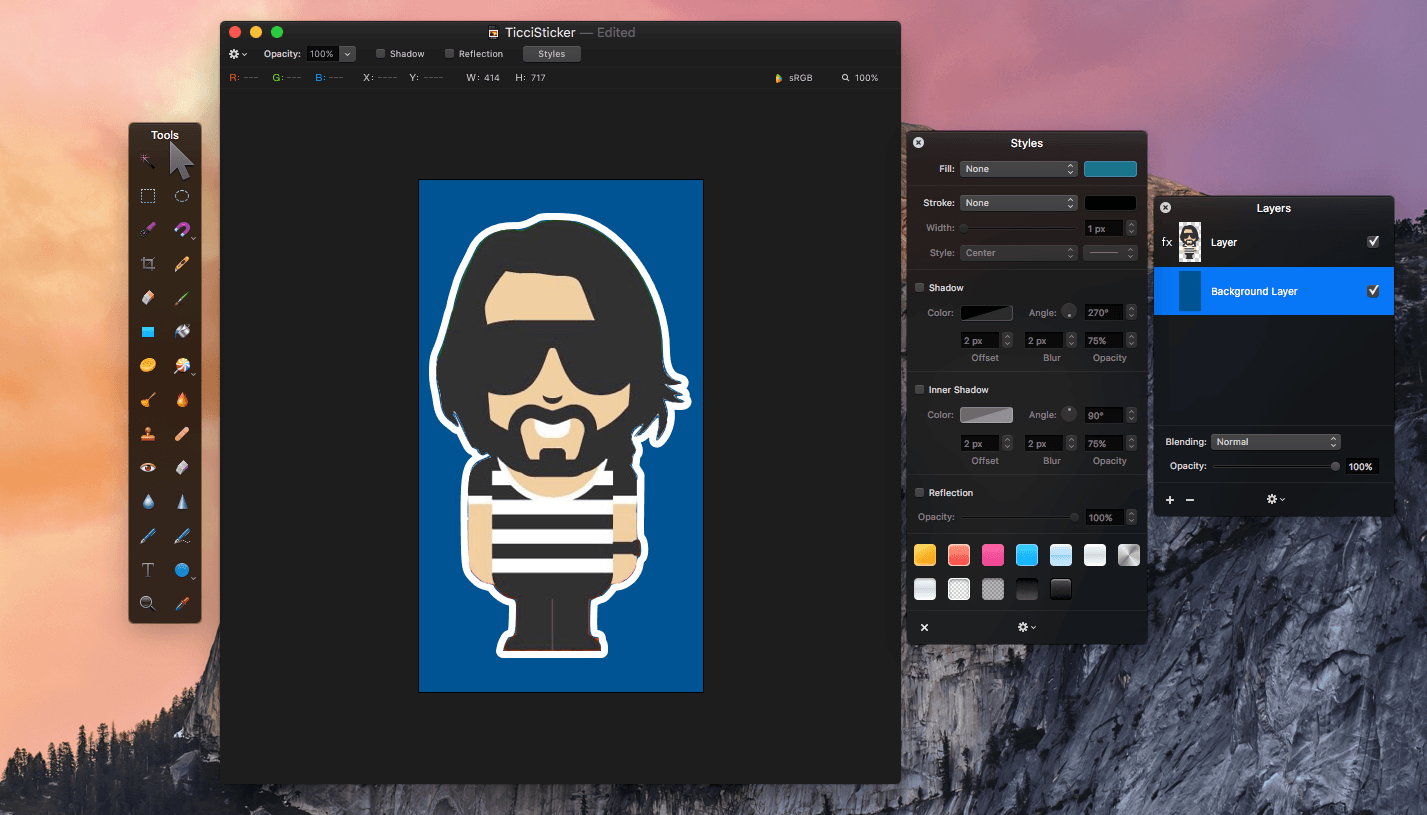
Pixelmator 3.5 was released today with three new tools - Quick Selection, Magnetic Selection, and a retouch extension for Apple’s Photos app. Pixelmator has been my go-to image editor for a long time. I use if for everything from screenshot editing for MacStories and creating assets for my own website, to retouching family photos. As many readers may know, we started a Telegram channel a couple months ago called The MacStories Lounge. One of Telegram’s strengths is its media integration. I figured, what better way to test the new Pixelmator selection tools than to create a Telegram sticker – of Federico.
India’s finance minister has ratified a decision that Apple Inc. must meet local sourcing rules to open its own stores, according to people familiar with the matter, dealing what may be a fatal blow to the iPhone maker’s effort to open retail outlets in the country.
Minister Arun Jaitley decided to support the decision by India’s Foreign Investment Promotion Board that Apple will have to procure 30 percent of components locally if it wants to sell through its own retail stores, said the people, asking not to be identified because the matter is private. The company makes most of its products in China and doesn’t currently meet that criteria.
It comes after another government panel had recommended, in late April, that Apple be granted the exemption. But more significantly, today’s move comes after Tim Cook visited India in his first official trip to the country as CEO of Apple.
The decision by India’s finance minister may not be the last word, as Indian Prime Minister Narendra Modi could theoretically intervene. During Cook’s trip to India he met with Prime Minister Modi and Apple’s retail plans were reportedly discussed, as was Modi’s “Made in India” program which encourages foreign companies to manufacture in India. In public comments during the week Cook suggested that Apple was looking to establish a facility in India that would refurbish old iPhones for resale in India, but had no plans for other manufacturing at this stage.
In this day and age, there’s no shortage of ways to collaborate. You can use shared FTP drives, company-wide chat apps, or maybe you can use the one that thing that’s been neglected for a while: your corporate communications portal. While each app might serve a purpose, the sheer volume (and fragmentation) can be overwhelming for people at work these days.
That’s why you should try Igloo. It combines department spaces, team calendars, corporate file sharing, internal communications capabilities, social features, and plenty more—easily.
At Igloo, they think your way is the best way, they just want to support you, and make your way better.
Work has evolved and your tools should too. Never email yourself a file again. Bring your company into the 21st century - send your IT guy to try Igloo Software for free.
Igloo is an intranet you’ll actually like.
Our thanks to Igloo for sponsoring MacStories this week.
Twitter announced some big changes today that are designed to encourage conversations and media sharing. The 140 character limit of a tweet becomes a more significant constraint as you add more ‘@names’ to a conversation or attach media to a tweet. The changes announced by Twitter, which go a long way toward addressing those constraints, will be rolled out over the coming months in Twitter’s own app and will be available to third-party Twitter clients.
Replies
Large group conversations on Twitter are hard. The more people you add to a thread, the fewer characters you have left to communicate with the group. With the upcoming change to replies, ’@names’ of up to 50 people will no longer count toward the 140-character limit of a tweet. The tweet will still be seen only in the timelines of the people @replied, but eliminating ‘@names’ from the character count should facilitate conversations among more people. I am happy to see this change overall, but I wonder whether Twitter has gone too far by allowing up to 50 ‘@names’ in a single tweet.
The change to ‘@names’ will also eliminate the quandary about what to do when you want to start a tweet with someone’s ‘@name’ that is not a reply. With the changes announced, these tweets will be treated like any other tweet and be visible to all of your followers, eliminating the need to use the convention of a period before an ‘@name’ to ensure that everyone who follows you sees the tweet.
Media
When Twitter rolls out the changes announced, photos, videos, and GIFs will not count against the 140 character limit of a tweet, which should encourage the use of more media in tweets. The existing limits of four photos, or one video or GIF per tweet still apply. Links that are pasted into a tweet and not generated by attaching media will also still count against the 140-character limit.
Retweets
Finally, Twitter announced that you will be able to retweet your own tweets. Though this struck me as strange at first, it eliminates the need for things like the ubiquitous ‘ICYM’ tweets and will allow you to share an @reply, which would normally only be visible to its recipients, with all your followers.
As we highlighted yesterday, among the components of Apple’s new Union Square store are Creative Sessions that will be held in what Apple has dubbed ‘The Forum.’ Today, VSCO announced a partnership with Apple highlighting iOS photography:
From May 26th until July 7th, Apple Union Square will host four Creative Sessions, each led by an established photographer from the VSCO community. Each photographer will share their story, inspiration, and creative process, and will lead a hands-on lesson based on their unique style and techniques.
Apple’s history with events scheduled around WWDC has been stormy. In 2013, CocoaConf scheduled an alternative conference for developers who were unable to get a ticket to WWDC called CocoaConf Alt. The conference was set to coincide with WWDC until CocoaConf organizers received an email from the Intercontinental Hotel that they could not hold the conference due to a contractual conflict with Apple. More recently, AltConf (originally AltWWDC and changed) planned to stream the 2015 WWDC keynote and State of the Union presentations at the Metreon Theater across the street from Moscone West. Initially, Apple threatened legal action, but ultimately, agreed to allow AltConf to stream the sessions that Apple streamed itself.
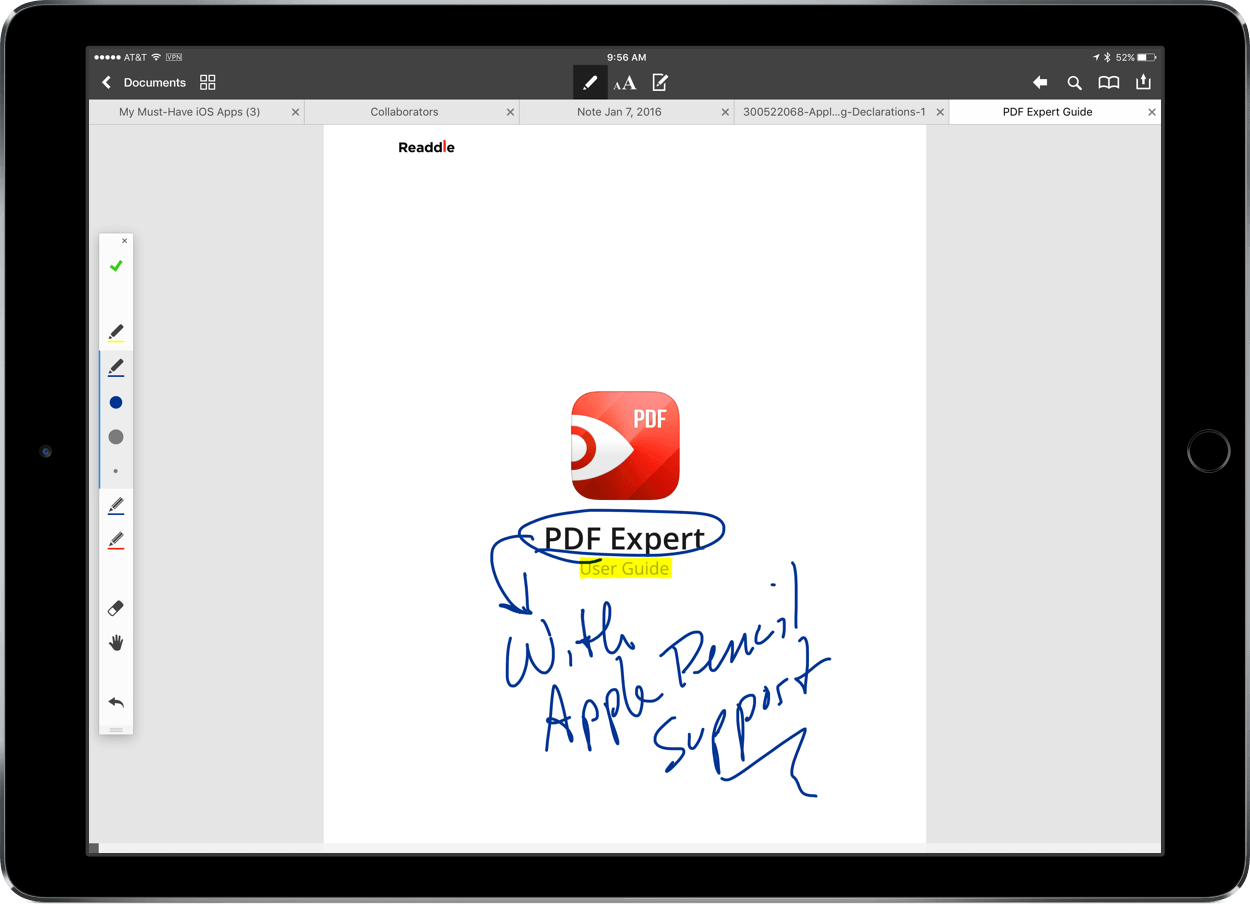
Today Readdle updated PDF Expert for the Mac and iOS with two new features - Apple Pencil support for the iPad Pro and file transfer between the Mac and iOS. In my initial tests, Apple Pencil worked well in most circumstances and file transfer may come in handy for some people, though it’s a little cumbersome compared with saving PDFs to a cloud storage service.
At its I/O keynote earlier today, Google announced that it would venture further into messaging and video calling with two new apps: Allo and Duo. A familiar combination of text messaging and video chat, the two will provide a new way to chat with friends and obtain useful information within Google’s ecoystem.
The apps, which will be released this summer, will come to both Android and iOS, directly challenging the latter’s own iMessage and FaceTime services. Although Google did not put a strict release date on Duo or Allo, it did offer a sneak peak of what’s next.
Allo
Drawing inspiration from iMessage, Slack, and Google’s own Inbox, Allo looks to enrich the messaging experience by providing contextual information in a typical conversational format.
Based on your phone number, Allo will use your contacts to create a conversation. In many ways, Allo is a familiar messaging app, promoting back-and-forth conversation and displaying the responding status of the other party. However, Google has added a few features to make conversing easier and smarter.
Smart Reply
Mirroring Inbox, Allo supports Google’s Smart Reply system, a feature that scans the conversation and presents pre-written responses for your choosing. This can be anything from a simple “Hello!” to a response to a dinner request and, more impressively, a comment on a photo. Google claims that Smart Reply can identify the context of the action in a picture and suggest responses based on what it’s seen. As with much of Google’s software, the service will learn how you interact and adjust its replies based on your language patterns.
Google’s Assistant
Within a conversation, Google will present relevant search results based on the information you type. If, for example, you wanted to suggest to your friend that you should get coffee, the assistant would display an option to perform a search for coffee shops nearby.
After selecting the search, the assistant will insert options in a carousel with rating and distance. Choosing one of the shops would provide the opportunity to call, make a reservation, and so on. This isn’t limited to restaurants, of course, and Google said that it will be working with developers to bring tailored results straight into your conversation.
The assistant also works by itself, using natural language processing to perform actions like searching the web or getting the day’s schedule. One example from the keynote involved asking the assistant in a private conversation the result of the user’s favorite team, returning the latest result for Real Madrid.
Miscellaneous
Allo provides a simple way to send and draw on pictures – when sending an image, a pencil icon can be selected to write on the image. This was only demoed for a few seconds, so it’ll be interesting to see the customization options this features.
Also included is “WhisperShout,” a method for adjusting the text size to fit the desired message. By tapping and holding on the send button, users can slide a finger up or down to change the size of the message.
Incognito mode also makes an appearance in Allo, providing “end-to-end encryption and discreet notifications” for conversations. According to Open Whisper Systems, the company is partnering with Google to use their Signal Protocol technology, a “modern, open source, strong encyrption protocol for asynchronous messaging systems.” Incognito mode is not on by default, it seems, but it’s a welcome feature for those desiring more privacy.
Duo
Along with text messaging, Google also showed Duo, a video messaging service akin to Skype or FaceTime. Essentially, it’s much of the same story: a video call between two people through their phone numbers. Google claims Duo will show video in “crisp HD video” (up to 720p) and will switch between cellular and WiFi when it deems necessary. It also claims that video quality will adjust based on connection, ensuring that it’s still possible to continue the call.
The biggest differentiator between Duo and its competitors is what Google calls Knock Knock. With Knock Knock, the caller’s video stream will start before the video is accepted, meaning that the receiver is able to see the other party before picking up. Once the call is accepted, the video call will start between the two.
Without a firm launch date, Google is left with the task of providing information along the way to keep potential users interested. So far, it seems that both Allo and Duo are contenders in their respective categories; unfortunately, all we have of the apps today are the few screenshots, GIFs, and a blog post. In the coming months, it’d be nice to see a beta release from Google to get a better understanding how Allo and Duo work.