Posts in news

Pixelmator Pro Announced

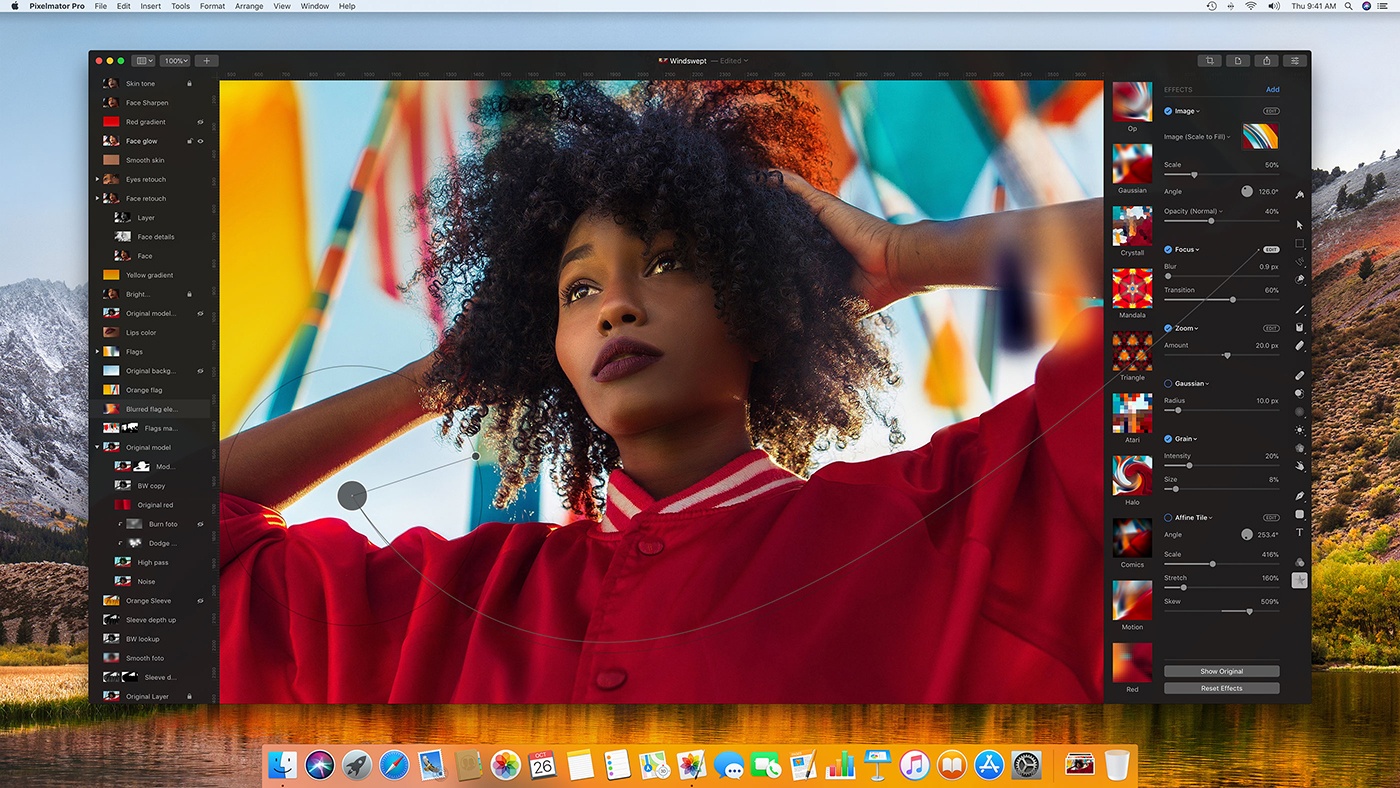
Just before WWDC, the Pixelmator team teased a Mac app they’ve been working on for five years. The big reveal came today with an announcement that Pixelmator Pro will be joining the Pixelmator family of image editing apps this fall. Reimagined and rebuilt from the ground up, Pixelmator Pro promises a whole new level of power and ease-of-use.

According to the announcement:

“Pixelmator Pro provides every tool you could ever need to create, edit, and enhance your images on a Mac in an incredibly intuitive and accessible interface”, said Saulius Dailide, one of the founders of the Pixelmator Team. “And with its GPU-powered, machine learning-enhanced tools, it’s truly one of the most advanced and innovative image editing apps on the planet.”

I haven’t tried Pixelmator Pro yet, but judging from the announcement, I expect we’re in for a treat. The most noticeable thing about the new app is its striking UI. Gone are the floating toolbars, replaced by left and right-hand side panels that fade into the background, so the image you’re working on dominates your workspace. I like the one window approach a lot, if for no other reason than I know exactly where my tools are at all times. The combination of a minimalistic toolbar, sparse chrome around the panels, use of transparency, dark interface, and ability to hide UI elements give Pixelmator Pro an expansive feel that emphasizes the image in your workspace instead of the tools.

https://vimeo.com/231354647

The changes announced go much deeper than just a redesign, though. The Pixelmator team has taken the opportunity to incorporate the latest Apple technologies and harness Machine Learning. Pixelmator Pro’s editor takes advantage of a Mac’s GPU using Metal 2, the graphics framework announced at WWDC that will debut with macOS X High Sierra. CoreML, also announced at WWDC, will drive much of Pixelmator Pro’s editing engine according to the announcement. There’s also support for the new HEIF image file format.

Also, editing in Pixelmator Pro will be non-destructive:

Pixelmator Pro’s color adjustments, effects, styles, and layouting tools are completely nondestructive, giving users the freedom and flexibility to go back and modify or delete individual changes at any point in the editing workflow. Thanks to the new presets feature, you can create endless combinations of multiple adjustments, effects, or styles, save them to your favorites and reuse them in any of your images. Drag-and-drop sharing also makes it a breeze to share presets with others.

I expect the ability to share combinations of effects, styles, and adjustments will be especially popular.

Pixelmator Pro will be available exclusively from the Mac App Store this fall alongside the current Pixelmator app.



Apple Introduces Wireless, Noise-Cancelling Beats Studio3 Headphones

Today Apple introduced the latest addition to its Beats lineup of premium headphones: the Beats Studio3 Wireless Headphones.

The Studio3 headphones differ from the existing Solo3 option in two primary ways. First, they sit over your ears rather than on them – an important distinction for prospective buyers. Second, related to the over-ear design, they include Pure Adaptive Noise Cancelling (Pure ANC), which works to shut out external noise while also optimizing audio for the precise fit of the wearer and calibrating music to top-quality.

These wireless headphones join the existing lineup of Beats options that adopted Apple’s W1 chip late last year. Also seen in Apple’s AirPods, the W1 chip provides improved connectivity and power efficiency. With Studio3, the W1 chip enables battery life of up to 22 hours with Pure ANC enabled, and up to 40 hours without it. The Studio3 headphones also charge quickly, with up to 3 hours of playtime after a 10-minute charge.

The last noteworthy design note is that on-ear controls allow you to control playback directly from the Solo3 hardware, enabling audio control and even Siri activation.

You can order the Studio3 headphones today in a variety of colors for $349.95, but they won’t ship until mid-October.


Stay Connected to Your Files With Remotely [Sponsor]

Remotely is an iOS app that lets you leave your Mac at home with the peace of mind that you can get at the files on it anytime with just a few taps. Everything about Remotely is fast. Setup couldn’t be easier. Just run a helper app on your Mac, connect using Remotely and you’re ready to go with a direct, encrypted peer-to-peer connection and no confusing network setup.

Remotely’s speed doesn’t stop after you’ve got it up and running. Its unique user interface gives you a portal into your Mac’s file system without having to mirror your Mac’s Desktop like other apps do. The result is a simple, native file browser that’s lightning fast.

As soon as Remotely is connected to your Mac you can start browsing your files or use the app’s search functionality to find exactly what you want. You don’t even have to be on the same network. Remotely is free to use for browsing your Mac’s Documents folder. Preview tons of different file types from within Remotely, and when you find the file you want, you can download it to work on it on iOS and share it using the system share sheet. To explore beyond your Documents folder, you can subscribe to Remotely for $2.99/month or $30/year.

Remotely is doing a special giveaway for MacStories readers. Click here for a chance to win one of five free annual subscriptions to Remotely.

Our thanks to Remotely for sponsoring MacStories this week.


Apple Announces September 12 Event

As first reported by Marques Brownlee, Apple has announced a media event for September 12, 2017 at 10:00 am. The event will be held at the Steve Jobs Theater in Cupertino.

Based on widespread speculation, Apple is expected to introduce new iPhones, including a redesigned model with an edge-to-edge OLED screen. Rumors in recent weeks also point to the introduction of a 4K-compatible Apple TV, a new LTE-enabled Apple Watch, and perhaps other products.

In addition to hardware, Apple is expected to announce release dates for updates to its operating systems, including iOS 11 and macOS High Sierra. As in the past, Apple should release a Golden Master of iOS 11 and High Sierra shortly after the event with a public release date within about 10 days.


Nest, Philips Hue, and Libratone Zipp Product Announcements

The market for smart home devices continues to heat up with new products and updates being released almost every day. Of note today are a trio of announcements:


Ramp Champ Joins Other Classic iOS Games With iOS 11 Support

The last update to Ramp Champ added retina graphics – for the iPhone 4. The beloved iOS arcade game sat untouched for nearly four years, until now. An update released yesterday by SocketFace Games adds 64-bit support, ensuring iOS 11 compatibility, along with several other changes including:

  • Additional retina graphics
  • Updated physics
  • Updated sounds and music
  • iCloud syncing
  • Game Center leaderboards and achievements
  • Force Touch icon support

Some classic games will inevitably be lost as a result of the transition to 64-bit apps, but it’s heartening to see some of the very best classics updated in recent weeks.

The update to Ramp Champ is available on the App Store.


YouTube Revamps Logo, Adds Dark Mode for Web, Playback Speed Adjustment for Mobile, with More Coming Soon

YouTube today introduced a new logo and announced a host of improvements to its service across mobile and web platforms – some of which launch today, while others are coming soon.

After testing with limited groups for a time, YouTube’s Material Design web update is now being rolled out to all users. With it comes the exciting addition of a Dark Theme – a feature I hope makes its way to the service’s mobile apps soon.

YouTube’s iOS app received a minor update today that brought two primary changes: a redesigned header dominated by white space and the new logo, and new playback speed controls. Playback speed can be set as slow as 0.25x or as fast as 2x, with several options in-between. You’ll find the controls in a video’s settings menu, which can be accessed from the top-right corner of the screen.

Perhaps more exciting than the new features launching today are those coming in the near future, such as adaptive video:

Soon, the YouTube player will seamlessly change shape to match the video format you’re watching, such as vertical, square or horizontal. That means you’ll always get the best viewing experience automatically – including vertical videos with no black bars on the sides!

A new gesture to switch videos with a single swipe is also coming soon, and lastly a revamped area below the video player for improved browsing.


Elgato Introduces Five New Eve HomeKit Devices

Adding to its collection of HomeKit-supported devices, Elgato today introduced five new devices that are coming soon, each of which serves different areas of the home.

  • Eve Thermo is a second-generation connected radiator valve that brings the typical benefits of a smart thermostat to the world of radiators. It includes capacitive touch control on-device, doesn’t require a connected bridge, and starts shipping September 26.
  • Eve Smoke is a smart smoke detector that can not only set off an alarm, but also trigger different HomeKit notifications and scenes. One of the benefits is that in addition to offering a ten-year battery life, you can also check the device’s state using Siri or your iPhone to ensure it’s working properly.
  • Eve Lock enables control of locking and unlocking a door via HomeKit, even if you’re away from home. It can also automatically lock the door every time it shuts. It’s powered by an internal battery and uses Bluetooth.
  • Eve Window Guard monitors the state of a window, so you can easily see if it’s open or closed from your iPhone. It also can sense when the window is being tampered with and will send a notification to let you know.
  • Eve Aqua makes watering the lawn or plants easy by allowing you to set up and manage irrigation schedules from your phone. You can also activate and monitor irrigation on-demand.

Besides the Eve Thermo, every other new Eve device is currently without a shipping date.

It’s always good to see more devices enter the HomeKit ecosystem, especially now that Apple will soon have HomePod, a voice-powered HomeKit hub, on the market. Hopefully the combination of HomePod’s launch and the changes Apple has in store for HomeKit in iOS 11 will lead to a renewed enthusiasm for Apple’s ecosystem among smart device makers.