Posts in news

Apple Q1 2019 Results - $84.3 Billion Revenue, the First Holiday Quarter Decline Since the iPhone’s Introduction

Apple has just published its financial results for Q1 2019, which is the company’s holiday quarter. The company posted revenue of $84.3 billion, which is the first holiday quarter decline in sales since the iPhone’s introduction. Apple CEO Tim Cook said:

“While it was disappointing to miss our revenue guidance, we manage Apple for the long term, and this quarter’s results demonstrate that the underlying strength of our business runs deep and wide,” said Tim Cook, Apple’s CEO. “Our active installed base of devices reached an all-time high of 1.4 billion in the first quarter, growing in each of our geographic segments. That’s a great testament to the satisfaction and loyalty of our customers, and it’s driving our Services business to new records thanks to our large and fast-growing ecosystem.”

Read more


Fortnite Adds MFi Controller Support

The latest update to Fortnite on iOS adds support for MFi controllers. I don’t play Fortnite on iOS regularly, but I tried the game when it was released on iOS and have played on the Nintendo Switch from time to time. The game has done extraordinarily well on iOS, but on balance, I’ve preferred playing on the Switch because I found it much easier to play with a physical game controller than onscreen gestures. That calculus could change for a lot of players now that the iOS version of the game supports MFi controllers.

I paired my SteelSeries Nimbus Bluetooth controller with my iPad Pro and gave Fortnite a try for the first time in months. Having played on the Switch, the controls felt immediately natural. The game’s HUD has labels showing what each button does, and there are diagrams available in Fortnite’s help system too. The responsiveness of a Bluetooth controller isn’t on par with a wired game controller, but it’s a big improvement over onscreen controls and paired with an iOS device that can push 60fps, iOS can be an excellent way to play Fortnite.

A full rundown on the latest Fortnite update is available on Epic Games’ website.


Microsoft Office Debuts on the Mac App Store

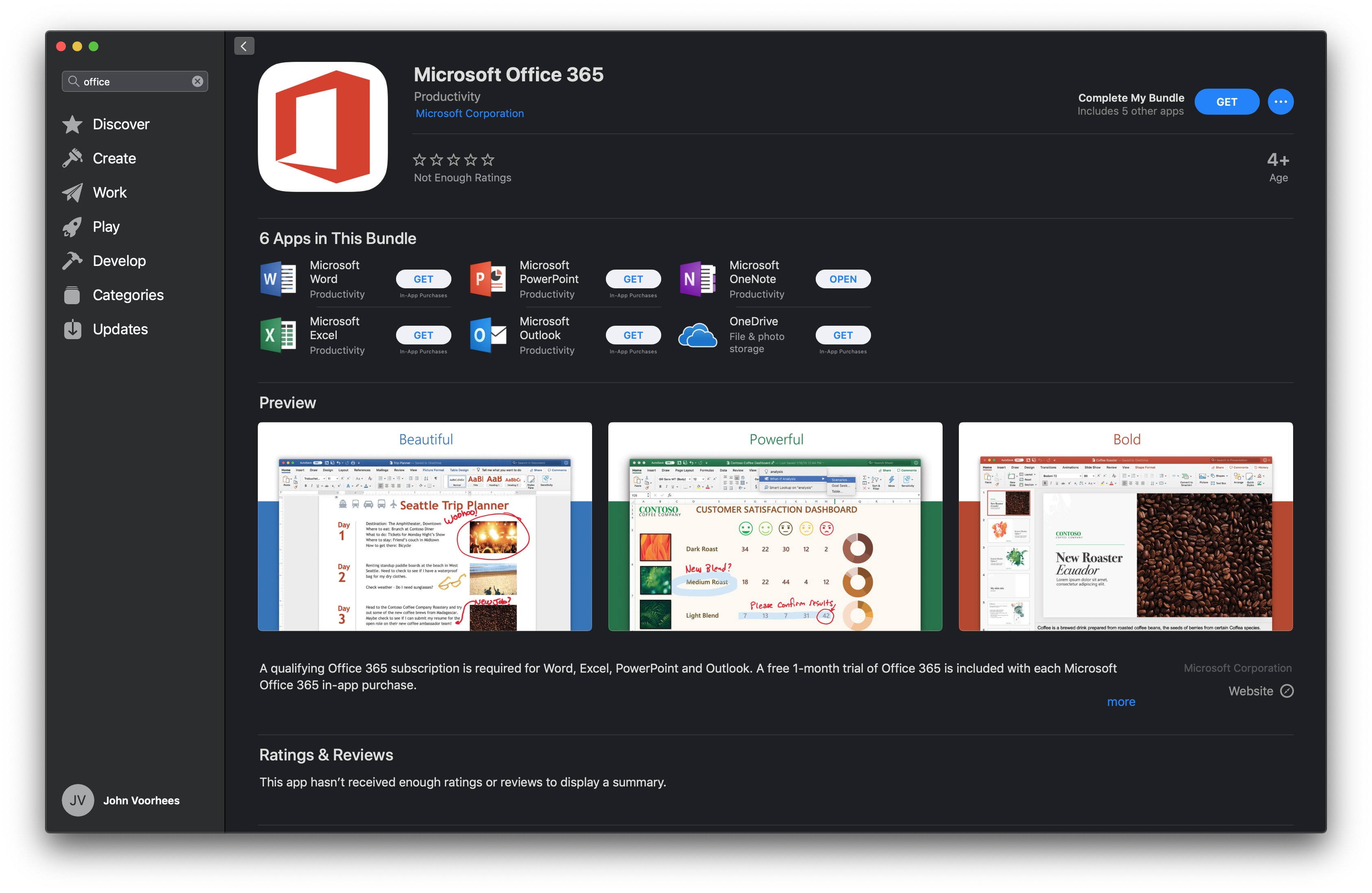
Promised at WWDC last June, Microsoft Office 365 has arrived on the Mac App Store today. Office 365, which includes the company’s flagship Word, Excel, PowerPoint, and Outlook productivity apps are free to download but require a subscription available via an In-App Purchase to create and edit documents and to send and receive email messages. Before today, the Mac versions of the apps were only available as direct downloads from Microsoft.

At WWDC 2018, Apple announced a redesign of the Mac App Store. During the presentation, the company said the following apps would be coming to the Mac App Store:

  • Microsoft’s Office 365
  • Adobe’s Lightroom CC
  • Panic’s Transmit
  • Bare Bones’ BBEdit
  • Snap’s Live Studio
  • Houseparty

The addition of the apps announced has been slow. Houseparty debuted on the Mac App Store several months ago, but Transmit didn’t appear until last November. With today’s addition of Office 365, that leaves Lightroom, BBEdit, and Live Studio to go.

Office is a significant addition to the Mac App Store. The apps in the suite are used by millions of people worldwide, and the convenience of downloading them and updating the apps from the Mac App Store alongside other apps should be a welcome addition for many users. Hopefully, the remainder of apps promised aren’t far behind and will help reinvigorate the Store, which has not seen the same level of success as its iOS sibling.

Office 365 is available on the Mac App Store as a bundle. Word, Excel, PowerPoint, and Outlook can also be downloaded individually.


Apple Announces ‘Shot on iPhone’ Photography Challenge

For longer than I can remember now, Apple has plucked photos taken by iPhone users from the vast sea of images posted online and featured them on billboards, in print advertising, and online. Today, the company announced that through February 7th, it’s running a Shot on iPhone Challenge. Apple says that:

A panel of judges will review worldwide submissions and select 10 winning photos, to be announced in February. The winning photos will be featured on billboards in select cities, Apple retail stores and online.

Apple’s announcement also introduces the contest’s 11 judges, 6 of whom are from Apple and 5 of whom are outsiders with backgrounds in photography. The Apple team includes Phil Schiller, members of his marketing team, and others who work on Apple’s photo software. The rest of the judges include former White House photographer Pete Souza, travel photographer Austin Mann, who we recently interviewed for Club MacStories, Annet de Graaf, a travel photographer and author of iPhone photography books, Luisa Dörr who shot TIME magazine’s special Firsts issue entirely on an iPhone, and Chen Man, a visual artist and creator of photography-based social apps.

If you’d like to submit your iPhone photos, here’s what to do:

Post your best photo taken on iPhone to Instagram or Twitter with the #ShotOniPhone hashtag to participate in the the Shot on iPhone Challenge. Weibo users can participate as well using #ShotOniPhone#. In the image caption, note which model was used. Alternatively, you can also submit the photo in its highest resolution to [email protected] with the file format ‘firstname_lastname_iphonemodel.’ Photos can be straight from the camera, edited through Apple’s editing tools in the Photos app or with third-party software. Submissions for photos begins at 12:01 a.m. PST on January 22 and ends at 11:59 p.m. PST on February 7. You must be 18 years of age or older to participate, and this challenge is not open to Apple employees or their immediate families.

I’ve always enjoyed Apple’s Shot on iPhone ad campaigns. It will be fun to see which shots its judges pick from what I can only imagine will be a huge number of submissions.


Pixelmator Pro Updated with New Layers Features

Today the Pixelmator team released a layers-focused update to Pixelmator Pro, their Mac image editor.

The update allows users to add any of seven colored tags to a layer to help identify them. The feature also supports Adobe PSD color tags on import and export.

To make navigating projects with lots of layers easier, users can now filter layers based on several criteria including the new color tags, images, shapes, text, RAW, and groups. At the bottom of the layers sidebar, there is also a search field for locating layers by name.

Pixelmator Pro 1.3 supports clipping masks too. The feature allows users to apply the contents of one layer to the shape of another layer or group of layers. Clipping masks can be created from text, shapes, groups of layers, or nested shapes.

Finally, you can also adjust a layer’s opacity and blending mode using the controls at the bottom of the layers sidebar. Adjustments made are previewed live in the app’s main window.

Pixelmator Pro is available on the Mac App Store.


Apple Publishes Videos Showcasing iPad Pro Workflows

Apple shared five new videos on its YouTube channel today, all of which center around working on an iPad Pro. Each video covers a different iPad workflow, as described by the following titles:

  • A new way to host your own podcast
  • A new way to create a presentation
  • A new way to go paperless
  • A new way to take notes
  • A new way to design your space

What I love about these videos, each of which are just over a minute long, is that they demonstrate the actual apps and workflows you can use to accomplish these tasks on the iPad Pro. For example, the podcast hosting video features Anchor for recording, editing, and publishing the podcast, Files for adding audio from an external source, and GoodNotes for holding your speaking notes. The video on taking notes features Notability exclusively, highlighting the app’s versatility for handwritten and typed notes, drawings, and audio recordings.

Each of the five videos ends the same way, by stating that the video was filmed, edited, designed, and made entirely with the iPad Pro. I can’t imagine a better way Apple could push the message that the iPad is a device for getting real work done.

Read more


Apple Launches Smart Battery Cases for iPhone XS, XS Max, and XR

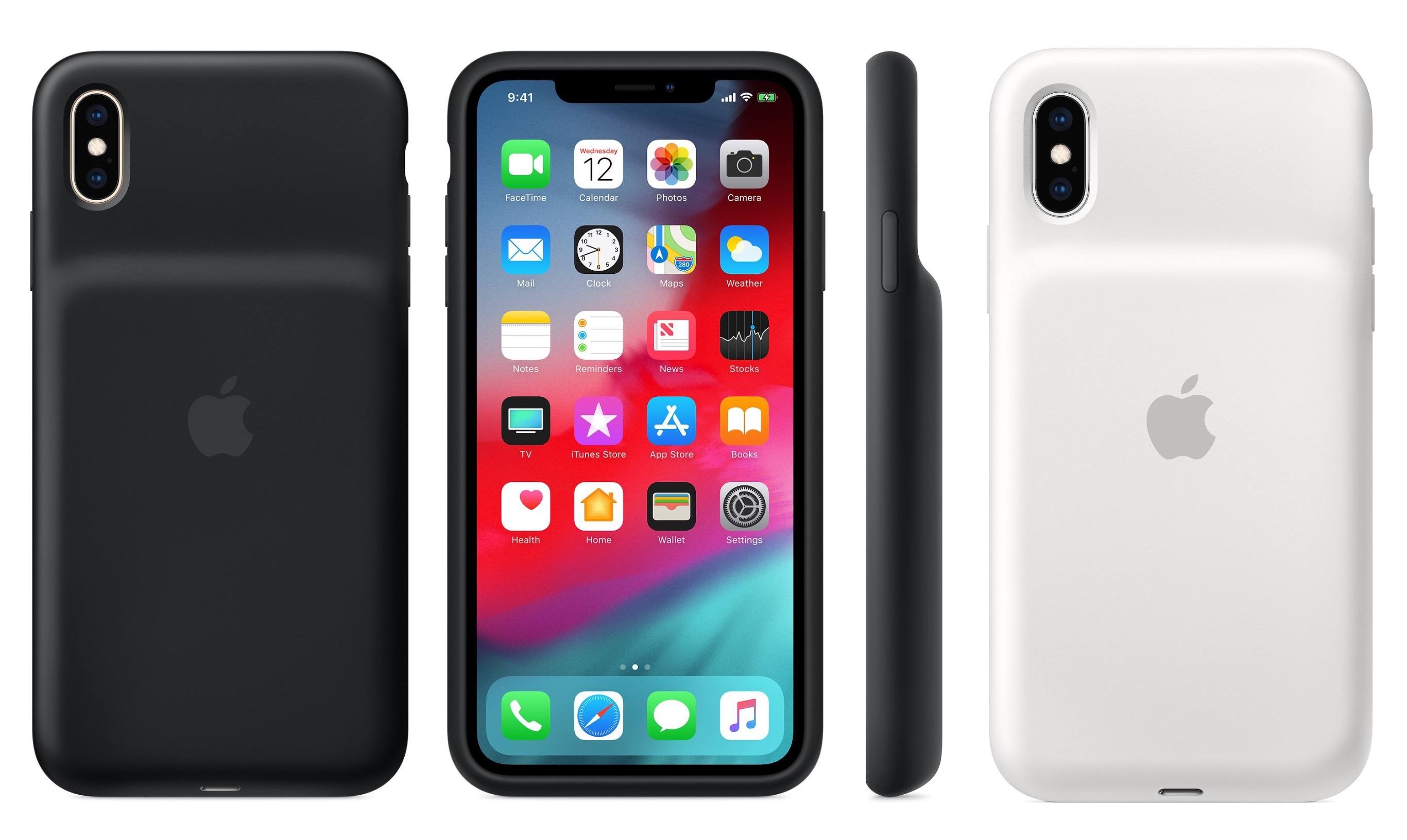
Apple today updated its online store with the addition of three new products: Smart Battery Cases for the iPhone XS, XS Max, and XR. Every version of the case costs $129, regardless of iPhone size. Each new case is available in both Black and White, and the designs resemble that of the previous Apple Smart Battery Cases, with a silicone exterior and a large bulge on the back to accommodate the battery.

The Smart Battery Case is compatible with Qi chargers, so you can still take advantage of wireless charging while using the case. These are the quoted charge estimates for each case:

  • XS: 33 hours talk time, 21 hours Internet use, and 25 hours video playback
  • XS Max: 37 hours talk time, 20 hours Internet use, and 25 hours video playback
  • XR: 39 hours talk time, 22 hours Internet use, and 27 hours video playback

In the past, Apple hasn’t made Smart Battery Cases available for Plus-sized phones, so it’s great to see that now, regardless of your iPhone size, you can get a case that raises battery life to meet the needs of heavy use.


DuckDuckGo Switches to Apple Maps for Location Searches

Today, DuckDuckGo, the privacy-focused web search engine, began using Apple Maps for location-based searches. The company, which previously used OpenStreetMap, switched to Apple’s MapKit JS framework, which Apple introduced at WWDC in June 2018.

General search results and DuckDuckGo’s Maps tab both embed Apple Maps’ familiar UI with options to display street, satellite, and hybrid views of locations combined with Yelp data for businesses and other destinations. According to DuckDuckGo, users can search by address, geographical place, business name and type, and nearby. Clicking or tapping on the map preview in search results expands the map while selecting a location highlights it on the map.

With respect to location tracking, DuckDuckGo says:

At DuckDuckGo, we believe getting the privacy you deserve online should be as simple as closing the blinds. Naturally, our strict privacy policy of not collecting or sharing any personal information extends to this integration. We do not send any personally identifiable information such as IP address to Apple or other third parties.

DuckDuckGo explains elsewhere on its site that it uses GEO::IP lookup to determine users’ location by default. For better results, users can grant DuckDuckGo permission to use their browser location data, in which case DuckDuckGo says searches are still anonymous because the company does not store location data on its servers.

I tried DuckDuckGo’s new Apple Maps integration with several different searches. The search engine had no problem finding the coffee shop I was at this morning, and the familiar Apple Maps UI is a definite plus. However, the results weren’t as good when I ran a few ‘near me’ searches. Searches for coffee, pizza, and barbers ‘near me’ all returned better results before I granted DuckDuckGo access to my location. Of course, these are just a few non-scientific searches from one location, so your results may be different.



AppStories, Episode 94 – Interview: iOS Game Design with Edwin Smith of Feral Interactive

On this week’s episode of AppStories, we interview Edwin Smith of Feral Interactive, the developer and publisher of Mac and iOS games about the design challenges of bringing complex desktop games to the iPad and iPhone.

Sponsored by:

  • Agenda – An elegant new take on notes.
  • ExpressVPN – High-Speed, Secure & Anonymous VPN Service. Get 3 months free with a 1-year package.

Permalink